
Uninstalling F-Secure

seekermeister

Old School
I "temporarily" installed this program a while back, in an attempt to solve a problem, but all that it did was to create another, because I can't seem to get rid of it. I put the problem on the back burner until now, because it didn't seem to create a problem.

My normal firewall/AV is Outpost, and it didn't seem to care that F-Secure was also installed, but I guess that was because it was installed first. However, when I just attempted to install an update for Outpost, it complained that F-Secure was installed and created an incompatibility problem, and the install failed.

Trying to remove it from Programs And Features failed with a message to attempt it again logged in as administrator. However, I was already logged in as such, so I tried once more from Safe Mode, but that produced the same result.

I then installed Revo Uninstaller and tried, but when I opened the program, it revved the CPU to 50%, and after a few seconds, it crashed.

The obvious question is how to get F-Secure securely off my system?
 

My Computer

Computer Manufacturer/Model Number
DIY
OS
W7x64 Pro, SuSe 12.1/** W7 x64 Pro, XP MCE
CPU
Phenom II 1090T w/Noctua NH-D14 /**4400+ X2 w/CM Hyper TX 3
Motherboard
ASRock 890FX Deluxe 4/**A8N-SLI
Memory
2 x 2GB Patriot PGS34g1600LLKA/**4x1GB Corsair VS
Graphics Card(s)
EVGA GTX460 SC/**EVGA 8800GTS
Sound Card
Asus Xonar D2X/**Xonar D1
Monitor(s) Displays
Acer X233H, Dell E152FPc /**LG M237-WD
Screen Resolution
1920x1080 & 1024x768/**1980x1080
Hard Drives
WDC 2TB, 1.5TB, 1TB, 500GB,Seagate 500GB , Maxtor 80GB /**500GB Seagate & WDC 1TB Black
PSU
CM RS600 w/ APC BX1000G/**Antec 500 TP w/ APC BX1000
Case
HAF922/**Antec 1040IIB
Cooling
3x200mm, 1x140 and 1x120mm/**5x80mm fans
Keyboard
Logitech Media USB/**Saitek Eclipse
Mouse
Cordless Trackman Wheel/**Ditto
Internet Speed
3.3Mbps
Other Info
SB 560 5.1 w/ Sennheiser RS140/**Creative T20 speakers, Dvico FusionHDTV7 Gold RT, Cisco E3000, HP 5510V AIO, Linksys E3000, Belkin F5U237 hub and **F5D8055 adapter
(** = 2nd rig)
I finally got the problem resolved...partially, after getting Revo to work. However, even though I had Revo do the Advance uninstall, which was supposed to search for all files, reg keys, etc., it apparently left something behind, because OutPost still complains about it on setup. I unchecked F-Secure in the OP setup, which was supposed to tell it that F-Secure was not installed, but then it produced a window saying that installation was impossible, yet when closing that, the installation proceeded. I did a manual search of the registry, and found a number of F-Secure key remaining, which I deleted, so I guess that Revo's search is not very thorough.
 

My Computer

Computer Manufacturer/Model Number
DIY
OS
W7x64 Pro, SuSe 12.1/** W7 x64 Pro, XP MCE
CPU
Phenom II 1090T w/Noctua NH-D14 /**4400+ X2 w/CM Hyper TX 3
Motherboard
ASRock 890FX Deluxe 4/**A8N-SLI
Memory
2 x 2GB Patriot PGS34g1600LLKA/**4x1GB Corsair VS
Graphics Card(s)
EVGA GTX460 SC/**EVGA 8800GTS
Sound Card
Asus Xonar D2X/**Xonar D1
Monitor(s) Displays
Acer X233H, Dell E152FPc /**LG M237-WD
Screen Resolution
1920x1080 & 1024x768/**1980x1080
Hard Drives
WDC 2TB, 1.5TB, 1TB, 500GB,Seagate 500GB , Maxtor 80GB /**500GB Seagate & WDC 1TB Black
PSU
CM RS600 w/ APC BX1000G/**Antec 500 TP w/ APC BX1000
Case
HAF922/**Antec 1040IIB
Cooling
3x200mm, 1x140 and 1x120mm/**5x80mm fans
Keyboard
Logitech Media USB/**Saitek Eclipse
Mouse
Cordless Trackman Wheel/**Ditto
Internet Speed
3.3Mbps
Other Info
SB 560 5.1 w/ Sennheiser RS140/**Creative T20 speakers, Dvico FusionHDTV7 Gold RT, Cisco E3000, HP 5510V AIO, Linksys E3000, Belkin F5U237 hub and **F5D8055 adapter
(** = 2nd rig)
I use outpost as well and you may have to uninstall that first, but first download a copy of your uninstaller and set the match level to the average setting and then use the super-mode uninstall to uninstall it, but when it asks you to restart the computer say no and do it after your uninstaller completes it's tasks. Then download a small shareware program called effective file search and make sure you unhide all folders and files even the system files on the drive, you know how to do that. Open effective file search and go to the options menu and select files folders and archives for the search parameters and then type outpost in the search bar for drive C:\ and hit search. Anything it finds delete it and if it says you don't have permission then make yourself the owner of the folder and all it's sub contents from the security tab. And do the same thing for f-secure as well, to delete something you don't have access to you sometimes have to remove all permissions from that folder especially when it has a creator, owner or a trusted installer in the security types, if it does go into the advanced button select "change permissions" and delete everybody in there, sometimes it will say it can't do it but continue anyway and it will. Then close all those windows and then open up the security tab again and then go to the owners tab and select administrator as the owner and close the tabs again and reopen them again and set the permissions tab and create the administrator and you the user as having all permissions of sub-folders and files. Now come the registry and a program called jv-16 tools by macecraft will remove the registry entries. It has a feature that lets you search for certain entries that other registry programs miss. Download it and use the registry tools menu and the select find registry entries. Then type in the search box:
Agnitum
Outpost
f-secure
and any other word that could be associated the manufactures name what ever you can think of and search your registry and delete everything jv tools finds, some entries won't delete cause of permissions but that wont matter for the outpost but if the traces are left by f-secure right click on the registry entry and jvtools will open up regedit exactly to the place that you need to get rid of the key by changing the permissions like we did above.

Just be sure to get all the tools to do this with cause you know you will have your internet disconnected through the entire progress...I know this sounds really extreme but in some cases such as these it is necessary. :cry:
 

My Computer

Computer Manufacturer/Model Number
Custom built be me
OS
Windows 7 Ultimate x64
CPU
Amd dual-core 4400 Socket 979
Motherboard
Asus A8N-SLI
Memory
Kingston 3gb ddr 3200
Graphics Card(s)
Radeon Sapphire HD5670 1gb GDDR5 Artic cooling
Sound Card
Standard Motherboards Realtec
Monitor(s) Displays
IC Power
Screen Resolution
1280 x 1024
Hard Drives
Seagate Barracuda 500gb Sata 16mb Cache 7200 rpm Primary Drive
300gb Maxtor IDE
Seagate 500gb usb freeagent backup drive
PSU
600 watt power star
Case
Lian-Li Aluminum
Cooling
MassCool Socket 979
Keyboard
Microsoft Comfort Curve
Mouse
Microsoft Basic Optical Mouse 2.0
Internet Speed
5mb
Other Info
The system as of now is about a year old and the OS was installed on 11/30/2010..
I got the program uninstalled, but scraps of it remain. Numerous registry keys, which I deleted with The Registrar editor, which is thorough...perhaps too thorough, because the OS experienced a lot of problems afterward, and two items remain in Non-Plug And Play Drivers, which even when uninstalled, return after rebooting.

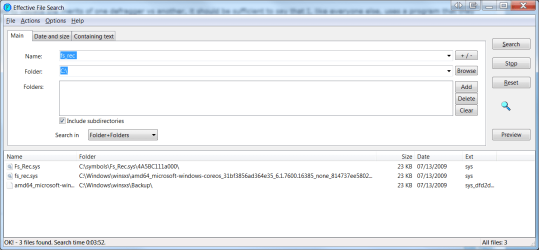
I did use your suggestion with EFS, but with F-Secure, it found nothing that should have any effect. However, when searching for fs_rec, it found three items as shown below. Not being familiar with these locations, I'm not certain if they are significant or how careful to be with deleting them?
 

Attachments

  • EFS.png
    EFS.png
    104.7 KB · Views: 17

My Computer

Computer Manufacturer/Model Number
DIY
OS
W7x64 Pro, SuSe 12.1/** W7 x64 Pro, XP MCE
CPU
Phenom II 1090T w/Noctua NH-D14 /**4400+ X2 w/CM Hyper TX 3
Motherboard
ASRock 890FX Deluxe 4/**A8N-SLI
Memory
2 x 2GB Patriot PGS34g1600LLKA/**4x1GB Corsair VS
Graphics Card(s)
EVGA GTX460 SC/**EVGA 8800GTS
Sound Card
Asus Xonar D2X/**Xonar D1
Monitor(s) Displays
Acer X233H, Dell E152FPc /**LG M237-WD
Screen Resolution
1920x1080 & 1024x768/**1980x1080
Hard Drives
WDC 2TB, 1.5TB, 1TB, 500GB,Seagate 500GB , Maxtor 80GB /**500GB Seagate & WDC 1TB Black
PSU
CM RS600 w/ APC BX1000G/**Antec 500 TP w/ APC BX1000
Case
HAF922/**Antec 1040IIB
Cooling
3x200mm, 1x140 and 1x120mm/**5x80mm fans
Keyboard
Logitech Media USB/**Saitek Eclipse
Mouse
Cordless Trackman Wheel/**Ditto
Internet Speed
3.3Mbps
Other Info
SB 560 5.1 w/ Sennheiser RS140/**Creative T20 speakers, Dvico FusionHDTV7 Gold RT, Cisco E3000, HP 5510V AIO, Linksys E3000, Belkin F5U237 hub and **F5D8055 adapter
(** = 2nd rig)
krokusnat,

Neither jv16 nor the cleaner that I normally use (CMPC) found a single reg key or value relating to F-Secure. However, The Registrar which is kind of an advanced form of regedit found ~316 keys and values that are clearly F-Secure's. I'm reluctant to simply delete these, because when I did that previously, it caused a lot of problems, which forced me to restore the OS from an image. I may do that yet, if I find no other solution, because I have definitely determined that F-Secure is the cause for my O&O defragger not to work.

I'm not certain, but I think that the problem is more due to what is not there (F-Secure uninstalled), because it appears that due to the reg keys, that it is detouring the defragger to a place that doesn't exist.
 

My Computer

Computer Manufacturer/Model Number
DIY
OS
W7x64 Pro, SuSe 12.1/** W7 x64 Pro, XP MCE
CPU
Phenom II 1090T w/Noctua NH-D14 /**4400+ X2 w/CM Hyper TX 3
Motherboard
ASRock 890FX Deluxe 4/**A8N-SLI
Memory
2 x 2GB Patriot PGS34g1600LLKA/**4x1GB Corsair VS
Graphics Card(s)
EVGA GTX460 SC/**EVGA 8800GTS
Sound Card
Asus Xonar D2X/**Xonar D1
Monitor(s) Displays
Acer X233H, Dell E152FPc /**LG M237-WD
Screen Resolution
1920x1080 & 1024x768/**1980x1080
Hard Drives
WDC 2TB, 1.5TB, 1TB, 500GB,Seagate 500GB , Maxtor 80GB /**500GB Seagate & WDC 1TB Black
PSU
CM RS600 w/ APC BX1000G/**Antec 500 TP w/ APC BX1000
Case
HAF922/**Antec 1040IIB
Cooling
3x200mm, 1x140 and 1x120mm/**5x80mm fans
Keyboard
Logitech Media USB/**Saitek Eclipse
Mouse
Cordless Trackman Wheel/**Ditto
Internet Speed
3.3Mbps
Other Info
SB 560 5.1 w/ Sennheiser RS140/**Creative T20 speakers, Dvico FusionHDTV7 Gold RT, Cisco E3000, HP 5510V AIO, Linksys E3000, Belkin F5U237 hub and **F5D8055 adapter
(** = 2nd rig)
I finally fixed the problem and have O&O working again. I gave up actually fixing it and dug around until I found an older backup image (10-13-2010) and restored from it. This means that I have a couple of months to catchup on changes made since then, but at least I'm not banging my head against a wall. Needless to say, F-Secure shall never "grace" my system again, and I would strongly recommend that if anyone else decides to install it, that they make a System Restore point prior to doing so.
 

My Computer

Computer Manufacturer/Model Number
DIY
OS
W7x64 Pro, SuSe 12.1/** W7 x64 Pro, XP MCE
CPU
Phenom II 1090T w/Noctua NH-D14 /**4400+ X2 w/CM Hyper TX 3
Motherboard
ASRock 890FX Deluxe 4/**A8N-SLI
Memory
2 x 2GB Patriot PGS34g1600LLKA/**4x1GB Corsair VS
Graphics Card(s)
EVGA GTX460 SC/**EVGA 8800GTS
Sound Card
Asus Xonar D2X/**Xonar D1
Monitor(s) Displays
Acer X233H, Dell E152FPc /**LG M237-WD
Screen Resolution
1920x1080 & 1024x768/**1980x1080
Hard Drives
WDC 2TB, 1.5TB, 1TB, 500GB,Seagate 500GB , Maxtor 80GB /**500GB Seagate & WDC 1TB Black
PSU
CM RS600 w/ APC BX1000G/**Antec 500 TP w/ APC BX1000
Case
HAF922/**Antec 1040IIB
Cooling
3x200mm, 1x140 and 1x120mm/**5x80mm fans
Keyboard
Logitech Media USB/**Saitek Eclipse
Mouse
Cordless Trackman Wheel/**Ditto
Internet Speed
3.3Mbps
Other Info
SB 560 5.1 w/ Sennheiser RS140/**Creative T20 speakers, Dvico FusionHDTV7 Gold RT, Cisco E3000, HP 5510V AIO, Linksys E3000, Belkin F5U237 hub and **F5D8055 adapter
(** = 2nd rig)
I finally fixed the problem and have O&O working again. I gave up actually fixing it and dug around until I found an older backup image (10-13-2010) and restored from it. This means that I have a couple of months to catchup on changes made since then, but at least I'm not banging my head against a wall. Needless to say, F-Secure shall never "grace" my system again, and I would strongly recommend that if anyone else decides to install it, that they make a System Restore point prior to doing so.

I really sounds like f-secure is trying to control every little nook and cranny of the computer and programs like that which I'm sad to say have graced my system from time to time the only solution was to go from a clean install and really do my homework before installing anything like a program such as suites and stuff. They can create a lot of problems that aren't really worth it. I'm sorry you had to go through that seekermeister....bummer:(
 

My Computer

Computer Manufacturer/Model Number
Custom built be me
OS
Windows 7 Ultimate x64
CPU
Amd dual-core 4400 Socket 979
Motherboard
Asus A8N-SLI
Memory
Kingston 3gb ddr 3200
Graphics Card(s)
Radeon Sapphire HD5670 1gb GDDR5 Artic cooling
Sound Card
Standard Motherboards Realtec
Monitor(s) Displays
IC Power
Screen Resolution
1280 x 1024
Hard Drives
Seagate Barracuda 500gb Sata 16mb Cache 7200 rpm Primary Drive
300gb Maxtor IDE
Seagate 500gb usb freeagent backup drive
PSU
600 watt power star
Case
Lian-Li Aluminum
Cooling
MassCool Socket 979
Keyboard
Microsoft Comfort Curve
Mouse
Microsoft Basic Optical Mouse 2.0
Internet Speed
5mb
Other Info
The system as of now is about a year old and the OS was installed on 11/30/2010..
did you check F-Secure website re, uninstalling?? :confused:
 

My Computer

Computer type
PC/Desktop
Computer Manufacturer/Model Number
Desktop: Prebuilt & Laptop: Toshiba Notebook
OS
Windows 7 - Home Premium - 64bit (x2)
CPU
Pentium (Dual) E6600 @ 3.06GHz & Intel i5-2410M @ 2.3GHz
Motherboard
ASUS P5G41C-M LX & Toshiba L750
Memory
4GB & 4GB
Graphics Card(s)
GeForce 210 & Intel HD Graphics Family
Sound Card
Integrated (x2)
Monitor(s) Displays
AOC 2051 & Generic PnP
Screen Resolution
1280 x 1024 & 1366 x 768
Hard Drives
ST3500418AS ATA - 500GB,

Toshiba MK6465GSXN - 600GB
PSU
520 WATT & 120 WATT
Case
Unknown (x2)
Cooling
Unknown (x2)
Keyboard
Standard PS/2 (x2)
Mouse
Microsoft USB Intellimouse & Touchpad
Internet Speed
11 Mbps (DL) 1 Mbps (UL)
Antivirus
F-Secure (ISP provided) & Kapersky
Browser
Google Chrome (x2)
Other Info
Modem: Dynalink RTA1025W
did you check F-Secure website re, uninstalling?? :confused:

I did and it basically states to just uninstall it the regular way which obviously didn't help much. I have ran into a few programs like this that require a lot more hands on uninstalling procedures. Nero for example just uninstalling it doesn't remove everything necessary unless you use their nero clean for example...:(
 

My Computer

Computer Manufacturer/Model Number
Custom built be me
OS
Windows 7 Ultimate x64
CPU
Amd dual-core 4400 Socket 979
Motherboard
Asus A8N-SLI
Memory
Kingston 3gb ddr 3200
Graphics Card(s)
Radeon Sapphire HD5670 1gb GDDR5 Artic cooling
Sound Card
Standard Motherboards Realtec
Monitor(s) Displays
IC Power
Screen Resolution
1280 x 1024
Hard Drives
Seagate Barracuda 500gb Sata 16mb Cache 7200 rpm Primary Drive
300gb Maxtor IDE
Seagate 500gb usb freeagent backup drive
PSU
600 watt power star
Case
Lian-Li Aluminum
Cooling
MassCool Socket 979
Keyboard
Microsoft Comfort Curve
Mouse
Microsoft Basic Optical Mouse 2.0
Internet Speed
5mb
Other Info
The system as of now is about a year old and the OS was installed on 11/30/2010..
There is a dead easy way out of problems. Invest in ACRONIS or similar, together with a large plug in hard drive, and make regular mirror images. Problems solved.:geek::geek:
 

My Computer

Computer Manufacturer/Model Number
Privately built
OS
Windows 7 32 bit
CPU
Intel Core 2 Duo E8400 @ 3.00GHz
Motherboard
ASAUS P5KPL/1600
Memory
4GB
Graphics Card(s)
AOC LM729 on NVIDIA GeForce 7300 SE/7200 GS
Sound Card
On board
Monitor(s) Displays
AOC LM729 @ 1280x1024
Screen Resolution
1280 X 1024
Hard Drives
1X150BG 1X250GB
PSU
Intel core 2 DUO E8400
Case
Antec
Keyboard
Trust PS/2
Mouse
Trust PS/2
Internet Speed
10Mb
There is a dead easy way out of problems. Invest in ACRONIS or similar, together with a large plug in hard drive, and make regular mirror images. Problems solved.:geek::geek:

This is true, very true...

@ andsome has acronis ironed out the problems true image for windows 7? Have you had good luck with it? I used to use it all the time on xp but last years acronis 2009-2010 didn't favor my W7 installation.:p
 

My Computer

Computer Manufacturer/Model Number
Custom built be me
OS
Windows 7 Ultimate x64
CPU
Amd dual-core 4400 Socket 979
Motherboard
Asus A8N-SLI
Memory
Kingston 3gb ddr 3200
Graphics Card(s)
Radeon Sapphire HD5670 1gb GDDR5 Artic cooling
Sound Card
Standard Motherboards Realtec
Monitor(s) Displays
IC Power
Screen Resolution
1280 x 1024
Hard Drives
Seagate Barracuda 500gb Sata 16mb Cache 7200 rpm Primary Drive
300gb Maxtor IDE
Seagate 500gb usb freeagent backup drive
PSU
600 watt power star
Case
Lian-Li Aluminum
Cooling
MassCool Socket 979
Keyboard
Microsoft Comfort Curve
Mouse
Microsoft Basic Optical Mouse 2.0
Internet Speed
5mb
Other Info
The system as of now is about a year old and the OS was installed on 11/30/2010..
There is a dead easy way out of problems. Invest in ACRONIS or similar, together with a large plug in hard drive, and make regular mirror images. Problems solved.:geek::geek:

This is true, very true...

@ andsome has acronis ironed out the problems true image for windows 7? Have you had good luck with it? I used to use it all the time on xp but last years acronis 2009-2010 didn't favor my W7 installation.:p
I use ACRONIS 2010 on Windows 7 Home Premium.I tried it out and it installed the mirror image perfectly in about forty minutes. I had played safe and made a new recovery disc after installing Windows 7.
 

My Computer

Computer Manufacturer/Model Number
Privately built
OS
Windows 7 32 bit
CPU
Intel Core 2 Duo E8400 @ 3.00GHz
Motherboard
ASAUS P5KPL/1600
Memory
4GB
Graphics Card(s)
AOC LM729 on NVIDIA GeForce 7300 SE/7200 GS
Sound Card
On board
Monitor(s) Displays
AOC LM729 @ 1280x1024
Screen Resolution
1280 X 1024
Hard Drives
1X150BG 1X250GB
PSU
Intel core 2 DUO E8400
Case
Antec
Keyboard
Trust PS/2
Mouse
Trust PS/2
Internet Speed
10Mb
There is a dead easy way out of problems. Invest in ACRONIS or similar, together with a large plug in hard drive, and make regular mirror images. Problems solved.:geek::geek:

This is true, very true...

@ andsome has acronis ironed out the problems true image for windows 7? Have you had good luck with it? I used to use it all the time on xp but last years acronis 2009-2010 didn't favor my W7 installation.:p
I use ACRONIS 2010 on Windows 7 Home Premium.I tried it out and it installed the mirror image perfectly in about forty minutes. I had played safe and made a new recovery disc after installing Windows 7.

I installed their trial True Image brand new this year and I'm impressed once again. It made an image and verified it perfectly to my external usb drive. The interface is nice and has a lot of wonderful features. There's nothing like having an image of your drive to work with...:)
 

My Computer

Computer Manufacturer/Model Number
Custom built be me
OS
Windows 7 Ultimate x64
CPU
Amd dual-core 4400 Socket 979
Motherboard
Asus A8N-SLI
Memory
Kingston 3gb ddr 3200
Graphics Card(s)
Radeon Sapphire HD5670 1gb GDDR5 Artic cooling
Sound Card
Standard Motherboards Realtec
Monitor(s) Displays
IC Power
Screen Resolution
1280 x 1024
Hard Drives
Seagate Barracuda 500gb Sata 16mb Cache 7200 rpm Primary Drive
300gb Maxtor IDE
Seagate 500gb usb freeagent backup drive
PSU
600 watt power star
Case
Lian-Li Aluminum
Cooling
MassCool Socket 979
Keyboard
Microsoft Comfort Curve
Mouse
Microsoft Basic Optical Mouse 2.0
Internet Speed
5mb
Other Info
The system as of now is about a year old and the OS was installed on 11/30/2010..
There is a dead easy way out of problems. Invest in ACRONIS or similar, together with a large plug in hard drive, and make regular mirror images. Problems solved.:geek::geek:

Though I didn't specify, the backup image that I used was from TI 2010. It doesn't necessarily help, if one does not make an image that corresponds to the point in time that it is needed. While I can't argue with your advice, it is of no help after the fact and after the problem has been solved.
 

My Computer

Computer Manufacturer/Model Number
DIY
OS
W7x64 Pro, SuSe 12.1/** W7 x64 Pro, XP MCE
CPU
Phenom II 1090T w/Noctua NH-D14 /**4400+ X2 w/CM Hyper TX 3
Motherboard
ASRock 890FX Deluxe 4/**A8N-SLI
Memory
2 x 2GB Patriot PGS34g1600LLKA/**4x1GB Corsair VS
Graphics Card(s)
EVGA GTX460 SC/**EVGA 8800GTS
Sound Card
Asus Xonar D2X/**Xonar D1
Monitor(s) Displays
Acer X233H, Dell E152FPc /**LG M237-WD
Screen Resolution
1920x1080 & 1024x768/**1980x1080
Hard Drives
WDC 2TB, 1.5TB, 1TB, 500GB,Seagate 500GB , Maxtor 80GB /**500GB Seagate & WDC 1TB Black
PSU
CM RS600 w/ APC BX1000G/**Antec 500 TP w/ APC BX1000
Case
HAF922/**Antec 1040IIB
Cooling
3x200mm, 1x140 and 1x120mm/**5x80mm fans
Keyboard
Logitech Media USB/**Saitek Eclipse
Mouse
Cordless Trackman Wheel/**Ditto
Internet Speed
3.3Mbps
Other Info
SB 560 5.1 w/ Sennheiser RS140/**Creative T20 speakers, Dvico FusionHDTV7 Gold RT, Cisco E3000, HP 5510V AIO, Linksys E3000, Belkin F5U237 hub and **F5D8055 adapter
(** = 2nd rig)
I was suggesting that ACRONIS was a way of avoiding such a problem in the future. I appreciate the fact that it cannot remove a problem AFTER it has been installed. The advice with ACRONIS is to start with a clean computer and back it up, then apply ACRONIS if a problem occurs.:cool:
 

My Computer

Computer Manufacturer/Model Number
Privately built
OS
Windows 7 32 bit
CPU
Intel Core 2 Duo E8400 @ 3.00GHz
Motherboard
ASAUS P5KPL/1600
Memory
4GB
Graphics Card(s)
AOC LM729 on NVIDIA GeForce 7300 SE/7200 GS
Sound Card
On board
Monitor(s) Displays
AOC LM729 @ 1280x1024
Screen Resolution
1280 X 1024
Hard Drives
1X150BG 1X250GB
PSU
Intel core 2 DUO E8400
Case
Antec
Keyboard
Trust PS/2
Mouse
Trust PS/2
Internet Speed
10Mb
Back
Top