Solved Uninstalling VB Express 2010

Kapusta Kid

New member
Local time
11:16 AM
Messages
11
Location
Central NJ
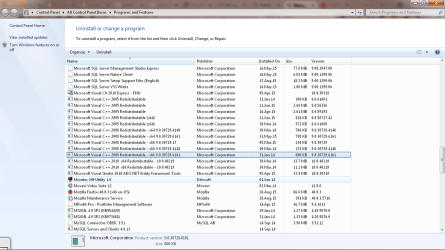
I installed VB Express 2010, but I have decided that it's not for me and I want to uninstall it. However, I notice in Control Panel that several additional components were installed at the same time. Some can obviously be uninstalled, but I have questions about others, namely: Are they needed solely for VB development (which I will no longer be doing) or are they necessary for me to run programs/software on my Win7 PC ? Here's a list of components with the same installed date as VB Express:

Microsoft .NET Framework 4 Multi-targeting Pack

Microsoft Help Viewer 1.0

Microsoft SQL Server 2008 R2 Management Objects

Microsoft SQL Server 2008 Compact 3.5 SP2 ENU

Microsoft SQL Server 2008 Compact 3.5 SP2 x64 ENU

Microsoft SQL Server System CLR Types

Microsoft Visual Basic 2010 Express - ENU

Microsoft Visual C++ 2008 Redistributable -x86 9....

Microsoft Visual C++ 2010 x64 Runtime - 10.0.3...

Microsoft Visual Studio 2010 ADO.NET Entity Fram...

Microsoft Visual Studio 2010 Express Prerequisites...

Visual Studio 2010 Tools for SQL Server Compact...

- - - - - - - - - - - - - - - - - - - - - - - - - - - - - -
I'm fairly certain the above were all part of the VB Express install. But,

Microsoft SQL Server 2005 Compact Edition [ENU] was on my system when I bought it.

Will uninstalling Microsoft Visual Basic 2010 Express remove all the components added along with it or will I have to handle the others individually? Has anyone gone through this process ? Or is there a list anywhere of components not to remove under any circumstances ?
 

My Computer

Computer Manufacturer/Model Number
HP Pavilion Slimline
OS
Windows 7 Home Premium 64bit
CPU
Intel Pentium
I see my posting was moved. Thought that could happen...

Uninstalling VB Express 2010 only removed VB Express and no other components. I also uninstalled a couple of the obvious ones:

Microsoft Visual Studio 2010 ADO.NET Entity Fram...
Microsoft Visual Studio 2010 Express Prerequisites...
Visual Studio 2010 Tools for SQL Server Compact...
Microsoft Help Viewer 1.0
 

My Computer

Computer Manufacturer/Model Number
HP Pavilion Slimline
OS
Windows 7 Home Premium 64bit
CPU
Intel Pentium
Hello!

I can never be 100% sure, because it is not my own computer, and I don't know which programs are installed etc. (however, I do use Visual Studio regularly, and have done many installs and uninstalls in the past)

DO REMOVE:
Microsoft Visual Basic 2010 Express - ENU
Microsoft Visual Studio 2010 ADO.NET Entity Fram...
Microsoft Visual Studio 2010 Express Prerequisites...
Microsoft Help Viewer 1.0
Microsoft .NET Framework 4 Multi-targeting Pack
Visual Studio 2010 Tools for SQL Server Compact...
Microsoft SQL Server 2008 R2 Management Objects
Microsoft SQL Server 2008 Compact 3.5 SP2 ENU
Microsoft SQL Server 2008 Compact 3.5 SP2 x64 ENU
Microsoft SQL Server System CLR Types

DO NOT REMOVE:
Microsoft Visual C++ 2008 Redistributable -x86 9....
Microsoft Visual C++ 2010 x64 Runtime - 10.0.3...
Microsoft SQL Server 2005 Compact Edition [ENU]
Any SQL Server 2005 stuff
Any redistributable stuff
Any Visual C++ stuff
Any .net Framework stuff

If you have any subsequent problems, just come back, but I don't think that you will with those removals. I have played the normal and safe hand. :)

Richard
 

My Computer

Computer Manufacturer/Model Number
Dell XPS 420
OS
Vista Home Premium x86 SP2
CPU
Intel Core 2 Quad Q9300 2.50GHz
Motherboard
Stock Dell 0TP406
Memory
4 gb (DDR2 800) 400MHz
Graphics Card(s)
ATI Radeon HD 3870 (512 MBytes)
Monitor(s) Displays
1 x Dell 2007FP and 1 x (old) Sonic flat screen
Screen Resolution
1600 x 1200 and 1280 x 1204
Hard Drives
1 x 640Gb (SATA 300) Western Digital: WDC WD6400AAKS-75A7B0 1 x 1Tb (SATA 600) Western Digital: Caviar Black, SATA 6GB/S, 64Mb cache, 8ms Western Digital: WDC WD1002FAEX-00Z3A0 ATA Device
Case
Dell XPS 420
Cooling
Stock Fan
Keyboard
Dell Bluetooth
Mouse
Advent Optical ADE-WG01 (colour change light up)
Internet Speed
Varies from 10kb/s to 170kb/s. So unreliable it is not funny
Other Info
ASUS USB 3.0 5Gbps/SATA 6Gbps - PCI-Express Combo Controller Card (U3S6)
Much obliged, Richard. The only questionable component was

Microsoft Visual C++ 2010 x64 Runtime = 10.0.3

which had the same install date as those I did uninstall. But I followed your advice and left it. Why chance it ?

Thanks again.....Pete
 

My Computer

Computer Manufacturer/Model Number
HP Pavilion Slimline
OS
Windows 7 Home Premium 64bit
CPU
Intel Pentium
Hello Pete!

Basically, that component is half way in-between. It is technically the Developer edition (contains the developer and client parts) installed alongside Visual Studio, as opposed to the Client edition (redistributable edition) installed separately, and so removing it will leave you with nothing. However, because you don't already have the Client edition installed separately, it is likely that none of your programs actually require it (especially likely because it is the latest version of the Visual C++ Runtimes, and so not used by many programs yet)

Since it is a part of Visual Studio, let's do a clean and safe job of it. Basically, if you go and remove this package, and then immediately install the client package, then all will be well. In actual fact, by the looks of things, you don't need it at all, but let's be safe rather than sorry.

Please download this package from Microsoft, and save it somewhere convenient: Download Details - Microsoft Download Center - Microsoft Visual C++ 2010 Redistributable Package (x64)

Now go and uninstall Microsoft Visual C++ 2010 x64 Runtime = 10.0.3

If it asks for a reboot, do just that: reboot. This will not risk your computer not starting. The very worst that could possibly happen is for a startup program to Stop Working and be Closed, although that is exceedingly unlikely.

Now install that downloaded package, and reboot again if necessary.

Now you have done a perfectly safe, and clean job of removing Visual Studio :)

Richard
 

My Computer

Computer Manufacturer/Model Number
Dell XPS 420
OS
Vista Home Premium x86 SP2
CPU
Intel Core 2 Quad Q9300 2.50GHz
Motherboard
Stock Dell 0TP406
Memory
4 gb (DDR2 800) 400MHz
Graphics Card(s)
ATI Radeon HD 3870 (512 MBytes)
Monitor(s) Displays
1 x Dell 2007FP and 1 x (old) Sonic flat screen
Screen Resolution
1600 x 1200 and 1280 x 1204
Hard Drives
1 x 640Gb (SATA 300) Western Digital: WDC WD6400AAKS-75A7B0 1 x 1Tb (SATA 600) Western Digital: Caviar Black, SATA 6GB/S, 64Mb cache, 8ms Western Digital: WDC WD1002FAEX-00Z3A0 ATA Device
Case
Dell XPS 420
Cooling
Stock Fan
Keyboard
Dell Bluetooth
Mouse
Advent Optical ADE-WG01 (colour change light up)
Internet Speed
Varies from 10kb/s to 170kb/s. So unreliable it is not funny
Other Info
ASUS USB 3.0 5Gbps/SATA 6Gbps - PCI-Express Combo Controller Card (U3S6)
I believe we are done

I downloaded Microsoft Visual C++ 2010 Redistributable Package (x64) as recommended, then uninstalled Microsoft Visual C++ 2010 x64 Runtime = 10.0.3.

However, I did not install the Redist package since it already exists in the Control Panel and predates my purchase. I did, however, save the new download, just in case.

My deepest thanks for talking me through this, Richard. You certainly went the extra mile.....Pete


My Computer

Computer Manufacturer/Model Number
HP Pavilion Slimline
OS
Windows 7 Home Premium 64bit
CPU
Intel Pentium
Good day to you, Pete!

It is no problem at all! It sounds as though all is well! It has been an absolute pleasure to work with you, and I wish you all the very best for the future!

If all is still well, could I please kindly ask you to click on the
tick.png
Mark this thread as Solved button at the top of this thread?

Thanks a lot!

Richard
 

My Computer

Computer Manufacturer/Model Number
Dell XPS 420
OS
Vista Home Premium x86 SP2
CPU
Intel Core 2 Quad Q9300 2.50GHz
Motherboard
Stock Dell 0TP406
Memory
4 gb (DDR2 800) 400MHz
Graphics Card(s)
ATI Radeon HD 3870 (512 MBytes)
Monitor(s) Displays
1 x Dell 2007FP and 1 x (old) Sonic flat screen
Screen Resolution
1600 x 1200 and 1280 x 1204
Hard Drives
1 x 640Gb (SATA 300) Western Digital: WDC WD6400AAKS-75A7B0 1 x 1Tb (SATA 600) Western Digital: Caviar Black, SATA 6GB/S, 64Mb cache, 8ms Western Digital: WDC WD1002FAEX-00Z3A0 ATA Device
Case
Dell XPS 420
Cooling
Stock Fan
Keyboard
Dell Bluetooth
Mouse
Advent Optical ADE-WG01 (colour change light up)
Internet Speed
Varies from 10kb/s to 170kb/s. So unreliable it is not funny
Other Info
ASUS USB 3.0 5Gbps/SATA 6Gbps - PCI-Express Combo Controller Card (U3S6)
Hello there, i am also having problems with removing MVB (visual basic). I have removed everything in the safe zone but was wondering about these: Microsoft SQL Server 2008 Compact 3.5 SP2 ENU, and
Microsoft SQL Server 2008 Compact 3.5 SP2 x64 ENU . Well you see, i dont have those I only have Microsoft SLQ Server Compact 3.5 SP2 ENU, not Microsoft SQL Server 2008, so i dont know if I should remove it. Any ideas?
 

My Computer

OS
windows 7 32bit
Hello there, i am also having problems with removing MVB (visual basic). I have removed everything in the safe zone but was wondering about these: Microsoft SQL Server 2008 Compact 3.5 SP2 ENU, and
Microsoft SQL Server 2008 Compact 3.5 SP2 x64 ENU . Well you see, i dont have those I only have Microsoft SLQ Server Compact 3.5 SP2 ENU, not Microsoft SQL Server 2008, so i dont know if I should remove it. Any ideas?

Hello!

Yes, that should be fine to remove. Any SQL Server 2008, and any SQL Compact 3.5 is fine to remove. Do not remove SQL Server 2005.

Hope this helps. :)

Richard
 

My Computer

Computer Manufacturer/Model Number
Dell XPS 420
OS
Vista Home Premium x86 SP2
CPU
Intel Core 2 Quad Q9300 2.50GHz
Motherboard
Stock Dell 0TP406
Memory
4 gb (DDR2 800) 400MHz
Graphics Card(s)
ATI Radeon HD 3870 (512 MBytes)
Monitor(s) Displays
1 x Dell 2007FP and 1 x (old) Sonic flat screen
Screen Resolution
1600 x 1200 and 1280 x 1204
Hard Drives
1 x 640Gb (SATA 300) Western Digital: WDC WD6400AAKS-75A7B0 1 x 1Tb (SATA 600) Western Digital: Caviar Black, SATA 6GB/S, 64Mb cache, 8ms Western Digital: WDC WD1002FAEX-00Z3A0 ATA Device
Case
Dell XPS 420
Cooling
Stock Fan
Keyboard
Dell Bluetooth
Mouse
Advent Optical ADE-WG01 (colour change light up)
Internet Speed
Varies from 10kb/s to 170kb/s. So unreliable it is not funny
Other Info
ASUS USB 3.0 5Gbps/SATA 6Gbps - PCI-Express Combo Controller Card (U3S6)
Ok thank you Richard, it helps a lot.

No problem. Thanks a lot for reporting back. Glad to have been of assistance.

Should you encounter any problems, come straight back, and I can help you to reinstall it, although I do not believe that you should experience any problems of any kind. But if you do, I am here to help :)

Richard
 

My Computer

Computer Manufacturer/Model Number
Dell XPS 420
OS
Vista Home Premium x86 SP2
CPU
Intel Core 2 Quad Q9300 2.50GHz
Motherboard
Stock Dell 0TP406
Memory
4 gb (DDR2 800) 400MHz
Graphics Card(s)
ATI Radeon HD 3870 (512 MBytes)
Monitor(s) Displays
1 x Dell 2007FP and 1 x (old) Sonic flat screen
Screen Resolution
1600 x 1200 and 1280 x 1204
Hard Drives
1 x 640Gb (SATA 300) Western Digital: WDC WD6400AAKS-75A7B0 1 x 1Tb (SATA 600) Western Digital: Caviar Black, SATA 6GB/S, 64Mb cache, 8ms Western Digital: WDC WD1002FAEX-00Z3A0 ATA Device
Case
Dell XPS 420
Cooling
Stock Fan
Keyboard
Dell Bluetooth
Mouse
Advent Optical ADE-WG01 (colour change light up)
Internet Speed
Varies from 10kb/s to 170kb/s. So unreliable it is not funny
Other Info
ASUS USB 3.0 5Gbps/SATA 6Gbps - PCI-Express Combo Controller Card (U3S6)
as of right now i am re-installing microsoft visual basic express, and it is working fine.:)
 

My Computer

OS
windows 7 32bit
well as i was installing visual basic this showed up: "error 1311.source file not found: C:\Microsoft Visual Studio 10.0\Microsoft Visual Basic 10 Express-ENU\vs_setup.cab. Verify that the file exist's and you can access it." what should I do? re: Never mind, i fixed it by running a different setup.
 
Last edited:

My Computer

OS
windows 7 32bit
I too have same problem(s)

@Richard, I too have similar looking many components and I want to remove all those (since excel addons give some VB errors) and install the required ones afresh.

I am, though a power user, but amateur as far as VB is concerned. Can you pls guide me how to uninstall those properly (though as I'm writing this, I'm trying to search and remove all those with the help of Perfect Uninstaller).

Thanks friends.
 

Attachments

  • VB Problems.png
    VB Problems.png
    191.7 KB · Views: 0

My Computer

OS
Windows Seven
Back
Top