Solved Unknown Environemnt variable found UD_DISABLE_USAGE-TRACKING

amethystina

New member
Local time
7:41 PM
Messages
9
I was just completing an upgrade of my system when I noticed an item I had not noticed before (but was probably present before the upgrade, I just had not checked these variables for some time).

Under Environment Variables, in the user variable section I have 3 items.

The first 2 are the stand definitions for TEMP and TMP.

The third is UD_DISABLE_USAGE_TRACKING with a value of 1

Google returned 0 results for this string (which is VERY unusual), so I wondered if anyone might know what it is for or how it got there?

Thanx
 

My Computer My Computer

At a glance

Windows 7 Professional 64bit, Windows 7 Home ...Intel i7-4790 or Intel i7-3770, Celeron & Pen...PC's 32 GB, Laptops 2 to 4 GBGigabyte 750 GTX or 650 GTX
Computer type
PC/Desktop
Computer Manufacturer/Model Number
3PCs all built-up & Dell, Mecer, HP laptops
OS
Windows 7 Professional 64bit, Windows 7 Home Basic 64bit, Windows 8.1 Single Language
CPU
Intel i7-4790 or Intel i7-3770, Celeron & Pentium laptops
Motherboard
Asus H97M Plus or Asus P8Z77-M Pro
Memory
PC's 32 GB, Laptops 2 to 4 GB
Graphics Card(s)
Gigabyte 750 GTX or 650 GTX
Hard Drives
Seagate internal & external (120 TB)
Antivirus
Comodo
Browser
Firefox
It may be a "Do Not Track" flag set by a browser, but I would be surprised for it to be stored as an environment variable. It may be set by your antivirus/internet security package?

I think it is more likely it was set in Microsoft Management Console.
Microsoft Management Console - Wikipedia, the free encyclopedia
 

My Computer My Computer

At a glance

Windows 10 Pro x64 ; Xubuntu x64Intel i7 860 @ 2.80 GHz O/C'ed to 4.0GHz16GB Corsair Vengance DDR3 @ 661 MHz Dual Cha...EVGA NVidia GTX 560 1024MB
Computer type
PC/Desktop
Computer Manufacturer/Model Number
Golden Mk. I.4
OS
Windows 10 Pro x64 ; Xubuntu x64
CPU
Intel i7 860 @ 2.80 GHz O/C'ed to 4.0GHz
Motherboard
Gigabyte P55A-UD3R Rev.1. Award BIOS F13
Memory
16GB Corsair Vengance DDR3 @ 661 MHz Dual Channel (9-9-9-24)
Graphics Card(s)
EVGA NVidia GTX 560 1024MB
Sound Card
Realtek Integrated
Monitor(s) Displays
Dual Samsung SyncMaster 2494HS
Screen Resolution
1920*1080 and 1920*1080
Hard Drives
1*Samsung 840 EVO 120GB SSD;
1*OCZ Vertex 2 60GB SSD;
2*Samsung F3 SpinPoint 1TB in RAID0;
1*Samsung F1 SpinPoint 1TB;
2*Western Digital 1TB External USB 3.0
1*Western Digital 500GB External USB 3.0
1*Seagate 500GB External USB 2.0
PSU
Thermaltake ToughPower QFan 750W
Case
Thermaltake Element S VK60001W2Z
Cooling
Corsair H60 Water Cooling, 2*230mm and 2*80mm case fans
Keyboard
Logitech G110
Mouse
Logitech MX518
It may be a "Do Not Track" flag set by a browser, but I would be surprised for it to be stored as an environment variable. It may be set by your antivirus/internet security package?

I would agree that is a possibility, and I have set do not track in Firefox, but why has nobody else in the world (as defined by Google) ever questioned this variable? That is what puzzles me.
 

My Computer My Computer

At a glance

Windows 7 Professional 64bit, Windows 7 Home ...Intel i7-4790 or Intel i7-3770, Celeron & Pen...PC's 32 GB, Laptops 2 to 4 GBGigabyte 750 GTX or 650 GTX
Computer type
PC/Desktop
Computer Manufacturer/Model Number
3PCs all built-up & Dell, Mecer, HP laptops
OS
Windows 7 Professional 64bit, Windows 7 Home Basic 64bit, Windows 8.1 Single Language
CPU
Intel i7-4790 or Intel i7-3770, Celeron & Pentium laptops
Motherboard
Asus H97M Plus or Asus P8Z77-M Pro
Memory
PC's 32 GB, Laptops 2 to 4 GB
Graphics Card(s)
Gigabyte 750 GTX or 650 GTX
Hard Drives
Seagate internal & external (120 TB)
Antivirus
Comodo
Browser
Firefox
I actually don't think it was the browser for that reason. Check your Comodo suite and MMC.
 

My Computer My Computer

At a glance

Windows 10 Pro x64 ; Xubuntu x64Intel i7 860 @ 2.80 GHz O/C'ed to 4.0GHz16GB Corsair Vengance DDR3 @ 661 MHz Dual Cha...EVGA NVidia GTX 560 1024MB
Computer type
PC/Desktop
Computer Manufacturer/Model Number
Golden Mk. I.4
OS
Windows 10 Pro x64 ; Xubuntu x64
CPU
Intel i7 860 @ 2.80 GHz O/C'ed to 4.0GHz
Motherboard
Gigabyte P55A-UD3R Rev.1. Award BIOS F13
Memory
16GB Corsair Vengance DDR3 @ 661 MHz Dual Channel (9-9-9-24)
Graphics Card(s)
EVGA NVidia GTX 560 1024MB
Sound Card
Realtek Integrated
Monitor(s) Displays
Dual Samsung SyncMaster 2494HS
Screen Resolution
1920*1080 and 1920*1080
Hard Drives
1*Samsung 840 EVO 120GB SSD;
1*OCZ Vertex 2 60GB SSD;
2*Samsung F3 SpinPoint 1TB in RAID0;
1*Samsung F1 SpinPoint 1TB;
2*Western Digital 1TB External USB 3.0
1*Western Digital 500GB External USB 3.0
1*Seagate 500GB External USB 2.0
PSU
Thermaltake ToughPower QFan 750W
Case
Thermaltake Element S VK60001W2Z
Cooling
Corsair H60 Water Cooling, 2*230mm and 2*80mm case fans
Keyboard
Logitech G110
Mouse
Logitech MX518
Check your Comodo suite and MMC.
I having been doing further research, and it is possible that it came from an NVIDIA software installer for Solaris!

I remember that I reloaded my GPU driver (Gigabyte 750 GTX) but that it failed on the first attempt, but worked on the second. I was working from the CD that came with the hardware, so it seems that NVIDIA must just have one CD for every installation it ever does - and somehow it picked the wrong one. But how a Solaris program inserted an environment variable into Windows has me baffled. So I am not convinced, but Solaris is the only software that I can find that uses the "UD_" string.

If anyone has a better explanation I would really appreciate it,
 

My Computer My Computer

At a glance

Windows 7 Professional 64bit, Windows 7 Home ...Intel i7-4790 or Intel i7-3770, Celeron & Pen...PC's 32 GB, Laptops 2 to 4 GBGigabyte 750 GTX or 650 GTX
Computer type
PC/Desktop
Computer Manufacturer/Model Number
3PCs all built-up & Dell, Mecer, HP laptops
OS
Windows 7 Professional 64bit, Windows 7 Home Basic 64bit, Windows 8.1 Single Language
CPU
Intel i7-4790 or Intel i7-3770, Celeron & Pentium laptops
Motherboard
Asus H97M Plus or Asus P8Z77-M Pro
Memory
PC's 32 GB, Laptops 2 to 4 GB
Graphics Card(s)
Gigabyte 750 GTX or 650 GTX
Hard Drives
Seagate internal & external (120 TB)
Antivirus
Comodo
Browser
Firefox
I use Comodo. I'll check my Environment variables and report back. (On Win 8 as I browse this and still haven't figured out the virtual machine thing).
 

My Computer My Computer

At a glance

Dual Boot Win 8.1 x64; Win 7 SP1 x64i7-3610QM @ 2.3 GHz8 GB Dual-Channel DDR3 @ 798MHzIntel HD Graphics 4000
Computer type
Laptop
Computer Manufacturer/Model Number
HP
OS
Dual Boot Win 8.1 x64; Win 7 SP1 x64
CPU
i7-3610QM @ 2.3 GHz
Motherboard
Hewlett-Packard 181C (U3E1)
Memory
8 GB Dual-Channel DDR3 @ 798MHz
Graphics Card(s)
Intel HD Graphics 4000
Hard Drives
Hitachi HTS547575A9E384 SCSI Disk Device;
WD Elements 1042 USB Device
Antivirus
Microsoft Security Essentials; Comodo Firewall w/ Defense +
UltraDefrag

Seems to be related to UltraDefrag. I used this software previously but currently it's not installed. Possibly it has something to do with auto update checks for UltraDefrag.

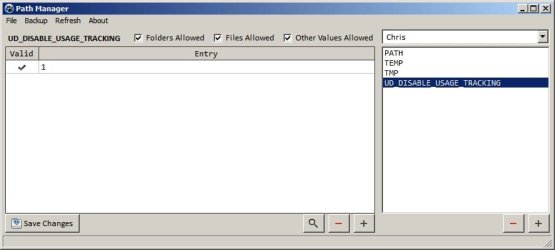
If you like you can run Path Manager 2.3

Run as admin (right click)

Check all boxes and select username in the dropdown list. Check out what it finds. Double click the UD_DISABLE_USAGE_TRACKING entry and see if it's location opens in Explorer.

Note: Don't make any changes unless you are 100% sure that paths are invalid.
 

My Computer My Computer

At a glance

Microsoft Windows 7 Home Premium 64-bit 7601 ...AMD C-60 APU with Radeon(tm) HD Graphics4.00 GBAMD Radeon HD 6290 Graphics
Computer type
Laptop
Computer Manufacturer/Model Number
ASUS
OS
Microsoft Windows 7 Home Premium 64-bit 7601 Multiprocessor Free Service Pack 1
CPU
AMD C-60 APU with Radeon(tm) HD Graphics
Motherboard
ASUSTeK COMPUTER INC. X501U
Memory
4.00 GB
Graphics Card(s)
AMD Radeon HD 6290 Graphics
Sound Card
(1) AMD High Definition Audio Device (2) Realtek High Defi
Screen Resolution
1366 x 768 x 32 bits (4294967296 colors) @ 60 Hz
Hard Drives
Hitachi HTS545050A7E380 SATA Disk Device
Antivirus
Comodo CIS & FW, SecureAplus App Whitelisting, Threatfire
Browser
Cyberfox 64bit, Opera 64bit, Airfox
Other Info
Spy-The-Spy, HitmanPro.Alert, Norton Connect Safe, MJRegWatcher, BitDefender TrafficLight, Voodoo Shield, Zemana AntiMalware
Good call Callender.

I run Comodo on Win 7 but not on Win 8.
I ran this little program and it doesn't say what UD_DISABLE_USAGE_TRACKING is linked to but it does say Ultra Defrag has a variable called: UD_INSTALL_DIR.
 
Last edited:

My Computer My Computer

At a glance

Dual Boot Win 8.1 x64; Win 7 SP1 x64i7-3610QM @ 2.3 GHz8 GB Dual-Channel DDR3 @ 798MHzIntel HD Graphics 4000
Computer type
Laptop
Computer Manufacturer/Model Number
HP
OS
Dual Boot Win 8.1 x64; Win 7 SP1 x64
CPU
i7-3610QM @ 2.3 GHz
Motherboard
Hewlett-Packard 181C (U3E1)
Memory
8 GB Dual-Channel DDR3 @ 798MHz
Graphics Card(s)
Intel HD Graphics 4000
Hard Drives
Hitachi HTS547575A9E384 SCSI Disk Device;
WD Elements 1042 USB Device
Antivirus
Microsoft Security Essentials; Comodo Firewall w/ Defense +

My Computer My Computer

At a glance

Dual Boot Win 8.1 x64; Win 7 SP1 x64i7-3610QM @ 2.3 GHz8 GB Dual-Channel DDR3 @ 798MHzIntel HD Graphics 4000
Computer type
Laptop
Computer Manufacturer/Model Number
HP
OS
Dual Boot Win 8.1 x64; Win 7 SP1 x64
CPU
i7-3610QM @ 2.3 GHz
Motherboard
Hewlett-Packard 181C (U3E1)
Memory
8 GB Dual-Channel DDR3 @ 798MHz
Graphics Card(s)
Intel HD Graphics 4000
Hard Drives
Hitachi HTS547575A9E384 SCSI Disk Device;
WD Elements 1042 USB Device
Antivirus
Microsoft Security Essentials; Comodo Firewall w/ Defense +
UltraDefrag handbook

Quote from the UltraDefrag handbook:

/DISABLE_USAGE_TRACKING=(0|1)
Enable or disable tracking the usage of UltraDefrag. Example: /DISABLE_USAGE_TRACKING=1 disables usage tracking.
Usage tracking is done by accessing a simple text file on the UltraDefrag home page.

UltraDefrag Handbook: Installation - 7.0.0

I also run Comodo CIS and there's no trace of that entry on my machine.
 

My Computer My Computer

At a glance

Microsoft Windows 7 Home Premium 64-bit 7601 ...AMD C-60 APU with Radeon(tm) HD Graphics4.00 GBAMD Radeon HD 6290 Graphics
Computer type
Laptop
Computer Manufacturer/Model Number
ASUS
OS
Microsoft Windows 7 Home Premium 64-bit 7601 Multiprocessor Free Service Pack 1
CPU
AMD C-60 APU with Radeon(tm) HD Graphics
Motherboard
ASUSTeK COMPUTER INC. X501U
Memory
4.00 GB
Graphics Card(s)
AMD Radeon HD 6290 Graphics
Sound Card
(1) AMD High Definition Audio Device (2) Realtek High Defi
Screen Resolution
1366 x 768 x 32 bits (4294967296 colors) @ 60 Hz
Hard Drives
Hitachi HTS545050A7E380 SATA Disk Device
Antivirus
Comodo CIS & FW, SecureAplus App Whitelisting, Threatfire
Browser
Cyberfox 64bit, Opera 64bit, Airfox
Other Info
Spy-The-Spy, HitmanPro.Alert, Norton Connect Safe, MJRegWatcher, BitDefender TrafficLight, Voodoo Shield, Zemana AntiMalware
UltraDefrag install options

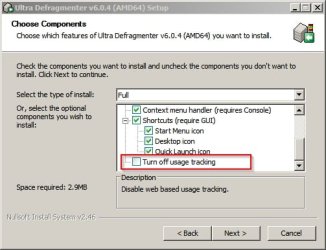
So I just installed UltraDefrag for test purposes.

Install options:

Ultra Defragmenter v6.0.4 (AMD64) Setup.jpg

If you tick the checkbox to disable usage tracking you get the environment variable

Path Manager.jpg
 

My Computer My Computer

At a glance

Microsoft Windows 7 Home Premium 64-bit 7601 ...AMD C-60 APU with Radeon(tm) HD Graphics4.00 GBAMD Radeon HD 6290 Graphics
Computer type
Laptop
Computer Manufacturer/Model Number
ASUS
OS
Microsoft Windows 7 Home Premium 64-bit 7601 Multiprocessor Free Service Pack 1
CPU
AMD C-60 APU with Radeon(tm) HD Graphics
Motherboard
ASUSTeK COMPUTER INC. X501U
Memory
4.00 GB
Graphics Card(s)
AMD Radeon HD 6290 Graphics
Sound Card
(1) AMD High Definition Audio Device (2) Realtek High Defi
Screen Resolution
1366 x 768 x 32 bits (4294967296 colors) @ 60 Hz
Hard Drives
Hitachi HTS545050A7E380 SATA Disk Device
Antivirus
Comodo CIS & FW, SecureAplus App Whitelisting, Threatfire
Browser
Cyberfox 64bit, Opera 64bit, Airfox
Other Info
Spy-The-Spy, HitmanPro.Alert, Norton Connect Safe, MJRegWatcher, BitDefender TrafficLight, Voodoo Shield, Zemana AntiMalware
Good job Callender. I would say we can mark this as solved if the OP ever shows up again.
 

My Computer My Computer

At a glance

Dual Boot Win 8.1 x64; Win 7 SP1 x64i7-3610QM @ 2.3 GHz8 GB Dual-Channel DDR3 @ 798MHzIntel HD Graphics 4000
Computer type
Laptop
Computer Manufacturer/Model Number
HP
OS
Dual Boot Win 8.1 x64; Win 7 SP1 x64
CPU
i7-3610QM @ 2.3 GHz
Motherboard
Hewlett-Packard 181C (U3E1)
Memory
8 GB Dual-Channel DDR3 @ 798MHz
Graphics Card(s)
Intel HD Graphics 4000
Hard Drives
Hitachi HTS547575A9E384 SCSI Disk Device;
WD Elements 1042 USB Device
Antivirus
Microsoft Security Essentials; Comodo Firewall w/ Defense +
Just out of curiosity how come you don't run Win 8?
 

My Computer My Computer

At a glance

Dual Boot Win 8.1 x64; Win 7 SP1 x64i7-3610QM @ 2.3 GHz8 GB Dual-Channel DDR3 @ 798MHzIntel HD Graphics 4000
Computer type
Laptop
Computer Manufacturer/Model Number
HP
OS
Dual Boot Win 8.1 x64; Win 7 SP1 x64
CPU
i7-3610QM @ 2.3 GHz
Motherboard
Hewlett-Packard 181C (U3E1)
Memory
8 GB Dual-Channel DDR3 @ 798MHz
Graphics Card(s)
Intel HD Graphics 4000
Hard Drives
Hitachi HTS547575A9E384 SCSI Disk Device;
WD Elements 1042 USB Device
Antivirus
Microsoft Security Essentials; Comodo Firewall w/ Defense +
Windows 8

Just out of curiosity how come you don't run Win 8?

I use Win 7 as it the machine that has "Stereo Mix" - not that I use it much! Also having spent a couple of years customizing and tweaking things to my liking I don't fancy starting afresh with a new OS.

Having said that, I will seriously be considering switching to Windows 10. I've run both Windows 8 and Windows 10 in a VM. I also use various Linux distros at times. I prefer Windows for day to day stuff.
 

My Computer My Computer

At a glance

Microsoft Windows 7 Home Premium 64-bit 7601 ...AMD C-60 APU with Radeon(tm) HD Graphics4.00 GBAMD Radeon HD 6290 Graphics
Computer type
Laptop
Computer Manufacturer/Model Number
ASUS
OS
Microsoft Windows 7 Home Premium 64-bit 7601 Multiprocessor Free Service Pack 1
CPU
AMD C-60 APU with Radeon(tm) HD Graphics
Motherboard
ASUSTeK COMPUTER INC. X501U
Memory
4.00 GB
Graphics Card(s)
AMD Radeon HD 6290 Graphics
Sound Card
(1) AMD High Definition Audio Device (2) Realtek High Defi
Screen Resolution
1366 x 768 x 32 bits (4294967296 colors) @ 60 Hz
Hard Drives
Hitachi HTS545050A7E380 SATA Disk Device
Antivirus
Comodo CIS & FW, SecureAplus App Whitelisting, Threatfire
Browser
Cyberfox 64bit, Opera 64bit, Airfox
Other Info
Spy-The-Spy, HitmanPro.Alert, Norton Connect Safe, MJRegWatcher, BitDefender TrafficLight, Voodoo Shield, Zemana AntiMalware
I just switched and I'm loving it. Only booted back to 7 once, and only because I can't get one program to run.

Win 8.1 (as I run it with the IDT High Definition Codec) has Stereo Mix.
There's almost no difference that I can discern, except it's faster, more stable, and uses less resources. I never use the "modern apps" and never see them. Boots right . . .

Ahh I don't know why I'm doing that. I'm really not trying to convert you.

I don't have many programs installed, and I have all my media etc on a separate partition, so making the switch was relatively painless--if you consider 3 days of updates and installs painless. I did lose one of the few games I play, but meh. I'd already beat it, all I was doing now was collecting Riddler trophies once a month or so.

What's so special about Win 10?
 
Last edited:

My Computer My Computer

At a glance

Dual Boot Win 8.1 x64; Win 7 SP1 x64i7-3610QM @ 2.3 GHz8 GB Dual-Channel DDR3 @ 798MHzIntel HD Graphics 4000
Computer type
Laptop
Computer Manufacturer/Model Number
HP
OS
Dual Boot Win 8.1 x64; Win 7 SP1 x64
CPU
i7-3610QM @ 2.3 GHz
Motherboard
Hewlett-Packard 181C (U3E1)
Memory
8 GB Dual-Channel DDR3 @ 798MHz
Graphics Card(s)
Intel HD Graphics 4000
Hard Drives
Hitachi HTS547575A9E384 SCSI Disk Device;
WD Elements 1042 USB Device
Antivirus
Microsoft Security Essentials; Comodo Firewall w/ Defense +
Windows 10

Nothing special about it but it like the ability to switch between Start Menu and Start Screen. I think GregRocker's post explains why 10 would be a better option than 8.

So I've made some changes to Windows 7 and can use a portable Metro style Explorer if I want to use it. I also a Metro Style windows photo viewer and at the weekend I downloaded Windows 10 Start Menu for Windows 7 but couldn't get a few of my pinned shortcuts to work so gave up on it and uninstalled it!

I like to disable fancy effects and stick with the classic shell although I hear there are moves to block classic shell. Last time I checked there was still a workaround and it could be installed with a little effort.

Windows 7 support is winding down so it makes sense to upgrade. A free Windows 10 is tempting.
 

My Computer My Computer

At a glance

Microsoft Windows 7 Home Premium 64-bit 7601 ...AMD C-60 APU with Radeon(tm) HD Graphics4.00 GBAMD Radeon HD 6290 Graphics
Computer type
Laptop
Computer Manufacturer/Model Number
ASUS
OS
Microsoft Windows 7 Home Premium 64-bit 7601 Multiprocessor Free Service Pack 1
CPU
AMD C-60 APU with Radeon(tm) HD Graphics
Motherboard
ASUSTeK COMPUTER INC. X501U
Memory
4.00 GB
Graphics Card(s)
AMD Radeon HD 6290 Graphics
Sound Card
(1) AMD High Definition Audio Device (2) Realtek High Defi
Screen Resolution
1366 x 768 x 32 bits (4294967296 colors) @ 60 Hz
Hard Drives
Hitachi HTS545050A7E380 SATA Disk Device
Antivirus
Comodo CIS & FW, SecureAplus App Whitelisting, Threatfire
Browser
Cyberfox 64bit, Opera 64bit, Airfox
Other Info
Spy-The-Spy, HitmanPro.Alert, Norton Connect Safe, MJRegWatcher, BitDefender TrafficLight, Voodoo Shield, Zemana AntiMalware
Nothing special about it but it like the ability to switch between Start Menu and Start Screen.

I run a dual monitor setup. I installed Start Menu Reviver from Reviversoft.
I set my big monitor as default and Start Menu Reviver places a Start Menu, almost like the Win 7 Start menu right in the bottom left where I expect it, and Windows keeps the Start Screen Shortcut in the bottom left of the smaller monitor. So on the rare occasion I want to use the Start Screen I can. I mostly only do that to check the weather, and see what other widgets I can install.

Most everything else is handled just like Win 7.

I like to disable fancy effects and stick with the classic shell although I hear there are moves to block classic shell. Last time I checked there was still a workaround and it could be installed with a little effort.

Windows 7 support is winding down so it makes sense to upgrade. A free Windows 10 is tempting.

Ditto on the Classic shell (desktop view). My setup is so utilitarian it's almost spare. One of the reasons I'm on 7 forums. Get new utilities, better ways of doing stuff I do. Thanks for the app your recommended in this thread by the way.

I notice most people have hundreds of installed programs. I have less than 100.
I take that back. I just checked. Revo says I have 72.

Considering how much greg raved about it, I may try to download and install the Windows 10 preview. More likely I'll just wait until MS releases it. If they do release it for free sign me right up. Win 8.1 made a believer out of me. I really don't understand what all the fuss was about. It's more or less just like 7, but better. That said, I didn't have to deal with the Win 8 problems, or the Start Screen being forced down my throat so. . .
 

My Computer My Computer

At a glance

Dual Boot Win 8.1 x64; Win 7 SP1 x64i7-3610QM @ 2.3 GHz8 GB Dual-Channel DDR3 @ 798MHzIntel HD Graphics 4000
Computer type
Laptop
Computer Manufacturer/Model Number
HP
OS
Dual Boot Win 8.1 x64; Win 7 SP1 x64
CPU
i7-3610QM @ 2.3 GHz
Motherboard
Hewlett-Packard 181C (U3E1)
Memory
8 GB Dual-Channel DDR3 @ 798MHz
Graphics Card(s)
Intel HD Graphics 4000
Hard Drives
Hitachi HTS547575A9E384 SCSI Disk Device;
WD Elements 1042 USB Device
Antivirus
Microsoft Security Essentials; Comodo Firewall w/ Defense +
Sorry for the very belated response - I had rather given up on finding a meaningful answer and so never checked if anything further was added to the thread (I also assumed I would get an email informing me of new posts as happened on the 2 earlier responses - as a first time poster, I am not sure how the system works).

Anyway, I do use Ultradefrag - so that is undoubtedly the cause.

Great job Callender, I would not have found that because I only use Ultradefrag very rarely, and had uninstalled it some time ago. The reason that the environment variable was still have been present is that my system was badly damaged in a lightning strike a month ago, but since all the disks were OK, I just replaced the MOBO, RAM, GPU and PSU then said a prayer and booted up the 'new' PC as I has upgraded from a 1155 chipset to 1150. After load the new MOBO drivers, all I had to do was reactivate Windows. Everything else worked - which surprised me. So I was just doing a through check of the system when I found this strange environment variable. Technically, I had never loaded Ultradefrag onto this machine - it was just a left-over on the disk.

Always nice to know how something got there.

Thanx to Callender and PlatypusKnight for solving this one
 

My Computer My Computer

At a glance

Windows 7 Professional 64bit, Windows 7 Home ...Intel i7-4790 or Intel i7-3770, Celeron & Pen...PC's 32 GB, Laptops 2 to 4 GBGigabyte 750 GTX or 650 GTX
Computer type
PC/Desktop
Computer Manufacturer/Model Number
3PCs all built-up & Dell, Mecer, HP laptops
OS
Windows 7 Professional 64bit, Windows 7 Home Basic 64bit, Windows 8.1 Single Language
CPU
Intel i7-4790 or Intel i7-3770, Celeron & Pentium laptops
Motherboard
Asus H97M Plus or Asus P8Z77-M Pro
Memory
PC's 32 GB, Laptops 2 to 4 GB
Graphics Card(s)
Gigabyte 750 GTX or 650 GTX
Hard Drives
Seagate internal & external (120 TB)
Antivirus
Comodo
Browser
Firefox
Back
Top