
Hi,
I've been having some very slow system issues today and have checked that system resources seem to be at normal levels - CPU usage at around 20% and Memory usage at around 50% during normal operating.
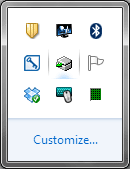
However I have noticed a new icon in my system tray which I can't identify, can't click on, and has no text when I hover over it. Can anyone recognise it? It looks like a grey/silver square or box with something green on it - no idea what it's trying to represent
Does anyone know what it represents?
Cheers, Smootus
I've been having some very slow system issues today and have checked that system resources seem to be at normal levels - CPU usage at around 20% and Memory usage at around 50% during normal operating.
However I have noticed a new icon in my system tray which I can't identify, can't click on, and has no text when I hover over it. Can anyone recognise it? It looks like a grey/silver square or box with something green on it - no idea what it's trying to represent
Does anyone know what it represents?
Cheers, Smootus
Attachments
My Computer
At a glance
Windows 7 Professional 64bit SP1
- OS
- Windows 7 Professional 64bit SP1


