Unknown, not initialized Disk does not show up in the recovery tool

LYONOON

New member
Local time
4:48 AM
Messages
4
Hi,

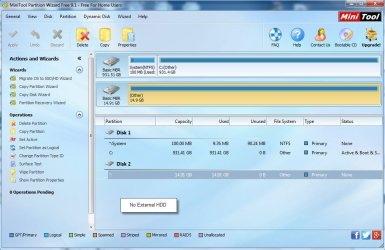
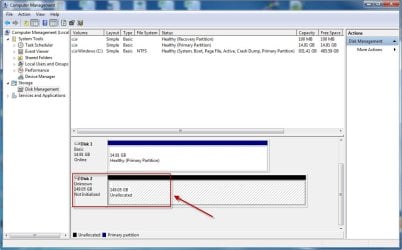
My WD External HDD becomes unknown, not initialized and unallocated. I am abt to use minitool v9.1 to do partition recovery. However when I started the program, the unknown disk does not present in the recovery screen. Please help,,,
 

Attachments
  • unknown1.jpg
    unknown1.jpg
    86.7 KB · Views: 2
  • unknown2.jpg
    unknown2.jpg
    90.9 KB · Views: 1

My Computer My Computer

At a glance

windows 7 64 bit
Computer type
PC/Desktop
OS
windows 7 64 bit
Welcome to the forum. I am on phone but both images show drive 2 isn't that the drive?
 

My Computer My Computer

At a glance

win 8 32 bit
Computer type
PC/Desktop
OS
win 8 32 bit
Disk 2 displayed in minitool screen is actually disk 1 in disk management screen
 

My Computer My Computer

At a glance

windows 7 64 bit
Computer type
PC/Desktop
OS
windows 7 64 bit
Your drive my be dead.
Don't try to fix it.
Wait for Jumanji. He is the disk guru.
 

My Computers My Computers

  • At a glance

    Windows 7 HP 64i5 6600K - 800MHz to 4200MHz4+4G GSkill DDR4 3000IG - Intel 530
    Computer type
    PC/Desktop
    Computer Manufacturer/Model Number
    custom build
    OS
    Windows 7 HP 64
    CPU
    i5 6600K - 800MHz to 4200MHz
    Motherboard
    GA-Z170-HD3P
    Memory
    4+4G GSkill DDR4 3000
    Graphics Card(s)
    IG - Intel 530
    Monitor(s) Displays
    Samsung 226BW
    Screen Resolution
    1680x1050
    Hard Drives
    (1) -1 SM951 – 128GB M.2 AHCI PCIe SSD drive for Windows 7 and Lubuntu
    (2) -1 WD SATA 3 - 1T for Data
    (3) -1 WD SATA 3 - 1T for backup
    PSU
    Thermaltake 450W TR2 gold
    Keyboard
    Old and good Chicony mechanical keyboard
    Mouse
    Logitech mX performance - 9 buttons (had to disable some)
    Internet Speed
    500Mb/s
    Browser
    Firefox 64
    Other Info
    TinyWall firewall
  • At a glance

    Windows 7 Proi7-4500U 800MHz to 3.0GHz(4+4)G DDR3 1600IG intel 4400 + NVIDIA GeForce GT 745M
    Computer type
    Laptop
    System Manufacturer/Model Number
    Asus Q550LF
    OS
    Windows 7 Pro
    CPU
    i7-4500U 800MHz to 3.0GHz
    Motherboard
    Asus Q550LF
    Memory
    (4+4)G DDR3 1600
    Graphics Card(s)
    IG intel 4400 + NVIDIA GeForce GT 745M
    Sound Card
    Realtek
    Monitor(s) Displays
    LG Display LP156WF4-SPH1
    Screen Resolution
    1920 x 1080
    Hard Drives
    BX500 120G SSD for Windows and programs +
    1T HDD for data
    Internet Speed
    500 Mb/s
    Browser
    Firefox
    Other Info
    TinyWall firewall
haha,, yes yes,, am actually hoping that he will see this and can give some advice.....
 

My Computer My Computer

At a glance

windows 7 64 bit
Computer type
PC/Desktop
OS
windows 7 64 bit
Western Digital HDD. Most probably 160GB. Is that right? Model No:???? Model name : ?????? Desktop variety or Portable?

In most Western Digital HDDs, the SATA to USB Interface electronics inside the enclosure fail.

Only in WD Elements Desktop https://www.wdc.com/products/external-storage.html you can take the HDD out and try to retrieve the data. Any other Desktop Model the data is encrypted by the enclosure electronics. Even if the HDD inside is good, you cannot take it out and retrieve the data. You will only get the encrypted data which is useless,

In any of the WD Portable external drives https://www.wdc.com/products/portable-storage.html the Sata to USB bridge is integrated with the HDD and also encrypted ( except Elements). So you cannot separate the HDD. No DIY data recovery possible.

In short only if you have Western Digital Elements Desktop, can take out the HDD and try to recover the data by direct connection in a desktop. Any other desktop/portable no DIY data recovery possible.

You have to contact WesternDigial data Recovery partners of your region if yo want to recover the data.
http://support.wdc.com/warranty/datarecovery.aspx?lang=en

I would suggest that you check your external HDD with Data Lifeguard Diagnostic for Windows.

http://support.wdc.com/downloads.aspx?lang=en
 

My Computer My Computer

At a glance

Windows 7 Home Premium 32 bit
OS
Windows 7 Home Premium 32 bit
Many many thanks JUMANJI,,

Yes, it's 160 GB passport. Model WD1600MER-00..

I will try with the diagnostic tools...
 

My Computer My Computer

At a glance

windows 7 64 bit
Computer type
PC/Desktop
OS
windows 7 64 bit
Back
Top