Unnecessary spacing on desktop icons

Diablosblizz

New member
Member
Local time
9:28 PM
Messages
33
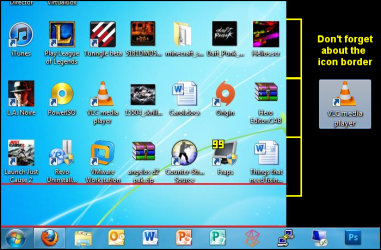
I've had this problem before, except in XP. Basically, I am having issues putting my icons right above my task bar, there is a bit of a gap where it won't let me put my icons. Just because I know I'll be asked, here's my icon spacing:

Icon Spacing (Horizontal): 43
Icon Spacing (Vertical): 43
Align Icons to Grid: On (I like to have them space out correctly, other than me trying to do it manually)

If I disable aligning the icons to grid it allows me to move icons into the space, however it's much harder to align them correctly. I'm not sure why this has happened, I turned on my computer one day and all the icons were messed up and I was no longer able to organize them the way I like. Here is a picture of what I'm talking about, you can see the space I can't put icons in is bordered with red.

GMoCX.jpg


If anybody has any suggestions on how to fix this, it would be grateful. I did a quick search and wasn't able to find anything.
 

My Computer My Computer

At a glance

Windows 7 UltimateAMD Phenom II X6 1055T 2.8GHz4x G.SKILL Sniper 4GB DDR3 (PC3 12800)XFX Radeon HD 6950 1GB DDR3
OS
Windows 7 Ultimate
CPU
AMD Phenom II X6 1055T 2.8GHz
Memory
4x G.SKILL Sniper 4GB DDR3 (PC3 12800)
Graphics Card(s)
XFX Radeon HD 6950 1GB DDR3
Monitor(s) Displays
Main Display: LG Flatron W2343T 23" | Secondary Display: 19"
Screen Resolution
Main: 1920x1080 | Secondary: 1360 x 768
Hard Drives
Main:
Corsair 50GB SSD
Western Digital Blue Drive 500GB 7200rpm

Server:
4TB worth of drives (no special branding)
Case
Antec 600
Cooling
Cooler Master V6GT
Keyboard
Razer Lycosta
Mouse
Logitech MX Revolution
Enough space?

Are you sure that there is enough room for another row?
Don't forget about the icon border.
Icon Spacing.png Icon Spacing 02.png


My Computer My Computer

At a glance

W7 Ultimate SP1, LM19.2 MATE, W10 Home 1703, ...AMD Phenom II x6 1100T, 3.3 GHz12GB DDR3 1333 G-Skill (4GB x 2), G-Skill (2G...NVIDIA GeForce GTX 660
Computer type
PC/Desktop
Computer Manufacturer/Model Number
n/a
OS
W7 Ultimate SP1, LM19.2 MATE, W10 Home 1703, W10 Pro 1703 VM, #All 64 bit
CPU
AMD Phenom II x6 1100T, 3.3 GHz
Motherboard
ASUS M4A88T-M/USB3 (AM3)
Memory
12GB DDR3 1333 G-Skill (4GB x 2), G-Skill (2GB x 2)
Graphics Card(s)
NVIDIA GeForce GTX 660
Sound Card
Realtek?
Monitor(s) Displays
Samsung S23B350
Screen Resolution
1920x1080
Hard Drives
WD Green 2TB (SATA), WD Green 3TB (SATA), WD Blue 4TB (SATA), WD Blue 6TB (SATA)
PSU
Cooler Master
Case
Antec GX300 Tower
Cooling
3x Antec TRICOOL 120mm Fans
Mouse
Wired Optical
Internet Speed
DSL
Antivirus
Avast
Browser
Pale Moon (64 bit)
Other Info
2018-12-27 Upgraded HDDs
2015-12-10 Upgraded case, graphics card, storage
2015-08-15 Upgraded motherboard & RAM
2015-07-15 Upgraded LM17.1 to LM17.2
I was able to before, however before I wasn't able to line up my icons on the very bottom on my second monitor (to the left) and I was on my main one. Now, it's flipped. Can on the second one, can't on the main.
 

My Computer My Computer

At a glance

Windows 7 UltimateAMD Phenom II X6 1055T 2.8GHz4x G.SKILL Sniper 4GB DDR3 (PC3 12800)XFX Radeon HD 6950 1GB DDR3
OS
Windows 7 Ultimate
CPU
AMD Phenom II X6 1055T 2.8GHz
Memory
4x G.SKILL Sniper 4GB DDR3 (PC3 12800)
Graphics Card(s)
XFX Radeon HD 6950 1GB DDR3
Monitor(s) Displays
Main Display: LG Flatron W2343T 23" | Secondary Display: 19"
Screen Resolution
Main: 1920x1080 | Secondary: 1360 x 768
Hard Drives
Main:
Corsair 50GB SSD
Western Digital Blue Drive 500GB 7200rpm

Server:
4TB worth of drives (no special branding)
Case
Antec 600
Cooling
Cooler Master V6GT
Keyboard
Razer Lycosta
Mouse
Logitech MX Revolution
That's weird. :confused:

Both monitors are:

  • The same resolution and are set to it?
  • Set to the same dpi setting?
You haven't recently changed the font face (Arial, Tahoma, etc.) or size?
 

My Computer My Computer

At a glance

W7 Ultimate SP1, LM19.2 MATE, W10 Home 1703, ...AMD Phenom II x6 1100T, 3.3 GHz12GB DDR3 1333 G-Skill (4GB x 2), G-Skill (2G...NVIDIA GeForce GTX 660
Computer type
PC/Desktop
Computer Manufacturer/Model Number
n/a
OS
W7 Ultimate SP1, LM19.2 MATE, W10 Home 1703, W10 Pro 1703 VM, #All 64 bit
CPU
AMD Phenom II x6 1100T, 3.3 GHz
Motherboard
ASUS M4A88T-M/USB3 (AM3)
Memory
12GB DDR3 1333 G-Skill (4GB x 2), G-Skill (2GB x 2)
Graphics Card(s)
NVIDIA GeForce GTX 660
Sound Card
Realtek?
Monitor(s) Displays
Samsung S23B350
Screen Resolution
1920x1080
Hard Drives
WD Green 2TB (SATA), WD Green 3TB (SATA), WD Blue 4TB (SATA), WD Blue 6TB (SATA)
PSU
Cooler Master
Case
Antec GX300 Tower
Cooling
3x Antec TRICOOL 120mm Fans
Mouse
Wired Optical
Internet Speed
DSL
Antivirus
Avast
Browser
Pale Moon (64 bit)
Other Info
2018-12-27 Upgraded HDDs
2015-12-10 Upgraded case, graphics card, storage
2015-08-15 Upgraded motherboard & RAM
2015-07-15 Upgraded LM17.1 to LM17.2
Text isn't enlarged (it is still set to smaller). Font for the "icon" property is:

Font: Segoe UI
Size: 9

Resolutions haven't changed. Monitor two is a smaller monitor, but that hasn't ever affected it.
 
Last edited:

My Computer My Computer

At a glance

Windows 7 UltimateAMD Phenom II X6 1055T 2.8GHz4x G.SKILL Sniper 4GB DDR3 (PC3 12800)XFX Radeon HD 6950 1GB DDR3
OS
Windows 7 Ultimate
CPU
AMD Phenom II X6 1055T 2.8GHz
Memory
4x G.SKILL Sniper 4GB DDR3 (PC3 12800)
Graphics Card(s)
XFX Radeon HD 6950 1GB DDR3
Monitor(s) Displays
Main Display: LG Flatron W2343T 23" | Secondary Display: 19"
Screen Resolution
Main: 1920x1080 | Secondary: 1360 x 768
Hard Drives
Main:
Corsair 50GB SSD
Western Digital Blue Drive 500GB 7200rpm

Server:
4TB worth of drives (no special branding)
Case
Antec 600
Cooling
Cooler Master V6GT
Keyboard
Razer Lycosta
Mouse
Logitech MX Revolution
FIX

I figured out at least a temporary fix. This program called dual monitor:

Download Dual Monitor Taskbar from SourceForge.net

It makes a second taskbar so that there is on on each monitor. I don't know how they did it, but somehow it fools the system into thinking the 2nd monitor is the first. My icons are no longer spaced weird on the right monitor, although now theres a taskbar on the left.

Funny thing is, deleting the "new" taskbar on the left monitor makes the icons on the right monitor go weird again.

enjoy
 

My Computer My Computer

At a glance

Windows 7 Home 64
OS
Windows 7 Home 64
Back
Top