"Unsaved Theme" Problem

ishmael9100

T4K3ND0WN
Power User
Local time
11:33 AM
Messages
141
Location
UK, London
Hey everyone. I have a problem with the Themes in Windows 7. There is a problem with the "Unsaved Theme" Here's the problem:

I go into Themes and it shows two themes, "Unsaved Theme" and the current theme I created. Right now it is on "Unsaved Theme" so I change it to the theme I want to and then delete "Unsaved Theme" and then another "Unsaved Theme" is created and it reverts back to Unsaved Theme. :S I don't understand what is causing this?
 

My Computer

Computer Manufacturer/Model Number
Dell Inspiron 1545
OS
Windows 7 Ultimate x64
CPU
Celeron(R) Dual-Core CPU T3500 @ 2.10GHz
Motherboard
Dell Motherboard Model 0G848F
Memory
4.00GB
Graphics Card(s)
Mobile Intel® 4 Series Express Chipset Family (4500MHD)
Sound Card
IDT Hight Definition Audio
Monitor(s) Displays
Generic PnP Monitor
Screen Resolution
1366 x 768
Hard Drives
WDCW WD1600BEVT-75ZCT2 150GB ATA Device
Keyboard
Standard PS/2 Keyboard
Mouse
Wireless Optical Mouse
Internet Speed
48.0Mpbs
I think it's just the way Windows 7 works. You load your theme into Windows, close the window and as soon as you make any little change, intentional or unintentional, knowingly or unknowingly, Windows will "update" your loaded theme to what you have "now", the Unsaved Theme.

Just in case you want to "update" your theme. Means you don't have to physically edit it.
 

My Computer

OS
Win7 HP 64bit
I think it's just the way Windows 7 works. You load your theme into Windows, close the window and as soon as you make any little change, intentional or unintentional, knowingly or unknowingly, Windows will "update" your loaded theme to what you have "now", the Unsaved Theme.

Just in case you want to "update" your theme. Means you don't have to physically edit it.

The thing is, is that I have done nothing to change the theme. It doesn't matter now because I have done a Repair Install but what happened was I went into the Themes section and then I changed from Unsaved Theme to the theme I wanted and then deleted Unsaved Theme and then it reverted back to Unsaved Theme. So no matter what I do, Unsaved Theme will always be there.
 

My Computer

Computer Manufacturer/Model Number
Dell Inspiron 1545
OS
Windows 7 Ultimate x64
CPU
Celeron(R) Dual-Core CPU T3500 @ 2.10GHz
Motherboard
Dell Motherboard Model 0G848F
Memory
4.00GB
Graphics Card(s)
Mobile Intel® 4 Series Express Chipset Family (4500MHD)
Sound Card
IDT Hight Definition Audio
Monitor(s) Displays
Generic PnP Monitor
Screen Resolution
1366 x 768
Hard Drives
WDCW WD1600BEVT-75ZCT2 150GB ATA Device
Keyboard
Standard PS/2 Keyboard
Mouse
Wireless Optical Mouse
Internet Speed
48.0Mpbs

My Computer

Computer Manufacturer/Model Number
Mikrotestas
OS
Win7 Pro 64bit RTM
CPU
E8500
Motherboard
Gigabyte GA-EP35-DS3
Memory
4GB
Graphics Card(s)
Gigabyte ATI HD4870
Sound Card
MOBO
Monitor(s) Displays
Samsung T220
Screen Resolution
1680x1050
Hard Drives
1x450GB
PSU
Sonata III
Case
Sonata III
Cooling
Default
Keyboard
Chicony
Mouse
Optical
Internet Speed
100mbit
Hi. i have this problem too. I make changes to the theme, save it, and then theres 2 themes: saved one and the "unsaved theme".
This might have started after i installed Earthview software.

similar threads:
http://www.sevenforums.com/themes-styles/86529-cant-delete-windows-7-theme.html
http://www.sevenforums.com/themes-styles/78316-my-themes-problem-personalization.html
http://www.sevenforums.com/customization/87432-renaming-composition-unsaved.html

That could be the problem. The "Unsaved Theme" problem started when I probably installed something. I think a repair install is the only way out of this problem.
 

My Computer

Computer Manufacturer/Model Number
Dell Inspiron 1545
OS
Windows 7 Ultimate x64
CPU
Celeron(R) Dual-Core CPU T3500 @ 2.10GHz
Motherboard
Dell Motherboard Model 0G848F
Memory
4.00GB
Graphics Card(s)
Mobile Intel® 4 Series Express Chipset Family (4500MHD)
Sound Card
IDT Hight Definition Audio
Monitor(s) Displays
Generic PnP Monitor
Screen Resolution
1366 x 768
Hard Drives
WDCW WD1600BEVT-75ZCT2 150GB ATA Device
Keyboard
Standard PS/2 Keyboard
Mouse
Wireless Optical Mouse
Internet Speed
48.0Mpbs
Hi there, I have the same problem as kancaras - I select the current theme, make changes, click 'save changes' and instead of updating the theme it creates a new Unsaved Theme. Why isn't the current theme being updated?
 

My Computer

Computer Manufacturer/Model Number
Acer Aspire 5741
OS
windows 7 Home Premium
CPU
Intel Core i5 @ 2.27GHz 32nm Technology
Motherboard
Acer Aspire 5741 (CPU)
Memory
DDR3 4.0GB
Graphics Card(s)
Intel(R) Graphics Media Accelerator HD
Sound Card
Realtek High Definition Audio Intel(R) Display Audio
Monitor(s) Displays
Generic PnP Monitor on Intel Graphics Media Accelerator HD
Screen Resolution
1366x768
Hard Drives
Seagate 2.5" SATA 500GB
Keyboard
Synaptics PS/2 Port TouchPad
Mouse
Microsoft Comfort Mouse 4500 (IntelliPoint)
Hi there, I have the same problem as kancaras - I select the current theme, make changes, click 'save changes' and instead of updating the theme it creates a new Unsaved Theme. Why isn't the current theme being updated?
from what i believe, it is how windows set up the personalize options, instead of updating the old theme it creates a new theme so that you can revert back to the old theme if you do not like it (i do believe that there should be an update option as well as a new theme option)
 

My Computer

Computer Manufacturer/Model Number
Dell Studio 1749
OS
Windows 7 Home Premium 64 Bit
CPU
Intel i5 2.40GHz
Internet Speed
university ethernet sucks
Hi there, I have the same problem as kancaras - I select the current theme, make changes, click 'save changes' and instead of updating the theme it creates a new Unsaved Theme. Why isn't the current theme being updated?

Whenever you make changes to a current theme windows by default saves it as an unsaved theme. To make the changes permanent right click on the unsaved theme and save as your new theme (give it a name).

Also note that you may have to save and rename your theme multiple times if changing both window color desktop background. The best technique I have used is to change my desired window colors then save and rename (right click) the Unsaved theme, then change the desktop background/sideshow/time & save and rename (right click) the Unsaved theme again.

Each time thereafter when you make a change ( slide show time, desktop background the theme will have to be re saved & renamed - Aagain :(
 

My Computer

Computer type
PC/Desktop
Computer Manufacturer/Model Number
My own abomination, I call it the Money Pit
OS
Windows 10 Pro x 2/Windows 11 Home
CPU
Intel i7 2600K @ 3.40 GHz
Motherboard
ASUS Sabertooth P67
Memory
Corsair Vengeance 16GB DDR3 1600MHz CL8 Dual Channel Kit
Graphics Card(s)
EVGA GeForce RTX 3080 XC3 ULTRA GAMING 10GB GDDR6X
Sound Card
Onboard Realtek or Nvidia High Definition Audio (HDMI)
Monitor(s) Displays
Samsung JS7000 50" SUHD TV or Samsung 27" FHD 60Hz 8ms GTG V
Screen Resolution
1920 x 1080
Hard Drives
1 x Samsung 870 EVO 250 GB SSD (Windows 10 Pro), 1 x Samsung 850 EVO 250 GB SSD (Windows 10 Pro)
PSU
Corsair AX860 - 860W Modular Power Supply
Case
Phanteks Enthoo Luxe Full Tower Case - Black
Cooling
CORSAIR Hydro Series H150i PRO RGB 360mm Liquid CPU Cooler
Keyboard
Logitech K830 Illuminated Living-Room Keyboard
Mouse
Logitech MX Anywhere 2S Wireless Mouse
Internet Speed
100 Mbps
Antivirus
ESET Internet Security
Browser
Latest Version Of Firefox & Microsoft Edge Chromium Stable
Other Info
LG Super Multi Blue Internal Blu-ray Disk Rewriter - BH10LS30
6x2 HDMI Switcher (6 inputs, 2 outputs) so I can send the output of my Cable Box, Roku, or any my 4 computers to either my TV or Monitor separately or simultaneously.
Thanks IownAmoneyPit & theski232, So basically what you're saying is this is the correct behaviour and there's nothing wrong? Well the "save changes" is very misleading then isn't it? It does tend to imply you are saving changes to your current theme, not saving changes a completely new theme. How typical of Microsoft to make something so un-user-friendly!! :rolleyes:
 

My Computer

Computer Manufacturer/Model Number
Acer Aspire 5741
OS
windows 7 Home Premium
CPU
Intel Core i5 @ 2.27GHz 32nm Technology
Motherboard
Acer Aspire 5741 (CPU)
Memory
DDR3 4.0GB
Graphics Card(s)
Intel(R) Graphics Media Accelerator HD
Sound Card
Realtek High Definition Audio Intel(R) Display Audio
Monitor(s) Displays
Generic PnP Monitor on Intel Graphics Media Accelerator HD
Screen Resolution
1366x768
Hard Drives
Seagate 2.5" SATA 500GB
Keyboard
Synaptics PS/2 Port TouchPad
Mouse
Microsoft Comfort Mouse 4500 (IntelliPoint)
Thanks IownAmoneyPit & theski232, So basically what you're saying is this is the correct behaviour and there's nothing wrong? Well the "save changes" is very misleading then isn't it? It does tend to imply you are saving changes to your current theme, not saving changes a completely new theme. How typical of Microsoft to make something so un-user-friendly!! :rolleyes:
that be Microsoft for you :cool:
 

My Computer

Computer Manufacturer/Model Number
Dell Studio 1749
OS
Windows 7 Home Premium 64 Bit
CPU
Intel i5 2.40GHz
Internet Speed
university ethernet sucks
Thanks IownAmoneyPit & theski232, So basically what you're saying is this is the correct behaviour and there's nothing wrong? Well the "save changes" is very misleading then isn't it? It does tend to imply you are saving changes to your current theme, not saving changes a completely new theme. How typical of Microsoft to make something so un-user-friendly!! :rolleyes:

Yes every time you change to a new theme or make modifications to an existing theme you still have that unsaved theme thumbnail in upper left corner, Only when right clicking and save as, then naming the unsaved theme does it get alphabetically added to My themes.

I remember having the same issue the first time I made a Sideshow and windows would not remember my changes, the only way I had success was right clicking, save as + name the unsaved theme after every change (eg: A1, A2, A3...) until I was satisfied with my changes
 

My Computer

Computer type
PC/Desktop
Computer Manufacturer/Model Number
My own abomination, I call it the Money Pit
OS
Windows 10 Pro x 2/Windows 11 Home
CPU
Intel i7 2600K @ 3.40 GHz
Motherboard
ASUS Sabertooth P67
Memory
Corsair Vengeance 16GB DDR3 1600MHz CL8 Dual Channel Kit
Graphics Card(s)
EVGA GeForce RTX 3080 XC3 ULTRA GAMING 10GB GDDR6X
Sound Card
Onboard Realtek or Nvidia High Definition Audio (HDMI)
Monitor(s) Displays
Samsung JS7000 50" SUHD TV or Samsung 27" FHD 60Hz 8ms GTG V
Screen Resolution
1920 x 1080
Hard Drives
1 x Samsung 870 EVO 250 GB SSD (Windows 10 Pro), 1 x Samsung 850 EVO 250 GB SSD (Windows 10 Pro)
PSU
Corsair AX860 - 860W Modular Power Supply
Case
Phanteks Enthoo Luxe Full Tower Case - Black
Cooling
CORSAIR Hydro Series H150i PRO RGB 360mm Liquid CPU Cooler
Keyboard
Logitech K830 Illuminated Living-Room Keyboard
Mouse
Logitech MX Anywhere 2S Wireless Mouse
Internet Speed
100 Mbps
Antivirus
ESET Internet Security
Browser
Latest Version Of Firefox & Microsoft Edge Chromium Stable
Other Info
LG Super Multi Blue Internal Blu-ray Disk Rewriter - BH10LS30
6x2 HDMI Switcher (6 inputs, 2 outputs) so I can send the output of my Cable Box, Roku, or any my 4 computers to either my TV or Monitor separately or simultaneously.
I created an account for my cousin in my PC a week ago. "Unsaved Theme problem" didn't appear in his account.
 

My Computer

OS
Windows 7 Home Premium 64-bit
I think I've found the solution after a few years experiencing this problem. It keeps reverting back to Unsaved Theme(WITHOUT WALLPAPER SLIDESHOW). Usually occurs after:
1. I plug out the battery, or
2. reboot, or
3. hibernate, or
4. opening Aero incompatible software(such as Digi Broadband), or
5. sometimes let the laptop opened for too long (>12 hours non stop)
6. no reason, suddenly slideshow is disabled(sometimes while I'm watching movies)

I tried creating a theme named "Unsaved Theme" to prevent windows to make its own theme. No success.
I don't want to uninstall any of my favorite programs. The main reason we buy a laptop is to install programs, right?
I've tried deleting slideshow.ini & TranscodedWallpaper.jpg. No success.
I tried enable slideshow on battery and on plugged in (power plan). No success.
I don't want to create new account every time this thing happens. I prefer my OWN Account for eternity.
I also don't want to upgrade Windows every times it happens...
I don't want to compare registry files, windows can change these registry whenever it likes, thus not very practical.

Windows keeps creating its own theme file named Custom.theme and emptying the file slideshow.ini.
The trick is to lock these 2 files but allow windows to access it.

1. Create your theme(setting up all appearances, images, screensaver, font, color, slideshow setting, whatever..),
then name it (e.g.: MyTheme)
Make sure it works on the background before proceed. (use 10 seconds delay to ensure that it works)

2. Go to %localAppData%\Microsoft\Windows\Themes

We only concern about these 2 files:
1. MyTheme.theme
2. Custom.theme

If there is no Custom.theme, duplicate MyTheme.theme then rename it to Custom.theme.
(In my case, I let Windows do her things in creating the unwanted "Unsaved Theme", so annoying)

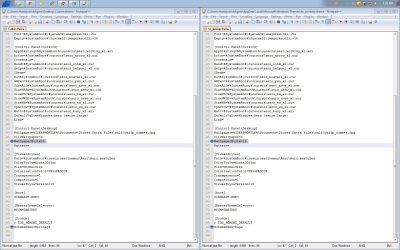
use Beyond Compare(or other comparing softwares) between these 2 files:
copy all content from MyTheme.theme --> Custom.theme
except:
MyTheme.theme | Custom.theme
------------------------------------------------------------------------
DisplayName=MyTheme | DisplayName=Unsaved Theme

Make sure both of the themes contain something similar to these:
[Slideshow]
ImagesRootPIDL=8TAFA8BUg/E0gouOpBhoYjAArADMdm

Then, save both files.

THEN THE IMPORTANT PART, change Custom.theme ---> Read only (in properties menu)

3. Go to %USERPROFILE%\AppData\Roaming\Microsoft\Windows\Themes

You will find these 2 files:

slideshow.ini-I think where the slideshow data is stored, who knows
TranscodedWallpaper.jpg-current image being displayed on the background

try open the slideshow.ini, it should contain some gibberish characters e.g:
[Slideshow]
ImagesRootPIDL=8TAFA8BUg/E0gouOpBhoYjAArADMdm.........................

If it's empty, then your slideshow maybe already disabled.

THEN THE IMPORTANT PART, change ONLY slideshow.ini ---> read only (in properties menu)
[don't touch the TranscodedWallpaper.jpg. Just let it be]

4. Then you're ready to enjoy wallpaper slideshow without having to worry about it.

Maybe this only works for me. Mehh. Whatever.

 

My Computer

Computer Manufacturer/Model Number
Acer
OS
Windows 7 Ultimate x32
CPU
Intel® Core™ i3-370M processor
Motherboard
Acer Aspire 4741
Memory
1781 MB
Graphics Card(s)
Intel® HD Graphics with 128 MB of dedicated system memory
Sound Card
Realtek High Definition
Monitor(s) Displays
Raster Display
Hard Drives
500 GB
PSU
ACPI 3.0 CPU power management standard 3-pin 65 W AC adapter
Case
Plastic
Cooling
External fan
I think I've found the solution after a few years experiencing this problem. It keeps reverting back to Unsaved Theme(WITHOUT WALLPAPER SLIDESHOW). Usually occurs after:
1. I plug out the battery, or
2. reboot, or
3. hibernate, or
4. opening Aero incompatible software(such as Digi Broadband), or
5. sometimes let the laptop opened for too long (>12 hours non stop)
6. no reason, suddenly slideshow is disabled(sometimes while I'm watching movies)

I tried creating a theme named "Unsaved Theme" to prevent windows to make its own theme. No success.
I don't want to uninstall any of my favorite programs. The main reason we buy a laptop is to install programs, right?
I've tried deleting slideshow.ini & TranscodedWallpaper.jpg. No success.
I tried enable slideshow on battery and on plugged in (power plan). No success.
I don't want to create new account every time this thing happens. I prefer my OWN Account for eternity.
I also don't want to upgrade Windows every times it happens...
I don't want to compare registry files, windows can change these registry whenever it likes, thus not very practical.

Windows keeps creating its own theme file named Custom.theme and emptying the file slideshow.ini.
The trick is to lock these 2 files but allow windows to access it.

1. Create your theme(setting up all appearances, images, screensaver, font, color, slideshow setting, whatever..),
then name it (e.g.: MyTheme)
Make sure it works on the background before proceed. (use 10 seconds delay to ensure that it works)

2. Go to %localAppData%\Microsoft\Windows\Themes

We only concern about these 2 files:
1. MyTheme.theme
2. Custom.theme

If there is no Custom.theme, duplicate MyTheme.theme then rename it to Custom.theme.
(In my case, I let Windows do her things in creating the unwanted "Unsaved Theme", so annoying)

use Beyond Compare(or other comparing softwares) between these 2 files:
copy all content from MyTheme.theme --> Custom.theme
except:
MyTheme.theme | Custom.theme
------------------------------------------------------------------------
DisplayName=MyTheme | DisplayName=Unsaved Theme

Make sure both of the themes contain something similar to these:
[Slideshow]
ImagesRootPIDL=8TAFA8BUg/E0gouOpBhoYjAArADMdm

Then, save both files.

THEN THE IMPORTANT PART, change Custom.theme ---> Read only (in properties menu)

3. Go to %USERPROFILE%\AppData\Roaming\Microsoft\Windows\Themes

You will find these 2 files:

slideshow.ini-I think where the slideshow data is stored, who knows
TranscodedWallpaper.jpg-current image being displayed on the background

try open the slideshow.ini, it should contain some gibberish characters e.g:
[Slideshow]
ImagesRootPIDL=8TAFA8BUg/E0gouOpBhoYjAArADMdm.........................

If it's empty, then your slideshow maybe already disabled.

THEN THE IMPORTANT PART, change ONLY slideshow.ini ---> read only (in properties menu)
[don't touch the TranscodedWallpaper.jpg. Just let it be]

4. Then you're ready to enjoy wallpaper slideshow without having to worry about it.

Hope this helps.
 

My Computer

Computer Manufacturer/Model Number
Acer
OS
Windows 7 Ultimate x32
CPU
Intel® Core™ i3-370M processor
Motherboard
Acer Aspire 4741
Memory
1781 MB
Graphics Card(s)
Intel® HD Graphics with 128 MB of dedicated system memory
Sound Card
Realtek High Definition
Monitor(s) Displays
Raster Display
Hard Drives
500 GB
PSU
ACPI 3.0 CPU power management standard 3-pin 65 W AC adapter
Case
Plastic
Cooling
External fan
This must have had something to do with wallpaper and sound scheme, in my own case. It's a persistent pest that doesn't want to leave.
2012-08-05_032804.jpg

Of course, you could try saving as "Custom" and overwrite "Custom" in the same folder and see what happens there, but I doubt with the way Windows handles things, things could get UGLY.

I don't use slideshows, because it takes up CPU time to change over to the next picture. It looked really cool at first, but when I had been playing Sims 2 and a new desktop picture would load, that's when the game started to lag a bit. Don't count on running slideshows on a laptop with battery, either.
 
Last edited:

My Computer

Computer type
PC/Desktop
Computer Manufacturer/Model Number
Custom
OS
Microsoft Windows 7 Home Premium 64-bit Service Pack 1
CPU
AMD A10-6800K APU with Radeon(tm)™ HD Graphics 4100
Motherboard
ASRock FM2A85X Extreme4-M
Memory
(2) G.Skill F3-12800CL10-8GBXL
Graphics Card(s)
ASUS R7 250 Series (0x6610)
Sound Card
Realtek High Definition Audio
Monitor(s) Displays
Acer X213H LCD monitor, 21"
Screen Resolution
1920 x 1080 x 32 bits @ 60 Hz
Hard Drives
WD Black, 1.0TB, WDC WD1002FAEX-00Z3A0
PSU
Rosewill Quark-650
Case
Raidmax Comet SECC Steel ATX Mid Tower Computer Case
Cooling
1 x 80mm + 2 x 120mm + Stock cooler
Mouse
Gear Head Wireless Optical 5-button mouse
Internet Speed
FTTx 6000 / 1000
Antivirus
Avast! Free Antivirus 2015.10.0.2208
Browser
Google Chrome Version 40.0.2214.115
Other Info
*AMD Dual-Graphics
*Uses OpenDNS
*Uses Folding@Home
*HP 16x Super-Multi DVD Writer
*Superspeed 74-in-1 Card Reader
*Maximum overclock has not been determined.
Back
Top