Unshare my Users folder

sitlet

New member
Local time
5:19 AM
Messages
3
Im on a network with two computers running Win 7 Home. I want to share the Public folder on my laptop to my desktop, so I can transfer files, but nothing else. My roommates have access to the desktop, and I dont want them getting into my pictures and documents.

I have set up sharing, and when I go to the Desktop, I am able to see my Public folder, and my User folder (Chris). The problem is, I cannot unshare the Chris folder, which is the one with all my pics and documents. I have right clicked it on my laptop, and hit share with-nobody, and went into the sharing properties, and uncheck the share button, but no matter what, it still shows up. If i right click the whole Users folder, and unshare that, it works, but then I dont get access to the Public folder either.

Can anyone help? I read a few threads on here about this same issue, but it seems nobody ever figured it out.
 

My Computer

OS
windows 7 home
you can try and set the permissions to were only you can read them. Does that work?
 

My Computer

Computer Manufacturer/Model Number
SMN-Productions
OS
Windows 7 x86/x64, Server 2008r2, Web Server 2008
CPU
i7 v2 3930K Steping stone 2
Motherboard
ASUS Rampage IV Extreme
Memory
G.SKILL Ripjaws Z Series 32GB
Graphics Card(s)
AMD HD 5770
Monitor(s) Displays
Acer 21" and Samsung 20"
Hard Drives
Patriot Pyro 80GB
PSU
1000 Watt
Case
HAF-X
Cooling
4 Fans
Keyboard
Black Widow Ultimate
If they have access to the root of the share: "Desktop\(shared folder)" You'll need to remove the inheritted permission on the (shared folder). Then you'll be able to modify the ACL to your liking.
 

My Computer

OS
7 Pro
you can try and set the permissions to were only you can read them. Does that work?

No it doesnt, because it's me logging into my account on the desktop. So when I login, it thinks its me, and allows access to everything.

Actually I think I answered my own question there. Since i'm the one logging into my account, thats why my stuff is showing up. Is there a way to NOT login to my computer, therefore only allowing the public folder to be shared? Everytime I have tried to connect to my computer, it asks for my password. How would I set this up so just the public folder is shared without a password?
 

My Computer

OS
windows 7 home
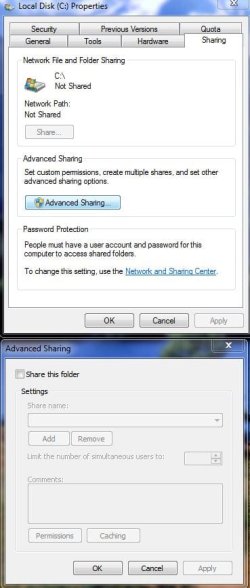
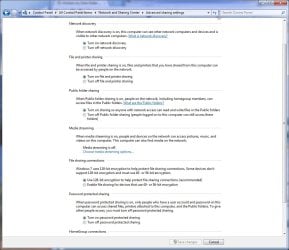
Exactly like these photos... and make sure its the same settings on all computers you want to share..

If you decide to make it easier.. which in most cases it is not, you can always do the whole home group thing if you are running 7 on all computers.
 

Attachments

  • C shared.JPG
    C shared.JPG
    49.1 KB · Views: 504
  • Public Sharing.jpg
    Public Sharing.jpg
    97.9 KB · Views: 553

My Computer

Computer Manufacturer/Model Number
HP Pavilion Elite HPE-410f
OS
Windows 7 Ultimate x64
CPU
AMD Phenom x6 1045t
Motherboard
N/A
Memory
8 GB
Graphics Card(s)
ATI Radeon HD 5570
Sound Card
Realtek Highdefinition Audio / 5.1 Dolby Setup
Monitor(s) Displays
HP w2207h Widescreen
Screen Resolution
1680*1050
Hard Drives
1 TB (fixed), 320 Portable maxtor, Server Hard drives
PSU
350 Watt
Case
HP CASE
Cooling
Bass
Keyboard
Logitech MX 5500
Mouse
Logitech MX 5500
Internet Speed
ROAD RUNNER 16MB D/512 U
Yes, I am using a homegroup, as both computers are Win 7 Home. How would I go about doing that? The whole sharing thing for Win 7 has got me confused compared to XP and Vista.
 

My Computer

OS
windows 7 home
For homegroup to work...

The Main Computer has to be the server/host and the other computers will be the client..

Control Panel\All Control Panel Items\HomeGroup

Go there in your computer and click on Create a Homegroup.

You have to make sure your IPv6 is enabled in all computers as well for this to work.

Once you make a password on your computer, you go to another computer and it will find the homegroup automatically and ask for the password that you created on your computer.
 

My Computer

Computer Manufacturer/Model Number
HP Pavilion Elite HPE-410f
OS
Windows 7 Ultimate x64
CPU
AMD Phenom x6 1045t
Motherboard
N/A
Memory
8 GB
Graphics Card(s)
ATI Radeon HD 5570
Sound Card
Realtek Highdefinition Audio / 5.1 Dolby Setup
Monitor(s) Displays
HP w2207h Widescreen
Screen Resolution
1680*1050
Hard Drives
1 TB (fixed), 320 Portable maxtor, Server Hard drives
PSU
350 Watt
Case
HP CASE
Cooling
Bass
Keyboard
Logitech MX 5500
Mouse
Logitech MX 5500
Internet Speed
ROAD RUNNER 16MB D/512 U
Back
Top