Unstable Internet Connection?

hastyle

New member
Member
VIP
Local time
10:11 PM
Messages
112
Hey guys , Just installed windows 7 last week, notice my internet keeps going on and offline, its not my internet or network router, cuz my laptop is working fine, I tried disabling and re-enabling , doesn't seem to help, I have to reboot my pc every time. Do you guys think this is driver issues??

I have a PC Partner RD580AK9-A79D MB:

-Marvell 88E8052 PCI Express Gigabit LAN - updted this driver, still has problems.
-Realtek RTL8100C PCI LAN - can't seem to find working win7 drivers. downloaded a few, but keep getting incompatibility issues during install.


These are the two on board network cards.

thank you.
 

My Computer

Computer Manufacturer/Model Number
Clone
OS
windows 7 Ultimate 32bit & 64bit
CPU
athlon 64 3500+ Venice
Motherboard
Asus A8R-MVP
Memory
2x1GB OCZ Gold dual-channel DDR @ 200MHZ 3-3-3-8
Graphics Card(s)
xfx 8600 gts
Monitor(s) Displays
3007fpw
Screen Resolution
2560x1600
Hard Drives
312.57GB Seagate ST3320620AS
244.20GB Western Digital WDC WD2500KS-00MJB0
488.39GB Western Digital WDC WD5000AAKS-00TMA0
PSU
Antec Truepower 2.0 380watts (came with case)
Case
Antec

My Computer

Computer type
PC/Desktop
Computer Manufacturer/Model Number
Home built
OS
Windows 7 Ult, Windows 8.1 Pro,
CPU
Q9650-4.275GHz, E8600 4.5GHz, E6750-3.8GHz
Motherboard
Evga 780i FTW
Memory
G.Skill PC2 9600 1200Mhz 5 5 5 15 2T
Graphics Card(s)
GTX480
Sound Card
Asus Xonar D2
Monitor(s) Displays
HannsG
Screen Resolution
1680X1050
Hard Drives
GSkill Phoenix Pro 120GB SSD
PSU
ThermalTake Toughpower 1000Watt modular
Case
ThermalTake XaserV
Cooling
Xigmatek S1283
Keyboard
Logitech G15
Mouse
Logitech G9
Internet Speed
T1
Its an old D-link di-614+, no my laptop is a Powerbook with OSX tiger.
 

My Computer

Computer Manufacturer/Model Number
Clone
OS
windows 7 Ultimate 32bit & 64bit
CPU
athlon 64 3500+ Venice
Motherboard
Asus A8R-MVP
Memory
2x1GB OCZ Gold dual-channel DDR @ 200MHZ 3-3-3-8
Graphics Card(s)
xfx 8600 gts
Monitor(s) Displays
3007fpw
Screen Resolution
2560x1600
Hard Drives
312.57GB Seagate ST3320620AS
244.20GB Western Digital WDC WD2500KS-00MJB0
488.39GB Western Digital WDC WD5000AAKS-00TMA0
PSU
Antec Truepower 2.0 380watts (came with case)
Case
Antec
heey, tried both drivers, still same problem? aggh this is not good. for a moment i actualy believe windows 7 was running smoothly for me.
 

My Computer

Computer Manufacturer/Model Number
Clone
OS
windows 7 Ultimate 32bit & 64bit
CPU
athlon 64 3500+ Venice
Motherboard
Asus A8R-MVP
Memory
2x1GB OCZ Gold dual-channel DDR @ 200MHZ 3-3-3-8
Graphics Card(s)
xfx 8600 gts
Monitor(s) Displays
3007fpw
Screen Resolution
2560x1600
Hard Drives
312.57GB Seagate ST3320620AS
244.20GB Western Digital WDC WD2500KS-00MJB0
488.39GB Western Digital WDC WD5000AAKS-00TMA0
PSU
Antec Truepower 2.0 380watts (came with case)
Case
Antec
If those drivers don't work then you should perform a reset on your router. Should be a small button you can push and hold down for ten seconds while powered on. Your router is fully compatible with Windows 7 and everything should be working.
 

My Computer

Computer type
PC/Desktop
Computer Manufacturer/Model Number
Home built
OS
Windows 7 Ult, Windows 8.1 Pro,
CPU
Q9650-4.275GHz, E8600 4.5GHz, E6750-3.8GHz
Motherboard
Evga 780i FTW
Memory
G.Skill PC2 9600 1200Mhz 5 5 5 15 2T
Graphics Card(s)
GTX480
Sound Card
Asus Xonar D2
Monitor(s) Displays
HannsG
Screen Resolution
1680X1050
Hard Drives
GSkill Phoenix Pro 120GB SSD
PSU
ThermalTake Toughpower 1000Watt modular
Case
ThermalTake XaserV
Cooling
Xigmatek S1283
Keyboard
Logitech G15
Mouse
Logitech G9
Internet Speed
T1
Will give it a try, but if its the router, then shouldn't it be disrupting my laptop connection too?
 

My Computer

Computer Manufacturer/Model Number
Clone
OS
windows 7 Ultimate 32bit & 64bit
CPU
athlon 64 3500+ Venice
Motherboard
Asus A8R-MVP
Memory
2x1GB OCZ Gold dual-channel DDR @ 200MHZ 3-3-3-8
Graphics Card(s)
xfx 8600 gts
Monitor(s) Displays
3007fpw
Screen Resolution
2560x1600
Hard Drives
312.57GB Seagate ST3320620AS
244.20GB Western Digital WDC WD2500KS-00MJB0
488.39GB Western Digital WDC WD5000AAKS-00TMA0
PSU
Antec Truepower 2.0 380watts (came with case)
Case
Antec
You reset the router, then re-create the wireless network (ie SSID). After which your laptop will try and pick up the network. From there you use your security key to log in.
 

My Computer

Computer Manufacturer/Model Number
Lenovo ThinkPad T60
OS
Windows 7 Ultimate 64Bit
CPU
GenuineIntel Intel(R) Core(TM) DuoCore T2400 @ 1.83GHz
Motherboard
Intel(R) 82801G (ICH7 Family)
Memory
2.00 GB
Graphics Card(s)
Mobile Intel(R) 945 Express Chipset
Sound Card
SoundMAX Integrated Digital HD Audio
Monitor(s) Displays
ThinkPad Display
Screen Resolution
1400x1050
Hard Drives
100Gb SATA
Keyboard
Standard Keyboard
Mouse
HID-compliant Mouse
Internet Speed
Cable Broadband - 54Mbps
Other Info
Intel(R) PRO/1000 PL Network Connection
11a/b/g Wireless LAN Mini PCI Express Adapter
Hey guys, So i restarted the modem, setup the wire, etc all over again. Still does the same thing? its weird, My internet connection doesnt die completely, because my live trading software (which requires internet for live data feed) still works, its my browser and downloads that get cut off? do you think its the service provider?

thank you.
 

My Computer

Computer Manufacturer/Model Number
Clone
OS
windows 7 Ultimate 32bit & 64bit
CPU
athlon 64 3500+ Venice
Motherboard
Asus A8R-MVP
Memory
2x1GB OCZ Gold dual-channel DDR @ 200MHZ 3-3-3-8
Graphics Card(s)
xfx 8600 gts
Monitor(s) Displays
3007fpw
Screen Resolution
2560x1600
Hard Drives
312.57GB Seagate ST3320620AS
244.20GB Western Digital WDC WD2500KS-00MJB0
488.39GB Western Digital WDC WD5000AAKS-00TMA0
PSU
Antec Truepower 2.0 380watts (came with case)
Case
Antec
I'm not 100% convince that a browser could die on it's own. Can you confirm 100% that you have internet connection, or still have it after your browser died? Can you try Firefox.

Sometimes limited connection allows u to connect but this doesn't last long.

Also, check in your router control panel to see if there is an Option on MAC Cloning.
 

My Computer

Computer Manufacturer/Model Number
Lenovo ThinkPad T60
OS
Windows 7 Ultimate 64Bit
CPU
GenuineIntel Intel(R) Core(TM) DuoCore T2400 @ 1.83GHz
Motherboard
Intel(R) 82801G (ICH7 Family)
Memory
2.00 GB
Graphics Card(s)
Mobile Intel(R) 945 Express Chipset
Sound Card
SoundMAX Integrated Digital HD Audio
Monitor(s) Displays
ThinkPad Display
Screen Resolution
1400x1050
Hard Drives
100Gb SATA
Keyboard
Standard Keyboard
Mouse
HID-compliant Mouse
Internet Speed
Cable Broadband - 54Mbps
Other Info
Intel(R) PRO/1000 PL Network Connection
11a/b/g Wireless LAN Mini PCI Express Adapter
Hey guys, So i restarted the modem, setup the wire, etc all over again. Still does the same thing? its weird, My internet connection doesnt die completely, because my live trading software (which requires internet for live data feed) still works, its my browser and downloads that get cut off? do you think its the service provider?

thank you.
 

My Computer

Computer Manufacturer/Model Number
Clone
OS
windows 7 Ultimate 32bit & 64bit
CPU
athlon 64 3500+ Venice
Motherboard
Asus A8R-MVP
Memory
2x1GB OCZ Gold dual-channel DDR @ 200MHZ 3-3-3-8
Graphics Card(s)
xfx 8600 gts
Monitor(s) Displays
3007fpw
Screen Resolution
2560x1600
Hard Drives
312.57GB Seagate ST3320620AS
244.20GB Western Digital WDC WD2500KS-00MJB0
488.39GB Western Digital WDC WD5000AAKS-00TMA0
PSU
Antec Truepower 2.0 380watts (came with case)
Case
Antec
At this point I would suspect that your live trading software may be causing problems with your connection.
 

My Computer

Computer type
PC/Desktop
Computer Manufacturer/Model Number
Home built
OS
Windows 7 Ult, Windows 8.1 Pro,
CPU
Q9650-4.275GHz, E8600 4.5GHz, E6750-3.8GHz
Motherboard
Evga 780i FTW
Memory
G.Skill PC2 9600 1200Mhz 5 5 5 15 2T
Graphics Card(s)
GTX480
Sound Card
Asus Xonar D2
Monitor(s) Displays
HannsG
Screen Resolution
1680X1050
Hard Drives
GSkill Phoenix Pro 120GB SSD
PSU
ThermalTake Toughpower 1000Watt modular
Case
ThermalTake XaserV
Cooling
Xigmatek S1283
Keyboard
Logitech G15
Mouse
Logitech G9
Internet Speed
T1
what you may do to source the problem.
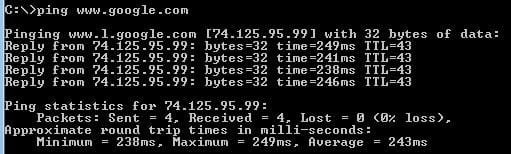
Note the google IP (ping google.com).
When things start to become messy, then ping your gateway, if ok, ping google IP, if ok, ping google url, if OK, telnet google.com 80 then type anything+enter, you would see a HTML bad request from google.
If all the step above are working then you do not have issues accessing internet, so it would be software that is crazy.
 

My Computer

Computer Manufacturer/Model Number
T60P
OS
7
CPU
C2DUO T2500
I'm not to sure how to ping something? is that in the cmd ? ping 192.1.... (gateway Ip)

which then gives u this info?

Ping statistics for 192.1....
Packets: Sent = 4, Received = 4, Lost = 0 (0% loss),
Approximate round trip times in milli-seconds:
Minimum = 0ms, Maximum = 0ms, Average = 0ms
 

My Computer

Computer Manufacturer/Model Number
Clone
OS
windows 7 Ultimate 32bit & 64bit
CPU
athlon 64 3500+ Venice
Motherboard
Asus A8R-MVP
Memory
2x1GB OCZ Gold dual-channel DDR @ 200MHZ 3-3-3-8
Graphics Card(s)
xfx 8600 gts
Monitor(s) Displays
3007fpw
Screen Resolution
2560x1600
Hard Drives
312.57GB Seagate ST3320620AS
244.20GB Western Digital WDC WD2500KS-00MJB0
488.39GB Western Digital WDC WD5000AAKS-00TMA0
PSU
Antec Truepower 2.0 380watts (came with case)
Case
Antec

My Computer

Computer Manufacturer/Model Number
Lenovo ThinkPad T60
OS
Windows 7 Ultimate 64Bit
CPU
GenuineIntel Intel(R) Core(TM) DuoCore T2400 @ 1.83GHz
Motherboard
Intel(R) 82801G (ICH7 Family)
Memory
2.00 GB
Graphics Card(s)
Mobile Intel(R) 945 Express Chipset
Sound Card
SoundMAX Integrated Digital HD Audio
Monitor(s) Displays
ThinkPad Display
Screen Resolution
1400x1050
Hard Drives
100Gb SATA
Keyboard
Standard Keyboard
Mouse
HID-compliant Mouse
Internet Speed
Cable Broadband - 54Mbps
Other Info
Intel(R) PRO/1000 PL Network Connection
11a/b/g Wireless LAN Mini PCI Express Adapter
if OK, telnet google.com 80 then type anything+enter, you would see a HTML bad request from google. ??? i dont get this part

ping telnet google.com 80 ..?
 

My Computer

Computer Manufacturer/Model Number
Clone
OS
windows 7 Ultimate 32bit & 64bit
CPU
athlon 64 3500+ Venice
Motherboard
Asus A8R-MVP
Memory
2x1GB OCZ Gold dual-channel DDR @ 200MHZ 3-3-3-8
Graphics Card(s)
xfx 8600 gts
Monitor(s) Displays
3007fpw
Screen Resolution
2560x1600
Hard Drives
312.57GB Seagate ST3320620AS
244.20GB Western Digital WDC WD2500KS-00MJB0
488.39GB Western Digital WDC WD5000AAKS-00TMA0
PSU
Antec Truepower 2.0 380watts (came with case)
Case
Antec
if OK, telnet google.com 80 then type anything+enter, you would see a HTML bad request from google. ??? i dont get this part

ping telnet google.com 80 ..?
here what you has to do under CMD:
Code:
ping google.com, and note the IP, here 209.85.229.147
C:\Users\bastien>ping google.com

Envoi d'une requête 'ping' sur google.com [209.85.229.147] avec 32 octets de don
nées :
Réponse de 209.85.229.147 : octets=32 temps=41 ms TTL=45

Statistiques Ping pour 209.85.229.147:
    Paquets : envoyés = 1, reçus = 1, perdus = 0 (perte 0%),
Durée approximative des boucles en millisecondes :
    Minimum = 41ms, Maximum = 41ms, Moyenne = 41ms
Ctrl+C
^C
when things become strange

Code:
Ping your gateway : The ip will change, you get it by typing ipconfig in cmd and notice the default gateway of your adapter
C:\Users\bastien>ping  10.24.160.254

Envoi d'une requête 'Ping'  10.24.160.254 avec 32 octets de données :
Réponse de 10.24.160.254 : octets=32 temps<1ms TTL=64

Statistiques Ping pour 10.24.160.254:
    Paquets : envoyés = 1, reçus = 1, perdus = 0 (perte 0%),
Durée approximative des boucles en millisecondes :
    Minimum = 0ms, Maximum = 0ms, Moyenne = 0ms
Ctrl+C
^C
ping google IP:
C:\Users\bastien>ping 209.85.229.147

Envoi d'une requête 'Ping'  209.85.229.147 avec 32 octets de données :
Réponse de 209.85.229.147 : octets=32 temps=96 ms TTL=45

Statistiques Ping pour 209.85.229.147:
    Paquets : envoyés = 1, reçus = 1, perdus = 0 (perte 0%),
Durée approximative des boucles en millisecondes :
    Minimum = 96ms, Maximum = 96ms, Moyenne = 96ms
Ctrl+C
^C
A successful ping give you a response time in millisecs.
If it work, try to test your dns:
Code:
C:\Users\bastien>nslookup google.com
Serveur :  XXXXXXXXX
Address:  XXXX

Réponse ne faisant pas autorité :
Nom :    google.com
Addresses:  209.85.227.106  !see here some google IP, not mandatory same as above
          209.85.227.147
          209.85.227.99
          209.85.227.103
          209.85.227.104
          209.85.227.105
then try to establish a connection to google:
Code:
 C:\Users\bastien>telnet [URL="http://www.google.com/"]www.google.com[/URL] 80
It shouldn't have any errors, and depending if you are behind a firewall, you may get strange characters appearing with a bad request message, but it can also be blank.
 

My Computer

Computer Manufacturer/Model Number
T60P
OS
7
CPU
C2DUO T2500
Howdy.

I'd like to suggest taking a look at your Network adapter. Start -> dev manager -> network adapter. Double click, open her up and then under "advanced", take a look at "Link Speed & Duplex".

If this is set to auto-negotiation, try re-setting it to 10 or 100mbps Full Duplex, re-start your computer and see if the problem persists.

For whatever reason, auto-negotiation features in some network cards poor.

Good luck!

eamon
 

My Computer

OS
Windows 7 Home Ultimate 64-Bit, Ubuntu 10.04 Lucid Lynx, Windows XP
CPU
Pentium i7 @fast
Memory
6GB DDR3 @fast
Graphics Card(s)
ATI Radeon HD 4600 Series (512mb) / ATI TV Wonder 650PCIe
Sound Card
Integrated
Monitor(s) Displays
32" VIZIO HDTV
Screen Resolution
1080p @super sharp
Hard Drives
Internal 500GB @7200rpm and not big enough cache
External 500GB @7200rpm and not big enough cache
Cooling
My apartment's AC / Chicago Winters
Keyboard
LG Bluetooth
Mouse
LG Bluetooth
Internet Speed
~21.50Mb/S Down, ~3.5Mb/S Up
Hey. Did you find out what i it was?

My computer is VERY slow on the internet sometimes, but my laptop is okay. WTF?

Im pretty good at computers and network, and i just cannot seem to find the problem.

The internet connection is VERY unstable. When i run speed test i get 0.5 mbit or 8 mbit. Depends on when i do the test. The upload is always good?

My laptop is showing about 4-5 mbit, and suddently in the last part of the test, it jumps up to 60 mbit or so! wuuut?

I only have 10/1

I have a linksys repeater thingy, then a linksys N wifi AP and then the ADSL router.
 

My Computer

OS
win 7 64 bit ultimate
Back
Top