Unusual behaviour on desktop with files and menus.

WatfordLad

New member
Local time
5:34 AM
Messages
9
Hi, I'm new here and I hope I have posted in the correct place.

I have a weird issue that came up yesterday. I have not installed anything new recently or changed any settings.

I went to rename a folder that I had just created on the desktop, I clicked on it, the text went blue as it would. Then I went to type the new folder name but but it acted as if someone pushed "Enter". It just went back to normal. Tried a few more times, always the same.
Also, if I open a folder to see the files, this is ok, but if I click on the top of the folder and drag across to the side of the screen, it starts moving but then jumps back to where it came from.
Menus can be an issue too. Tried to click Start/All Programs then go to click on Accessories it jumps out of the start menu as if I hadn't clicked it in the first place.

I have run AVG full system scan, nothing. Ran a couple of other virus tools, nothing.

I have run sfc /scannow from CMD box and it has come up with errors in the cbs.log. I opened this log but don't understand what I'm looking at as there is so much of it.
On the web where I found out about sfc /scannow, it said if it came up with errors, to then type (and run) icacls * /T /C /Q /RESET. After this, run sfc /scannow and see if it solved the errors. It didn't.
I'm not sure if the errors in the log will tell me what the issue is here or not.

I ran chkdsk but all seems ok there.

I not that techie but am open to ideas. I did build the PC about 3 years and run my own server for the house, but when it comes to things like this, i'm a bit lost.

Any help would be appreciated.

Andy
 

My Computer My Computer

At a glance

Windows 7, 64bit Proi7 3.2GHz6GBOnboard
Computer type
PC/Desktop
Computer Manufacturer/Model Number
Custom
OS
Windows 7, 64bit Pro
CPU
i7 3.2GHz
Motherboard
Gigabyte
Memory
6GB
Graphics Card(s)
Onboard
Hard Drives
Samsung SSD
Antivirus
AVG Free
Hmm, sfc error and the rest may be different problems.

For SFC corruption:
There is a known issue with a recent Windows Update (KB3022345), it causes an irrepairable corruption (Actually the files are not corrupt but reported to be so) . If you have this update installed then do one of the following:
- Uninstall this update (it is Windows 10 preparation update)
- Run the fix from The Tech Cookbook – Windows 7 update (KB3022345) causing corrupt files

Couple of things come to my mind:
- A double clicking mouse perhaps - do you have another one to try?
- Some program stealing focus - see if happens when - http://www.sevenforums.com/tutorial...ation-conflicts-performing-clean-startup.html

Also scan with Malwarebytes Anti-Malware free - https://www.malwarebytes.org/

- If the above won't work - try a System Restore to a date prior to the problem.

Hope this helps!
 

My Computer My Computer

At a glance

Windows 7 Ultimate x64 SP1AMD Phenom 2 1090T2x8GB Kingston HyperX Fury Black 1600Mhz Unga...MSI GTX 970 Gaming 4G
Computer type
PC/Desktop
Computer Manufacturer/Model Number
Custom Build
OS
Windows 7 Ultimate x64 SP1
CPU
AMD Phenom 2 1090T
Motherboard
Gigabyte GA-890FXA-UD5
Memory
2x8GB Kingston HyperX Fury Black 1600Mhz Unganged
Graphics Card(s)
MSI GTX 970 Gaming 4G
Sound Card
Realtek On-Board HD 7.1 Audio / Logitech G35
Monitor(s) Displays
3xAcer GD245HQ
Screen Resolution
1920x1080
Hard Drives
Samsung 850 Pro 512GB SSD - OS /
WD Caviar Black SATA 3 - 1 TBx2 - Dynamic RAID 0 /
WD Caviar Green SATA 2 - 640GBx2 - Dynamic RAID 0 /
WD Caviar Green SATA 2 - 640GB - Internal Backup /
Seagate Barracude SATA 3 - 3TB - External Backup/ Sync
PSU
HighPower 1000W
Case
Cooler Master HAF 932
Cooling
Noctua NH-D14
Keyboard
Logitech G19
Mouse
Logitech G500
Internet Speed
100/4 Mbit Cable (100GB quota)
Antivirus
ZoneAlarm Extreme Security / MBAM Pro / MBAE Free / SAS Free
Browser
IE 11 - Firefox - Chrome
Other Info
Logitech F710/ G27/ G940/ Z5500 // TrackIR 5 // Nvidia 3D Surround Vision
Hey GokAy,

Many thanks for the reply :-)

I tried Malware bytes first and while that was scanning I uninstalled the Windows Update you mentioned. I haven't run the fix yet as I have just booted my pc up. Malware didn't find anything.

As it happens, the issue has gone :-). I will run sfc again now (wouldn't let me after update removal as it knew i had to restart) and check the errors in the log (wish me luck). If they are the two mentioned on that page then it looks like I will be able to run that fix too.

As for the mouse, it's a good shout but the problems I'm having here are only on the things I mentioned. Everything else works perfectly with the mouse. The problems seem to be mainly when I'm on the desktop screen.

If this works, I'm going to seek you out and shake your hand sir. Either way, I really appreciate your help.

Best regards

Andy
 

My Computer My Computer

At a glance

Windows 7, 64bit Proi7 3.2GHz6GBOnboard
Computer type
PC/Desktop
Computer Manufacturer/Model Number
Custom
OS
Windows 7, 64bit Pro
CPU
i7 3.2GHz
Motherboard
Gigabyte
Memory
6GB
Graphics Card(s)
Onboard
Hard Drives
Samsung SSD
Antivirus
AVG Free
You don't need the fix if you uninstall the KB, that was an "either/or" kind of solution.

By the way, the new information is those 2 files are not actually corrupted but report to be so. Confirmed by Microsoft and hopefully will be fixed soon.
 

My Computer My Computer

At a glance

Windows 7 Ultimate x64 SP1AMD Phenom 2 1090T2x8GB Kingston HyperX Fury Black 1600Mhz Unga...MSI GTX 970 Gaming 4G
Computer type
PC/Desktop
Computer Manufacturer/Model Number
Custom Build
OS
Windows 7 Ultimate x64 SP1
CPU
AMD Phenom 2 1090T
Motherboard
Gigabyte GA-890FXA-UD5
Memory
2x8GB Kingston HyperX Fury Black 1600Mhz Unganged
Graphics Card(s)
MSI GTX 970 Gaming 4G
Sound Card
Realtek On-Board HD 7.1 Audio / Logitech G35
Monitor(s) Displays
3xAcer GD245HQ
Screen Resolution
1920x1080
Hard Drives
Samsung 850 Pro 512GB SSD - OS /
WD Caviar Black SATA 3 - 1 TBx2 - Dynamic RAID 0 /
WD Caviar Green SATA 2 - 640GBx2 - Dynamic RAID 0 /
WD Caviar Green SATA 2 - 640GB - Internal Backup /
Seagate Barracude SATA 3 - 3TB - External Backup/ Sync
PSU
HighPower 1000W
Case
Cooler Master HAF 932
Cooling
Noctua NH-D14
Keyboard
Logitech G19
Mouse
Logitech G500
Internet Speed
100/4 Mbit Cable (100GB quota)
Antivirus
ZoneAlarm Extreme Security / MBAM Pro / MBAE Free / SAS Free
Browser
IE 11 - Firefox - Chrome
Other Info
Logitech F710/ G27/ G940/ Z5500 // TrackIR 5 // Nvidia 3D Surround Vision
Ahhh right I see. Cheers.

Well, I ran sfc again and it didn't find anything. So it looks like this is case closed. Give yourself a pat on the back.

Thanks again.
 

My Computer My Computer

At a glance

Windows 7, 64bit Proi7 3.2GHz6GBOnboard
Computer type
PC/Desktop
Computer Manufacturer/Model Number
Custom
OS
Windows 7, 64bit Pro
CPU
i7 3.2GHz
Motherboard
Gigabyte
Memory
6GB
Graphics Card(s)
Onboard
Hard Drives
Samsung SSD
Antivirus
AVG Free
Ok, so this issue has come back again. Everything has been fine for the last few days since I uninstalled that update.
I have not installed anything since. But I just made a new text file on the desktop to leave a note for myself and I was unable to rename it. Here we go again I thought.
Something else I have noticed about any window that is open, (ie: the new text file), the top blue bar flashes very slightly sometimes. It's the renaming thing that is the most significant sign that something is wrong though.
I'm open to try something new if anybody has any ideas?
Thanks in advance.
Andy
 

My Computer My Computer

At a glance

Windows 7, 64bit Proi7 3.2GHz6GBOnboard
Computer type
PC/Desktop
Computer Manufacturer/Model Number
Custom
OS
Windows 7, 64bit Pro
CPU
i7 3.2GHz
Motherboard
Gigabyte
Memory
6GB
Graphics Card(s)
Onboard
Hard Drives
Samsung SSD
Antivirus
AVG Free

My Computer My Computer

At a glance

Windows 7 Ultimate x64 SP1AMD Phenom 2 1090T2x8GB Kingston HyperX Fury Black 1600Mhz Unga...MSI GTX 970 Gaming 4G
Computer type
PC/Desktop
Computer Manufacturer/Model Number
Custom Build
OS
Windows 7 Ultimate x64 SP1
CPU
AMD Phenom 2 1090T
Motherboard
Gigabyte GA-890FXA-UD5
Memory
2x8GB Kingston HyperX Fury Black 1600Mhz Unganged
Graphics Card(s)
MSI GTX 970 Gaming 4G
Sound Card
Realtek On-Board HD 7.1 Audio / Logitech G35
Monitor(s) Displays
3xAcer GD245HQ
Screen Resolution
1920x1080
Hard Drives
Samsung 850 Pro 512GB SSD - OS /
WD Caviar Black SATA 3 - 1 TBx2 - Dynamic RAID 0 /
WD Caviar Green SATA 2 - 640GBx2 - Dynamic RAID 0 /
WD Caviar Green SATA 2 - 640GB - Internal Backup /
Seagate Barracude SATA 3 - 3TB - External Backup/ Sync
PSU
HighPower 1000W
Case
Cooler Master HAF 932
Cooling
Noctua NH-D14
Keyboard
Logitech G19
Mouse
Logitech G500
Internet Speed
100/4 Mbit Cable (100GB quota)
Antivirus
ZoneAlarm Extreme Security / MBAM Pro / MBAE Free / SAS Free
Browser
IE 11 - Firefox - Chrome
Other Info
Logitech F710/ G27/ G940/ Z5500 // TrackIR 5 // Nvidia 3D Surround Vision
Yep, tried it, rebooted and problem still there. This is really odd.
 

My Computer My Computer

At a glance

Windows 7, 64bit Proi7 3.2GHz6GBOnboard
Computer type
PC/Desktop
Computer Manufacturer/Model Number
Custom
OS
Windows 7, 64bit Pro
CPU
i7 3.2GHz
Motherboard
Gigabyte
Memory
6GB
Graphics Card(s)
Onboard
Hard Drives
Samsung SSD
Antivirus
AVG Free
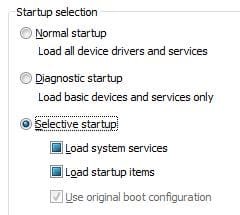
Ok, even more odd, I don't think it is allowing me to change the startup sequence. When I uncheck the boxes, they stay blue? If I click on Diagnostic startup, it lets me do it, but when i click "Apply" it goes back to "Selective" startup.
 

Attachments

  • Capture1.JPG
    Capture1.JPG
    15.4 KB · Views: 7

My Computer My Computer

At a glance

Windows 7, 64bit Proi7 3.2GHz6GBOnboard
Computer type
PC/Desktop
Computer Manufacturer/Model Number
Custom
OS
Windows 7, 64bit Pro
CPU
i7 3.2GHz
Motherboard
Gigabyte
Memory
6GB
Graphics Card(s)
Onboard
Hard Drives
Samsung SSD
Antivirus
AVG Free
Ok, so, after some playing around with this, I am unable to boot in safe mode (F8 on boot up etc) it just gives me a small white cursor in the top left corner of a black screen every time.
So, I booted up normally to find I had no internet, an odd looking start bar (grey not blue) and the mysterious issue had gone. Next I have started ticking boxes in the "services" menu in Msconfig, and my internet is back, start bar is now blue and issue is back.
I need to play more with this, I'll be back......
 

My Computer My Computer

At a glance

Windows 7, 64bit Proi7 3.2GHz6GBOnboard
Computer type
PC/Desktop
Computer Manufacturer/Model Number
Custom
OS
Windows 7, 64bit Pro
CPU
i7 3.2GHz
Motherboard
Gigabyte
Memory
6GB
Graphics Card(s)
Onboard
Hard Drives
Samsung SSD
Antivirus
AVG Free
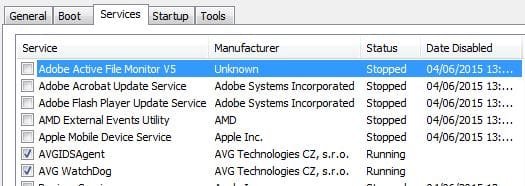
I am unable to uncheck these two items, could this be the issue?
I can uncheck them, but when I click "Apply" the check mark comes back.
 

Attachments

  • Capture1.JPG
    Capture1.JPG
    32 KB · Views: 2

My Computer My Computer

At a glance

Windows 7, 64bit Proi7 3.2GHz6GBOnboard
Computer type
PC/Desktop
Computer Manufacturer/Model Number
Custom
OS
Windows 7, 64bit Pro
CPU
i7 3.2GHz
Motherboard
Gigabyte
Memory
6GB
Graphics Card(s)
Onboard
Hard Drives
Samsung SSD
Antivirus
AVG Free
I am unable to uncheck these two items, as when I click apply, they recheck themselves.
I do run AVG, maybe it has to be disabled first?
If so, then it can't be these files causing the issue right?
I have never had a problem with AVG in the past.
 

My Computer My Computer

At a glance

Windows 7, 64bit Proi7 3.2GHz6GBOnboard
Computer type
PC/Desktop
Computer Manufacturer/Model Number
Custom
OS
Windows 7, 64bit Pro
CPU
i7 3.2GHz
Motherboard
Gigabyte
Memory
6GB
Graphics Card(s)
Onboard
Hard Drives
Samsung SSD
Antivirus
AVG Free
AVG are your antivirus services, they should be checked.
When you say the issue wasn't there, and you started checking services did you just do them in 1 go?

Disable them once again and ..
Try enabling them 1 by 1, restart after each and see if you can find the culprit.
 

My Computer My Computer

At a glance

Windows 7 Ultimate x64 SP1AMD Phenom 2 1090T2x8GB Kingston HyperX Fury Black 1600Mhz Unga...MSI GTX 970 Gaming 4G
Computer type
PC/Desktop
Computer Manufacturer/Model Number
Custom Build
OS
Windows 7 Ultimate x64 SP1
CPU
AMD Phenom 2 1090T
Motherboard
Gigabyte GA-890FXA-UD5
Memory
2x8GB Kingston HyperX Fury Black 1600Mhz Unganged
Graphics Card(s)
MSI GTX 970 Gaming 4G
Sound Card
Realtek On-Board HD 7.1 Audio / Logitech G35
Monitor(s) Displays
3xAcer GD245HQ
Screen Resolution
1920x1080
Hard Drives
Samsung 850 Pro 512GB SSD - OS /
WD Caviar Black SATA 3 - 1 TBx2 - Dynamic RAID 0 /
WD Caviar Green SATA 2 - 640GBx2 - Dynamic RAID 0 /
WD Caviar Green SATA 2 - 640GB - Internal Backup /
Seagate Barracude SATA 3 - 3TB - External Backup/ Sync
PSU
HighPower 1000W
Case
Cooler Master HAF 932
Cooling
Noctua NH-D14
Keyboard
Logitech G19
Mouse
Logitech G500
Internet Speed
100/4 Mbit Cable (100GB quota)
Antivirus
ZoneAlarm Extreme Security / MBAM Pro / MBAE Free / SAS Free
Browser
IE 11 - Firefox - Chrome
Other Info
Logitech F710/ G27/ G940/ Z5500 // TrackIR 5 // Nvidia 3D Surround Vision
Back
Top