Unusual Problem With A Dell XPS 13 Laptop

sloooo44

New member
Local time
7:02 AM
Messages
5
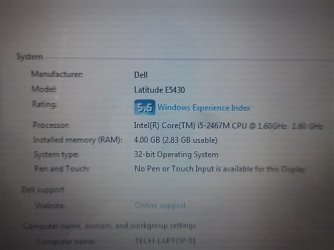
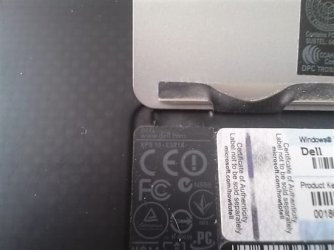
Don't know where to post this because it's something you don't see everyday, so I thought I would put it here. I bought a used Dell XPS 13-L321X laptop and I have been using it for a few months without any issue except that the right USB port didn't work. I started looking at drivers and everything and decided to download the latest USB drivers from Dell. When I tried, it said that my operating system is not supported. After looking around, I found out when you go to system, my computer is listed as a Dell Latitude E5430. That model came with Windows 32 bit where my Dell XPS has only come out in 64 bit. When I run my system through the Dell website, you can see that my computer shows up as a Dell XPS 13-L321X. Question is, how the heck do I get this thing back to 64 bit and have the system recognize it as an XPS and not a E5430? Pictures are below to show you what I mean.
 

Attachments
  • 2514_CAM00307_jpg-550x0.jpg
    2514_CAM00307_jpg-550x0.jpg
    22 KB · Views: 13
  • 4670_CAM00308_jpg-550x0.jpg
    4670_CAM00308_jpg-550x0.jpg
    15.9 KB · Views: 13
  • 7384_CAM00314_jpg-550x0.jpg
    7384_CAM00314_jpg-550x0.jpg
    14.2 KB · Views: 13

My Computer My Computer

At a glance

Windows 7 Home Premium 32 BitIntel Core 2 Duo E6550 2.33 Ghz3 GBNvidia GeForce 86 GT DDR3 256 Mb.
Computer Manufacturer/Model Number
Velocity Micro
OS
Windows 7 Home Premium 32 Bit
CPU
Intel Core 2 Duo E6550 2.33 Ghz
Motherboard
Azus P5N-E SLI
Memory
3 GB
Graphics Card(s)
Nvidia GeForce 86 GT DDR3 256 Mb.
Sound Card
Turtle Beach Montego DDL Wave
Hard Drives
Seagate Barracuda 300 GB SATA - Main
Seagate Barracuda 400 GB SATA - Music and Movies
Case
Generic
Cooling
Standard Fans

My Computer My Computer

At a glance

Vista, Windows7, Mint Mate, Zorin, Windows 8from 1.6GHz Duo to i7
Computer Manufacturer/Model Number
HP, Dell, Gateway, Toshiba - 4 laptops and 2 desktops
OS
Vista, Windows7, Mint Mate, Zorin, Windows 8
CPU
from 1.6GHz Duo to i7
Monitor(s) Displays
2x HP w2207
Hard Drives
5x HDD, 7x SSD, 12x Externals
Keyboard
with trackball - no mices
Mouse
Trackball mice
Internet Speed
DSL 6000
The system clearly states it's a Dell Latitude computer too, but it's not. That's my point.
 

My Computer My Computer

At a glance

Windows 7 Home Premium 32 BitIntel Core 2 Duo E6550 2.33 Ghz3 GBNvidia GeForce 86 GT DDR3 256 Mb.
Computer Manufacturer/Model Number
Velocity Micro
OS
Windows 7 Home Premium 32 Bit
CPU
Intel Core 2 Duo E6550 2.33 Ghz
Motherboard
Azus P5N-E SLI
Memory
3 GB
Graphics Card(s)
Nvidia GeForce 86 GT DDR3 256 Mb.
Sound Card
Turtle Beach Montego DDL Wave
Hard Drives
Seagate Barracuda 300 GB SATA - Main
Seagate Barracuda 400 GB SATA - Music and Movies
Case
Generic
Cooling
Standard Fans
What did the Belarc Advisor say.
 

My Computer My Computer

At a glance

Vista, Windows7, Mint Mate, Zorin, Windows 8from 1.6GHz Duo to i7
Computer Manufacturer/Model Number
HP, Dell, Gateway, Toshiba - 4 laptops and 2 desktops
OS
Vista, Windows7, Mint Mate, Zorin, Windows 8
CPU
from 1.6GHz Duo to i7
Monitor(s) Displays
2x HP w2207
Hard Drives
5x HDD, 7x SSD, 12x Externals
Keyboard
with trackball - no mices
Mouse
Trackball mice
Internet Speed
DSL 6000
The XPS 13 only came out in 64 bit, that's what has me scratching my head. As you can see, it's 64 bit ready but has 32 bit installed.


Operating System System ModelWindows 7 Professional Service Pack 1 (build 7601)
Install Language: English (United States)
System Locale: English (United States)
Installed: 9/7/2012 4:41:14 PM
Boot Mode: BIOS (Secure Boot not supported)
Dell Inc. Dell System XPS L321X
System Service Tag: GMBHVW1 (support for this PC)
Chassis Serial Number: GMBHVW1
Enclosure Type: Portable
Processor a Main Circuit Board b1.60 gigahertz Intel Core i5-2467M
64 kilobyte primary memory cache
256 kilobyte secondary memory cache
3072 kilobyte tertiary memory cache
64-bit ready
Multi-core (2 total)
Hyper-threaded (4 total)
Board: Dell Inc. 085X6F A00
Serial Number: .GMBHVW1.CN4864333E0040.
Bus Clock: 100 megahertz
BIOS: Dell Inc. A08 01/22/2013
Drives Memory Modules c,d127.20 Gigabytes Usable Hard Drive Capacity
48.96 Gigabytes Hard Drive Free Space

SAMSUNG SSD PM830 mSATA 128GB [Hard drive] (128.04 GB) -- drive 0, s/n S0XNNSAD202037, rev CXM13D1Q, SMART Status: Healthy
2898 Megabytes Usable Installed Memory

Slot 'ChannelA-DIMM0' has 2048 MB
Slot 'ChannelB-DIMM0' has 2048 MB
Local Drive Volumes c: (NTFS on drive 0)127.20 GB48.96 GB free Network Drives None discoveredUsers (mouse over user name for details) Printerslocal user accountslast logon
trans.gif
CFO2/10/2015 9:32:18 AM(admin)
trans.gif
Owner2/10/2015 9:32:19 AM(admin)local system accounts
no.gif
Guest 21/22/2015 8:57:41 PM
no.gif
Marks a disabled account;
lock.gif
Marks a locked account
HP Designjet T2300ps PS3on \\GLEN-FILE.AcuityLightingGroup.com\HP Designjet T2300ps PS3KODAK ESP Office 2150 Series XPSon EK948CB215Microsoft Shared Fax Driveron SHRFAX:Microsoft XPS Document Writeron XPSPort:Send To Microsoft OneNote 2010 Driveron nul:SHARP MX-3610N PCL6on \\GLEN-FILE.AcuityLightingGroup.com\TECH-SHARP MX-3610N (Graphics)Controllers DisplayIntel(R) Mobile Express Chipset SATA AHCI Controller Intel(R) HD Graphics 3000 [Display adapter]
LANDesk Remote Control Mirror Driver [Display adapter]
Generic PnP Monitor (13.0"vis, November 2011)
Bus Adapters MultimediaStandard Enhanced PCI to USB Host Controller (2x) High Definition Audio Device
Intel(R) Display Audio
Virus Protection [Back to Top] Group PoliciesOfficeScan Corporate Edition Version 10.0 Virus Definitions Version 1/31/2015 Rev 1.000.00 (000) Realtime File Scanning OffKaspersky Total Security None discoveredCommunications Other Devices↓ Bluetooth Device (Personal Area Network) #3Status: Cable unpluggedDhcp Server: none responded Physical Address: 00:DB:DF:2C:1D:6ABluetooth Device (RFCOMM Protocol TDI) #3Cisco Systems VPN Adapter↑ Intel(R) Centrino(R) Advanced-N 6230 primary Auto IP Address: 192.168.0.2 / 24Gateway: 192.168.0.1Dhcp Server: 192.168.0.1Physical Address: 00:DB:DF:2C:1D:66Connection Speed: 270 Mbps↓ Juniper Network Connect Virtual AdapterStatus: Cable unpluggedDhcp Server: none responded Physical Address: 00:FF:98:AC:13:8BConnection Speed: 1 Gbps↓ Microsoft Virtual WiFi Miniport AdapterStatus: Not connected to a networkDhcp Server: none responded Physical Address: 00:DB:DF:2C:1D:67Connection Speed: 300 Mbps↓ Microsoft Virtual WiFi Miniport Adapter #2Status: Not connected to a networkDhcp Server: none responded Physical Address: 00:DB:DF:2C:1D:67Connection Speed: 300 Mbps Networking Dns Servers: 209.18.47.61
209.18.47.62
Intel® Centrino® Wireless Bluetooth® + High Speed Virtual Adapter
Microsoft AC Adapter
Microsoft ACPI-Compliant Control Method Battery
Microsoft Composite Battery
Generic Bluetooth Adapter
Microsoft Bluetooth Enumerator
Cypress Input Device
HID-compliant consumer control device
HID-compliant device (5x)
USB Input Device (2x)
USB Input Device (Logitech Download Assistant)
Integrated Webcam
KODAK ESP Office 2150 Series Scanner WIFI
WinDriver
HID Keyboard Device (2x)
Integrated PS/2 Keyboard
Bluetooth Peripheral Device (3x)
Universal Serial Bus (USB) Controller
HID-compliant mouse (2x)
PS/2 Compatible Mouse
Light Sensor
Generic USB Hub (2x)
USB Composite Device (2x)
USB Root Hub (2x)
Generic volume shadow copy
 

My Computer My Computer

At a glance

Windows 7 Home Premium 32 BitIntel Core 2 Duo E6550 2.33 Ghz3 GBNvidia GeForce 86 GT DDR3 256 Mb.
Computer Manufacturer/Model Number
Velocity Micro
OS
Windows 7 Home Premium 32 Bit
CPU
Intel Core 2 Duo E6550 2.33 Ghz
Motherboard
Azus P5N-E SLI
Memory
3 GB
Graphics Card(s)
Nvidia GeForce 86 GT DDR3 256 Mb.
Sound Card
Turtle Beach Montego DDL Wave
Hard Drives
Seagate Barracuda 300 GB SATA - Main
Seagate Barracuda 400 GB SATA - Music and Movies
Case
Generic
Cooling
Standard Fans
Since it shows you're using only 3 of the 4gb RAM with 32 bit I'd do a Clean Reinstall Windows 7
with 64 bit media.

If the downloads are still not working in tutorial you can order a Reinstallation DVD from Dell.

Then follow the steps in tutorial to get and keep a perfect install.
 
Back
Top