Unusual Wireless Problems

StupidUser

New member
Member
VIP
Local time
4:22 AM
Messages
109
Sorry for the vague title, but I am networking challenged and strange things that I can't explain are happening. Now I will try to explain them:

Edit: I think I should have been clearer: The primary problem is I am not getting an wireless access and need to reestablish it.

I have my cable modem connected to a Netgear router with wireless capability. Currently, my PC is plugged into one of the router's ports (which is how you're reading this). I use a Lenovo program called Access Connections (AC) to manage my wireless connections because I'm confused by Windows' tools and AC usually switches me automatically between networks (note use of the word "usually").

In Access Connections, I connect to the network "Home" when I am using the cable (like now) and the network "JeffNet" to use the wireless network. Currently, "JeffNet" does not appear when I click "Find" to find the wireless signals near me. If I try to connect to "JeffNet", AC tells me "Connection Failed". I click on "Help me solve this" and am told "DHCP server not responding." BTW, I am sitting next to the wireless router (and yes, it is plugged in! :D ). I have already tried resetting the cable modem, router, and laptop.

But this gets stranger. In the Start tray (the thing on the right of the start menu), is an icon with a yellow exclamation mark. If I hover over it, the icon says "NETGEAR 2, Internet access, Identifiying". If I click that icon, a popup shows that I am connected to "JeffNet" and it shows a yellow exclamation next to "SETUP". I click "Open Network and Sharing Center" and, among other things, there is a twirling circle and teh word "Identifying".

This problem started before I made any changes. But note that I tried some configuration changes to fix it (like somewhere I merged two networks called "NETGEAR" and "NETGEAR 2" into one network called "NETGEAR 2".

One more symptom: sometimes when I am connected wirelessly and I plug in the ethernet cable and try to switch to connection "Home", AC reports that "Ethernet cable not plugged in".

Anyone have any clue what could be wrong or how I can fix it? Why does Access Connections not show JeffNet while Network and Sharing icon says I'm connected to it?

Thanks for your help, sorry for such a long post, and please speak slowly. :D
-SU
 

My Computer

Computer type
PC/Desktop
Computer Manufacturer/Model Number
Lenovo/2757CTO Thinkpad W700
OS
Microsoft Windows 7 Professional 64-bit 7601 Multiprocessor Free Service Pack 1
CPU
AMD A6-5350M APU with Radeon(tm) HD Graphics
Motherboard
LENOVO 20B20011US
Memory
16.00 GB
Graphics Card(s)
AMD Radeon HD 8450G
Sound Card
(1) AMD High Definition Audio Device (2) Conexant 20671 Sm
Monitor(s) Displays
??
Screen Resolution
1366 x 768 x 32 bits (4294967296 colors) @ 60 Hz
Hard Drives
HGST HTS 545032A7E380 SATA Disk Device
Mouse
Microsoft Optical Wheel Mouse
Other Info
BIOS: Ver 1.00PARTTBLX

My Computer

Computer type
PC/Desktop
Computer Manufacturer/Model Number
Custom Asus Build
OS
Microsoft Windows 8.1 Pro 64-bit
CPU
Intel(R) Core(TM) i3-4130 CPU @ 3.40GHz
Motherboard
B85M-E
Memory
8.00 GB
Graphics Card(s)
None
Sound Card
Realtek High Definition Audio
Monitor(s) Displays
Asus 23.6" Monitor
Screen Resolution
1920 x 1080 x 32 bits (4294967296 colors) @ 60 Hz
Hard Drives
INTEL SSDSC2BW180A4
Samsung SSD 840 PRO Series
PSU
Seasonic S12II-380Bronze
Case
Lian Li
Cooling
Fan, Passive
Keyboard
Logitech K120
Mouse
Microsoft Touch Mouse
Internet Speed
4ms Ping, 19.0 Mbps Download, 19.0 Mbps Upload
Antivirus
Eset Endpoint
Browser
Internet Explorer, Chrome
I restarted everything again and it's working better now (I didn't replace the adapter's driver yet, but I will). I'm getting another hard to explain situation.

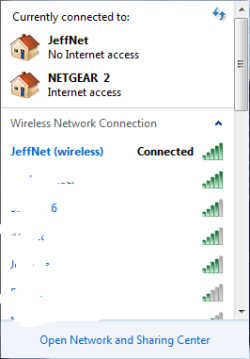
The network and sharing center icon in the system tray popup shows the following (I whited out my neighbor's wireless names for their privacy):
Capture.PNG
Note how it says "JeffNet (wireless) Connected", but above that it has the picture of the house and says "JeffNet No Internet Access". Don't those two pieces of info seem contradictory? Why does it say that?

Could I really get two networks going (the wireless one and the ethernet cable one)? If so, can I get twice the throughput then?

Thanks.
 

My Computer

Computer type
PC/Desktop
Computer Manufacturer/Model Number
Lenovo/2757CTO Thinkpad W700
OS
Microsoft Windows 7 Professional 64-bit 7601 Multiprocessor Free Service Pack 1
CPU
AMD A6-5350M APU with Radeon(tm) HD Graphics
Motherboard
LENOVO 20B20011US
Memory
16.00 GB
Graphics Card(s)
AMD Radeon HD 8450G
Sound Card
(1) AMD High Definition Audio Device (2) Conexant 20671 Sm
Monitor(s) Displays
??
Screen Resolution
1366 x 768 x 32 bits (4294967296 colors) @ 60 Hz
Hard Drives
HGST HTS 545032A7E380 SATA Disk Device
Mouse
Microsoft Optical Wheel Mouse
Other Info
BIOS: Ver 1.00PARTTBLX
User,

netgear 2 a wireless network profile that you connected to at another location, or is it just another network being broadcasted?

This is why I asked if you would uninstall/reinstall the driver, because this often removes the profiles and allows you to create them new. If there are any pop-ups, etc. that ask if you would like to replace anything, say "yes". You might also consider removing it via free revo uninstaller just so it gets rid of it all, but I don't think that is completely necessary.

No, you can't use both wireless and ethernet at the same time. Windows automatically chooses wireless over ethernet if available, but will only use one or the other.

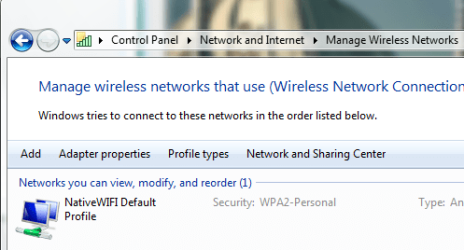
When you go to this location, do you only see 1 profile?:
Capture.PNG
 

My Computer

Computer type
PC/Desktop
Computer Manufacturer/Model Number
Custom Asus Build
OS
Microsoft Windows 8.1 Pro 64-bit
CPU
Intel(R) Core(TM) i3-4130 CPU @ 3.40GHz
Motherboard
B85M-E
Memory
8.00 GB
Graphics Card(s)
None
Sound Card
Realtek High Definition Audio
Monitor(s) Displays
Asus 23.6" Monitor
Screen Resolution
1920 x 1080 x 32 bits (4294967296 colors) @ 60 Hz
Hard Drives
INTEL SSDSC2BW180A4
Samsung SSD 840 PRO Series
PSU
Seasonic S12II-380Bronze
Case
Lian Li
Cooling
Fan, Passive
Keyboard
Logitech K120
Mouse
Microsoft Touch Mouse
Internet Speed
4ms Ping, 19.0 Mbps Download, 19.0 Mbps Upload
Antivirus
Eset Endpoint
Browser
Internet Explorer, Chrome
User,

netgear 2 a wireless network profile that you connected to at another location, or is it just another network being broadcasted?

To find the networks being broadcasted, I use a program called Access Connections (from Lenovo) and click "Find". It does not show "NETGEAR 2". Therefore, it must be something I connected to at another location (if those are the only two choices). I don't know where it's from.

...When you go to this location, do you only see 1 profile?:
View attachment 191014

Not quite sure about this question. In Lenovo's Access Connections, I can choose Locations and click "Connect". There is no Location called "NETGEAR 2". I'm not sure what you mean about a profile (sorry for being so obtuse - but thanks, again, for helping).
 

My Computer

Computer type
PC/Desktop
Computer Manufacturer/Model Number
Lenovo/2757CTO Thinkpad W700
OS
Microsoft Windows 7 Professional 64-bit 7601 Multiprocessor Free Service Pack 1
CPU
AMD A6-5350M APU with Radeon(tm) HD Graphics
Motherboard
LENOVO 20B20011US
Memory
16.00 GB
Graphics Card(s)
AMD Radeon HD 8450G
Sound Card
(1) AMD High Definition Audio Device (2) Conexant 20671 Sm
Monitor(s) Displays
??
Screen Resolution
1366 x 768 x 32 bits (4294967296 colors) @ 60 Hz
Hard Drives
HGST HTS 545032A7E380 SATA Disk Device
Mouse
Microsoft Optical Wheel Mouse
Other Info
BIOS: Ver 1.00PARTTBLX
While I would only recommend using your wireless adapter's connection (wouldn't it know best?), if you want to use Lenovo, you shouldn't have any windows network profiles.

How to do this, is you would navigate in Windows (not in Lenovo) by typing into Windows Start Search: "Network and Sharing", and clicking the icon at the very top. Then click "Manage wireless networks" on the far left hand side of the control panel window that pops up. If there is anything listed, right click the "Profile" and click "remove network".

There is no way for me to know if Lenovo is causing the problem or not. I wouldn't understand why you use it as windows has made connecting wirelessly extremely easy, but it is your personal choice.
 

My Computer

Computer type
PC/Desktop
Computer Manufacturer/Model Number
Custom Asus Build
OS
Microsoft Windows 8.1 Pro 64-bit
CPU
Intel(R) Core(TM) i3-4130 CPU @ 3.40GHz
Motherboard
B85M-E
Memory
8.00 GB
Graphics Card(s)
None
Sound Card
Realtek High Definition Audio
Monitor(s) Displays
Asus 23.6" Monitor
Screen Resolution
1920 x 1080 x 32 bits (4294967296 colors) @ 60 Hz
Hard Drives
INTEL SSDSC2BW180A4
Samsung SSD 840 PRO Series
PSU
Seasonic S12II-380Bronze
Case
Lian Li
Cooling
Fan, Passive
Keyboard
Logitech K120
Mouse
Microsoft Touch Mouse
Internet Speed
4ms Ping, 19.0 Mbps Download, 19.0 Mbps Upload
Antivirus
Eset Endpoint
Browser
Internet Explorer, Chrome
While I would only recommend using your wireless adapter's connection (wouldn't it know best?), if you want to use Lenovo, you shouldn't have any windows network profiles.

How to do this, is you would navigate in Windows (not in Lenovo) by typing into Windows Start Search: "Network and Sharing", and clicking the icon at the very top. Then click "Manage wireless networks" on the far left hand side of the control panel window that pops up. If there is anything listed, right click the "Profile" and click "remove network".

There is no way for me to know if Lenovo is causing the problem or not. I wouldn't understand why you use it as windows has made connecting wirelessly extremely easy, but it is your personal choice.

I think the Lenovo apps are just interfaces to the Windows tools. The Windows Network Profiles that you recommend I remove are the ones that the Lenovo applications switch between (I think, anyway - I really have no idea what's going on).
 

My Computer

Computer type
PC/Desktop
Computer Manufacturer/Model Number
Lenovo/2757CTO Thinkpad W700
OS
Microsoft Windows 7 Professional 64-bit 7601 Multiprocessor Free Service Pack 1
CPU
AMD A6-5350M APU with Radeon(tm) HD Graphics
Motherboard
LENOVO 20B20011US
Memory
16.00 GB
Graphics Card(s)
AMD Radeon HD 8450G
Sound Card
(1) AMD High Definition Audio Device (2) Conexant 20671 Sm
Monitor(s) Displays
??
Screen Resolution
1366 x 768 x 32 bits (4294967296 colors) @ 60 Hz
Hard Drives
HGST HTS 545032A7E380 SATA Disk Device
Mouse
Microsoft Optical Wheel Mouse
Other Info
BIOS: Ver 1.00PARTTBLX
From what I've read, Lenovo is its own thing and if you use it, windows profiles cause it problems. If you do need them, you should be able just to create them again (easy using windows, i don' know how easy it is in lenovo). You might read up on it, or just abandon it, unless it has some special tool about it that I don't know about.
 

My Computer

Computer type
PC/Desktop
Computer Manufacturer/Model Number
Custom Asus Build
OS
Microsoft Windows 8.1 Pro 64-bit
CPU
Intel(R) Core(TM) i3-4130 CPU @ 3.40GHz
Motherboard
B85M-E
Memory
8.00 GB
Graphics Card(s)
None
Sound Card
Realtek High Definition Audio
Monitor(s) Displays
Asus 23.6" Monitor
Screen Resolution
1920 x 1080 x 32 bits (4294967296 colors) @ 60 Hz
Hard Drives
INTEL SSDSC2BW180A4
Samsung SSD 840 PRO Series
PSU
Seasonic S12II-380Bronze
Case
Lian Li
Cooling
Fan, Passive
Keyboard
Logitech K120
Mouse
Microsoft Touch Mouse
Internet Speed
4ms Ping, 19.0 Mbps Download, 19.0 Mbps Upload
Antivirus
Eset Endpoint
Browser
Internet Explorer, Chrome
Back
Top