up to 1000 csrss.exe process', under different session ID's, spanwing

irishdrunk

New member
Local time
7:54 PM
Messages
12
This started happening recently, although I cannot pinpoint an action that could have caused it.

I was messing around with

GPRESULT and GPUPDATE, and added a custom event with EVENTCREATE in cmd around the time it started doing a project for class.

I have scanned with Avira and Malwarebytes and its all clean. The separate csrss.exe process's each start up under their own Session ID (and are the only process' belonging to that session ID) They have gotten as high as 1000.

Does anyone know what is going on and how I can fix this?? I don't have any restore points available to use, and my one and only recent complete backup was a few days after this started...

If I had to try and narrow it down to something, it would be maybe running GPUPDATE from the CLI...that's the closest thing timeframe-wise to when it started
 

My Computer My Computer

OS
Windows 7 Professional 64-bit
CPU
AMD 1090T 6-core 3.4ghz, OC to 4.1ghz
Motherboard
Asus Sabretooth 990FX
Memory
G.Skill Ripjaw 8GB DD3 1600
Graphics Card(s)
AMD HD 6950 2GB
Monitor(s) Displays
2x ASUS 23" LED LCD
Screen Resolution
1920x1080 x2
Hard Drives
2x SATA III Crucial M4 64GB SSD's in Raid0 as System Volue
1x Hitachi Deskstar 1.5TB 7200 RPM SATAIII HDD
PSU
CoolerMaster SilentPro 1000W
Case
Coolermaster 690 Nvidia Edition Mid tower
Cooling
CoolerMaster Hyper 212, with push pull fans
Keyboard
Logitech Illuminated keyboard
Mouse
Razer Mamba (omgomgomgomgomg)
Internet Speed
Cableone 50Mbps
download SystemLook from one of the links below and save it to your Desktop.
Download Mirror #1

Download Mirror #2

•Copy the content of the following box into the main textfield:

Code:
::filefind
csrss.exe

Right click on SystemLook.exe, click Run As Administrator
  • Click the Look button to start the scan.
  • When finished, a notepad window will open with the results of the scan
The log can also be found on your Desktop entitled SystemLook.txt
 

My Computer My Computer

Computer type
PC/Desktop
Computer Manufacturer/Model Number
Bruce ... somewhere in his 40's
OS
Windows 7 Ultimate 32bit SP1
CPU
Intel(R) Core(TM)2 Quad CPU @ 2.40GHz, 2400 MHz
Motherboard
INTEL/D975XBX2
Memory
4 GB
Graphics Card(s)
ATI Radeon HD 2600 Pro
Monitor(s) Displays
Samsung SyncMaster 914v
Screen Resolution
1280 x 1024
Hard Drives
2/500GB each ... ST3500630AS ATA Device.
One is not connected
PSU
Rocketfish 700 W
Case
G.Skill Gigabyte Chassis
Keyboard
Standard PS/2 Keyboard
Mouse
Microsoft PS/2 Mouse
Internet Speed
DSL
Antivirus
Avira Internet Security
Browser
IE 11
Other Info
ATI HDMI Audio
download SystemLook from one of the links below and save it to your Desktop.
Download Mirror #1

Download Mirror #2

•Copy the content of the following box into the main textfield:

Code:
::filefind
csrss.exe

Right click on SystemLook.exe, click Run As Administrator
  • Click the Look button to start the scan.
  • When finished, a notepad window will open with the results of the scan
The log can also be found on your Desktop entitled SystemLook.txt


Ran it, nothing, "No Context"
All instances of csrss.exe are always legit in System32, its the spanwing of separate Session ID's that is puzzling me...


System File Checker came back fine as well...

I already stated before I had no usable Restore Points available from before this started.
Thanks for the help so far guys, keep it coming
 

My Computer My Computer

OS
Windows 7 Professional 64-bit
CPU
AMD 1090T 6-core 3.4ghz, OC to 4.1ghz
Motherboard
Asus Sabretooth 990FX
Memory
G.Skill Ripjaw 8GB DD3 1600
Graphics Card(s)
AMD HD 6950 2GB
Monitor(s) Displays
2x ASUS 23" LED LCD
Screen Resolution
1920x1080 x2
Hard Drives
2x SATA III Crucial M4 64GB SSD's in Raid0 as System Volue
1x Hitachi Deskstar 1.5TB 7200 RPM SATAIII HDD
PSU
CoolerMaster SilentPro 1000W
Case
Coolermaster 690 Nvidia Edition Mid tower
Cooling
CoolerMaster Hyper 212, with push pull fans
Keyboard
Logitech Illuminated keyboard
Mouse
Razer Mamba (omgomgomgomgomg)
Internet Speed
Cableone 50Mbps
Only if you disabled system restore do you not have system restore points.
Win 7 creates system restore points without you even asking.

RESTORE TO A PREVIOUS SYSTEM RESTORE POINT
1) WIN | type SYSTEM RESTORE | ENTER | NEXT
|Choose a different restore point radio button
| NEXT


2) Show more restore points checkbox (lower left)


3) Highlight the desired restore point


4) Scan for affected programs (lower right)make a note of affected programs
5) CLOSE | NEXT | FINISH


WIN = key with the wavy Microsoft flag on top.
 

My Computer My Computer

Computer Manufacturer/Model Number
Toshiba Satellite S875D-S7239 laptop
OS
MS Windows 7 Ultimate SP1 64-bit
CPU
AMD A10-4600M
Motherboard
AMD Pumori (Socket FT1)
Memory
6.00 GB Dual-Channel DDR3 @ 798MHz (11-11-12-28)
Graphics Card(s)
AMD Radeon HD 7660G
Sound Card
High Definition Audio Device
Monitor(s) Displays
Generic PnP Monitor (1600x900@60Hz)
Screen Resolution
1600x900@60Hz
Hard Drives
SSD 119GB Corsair CSSD-V128GB2 ATA Device
Keyboard
Standard PS/2 Keyboard
Mouse
HP Wireless Optical Mobile Mouse Model FHA-3410
Internet Speed
What the local pub, local coffee shop offers.
Other Info
Optical Drive:MATSHITA BD-CMB UJ160B ATA Device


Also have an Asus ha1002xp netbook with Win 7 Ultimate installed.
Only if you disabled system restore do you not have system restore points.
Win 7 creates system restore points without you even asking.

RESTORE TO A PREVIOUS SYSTEM RESTORE POINT
1) WIN | type SYSTEM RESTORE | ENTER | NEXT
|Choose a different restore point radio button
| NEXT


2) Show more restore points checkbox (lower left)


3) Highlight the desired restore point


4) Scan for affected programs (lower right)make a note of affected programs
5) CLOSE | NEXT | FINISH


WIN = key with the wavy Microsoft flag on top.

Maybe I should have listed my technical skill level in my original post. I am A+, N+, CCNA certified

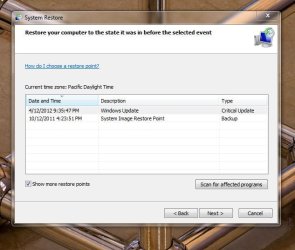
I only have 5 points, 1 point from a full system image from October of last year, and 4 restore points, oldest being April 6 which is after this started.

I have protection on for C (Raid Volume) but not E: (Data Volume). I may have cleaned out older restore points at some point...I did run CCleaner not to long ago...

I want to repair install as a last resort. Thank you for your reply though...if you have any idea's you can be more technical with me :)
 

My Computer My Computer

OS
Windows 7 Professional 64-bit
CPU
AMD 1090T 6-core 3.4ghz, OC to 4.1ghz
Motherboard
Asus Sabretooth 990FX
Memory
G.Skill Ripjaw 8GB DD3 1600
Graphics Card(s)
AMD HD 6950 2GB
Monitor(s) Displays
2x ASUS 23" LED LCD
Screen Resolution
1920x1080 x2
Hard Drives
2x SATA III Crucial M4 64GB SSD's in Raid0 as System Volue
1x Hitachi Deskstar 1.5TB 7200 RPM SATAIII HDD
PSU
CoolerMaster SilentPro 1000W
Case
Coolermaster 690 Nvidia Edition Mid tower
Cooling
CoolerMaster Hyper 212, with push pull fans
Keyboard
Logitech Illuminated keyboard
Mouse
Razer Mamba (omgomgomgomgomg)
Internet Speed
Cableone 50Mbps
did you follow the procedure given?
 

My Computer My Computer

Computer Manufacturer/Model Number
Toshiba Satellite S875D-S7239 laptop
OS
MS Windows 7 Ultimate SP1 64-bit
CPU
AMD A10-4600M
Motherboard
AMD Pumori (Socket FT1)
Memory
6.00 GB Dual-Channel DDR3 @ 798MHz (11-11-12-28)
Graphics Card(s)
AMD Radeon HD 7660G
Sound Card
High Definition Audio Device
Monitor(s) Displays
Generic PnP Monitor (1600x900@60Hz)
Screen Resolution
1600x900@60Hz
Hard Drives
SSD 119GB Corsair CSSD-V128GB2 ATA Device
Keyboard
Standard PS/2 Keyboard
Mouse
HP Wireless Optical Mobile Mouse Model FHA-3410
Internet Speed
What the local pub, local coffee shop offers.
Other Info
Optical Drive:MATSHITA BD-CMB UJ160B ATA Device


Also have an Asus ha1002xp netbook with Win 7 Ultimate installed.

My Computer My Computer

Computer type
PC/Desktop
Computer Manufacturer/Model Number
Bruce ... somewhere in his 40's
OS
Windows 7 Ultimate 32bit SP1
CPU
Intel(R) Core(TM)2 Quad CPU @ 2.40GHz, 2400 MHz
Motherboard
INTEL/D975XBX2
Memory
4 GB
Graphics Card(s)
ATI Radeon HD 2600 Pro
Monitor(s) Displays
Samsung SyncMaster 914v
Screen Resolution
1280 x 1024
Hard Drives
2/500GB each ... ST3500630AS ATA Device.
One is not connected
PSU
Rocketfish 700 W
Case
G.Skill Gigabyte Chassis
Keyboard
Standard PS/2 Keyboard
Mouse
Microsoft PS/2 Mouse
Internet Speed
DSL
Antivirus
Avira Internet Security
Browser
IE 11
Other Info
ATI HDMI Audio

My Computer My Computer

OS
Windows 7 Professional 64-bit
CPU
AMD 1090T 6-core 3.4ghz, OC to 4.1ghz
Motherboard
Asus Sabretooth 990FX
Memory
G.Skill Ripjaw 8GB DD3 1600
Graphics Card(s)
AMD HD 6950 2GB
Monitor(s) Displays
2x ASUS 23" LED LCD
Screen Resolution
1920x1080 x2
Hard Drives
2x SATA III Crucial M4 64GB SSD's in Raid0 as System Volue
1x Hitachi Deskstar 1.5TB 7200 RPM SATAIII HDD
PSU
CoolerMaster SilentPro 1000W
Case
Coolermaster 690 Nvidia Edition Mid tower
Cooling
CoolerMaster Hyper 212, with push pull fans
Keyboard
Logitech Illuminated keyboard
Mouse
Razer Mamba (omgomgomgomgomg)
Internet Speed
Cableone 50Mbps
and how many choices were given?
 

My Computer My Computer

Computer Manufacturer/Model Number
Toshiba Satellite S875D-S7239 laptop
OS
MS Windows 7 Ultimate SP1 64-bit
CPU
AMD A10-4600M
Motherboard
AMD Pumori (Socket FT1)
Memory
6.00 GB Dual-Channel DDR3 @ 798MHz (11-11-12-28)
Graphics Card(s)
AMD Radeon HD 7660G
Sound Card
High Definition Audio Device
Monitor(s) Displays
Generic PnP Monitor (1600x900@60Hz)
Screen Resolution
1600x900@60Hz
Hard Drives
SSD 119GB Corsair CSSD-V128GB2 ATA Device
Keyboard
Standard PS/2 Keyboard
Mouse
HP Wireless Optical Mobile Mouse Model FHA-3410
Internet Speed
What the local pub, local coffee shop offers.
Other Info
Optical Drive:MATSHITA BD-CMB UJ160B ATA Device


Also have an Asus ha1002xp netbook with Win 7 Ultimate installed.
What I mean is: How many restore points are listed?
 

My Computer My Computer

Computer Manufacturer/Model Number
Toshiba Satellite S875D-S7239 laptop
OS
MS Windows 7 Ultimate SP1 64-bit
CPU
AMD A10-4600M
Motherboard
AMD Pumori (Socket FT1)
Memory
6.00 GB Dual-Channel DDR3 @ 798MHz (11-11-12-28)
Graphics Card(s)
AMD Radeon HD 7660G
Sound Card
High Definition Audio Device
Monitor(s) Displays
Generic PnP Monitor (1600x900@60Hz)
Screen Resolution
1600x900@60Hz
Hard Drives
SSD 119GB Corsair CSSD-V128GB2 ATA Device
Keyboard
Standard PS/2 Keyboard
Mouse
HP Wireless Optical Mobile Mouse Model FHA-3410
Internet Speed
What the local pub, local coffee shop offers.
Other Info
Optical Drive:MATSHITA BD-CMB UJ160B ATA Device


Also have an Asus ha1002xp netbook with Win 7 Ultimate installed.
As you will know, wery often the last thing you did before a problem starts, is the thing that caused it.
I was wondering from your OP you say you added a custom event with EVENTCREATE .
What event and what was the syntax used, and if any the resulting output.
 

My Computer My Computer

Computer Manufacturer/Model Number
DIY
OS
Windows 7 home premium x64
CPU
AMD FX-4100 AM3+ 3.6GHz 12MB Black Edition
Motherboard
Asus M5A97 Pro
Memory
Crsair vengeance 12Gb DDR3 1600MHz CL9
Graphics Card(s)
Asus GTX 560 1GB
Sound Card
Realtek onboard
Monitor(s) Displays
Hanns G 1680x1050 native
Hard Drives
OCZ 128Gb Petrol ssd
2x500 Gb Samsung
PSU
OCZ StealthXstream II 500W
Internet Speed
8Mb or better
and how many choices were given?
It has changed since I uninstalled some stuff, but only a few recent, plus the last system image from october

restorepic.jpg


irishdrunk_2007
 

My Computer My Computer

OS
Windows 7 Professional 64-bit
CPU
AMD 1090T 6-core 3.4ghz, OC to 4.1ghz
Motherboard
Asus Sabretooth 990FX
Memory
G.Skill Ripjaw 8GB DD3 1600
Graphics Card(s)
AMD HD 6950 2GB
Monitor(s) Displays
2x ASUS 23" LED LCD
Screen Resolution
1920x1080 x2
Hard Drives
2x SATA III Crucial M4 64GB SSD's in Raid0 as System Volue
1x Hitachi Deskstar 1.5TB 7200 RPM SATAIII HDD
PSU
CoolerMaster SilentPro 1000W
Case
Coolermaster 690 Nvidia Edition Mid tower
Cooling
CoolerMaster Hyper 212, with push pull fans
Keyboard
Logitech Illuminated keyboard
Mouse
Razer Mamba (omgomgomgomgomg)
Internet Speed
Cableone 50Mbps
As you will know, wery often the last thing you did before a problem starts, is the thing that caused it.
I was wondering from your OP you say you added a custom event with EVENTCREATE .
What event and what was the syntax used, and if any the resulting output.

Yep, that's why I was hoping to track it down to running a GPUpdate (don't see exactly how that caused it) or the EventCreate (don't see there either... :( )


It was to System log, a Warning, EventID 999, Source= EventCreate, Level 3 Event.


These instances of csrss.exe don't seem to happen when not on the network either. I am completely baffled on this, been searching and searching for days. Bug? Hacked? guh....lol
 

My Computer My Computer

OS
Windows 7 Professional 64-bit
CPU
AMD 1090T 6-core 3.4ghz, OC to 4.1ghz
Motherboard
Asus Sabretooth 990FX
Memory
G.Skill Ripjaw 8GB DD3 1600
Graphics Card(s)
AMD HD 6950 2GB
Monitor(s) Displays
2x ASUS 23" LED LCD
Screen Resolution
1920x1080 x2
Hard Drives
2x SATA III Crucial M4 64GB SSD's in Raid0 as System Volue
1x Hitachi Deskstar 1.5TB 7200 RPM SATAIII HDD
PSU
CoolerMaster SilentPro 1000W
Case
Coolermaster 690 Nvidia Edition Mid tower
Cooling
CoolerMaster Hyper 212, with push pull fans
Keyboard
Logitech Illuminated keyboard
Mouse
Razer Mamba (omgomgomgomgomg)
Internet Speed
Cableone 50Mbps
Your images are too small to read in photobucket! :(
 

My Computer My Computer

Computer type
PC/Desktop
Computer Manufacturer/Model Number
Bruce ... somewhere in his 40's
OS
Windows 7 Ultimate 32bit SP1
CPU
Intel(R) Core(TM)2 Quad CPU @ 2.40GHz, 2400 MHz
Motherboard
INTEL/D975XBX2
Memory
4 GB
Graphics Card(s)
ATI Radeon HD 2600 Pro
Monitor(s) Displays
Samsung SyncMaster 914v
Screen Resolution
1280 x 1024
Hard Drives
2/500GB each ... ST3500630AS ATA Device.
One is not connected
PSU
Rocketfish 700 W
Case
G.Skill Gigabyte Chassis
Keyboard
Standard PS/2 Keyboard
Mouse
Microsoft PS/2 Mouse
Internet Speed
DSL
Antivirus
Avira Internet Security
Browser
IE 11
Other Info
ATI HDMI Audio

My Computer My Computer

Computer Manufacturer/Model Number
Custom Build
OS
windows Home Premium 64 bit
restorescreenshot.JPG

There we go. That's it for restore points.
 

My Computer My Computer

OS
Windows 7 Professional 64-bit
CPU
AMD 1090T 6-core 3.4ghz, OC to 4.1ghz
Motherboard
Asus Sabretooth 990FX
Memory
G.Skill Ripjaw 8GB DD3 1600
Graphics Card(s)
AMD HD 6950 2GB
Monitor(s) Displays
2x ASUS 23" LED LCD
Screen Resolution
1920x1080 x2
Hard Drives
2x SATA III Crucial M4 64GB SSD's in Raid0 as System Volue
1x Hitachi Deskstar 1.5TB 7200 RPM SATAIII HDD
PSU
CoolerMaster SilentPro 1000W
Case
Coolermaster 690 Nvidia Edition Mid tower
Cooling
CoolerMaster Hyper 212, with push pull fans
Keyboard
Logitech Illuminated keyboard
Mouse
Razer Mamba (omgomgomgomgomg)
Internet Speed
Cableone 50Mbps
Click on that button for Affected Programs so that you have an idea of you will need to reinstall.

Choose the most recent restore point and see if problem is gone. If not choose the other restore point and do the same thing.

You will need to then perform a full and complete update of your Win 7.

UPDATING YOUR WIN 7
ASSURE THAT YOU RECEIVE ALL UPDATES
WIN | type WINDOWS UPDATE | ENTER |
Change settings (left-hand column) |
checkmark all four of the boxes | OK
button

Approve any dialog boxes presented. Let Windows install any update features.

WIN is the key with the Microsoft flag on top.

INSTALL CRITICAL UPDATES
Check for Updates
(left-hand column)
Install ALL critical updates.
Restart your computer (even if not prompted)

Repeat this procedure until there are no more critical updates.

DO NOT TRUST the “Windows is up to date” in center of dialog. until you see that TWICE IN A ROW!

INSTALL IMPORTANT UPDATES
Use the “critical update” procedure until all important updates are installed.

INSTALL OPTIONAL UPDATES
Use the “critical update” procedure until all optional updates are installed.

Under Optional updates you will be presented with a list of about 34 language updates.
You can hide those updates so that aren't continually notified of those updates. When you click on 34 optional updates are available, then you
a) highlight all of the language updates,
b) right-click anywhere in the highlighted list.
c) click on Hide Updates,
d) OK button.


UPDATE GOLDEN RULES

Install ALL, yes, ALL updates.
This is Win 7 and not Vista or XP (eXPired).

UPDATE IS HUNG –TAKING FOREVER
Hung is very doubtful unless you interrupted updates.

CTRL + SHIFT + ESC key combo will pop-up the Task Manager.
Lo and behold, Windows Update is still running!

You hold down the CTRL and SHIFT keys.
While holding them down, tap the ESC key once.
 

My Computer My Computer

Computer Manufacturer/Model Number
Toshiba Satellite S875D-S7239 laptop
OS
MS Windows 7 Ultimate SP1 64-bit
CPU
AMD A10-4600M
Motherboard
AMD Pumori (Socket FT1)
Memory
6.00 GB Dual-Channel DDR3 @ 798MHz (11-11-12-28)
Graphics Card(s)
AMD Radeon HD 7660G
Sound Card
High Definition Audio Device
Monitor(s) Displays
Generic PnP Monitor (1600x900@60Hz)
Screen Resolution
1600x900@60Hz
Hard Drives
SSD 119GB Corsair CSSD-V128GB2 ATA Device
Keyboard
Standard PS/2 Keyboard
Mouse
HP Wireless Optical Mobile Mouse Model FHA-3410
Internet Speed
What the local pub, local coffee shop offers.
Other Info
Optical Drive:MATSHITA BD-CMB UJ160B ATA Device


Also have an Asus ha1002xp netbook with Win 7 Ultimate installed.
Click on that button for Affected Programs so that you have an idea of you will need to reinstall.

Choose the most recent restore point and see if problem is gone. If not choose the other restore point and do the same thing.

You will need to then perform a full and complete update of your Win 7.

UPDATING YOUR WIN 7
ASSURE THAT YOU RECEIVE ALL UPDATES
WIN | type WINDOWS UPDATE | ENTER |
Change settings (left-hand column) |
checkmark all four of the boxes | OK
button

Approve any dialog boxes presented. Let Windows install any update features.

WIN is the key with the Microsoft flag on top.

INSTALL CRITICAL UPDATES
Check for Updates
(left-hand column)
Install ALL critical updates.
Restart your computer (even if not prompted)

Repeat this procedure until there are no more critical updates.

DO NOT TRUST the “Windows is up to date” in center of dialog. until you see that TWICE IN A ROW!

INSTALL IMPORTANT UPDATES
Use the “critical update” procedure until all important updates are installed.

INSTALL OPTIONAL UPDATES
Use the “critical update” procedure until all optional updates are installed.

Under Optional updates you will be presented with a list of about 34 language updates.
You can hide those updates so that aren't continually notified of those updates. When you click on 34 optional updates are available, then you
a) highlight all of the language updates,
b) right-click anywhere in the highlighted list.
c) click on Hide Updates,
d) OK button.


UPDATE GOLDEN RULES

Install ALL, yes, ALL updates.
This is Win 7 and not Vista or XP (eXPired).

UPDATE IS HUNG –TAKING FOREVER
Hung is very doubtful unless you interrupted updates.

CTRL + SHIFT + ESC key combo will pop-up the Task Manager.
Lo and behold, Windows Update is still running!

You hold down the CTRL and SHIFT keys.
While holding them down, tap the ESC key once.


I have been fully updated this whole time, although I appreciate the help.

I think maybe this isn't the right place to discuss this issue, as I was looking for insight into a deeper understanding of how Windows works, as to what could be causing this issue, not so much just restore/repair. I'm a couple days into basically proving how many restore points I have. I tried to lay it down that I'm educated a bit more than average and that I knew what I was talking about...it think most of the posts I'm going to get here are going to be basic troubleshooting tips that I'm already aware of...

Basically I was looking for help with solving the problem outside of the recovery environment, knowing there are no issues with system files or permissions...

If anyone would like to help, or can, without talking about restore options, feel free to chime in. Does this thread belong in a different sub-forum?
Thanks
 

My Computer My Computer

OS
Windows 7 Professional 64-bit
CPU
AMD 1090T 6-core 3.4ghz, OC to 4.1ghz
Motherboard
Asus Sabretooth 990FX
Memory
G.Skill Ripjaw 8GB DD3 1600
Graphics Card(s)
AMD HD 6950 2GB
Monitor(s) Displays
2x ASUS 23" LED LCD
Screen Resolution
1920x1080 x2
Hard Drives
2x SATA III Crucial M4 64GB SSD's in Raid0 as System Volue
1x Hitachi Deskstar 1.5TB 7200 RPM SATAIII HDD
PSU
CoolerMaster SilentPro 1000W
Case
Coolermaster 690 Nvidia Edition Mid tower
Cooling
CoolerMaster Hyper 212, with push pull fans
Keyboard
Logitech Illuminated keyboard
Mouse
Razer Mamba (omgomgomgomgomg)
Internet Speed
Cableone 50Mbps
I haven't read through the entire thread but it's clear you have chosen to limit the number of restore points. Windows Update will usually create a restore point so you should have at least one per month.

Have you tried deleting your profile and making a new one? A corrupt profile will sometimes cause multiple Csrss.exe programs to start.
 

My Computer My Computer

Computer type
PC/Desktop
Computer Manufacturer/Model Number
Built 2/11/2011
OS
Windows 7 Pro-x64
CPU
i7-2600 3.4GHz - 3.8GHz Turbo
Motherboard
Intel DH67BL-B3
Memory
8Gb - 2x4GB, Muskin 991770 PC3-1333
Graphics Card(s)
Integrated Intel HD 2000
Sound Card
Integrated Intel 10.1 HD, RealTek ALC892
Monitor(s) Displays
Asus LCD VH222H, Haier HL24XSL2a
Screen Resolution
1920x1080, 1920x1080
Hard Drives
Crucial SSD C300-128Gb,
Western Digital WD5002AALX - 500Gb,
Western Digital WD7501AALS - 750Gb
PSU
Seasonic 650W 80+ Gold Modular
Case
Rosewill Defender
Cooling
Stock CPU, Four 120mm case fans, PCH fan added
Keyboard
Logitech EX100 Y-RBH94 Wireless
Mouse
Logitech EX100 M-RCE95 Wireless
Internet Speed
3.0/1.5 Mbs
Antivirus
Microsoft Security Essentials
Browser
Microsoft Internet Explorer 11
Other Info
Antec Veris Premier-Multimedia IR Station,
Cyber Accoustics-3602 Speakers,
AFT XM-5U Card Reader,
Hauppauge TV-HVR-2250,
Sony LX300 USB Turntable
Back
Top