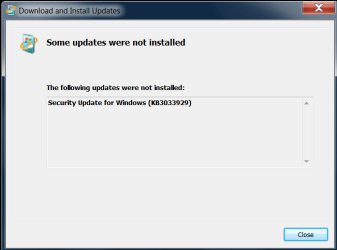
Update 3033929 not installing, error code 80073712

The update 3033929 failed with error 80073712.
 

My Computer

Computer type
PC/Desktop
Computer Manufacturer/Model Number
Lenovo T430
OS
Windows 7 Home Premium 64bit
CPU
Intel(R) Core(TM) i5-3230M CPU @2.6Ghz 2.6GHz
Memory
4GB
Graphics Card(s)
NVIDIA® NVS 5400M Graphics with Optimus Technology
Hard Drives
320GB (7200 rpm)
Antivirus
Microsoft Security Essentials
Browser
Mozilla firefox 38.0.5

My Computer

Computer type
Laptop
Computer Manufacturer/Model Number
Asus K52F or Lenovo B51-80
OS
Win 7 x64 Home Premium (and x86 VirtualBox VM)/Win10
CPU
i3 370M/i7 6500U
Motherboard
Asus/Lenovo
Memory
8GB - finally :)/8GB
Graphics Card(s)
it's an i3, dude!/dual Intel&nVidia
Sound Card
onboard
Monitor(s) Displays
15.6" built-in
Screen Resolution
1366x768/1920x1080
Hard Drives
750GB Seagate internal
Sundry external drives attached to other computers on the local network
1TB SSD on the Lenovo
PSU
n/a
Internet Speed
as much as I can get - usually on a dongle/phone, so <1MB/s
Antivirus
MSE/Defender
Browser
IE11/12/Edge/Chrome/FF(if I must)
The standalone didn't install and the popup didn't really offer anything in the way of clues. I did attach the windowsupdate.log
 

Attachments

  • NotInstalled.PNG
    NotInstalled.PNG
    10.4 KB · Views: 10
Last edited:

My Computer

Computer type
PC/Desktop
Computer Manufacturer/Model Number
Lenovo T430
OS
Windows 7 Home Premium 64bit
CPU
Intel(R) Core(TM) i5-3230M CPU @2.6Ghz 2.6GHz
Memory
4GB
Graphics Card(s)
NVIDIA® NVS 5400M Graphics with Optimus Technology
Hard Drives
320GB (7200 rpm)
Antivirus
Microsoft Security Essentials
Browser
Mozilla firefox 38.0.5
Hi Noel, do you have any further suggestions for me?
 

My Computer

Computer type
PC/Desktop
Computer Manufacturer/Model Number
Lenovo T430
OS
Windows 7 Home Premium 64bit
CPU
Intel(R) Core(TM) i5-3230M CPU @2.6Ghz 2.6GHz
Memory
4GB
Graphics Card(s)
NVIDIA® NVS 5400M Graphics with Optimus Technology
Hard Drives
320GB (7200 rpm)
Antivirus
Microsoft Security Essentials
Browser
Mozilla firefox 38.0.5
Sorry - was offline most of the weekend.
windowsupdate.log is still its usual uninformative self :(

The error message tells us that there are registry problems - but doesn't tell us where, and CheckSUR is now clear, so that's no help either.
CBS background data didn't give us any clues before either.

I'm very close to recommending a repair install if you have the media for one - see the tutorial here... http://www.sevenforums.com/tutorials/3413-repair-install.html?ltr=R
 

My Computer

Computer type
Laptop
Computer Manufacturer/Model Number
Asus K52F or Lenovo B51-80
OS
Win 7 x64 Home Premium (and x86 VirtualBox VM)/Win10
CPU
i3 370M/i7 6500U
Motherboard
Asus/Lenovo
Memory
8GB - finally :)/8GB
Graphics Card(s)
it's an i3, dude!/dual Intel&nVidia
Sound Card
onboard
Monitor(s) Displays
15.6" built-in
Screen Resolution
1366x768/1920x1080
Hard Drives
750GB Seagate internal
Sundry external drives attached to other computers on the local network
1TB SSD on the Lenovo
PSU
n/a
Internet Speed
as much as I can get - usually on a dongle/phone, so <1MB/s
Antivirus
MSE/Defender
Browser
IE11/12/Edge/Chrome/FF(if I must)
Hi Noel, Do you think I need to fix this before trying the upgrade to Windows 10, or would the new OS possibly "fix" the problem?

I'm asking because I have an OEM install and following the link in the instructions you linked me to, the OEM .iso isn't available from the direct download site as of Feb 2015. which means I have to order a new disk from Microsoft. If that's what I need to do then fine, but if you think the upgrade might do the trick that seems easier.

Thanks again, serious about the pub money if you let me know how.
 

My Computer

Computer type
PC/Desktop
Computer Manufacturer/Model Number
Lenovo T430
OS
Windows 7 Home Premium 64bit
CPU
Intel(R) Core(TM) i5-3230M CPU @2.6Ghz 2.6GHz
Memory
4GB
Graphics Card(s)
NVIDIA® NVS 5400M Graphics with Optimus Technology
Hard Drives
320GB (7200 rpm)
Antivirus
Microsoft Security Essentials
Browser
Mozilla firefox 38.0.5
Are you currently being offered the upgrade? - it is one possible way out.
 

My Computer

Computer type
Laptop
Computer Manufacturer/Model Number
Asus K52F or Lenovo B51-80
OS
Win 7 x64 Home Premium (and x86 VirtualBox VM)/Win10
CPU
i3 370M/i7 6500U
Motherboard
Asus/Lenovo
Memory
8GB - finally :)/8GB
Graphics Card(s)
it's an i3, dude!/dual Intel&nVidia
Sound Card
onboard
Monitor(s) Displays
15.6" built-in
Screen Resolution
1366x768/1920x1080
Hard Drives
750GB Seagate internal
Sundry external drives attached to other computers on the local network
1TB SSD on the Lenovo
PSU
n/a
Internet Speed
as much as I can get - usually on a dongle/phone, so <1MB/s
Antivirus
MSE/Defender
Browser
IE11/12/Edge/Chrome/FF(if I must)
I am being offered the upgrade, I went ahead and reserved a copy
 

My Computer

Computer type
PC/Desktop
Computer Manufacturer/Model Number
Lenovo T430
OS
Windows 7 Home Premium 64bit
CPU
Intel(R) Core(TM) i5-3230M CPU @2.6Ghz 2.6GHz
Memory
4GB
Graphics Card(s)
NVIDIA® NVS 5400M Graphics with Optimus Technology
Hard Drives
320GB (7200 rpm)
Antivirus
Microsoft Security Essentials
Browser
Mozilla firefox 38.0.5
Good luck! Make sure that you back up everything to external media before the upgrade starts!
 

My Computer

Computer type
Laptop
Computer Manufacturer/Model Number
Asus K52F or Lenovo B51-80
OS
Win 7 x64 Home Premium (and x86 VirtualBox VM)/Win10
CPU
i3 370M/i7 6500U
Motherboard
Asus/Lenovo
Memory
8GB - finally :)/8GB
Graphics Card(s)
it's an i3, dude!/dual Intel&nVidia
Sound Card
onboard
Monitor(s) Displays
15.6" built-in
Screen Resolution
1366x768/1920x1080
Hard Drives
750GB Seagate internal
Sundry external drives attached to other computers on the local network
1TB SSD on the Lenovo
PSU
n/a
Internet Speed
as much as I can get - usually on a dongle/phone, so <1MB/s
Antivirus
MSE/Defender
Browser
IE11/12/Edge/Chrome/FF(if I must)
Back
Top