Update XML Core services ?

goodlad

New member
Member
VIP
Local time
2:52 AM
Messages
239
I have Secunia installed on my system to notify me about softwares & their updates.

For the past 2 days, its alerting me Microsoft XML Core Services(MSXML) 4.x needs to be updated.

So, when I clicked on it it, I went to the following page:
Download Microsoft Core XML Services (MSXML) 6.0 from Official Microsoft Download Center

I installed the script few days back & it showed success but still I have this warning. When, I again opened to check in details, I noticed in the MS page that..
System Requirements

Supported Operating System
Windows 2000 Service Pack 4, Windows Server 2003, Windows Server 2003 Service Pack 1, Windows XP Service Pack 1, Windows XP Service Pack 2
There's no W7 in there, huh ?


Looking down further,

To install MSXML 6.0 you must have Microsoft Windows® Installer 3.1 (MSI 3.1) or higher on your computer. If you are running Microsoft Windows Server 2003 Service Pack 1 (SP1) you already have the correct version. For other operating systems you may need to upgrade. Please see the Windows Installer 3.1 knowledge base article for details.
How do I know I have Windows Installer in my system or not & it shows the same supported OS details with no mention of W7 :huh:


I would appreciate some assistance on this regard, whether its a false alarm by my software or am I really missing something down here ? :rolleyes:
 

My Computer

Computer type
Laptop
Computer Manufacturer/Model Number
DELL
OS
windows 7 ultimate x32
CPU
T6670,
Motherboard
INTEL CORE 2 DUO, 0TFXK9
Memory
8GB DDR3
Screen Resolution
1366*768
Hard Drives
512GB SSD
Mouse
Logitech M165 w/sidebuttons
Internet Speed
30-150 mb/s
Antivirus
Bitdefender
Browser
FF, Opera GX
I have Secunia installed on my system to notify me about softwares & their updates.

For the past 2 days, its alerting me Microsoft XML Core Services(MSXML) 4.x needs to be updated.

So, when I clicked on it it, I went to the following page:
Download Microsoft Core XML Services (MSXML) 6.0 from Official Microsoft Download Center

I installed the script few days back & it showed success but still I have this warning. When, I again opened to check in details, I noticed in the MS page that..
System Requirements

Supported Operating System
Windows 2000 Service Pack 4, Windows Server 2003, Windows Server 2003 Service Pack 1, Windows XP Service Pack 1, Windows XP Service Pack 2
There's no W7 in there, huh ?


Looking down further,

To install MSXML 6.0 you must have Microsoft Windows® Installer 3.1 (MSI 3.1) or higher on your computer. If you are running Microsoft Windows Server 2003 Service Pack 1 (SP1) you already have the correct version. For other operating systems you may need to upgrade. Please see the Windows Installer 3.1 knowledge base article for details.
How do I know I have Windows Installer in my system or not & it shows the same supported OS details with no mention of W7 :huh:


I would appreciate some assistance on this regard, whether its a false alarm by my software or am I really missing something down here ? :rolleyes:

That must be this one you're heading for...:
Download Security Update for Microsoft XML Core Services 4.0 Service Pack 3 for x64-based Systems (KB2721691) from Official Microsoft Download Center

install it and then manually run Windows Update if it does invite you to a newer version.
 

My Computer

Computer type
PC/Desktop
Computer Manufacturer/Model Number
Custom Build
OS
Windows 7 Professional SP1 - x64 [Non-UEFI Boot]
CPU
Ivy Bridge Core i5 3570K (Delidded)
Motherboard
Asus P8Z77-V LE PLUS
Memory
G.Skill "Ares" DDR3 PC3-12800 - 1600MHz (16Gb)
Graphics Card(s)
Asus Dual-RX480-O4G
Sound Card
Creative Sound Blaster Z w/5.1 sound system
Monitor(s) Displays
Asus IPS 23"
Screen Resolution
16/9
Hard Drives
Internal:
500Go Sata 6Gb/s (x2)
500Go Sata 3Gb/s (x2)
SSD 60Go Sata 6Gb/s
PSU
In Win C 900W Series 80+ Platinum
Case
Thermaltake Chaser A71
Cooling
Custom Water Cooling Loop
Keyboard
Cooler Master QuickFire XTi
Mouse
Razer Imperator 2012 (4G)
Antivirus
MSE
Browser
IE 11.0.xxx Rtm
Other Info
"Raid0" with Intel Smart Response Technology (HDD/SSD)
Thanks Non for your assistance :)

But I have x32, will x64 pack work for x32 too ?
 

My Computer

Computer type
Laptop
Computer Manufacturer/Model Number
DELL
OS
windows 7 ultimate x32
CPU
T6670,
Motherboard
INTEL CORE 2 DUO, 0TFXK9
Memory
8GB DDR3
Screen Resolution
1366*768
Hard Drives
512GB SSD
Mouse
Logitech M165 w/sidebuttons
Internet Speed
30-150 mb/s
Antivirus
Bitdefender
Browser
FF, Opera GX

My Computer

Computer type
PC/Desktop
Computer Manufacturer/Model Number
Custom Build
OS
Windows 7 Professional SP1 - x64 [Non-UEFI Boot]
CPU
Ivy Bridge Core i5 3570K (Delidded)
Motherboard
Asus P8Z77-V LE PLUS
Memory
G.Skill "Ares" DDR3 PC3-12800 - 1600MHz (16Gb)
Graphics Card(s)
Asus Dual-RX480-O4G
Sound Card
Creative Sound Blaster Z w/5.1 sound system
Monitor(s) Displays
Asus IPS 23"
Screen Resolution
16/9
Hard Drives
Internal:
500Go Sata 6Gb/s (x2)
500Go Sata 3Gb/s (x2)
SSD 60Go Sata 6Gb/s
PSU
In Win C 900W Series 80+ Platinum
Case
Thermaltake Chaser A71
Cooling
Custom Water Cooling Loop
Keyboard
Cooler Master QuickFire XTi
Mouse
Razer Imperator 2012 (4G)
Antivirus
MSE
Browser
IE 11.0.xxx Rtm
Other Info
"Raid0" with Intel Smart Response Technology (HDD/SSD)
thanks Non, appreciate your assistance.

I get an error when I try to run the application:

Error Opening the Installation Log File. Verify that the specified log file location exists and is writable
 

My Computer

Computer type
Laptop
Computer Manufacturer/Model Number
DELL
OS
windows 7 ultimate x32
CPU
T6670,
Motherboard
INTEL CORE 2 DUO, 0TFXK9
Memory
8GB DDR3
Screen Resolution
1366*768
Hard Drives
512GB SSD
Mouse
Logitech M165 w/sidebuttons
Internet Speed
30-150 mb/s
Antivirus
Bitdefender
Browser
FF, Opera GX
thanks Non, appreciate your assistance.

I get an error when I try to run the application:

Error Opening the Installation Log File. Verify that the specified log file location exists and is writable

That's a common error...sorry i should have told you.

Read carefully this chapter Known issues with this security update here:
MS13-002: Description of the security update for XML Core Services 4.0: January 8, 2013

Then pick up the kb973685 here:
Download Update for Microsoft XML Core Services 4.0 Service Pack 3 (KB973685) from Official Microsoft Download Center

kb973685 have to be install first in certain circumstance.
 

My Computer

Computer type
PC/Desktop
Computer Manufacturer/Model Number
Custom Build
OS
Windows 7 Professional SP1 - x64 [Non-UEFI Boot]
CPU
Ivy Bridge Core i5 3570K (Delidded)
Motherboard
Asus P8Z77-V LE PLUS
Memory
G.Skill "Ares" DDR3 PC3-12800 - 1600MHz (16Gb)
Graphics Card(s)
Asus Dual-RX480-O4G
Sound Card
Creative Sound Blaster Z w/5.1 sound system
Monitor(s) Displays
Asus IPS 23"
Screen Resolution
16/9
Hard Drives
Internal:
500Go Sata 6Gb/s (x2)
500Go Sata 3Gb/s (x2)
SSD 60Go Sata 6Gb/s
PSU
In Win C 900W Series 80+ Platinum
Case
Thermaltake Chaser A71
Cooling
Custom Water Cooling Loop
Keyboard
Cooler Master QuickFire XTi
Mouse
Razer Imperator 2012 (4G)
Antivirus
MSE
Browser
IE 11.0.xxx Rtm
Other Info
"Raid0" with Intel Smart Response Technology (HDD/SSD)
There is much discussion on the Secunia forums. Bottom line is PSI is reporting the file as end of life because MS support just ended. HOWEVER, the suggested fix they link to is (MSXML) 6.0, and does not apply to Windows 7. Also, if you have MSXML 4 SP3, version 4.30.2117 then it is the latest version and is not insecure, just end of life according to Secunia:

Microsoft has announced that the widely used Microsoft XML Core Services (MSXML) 4.x has reached the end of its lifecycle. The announcement was made back in 2013 (Microsoft Support), stating that April 12th 2014 was the EOL date. This is further supported by the official Microsoft Lifecycle Policy found here: Microsoft Product Lifecycle Search

As a result, all versions of Microsoft XML Core Services (MSXML) 4.x will correctly be flagged as EOL by the Secunia products, recommending an upgrade to Microsoft XML Core Services (MSXML) 6.x, as stated in the Microsoft announcement.

--
Kind regards,

Jais Vemmer
xSI Signatures Specialist

So, it is not insecure, but rather EOL. They (Secunia) will not fix this, as in their eyes it isn't broken, It is indeed end of life. However, the 'fix" they link to is not correct, and does not apply. If the less then 100% score bothers you, do as I did, and mark that listing as Ignore. If there is an updated file, you will receive it via Windows Update. But don't expect one as MS are the ones marking it EOL.

A Guy
 

My Computer

Computer type
PC/Desktop
OS
Windows 10 Home x64
CPU
INTEL Core i5-750 Quad-Core 3.37GHz
Motherboard
ASUS P7P55D
Memory
HyperX Fury Black Series 8GB (2 x 4GB) 1866Mhz
Graphics Card(s)
EVGA GeForce GTX 750 Superclocked 1GB 128-Bit GDDR5
Monitor(s) Displays
LG 32MA68HY 32" IPS
Screen Resolution
1920 x 1080
Hard Drives
Samsung 840 Evo 120GB, SEAGATE 500GB Barracuda® 7200.12, SATA 3 Gb/s, 7200 RPM, 16MB cache
PSU
ANTEC TruePower New TP-550, 80 PLUS, 550W
Case
ANTEC Three Hundred Illusion
Cooling
COOLER MASTER Hyper 212 Plus, 4 x 120mm 1 x 140mm Noctua's
Internet Speed
85 + Mbps
Antivirus
Avast
Browser
Vivaldi
thanks friends for the assistance :)

There is much discussion on the Secunia forums. Bottom line is PSI is reporting the file as end of life because MS support just ended. HOWEVER, the suggested fix they link to is (MSXML) 6.0, and does not apply to Windows 7. Also, if you have MSXML 4 SP3, version 4.30.2117 then it is the latest version and is not insecure, just end of life according to Secunia:

Microsoft has announced that the widely used Microsoft XML Core Services (MSXML) 4.x has reached the end of its lifecycle. The announcement was made back in 2013 (Microsoft Support), stating that April 12th 2014 was the EOL date. This is further supported by the official Microsoft Lifecycle Policy found here: Microsoft Product Lifecycle Search

As a result, all versions of Microsoft XML Core Services (MSXML) 4.x will correctly be flagged as EOL by the Secunia products, recommending an upgrade to Microsoft XML Core Services (MSXML) 6.x, as stated in the Microsoft announcement.

--
Kind regards,

Jais Vemmer
xSI Signatures Specialist
So, it is not insecure, but rather EOL. They (Secunia) will not fix this, as in their eyes it isn't broken, It is indeed end of life. However, the 'fix" they link to is not correct, and does not apply. If the less then 100% score bothers you, do as I did, and mark that listing as Ignore. If there is an updated file, you will receive it via Windows Update. But don't expect one as MS are the ones marking it EOL.

A Guy

ah I didn't know about this EOL & I had set the list to ignore to avoid the constant nuisance of secunia popping up every now & then.

Really appreciate it :)
 

My Computer

Computer type
Laptop
Computer Manufacturer/Model Number
DELL
OS
windows 7 ultimate x32
CPU
T6670,
Motherboard
INTEL CORE 2 DUO, 0TFXK9
Memory
8GB DDR3
Screen Resolution
1366*768
Hard Drives
512GB SSD
Mouse
Logitech M165 w/sidebuttons
Internet Speed
30-150 mb/s
Antivirus
Bitdefender
Browser
FF, Opera GX
No worries, while we will never know if we could do without it, it is likely to never be a security problem. A Guy
 

My Computer

Computer type
PC/Desktop
OS
Windows 10 Home x64
CPU
INTEL Core i5-750 Quad-Core 3.37GHz
Motherboard
ASUS P7P55D
Memory
HyperX Fury Black Series 8GB (2 x 4GB) 1866Mhz
Graphics Card(s)
EVGA GeForce GTX 750 Superclocked 1GB 128-Bit GDDR5
Monitor(s) Displays
LG 32MA68HY 32" IPS
Screen Resolution
1920 x 1080
Hard Drives
Samsung 840 Evo 120GB, SEAGATE 500GB Barracuda® 7200.12, SATA 3 Gb/s, 7200 RPM, 16MB cache
PSU
ANTEC TruePower New TP-550, 80 PLUS, 550W
Case
ANTEC Three Hundred Illusion
Cooling
COOLER MASTER Hyper 212 Plus, 4 x 120mm 1 x 140mm Noctua's
Internet Speed
85 + Mbps
Antivirus
Avast
Browser
Vivaldi
Hi All,
I would like to add that I had the exact same issue. Installed Secunia on a freshly rebuilt system.
I've downloaded the x64 SP3 update, and will now tell Secunia to ignore it.
It installed without the hiccups goodlad had.
Many thanks
 

My Computer

Computer type
Laptop
Computer Manufacturer/Model Number
Lenovo Thinkpad T440s
OS
W8.1 Pro, x64
CPU
Intel Core i7
Memory
8GB
Monitor(s) Displays
Built-in, nice matt job
Hard Drives
250GB SSD
Mouse
built-in track-pad
Antivirus
Panda Dome free
Browser
Firefox
Other Info
Binisoft WFC Windows Firewall Control, MBAM on-demand, SandboxIE
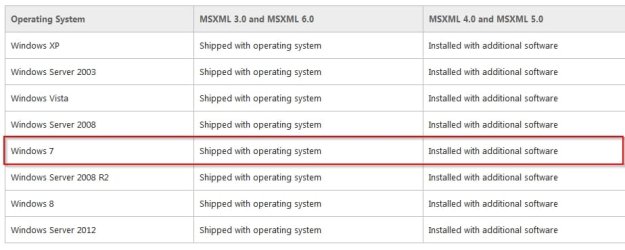
Microsoft XML Core Services 6.0

Microsoft XML Core Services 4.x has been superceded by Microsoft XML Core Services 6.x

Re Secunia: Can't comment on the download link they offer. All I can say is that Microsoft XML Core Services 6 is installed and working on my 64 bit Windows 7 machine. I've left Microsoft XML Core Services 4.x installed but if anyone wants me to remove it for test purposes I'm willing to try.

See security bulletin here:

https://technet.microsoft.com/en-us/library/security/ms12-043.aspx

MSXML.jpg
 
Last edited:

My Computer

Computer type
Laptop
Computer Manufacturer/Model Number
ASUS
OS
Microsoft Windows 7 Home Premium 64-bit 7601 Multiprocessor Free Service Pack 1
CPU
AMD C-60 APU with Radeon(tm) HD Graphics
Motherboard
ASUSTeK COMPUTER INC. X501U
Memory
4.00 GB
Graphics Card(s)
AMD Radeon HD 6290 Graphics
Sound Card
(1) AMD High Definition Audio Device (2) Realtek High Defi
Screen Resolution
1366 x 768 x 32 bits (4294967296 colors) @ 60 Hz
Hard Drives
Hitachi HTS545050A7E380 SATA Disk Device
Antivirus
Comodo CIS & FW, SecureAplus App Whitelisting, Threatfire
Browser
Cyberfox 64bit, Opera 64bit, Airfox
Other Info
Spy-The-Spy, HitmanPro.Alert, Norton Connect Safe, MJRegWatcher, BitDefender TrafficLight, Voodoo Shield, Zemana AntiMalware
May I safely uninstall MSXML 4.x?

As with everyone else, Secunia PSI flags MSXML 4.x as EOL.

I updated to MSXML6.x, may I now safely uninstall MSXML 4.x?

Running Windows 7.
 

My Computer

Computer type
PC/Desktop
Computer Manufacturer/Model Number
sony
OS
Windows Home Premium 64 bit
Antivirus
Norton
Browser
chrome
If flagged it up for me too. See earlier post. I have actually removed it with no issues. End of life just means that it will not get any more patches or security updates. Here's what I have currently:

MSXML.jpg

I'd say install MSXML 6 and remove MSXML 4. You can always reinstall MSXML 4 if you experience any issues with any program that installed MSXML 6.
 

My Computer

Computer type
Laptop
Computer Manufacturer/Model Number
ASUS
OS
Microsoft Windows 7 Home Premium 64-bit 7601 Multiprocessor Free Service Pack 1
CPU
AMD C-60 APU with Radeon(tm) HD Graphics
Motherboard
ASUSTeK COMPUTER INC. X501U
Memory
4.00 GB
Graphics Card(s)
AMD Radeon HD 6290 Graphics
Sound Card
(1) AMD High Definition Audio Device (2) Realtek High Defi
Screen Resolution
1366 x 768 x 32 bits (4294967296 colors) @ 60 Hz
Hard Drives
Hitachi HTS545050A7E380 SATA Disk Device
Antivirus
Comodo CIS & FW, SecureAplus App Whitelisting, Threatfire
Browser
Cyberfox 64bit, Opera 64bit, Airfox
Other Info
Spy-The-Spy, HitmanPro.Alert, Norton Connect Safe, MJRegWatcher, BitDefender TrafficLight, Voodoo Shield, Zemana AntiMalware
Back
Top