Update your Win 7 installation media

That is the purpose of the Import folder.

If you like, you can put NetFramework installer in the Import folder like this:

Import\Windows\Setup\Scripts\NET_Framework\NDP472-KB4054530-x86-x64-AllOS-ENU.exe

and also include

Import\Windows\Setup\Scripts\SetupComplete.cmd

Setupcomplete.cmd
Code:
%windir%\Setup\Scripts\NET_Framework\NDP472-KB4054530-x86-x64-AllOS-ENU.exe /q /norestart

I might include setupcomplete.cmd and cpufix in the next version.

The drivers need to be inf cat and sys files. Dism cannot integrate drivers in exe format.

Many Thanks Sir, Sorry to get late in response, Your utility is really amazing & its getting better & better!

Thanks & Regards. ...
 

My Computer My Computer

At a glance

Windows 7 Ultimate x32 With Sp1 + Vista Ultim...Intel Mobile Core 2 Duo T5750 @ 2.00GHz Merom...2.00GB Dual-Channel DDR2 @ 332MHz (5-5-5-15)Mobile Intel(R) 965 Express Chipset Family
Computer type
Laptop
Computer Manufacturer/Model Number
hp compaq presario c795VU notebook pc
OS
Windows 7 Ultimate x32 With Sp1 + Vista Ultimate x32 with Sp1 & Sp2 !!
CPU
Intel Mobile Core 2 Duo T5750 @ 2.00GHz Merom 65nm Technolog
Motherboard
Hewlett-Packard 30D9 (CPU)
Memory
2.00GB Dual-Channel DDR2 @ 332MHz (5-5-5-15)
Graphics Card(s)
Mobile Intel(R) 965 Express Chipset Family
Sound Card
High Definition Audio Device
Monitor(s) Displays
LP154WX4-TLCB on Mobile Intel 965 Express Chipset Family
Screen Resolution
1280x800 @ 60Hz
Hard Drives
149GB Western Digital WDC WD1600BEVS-60VAT0 ATA Device (SATA)
Keyboard
Standard 101/102-Key or Microsoft Natural PS/2 Key + HP QLB
Mouse
ALPS pointing device
Antivirus
Kaspersky AV 2017(Win 7) & AVG AntiVirus Free 2016 (VISTA)
Browser
google chrome
SIW2 Many thanks SIW2, I succeeded in integration, opened new frontiers, I used dism ++ to mount the image, I modified the cmd for new paths, and everything went well, even with the windows 7 drivers. Now I will work with an aio vista sp2 , so that it will be complete. God bless you.
tenor.gif
 

Attachments

  • PTINT.png
    PTINT.png
    72 KB · Views: 4

My Computer My Computer

At a glance

Windows 7 Home Premiumi5 2Gen6GB KingstonAMD 7000
Computer type
Laptop
Computer Manufacturer/Model Number
SonyVaio
OS
Windows 7 Home Premium
CPU
i5 2Gen
Motherboard
Sony
Memory
6GB Kingston
Graphics Card(s)
AMD 7000
Hard Drives
600GB
Antivirus
Avast
Browser
Chrome
UEFI Boot

Hello SIW2,

After the process complete i burnt the iso to USB using Rufus but it doesnt boot in UEFI mode, gives me an error that bottx64.efi was not found.
I noticed that the file in efi\boot dir was called bootx64 so i renamed it to bootx64.efi and it gave me a bcd boot error :

File: EFI\BOOT\BCD
Status: 0xc000000d
Info: An error occurred while attempting to read the boot configuration data


Thanks.
 

My Computer My Computer

At a glance

Windows 7 x64
Computer type
PC/Desktop
OS
Windows 7 x64
Thanks.

New version 19 feb 2019 on first post.


Hello SIW2,

After the process complete i burnt the iso to USB using Rufus but it doesnt boot in UEFI mode, gives me an error that bottx64.efi was not found.
I noticed that the file in efi\boot dir was called bootx64 so i renamed it to bootx64.efi and it gave me a bcd boot error :

File: EFI\BOOT\BCD
Status: 0xc000000d
Info: An error occurred while attempting to read the boot configuration data


Thanks.
 

My Computers My Computers

  • At a glance

    7 X64i5 84002x8gb 3200mhz
    Computer type
    PC/Desktop
    OS
    7 X64
    CPU
    i5 8400
    Motherboard
    gigabyte b365m ds3h
    Memory
    2x8gb 3200mhz
    Hard Drives
    various
    PSU
    pure power 11 400w cm
    Case
    Coolermaster
    Cooling
    cryorig m9i
  • At a glance

    7x64g54008gb ddr4 2400
    Computer type
    PC/Desktop
    OS
    7x64
    CPU
    g5400
    Motherboard
    ga b365m ds3h
    Memory
    8gb ddr4 2400
    PSU
    xfx pro 450w
hello guys, i don't want you to think i am lazy, but if there are already modified iso files made by you, why you don't uploaded them?????? i know that is nice to get it done by yourself, but when you don't want to spend an entire day doing things that others already made I think it is better to have a download link.


just saying ...
 

My Computer My Computer

At a glance

Manjaroi7 7700nVidia 1050 Ti
Computer type
Laptop
Computer Manufacturer/Model Number
HP
OS
Manjaro
CPU
i7 7700
Graphics Card(s)
nVidia 1050 Ti
Hi,

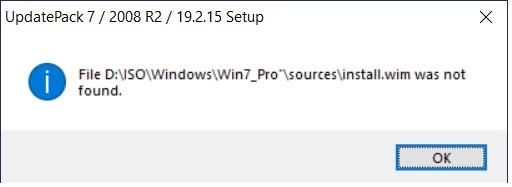
Now i get this error :

94yBzHj.jpg


The WimDir or INSWimpath has an extra char added (') and i can not find where, lol.
 

My Computer My Computer

At a glance

Windows 7 x64
Computer type
PC/Desktop
OS
Windows 7 x64
I don't see it either.

Lines 263-267

Code:
IF %DOIE11% EQU YES (
%PACKNAM% /ie11 /WimFile=%wimdir%\sources\install.wim /Index=%INDNO%& >nul %DISM% /cleanup-wim
 ) ELSE (
 %PACKNAM% /WimFile=%wimdir%\sources\install.wim /Index=%INDNO%& >nul %DISM% /cleanup-wim
  )

Lines 321-325

Code:
IF %DOIE11% EQU YES (
%PACKNAM% /ie11 /WimFile=%wimdir%\sources\install.wim /Index=%INDNO%& >nul %DISM% /cleanup-wim
 ) ELSE (
 %PACKNAM% /WimFile=%wimdir%\sources\install.wim /Index=%INDNO%& >nul %DISM% /cleanup-wim
  )


There is a patch for the updatepack - put UpdatePatch-19.3.3.exe next to your already downloaded UpdatePack7R2-19.2.15.exe and run it. It will create UpdatePack7R2-19.3.3.exe.

Then you need to move/delete UpdatePack7R2-19.2.15.exe from that directory or the cmd file will get confused.

View attachment UpdatePatch-19.3.3.zip
 

My Computers My Computers

  • At a glance

    7 X64i5 84002x8gb 3200mhz
    Computer type
    PC/Desktop
    OS
    7 X64
    CPU
    i5 8400
    Motherboard
    gigabyte b365m ds3h
    Memory
    2x8gb 3200mhz
    Hard Drives
    various
    PSU
    pure power 11 400w cm
    Case
    Coolermaster
    Cooling
    cryorig m9i
  • At a glance

    7x64g54008gb ddr4 2400
    Computer type
    PC/Desktop
    OS
    7x64
    CPU
    g5400
    Motherboard
    ga b365m ds3h
    Memory
    8gb ddr4 2400
    PSU
    xfx pro 450w
Thanks for the reply,
still get the same error. Previous version does not give me this error.
 

My Computer My Computer

At a glance

Windows 7 x64
Computer type
PC/Desktop
OS
Windows 7 x64
New version march 2019 on first post.
 

My Computers My Computers

  • At a glance

    7 X64i5 84002x8gb 3200mhz
    Computer type
    PC/Desktop
    OS
    7 X64
    CPU
    i5 8400
    Motherboard
    gigabyte b365m ds3h
    Memory
    2x8gb 3200mhz
    Hard Drives
    various
    PSU
    pure power 11 400w cm
    Case
    Coolermaster
    Cooling
    cryorig m9i
  • At a glance

    7x64g54008gb ddr4 2400
    Computer type
    PC/Desktop
    OS
    7x64
    CPU
    g5400
    Motherboard
    ga b365m ds3h
    Memory
    8gb ddr4 2400
    PSU
    xfx pro 450w

My Computer My Computer

At a glance

Win 7 HP SP1 64-bit Vista HB SP2 32-bit Linux...Intel(R) Pentium(R) CPU P6200 @ 2.13GHz4.00 GBIntel(R) Graphics Media Accelerator HD
Computer type
Laptop
Computer Manufacturer/Model Number
Fujitsu LIFEBOOK
OS
Win 7 HP SP1 64-bit Vista HB SP2 32-bit Linux Mint 18.3
CPU
Intel(R) Pentium(R) CPU P6200 @ 2.13GHz
Motherboard
FUJITSU FJNBB06
Memory
4.00 GB
Graphics Card(s)
Intel(R) Graphics Media Accelerator HD
Sound Card
[1] Realtek High Definition Audio [2] Intel(R) Display Audio
Screen Resolution
1366 x 768 x 32 bits (4294967296 colors) @ 59 Hz
Hard Drives
TOSHIBA MK5076GSX
Antivirus
AVG FREE
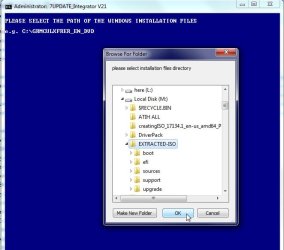
From post 1, when I follow these instructions:
1. Copy and paste your installation media to your hard drive (OK, seems easy enough to understand)
2. Right click and Run as administrator on the the 7update.cmd (OK, did that)
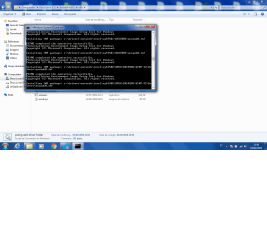
...The blue cmd window that opens just freaks out, flashes wildly, scrolls in high speed, and seems to be trying to flash messages about (hard to read as it's all flashing)
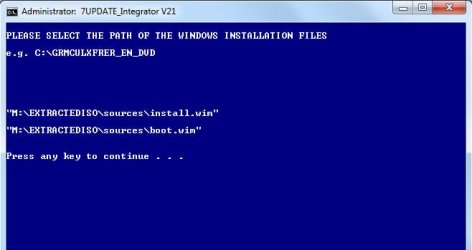
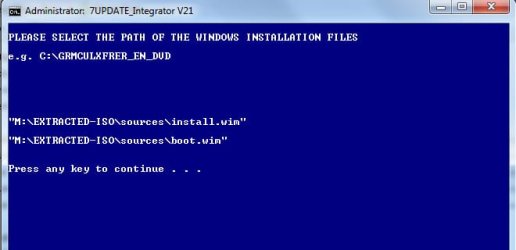
1. "please select the path of the windows installation file"
2. "BIN\setwimdirpath.cmd is not a recognized internal or external command"
But it's impossible to enter any text or interact with the cmd window at all now that it's freaking out. All I can do is close it again.

...is that what happens to everyone else when they try it? lol

I'm trying to get my new NVME drive to be recognized when I try to install Windows 7 x64 on it. Of course, with every new supposed fix I discover on the internet and try, I'm the only one getting the dead end results I keep seeing.
I see some have mentioned retrieving a driver from the drive's manufacturer which can be loaded via USB during the W7x64 install process. But there is no such driver referenced on the manufacturer's website. (it's a Sabrent Rocket 250GD NVME drive "SB-ROCKET-256")
 

My Computer My Computer

At a glance

Windows 7 Ultimate x64
Computer type
PC/Desktop
OS
Windows 7 Ultimate x64
Works fine for me:

best if you don't have spaces in the path

works-fine1.jpg
 

My Computers My Computers

  • At a glance

    7 X64i5 84002x8gb 3200mhz
    Computer type
    PC/Desktop
    OS
    7 X64
    CPU
    i5 8400
    Motherboard
    gigabyte b365m ds3h
    Memory
    2x8gb 3200mhz
    Hard Drives
    various
    PSU
    pure power 11 400w cm
    Case
    Coolermaster
    Cooling
    cryorig m9i
  • At a glance

    7x64g54008gb ddr4 2400
    Computer type
    PC/Desktop
    OS
    7x64
    CPU
    g5400
    Motherboard
    ga b365m ds3h
    Memory
    8gb ddr4 2400
    PSU
    xfx pro 450w
The thread topic fix didn't work for me, so I used free MSI Win7 Smart Tool, which was specifically made to effortlessly integrate NVME drivers into W7 installation media. It worked!
...It also supposedly can (I didn't try this) integrate USB drivers for the new AMD CPU's that normally force you to install Windows 7 with no USB support.
 

My Computer My Computer

At a glance

Windows 7 Ultimate x64
Computer type
PC/Desktop
OS
Windows 7 Ultimate x64
Yes, I am aware of it. This tool can do much more. It is really intended to create updated installation media.
 

My Computers My Computers

  • At a glance

    7 X64i5 84002x8gb 3200mhz
    Computer type
    PC/Desktop
    OS
    7 X64
    CPU
    i5 8400
    Motherboard
    gigabyte b365m ds3h
    Memory
    2x8gb 3200mhz
    Hard Drives
    various
    PSU
    pure power 11 400w cm
    Case
    Coolermaster
    Cooling
    cryorig m9i
  • At a glance

    7x64g54008gb ddr4 2400
    Computer type
    PC/Desktop
    OS
    7x64
    CPU
    g5400
    Motherboard
    ga b365m ds3h
    Memory
    8gb ddr4 2400
    PSU
    xfx pro 450w
Yes, I am aware of it. This tool can do much more. It is really intended to create updated installation media.
OK, NOW I'm confused.
I know this whole thread is specifically about updating installation media, because it's in the title. I also know that the MSI Win7 Smart Tool I mentioned was specifically created to update installation media. So when you say "this tool" and "is really intended to create updated installation media" I can't know for sure which tool you're talking about. I assume you're talking about the thread topic tool, but who knows.


In the end, my fix didn't really work either. The NVME drive was finally recognized with my updated installation media (created by MSI Win7 Smart Tool) during my Windows 7x64 install attempt. Problem was, it stopped right there and gave a fun new warning message about: "this drive might not be able to boot" so it would once again not allow me proceed with OS installation to my NVME drive. The warning said to make sure it's set to "AHCI" in the bios ("RAID" was my only other choice) which is definitely already is... Still, I got their tool to do stuff instead of just freaking out, so that was nice.
 

My Computer My Computer

At a glance

Windows 7 Ultimate x64
Computer type
PC/Desktop
OS
Windows 7 Ultimate x64
Most people use 7Updater to integrate the 200 or so windows updates into their installation media. 7updater was originally intended to use Simplix update pack.

However, the user can also answer N to the Download Updates question and therefore not use Simplix. 7updater will then continue and only integrate updates and drivers that the user has placed in the relevant folders. See first and second post of this thread.

Other advantages are that it updates boot.wim and winre.wim as well as install.wim. It can also update either an individual image or all images.
 

My Computers My Computers

  • At a glance

    7 X64i5 84002x8gb 3200mhz
    Computer type
    PC/Desktop
    OS
    7 X64
    CPU
    i5 8400
    Motherboard
    gigabyte b365m ds3h
    Memory
    2x8gb 3200mhz
    Hard Drives
    various
    PSU
    pure power 11 400w cm
    Case
    Coolermaster
    Cooling
    cryorig m9i
  • At a glance

    7x64g54008gb ddr4 2400
    Computer type
    PC/Desktop
    OS
    7x64
    CPU
    g5400
    Motherboard
    ga b365m ds3h
    Memory
    8gb ddr4 2400
    PSU
    xfx pro 450w
I still can't make it past step 2.
When right click and run 7UPDATEv21.cmd as administrator, all heck breaks loose.
"3. Browse to the folder containing your win 7 installation media" is impossible, and a mere pipe dream.

I could do a Rubik's cube in under a minute when I was 13. Taught myself to play multiple instruments.

I seem to be able to read
'BIN\setWindirpath.cmd' is not recognized as an internal or external command, operable program, or batch file
flashing/scrolling at hyper-speed, filling the entire cmd window.
When I just right-click on "7UPDATEv21.cmd" and open as administrator [i.e. step 2 of the instructions] it sets off a funhouse of unstoppable action in the cmd window. All I can do is close the window when I've had my fill of watching it scroll wildly.
 
Last edited:

My Computer My Computer

At a glance

Windows 7 Ultimate x64
Computer type
PC/Desktop
OS
Windows 7 Ultimate x64
Not sure what you are doing wrong.

1) First, it is always a good idea to use short paths without spaces.
Extract the zip file directly to the root of the drive, so you should have C:\7UPDATEv21 folder
Also make sure the ISO contents have been extracted to a short path without spaces. E.G. C:\EXTRACTED-ISO

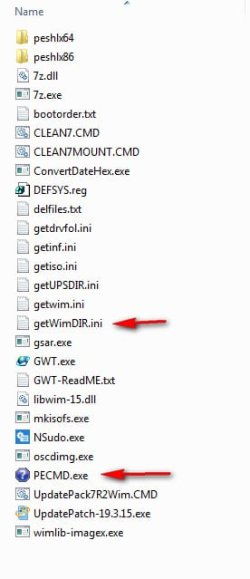
2) Check the contents of the C:\7UPDATEv21\BIN folder.
It should contain the following: ( the two arrowed files are used for that browse function)

2019-03-22_213038.jpg
 

My Computers My Computers

  • At a glance

    7 X64i5 84002x8gb 3200mhz
    Computer type
    PC/Desktop
    OS
    7 X64
    CPU
    i5 8400
    Motherboard
    gigabyte b365m ds3h
    Memory
    2x8gb 3200mhz
    Hard Drives
    various
    PSU
    pure power 11 400w cm
    Case
    Coolermaster
    Cooling
    cryorig m9i
  • At a glance

    7x64g54008gb ddr4 2400
    Computer type
    PC/Desktop
    OS
    7x64
    CPU
    g5400
    Motherboard
    ga b365m ds3h
    Memory
    8gb ddr4 2400
    PSU
    xfx pro 450w
2019-03-22_213906.jpg


2019-03-22_213928.jpg
 

My Computers My Computers

  • At a glance

    7 X64i5 84002x8gb 3200mhz
    Computer type
    PC/Desktop
    OS
    7 X64
    CPU
    i5 8400
    Motherboard
    gigabyte b365m ds3h
    Memory
    2x8gb 3200mhz
    Hard Drives
    various
    PSU
    pure power 11 400w cm
    Case
    Coolermaster
    Cooling
    cryorig m9i
  • At a glance

    7x64g54008gb ddr4 2400
    Computer type
    PC/Desktop
    OS
    7x64
    CPU
    g5400
    Motherboard
    ga b365m ds3h
    Memory
    8gb ddr4 2400
    PSU
    xfx pro 450w
I finally got past the wackiness with your added instructions, thanks!

Now the resulting installation files are too massive to put on a fat32 USB stick or a DVD. So I'll now assume the installations created with this method cannot be UEFI-install capable. I tried some methods to split it, and tried a fix (Rufus) that claimed NTFS file system could work instead of FAT32 USB. Nothing worked for me. Thanks for all your help getting your extremely clever tool working for me, it clearly did run as intended in the end. It was like a fantastic Rube Goldberg machine the way it took off and did things on its own.
 

My Computer My Computer

At a glance

Windows 7 Ultimate x64
Computer type
PC/Desktop
OS
Windows 7 Ultimate x64
Back
Top