Update your Win 7 installation media

Might be the new version of BIN\gwt.exe that is flagged as false positive.

Try previous version
View attachment GetWaikTools18.10.zip


JFX created gwt.exe, so probably it is the packing used for latest gwt.exe 32 bit.

EDIT: Yep. That was it. Have changed to older version of gwt.exe in 7UPDATERv25. Now on first post.
 
Last edited:

My Computers My Computers

System One System Two

  • Computer type
    PC/Desktop
    OS
    7 X64
    CPU
    i5 8400
    Motherboard
    gigabyte b365m ds3h
    Memory
    2x8gb 3200mhz
    Hard Drives
    various
    PSU
    pure power 11 400w cm
    Case
    Coolermaster
    Cooling
    cryorig m9i
  • Computer type
    PC/Desktop
    OS
    7x64
    CPU
    g5400
    Motherboard
    ga b365m ds3h
    Memory
    8gb ddr4 2400
    PSU
    xfx pro 450w
Not sure what MS changed/updated in Win10-1903 but after adding all of the mobo drivers to both bootx64/installx64 folders, the updater didn't give me any problems (49 drivers were installed). Hopefully it also found the AMD NVME drivers (part of the raid drivers). Only errors I say was the same one about Unmounting Install.wim - guess MS still hasn't fixed it but updated all install images (*).
 

My Computer My Computer

Computer type
PC/Desktop
Computer Manufacturer/Model Number
White Box
OS
Win7-64/Sp1 Ultimate
CPU
AMD Ryzen 5 1600
Motherboard
Asrock B450m Pro
Memory
64GB
Graphics Card(s)
GTX 1060 6GB
Hard Drives
Boot = Crucial MX500 250GB M2 Sata/AHCI
LSI 9211-8i HBA/IT card
Port1 = 1x Team Group GX2 256GB SSD (boot)
1x Crucial MX500 1TB (Raid 1 storage)
2x Team Group GX2 1TB (storage)
Port2 = 1x Team Group GX2 256GB SSD (boot)
1x Crucial MX500 1TB
PSU
EVGA B450
Keyboard
88 key (TKL) mechanical
Do Not add all of the device drivers into the Boot.WIM - Locked Hard but was worth the test.


Failed to unmount the WIM errors Work around
Close the File Explorer (Explorer.exe) is holding something open


Did this and no issues unmounting the image
 
Last edited:

My Computer My Computer

Computer type
PC/Desktop
Computer Manufacturer/Model Number
White Box
OS
Win7-64/Sp1 Ultimate
CPU
AMD Ryzen 5 1600
Motherboard
Asrock B450m Pro
Memory
64GB
Graphics Card(s)
GTX 1060 6GB
Hard Drives
Boot = Crucial MX500 250GB M2 Sata/AHCI
LSI 9211-8i HBA/IT card
Port1 = 1x Team Group GX2 256GB SSD (boot)
1x Crucial MX500 1TB (Raid 1 storage)
2x Team Group GX2 1TB (storage)
Port2 = 1x Team Group GX2 256GB SSD (boot)
1x Crucial MX500 1TB
PSU
EVGA B450
Keyboard
88 key (TKL) mechanical
No working USB 3 drivers in both images. Not sure what the problem is except possibly incomplete drivers from the Motherboard Disk. The only time I had a working version indicated that there were 5 drivers added but don't recall if that was from the AMD Official Drivers


Looks as though Asrock finally updated their USB Patcher Tool instruction page ASRock---Installing Windows 7 on Intel 100 / 200 / SoC and AMD AM4 series Platforms to clarify the options - seems that the best is to use the Install Disk (DVD) to create the flash based version with the needed drivers for Intel/AMD. Much easier to read then the tiny fonts Win10 insists on using in the tool's menu.


Not sure if it'll work and don't really care now since I ordered a StarTech PEXUSB4DP 4 Port PCI Express Low Profile High Speed USB Card - PCIe USB 2.0 Card - PCI-E USB 2.0 Card - Newegg.com - x1 PCIe USB 2.0 add-on card that win7 includes drivers for. Have a question in to AsRock as to whether this board will be usable at boot with the xhci mode disabled. Don't know if that shuts off all the onboard ports or leaves them functional, which is the big question as the USB chip is a Via 62xx series. Supported by Win2K and later.
 

My Computer My Computer

Computer type
PC/Desktop
Computer Manufacturer/Model Number
White Box
OS
Win7-64/Sp1 Ultimate
CPU
AMD Ryzen 5 1600
Motherboard
Asrock B450m Pro
Memory
64GB
Graphics Card(s)
GTX 1060 6GB
Hard Drives
Boot = Crucial MX500 250GB M2 Sata/AHCI
LSI 9211-8i HBA/IT card
Port1 = 1x Team Group GX2 256GB SSD (boot)
1x Crucial MX500 1TB (Raid 1 storage)
2x Team Group GX2 1TB (storage)
Port2 = 1x Team Group GX2 256GB SSD (boot)
1x Crucial MX500 1TB
PSU
EVGA B450
Keyboard
88 key (TKL) mechanical
Why get error on "setWimdirpath.cmd" and it loops very fast on it.

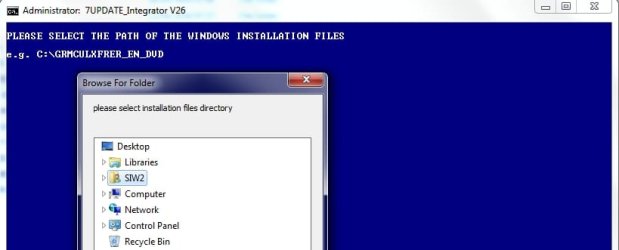
No "Browse" window to select installation directory. How to "call that window" ?


ALso, where to put those "microsoft nvme MSU files", so my M2 to appear on the List of drives on installation. UPDATES or DRIVERS folder?

The problem itself is: I have Corsair MP510 installed on the M2 slot, but when Windows 7 boots up from USB stick... it stops on the "Drives list" and nothing is there.
I have "Load driver option", but i can`t find driver for this stupid Corsair ! Can i still do something , so i can use Windows 7 x64 on my nvme ? Or i must install windows 10(sh*t)
 

My Computer My Computer

Computer type
PC/Desktop
OS
XP 32 bit
Yovko: those MSU files go into the Updates folder - Note that others reported them as being very slow in write speeds but you should see the drives.


If your system boots with a working Mouse/Keyboard on the board, then you should be able to complete the installation. The problem most of us have is the latest chips from Intel and AMD - z100 and later from Intel /x300 and later from AMD may not have any EHCI for Win7 as is the case with my AMD B450 based board. Absolutely no USB 2.0 support, meaning I can't get Win7 to find a keyboard/mouse unless I can find my PS2 keyboard
 

My Computer My Computer

Computer type
PC/Desktop
Computer Manufacturer/Model Number
White Box
OS
Win7-64/Sp1 Ultimate
CPU
AMD Ryzen 5 1600
Motherboard
Asrock B450m Pro
Memory
64GB
Graphics Card(s)
GTX 1060 6GB
Hard Drives
Boot = Crucial MX500 250GB M2 Sata/AHCI
LSI 9211-8i HBA/IT card
Port1 = 1x Team Group GX2 256GB SSD (boot)
1x Crucial MX500 1TB (Raid 1 storage)
2x Team Group GX2 1TB (storage)
Port2 = 1x Team Group GX2 256GB SSD (boot)
1x Crucial MX500 1TB
PSU
EVGA B450
Keyboard
88 key (TKL) mechanical
I have PS2 keyboard and mouse - no problem with that...

But i`m not able to run the "7updater26". It shows error and i don`t get to the "Browse" window to select installation source...

May be developer of this can tell me why or fix the problem ?
 

My Computer My Computer

Computer type
PC/Desktop
OS
XP 32 bit
i don`t get to the "Browse" window to select installation source...


Just checked. I get the browse window..

browse.jpg


Maybe the files weren't extracted properly from the zip folder.

Check that you have pecmd.exe and getwimdir.ini in the BIN folder
 

My Computers My Computers

System One System Two

  • Computer type
    PC/Desktop
    OS
    7 X64
    CPU
    i5 8400
    Motherboard
    gigabyte b365m ds3h
    Memory
    2x8gb 3200mhz
    Hard Drives
    various
    PSU
    pure power 11 400w cm
    Case
    Coolermaster
    Cooling
    cryorig m9i
  • Computer type
    PC/Desktop
    OS
    7x64
    CPU
    g5400
    Motherboard
    ga b365m ds3h
    Memory
    8gb ddr4 2400
    PSU
    xfx pro 450w
I got message that blinsk very fast , just below the "e.g. C:\........." example

If i can snapshot it, will post picture.
Between i`m doing this on 32 bit Windows 7, if this makes sense.
Yes, i have those files in BIN folder.
Here is a video, because i can`t "print screen" - it`s fast.

Download the video to see it, if not run in browser.

Zippyshare.com - WP_20190608_00_33_11_Pro.mp4
 
Last edited:

My Computer My Computer

Computer type
PC/Desktop
OS
XP 32 bit
I think i found the solution.

Moved the whole folder to D:.. and voila, "Browse" window is alive.
 

My Computer My Computer

Computer type
PC/Desktop
OS
XP 32 bit
Now another problem, creating ISO file..

See picture for more info.
 

Attachments

  • Untitled.jpg
    Untitled.jpg
    41.9 KB · Views: 97

My Computer My Computer

Computer type
PC/Desktop
OS
XP 32 bit

My Computers My Computers

System One System Two

  • Computer type
    PC/Desktop
    OS
    7 X64
    CPU
    i5 8400
    Motherboard
    gigabyte b365m ds3h
    Memory
    2x8gb 3200mhz
    Hard Drives
    various
    PSU
    pure power 11 400w cm
    Case
    Coolermaster
    Cooling
    cryorig m9i
  • Computer type
    PC/Desktop
    OS
    7x64
    CPU
    g5400
    Motherboard
    ga b365m ds3h
    Memory
    8gb ddr4 2400
    PSU
    xfx pro 450w
OK, working.

Just some infor i saw

"memtest.efi" is not found in \boot ....
So may be something is deleted this file during whole process. If it`s not something to worry about, then i`m just saying.
 

My Computer My Computer

Computer type
PC/Desktop
OS
XP 32 bit
BUt, overall i still don`t see my NVMe in the list of drives when install Win7.

SO i suspect that installation want some other driver, but i can`t see what is it

I forgot to say that the motherboard is AB350M (AM4)
 

My Computer My Computer

Computer type
PC/Desktop
OS
XP 32 bit
Got this error now


CREATING WinRE.WIM...

[ERROR] There is already an image named "Microsoft Windows Setup (x64)" in the destination WIM
ERROR: Exiting with error code 11:
Tried to add an image with a name that is already in use.

Scanning "D:\7UPDATERv26\BIN\peshlx64\Windows" (loading as WIM path: "\Windows")...
44 bytes scanned (1 files, 8 directories)
Updating "\Windows\System32\winpeshl.ini" in WIM image
Using LZX compression with 1 thread
Archiving file data: 0 bytes of 0 bytes (0%) donee


using v26 the USB 3 support is now working but no selection menus to be installed - no cfg files for basic, premium, pro and ultimate


reran on fresh files and this time all of the cfg files are there this time - hope the usb 3 works again
 

My Computer My Computer

Computer type
PC/Desktop
Computer Manufacturer/Model Number
White Box
OS
Win7-64/Sp1 Ultimate
CPU
AMD Ryzen 5 1600
Motherboard
Asrock B450m Pro
Memory
64GB
Graphics Card(s)
GTX 1060 6GB
Hard Drives
Boot = Crucial MX500 250GB M2 Sata/AHCI
LSI 9211-8i HBA/IT card
Port1 = 1x Team Group GX2 256GB SSD (boot)
1x Crucial MX500 1TB (Raid 1 storage)
2x Team Group GX2 1TB (storage)
Port2 = 1x Team Group GX2 256GB SSD (boot)
1x Crucial MX500 1TB
PSU
EVGA B450
Keyboard
88 key (TKL) mechanical
There is already an image named "Microsoft Windows Setup (x64)" in the destination WIM

That is because you already have winre.wim from a previous time you ran it.
 

My Computers My Computers

System One System Two

  • Computer type
    PC/Desktop
    OS
    7 X64
    CPU
    i5 8400
    Motherboard
    gigabyte b365m ds3h
    Memory
    2x8gb 3200mhz
    Hard Drives
    various
    PSU
    pure power 11 400w cm
    Case
    Coolermaster
    Cooling
    cryorig m9i
  • Computer type
    PC/Desktop
    OS
    7x64
    CPU
    g5400
    Motherboard
    ga b365m ds3h
    Memory
    8gb ddr4 2400
    PSU
    xfx pro 450w
Not critical as it has not happened again:


Had the same issue after rerunning the updater with no Selection Menu (installer can't continue) even though all files where there (ei.cfg.bak/home.basic.***.cfg and the others) so beginning to suspect bad copy from latest Win7-Ultimate ISO using that screwy UDF file system. Was able to mount the image and once mounted, copied files to hard drive but suspect something wrong.

Used the Gigabyte Tool and was successful - Was able to install Selected Win7 (Menus did show up)
Testing with Original Win7/SP1 install media (DVD) will see if the USB 3 and NVME updates work


Test Results:
No Menus but USB 3 does work - Will try again without NVME update


No menus w/o the NVME update


Suspect USB working due to recent firmware update - will test w/o ei.cfg file from instal dvd


No USB with plain Win7 Installer files. Really beginning to annoy me though I'm trying again with just USB 3 support, none of the 3.1 support from AMD or any NVME. Hoping to see a menu offering


Now I'm getting missing driver errors - indicating the DVD/CD is missing but suspect it's due to the 3.1 support screwing things up. AMD has really made it damn near impossible to get a working Win7 installation with any tools.


I'll have to see if I can use the Gigabyte patcher that folks says works well.
 
Last edited:

My Computer My Computer

Computer type
PC/Desktop
Computer Manufacturer/Model Number
White Box
OS
Win7-64/Sp1 Ultimate
CPU
AMD Ryzen 5 1600
Motherboard
Asrock B450m Pro
Memory
64GB
Graphics Card(s)
GTX 1060 6GB
Hard Drives
Boot = Crucial MX500 250GB M2 Sata/AHCI
LSI 9211-8i HBA/IT card
Port1 = 1x Team Group GX2 256GB SSD (boot)
1x Crucial MX500 1TB (Raid 1 storage)
2x Team Group GX2 1TB (storage)
Port2 = 1x Team Group GX2 256GB SSD (boot)
1x Crucial MX500 1TB
PSU
EVGA B450
Keyboard
88 key (TKL) mechanical
Something went wrong...

Hello!

I wanted to try this installation media updater, I followed the steps described, but during the update process, a window shows up, saying: something went wrong.

image.png

I tried using a win10 and a win7 as the OS doing the update, same result.
Can you please help me what am I doing wrong, since the error message do not hold much information in it.


Edit: Currently i am using virtualbox to run Windows
 
Last edited:

My Computer My Computer

Computer type
Laptop
Computer Manufacturer/Model Number
ASUS G752
OS
ArchLinux 64bit
CPU
Intel i7-6700HQ
Motherboard
G752VM
Memory
32GB
Graphics Card(s)
Nvidia GeForce GTX1060
Sound Card
Realtek ALC668
Screen Resolution
1920x1080
Hard Drives
Samsung 960 EVO M2 NVMe SSD 250GB +
Hitachi HTS721010A9 1TB @ 7200rpm
PSU
ASUS ADP-180MB-F 180W
Case
ASUS G752
Cooling
Stock dual fan + Microsoft 1388 notebook coolug base
Keyboard
G752 keyboard
Mouse
ASUS Cerberus Arctic
Internet Speed
1Gbps
Antivirus
Kaspersky
Browser
Opera
That is a message from simplix downloader. Internet connection problem, possibly.

You can download directly download directly

The Updatepack needs to be next to 7UPDATER.cmd
 

My Computers My Computers

System One System Two

  • Computer type
    PC/Desktop
    OS
    7 X64
    CPU
    i5 8400
    Motherboard
    gigabyte b365m ds3h
    Memory
    2x8gb 3200mhz
    Hard Drives
    various
    PSU
    pure power 11 400w cm
    Case
    Coolermaster
    Cooling
    cryorig m9i
  • Computer type
    PC/Desktop
    OS
    7x64
    CPU
    g5400
    Motherboard
    ga b365m ds3h
    Memory
    8gb ddr4 2400
    PSU
    xfx pro 450w
That is a message from simplix downloader. Internet connection problem, possibly.

You can download directly download directly

The Updatepack needs to be next to 7UPDATER.cmd


Working, Thank You!
 

My Computer My Computer

Computer type
Laptop
Computer Manufacturer/Model Number
ASUS G752
OS
ArchLinux 64bit
CPU
Intel i7-6700HQ
Motherboard
G752VM
Memory
32GB
Graphics Card(s)
Nvidia GeForce GTX1060
Sound Card
Realtek ALC668
Screen Resolution
1920x1080
Hard Drives
Samsung 960 EVO M2 NVMe SSD 250GB +
Hitachi HTS721010A9 1TB @ 7200rpm
PSU
ASUS ADP-180MB-F 180W
Case
ASUS G752
Cooling
Stock dual fan + Microsoft 1388 notebook coolug base
Keyboard
G752 keyboard
Mouse
ASUS Cerberus Arctic
Internet Speed
1Gbps
Antivirus
Kaspersky
Browser
Opera
Back
Top