Update your Win 7 installation media

I havent come across that message.

Read what it says. Pretty obvious.

If you already have win10 installed, I would install win 7 a different way.

Boot into win 10.

Rt click the win7 iso and mount it.

Apply the image to the target partition using dism ( or dism++ easier because it has a gui )

If the mounted iso has been assigned letter Z:
and you want to install win7 Pro which is index 3
and the target partition is E:
( create the partition first, cant apply an image to unallocated space)
( If the win7 installation media is on a usb stick, no need to mount an iso, just use the letter of the usb stick )
( if you want to apply home premium the index is 2 )

from admin cmd prompt:

dism /Apply-Image /ImageFile:Z:\sources\install.wim /Index:3 /ApplyDir:E:\
(then press enter)


It will take a couple of minutes. Then type:

bcdboot e:\windows
(then press enter)

close cmd prompt job done.
 

My Computers My Computers

System One System Two

  • Computer type
    PC/Desktop
    OS
    7 X64
    CPU
    i5 8400
    Motherboard
    gigabyte b365m ds3h
    Memory
    2x8gb 3200mhz
    Hard Drives
    various
    PSU
    pure power 11 400w cm
    Case
    Coolermaster
    Cooling
    cryorig m9i
  • Computer type
    PC/Desktop
    OS
    7x64
    CPU
    g5400
    Motherboard
    ga b365m ds3h
    Memory
    8gb ddr4 2400
    PSU
    xfx pro 450w
I havent come across that message.

Read what it says. Pretty obvious.

If you already have win10 installed, I would install win 7 a different way.

Boot into win 10.

Rt click the win7 iso and mount it.

Apply the image to the target partition using dism ( or dism++ easier because it has a gui )

If the mounted iso has been assigned letter Z:
and you want to install win7 Pro which is index 3
and the target partition is E:
( create the partition first, cant apply an image to unallocated space)
( If the win7 installation media is on a usb stick, no need to mount an iso, just use the letter of the usb stick )
( if you want to apply home premium the index is 2 )

from admin cmd prompt:

dism /Apply-Image /ImageFile:Z:\sources\install.wim /Index:3 /ApplyDir:E:\
(then press enter)


It will take a couple of minutes. Then type:

bcdboot e:\windows
(then press enter)

close cmd prompt job done.
Will the OOBE automatically come once I boot into the Windows 7 install? And when I restart the computer will Windows 7 be listed in the boot manager? Thank you.
 

My Computers My Computers

System One System Two

  • Computer type
    PC/Desktop
    Computer Manufacturer/Model Number
    Custom
    OS
    Windows 7 Professional x64
    CPU
    AMD Ryzen 5 3600
    Motherboard
    MSI B450 Tomahawk MAX
    Memory
    16 GB Corsair kit 2x
    Graphics Card(s)
    NVidia GTX 1660
    Hard Drives
    Seagate ST2000DM008 HDD
    SPCC M.2 NVMe SSD
  • Computer type
    PC/Desktop
Will the OOBE automatically come once I boot into the Windows 7 install? And when I restart the computer will Windows 7 be listed in the boot manager?

yes.
 

My Computers My Computers

System One System Two

  • Computer type
    PC/Desktop
    OS
    7 X64
    CPU
    i5 8400
    Motherboard
    gigabyte b365m ds3h
    Memory
    2x8gb 3200mhz
    Hard Drives
    various
    PSU
    pure power 11 400w cm
    Case
    Coolermaster
    Cooling
    cryorig m9i
  • Computer type
    PC/Desktop
    OS
    7x64
    CPU
    g5400
    Motherboard
    ga b365m ds3h
    Memory
    8gb ddr4 2400
    PSU
    xfx pro 450w
I just tried to boot into the Windows 7 install and it BSOD on me. I couldn't get the info because it flashed really quickly and restarted. Is there any problem?

EDIT: Now it wouldn't even show up in the boot manager. It only shows in msconfig.
 
Last edited:

My Computers My Computers

System One System Two

  • Computer type
    PC/Desktop
    Computer Manufacturer/Model Number
    Custom
    OS
    Windows 7 Professional x64
    CPU
    AMD Ryzen 5 3600
    Motherboard
    MSI B450 Tomahawk MAX
    Memory
    16 GB Corsair kit 2x
    Graphics Card(s)
    NVidia GTX 1660
    Hard Drives
    Seagate ST2000DM008 HDD
    SPCC M.2 NVMe SSD
  • Computer type
    PC/Desktop
You would need to integrate the correct drivers into the installation media.

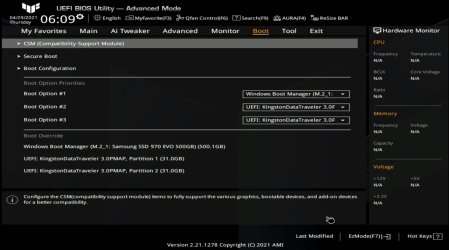
You also need to enable CSM in the bios

asus-b560m-csm-bios-.jpg


Ryzen drivers are linked at the start of thread, post3
Update your Win 7 installation media

If it is still not working after enabling CSM , you could follow that link and see if there is anything else you need for your machine.

I dont have an amd system, so you need to ask there.
 

My Computers My Computers

System One System Two

  • Computer type
    PC/Desktop
    OS
    7 X64
    CPU
    i5 8400
    Motherboard
    gigabyte b365m ds3h
    Memory
    2x8gb 3200mhz
    Hard Drives
    various
    PSU
    pure power 11 400w cm
    Case
    Coolermaster
    Cooling
    cryorig m9i
  • Computer type
    PC/Desktop
    OS
    7x64
    CPU
    g5400
    Motherboard
    ga b365m ds3h
    Memory
    8gb ddr4 2400
    PSU
    xfx pro 450w
You would need to integrate the correct drivers into the installation media.

You also need to enable CSM in the bios

View attachment 419955


Ryzen drivers are linked at the start of thread, post3
Update your Win 7 installation media

If it is still not working after enabling CSM , you could follow that link and see if there is anything else you need for your machine.

I dont have an amd system, so you need to ask there.
I already had CSM enabled since I bought the motherboard and for the drivers, I used Win7UP and the drivers you listed are for AMD APU's (integrated graphics) but I have a dedicated graphics card.
 

My Computers My Computers

System One System Two

  • Computer type
    PC/Desktop
    Computer Manufacturer/Model Number
    Custom
    OS
    Windows 7 Professional x64
    CPU
    AMD Ryzen 5 3600
    Motherboard
    MSI B450 Tomahawk MAX
    Memory
    16 GB Corsair kit 2x
    Graphics Card(s)
    NVidia GTX 1660
    Hard Drives
    Seagate ST2000DM008 HDD
    SPCC M.2 NVMe SSD
  • Computer type
    PC/Desktop
Last edited:

My Computers My Computers

System One System Two

  • Computer type
    PC/Desktop
    OS
    7 X64
    CPU
    i5 8400
    Motherboard
    gigabyte b365m ds3h
    Memory
    2x8gb 3200mhz
    Hard Drives
    various
    PSU
    pure power 11 400w cm
    Case
    Coolermaster
    Cooling
    cryorig m9i
  • Computer type
    PC/Desktop
    OS
    7x64
    CPU
    g5400
    Motherboard
    ga b365m ds3h
    Memory
    8gb ddr4 2400
    PSU
    xfx pro 450w

My Computers My Computers

System One System Two

  • Computer type
    PC/Desktop
    Computer Manufacturer/Model Number
    Custom
    OS
    Windows 7 Professional x64
    CPU
    AMD Ryzen 5 3600
    Motherboard
    MSI B450 Tomahawk MAX
    Memory
    16 GB Corsair kit 2x
    Graphics Card(s)
    NVidia GTX 1660
    Hard Drives
    Seagate ST2000DM008 HDD
    SPCC M.2 NVMe SSD
  • Computer type
    PC/Desktop
How did you fix your bsod problem? What did you do differently?
 

My Computers My Computers

System One System Two

  • Computer type
    PC/Desktop
    OS
    7 X64
    CPU
    i5 8400
    Motherboard
    gigabyte b365m ds3h
    Memory
    2x8gb 3200mhz
    Hard Drives
    various
    PSU
    pure power 11 400w cm
    Case
    Coolermaster
    Cooling
    cryorig m9i
  • Computer type
    PC/Desktop
    OS
    7x64
    CPU
    g5400
    Motherboard
    ga b365m ds3h
    Memory
    8gb ddr4 2400
    PSU
    xfx pro 450w
How did you fix your bsod problem? What did you do differently?

I reran the Win7UP batch file but I also added the updating program (forgot what it was called) and added the driver 7z megapack. That seemed to fix my issue. Now I'm on ESU updates.
 

My Computers My Computers

System One System Two

  • Computer type
    PC/Desktop
    Computer Manufacturer/Model Number
    Custom
    OS
    Windows 7 Professional x64
    CPU
    AMD Ryzen 5 3600
    Motherboard
    MSI B450 Tomahawk MAX
    Memory
    16 GB Corsair kit 2x
    Graphics Card(s)
    NVidia GTX 1660
    Hard Drives
    Seagate ST2000DM008 HDD
    SPCC M.2 NVMe SSD
  • Computer type
    PC/Desktop
:-)
 

My Computers My Computers

System One System Two

  • Computer type
    PC/Desktop
    OS
    7 X64
    CPU
    i5 8400
    Motherboard
    gigabyte b365m ds3h
    Memory
    2x8gb 3200mhz
    Hard Drives
    various
    PSU
    pure power 11 400w cm
    Case
    Coolermaster
    Cooling
    cryorig m9i
  • Computer type
    PC/Desktop
    OS
    7x64
    CPU
    g5400
    Motherboard
    ga b365m ds3h
    Memory
    8gb ddr4 2400
    PSU
    xfx pro 450w
does anyone ever get bluescreen after turning on monitor?
ex: power on, playing game is fine. after playing game, i turnoff monitor. and try turning on. and it crashed. ntoskrnl i use blurscreenview and it is always ntoskernel causing the problem. windows 7 is absolutely stable.. just this problem get me splitting hairs

5950X+MSI MAG Tomahawk + Gskills 2*16 3600mhz CL16 + 650W Seasonic Titanium. all new parts

thank you for creating this tool
 

My Computers My Computers

System One System Two

  • Computer type
    PC/Desktop
    Computer Manufacturer/Model Number
    Custom
    OS
    Windows 7 Ultimate x64
    CPU
    5950X
    Motherboard
    X570 MSI MAG Tomahawk
    Memory
    Gskills 2x16GB 3600mhz CL16
    Graphics Card(s)
    5700XT
    Hard Drives
    NVME 970 EVO
  • Computer type
    PC/Desktop
Hello,

I tried doing this and my keyboard and mouse were still not working :(...
 

My Computers My Computers

System One System Two

  • Computer type
    PC/Desktop
    Computer Manufacturer/Model Number
    ASUS
    OS
    Windows 10 Home
    CPU
    i5-10600 CPU @ 3.30 GHz
    Motherboard
    TUF GAMING Z490-PLUS
    Memory
    32 GB 4 slots used
    Graphics Card(s)
    GTX 1060 6GB
    Hard Drives
    SSD (CT1000MX500SSD1)
    Antivirus
    N/A
    Browser
    Microsoft Edge
  • Computer type
    PC/Desktop

My Computer My Computer

Computer type
PC/Desktop
Computer Manufacturer/Model Number
custom build
OS
The one I am using to register is my Windows 7 Professional x64 one.
CPU
Intel Core i7-3970x
Motherboard
Asus Rampage 4 Extreme
Memory
Cosair Dominator Platinum
Graphics Card(s)
2x eVGA GTX 770 4GB CLassified with ACX cooler
Antivirus
I have KIS 2016 which is an internet security suite....?
Browser
Fiefox
Changed to a different version of booticex86 to avoid that FP.
7UPv64a.zip on first post
 

My Computers My Computers

System One System Two

  • Computer type
    PC/Desktop
    OS
    7 X64
    CPU
    i5 8400
    Motherboard
    gigabyte b365m ds3h
    Memory
    2x8gb 3200mhz
    Hard Drives
    various
    PSU
    pure power 11 400w cm
    Case
    Coolermaster
    Cooling
    cryorig m9i
  • Computer type
    PC/Desktop
    OS
    7x64
    CPU
    g5400
    Motherboard
    ga b365m ds3h
    Memory
    8gb ddr4 2400
    PSU
    xfx pro 450w
tl;dr-------------------------------------------------

i have windows 7 pro 64bit already installed on my hard drive (actually, both hard drives a 1T and a uefi 6T). all i did was remove a KVM switch, and my win7 won't boot any more. when i try to go into safe mode, it freezes on ambakdrv.sys. (an aomei backer upper file.)

i have instructions on how to remove that, but it requires me to be able to get into regedit. my old recovery discs won't boot due to them not being uefi.
---------------------------------------------------------------------------

i don't have my original win7 installation cd, so i downloaded a win pro sp1 64 bit iso file. Windows 7 Professional SP1 (32 bit and 64 bit ISOs) : Microsoft Corporation : Free Download, Borrow, and Streaming : Internet Archive

i applied the 7Upv64a updater to the contents i extracted with 7zip. i didn't use any other driver updater options.

i tried to create a new iso, but oscdimg said it was too large? so i copied all the files to a uefi bootable usb i have.

however, when i told my bios to boot from it, even though it was listed as a bootable device, it failed and just dumped me back into bios.


i'm not sure i have everything exactly right. i'm not as geeky as i used to be. i brought the usb drive to this laptop and used the bootsect /nt60 command on it (from the amd64 section of the windows 7 aik petools), but it is still not being recognized as bootable.


QUESTIONS:
1: do i need an installation disc, or should i really be using a recovery disc. or a winPE disc? i have tried making both winPE and winRE discs, but they only had boot.wim files and not install.wim files, so this updater couldn't run on them.

2: is there a proper, tested win7 pro sp1 iso i should download and use? (siw2, i found an older post with links to isos you had for download, but they're not available any more?)


i've been a week without a computer. i need some serious help.

INFOS (helpful or not)
cpu: intel i5 3G
mobo: asus x99-a
bios: secure boot is disabled, csm is disabled, fast boot is disabled. (but i think secure boot and csm are the opposite things... either way, as it is, it only recognizes uefi devices to boot from. which is fine, cuz i tried to boot from legacy devices before, and they don't even start.)
 

My Computers My Computers

System One System Two

  • Computer type
    PC/Desktop
    Computer Manufacturer/Model Number
    AVA custom build
    OS
    Windows 7 Pro 64bit
    CPU
    Intel i7
    Motherboard
    ASUS X99-A
    Memory
    16G (4x4) DDR4 2133mHz
    Graphics Card(s)
    GeForce GTX 980Ti 6G
    Sound Card
    onboard audio
    Hard Drives
    Seagate 1T HDD, Seagate 6T HDD, SATA
    PSU
    Corsair RM750x 750 watts
    Keyboard
    model M ps/2 (manuf 2019, yes new)
    Mouse
    Logitech Wireless w/ USB hub
    Antivirus
    avast
    Browser
    pale moon
    Other Info
    from dec 2015
  • Computer type
    PC/Desktop
blr13

CSM must be enabled for win7.
Secure boot disabled.

I am not sure what you downloaded. From the label, GSP1RMCPRXFRER_EN_DVD.ISO it sounds like it could be an iso imaged from the dvd.
 

My Computers My Computers

System One System Two

  • Computer type
    PC/Desktop
    OS
    7 X64
    CPU
    i5 8400
    Motherboard
    gigabyte b365m ds3h
    Memory
    2x8gb 3200mhz
    Hard Drives
    various
    PSU
    pure power 11 400w cm
    Case
    Coolermaster
    Cooling
    cryorig m9i
  • Computer type
    PC/Desktop
    OS
    7x64
    CPU
    g5400
    Motherboard
    ga b365m ds3h
    Memory
    8gb ddr4 2400
    PSU
    xfx pro 450w
Simplix updatepack7R2 seems to have trouble integrating .Net Framework 4.8 on 32-bit windows 7:

Code:
Addon - Microsoft .NET Framework 4.8
Addon  - copy file error:  Windows\Microsoft.NET\assembly\GAC_MSIL\System.Windows.Input.Manipulations\v4.0_4.0.0.0__b77a5c561934e089\System.Windows.Forms.DataVisualization.Design.dll
Addon  - copy file error:  Windows\Microsoft.NET\assembly\GAC_MSIL\System.Windows.Forms.DataVisualization\v4.0_4.0.0.0__31bf3856ad364e35\System.Windows.Forms.DataVisualization.dll
Addon  - copy file error:  Windows\Microsoft.NET\assembly\GAC_MSIL\System.Security.Principal\v4.0_4.0.0.0__b03f5f7f11d50a3a\System.Security.Cryptography.X509Certificates.dll
Addon  - copy file error:  Windows\Microsoft.NET\assembly\GAC_MSIL\System.Security.Cryptography.Primitives\v4.0_4.0.0.0__b03f5f7f11d50a3a\System.Security.Cryptography.Primitives.dll
Addon  - copy file error:  Windows\Microsoft.NET\assembly\GAC_MSIL\System.Security.Cryptography.Algorithms\v4.0_4.0.0.0__b03f5f7f11d50a3a\System.Security.Cryptography.Algorithms.dll
Addon  - copy file error:  Windows\Microsoft.NET\assembly\GAC_MSIL\System.Runtime.Serialization.Primitives\v4.0_4.0.0.0__b03f5f7f11d50a3a\System.Runtime.Serialization.Primitives.dll
Addon  - copy file error:  Windows\Microsoft.NET\assembly\GAC_MSIL\System.Runtime.Serialization.Formatters.Soap\v4.0_4.0.0.0__b03f5f7f11d50a3a\System.Runtime.Serialization.Formatters.Soap.dll
Addon  - copy file error:  Windows\Microsoft.NET\assembly\GAC_MSIL\System.Runtime.Serialization.Formatters\v4.0_4.0.0.0__b03f5f7f11d50a3a\System.Runtime.Serialization.Formatters.dll
Addon  - copy file error:  Windows\Microsoft.NET\assembly\GAC_MSIL\System.Runtime.Numerics\v4.0_4.0.0.0__b03f5f7f11d50a3a\System.Runtime.InteropServices.WindowsRuntime.dll
Addon  - copy file error:  Windows\Microsoft.NET\assembly\GAC_MSIL\System.Runtime.Numerics\v4.0_4.0.0.0__b03f5f7f11d50a3a\System.Runtime.InteropServices.RuntimeInformation.dll
Addon  - copy file error:  Windows\Microsoft.NET\assembly\GAC_MSIL\System.Runtime.CompilerServices.VisualC\v4.0_4.0.0.0__b03f5f7f11d50a3a\System.Runtime.CompilerServices.VisualC.dll
Addon  - copy file error:  Windows\Microsoft.NET\assembly\GAC_MSIL\System.DirectoryServices.AccountManagement\v4.0_4.0.0.0__b77a5c561934e089\System.DirectoryServices.AccountManagement.dll
Addon  - copy file error:  Windows\Microsoft.NET\assembly\GAC_MSIL\System.Diagnostics.TextWriterTraceListener\v4.0_4.0.0.0__b03f5f7f11d50a3a\System.Diagnostics.TextWriterTraceListener.dll
Addon  - copy file error:  Windows\Microsoft.NET\assembly\GAC_MSIL\System.ComponentModel.DataAnnotations\v4.0_4.0.0.0__31bf3856ad364e35\System.ComponentModel.Composition.Registration.dll
Addon  - copy file error:  Windows\Microsoft.NET\assembly\GAC_MSIL\Microsoft.Workflow.Compiler\v4.0_4.0.0.0__31bf3856ad364e35\Microsoft.Windows.ApplicationServer.Applications.dll
Addon  - copy file error:  Windows\Microsoft.NET\assembly\GAC_MSIL\Microsoft.VisualBasic.Compatibility.Data\v4.0_10.0.0.0__b03f5f7f11d50a3a\Microsoft.VisualBasic.Compatibility.Data.dll
Addon  - copy file error:  Windows\Microsoft.NET\assembly\GAC_32\Microsoft.VisualBasic.Activities.Compiler\v4.0_10.0.0.0__b03f5f7f11d50a3a\Microsoft.VisualBasic.Activities.Compiler.dll

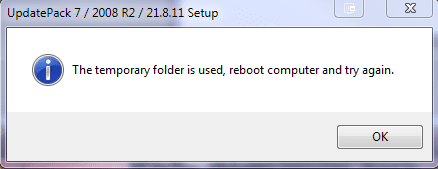
And when you start the next session you get:
Temp file error.PNG

Looked around and found some leftover files and folders that werent deleted:
Temp file error1.PNG

Deleted them and the error goes away and the updater continues to work but .Net Framework 4.8 still fails to copy over - so not installed?

Edit:
Seems like ultimate is the only version that has .net framework 4.8 integrated successfully:

The installation log of UpdatePack 7 / 2008 R2 / 21.8.11Installation start t - Pastebin.com
 
Last edited:

My Computer My Computer

Computer type
PC/Desktop
Computer Manufacturer/Model Number
custom build
OS
The one I am using to register is my Windows 7 Professional x64 one.
CPU
Intel Core i7-3970x
Motherboard
Asus Rampage 4 Extreme
Memory
Cosair Dominator Platinum
Graphics Card(s)
2x eVGA GTX 770 4GB CLassified with ACX cooler
Antivirus
I have KIS 2016 which is an internet security suite....?
Browser
Fiefox
Intel 8th gen with b365 motherboard Windows 7.

b365m-win7.JPG

b365m-win7-2.PNG
 

My Computers My Computers

System One System Two

  • Computer type
    PC/Desktop
    OS
    7 X64
    CPU
    i5 8400
    Motherboard
    gigabyte b365m ds3h
    Memory
    2x8gb 3200mhz
    Hard Drives
    various
    PSU
    pure power 11 400w cm
    Case
    Coolermaster
    Cooling
    cryorig m9i
  • Computer type
    PC/Desktop
    OS
    7x64
    CPU
    g5400
    Motherboard
    ga b365m ds3h
    Memory
    8gb ddr4 2400
    PSU
    xfx pro 450w
Hi SIW2,

I am try to install Win 7 pro 64 bit de to a partition on a Lenovo P17 Gen 2 Laptop. Win 10 is preinstalled on another partition.
Following your instructions in post 1- 3 using 7UPv64AD together with 7UPdrivers and DirectX_june2010_x64.wa and dotnetFx48_20211004_x64.wa patching of my copied Win7 image worked fine.

After generating an iso file again I tried the way you described using dsm in a win 10 cmd window. dism /Apply-Image /ImageFile:H:\sources\install.wim /Index:3 /ApplyDir:D:\ This command copies the win7 system to the partition and after using bcdboot d:\windows I also got an entry in the windows boot manager. Unfortunately it tries to start windows 7 but then it falls back and starts win 10.

In a second step I used rufus to generate a bootable usb drive containing the same image. When i boot from this drive the installer stops right after coping the data when displaying "Starting Windows" for the first time.

Details of my system:
Intel® Core™ i7-11800H Prozessor
32 GB (2 x 16 GB) SO-DIMM DDR4 3200MHz
1 TB M.2 2280 SSD (KXG7AZNV1T02 LA KIOXIA)
Intel UHD Grapics
NVIDIA® RTX™ A3000 6 GB GDDR6
Intel Wi-Fi 6E AX210 11AX (2x2) vPro & Bluetooth® 5.2

Do you think it is possible to run a dualboot configuration Win10/Win7 on such a system ?
Is there something I can try to figure out what is missing ?

Any ideas or recommendations would be great...

Best regards,
Harald
 

My Computers My Computers

System One System Two

  • OS
    Win 10 64 bit
  • Computer type
    PC/Desktop
Back
Top