Update your Win 7 installation media

OK so it is not my poor recollection. I just did another 'non-Simplix' integration of 64-bit ISO, installed and neither CMD Prompt or Take Ownership option is presenting in any context menu. But they are present after similarly integrating a 32-bit ISO.

So just delete the softx86.reg file in BIN folder prior to integration? I see there is a section in there regarding System Certificates, after all the registry entries adding the CMD Prompt and Take Ownership context menu option. Is that section related to the context menu mods or unrelated (and necessary or not)?
 

My Computer

OS
Windows XP
you can remove them with this

fixcontmen.reg
Code:
Windows Registry Editor Version 5.00

[-HKEY_LOCAL_MACHINE\software\Classes\*\shell\TO]

[-HKEY_LOCAL_MACHINE\software\Classes\Directory\shell\TO]

[-HKEY_LOCAL_MACHINE\software\Classes\Drive\shell\cmd\shell]

[-HKEY_LOCAL_MACHINE\software\Classes\Directory\shell\cmd\shell]

[-HKEY_LOCAL_MACHINE\software\Classes\Directory\Background\shell\cmd\shell]

[HKEY_LOCAL_MACHINE\software\Classes\Directory\shell\cmd]
@="@shell32.dll,-8506"
"Extended"=""
"NoWorkingDirectory"=""

[HKEY_LOCAL_MACHINE\software\Classes\Directory\shell\cmd\command]
@="cmd.exe /s /k pushd \"%V\""

[HKEY_LOCAL_MACHINE\software\Classes\Directory\Background\shell\cmd]
@="@shell32.dll,-8506"
"Extended"=""
"NoWorkingDirectory"=""

[HKEY_LOCAL_MACHINE\software\Classes\Directory\Background\shell\cmd\command]
@="cmd.exe /s /k pushd \"%V\""

[HKEY_LOCAL_MACHINE\software\Classes\Drive\shell\cmd]
@="@shell32.dll,-8506"
"Extended"=""
"NoWorkingDirectory"=""

[HKEY_LOCAL_MACHINE\software\Classes\Drive\shell\cmd\command]
@="cmd.exe /s /k pushd \"%V\""


if you dont want them in future replace softx86.reg in the BIN folder with this one :ar: View attachment softx86.zip
 

My Computers

System One System Two

  • Computer type
    PC/Desktop
    OS
    7 X64
    CPU
    i5 8400
    Motherboard
    gigabyte b365m ds3h
    Memory
    2x8gb 3200mhz
    Hard Drives
    various
    PSU
    pure power 11 400w cm
    Case
    Coolermaster
    Cooling
    cryorig m9i
  • Computer type
    PC/Desktop
    OS
    7x64
    CPU
    g5400
    Motherboard
    ga b365m ds3h
    Memory
    8gb ddr4 2400
    PSU
    xfx pro 450w
Thanks! Before you posted I built another ISO with softx86 deleted and have not noticed any problems.

- - - Updated - - -

Hey if I might ask, what is the purpose of the System Certificates\AuthRoot entries about?
 

My Computer

OS
Windows XP
It is the cert for the biostar win7 8th gen igpu driver which many people have been using.
If that driver is not included, it doesnt do anything.

There is another win7 8th gen igpu driver which SDI can install .

The x64 also includes the cert for the samsung nvme driver, dont remove that because it might be important depending which nvme disk you want to use.

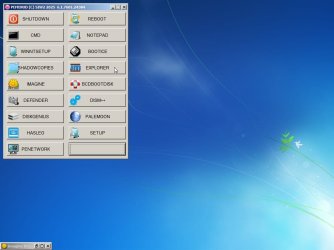
The enhanced menu is only for the bootable wim files and looks similar to this

It is not exactly the same because this example has a couple of extra programs added. I might get around to updating the enhanced menu if and when I have time.

botablewims-enhancedmenu1.jpg
 
Last edited:

My Computers

System One System Two

  • Computer type
    PC/Desktop
    OS
    7 X64
    CPU
    i5 8400
    Motherboard
    gigabyte b365m ds3h
    Memory
    2x8gb 3200mhz
    Hard Drives
    various
    PSU
    pure power 11 400w cm
    Case
    Coolermaster
    Cooling
    cryorig m9i
  • Computer type
    PC/Desktop
    OS
    7x64
    CPU
    g5400
    Motherboard
    ga b365m ds3h
    Memory
    8gb ddr4 2400
    PSU
    xfx pro 450w
SIW2: Hi. My main W7Ultimate machine isn't running 100% so I'll do a fresh install.
My W7Ultimate file is very old so I downloaded a 27Feb2022 version from an online archive. (link available)
Its description says it was fully updated as of 27\2\22, so I'm wondering if could benefit from your excellent Simplix update.
Is the update procedure still the same as you originally described it in your early posts of this thread?
Thanks.
 

My Computer

Computer type
PC/Desktop
Computer Manufacturer/Model Number
My build
OS
Win7 Ultimate SP1
CPU
Intel Core i5 9400 Coffee Lake 14nm
Motherboard
Asus Prime H310M-E R2.0 (LGA1151)
Memory
16G DDR4
Graphics Card(s)
NVidia GeForce GTX 960
Sound Card
Realtek High Definition Audio (mobo)
Monitor(s) Displays
Asus PA248 24" 16:10 format
Screen Resolution
1920x1200@59Hz
Hard Drives
1863GB Seagate ST2000DM
3726GB Seagate ST4000DM
1863GB Seagate ST2000DM
6TB Seagate
465GB NVMe Samsung SSD 970
PSU
750G2
Case
Tower
Cooling
Standard
Keyboard
USB
Mouse
USB
Internet Speed
920Mbs/480Mbs
Antivirus
Malwarebytes
Browser
Firefox
We dont know anything about those type of iso files.

Best to start with official iso
 

My Computers

System One System Two

  • Computer type
    PC/Desktop
    OS
    7 X64
    CPU
    i5 8400
    Motherboard
    gigabyte b365m ds3h
    Memory
    2x8gb 3200mhz
    Hard Drives
    various
    PSU
    pure power 11 400w cm
    Case
    Coolermaster
    Cooling
    cryorig m9i
  • Computer type
    PC/Desktop
    OS
    7x64
    CPU
    g5400
    Motherboard
    ga b365m ds3h
    Memory
    8gb ddr4 2400
    PSU
    xfx pro 450w
I think I now have such a file.
How to tell if it's the right type?
 

My Computer

Computer type
PC/Desktop
Computer Manufacturer/Model Number
My build
OS
Win7 Ultimate SP1
CPU
Intel Core i5 9400 Coffee Lake 14nm
Motherboard
Asus Prime H310M-E R2.0 (LGA1151)
Memory
16G DDR4
Graphics Card(s)
NVidia GeForce GTX 960
Sound Card
Realtek High Definition Audio (mobo)
Monitor(s) Displays
Asus PA248 24" 16:10 format
Screen Resolution
1920x1200@59Hz
Hard Drives
1863GB Seagate ST2000DM
3726GB Seagate ST4000DM
1863GB Seagate ST2000DM
6TB Seagate
465GB NVMe Samsung SSD 970
PSU
750G2
Case
Tower
Cooling
Standard
Keyboard
USB
Mouse
USB
Internet Speed
920Mbs/480Mbs
Antivirus
Malwarebytes
Browser
Firefox
Ideally should be the official

X17-59465.iso
or
en_windows_7_ultimate_with_sp1_x64_dvd_u_677332.iso

they are both the same file

SHA1: 36AE90DEFBAD9D9539E649B193AE573B77A71C83

**********************************

X17-59186
or
en_windows_7_professional_with_sp1_x64_dvd_u_676939.iso
SHA1: 0BCFC54019EA175B1EE51F6D2B207A3D14DD2B58

**********************************************************************************


X17-58997
or
en_windows_7_home_premium_with_sp1_x64_dvd_u_676549.iso
SHA1: 6C9058389C1E2E5122B7C933275F963EDF1C07B9


Any of the above will be fine. They all contain all the consumer editions. The difference is the tiny ei.cfg text file which 7updater takes care of.

- - - Updated - - -

I have just had a play with a 310 motherboard gigabyte rather than your asus

h310m s2h post9

h310m s2h post 11
 

My Computers

System One System Two

  • Computer type
    PC/Desktop
    OS
    7 X64
    CPU
    i5 8400
    Motherboard
    gigabyte b365m ds3h
    Memory
    2x8gb 3200mhz
    Hard Drives
    various
    PSU
    pure power 11 400w cm
    Case
    Coolermaster
    Cooling
    cryorig m9i
  • Computer type
    PC/Desktop
    OS
    7x64
    CPU
    g5400
    Motherboard
    ga b365m ds3h
    Memory
    8gb ddr4 2400
    PSU
    xfx pro 450w
SIW2, thank you heaps. We're very fortunate to have available, someone with such a wealth of knowledge who's also prepared to share that information with others.

Ok, I'm in business! Turns out I have the first two that you named: 677332.iso and 676939.iso. Should I start at the beginning of your 100-page post about using Simplix, or is there a later point in the post that'll be equally valid to start from?

BTW, thanks for the tip about the GFX drivers. I can't remember what I've done in the past about that sub-section of an installation but as I've always used a separate GFX card, I've probably skipped that problem unknowingly.

Again, much thanks :-)
 

My Computer

Computer type
PC/Desktop
Computer Manufacturer/Model Number
My build
OS
Win7 Ultimate SP1
CPU
Intel Core i5 9400 Coffee Lake 14nm
Motherboard
Asus Prime H310M-E R2.0 (LGA1151)
Memory
16G DDR4
Graphics Card(s)
NVidia GeForce GTX 960
Sound Card
Realtek High Definition Audio (mobo)
Monitor(s) Displays
Asus PA248 24" 16:10 format
Screen Resolution
1920x1200@59Hz
Hard Drives
1863GB Seagate ST2000DM
3726GB Seagate ST4000DM
1863GB Seagate ST2000DM
6TB Seagate
465GB NVMe Samsung SSD 970
PSU
750G2
Case
Tower
Cooling
Standard
Keyboard
USB
Mouse
USB
Internet Speed
920Mbs/480Mbs
Antivirus
Malwarebytes
Browser
Firefox
It is all in the first couple of posts and a link to screenshots
 

My Computers

System One System Two

  • Computer type
    PC/Desktop
    OS
    7 X64
    CPU
    i5 8400
    Motherboard
    gigabyte b365m ds3h
    Memory
    2x8gb 3200mhz
    Hard Drives
    various
    PSU
    pure power 11 400w cm
    Case
    Coolermaster
    Cooling
    cryorig m9i
  • Computer type
    PC/Desktop
    OS
    7x64
    CPU
    g5400
    Motherboard
    ga b365m ds3h
    Memory
    8gb ddr4 2400
    PSU
    xfx pro 450w
Excellent, thanks again.
 

My Computer

Computer type
PC/Desktop
Computer Manufacturer/Model Number
My build
OS
Win7 Ultimate SP1
CPU
Intel Core i5 9400 Coffee Lake 14nm
Motherboard
Asus Prime H310M-E R2.0 (LGA1151)
Memory
16G DDR4
Graphics Card(s)
NVidia GeForce GTX 960
Sound Card
Realtek High Definition Audio (mobo)
Monitor(s) Displays
Asus PA248 24" 16:10 format
Screen Resolution
1920x1200@59Hz
Hard Drives
1863GB Seagate ST2000DM
3726GB Seagate ST4000DM
1863GB Seagate ST2000DM
6TB Seagate
465GB NVMe Samsung SSD 970
PSU
750G2
Case
Tower
Cooling
Standard
Keyboard
USB
Mouse
USB
Internet Speed
920Mbs/480Mbs
Antivirus
Malwarebytes
Browser
Firefox
But all I have is a USB. The computer I am actually trying to update, after it getting closed before reset was complete, doesn't have a working disk drive ATM and I do not have a portable hard drive to transfer either. I see you have posted a lot here and I have been utilizing your files in my process of fixing the owners screw up. I posted my dilemma this morning and would like to ask if you would look at my post that I posted in my search of how to correct the issues I'm having. TIA
 

My Computers

System One System Two

  • Computer type
    Laptop
    Computer Manufacturer/Model Number
    verious
    OS
    windows 7 home premium
    CPU
    verious
    Motherboard
    marious
  • Computer type
    PC/Desktop
No,
It's NOT included.

on pg#1
installation media up to date: Includes "universal" usb3 , sata drivers, nvme drivers and MS nvme updates.


manatails/uefiseven
It's more like an install skill (when install Windows 7 under UEFI Class 3 systems).
i.e.
  • when boot, exchange file A0 to A (i.e. uefiseven bootx64.efi)
  • when reboot after install completed, exchange file A1 to A,

this skill only applied to install Windows 7 under UEFI Class 3 systems.
 

My Computers

System One System Two

  • Computer type
    PC/Desktop
    Computer Manufacturer/Model Number
    HP Elite 800 G5
    OS
    Windows 7 Pro 64-bit
    CPU
    I7-9700
    Memory
    32 GB
  • Computer type
    Laptop
    System Manufacturer/Model Number
    ASUS UX305C
    OS
    Windows 7 Pro 64-bit
Thanks. Tried two days but it still doesnt work to make a windows to go with Win7 on USB on modern computers.
With your program windows started and said "updating registry" - rebooted and got stuck on windows is starting.
Have tried WinToGo USB and Ventoy. Made an iso with your tools above.
 

My Computer

OS
Windows 7
A sign typically caused by

1. USB 3.0/3.1/3.2 driver missing. an easy fix using 7UPDATER.
2. improper graphics driver under UEFI Class 3 system. manatails/uefiseven is one of tries, working for Intel CPUs only.

what's your computer model? HP? Dell? Lenovo?

- rebooted and got stuck on windows is starting.
 

My Computers

System One System Two

  • Computer type
    PC/Desktop
    Computer Manufacturer/Model Number
    HP Elite 800 G5
    OS
    Windows 7 Pro 64-bit
    CPU
    I7-9700
    Memory
    32 GB
  • Computer type
    Laptop
    System Manufacturer/Model Number
    ASUS UX305C
    OS
    Windows 7 Pro 64-bit

My Computers

System One System Two

  • Computer type
    PC/Desktop
    Computer Manufacturer/Model Number
    HP Elite 800 G5
    OS
    Windows 7 Pro 64-bit
    CPU
    I7-9700
    Memory
    32 GB
  • Computer type
    Laptop
    System Manufacturer/Model Number
    ASUS UX305C
    OS
    Windows 7 Pro 64-bit
Back
Top