Update your Win 7 installation media

The last time that SIW2 released a new version of the 7updater tool was in July 2024.
At this stage in the life of Windows 7, I doubt he will release a new version to make it compatible with new hardware.
I may be wrong, but only he can tell us that.
 

My Computer

Computer type
PC/Desktop
Computer Manufacturer/Model Number
Dell OptiPlex 9020
OS
Windows 7 Professional SP1 64-bit
CPU
Intel Core i7-4790 3.60 GHz
Memory
32 GB DDR3-1600 MHz
Graphics Card(s)
Integrated Intel HD Graphics 4600
Monitor(s) Displays
Viewsonic 32" LCD
Hard Drives
Kingston SATA 3 240 GB SSD
Internet Speed
Spectrum Internet 1000 Mbps
It's easy to add the emmc driver yourself. that's what I did.

following the instruction on pg#1. what's your PC model? HP? NEC? Lenovo?

Thanks for making this. Is it possible to add support for emmc and uefi as well?
 

My Computers

System One System Two

  • Computer type
    PC/Desktop
    Computer Manufacturer/Model Number
    HP Elite 800 G5
    OS
    Windows 7 Pro 64-bit
    CPU
    I7-9700
    Memory
    32 GB
  • Computer type
    Laptop
    System Manufacturer/Model Number
    ASUS UX305C
    OS
    Windows 7 Pro 64-bit
hello all i have a dell e6430 core i 5 and well i have 2 but the ssd in this laptop works great and im running paid for avast antivirus well in my other laptop which its the same a dell e6430 core i5 i have put in a ssd into that on the same ssd as i got two of them and well i loaded windows 7 ultimate with simplex updates plus i have updated the updates the best i can threw windows updates but i cant for the life of me install microsoft word 2007 comes up with a bootstrap error . then also when i try to download the free avast on it to dont install either i have tried all and nothing works . plus i have a windows 10 ios and when i install that i can get avast to load i ca nt tremember about mocrosoft word but i have windows 10 i dont like nothing after windows 7 . i love windows 7 . have you guys got any idea with im missing i have installed .net framework but still no joy im not sure if i need to have other things installed or what . plus i notice that when i go into my windows updates installed list there is a right few installed theer is a right few that says failed .im at a loss as before i used to do this all the time frest install windows 7 ios and never had a problem until now
 

My Computer

Computer type
Laptop
Computer Manufacturer/Model Number
dell latitude e6430
OS
WINDOWS 7 64BIT ultimate
Memory
8GB
Hard Drives
sandisk extreme pro 480gb ssd
Antivirus
free avast

My Computers

System One System Two

  • Computer type
    PC/Desktop
    OS
    7 X64
    CPU
    i5 8400
    Motherboard
    gigabyte b365m ds3h
    Memory
    2x8gb 3200mhz
    Hard Drives
    various
    PSU
    pure power 11 400w cm
    Case
    Coolermaster
    Cooling
    cryorig m9i
  • Computer type
    PC/Desktop
    OS
    7x64
    CPU
    g5400
    Motherboard
    ga b365m ds3h
    Memory
    8gb ddr4 2400
    PSU
    xfx pro 450w
error.jpg

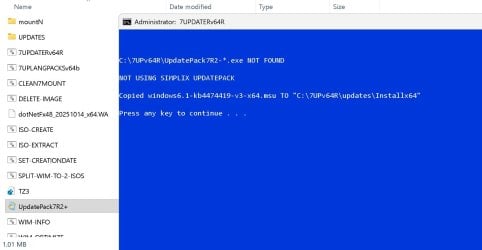
I'm getting an error message. UpdatePack7R2+.exe is not getting recognized.
 

My Computer

Computer type
PC/Desktop
OS
windows seven
Please read the first post. Rt click and run as admin on UpdatePack7R2+.exe to get the update pack
 
Last edited:

My Computers

System One System Two

  • Computer type
    PC/Desktop
    OS
    7 X64
    CPU
    i5 8400
    Motherboard
    gigabyte b365m ds3h
    Memory
    2x8gb 3200mhz
    Hard Drives
    various
    PSU
    pure power 11 400w cm
    Case
    Coolermaster
    Cooling
    cryorig m9i
  • Computer type
    PC/Desktop
    OS
    7x64
    CPU
    g5400
    Motherboard
    ga b365m ds3h
    Memory
    8gb ddr4 2400
    PSU
    xfx pro 450w
Rt click and run as admin on UpdatePack7R2+.exe to get the update pack

Thank you for helping us. This is my first time using your program.

I checked the first post, and it said, "Run as administrator on the the 7UPDATERv64.cmd".

There's a small mistake in "the the 7UPDATER". It's repeated twice.

It doesn't say to run UpdatePack7R2+.exe in step 4. Step 2 says, "put the UpdatePack7R2-date.exe in the C:\7UPv64 folder." It simply says to include the file in the folder.

Should I run UpdatePack as admin before 7UPDATER?

https://www.sevenforums.com/install...-win-7-installation-media-53.html#post3453182
In the screenshots there's no mention of running UpdatePack separately. "If the simplix updatepack is in the 7UP folder," It just mentions UpdatePack as an option if it's present in the folder.
 

My Computer

Computer type
PC/Desktop
OS
windows seven
Should I run UpdatePack as admin before 7UPDATER?

Yes as it says in the first post:

If you want to include the simplix pack:
Small downloader which can be run to download the latest Simplix updatepack ( about 850mb).
https://update7.simplix.info/UpdatePack7R2.exe

UpdatePack7R2+.exe is the downloader

UpdatePack7R2-date.exe is the update pack it downloads ( about 850mb)

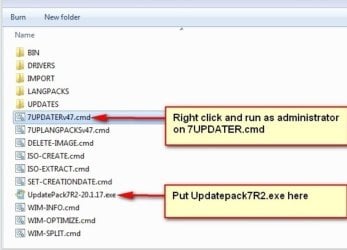
The pic in the first post

updatepack7R2-date.jpg

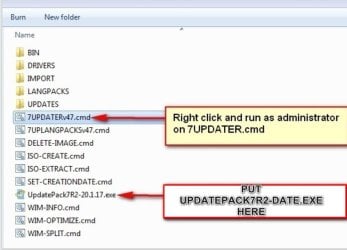
Should I change it to this to make it clearer

updatepack7R2-date2.jpg
 
Last edited:

My Computers

System One System Two

  • Computer type
    PC/Desktop
    OS
    7 X64
    CPU
    i5 8400
    Motherboard
    gigabyte b365m ds3h
    Memory
    2x8gb 3200mhz
    Hard Drives
    various
    PSU
    pure power 11 400w cm
    Case
    Coolermaster
    Cooling
    cryorig m9i
  • Computer type
    PC/Desktop
    OS
    7x64
    CPU
    g5400
    Motherboard
    ga b365m ds3h
    Memory
    8gb ddr4 2400
    PSU
    xfx pro 450w
Thank you, SIW2.

"Small downloader which can be run to download the latest Simplix updatepack".

The part that I misunderstood was "can be run". I think it should be changed to "should be run before 7UPDATERv64.cmd".

I thought it was automatic after 7UPDATER is run. Now I know that there is a manual action.

Yes, the new screenshot is better. Thank you, again. Have a nice day.
 

My Computer

Computer type
PC/Desktop
OS
windows seven
:-)
 

My Computers

System One System Two

  • Computer type
    PC/Desktop
    OS
    7 X64
    CPU
    i5 8400
    Motherboard
    gigabyte b365m ds3h
    Memory
    2x8gb 3200mhz
    Hard Drives
    various
    PSU
    pure power 11 400w cm
    Case
    Coolermaster
    Cooling
    cryorig m9i
  • Computer type
    PC/Desktop
    OS
    7x64
    CPU
    g5400
    Motherboard
    ga b365m ds3h
    Memory
    8gb ddr4 2400
    PSU
    xfx pro 450w
Hello! My first post....

May I start be saying thankyou for all your hard work! After reading all 151 pages of this thread, I tried this tool the other day, to attempt to install Win 7 on an old PC I had lying around in the garage.
It worked perfectly.

However today, on my host system, I noticed a program called 'Microsoft Edge' attempting to access the internet.

I found this strange, as i've never installed Microsoft Edge. After a quick search of the folders within your program, I notice references to said program. It looks as though it was installed 'silently' (never a good sign) presumably after running your tool.

Can you tell me if Microsoft Edge was needed for some reason? And, how do I remove it from your tool so as to be never seen or heard from again.

Many Thanks.
 

My Computers

System One System Two

  • OS
    64
  • Computer type
    PC/Desktop
There is no mention of ms edge in my batch file.

you might have got it through windows update if you have set it to "install updates automatically"

control panel >program features > rt click the program and uninstall

change the setting in windows update >change settings so it doesnt install updates automatically
 

My Computers

System One System Two

  • Computer type
    PC/Desktop
    OS
    7 X64
    CPU
    i5 8400
    Motherboard
    gigabyte b365m ds3h
    Memory
    2x8gb 3200mhz
    Hard Drives
    various
    PSU
    pure power 11 400w cm
    Case
    Coolermaster
    Cooling
    cryorig m9i
  • Computer type
    PC/Desktop
    OS
    7x64
    CPU
    g5400
    Motherboard
    ga b365m ds3h
    Memory
    8gb ddr4 2400
    PSU
    xfx pro 450w
Hi, didn't expect a reply so soon!

C:\7UPv64R\BIN\menux64\Program Files\winntsetup\MinWin\Default\Remove\Edge.reg

This was in a folder inside the 7UP zip. Should it not be there?

I've had windows update disabled on my host PC....for a long time.

Btw, just so there's no confusion, i'm talking about my main PC, the one I downloaded & extracted the 7UP zip, and created the ISO, not the install on the PC in the garage.

Thnx for any info.
 

My Computers

System One System Two

  • OS
    64
  • Computer type
    PC/Desktop
That is something in jfx program called winntsetup.Winntsetup will only be included in the boot.wim if you specify the enhanced option. Winntsetup can be used to install windows from an iso/wim/esd. One of the options of minwin is remove edge from the installation (e.g if it is windows 10 installation media)

It has nothing to do with installing edge on your windows 7.

edge never appears on any of my installations because I dont let win7 automatically update.
 

My Computers

System One System Two

  • Computer type
    PC/Desktop
    OS
    7 X64
    CPU
    i5 8400
    Motherboard
    gigabyte b365m ds3h
    Memory
    2x8gb 3200mhz
    Hard Drives
    various
    PSU
    pure power 11 400w cm
    Case
    Coolermaster
    Cooling
    cryorig m9i
  • Computer type
    PC/Desktop
    OS
    7x64
    CPU
    g5400
    Motherboard
    ga b365m ds3h
    Memory
    8gb ddr4 2400
    PSU
    xfx pro 450w
Hello again,

By 'Enhanced' do you mean that little panel with all the programs on it which appears after booting from the bootable USB? If so, then yes I must have used the 'enhanced version'. The cmd prompt there did save me after EasyBCD ruined my system...

But if it didn't install Edge, what else called 'Microsoft Edge' wanted to connect to the internet? And why, several days after I ran your tool.

Upon reading its 'install' log, it appeared to try to install itself on my host system (silently I might add, even removing the desktop icon!), but after it recognised my firewall blocked it, it then uninstalled itself.

Perhaps i'm incorrect, i'm no expert after all, but this appears to me to be nefarious behaviour. I might try the Un-Enhanced version...

Perhaps you could run the tool and observe what happens?

Update: A day later, something called MSFEEDSYNC or something also attempted to gain access to the internet. I believe its related to Internet Explorer, which i've never used on this system.

Many thanks.
 
Last edited:

My Computers

System One System Two

  • OS
    64
  • Computer type
    PC/Desktop
Back
Top