Updated to Date Windows 7 ISO Failure ???

BuckSkin

New member
Power User
VIP
Local time
3:36 PM
Messages
521
My first up-to-date Windows 7 install disc was a big failure.

I meticulously followed these instructions to the letter:

Create An Integrated Up To Date Windows 7 Install Disc • Raymond.CC

Once I figured out that the instructions were obviously written and screen-shot at different times and using different versions of NTLite, then the process went smoothly.

It took hours for NTLite to process the ISO.

I had a test machine that had plenty of HDD space that I used to test my creation.

I first loaded it with Win7 Home Premium; it installed and went into Windows without a hitch; however, when I opened IE, instead of IE 11, I had IE 8; there were only half-a-dozen listings in "Programs and Features".
I had to track down an internet controller driver before the machine became visible on my home network or could access the internet.

Once I convinced myself that what I actually had was a somewhat crippled version of Win7 Home Premium, I wiped it and installed Win7 Pro.

Win7 Pro was more handicapped than Home Premium; and, it also had IE 8 instead of the advertised IE 11.
Programs and Features did not have a single listing.

Has anyone else tried their hand at creating an up-to-date ISO by following those instructions ?
If you have, what were the results ?

Maybe I should first try one with only a single version of Windows and see how that plays out.

I don't really see where I could have messed up; I followed the instructions to the letter.

Thanks for reading and all help is appreciated.
 

My Computer

Computer type
PC/Desktop
Computer Manufacturer/Model Number
Dell Optiplex 780m "mini-tower"
OS
Windows 7 Pro x64
CPU
Intel Core Two Duo E8600 3.33 ghz
Motherboard
Whatever DELL put in it
Memory
8GB
Graphics Card(s)
Gigabyte Radeon R7 240
Monitor(s) Displays
HP 2159m
PSU
750 Watt Corsair CX750
Keyboard
Logitech Wireless
Mouse
Logitech Wireless
Browser
Chrome, Firefox, IE
I suggest you use dism++
Dism++ | New Windows Utility

These are the steps with dism++

1. mount image 1

2. ( make sure the mounted image is highlighted blue in the top pane) then click open session

3. click update in the left pane

4. click Scan

It downloads the update database and scans the mounted image. It takes a minute or two. Then it will list suggested updates.

5. click Install.

It might pop up a couple of windows suggesting you skip some - ok those boxes.

When it has finshed downloading and installing the updates :

6. File > Save Image. Select INCREMENTAL SAVE. Do the INCREMENTAL SAVE 4 times ( yes 4 times ).

7. File >Unmount Image

8. Close dism++
 

My Computers

System One System Two

  • Computer type
    PC/Desktop
    OS
    7 X64
    CPU
    i5 8400
    Motherboard
    gigabyte b365m ds3h
    Memory
    2x8gb 3200mhz
    Hard Drives
    various
    PSU
    pure power 11 400w cm
    Case
    Coolermaster
    Cooling
    cryorig m9i
  • Computer type
    PC/Desktop
    OS
    7x64
    CPU
    g5400
    Motherboard
    ga b365m ds3h
    Memory
    8gb ddr4 2400
    PSU
    xfx pro 450w
After saving 4 incemental images , your install.wim now contains

Images
1 HomeBasic
2 HomePremium
3 Professional
4 Ultimate
5 HomeBasic (updated)
6 HomeBasic (updated)
7 HomeBasic (updated)
8 Home Basic (updated)

So you want to change the editions of image 6 to HomePremium, image 7 to Professional, and Image 8 to Ultimate.

You can use my little gui for that.

Mount image 6 change edition to HomePremium, unmount and commit.

Mount image 7 change edition to Professional, unmount and commit.

Mount image 8 change edition to Ultimate, unmount and commit.
 

My Computers

System One System Two

  • Computer type
    PC/Desktop
    OS
    7 X64
    CPU
    i5 8400
    Motherboard
    gigabyte b365m ds3h
    Memory
    2x8gb 3200mhz
    Hard Drives
    various
    PSU
    pure power 11 400w cm
    Case
    Coolermaster
    Cooling
    cryorig m9i
  • Computer type
    PC/Desktop
    OS
    7x64
    CPU
    g5400
    Motherboard
    ga b365m ds3h
    Memory
    8gb ddr4 2400
    PSU
    xfx pro 450w
I suggest you use dism++

Thanks so much and I will give that a try.

So....., if I understand, I completely abort and disregard the update packages and such that I downloaded earlier and this dism++ handles the whole show, downloads the updates AND incorporates them into the new ISO, right ?
 

My Computer

Computer type
PC/Desktop
Computer Manufacturer/Model Number
Dell Optiplex 780m "mini-tower"
OS
Windows 7 Pro x64
CPU
Intel Core Two Duo E8600 3.33 ghz
Motherboard
Whatever DELL put in it
Memory
8GB
Graphics Card(s)
Gigabyte Radeon R7 240
Monitor(s) Displays
HP 2159m
PSU
750 Watt Corsair CX750
Keyboard
Logitech Wireless
Mouse
Logitech Wireless
Browser
Chrome, Firefox, IE
Yes. dism++ can mount, download the database, scan, download and install the updates. It uses the differ engine - so it only downloads the needed parts of the updates.
After INCREMENTAL saving the updated image 4 times, you need to unmount the image. Then close dism++


You then need a different tool to change the editions of the saved images.

Here:

View attachment Dism7v4.zip


Thanks so much and I will give that a try.

So....., if I understand, I completely abort and disregard the update packages and such that I downloaded earlier and this dism++ handles the whole show, downloads the updates AND incorporates them into the new ISO, right ?
 

My Computers

System One System Two

  • Computer type
    PC/Desktop
    OS
    7 X64
    CPU
    i5 8400
    Motherboard
    gigabyte b365m ds3h
    Memory
    2x8gb 3200mhz
    Hard Drives
    various
    PSU
    pure power 11 400w cm
    Case
    Coolermaster
    Cooling
    cryorig m9i
  • Computer type
    PC/Desktop
    OS
    7x64
    CPU
    g5400
    Motherboard
    ga b365m ds3h
    Memory
    8gb ddr4 2400
    PSU
    xfx pro 450w
Yes. dism++ can mount, download the database, scan, download and install the updates.

Thanks again !
I just had a look (and downloaded) and when I looked at "documentation", everything was in what I assume was Chinese, even the screenshots of the user interface; will I have a language choice that will change the interface to English ?
 

My Computer

Computer type
PC/Desktop
Computer Manufacturer/Model Number
Dell Optiplex 780m "mini-tower"
OS
Windows 7 Pro x64
CPU
Intel Core Two Duo E8600 3.33 ghz
Motherboard
Whatever DELL put in it
Memory
8GB
Graphics Card(s)
Gigabyte Radeon R7 240
Monitor(s) Displays
HP 2159m
PSU
750 Watt Corsair CX750
Keyboard
Logitech Wireless
Mouse
Logitech Wireless
Browser
Chrome, Firefox, IE
After you have used dism++ to updated image 1 and saved it 4 times, you want to change the editions of images 6,7, and 8.

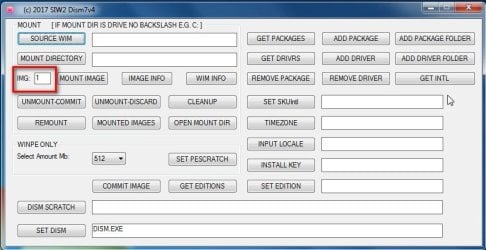
Use my dism7.exe to make it simple

Browse to wim
Browse to a mount folder
TYPE in the image number you want to mount e.g. 6
click mount image

Then in the box next to SET-EDITION type in the edition name you want to set e.g. HomePremium

Then click the SET EDITION button. A command window opens - it takes maybe 1 minute.

Then click the commit image button.

CHANGE-EDITITON.jpg
 

My Computers

System One System Two

  • Computer type
    PC/Desktop
    OS
    7 X64
    CPU
    i5 8400
    Motherboard
    gigabyte b365m ds3h
    Memory
    2x8gb 3200mhz
    Hard Drives
    various
    PSU
    pure power 11 400w cm
    Case
    Coolermaster
    Cooling
    cryorig m9i
  • Computer type
    PC/Desktop
    OS
    7x64
    CPU
    g5400
    Motherboard
    ga b365m ds3h
    Memory
    8gb ddr4 2400
    PSU
    xfx pro 450w
dism ++ will automatically run in English.
You don't need instructions - it is obvious.
 

My Computers

System One System Two

  • Computer type
    PC/Desktop
    OS
    7 X64
    CPU
    i5 8400
    Motherboard
    gigabyte b365m ds3h
    Memory
    2x8gb 3200mhz
    Hard Drives
    various
    PSU
    pure power 11 400w cm
    Case
    Coolermaster
    Cooling
    cryorig m9i
  • Computer type
    PC/Desktop
    OS
    7x64
    CPU
    g5400
    Motherboard
    ga b365m ds3h
    Memory
    8gb ddr4 2400
    PSU
    xfx pro 450w
Thanks !
Will the end result still fit on a single-layer DVD ?
Sorry for so many questions.
 

My Computer

Computer type
PC/Desktop
Computer Manufacturer/Model Number
Dell Optiplex 780m "mini-tower"
OS
Windows 7 Pro x64
CPU
Intel Core Two Duo E8600 3.33 ghz
Motherboard
Whatever DELL put in it
Memory
8GB
Graphics Card(s)
Gigabyte Radeon R7 240
Monitor(s) Displays
HP 2159m
PSU
750 Watt Corsair CX750
Keyboard
Logitech Wireless
Mouse
Logitech Wireless
Browser
Chrome, Firefox, IE
It might be a bit large with all 8 images.

After you have finished , you can delete images 1-4 , then export the install.wim using maximum compression.

For a professional looking finish, you can also change the display name and descriptions. ( That is quick and can de done afterwards - it doesn't require mounting)

I normally use wimlib for that ( and to change the date ). It looks nice when you get the installation window.

Whether it will fit on on a regular dvd depends how many updates you add ( dism++ skips a few that might cause problems on some machines - you can always get them afterwards) So it won't be as large as it would have been by installing all the .msu files.

I usually add a lot of drivers as well so mine don't fit on a regular dvd. I use a usb stick to install from.

I would guess that if don't add masses of drivers, and export with maximum compression, it might just fit.


If you want to be sure, you could untick all the net frame 2 and net frame 3.5 updates that dism++ lists. It means you will have to pick up those 15 or so after installing, but it also means the wim will be a lot smaller, and quicker to update.
 
Last edited:

My Computers

System One System Two

  • Computer type
    PC/Desktop
    OS
    7 X64
    CPU
    i5 8400
    Motherboard
    gigabyte b365m ds3h
    Memory
    2x8gb 3200mhz
    Hard Drives
    various
    PSU
    pure power 11 400w cm
    Case
    Coolermaster
    Cooling
    cryorig m9i
  • Computer type
    PC/Desktop
    OS
    7x64
    CPU
    g5400
    Motherboard
    ga b365m ds3h
    Memory
    8gb ddr4 2400
    PSU
    xfx pro 450w
Wouldn't just using a newer edition of windows 7 make it easier?
 

My Computer

Computer type
PC/Desktop
OS
Windows 7 64bit
1. There isn't a newer release of windows7.

2. This is something enthusiasts enjoy doing.
 

My Computers

System One System Two

  • Computer type
    PC/Desktop
    OS
    7 X64
    CPU
    i5 8400
    Motherboard
    gigabyte b365m ds3h
    Memory
    2x8gb 3200mhz
    Hard Drives
    various
    PSU
    pure power 11 400w cm
    Case
    Coolermaster
    Cooling
    cryorig m9i
  • Computer type
    PC/Desktop
    OS
    7x64
    CPU
    g5400
    Motherboard
    ga b365m ds3h
    Memory
    8gb ddr4 2400
    PSU
    xfx pro 450w
What I meant was the newest version available. As in with the newest service packs

For all we know he could be using Any ok windows 7 disk.... The newest disk would save some time....
 

My Computer

Computer type
PC/Desktop
OS
Windows 7 64bit
The "newest" version of Windows 7 contains Service Pack 1 (SP1) and IE8. He would still have to update the servicing stack and IE11, and all the rest of the update if he cared too.
 

My Computer

Computer type
PC/Desktop
OS
Windows 7 x64, Vista x64, 8.1 smartphone
CPU
Intel E8400 65W 64-bit
Motherboard
Gigabyte EP45-UD3LR
Memory
DDR2 2 x 2GB, 1GB x 2
Graphics Card(s)
XFX Radeon HD5750
Sound Card
AMD High Definition Audio; Realtek High Definition Audio
Monitor(s) Displays
iiyama prolite X2377HDS
Screen Resolution
1920 x 1080
Hard Drives
500GB 7200 rpm Seagate ST3500413AS 16MB, 500GB 5400 rpm Toshiba MQ02ABF050H 32MB, 200GB 7200 rpm Seagate ST3200820AS 8MB, 2TB 7200 rpm Western Digital WD20EZRX 64MB
PSU
Enermax Liberty Modular
Case
Antec P193 Midi Tower
Keyboard
Mionix ZIBAL 60
Mouse
Razer USB 2.0 Diamondback Mouse or Huion Graphics Tablet
Browser
Internet Explorer, Lunascape, Firefox, Opera, Avast Safezone
The "newest" version of Windows 7 contains Service Pack 1 (SP1) and IE8. He would still have to update the servicing stack and IE11, and all the rest of the update if he cared too.
No it's not... There's a SP2 version which just includes all patches from SP1 to April 2016
 

My Computer

Computer type
PC/Desktop
OS
Windows 7 64bit
Don't teach your grandmother how to suck eggs.:-)
 

My Computers

System One System Two

  • Computer type
    PC/Desktop
    OS
    7 X64
    CPU
    i5 8400
    Motherboard
    gigabyte b365m ds3h
    Memory
    2x8gb 3200mhz
    Hard Drives
    various
    PSU
    pure power 11 400w cm
    Case
    Coolermaster
    Cooling
    cryorig m9i
  • Computer type
    PC/Desktop
    OS
    7x64
    CPU
    g5400
    Motherboard
    ga b365m ds3h
    Memory
    8gb ddr4 2400
    PSU
    xfx pro 450w
Anyways dism works good? It's been around for some time but people were still using others options throughout the years.. you know all those different "lite" versions...
 

My Computer

Computer type
PC/Desktop
OS
Windows 7 64bit
Back
Top