Updates downloaded & installed without permission

Benteke

Member
Local time
9:46 AM
Messages
121
Location
Way Out West
This morning when I shut down my comp I noticed the "downloading updates, do not turn off comp" message. Later when I restarted, the usual "configuring windows" appeared prior to windows starting. Logged in & checked to see if any updates had been installed and sure enough, KB3140410 & KB3135983 had been installed..... BUT, I have my updates set to 'check for but let me choose whether to download & install.' I've never encountered windows automatically downloading & installing updates like this before... Any ideas????
 

My Computer

Computer type
Laptop
Computer Manufacturer/Model Number
Fujitsu LifeBook AH550
OS
Windows 7 Home Premium x64 SP1
This morning when I shut down my comp I noticed the "downloading updates, do not turn off comp" message. Later when I restarted, the usual "configuring windows" appeared prior to windows starting. Logged in & checked to see if any updates had been installed and sure enough, KB3140410 & KB3135983 had been installed..... BUT, I have my updates set to 'check for but let me choose whether to download & install.' I've never encountered windows automatically downloading & installing updates like this before... Any ideas????


You are not alone, I too have my PCs set to check and let me decide to download and install updates and it they are doing the SAME EXACT THING!

It's no mistake and honestly seems to be borderline criminal if you ask me. The only consolation is that the notorious get windows 10 updates are still under OPTIONAL updates and they are NOT being auto downloaded and installed, make sure you have that UNchecked

"Give me recommended updates the same way I receive important updates" UNCHECK THAT BOX!!!!
 

My Computer

Computer Manufacturer/Model Number
hp pavilion 6680t
OS
win 7 home premium 64 bit
CPU
core i5 760
Motherboard
iona (from MSI)
Memory
6 gb
Graphics Card(s)
ati 5450
Sound Card
real tek 888
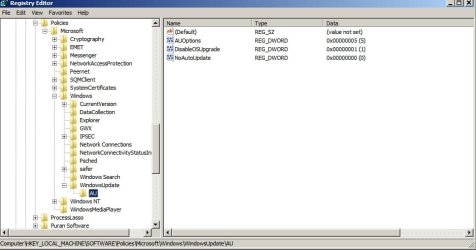
Check settings here:

HKEY_LOCAL_MACHINE\SOFTWARE\Policies\Microsoft\Windows\WindowsUpdate\AU

AU Options:
2 = Notify before download.
3 = Automatically download and notify of installation.
4 = Automatically download and schedule installation. Only valid if values exist for ScheduledInstallDay and ScheduledInstallTime.
5 = Automatic Updates is required and users can configure it.

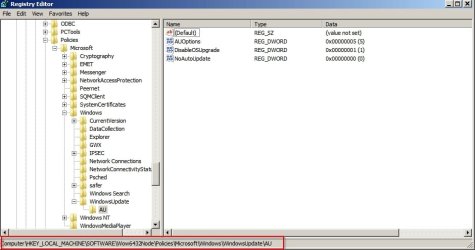
Note: On a 64bit machine you also need to check the above and additionally check here:

HKEY_LOCAL_MACHINE\SOFTWARE\Wow6432Node\Policies\Microsoft\Windows\WindowsUpdate\AU
 
Last edited:

My Computer

Computer type
Laptop
Computer Manufacturer/Model Number
ASUS
OS
Microsoft Windows 7 Home Premium 64-bit 7601 Multiprocessor Free Service Pack 1
CPU
AMD C-60 APU with Radeon(tm) HD Graphics
Motherboard
ASUSTeK COMPUTER INC. X501U
Memory
4.00 GB
Graphics Card(s)
AMD Radeon HD 6290 Graphics
Sound Card
(1) AMD High Definition Audio Device (2) Realtek High Defi
Screen Resolution
1366 x 768 x 32 bits (4294967296 colors) @ 60 Hz
Hard Drives
Hitachi HTS545050A7E380 SATA Disk Device
Antivirus
Comodo CIS & FW, SecureAplus App Whitelisting, Threatfire
Browser
Cyberfox 64bit, Opera 64bit, Airfox
Other Info
Spy-The-Spy, HitmanPro.Alert, Norton Connect Safe, MJRegWatcher, BitDefender TrafficLight, Voodoo Shield, Zemana AntiMalware
"Give me recommended updates the same way I receive important updates" UNCHECK THAT BOX!!!!

Yeah, I have it configured that way as well.... Thing I find interesting is that I still have 'important' updates ready to be installed, so my question is, why KB3140410 & KB3135983? Why are they being installed automatically and not the other 'important' updates?

And if this IS no mistake, then yeah I'd classify it as pretty devious!

Check settings here:

HKEY_LOCAL_MACHINE\SOFTWARE\Policies\Microsoft\Windows\WindowsUpdate\AU

AU Options:
2 = Notify before download.
3 = Automatically download and notify of installation.
4 = Automatically download and schedule installation. Only valid if values exist for ScheduledInstallDay and ScheduledInstallTime.
5 = Automatic Updates is required and users can configure it.

Note: On a 64bit machine you also need to check the above and additionally check here:

HKEY_LOCAL_MACHINE\SOFTWARE\Wow6432Node\Policies\Microsoft\Windows\WindowsUpdate\AU

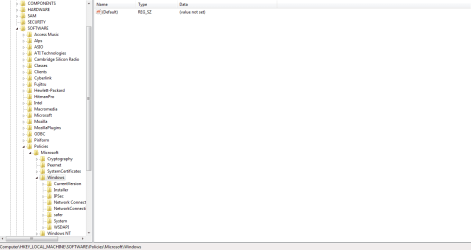
HKEY_LOCAL_MACHINE\SOFTWARE\Policies\Microsoft\Windows\
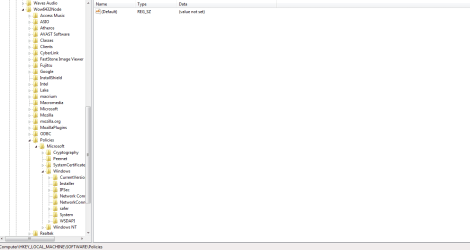
HKEY_LOCAL_MACHINE\SOFTWARE\Wow6432Node\Policies\Microsoft\Windows\

Both folders only go as far as I listed. Iow, there is no 'Windows Update' folder in either!
 

My Computer

Computer type
Laptop
Computer Manufacturer/Model Number
Fujitsu LifeBook AH550
OS
Windows 7 Home Premium x64 SP1
I did another clean install of W7 Professional last week. First thing I did was (sort of) 'remove' Internet Explorer in Programs and Features in Control Panel (Turn Windows features on or off).

Then, I downloaded all of the security updates from Windows Update (took the usual ages, of course). Because I had 'removed' Internet Explorer it is still at IE8 which came with Windows 7 and I wasn't offered any IE updates at all from Windows Update (which takes care of the W10 adware included in the latest IE11 security update).

I haven't installed ANY Optional or Recommended updates whatsoever and the PC runs fine without them. I only use Firefox for the Internet with the usual NoScript, etc. addons.

Now, the best part - I left an empty 50GB space at the end of the SSD during the W7 install. It now has Linux Mint installed on it in a dual boot with W7. All my Internet activities will now be done with Mint - at least until after the end of July when the W10 'free' offer comes to an end (hopefully).

W7 is now disconnected from the Internet and effectively 'frozen' from this point (Macrium images made, of course) until at least the end of July. Speaking of Macrium Reflect, I also like the way you can do Macrium images of Linux Mint from within Windows.
 

My Computer

Computer type
PC/Desktop
Computer Manufacturer/Model Number
Custom Build
OS
Win 7 Professional 64 (Main PC)/Win 7 Home Premium 32 (Laptop)
CPU
Intel Core i3 4160 @ 3.60GHz
Motherboard
ASUSTeK COMPUTER INC. H81M-PLUS (SOCKET 1150)
Memory
8.00GB Dual-Channel DDR3 @ 799MHz
Graphics Card(s)
2047MB NVIDIA GeForce GT 610 (Gigabyte)
Monitor(s) Displays
BenQ GL2460
Screen Resolution
1920x1080
Hard Drives
232GB Samsung SSD 840 EVO 250GB ATA Device (SSD) x3
2 external spinners - 4TB and 2TB
Antivirus
MSE
Browser
Pale Moon
HKEY_LOCAL_MACHINE\SOFTWARE\Policies\Microsoft\Windows\
HKEY_LOCAL_MACHINE\SOFTWARE\Wow6432Node\Policies\Microsoft\Windows\

Both folders only go as far as I listed. Iow, there is no 'Windows Update' folder in either!

Perhaps a screenshot will help.

HKEY_LOCAL_MACHINE\SOFTWARE\Policies\Microsoft\Windows\WindowsUpdate\AU

Policies WU.jpg

HKEY_LOCAL_MACHINE\SOFTWARE\Wow6432Node\Policies\Microsoft\Windows\WindowsUpdate\AU

Policies WU 2.jpg

If the \WindowsUpdate\AU key is missing it might possibly explain why updates are auto installed.
 

My Computer

Computer type
Laptop
Computer Manufacturer/Model Number
ASUS
OS
Microsoft Windows 7 Home Premium 64-bit 7601 Multiprocessor Free Service Pack 1
CPU
AMD C-60 APU with Radeon(tm) HD Graphics
Motherboard
ASUSTeK COMPUTER INC. X501U
Memory
4.00 GB
Graphics Card(s)
AMD Radeon HD 6290 Graphics
Sound Card
(1) AMD High Definition Audio Device (2) Realtek High Defi
Screen Resolution
1366 x 768 x 32 bits (4294967296 colors) @ 60 Hz
Hard Drives
Hitachi HTS545050A7E380 SATA Disk Device
Antivirus
Comodo CIS & FW, SecureAplus App Whitelisting, Threatfire
Browser
Cyberfox 64bit, Opera 64bit, Airfox
Other Info
Spy-The-Spy, HitmanPro.Alert, Norton Connect Safe, MJRegWatcher, BitDefender TrafficLight, Voodoo Shield, Zemana AntiMalware
Both folders only go as far as I listed. Iow, there is no 'Windows Update' folder in either!


Same here, no sign of WindowsUpdate in either directory.

Quite a coincidence that BOTH of our systems are missing those EXACT same entries. Don't you think?
 

My Computer

Computer Manufacturer/Model Number
hp pavilion 6680t
OS
win 7 home premium 64 bit
CPU
core i5 760
Motherboard
iona (from MSI)
Memory
6 gb
Graphics Card(s)
ati 5450
Sound Card
real tek 888
1) HKEY_LOCAL_MACHINE\SOFTWARE\Policies\Microsoft\Windows\WindowsUpdate\AU

2) HKEY_LOCAL_MACHINE\SOFTWARE\Wow6432Node\Policies\Microsoft\Windows\WindowsUpdate\AU
 

Attachments

  • Regedit Capture 1.PNG
    Regedit Capture 1.PNG
    55.2 KB · Views: 1
  • Regedit Capture 2.PNG
    Regedit Capture 2.PNG
    54.1 KB · Views: 2

My Computer

Computer type
Laptop
Computer Manufacturer/Model Number
Fujitsu LifeBook AH550
OS
Windows 7 Home Premium x64 SP1

My Computer

Computer type
Laptop
Computer Manufacturer/Model Number
ASUS
OS
Microsoft Windows 7 Home Premium 64-bit 7601 Multiprocessor Free Service Pack 1
CPU
AMD C-60 APU with Radeon(tm) HD Graphics
Motherboard
ASUSTeK COMPUTER INC. X501U
Memory
4.00 GB
Graphics Card(s)
AMD Radeon HD 6290 Graphics
Sound Card
(1) AMD High Definition Audio Device (2) Realtek High Defi
Screen Resolution
1366 x 768 x 32 bits (4294967296 colors) @ 60 Hz
Hard Drives
Hitachi HTS545050A7E380 SATA Disk Device
Antivirus
Comodo CIS & FW, SecureAplus App Whitelisting, Threatfire
Browser
Cyberfox 64bit, Opera 64bit, Airfox
Other Info
Spy-The-Spy, HitmanPro.Alert, Norton Connect Safe, MJRegWatcher, BitDefender TrafficLight, Voodoo Shield, Zemana AntiMalware
Not sure why they would be missing. You can try adding them:


I notice that it appears your using Windows XP? The style of your regedit design looks like it...


In any case I'd prefer to manually add the ability. I know that it requires us to add a key could you
assist on this?
 

My Computer

Computer Manufacturer/Model Number
hp pavilion 6680t
OS
win 7 home premium 64 bit
CPU
core i5 760
Motherboard
iona (from MSI)
Memory
6 gb
Graphics Card(s)
ati 5450
Sound Card
real tek 888
It's Windows 7 - it just looks like XP (a bit) because that's how I like it!


Create a key here by right clicking "Windows" then select create new key. Name it "Windows Update"
HKEY_LOCAL_MACHINE\Software\Policies\Microsoft\Windows

Then click on "Windows Update"
HKEY_LOCAL_MACHINE\SOFTWARE\Policies\Microsoft\Windows\WindowsUpdate

and create a new subkey with the name "AU"

In the left pane click on:
HKEY_LOCAL_MACHINE\SOFTWARE\Policies\Microsoft\Windows\WindowsUpdate\AU

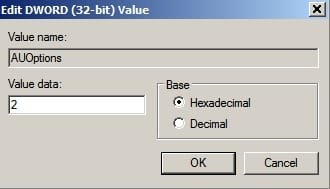
In the right pane create a new REG_DWORD 32bit Value

Give it a value of 2

Edit DWORD (32-bit) Value.jpg

Name it AU Options

Do the same for the other location posted.
 
Last edited:

My Computer

Computer type
Laptop
Computer Manufacturer/Model Number
ASUS
OS
Microsoft Windows 7 Home Premium 64-bit 7601 Multiprocessor Free Service Pack 1
CPU
AMD C-60 APU with Radeon(tm) HD Graphics
Motherboard
ASUSTeK COMPUTER INC. X501U
Memory
4.00 GB
Graphics Card(s)
AMD Radeon HD 6290 Graphics
Sound Card
(1) AMD High Definition Audio Device (2) Realtek High Defi
Screen Resolution
1366 x 768 x 32 bits (4294967296 colors) @ 60 Hz
Hard Drives
Hitachi HTS545050A7E380 SATA Disk Device
Antivirus
Comodo CIS & FW, SecureAplus App Whitelisting, Threatfire
Browser
Cyberfox 64bit, Opera 64bit, Airfox
Other Info
Spy-The-Spy, HitmanPro.Alert, Norton Connect Safe, MJRegWatcher, BitDefender TrafficLight, Voodoo Shield, Zemana AntiMalware
Okay, thanks for your help Callender. Before I start messing around w/my registry, I have a few questions though.

1. Any idea why these folders are missing?
2. My registry hasn't been changed (by me anyway) since a clean reinstall 3 months ago, so why would this "problem" decide to manifest now? It never happened prior to today!
3. Only 2 updates (out of 10 total) updated automatically, so why not all 10?


Thanks!
 

My Computer

Computer type
Laptop
Computer Manufacturer/Model Number
Fujitsu LifeBook AH550
OS
Windows 7 Home Premium x64 SP1
Okay, thanks for your help Callender. Before I start messing around w/my registry, I have a few questions though.

1. Any idea why these folders are missing?
2. My registry hasn't been changed (by me anyway) since a clean reinstall 3 months ago, so why would this "problem" decide to manifest now? It never happened prior to today!
3. Only 2 updates (out of 10 total) updated automatically, so why not all 10?


Thanks!

Interesting that we have very similar scenarios I did a clean install about three months ago and I'm certain that there is and never was any malware or registry cleaners on this PC...very odd, my thought was that this is connected to the required Windows update client that you needed to install with SP1...right after I installed that Windows Update Client WU was acting very strange and would be slow to find updates when you searched for them...
 

My Computer

Computer Manufacturer/Model Number
hp pavilion 6680t
OS
win 7 home premium 64 bit
CPU
core i5 760
Motherboard
iona (from MSI)
Memory
6 gb
Graphics Card(s)
ati 5450
Sound Card
real tek 888
Okay, thanks for your help Callender. Before I start messing around w/my registry, I have a few questions though.

Export those reg keys first so you have a backup. Right click in the left pane and choose "Export"

1. Any idea why these folders are missing?
2. My registry hasn't been changed (by me anyway) since a clean reinstall 3 months ago, so why would this "problem" decide to manifest now? It never happened prior to today!
3. Only 2 updates (out of 10 total) updated automatically, so why not all 10?

No idea why they would be missing. You have unchecked "Give me recommended updates" correct?

Did you run any other third party windows update check utilities?
 

My Computer

Computer type
Laptop
Computer Manufacturer/Model Number
ASUS
OS
Microsoft Windows 7 Home Premium 64-bit 7601 Multiprocessor Free Service Pack 1
CPU
AMD C-60 APU with Radeon(tm) HD Graphics
Motherboard
ASUSTeK COMPUTER INC. X501U
Memory
4.00 GB
Graphics Card(s)
AMD Radeon HD 6290 Graphics
Sound Card
(1) AMD High Definition Audio Device (2) Realtek High Defi
Screen Resolution
1366 x 768 x 32 bits (4294967296 colors) @ 60 Hz
Hard Drives
Hitachi HTS545050A7E380 SATA Disk Device
Antivirus
Comodo CIS & FW, SecureAplus App Whitelisting, Threatfire
Browser
Cyberfox 64bit, Opera 64bit, Airfox
Other Info
Spy-The-Spy, HitmanPro.Alert, Norton Connect Safe, MJRegWatcher, BitDefender TrafficLight, Voodoo Shield, Zemana AntiMalware
Interesting that we have very similar scenarios I did a clean install about three months ago and I'm certain that there is and never was any malware or registry cleaners on this PC...very odd, my thought was that this is connected to the required Windows update client that you needed to install with SP1...right after I installed that Windows Update Client WU was acting very strange and would be slow to find updates when you searched for them...
Yeah that is interesting.... WU has been acting weird on my system as well. Every now and then I experience cpu & mem spikes which in turn slows my entire system. When I disable the WU plugin, cpu & mem fall to normal. It only happens occasionally but I'm still not sure what causes it (or fixes it), tbh. Win Updates


No idea why they would be missing. You have unchecked "Give me recommended updates" correct?

Did you run any other third party windows update check utilities?

Yeah, 'give me recommended updates' is unchecked. My recommended updates are lumped in with optional updates.

I have NOT run any 3rd party WU check utilities!

I have a reg backup from a week ago (CC Cleaner) would that suffice? (CC listed one registry error from an app I previously removed)
 

My Computer

Computer type
Laptop
Computer Manufacturer/Model Number
Fujitsu LifeBook AH550
OS
Windows 7 Home Premium x64 SP1
Yeah that is interesting.... WU has been acting weird on my system as well. Every now and then I experience cpu & mem spikes which in turn slows my entire system. When I disable the WU plugin, cpu & mem fall to normal. It only happens occasionally but I'm still not sure what causes it (or fixes it), tbh. Win Updates

Wow, exactly the same problems ON TWO Systems now and yours as well...this other one is an OEM and also is well maintained and never had malware on it, nor registry cleaners, or other windows update check tools.


I'm still thinking that this is somehow connected to Windows 10 nonsense, and that
Windows update client that was when I noticed the issues starting.
 

My Computer

Computer Manufacturer/Model Number
hp pavilion 6680t
OS
win 7 home premium 64 bit
CPU
core i5 760
Motherboard
iona (from MSI)
Memory
6 gb
Graphics Card(s)
ati 5450
Sound Card
real tek 888
I have a reg backup from a week ago (CC Cleaner) would that suffice? (CC listed one registry error from an app I previously removed)

My mistake - there's no need to backup as those keys don't even exist. If they cause problems they can simply be deleted.

RE: Ccleaner. It only backs up what it has removed so unlit removed those keys it won't help.

Find the Ccleaner backup reg file anyway and right click then open with your text editor to check.
 

My Computer

Computer type
Laptop
Computer Manufacturer/Model Number
ASUS
OS
Microsoft Windows 7 Home Premium 64-bit 7601 Multiprocessor Free Service Pack 1
CPU
AMD C-60 APU with Radeon(tm) HD Graphics
Motherboard
ASUSTeK COMPUTER INC. X501U
Memory
4.00 GB
Graphics Card(s)
AMD Radeon HD 6290 Graphics
Sound Card
(1) AMD High Definition Audio Device (2) Realtek High Defi
Screen Resolution
1366 x 768 x 32 bits (4294967296 colors) @ 60 Hz
Hard Drives
Hitachi HTS545050A7E380 SATA Disk Device
Antivirus
Comodo CIS & FW, SecureAplus App Whitelisting, Threatfire
Browser
Cyberfox 64bit, Opera 64bit, Airfox
Other Info
Spy-The-Spy, HitmanPro.Alert, Norton Connect Safe, MJRegWatcher, BitDefender TrafficLight, Voodoo Shield, Zemana AntiMalware
RE: Ccleaner. It only backs up what it has removed so unlit removed those keys it won't help.

Find the Ccleaner backup reg file anyway and right click then open with your text editor to check.

Good to know, thanks! ... doesn't windows automatically backup the entire registry before app installs/updates?
 

My Computer

Computer type
Laptop
Computer Manufacturer/Model Number
Fujitsu LifeBook AH550
OS
Windows 7 Home Premium x64 SP1
Good to know, thanks! ... doesn't windows automatically backup the entire registry before app installs/updates?

I have to confess that I don't know what is backed up before updates are installed.
 

My Computer

Computer type
Laptop
Computer Manufacturer/Model Number
ASUS
OS
Microsoft Windows 7 Home Premium 64-bit 7601 Multiprocessor Free Service Pack 1
CPU
AMD C-60 APU with Radeon(tm) HD Graphics
Motherboard
ASUSTeK COMPUTER INC. X501U
Memory
4.00 GB
Graphics Card(s)
AMD Radeon HD 6290 Graphics
Sound Card
(1) AMD High Definition Audio Device (2) Realtek High Defi
Screen Resolution
1366 x 768 x 32 bits (4294967296 colors) @ 60 Hz
Hard Drives
Hitachi HTS545050A7E380 SATA Disk Device
Antivirus
Comodo CIS & FW, SecureAplus App Whitelisting, Threatfire
Browser
Cyberfox 64bit, Opera 64bit, Airfox
Other Info
Spy-The-Spy, HitmanPro.Alert, Norton Connect Safe, MJRegWatcher, BitDefender TrafficLight, Voodoo Shield, Zemana AntiMalware
Windows 7 used to create a restore point for the complete system prior to any "potentially" dangerous update set, one before the update complete download started, not one before each KB, manually selecting and deselecting KB's may change the default actions if they haven't been changed when Win7 went into Extended Support
 

My Computers

System One System Two

  • Computer type
    PC/Desktop
    Computer Manufacturer/Model Number
    ChillBlast - Custom to my design
    OS
    Windows 11 Pro x64 [Latest Release and Release Preview]
    CPU
    Ryzen 9 5950X, 3.8 - 5.2 MHz
    Motherboard
    Asus Prime X570-Pro
    Memory
    64GB [2 x 32GB] DDR4 3200MHz
    Graphics Card(s)
    4GB NVIDIA GEFORCE GTX 1650 Ti
    Sound Card
    On-board SPDIF to 5.1 System + HDMI [5.1 system]
    Monitor(s) Displays
    32" UHD 32 Bit HDR Monitor + 43" UHD 4K 32Bit HDR TV
    Screen Resolution
    2 x 3840 x 2160 @60Hz
    Hard Drives
    1TB M2 SSD OS, 500GB Fast Access SSD, 2 x 8TB Data + Various Externals from 1TB to 4TB, 10TB NAS
    PSU
    NZXT C750 80 PLUS Gold 750W Modular PSU
    Case
    Workstation Case [Matt Black]
    Cooling
    NZXT Kraken X63 280mm CPU Cooler +2x Quiet Case fans
    Keyboard
    Logitech Wireless MX Keys & K400 + others
    Mouse
    Logitech Wireless MX Master 3S
    Internet Speed
    920 MB Down 50 MB Up
    Antivirus
    BitDefender Total Security Pro
    Browser
    Chrome (always run latest Non-Beta)
    Other Info
    Also run ...
    Laptop - Quad 8GB - Windows 10 Pro x64
    Nexus 7 Android tablet x2
    Samsung 10.2" tablet
    Blackview TAB 8 4G Android Tablet c/w Keyboard
    Wacom Intuos Pro Medium Pen Pad
    Wacom Intuos Pro Small Pen Pad
    Wacom Expresskeys Remote
    Loopdeck+ Graphics Controller
    Shuttle Pro v2 Control
  • Computer type
    Laptop
    System Manufacturer/Model Number
    Dell XPS 17 10750H
    OS
    Windows 11 Pro x64 Latest RP
    CPU
    Intel I7 10750H 5.0GHz
    Motherboard
    Dell XPS
    Memory
    32GB [2x16GB] DDR4 2933 MHz
    Graphics Card(s)
    nVidia GTX1650Ti 4 GB GDDR6
    Sound Card
    Stock [Realtek] 4 Speaker
    Monitor(s) Displays
    17" IPS UHD+ Infinity Edge Touchscreen
    Screen Resolution
    3840 x 2400
    Hard Drives
    2TB M2 NVMe, 4TB External + various 500GB & 1TB External NVMe (also have access to spinner HDD from
    PSU
    Stock
    Case
    Stock XPS Aluminium & Carbon Fibre
    Cooling
    Stock - Active Fan Control
    Keyboard
    Backlit + Various Logitech
    Mouse
    Stock Track Pad + Logitech MX Trackball
    Internet Speed
    72 MB Down 18MB Up
    Browser
    Chrome
    Other Info
    Also run ...
    Laptop - Quad 8GB - Windows 10 Pro x64
    Nexus 7 Android tablet x2
    10.2" tablet
    Sony Z3 Android Smartphone
    Wacom Intuos Pro Medium Pen Pad
    Wacom Intuos Pro Small Pen Pad
    Wacom Expresskeys Remote
    Loopdeck+ Graphics Controller
    Shuttle Pro v2 Control Pad
    10TB NAS
Back
Top