
SP1 installed without permission

vesperdesign

New member
Local time
12:23 PM
Messages
13
So I woke up this morning and walked into my home office only to see a message on the windows wallpaper which was not there before saying- windows SP1 successfully installed and all my settings were reset and the restore history service wiped out all my points I made over the past 3 months. The weird part is I have restricted WINUPD to only download and not install, it seems in this case it ignored that permission. I should not I left my PC running the whole night until I walked in to the office in the morning where I saw this issue.
I went into the installation history for the windows update and I saw no trace of an installation for SP1, as a matter of fact SP1 is already installed on this computer which only added to my confusion. I decided to go into the Event viewer (I understand very little in there) and I managed to catch something that reads : Microsoft (R) Windows (R) 6.01. 7601 Service Pack 1 Multiprocessor Free. See attachment marked SP1.jpg

This was the only thing I found related to the installation that I saw that said anything about SP1

I need to figure out what happened and since I am a novice in troubleshooting these issues I am hoping someone on here will kindly help me get to the bottom of this.

I am running a 64 bit win 7 enterprise edition of windows
I attached the specs of my PC in the image attachment called computer info.jpg

Could someone please guide me and help me find out what happened?

Thanks
 

Attachments
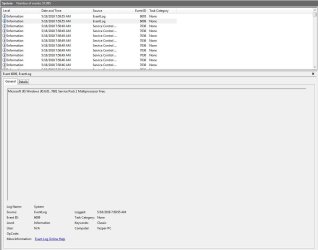
  • SP1.JPG
    SP1.JPG
    74.5 KB · Views: 2
  • computer info.JPG
    computer info.JPG
    61.2 KB · Views: 3

My Computer My Computer

Computer type
PC/Desktop
Computer Manufacturer/Model Number
Custom
OS
Windows 7 64Bit
CPU
Intel I7
Motherboard
MSI Z
Memory
32
Graphics Card(s)
nvidia GTX 1080ti
Hard Drives
Samsung ssd
Browser
chrome
Hi Vesper,

you can check when SP1 was installed
goto windows update and select update history >>TOP<< left
it will also show if it has failed previously.

As your running Enterprise
DID you change the Group policy settings as well??
(if not these will override the user control settings on the windows update GUI)

as for those events 6005/6009 they are created at every logon.


Roy
 

My Computer My Computer

Computer type
PC/Desktop
Computer Manufacturer/Model Number
medionl/Aspire 6930G/acer x55a
OS
W7 home premium 32bit/W7HP 64bit/w10 tp insider ring
CPU
E5300 dual core
Motherboard
medion MS7366
Memory
3gb
Graphics Card(s)
Nvidia Geforce 7100 Nforce 630i
Monitor(s) Displays
avixc
Internet Speed
n (isp resticted to 72)
Antivirus
mse/pands
Browser
palemoon
Other Info
Belkin Fd7050 n USB using Railink RT2870 drivers, more upto date
Hey Roy Thanks for replying, I looked at the update history and fail to see anything that looks like no update occured!!! Which is why I am confused. There is nothing there, but I clearly saw that it said windows updated the service pack 1. Proof is that my restore points were all deleted. I did a scan for the C drive in command prompt and said it found some errors but couldn't fix some of them.

How can an update occur and yet not show in the history??? this occured between 3:15 AM and 8 AM while
I was sleeping and the PC was left on. Is there a log I can upload that you could aid me review?
 

My Computer My Computer

Computer type
PC/Desktop
Computer Manufacturer/Model Number
Custom
OS
Windows 7 64Bit
CPU
Intel I7
Motherboard
MSI Z
Memory
32
Graphics Card(s)
nvidia GTX 1080ti
Hard Drives
Samsung ssd
Browser
chrome

My Computer My Computer

Computer type
PC/Desktop
Computer Manufacturer/Model Number
medionl/Aspire 6930G/acer x55a
OS
W7 home premium 32bit/W7HP 64bit/w10 tp insider ring
CPU
E5300 dual core
Motherboard
medion MS7366
Memory
3gb
Graphics Card(s)
Nvidia Geforce 7100 Nforce 630i
Monitor(s) Displays
avixc
Internet Speed
n (isp resticted to 72)
Antivirus
mse/pands
Browser
palemoon
Other Info
Belkin Fd7050 n USB using Railink RT2870 drivers, more upto date
Hey Roy ?Sorry for not getting back yesterday was tied up all day. I zipped the BSOD report and attached it. As far as the group policy is concerned this is the first I ever heard of it, let me know what to check and where.

thanks
Elijah
 

Attachments

My Computer My Computer

Computer type
PC/Desktop
Computer Manufacturer/Model Number
Custom
OS
Windows 7 64Bit
CPU
Intel I7
Motherboard
MSI Z
Memory
32
Graphics Card(s)
nvidia GTX 1080ti
Hard Drives
Samsung ssd
Browser
chrome

My Computer My Computer

Computer type
PC/Desktop
Computer Manufacturer/Model Number
HP Desktop & Compaq Laptop
OS
Win 10 x64, Linux Lite, Win 7 x64, BlackArch, & Kali
Hard Drives
Samsung 850 Pro 256Gb,
Hitachi HDD 1Tb,
Crucial MX SSD 250Gb
Segate 3Tb USB 3.0 Ext. Backup HDD
Internet Speed
150Mbps dn, 20Mbps up
Antivirus
Avast Free, Malwarebytes Anti-Exploit & Anti-Ransomware
Browser
Firefox, Chrome, Opera, & VPN
Hey there WIN 7 64 Enterprise
 

My Computer My Computer

Computer type
PC/Desktop
Computer Manufacturer/Model Number
Custom
OS
Windows 7 64Bit
CPU
Intel I7
Motherboard
MSI Z
Memory
32
Graphics Card(s)
nvidia GTX 1080ti
Hard Drives
Samsung ssd
Browser
chrome
Windows 7 Enterprise is only available to businesses through volume licensing. Contact your company's Network Administrator.
 

My Computer My Computer

Computer type
PC/Desktop
Computer Manufacturer/Model Number
HP Desktop & Compaq Laptop
OS
Win 10 x64, Linux Lite, Win 7 x64, BlackArch, & Kali
Hard Drives
Samsung 850 Pro 256Gb,
Hitachi HDD 1Tb,
Crucial MX SSD 250Gb
Segate 3Tb USB 3.0 Ext. Backup HDD
Internet Speed
150Mbps dn, 20Mbps up
Antivirus
Avast Free, Malwarebytes Anti-Exploit & Anti-Ransomware
Browser
Firefox, Chrome, Opera, & VPN
We don't give any help for cracked version of windows !
 
Last edited:

My Computer My Computer

Computer type
PC/Desktop
OS
Windows 7 x64
Nobody mentiones anything being cracked or similar, even the OP mentioned his "office" to begin with, which hints that Enterprise might have been provided for his use. Besides, he didnt asked for help cracking neither.
 

My Computer My Computer

Computer type
Laptop
Computer Manufacturer/Model Number
Toshiba Sattelite A665-S6092
OS
Windows 7 Ultimate x64
CPU
Intel Core i7-740QM
Memory
8 GB DDR3
Graphics Card(s)
NVIDIA GeForce 330GT
Screen Resolution
1366x768
Hard Drives
Samsung 840 SSD 500GB
1TB USB3 external HD
Cooling
Coolermaster Notepal U3 notebook cooling pad
Internet Speed
3mbps ASDL
Antivirus
ClamWin 0.98.7
Browser
Opera 12.17 x86 (main), Firefox 38 (sec), IE11 (last resort)

My Computer My Computer

Computer type
PC/Desktop
Computer Manufacturer/Model Number
HP Desktop & Compaq Laptop
OS
Win 10 x64, Linux Lite, Win 7 x64, BlackArch, & Kali
Hard Drives
Samsung 850 Pro 256Gb,
Hitachi HDD 1Tb,
Crucial MX SSD 250Gb
Segate 3Tb USB 3.0 Ext. Backup HDD
Internet Speed
150Mbps dn, 20Mbps up
Antivirus
Avast Free, Malwarebytes Anti-Exploit & Anti-Ransomware
Browser
Firefox, Chrome, Opera, & VPN
The data dump shows SP1 having been installed on 5/9/2016
There are only 6 updates that have been installed this year -
KB4074598 - 3/13/18
KB4054998 - 1/27/18
KB3184143 - 1/28/18
KB2813347 - 1/27/18
KB2923545 - 1/27/18
KB2952664 - 1/27/18

Having said that, some Windows Updates are forced - and some may not appear in the listing- but there is nothing in the Windows Update long to indicate that anything has been installed BY WU since the beginning of May.

What mechanisms did you use for file-checking etc?
 

My Computer My Computer

Computer type
Laptop
Computer Manufacturer/Model Number
Asus K52F or Lenovo B51-80
OS
Win 7 x64 Home Premium (and x86 VirtualBox VM)/Win10
CPU
i3 370M/i7 6500U
Motherboard
Asus/Lenovo
Memory
8GB - finally :)/8GB
Graphics Card(s)
it's an i3, dude!/dual Intel&nVidia
Sound Card
onboard
Monitor(s) Displays
15.6" built-in
Screen Resolution
1366x768/1920x1080
Hard Drives
750GB Seagate internal
Sundry external drives attached to other computers on the local network
1TB SSD on the Lenovo
PSU
n/a
Internet Speed
as much as I can get - usually on a dongle/phone, so <1MB/s
Antivirus
MSE/Defender
Browser
IE11/12/Edge/Chrome/FF(if I must)
Back
Top