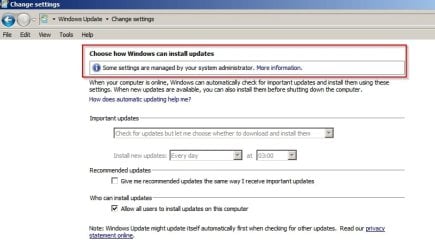
Windows 7 used to create a restore point for the complete system prior to any "potentially" dangerous update set, one before the update complete download started, not one before each KB, manually selecting and deselecting KB's may change the default actions if they haven't been changed when Win7 went into Extended Support
Okay, thanks.... That's what I was after. So, if I manually create a restore point, I'm essentially backing up the entire registry? Yes/No???
It's Windows 7 - it just looks like XP (a bit) because that's how I like it!
Create a key here by right clicking "Windows" then select create new key. Name it "Windows Update"
HKEY_LOCAL_MACHINE\Software\Policies\Microsoft\Windows
Then click on "Windows Update"
HKEY_LOCAL_MACHINE\SOFTWARE\Policies\Microsoft\Windows\WindowsUpdate
and create a new subkey with the name "AU"
In the left pane click on:
HKEY_LOCAL_MACHINE\SOFTWARE\Policies\Microsoft\Windows\WindowsUpdate\AU
In the right pane create a new REG_DWORD 32bit Value
Give it a value of 2
Name it AU Options
Do the same for the other location posted.
Thanks.... Did what you suggested. One point to mention... After creating the 1st key & subkey for HKEY_LOCAL_MACHINE\SOFTWARE\Policies\Microsoft\Windows, I then attempted to do the same for HKEY_LOCAL_MACHINE\SOFTWARE\Wow6432Node\Policies\Microsoft\Windows but found I didn't need to. The same key & subkey "magically" appeared there as well. Is that normal?
`
My Computer
At a glance
Windows 7 Home Premium x64 SP1
- Computer type
- Laptop
- Computer Manufacturer/Model Number
- Fujitsu LifeBook AH550
- OS
- Windows 7 Home Premium x64 SP1