Solved Updates won't install

Aperture

New member
I have four updates that will not install.
So far I have tried to double click them and go through the "Windows Update Error" wizard, I have also tried to launch the computer in Safe Mode with Networking, I tried to do it through the Microsoft website, I have turned off any anti-virus and anti-spam that I have but these four updates will simply not install.

Is there a workaround?

They are:
KB2515325
KB2522422
KB2492386
KB982018

I've tried again and again since they came out a few days ago and they download and seemingly install and the computer even wants to reboot but then I always get an Update notification error and they are still available for download.

Thanks

A
 

My Computer

OS
Windows 7 Home Premium

My Computer

OS
Windows 7

My Computer

Computer Manufacturer/Model Number
Toshiba C650
OS
Windows Home Premium 64bit
CPU
T61-- 2.0ghz
Motherboard
Toshiba
Memory
4 GB
Graphics Card(s)
On board
Sound Card
On board
Monitor(s) Displays
15.6"
Hard Drives
500 GB
Updates

Try using Microsoft update instead of Windows update, check you're update history to see if they are marked as installed.
 
Last edited:

My Computer

OS
windows 7 home premium 64bit
I tried the direct links before, that's what I was referring to when I said that I "tried through the Microsoft site".

The only difference was that I got a message that said "this update is not applicable to your computer".

Weird.

A
 

My Computer

OS
Windows 7 Home Premium

My Computer

Computer Manufacturer/Model Number
Hopalong/ Godzilla
OS
Windows7 Pro 64bit SP-1; Windows XP Pro 32bit
CPU
Intel Core i7-870 Lynnfield 2.93GHz LGA 1156 95W Quad-Core
Motherboard
ASUS P7P55D-E PRO
Memory
8GB@1400MHz Crucial Ballistix DDR3-1600 4x2GB
Graphics Card(s)
ASUS ENGTX460 DirectCU/2DI/1GD5 1GB 256-bit GDDR5
Sound Card
VIA Onboard
Monitor(s) Displays
Asus VS248H-P 24"; Samsung SyncMaster 941BW 19"ws
Screen Resolution
1920x1080; 1440x900
Hard Drives
Samsung 830 120GB SSD
Intel 320 120GB SSD
Western Digital Caviar Black WD7501AALS 750GB 7200 RPM SATA 3.0Gb/s
Western Digital Caviar Black WD6401AALS 640GB 7200 RPM SATA 3.0Gb/s
PSU
COOLER MASTER Silent Pro RS850-AMBAJ3-US 850W Modular
Case
COOLER MASTER HAF 932 RC-932-KKN5-GP Black
Cooling
Scythe "Mugen-2 Rev.B" (2 ScytheKaze-Jyuni PWM fans)
Keyboard
Logitech K-320
Mouse
Kensington
Antivirus
Avast Inernet Suite
Browser
IE 9 ; Chrome
Having same issue!

It says that these are Important Updates. It's a huge pain to need to reboot the machine all the time. I can't sleep it anymore with this issue.
 

My Computer

Computer type
PC/Desktop
OS
Microsoft Windows 7 Professional 64-bit 7601 Multiprocessor Free Service Pack 1
CPU
Intel(R) Core(TM) i7 CPU 920 @ 2.67GHz
Motherboard
ASUSTeK Computer INC. P6T
Memory
6.00 GB
Graphics Card(s)
(1) NVIDIA GeForce 9800 GT (2) NVIDIA GeForce 9800 GT
Sound Card
High Definition Audio Device
Screen Resolution
(1) 1920 x 1080 x 32 bits (4294967296 colors) @ 59 Hz (2)
Hard Drives
(1) WDC WD1001FALS-00J7B1 ATA Device (2) WDC WD1001FALS-00J7B1 ATA Device
Hi Albanberg and welcome to the Forum. Have you tried the proposed solution on post #3? It has worked for some people with this problem.
Cheers
JohnnyA
 

My Computer

Computer Manufacturer/Model Number
Toshiba C650
OS
Windows Home Premium 64bit
CPU
T61-- 2.0ghz
Motherboard
Toshiba
Memory
4 GB
Graphics Card(s)
On board
Sound Card
On board
Monitor(s) Displays
15.6"
Hard Drives
500 GB
First-
I should have included this tutorial. http://www.sevenforums.com/tutorials/2797-windows-update-settings-change.html
Win Update can be set to notify you before it downloads or installs updates.

Second-
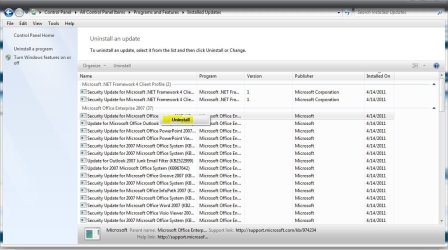
After that is set if they continue to try to install use the tutorial below to uninstall the messed up updates. They will be listed as unsuccessful. http://www.sevenforums.com/tutorials/24373-windows-update-uninstall-update.html
You can see in picture the Successful. The problem ones will be Unsuccessful.
Uninstall them and they can't try to install again if you set Win Update as I stated above.

Third-
Win Update will now tell you to download and install those same updates but then you hide them as in my original post.
You uninstalled them in Step 2 above so no more aggravation.


I hope that all makes sense.

1- Set Win Update to Notify not AUTO
2- Uninstall bad updates.
3- When Win Update shows download and install them again just hide them and they won't come back.

Sorry I didn't think about them trying to keep trying to install since they were already downloaded.
My bad. :o
Mike

I realize it is a pain and multi stepped but it is the only way I know to get rid of them and keep them gone.
 

My Computer

Computer Manufacturer/Model Number
Hopalong/ Godzilla
OS
Windows7 Pro 64bit SP-1; Windows XP Pro 32bit
CPU
Intel Core i7-870 Lynnfield 2.93GHz LGA 1156 95W Quad-Core
Motherboard
ASUS P7P55D-E PRO
Memory
8GB@1400MHz Crucial Ballistix DDR3-1600 4x2GB
Graphics Card(s)
ASUS ENGTX460 DirectCU/2DI/1GD5 1GB 256-bit GDDR5
Sound Card
VIA Onboard
Monitor(s) Displays
Asus VS248H-P 24"; Samsung SyncMaster 941BW 19"ws
Screen Resolution
1920x1080; 1440x900
Hard Drives
Samsung 830 120GB SSD
Intel 320 120GB SSD
Western Digital Caviar Black WD7501AALS 750GB 7200 RPM SATA 3.0Gb/s
Western Digital Caviar Black WD6401AALS 640GB 7200 RPM SATA 3.0Gb/s
PSU
COOLER MASTER Silent Pro RS850-AMBAJ3-US 850W Modular
Case
COOLER MASTER HAF 932 RC-932-KKN5-GP Black
Cooling
Scythe "Mugen-2 Rev.B" (2 ScytheKaze-Jyuni PWM fans)
Keyboard
Logitech K-320
Mouse
Kensington
Antivirus
Avast Inernet Suite
Browser
IE 9 ; Chrome
When I go to remove/delete the update, there's no place to click to remove it. I'm confused.
 

My Computer

Computer type
PC/Desktop
OS
Microsoft Windows 7 Professional 64-bit 7601 Multiprocessor Free Service Pack 1
CPU
Intel(R) Core(TM) i7 CPU 920 @ 2.67GHz
Motherboard
ASUSTeK Computer INC. P6T
Memory
6.00 GB
Graphics Card(s)
(1) NVIDIA GeForce 9800 GT (2) NVIDIA GeForce 9800 GT
Sound Card
High Definition Audio Device
Screen Resolution
(1) 1920 x 1080 x 32 bits (4294967296 colors) @ 59 Hz (2)
Hard Drives
(1) WDC WD1001FALS-00J7B1 ATA Device (2) WDC WD1001FALS-00J7B1 ATA Device
When I go to remove/delete the update, there's no place to click to remove it. I'm confused.

Right click on an installed update and it says "Uninstall"
 

Attachments

  • Capture.JPG
    Capture.JPG
    158.1 KB · Views: 10

My Computer

Computer type
PC/Desktop
Computer Manufacturer/Model Number
Self Built
OS
Win 10 Pro x64
CPU
Intel I5-2500K @3.3GHz
Motherboard
Asrock P67 Extreme4
Memory
16GB G.Skill Ripjaws X (4x4GB)
Graphics Card(s)
EVGA GeForce 750 Ti SC 2GB
Sound Card
ASUS Xonar DG 5.1 Channels 24-bit 96KHz PCI Interface Sound
Monitor(s) Displays
auria eq2367
Screen Resolution
1920 x 1080
Hard Drives
250GB Samsung 850 EVO SSD
1TB WD Blue
1TB Hitachi
PSU
SeaSonic X 650W 80 Plus Gold
Case
Corsair Obsidian 750D
Cooling
Corsair H60, Three 140mm case fans
Keyboard
Logitech Wireless Keyboard K520
Mouse
Logitech Wireless Mouse M310
Internet Speed
Wave Broadband ~ 100 dn 5 up
Antivirus
Windows Defender, Malwarebytes Premium
Browser
Edge, IE11, Chrome
Other Info
Laptop specs: HP g7-1365dx /
CPU: AMD A6-3420M APU with Radeon(tm) HD Graphics /
RAM: Crucial 8Gb (2x4Gb) /
SSD: Crucial M4-CT128M4SSD2 ATA Device/ FW 000F /
GFX: AMD Radeon HD 6520G /
OS: Windows 10 Pro x64
But they are not installed. The install failed. Now my machine has to reboot twice to get to the desktop.
 

My Computer

Computer type
PC/Desktop
OS
Microsoft Windows 7 Professional 64-bit 7601 Multiprocessor Free Service Pack 1
CPU
Intel(R) Core(TM) i7 CPU 920 @ 2.67GHz
Motherboard
ASUSTeK Computer INC. P6T
Memory
6.00 GB
Graphics Card(s)
(1) NVIDIA GeForce 9800 GT (2) NVIDIA GeForce 9800 GT
Sound Card
High Definition Audio Device
Screen Resolution
(1) 1920 x 1080 x 32 bits (4294967296 colors) @ 59 Hz (2)
Hard Drives
(1) WDC WD1001FALS-00J7B1 ATA Device (2) WDC WD1001FALS-00J7B1 ATA Device
By the way, thanks for responding. I really appreciate it. This is my work machine and I have no tech support. I am my business.
 

My Computer

Computer type
PC/Desktop
OS
Microsoft Windows 7 Professional 64-bit 7601 Multiprocessor Free Service Pack 1
CPU
Intel(R) Core(TM) i7 CPU 920 @ 2.67GHz
Motherboard
ASUSTeK Computer INC. P6T
Memory
6.00 GB
Graphics Card(s)
(1) NVIDIA GeForce 9800 GT (2) NVIDIA GeForce 9800 GT
Sound Card
High Definition Audio Device
Screen Resolution
(1) 1920 x 1080 x 32 bits (4294967296 colors) @ 59 Hz (2)
Hard Drives
(1) WDC WD1001FALS-00J7B1 ATA Device (2) WDC WD1001FALS-00J7B1 ATA Device
Maybe I'm not being clear.

I have the same 4 updates trying to install as the OP, but they fail each time.
I took my machine off of the automatic update.
The updates are still trying to install and I have to reboot the machine each time I want to sleep it.
 

My Computer

Computer type
PC/Desktop
OS
Microsoft Windows 7 Professional 64-bit 7601 Multiprocessor Free Service Pack 1
CPU
Intel(R) Core(TM) i7 CPU 920 @ 2.67GHz
Motherboard
ASUSTeK Computer INC. P6T
Memory
6.00 GB
Graphics Card(s)
(1) NVIDIA GeForce 9800 GT (2) NVIDIA GeForce 9800 GT
Sound Card
High Definition Audio Device
Screen Resolution
(1) 1920 x 1080 x 32 bits (4294967296 colors) @ 59 Hz (2)
Hard Drives
(1) WDC WD1001FALS-00J7B1 ATA Device (2) WDC WD1001FALS-00J7B1 ATA Device
I'm not sure how to get rid of them.

I understand you now. They are downloaded but not installed.

They are in a Temporary folder now but I don't know how to find it or which one.
 

My Computer

Computer Manufacturer/Model Number
Hopalong/ Godzilla
OS
Windows7 Pro 64bit SP-1; Windows XP Pro 32bit
CPU
Intel Core i7-870 Lynnfield 2.93GHz LGA 1156 95W Quad-Core
Motherboard
ASUS P7P55D-E PRO
Memory
8GB@1400MHz Crucial Ballistix DDR3-1600 4x2GB
Graphics Card(s)
ASUS ENGTX460 DirectCU/2DI/1GD5 1GB 256-bit GDDR5
Sound Card
VIA Onboard
Monitor(s) Displays
Asus VS248H-P 24"; Samsung SyncMaster 941BW 19"ws
Screen Resolution
1920x1080; 1440x900
Hard Drives
Samsung 830 120GB SSD
Intel 320 120GB SSD
Western Digital Caviar Black WD7501AALS 750GB 7200 RPM SATA 3.0Gb/s
Western Digital Caviar Black WD6401AALS 640GB 7200 RPM SATA 3.0Gb/s
PSU
COOLER MASTER Silent Pro RS850-AMBAJ3-US 850W Modular
Case
COOLER MASTER HAF 932 RC-932-KKN5-GP Black
Cooling
Scythe "Mugen-2 Rev.B" (2 ScytheKaze-Jyuni PWM fans)
Keyboard
Logitech K-320
Mouse
Kensington
Antivirus
Avast Inernet Suite
Browser
IE 9 ; Chrome
But they are not installed. The install failed. Now my machine has to reboot twice to get to the desktop.

By the way, thanks for responding. I really appreciate it. This is my work machine and I have no tech support. I am my business.

You're welcome.

Have you tried just hiding them? Right click, Hide update.
 

My Computer

Computer type
PC/Desktop
Computer Manufacturer/Model Number
Self Built
OS
Win 10 Pro x64
CPU
Intel I5-2500K @3.3GHz
Motherboard
Asrock P67 Extreme4
Memory
16GB G.Skill Ripjaws X (4x4GB)
Graphics Card(s)
EVGA GeForce 750 Ti SC 2GB
Sound Card
ASUS Xonar DG 5.1 Channels 24-bit 96KHz PCI Interface Sound
Monitor(s) Displays
auria eq2367
Screen Resolution
1920 x 1080
Hard Drives
250GB Samsung 850 EVO SSD
1TB WD Blue
1TB Hitachi
PSU
SeaSonic X 650W 80 Plus Gold
Case
Corsair Obsidian 750D
Cooling
Corsair H60, Three 140mm case fans
Keyboard
Logitech Wireless Keyboard K520
Mouse
Logitech Wireless Mouse M310
Internet Speed
Wave Broadband ~ 100 dn 5 up
Antivirus
Windows Defender, Malwarebytes Premium
Browser
Edge, IE11, Chrome
Other Info
Laptop specs: HP g7-1365dx /
CPU: AMD A6-3420M APU with Radeon(tm) HD Graphics /
RAM: Crucial 8Gb (2x4Gb) /
SSD: Crucial M4-CT128M4SSD2 ATA Device/ FW 000F /
GFX: AMD Radeon HD 6520G /
OS: Windows 10 Pro x64
They are in the Temp folder Derek.

So they try to install everytime he boots. A loop effect. I don't know where the Win Update Temp folder is or where to find it.
I never needed to.

So they are not showing as a download to install so he can't hide them.

Albanberg

I'm going to post for some more help. I'm not sure how to get rid of them I know they are in a Windows Temp folder but where?????
 

My Computer

Computer Manufacturer/Model Number
Hopalong/ Godzilla
OS
Windows7 Pro 64bit SP-1; Windows XP Pro 32bit
CPU
Intel Core i7-870 Lynnfield 2.93GHz LGA 1156 95W Quad-Core
Motherboard
ASUS P7P55D-E PRO
Memory
8GB@1400MHz Crucial Ballistix DDR3-1600 4x2GB
Graphics Card(s)
ASUS ENGTX460 DirectCU/2DI/1GD5 1GB 256-bit GDDR5
Sound Card
VIA Onboard
Monitor(s) Displays
Asus VS248H-P 24"; Samsung SyncMaster 941BW 19"ws
Screen Resolution
1920x1080; 1440x900
Hard Drives
Samsung 830 120GB SSD
Intel 320 120GB SSD
Western Digital Caviar Black WD7501AALS 750GB 7200 RPM SATA 3.0Gb/s
Western Digital Caviar Black WD6401AALS 640GB 7200 RPM SATA 3.0Gb/s
PSU
COOLER MASTER Silent Pro RS850-AMBAJ3-US 850W Modular
Case
COOLER MASTER HAF 932 RC-932-KKN5-GP Black
Cooling
Scythe "Mugen-2 Rev.B" (2 ScytheKaze-Jyuni PWM fans)
Keyboard
Logitech K-320
Mouse
Kensington
Antivirus
Avast Inernet Suite
Browser
IE 9 ; Chrome
Ah! Ok, I hid them. That might work.

I guess in some of my purging I got rid of SP1. Now that I have the auto install off, it's unclear to me how/where I download the update.
 

My Computer

Computer type
PC/Desktop
OS
Microsoft Windows 7 Professional 64-bit 7601 Multiprocessor Free Service Pack 1
CPU
Intel(R) Core(TM) i7 CPU 920 @ 2.67GHz
Motherboard
ASUSTeK Computer INC. P6T
Memory
6.00 GB
Graphics Card(s)
(1) NVIDIA GeForce 9800 GT (2) NVIDIA GeForce 9800 GT
Sound Card
High Definition Audio Device
Screen Resolution
(1) 1920 x 1080 x 32 bits (4294967296 colors) @ 59 Hz (2)
Hard Drives
(1) WDC WD1001FALS-00J7B1 ATA Device (2) WDC WD1001FALS-00J7B1 ATA Device
Ok Hopalong, I may need to delete them that way if the hide does not work. Thanks.
 

My Computer

Computer type
PC/Desktop
OS
Microsoft Windows 7 Professional 64-bit 7601 Multiprocessor Free Service Pack 1
CPU
Intel(R) Core(TM) i7 CPU 920 @ 2.67GHz
Motherboard
ASUSTeK Computer INC. P6T
Memory
6.00 GB
Graphics Card(s)
(1) NVIDIA GeForce 9800 GT (2) NVIDIA GeForce 9800 GT
Sound Card
High Definition Audio Device
Screen Resolution
(1) 1920 x 1080 x 32 bits (4294967296 colors) @ 59 Hz (2)
Hard Drives
(1) WDC WD1001FALS-00J7B1 ATA Device (2) WDC WD1001FALS-00J7B1 ATA Device
Back
Top