Solved Updating IE9

Please Noel, slowly.

This is what I meant.
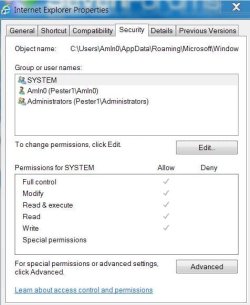
IE9raa.JPG

I see this when I go to: all programs\IE\properties\security tab.
It is the same permissions for all groups or user names listed in the groups or user names box.

The .exe shortcut I made was from the Folder at C:\Program Files (x86)\Internet Explorer\iexplorer.exe

No multiple profiles, just me.


EDIT: Confirming Profiles
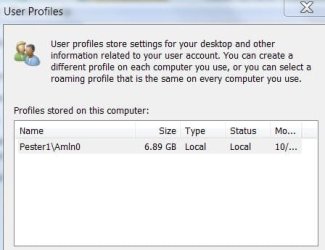
IE9raa1.JPG
 
Last edited:

My Computer My Computer

Computer type
PC/Desktop
Computer Manufacturer/Model Number
Gateway DX4831-01e (Mid-Tower Desktop)
OS
Originally Win 7 Hm Prem x64 Ver 6.1.7600 Build 7601-SP1 | Upgraded to Windows 10 December 14, 2019
CPU
Intel i3 530 2.93GHz, 2933MHz 2 Cores 4 Logical Processors
Motherboard
Gateway H57M01 133 megahertz
Memory
6GB of 1,333MHz DDR3 SDRAM
Graphics Card(s)
32MB Intel Graphics Media Accelerator HD IGChip
Sound Card
Realtek High Definition Audio
Monitor(s) Displays
Gateway HX2000 20inch TFT active matrix TN
Screen Resolution
1600 x 900 x 59 hertz
Hard Drives
WDC WD10EADS-00M2B0 [HDD] (1000.20 GB) -- drive 0,
HL-DT-ST DVDRAM GH41N [CD-ROM dr]
Four card readers, and Four USB 2.0
PSU
300watts.
Case
Mid-Tower Desktop
Cooling
Stock from Gateway
Keyboard
Natural Ergonomic Keyboard 4000, see Other Info
Mouse
Orig. Gateway wore out now using Insignia USB wired optical
Internet Speed
Vz FIOS 10ms png 57.64Mbps down 65.53Mbps up Speedtest.org
Antivirus
Zamana Anti-logger with Anti-malware, MSE, Windows Firewall,
Browser
IE11.0.9600.19399-Upd ver11.0.135, Firefox 68.0.1 x64
Other Info
System Specs by Belarc.

BIOS: American Megatrends Inc. P01-A0 11/17/2009

Replaced the MS 'Natural' Standard PS/2 Enhanced 101-102 Keyboard with a new Natural Ergonomic Keyboard 4000 on August 1st 2014.

Canon Pixma MG3222 Printer.

Updated to IE11 on 12102015 | Fios Quantum Router g1100

Additional AV: SpywareBlaster, manual Mbam, SAS
Noel, you mentioned one of the temp folders lost permissions.

Do you think it would help if I did a ipconfig /flushdns in an elevated CMD prompt?

This is my ipconfig /all:
Code:
Microsoft Windows [Version 6.1.7601]
Copyright (c) 2009 Microsoft Corporation.  All rights reserved.

C:\Windows\system32>ipconfig /all

Windows IP Configuration

   Host Name . . . . . . . . . . . . : Pester1
   Primary Dns Suffix  . . . . . . . :
   Node Type . . . . . . . . . . . . : Hybrid
   IP Routing Enabled. . . . . . . . : No
   WINS Proxy Enabled. . . . . . . . : No
   DNS Suffix Search List. . . . . . : home

Ethernet adapter Local Area Connection:

   Connection-specific DNS Suffix  . : home
   Description . . . . . . . . . . . : Intel(R) 82578DC Gigabit Network Connection
   Physical Address. . . . . . . . . : 90-FB-A6-2F-F1-85
   DHCP Enabled. . . . . . . . . . . : Yes
   Autoconfiguration Enabled . . . . : Yes
   Link-local IPv6 Address . . . . . : fe80::9c66:27d0:e1d0:d194%10(Preferred)
   IPv4 Address. . . . . . . . . . . : 192.168.1.2(Preferred)
   Subnet Mask . . . . . . . . . . . : 255.255.255.0
   Lease Obtained. . . . . . . . . . : Sunday, October 14, 2012 10:49:54 AM
   Lease Expires . . . . . . . . . . : Monday, October 15, 2012 10:49:54 AM
   Default Gateway . . . . . . . . . : 192.168.1.1
   DHCP Server . . . . . . . . . . . : 192.168.1.1
   DHCPv6 IAID . . . . . . . . . . . : 194050982
   DHCPv6 Client DUID. . . . . . . . : 00-01-00-01-13-E8-0D-10-90-FB-A6-2F-F1-85
   DNS Servers . . . . . . . . . . . : 192.168.1.1
   NetBIOS over Tcpip. . . . . . . . : Enabled

Tunnel adapter isatap.home:

   Media State . . . . . . . . . . . : Media disconnected
   Connection-specific DNS Suffix  . : home
   Description . . . . . . . . . . . : Microsoft ISATAP Adapter
   Physical Address. . . . . . . . . : 00-00-00-00-00-00-00-E0
   DHCP Enabled. . . . . . . . . . . : No
   Autoconfiguration Enabled . . . . : Yes

Tunnel adapter Teredo Tunneling Pseudo-Interface:

   Connection-specific DNS Suffix  . :
   Description . . . . . . . . . . . : Teredo Tunneling Pseudo-Interface
   Physical Address. . . . . . . . . : 00-00-00-00-00-00-00-E0
   DHCP Enabled. . . . . . . . . . . : No
   Autoconfiguration Enabled . . . . : Yes
   IPv6 Address. . . . . . . . . . . : 2001:0:9d38:6ab8:10a7:1d88:9d8a:fc05(Preferred)
   Link-local IPv6 Address . . . . . : fe80::10a7:1d88:9d8a:fc05%11(Preferred)
   Default Gateway . . . . . . . . . : ::
   NetBIOS over Tcpip. . . . . . . . : Disabled

C:\Windows\system32>
 

My Computer My Computer

Computer type
PC/Desktop
Computer Manufacturer/Model Number
Gateway DX4831-01e (Mid-Tower Desktop)
OS
Originally Win 7 Hm Prem x64 Ver 6.1.7600 Build 7601-SP1 | Upgraded to Windows 10 December 14, 2019
CPU
Intel i3 530 2.93GHz, 2933MHz 2 Cores 4 Logical Processors
Motherboard
Gateway H57M01 133 megahertz
Memory
6GB of 1,333MHz DDR3 SDRAM
Graphics Card(s)
32MB Intel Graphics Media Accelerator HD IGChip
Sound Card
Realtek High Definition Audio
Monitor(s) Displays
Gateway HX2000 20inch TFT active matrix TN
Screen Resolution
1600 x 900 x 59 hertz
Hard Drives
WDC WD10EADS-00M2B0 [HDD] (1000.20 GB) -- drive 0,
HL-DT-ST DVDRAM GH41N [CD-ROM dr]
Four card readers, and Four USB 2.0
PSU
300watts.
Case
Mid-Tower Desktop
Cooling
Stock from Gateway
Keyboard
Natural Ergonomic Keyboard 4000, see Other Info
Mouse
Orig. Gateway wore out now using Insignia USB wired optical
Internet Speed
Vz FIOS 10ms png 57.64Mbps down 65.53Mbps up Speedtest.org
Antivirus
Zamana Anti-logger with Anti-malware, MSE, Windows Firewall,
Browser
IE11.0.9600.19399-Upd ver11.0.135, Firefox 68.0.1 x64
Other Info
System Specs by Belarc.

BIOS: American Megatrends Inc. P01-A0 11/17/2009

Replaced the MS 'Natural' Standard PS/2 Enhanced 101-102 Keyboard with a new Natural Ergonomic Keyboard 4000 on August 1st 2014.

Canon Pixma MG3222 Printer.

Updated to IE11 on 12102015 | Fios Quantum Router g1100

Additional AV: SpywareBlaster, manual Mbam, SAS
Nah - that'd be irrelevant.....
At a guess, the TIF or other common folder has lost the proper permissions.


ICACLS "%userprofile%\AppData\Local\Microsoft\Windows\Temporary Internet Files"
ICACLS "%userprofile%\Favorites"


run those and post the results.

The other obvious place is in the registry - but I had no real idea where to start looking there.
 

My Computer My Computer

Computer type
Laptop
Computer Manufacturer/Model Number
Asus K52F or Lenovo B51-80
OS
Win 7 x64 Home Premium (and x86 VirtualBox VM)/Win10
CPU
i3 370M/i7 6500U
Motherboard
Asus/Lenovo
Memory
8GB - finally :)/8GB
Graphics Card(s)
it's an i3, dude!/dual Intel&nVidia
Sound Card
onboard
Monitor(s) Displays
15.6" built-in
Screen Resolution
1366x768/1920x1080
Hard Drives
750GB Seagate internal
Sundry external drives attached to other computers on the local network
1TB SSD on the Lenovo
PSU
n/a
Internet Speed
as much as I can get - usually on a dongle/phone, so <1MB/s
Antivirus
MSE/Defender
Browser
IE11/12/Edge/Chrome/FF(if I must)
Here you go:
Code:
[U][B]First CMD:[/B][/U]
[B]C:\Windows\system32>ICACLS "%userprofile%\AppData\Local\Microsoft\Windows\Temporary Internet Files"[/B]
C:\Users\Amln0\AppData\Local\Microsoft\Windows\Temporary Internet Files NT AUTHORITY\SYSTEM:(I)(OI)(CI)(F)
                                                                        BUILTIN\Administrators:(I)(OI)(CI)(F)
                                                                        Pester1\Amln0:(I)(OI)(CI)(F)

Successfully processed 1 files; Failed processing 0 files

[U][B]
Second CMD:[/B][/U]
[B]C:\Windows\system32>ICACLS "%userprofile%\Favorites"[/B]
C:\Users\Amln0\Favorites NT AUTHORITY\SYSTEM:(I)(OI)(CI)(F)
                         BUILTIN\Administrators:(I)(OI)(CI)(F)
                         Pester1\Amln0:(I)(OI)(CI)(F)
                         Mandatory Label\Low Mandatory Level:(OI)(CI)(NW)

Successfully processed 1 files; Failed processing 0 files

C:\Windows\system32>
I did run msert, and mbam to check for any malware. Both came back clean.

I also checked the event logs, but haven't found anything pertinent yet.

I was having connection problems with both IE9, and FF15.0.1 at the same time this started with IE9, but have since upgraded to FF16.0.1 and FF is okay now.

See: http://www.sevenforums.com/windows-...-odd-behaviour-patch-tuesday-oct-09-12-a.html for background.
 

My Computer My Computer

Computer type
PC/Desktop
Computer Manufacturer/Model Number
Gateway DX4831-01e (Mid-Tower Desktop)
OS
Originally Win 7 Hm Prem x64 Ver 6.1.7600 Build 7601-SP1 | Upgraded to Windows 10 December 14, 2019
CPU
Intel i3 530 2.93GHz, 2933MHz 2 Cores 4 Logical Processors
Motherboard
Gateway H57M01 133 megahertz
Memory
6GB of 1,333MHz DDR3 SDRAM
Graphics Card(s)
32MB Intel Graphics Media Accelerator HD IGChip
Sound Card
Realtek High Definition Audio
Monitor(s) Displays
Gateway HX2000 20inch TFT active matrix TN
Screen Resolution
1600 x 900 x 59 hertz
Hard Drives
WDC WD10EADS-00M2B0 [HDD] (1000.20 GB) -- drive 0,
HL-DT-ST DVDRAM GH41N [CD-ROM dr]
Four card readers, and Four USB 2.0
PSU
300watts.
Case
Mid-Tower Desktop
Cooling
Stock from Gateway
Keyboard
Natural Ergonomic Keyboard 4000, see Other Info
Mouse
Orig. Gateway wore out now using Insignia USB wired optical
Internet Speed
Vz FIOS 10ms png 57.64Mbps down 65.53Mbps up Speedtest.org
Antivirus
Zamana Anti-logger with Anti-malware, MSE, Windows Firewall,
Browser
IE11.0.9600.19399-Upd ver11.0.135, Firefox 68.0.1 x64
Other Info
System Specs by Belarc.

BIOS: American Megatrends Inc. P01-A0 11/17/2009

Replaced the MS 'Natural' Standard PS/2 Enhanced 101-102 Keyboard with a new Natural Ergonomic Keyboard 4000 on August 1st 2014.

Canon Pixma MG3222 Printer.

Updated to IE11 on 12102015 | Fios Quantum Router g1100

Additional AV: SpywareBlaster, manual Mbam, SAS
Those permissions look OK.

I was going to suggest a Repair of IE9, but I can see no easy way to do this :(

nearest I can com is a Reset...
Back up all essential IE data first - favorites, etc
then in the Internet Options Advanced tab, use the Reset button, and put a tick in the Delete personal setting option in the popup, and click Reset.

See if that helps (you may want to hang fire on this in case someone can come up with a less destructive option!!)
 

My Computer My Computer

Computer type
Laptop
Computer Manufacturer/Model Number
Asus K52F or Lenovo B51-80
OS
Win 7 x64 Home Premium (and x86 VirtualBox VM)/Win10
CPU
i3 370M/i7 6500U
Motherboard
Asus/Lenovo
Memory
8GB - finally :)/8GB
Graphics Card(s)
it's an i3, dude!/dual Intel&nVidia
Sound Card
onboard
Monitor(s) Displays
15.6" built-in
Screen Resolution
1366x768/1920x1080
Hard Drives
750GB Seagate internal
Sundry external drives attached to other computers on the local network
1TB SSD on the Lenovo
PSU
n/a
Internet Speed
as much as I can get - usually on a dongle/phone, so <1MB/s
Antivirus
MSE/Defender
Browser
IE11/12/Edge/Chrome/FF(if I must)

My Computer My Computer

Computer type
PC/Desktop
OS
Windows 10 Home x64
CPU
INTEL Core i5-750 Quad-Core 3.37GHz
Motherboard
ASUS P7P55D
Memory
HyperX Fury Black Series 8GB (2 x 4GB) 1866Mhz
Graphics Card(s)
EVGA GeForce GTX 750 Superclocked 1GB 128-Bit GDDR5
Monitor(s) Displays
LG 32MA68HY 32" IPS
Screen Resolution
1920 x 1080
Hard Drives
Samsung 840 Evo 120GB, SEAGATE 500GB Barracuda® 7200.12, SATA 3 Gb/s, 7200 RPM, 16MB cache
PSU
ANTEC TruePower New TP-550, 80 PLUS, 550W
Case
ANTEC Three Hundred Illusion
Cooling
COOLER MASTER Hyper 212 Plus, 4 x 120mm 1 x 140mm Noctua's
Internet Speed
85 + Mbps
Antivirus
Avast
Browser
Vivaldi
Mornin' Noel,

My apologies for dropping off the radar last night, got sidetracked when the DW came home from work.

To answer A Guy's question, yes, IE9(64-bit) also has the same problem.
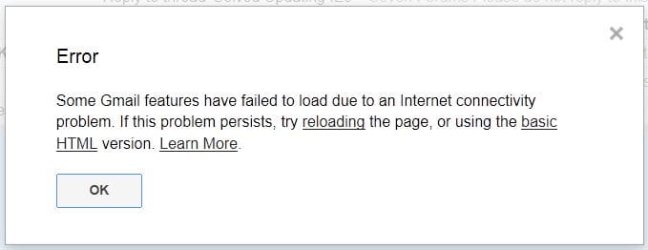
Eventually after five minutes or so the home page will load, but shows this error:
ie9raa2.JPG
Reloading or using basic html produces the same result.
Clicking on OK clears the error, but the only GUI commands that work are in the upper right corner i.e. the min, max, close buttons.

A Guy's suggestion for using Shyam's IE Restorator looks promising, and if I'm reading the tutorial correctly I'm still going to have to properly backup "all essential IE data"

I won't be able to use the tool until I get back sometime this morning, Rhaid i mi fod yn barod am fy mod i'n mynd â'r car i'r gwerthwr ar gyfer rhywfaint o waith warant, but I'm not leaving for another couple of hours so I'll watch for any replies until 6:30am, 11:30 your time?
 

My Computer My Computer

Computer type
PC/Desktop
Computer Manufacturer/Model Number
Gateway DX4831-01e (Mid-Tower Desktop)
OS
Originally Win 7 Hm Prem x64 Ver 6.1.7600 Build 7601-SP1 | Upgraded to Windows 10 December 14, 2019
CPU
Intel i3 530 2.93GHz, 2933MHz 2 Cores 4 Logical Processors
Motherboard
Gateway H57M01 133 megahertz
Memory
6GB of 1,333MHz DDR3 SDRAM
Graphics Card(s)
32MB Intel Graphics Media Accelerator HD IGChip
Sound Card
Realtek High Definition Audio
Monitor(s) Displays
Gateway HX2000 20inch TFT active matrix TN
Screen Resolution
1600 x 900 x 59 hertz
Hard Drives
WDC WD10EADS-00M2B0 [HDD] (1000.20 GB) -- drive 0,
HL-DT-ST DVDRAM GH41N [CD-ROM dr]
Four card readers, and Four USB 2.0
PSU
300watts.
Case
Mid-Tower Desktop
Cooling
Stock from Gateway
Keyboard
Natural Ergonomic Keyboard 4000, see Other Info
Mouse
Orig. Gateway wore out now using Insignia USB wired optical
Internet Speed
Vz FIOS 10ms png 57.64Mbps down 65.53Mbps up Speedtest.org
Antivirus
Zamana Anti-logger with Anti-malware, MSE, Windows Firewall,
Browser
IE11.0.9600.19399-Upd ver11.0.135, Firefox 68.0.1 x64
Other Info
System Specs by Belarc.

BIOS: American Megatrends Inc. P01-A0 11/17/2009

Replaced the MS 'Natural' Standard PS/2 Enhanced 101-102 Keyboard with a new Natural Ergonomic Keyboard 4000 on August 1st 2014.

Canon Pixma MG3222 Printer.

Updated to IE11 on 12102015 | Fios Quantum Router g1100

Additional AV: SpywareBlaster, manual Mbam, SAS
I see - try and baffle me with Welsh, would you? (thank goodness for Google Translate!)
Un fantais o beidio â bod yn berchen ar gar - dim teithiau i'r siop trwsio!
:)
Still playing catchup aftertwo days offline - but didn't really have anything to add, other than WTF part is Google playing in this?
I'm tempted to say uninstall all things Goolge from Programs, as well as from Internet Options Manage Add-ons, and see what happens.
 

My Computer My Computer

Computer type
Laptop
Computer Manufacturer/Model Number
Asus K52F or Lenovo B51-80
OS
Win 7 x64 Home Premium (and x86 VirtualBox VM)/Win10
CPU
i3 370M/i7 6500U
Motherboard
Asus/Lenovo
Memory
8GB - finally :)/8GB
Graphics Card(s)
it's an i3, dude!/dual Intel&nVidia
Sound Card
onboard
Monitor(s) Displays
15.6" built-in
Screen Resolution
1366x768/1920x1080
Hard Drives
750GB Seagate internal
Sundry external drives attached to other computers on the local network
1TB SSD on the Lenovo
PSU
n/a
Internet Speed
as much as I can get - usually on a dongle/phone, so <1MB/s
Antivirus
MSE/Defender
Browser
IE11/12/Edge/Chrome/FF(if I must)
Steve . . . Noel . . .

Im 'yn unig yn mynd i ddweud hyn unwaith.
Rhoi'r gorau i wneud i mi fynd i Google Cyfieithydd.
Dyna oedd unwaith ar gyfer pob un ohonoch.

(d) :roflmao:
 

My Computer My Computer

Computer type
Laptop
Computer Manufacturer/Model Number
Sony Vaio VPCEB47GM Laptop
OS
Win 7 Pro 64-bit
CPU
Intel i5 2.4 Ghz
Memory
8GB DDR3
Graphics Card(s)
Intel HD 3000
Sound Card
IDT High Definition
Monitor(s) Displays
15.6 WGXA Anti-Glare LED
Screen Resolution
1280x800
Hard Drives
640Gb 7200rpm
Antivirus
MSE
Browser
Opera (primary) with IE9 backup
That's OK - you can go back to watching reruns of "'Allo! 'Allo!" now :)
 

My Computer My Computer

Computer type
Laptop
Computer Manufacturer/Model Number
Asus K52F or Lenovo B51-80
OS
Win 7 x64 Home Premium (and x86 VirtualBox VM)/Win10
CPU
i3 370M/i7 6500U
Motherboard
Asus/Lenovo
Memory
8GB - finally :)/8GB
Graphics Card(s)
it's an i3, dude!/dual Intel&nVidia
Sound Card
onboard
Monitor(s) Displays
15.6" built-in
Screen Resolution
1366x768/1920x1080
Hard Drives
750GB Seagate internal
Sundry external drives attached to other computers on the local network
1TB SSD on the Lenovo
PSU
n/a
Internet Speed
as much as I can get - usually on a dongle/phone, so <1MB/s
Antivirus
MSE/Defender
Browser
IE11/12/Edge/Chrome/FF(if I must)
That's OK - you can go back to watching reruns of "'Allo! 'Allo!" now :)

Fond memories of Rene and Madam Fanny La Fan! :haha:

Sorry.

:focus:
 

My Computer My Computer

Computer type
Laptop
Computer Manufacturer/Model Number
Sony Vaio VPCEB47GM Laptop
OS
Win 7 Pro 64-bit
CPU
Intel i5 2.4 Ghz
Memory
8GB DDR3
Graphics Card(s)
Intel HD 3000
Sound Card
IDT High Definition
Monitor(s) Displays
15.6 WGXA Anti-Glare LED
Screen Resolution
1280x800
Hard Drives
640Gb 7200rpm
Antivirus
MSE
Browser
Opera (primary) with IE9 backup
As a blanket response: Fy Arglwydd, beth ydw i wedi gyr? or

I could give it to you in my Father's (Bless His Soul) native Lithuanian:
Mano Viešpatie, ką aš įstojo?

Now in order of reply; then, what was tried so far...

For Noel,

Byddwn wrth fy modd i fyw mewn pentref lle y gallwn i gerdded i'r siopau!

From here on unless one acts differently than the other I am reporting for both versions of IE9, x86 and 64.

google only showed up because it is our email client. I have been able to change the home page and when I re-open IE9x86 or 64 with a new home page I see the same result.

But google is the only page/site that offers that error upon opening IE9.
All the others stall until IE opens a pop-up telling me that it is checking on the problem then the pop-up abruptly closes and IE closes. I never see a result of the fact-finding scan.

The only programs I have of google is Picasa, and google earth, there are no google add-ons.


For Mars,

"Allo! 'Allo!" I liked that show, yes, fond memories...

Yr wyf yn Mate ddrwg gennym, nid oes cyfieithiad Texas a bydd yn rhaid i chi fynd i'r seler win un mwy o amser.


Okay!

I made it back around 9:30am EDT from the car dealer for service on the DW's car and shops to pick up hardware to work on the house, but went to the win 7 box to see if I could straighten out this IE9 problem.

First off I made a restore point.

I backed-up IE9 using this tool: Internet Explorer Backup - BackRex Software

I used A Guy's suggestion: http://www.sevenforums.com/tutorials/98056-sf-ie-restorator-troubleshooting-general-issues-ie.html I reset both flavors of IE9.

I then tried IE9 both flavors. Same result, if I clicked on the shortcut, IE9 would stall. It would only Run as Administrator (RaA)

I was surprised when IE 9 opened up as RaA and still had its favorites, but add-ons, passwords were gone. I worked with both for an hour or so and they worked well as RaA, but to go back and try a regular opening both would stall, no matter what home page.

I looked in the registry and there are a 'lot' of entries for IE9.
I saw some that were for http, https, ftp and other types of connections, but if I had to try and pick one I'd be lost unless I did a lot more research..

I'm thinking my next move would be to try a re-install of IE9, and if that didn't work a repair of the OS. :(

I would be open to the possibility of setting up IE9 to RaA for the DW so that she only had to click on the Icon without the UAC pop-up, but then I wouldn't get to the root of what is causing this unless it is possible to run either flavor of IE9 without RaA so I could troubleshoot them while running it with RaA for the DW.

Prasminga?
 

My Computer My Computer

Computer type
PC/Desktop
Computer Manufacturer/Model Number
Gateway DX4831-01e (Mid-Tower Desktop)
OS
Originally Win 7 Hm Prem x64 Ver 6.1.7600 Build 7601-SP1 | Upgraded to Windows 10 December 14, 2019
CPU
Intel i3 530 2.93GHz, 2933MHz 2 Cores 4 Logical Processors
Motherboard
Gateway H57M01 133 megahertz
Memory
6GB of 1,333MHz DDR3 SDRAM
Graphics Card(s)
32MB Intel Graphics Media Accelerator HD IGChip
Sound Card
Realtek High Definition Audio
Monitor(s) Displays
Gateway HX2000 20inch TFT active matrix TN
Screen Resolution
1600 x 900 x 59 hertz
Hard Drives
WDC WD10EADS-00M2B0 [HDD] (1000.20 GB) -- drive 0,
HL-DT-ST DVDRAM GH41N [CD-ROM dr]
Four card readers, and Four USB 2.0
PSU
300watts.
Case
Mid-Tower Desktop
Cooling
Stock from Gateway
Keyboard
Natural Ergonomic Keyboard 4000, see Other Info
Mouse
Orig. Gateway wore out now using Insignia USB wired optical
Internet Speed
Vz FIOS 10ms png 57.64Mbps down 65.53Mbps up Speedtest.org
Antivirus
Zamana Anti-logger with Anti-malware, MSE, Windows Firewall,
Browser
IE11.0.9600.19399-Upd ver11.0.135, Firefox 68.0.1 x64
Other Info
System Specs by Belarc.

BIOS: American Megatrends Inc. P01-A0 11/17/2009

Replaced the MS 'Natural' Standard PS/2 Enhanced 101-102 Keyboard with a new Natural Ergonomic Keyboard 4000 on August 1st 2014.

Canon Pixma MG3222 Printer.

Updated to IE11 on 12102015 | Fios Quantum Router g1100

Additional AV: SpywareBlaster, manual Mbam, SAS
I'd go for uninstall/reinstall of IE9 - with any luck that should fix it.
 

My Computer My Computer

Computer type
Laptop
Computer Manufacturer/Model Number
Asus K52F or Lenovo B51-80
OS
Win 7 x64 Home Premium (and x86 VirtualBox VM)/Win10
CPU
i3 370M/i7 6500U
Motherboard
Asus/Lenovo
Memory
8GB - finally :)/8GB
Graphics Card(s)
it's an i3, dude!/dual Intel&nVidia
Sound Card
onboard
Monitor(s) Displays
15.6" built-in
Screen Resolution
1366x768/1920x1080
Hard Drives
750GB Seagate internal
Sundry external drives attached to other computers on the local network
1TB SSD on the Lenovo
PSU
n/a
Internet Speed
as much as I can get - usually on a dongle/phone, so <1MB/s
Antivirus
MSE/Defender
Browser
IE11/12/Edge/Chrome/FF(if I must)
Have you tried this from Tips for solving problems when Internet Explorer crashes or stops working
Use software rendering instead of GPU rendering (Internet Explorer 9 only)
You can turn off hardware acceleration and use software rendering instead of graphics processing unit (GPU) rendering to view webpages. Hardware acceleration uses your computer's GPU to speed up graphics-heavy tasks like video streaming or online gaming. Turning this feature off might help solve display problems.
To turn off hardware acceleration

  1. Open Internet Explorer by clicking the Start button
    4f6cbd09-148c-4dd8-b1f2-48f232a2fd33_818.jpg
    . In the search box, type Internet Explorer, and then, in the list of results, click Internet Explorer.
  2. Click the Tools button
    448ef968-d58a-43a2-b0cc-f396f4024f2c_14.jpg
    , and then click Internet options.
  3. Click the Advanced tab, and then select Use software rendering instead of GPU rendering.
  4. Click OK, and then close and reopen Internet Explorer for the change to take effect.
   Note
If your computer's GPU driver requires an update to work with Internet Explorer 9, then hardware acceleration might be turned off automatically. For more information about updating drivers, see Update a driver for hardware that isn't working properly.

There are two MS fixits above this suggestion (1-diable add-ons, and 2-reset IE). I think you might have already tried those.


My Computer My Computer

Computer type
Laptop
Computer Manufacturer/Model Number
HP Pavilion dv6-6c10us
OS
x64 (6.3.9600) Win8.1 Pro & soon dual boot x64 (6.1.7601) Win7_SP1 HomePrem
CPU
AMD A6-3420M APU with Radeon(tm) HD Graphics
Motherboard
Hewlett-Packard 1805
Memory
6.00 GB
Graphics Card(s)
AMD Radeon(TM) HD 6520G
Sound Card
(1) AMD High Definition Audio Device (2) IDT High Definiti
Monitor(s) Displays
HP W2072a 20" LCD (1600 x 900) @ 60 Hz
Screen Resolution
1366 x 768 x 32 bits (4294967296 colors) @ 60 Hz
Hard Drives
ST640LM0 00 HM641JI SATA Disk Device
Keyboard
Logitech k520 wireless KB
Mouse
Logitech m320 wireless mouse (bundled with KB)
Internet Speed
15/5 | 54 MB Wireless 'n'
Antivirus
Realtime: Defender or Avast | On-demand: Malwarebytes, ESET
Browser
IE 11 on Win8, IE 10 on win 7
Other Info
Media: [Gimp, Audacity, VLC] || Comm: [WEmail 2012, Skype] || Productivity: [OpenOffice,| Textpad] || Utils: [Sysinternals, cCleaner, Speccy, Defraggler]
Just a thought. What is your popup blocker setting? The issue might be closing the popup window before an applet finishes. See if allowing popups gives you more information.
Anak said:
.....But google is the only page/site that offers that error upon opening IE9.
All the others stall until IE opens a pop-up telling me that it is checking on the problem then the pop-up abruptly closes and IE closes. I never see a result of the fact-finding scan.
There is also a discussion about Google labs, but you've already said that you only have Picasa, and google earth.
but..... the Gmail client thingy.

Try using HTTP: google vs HTTPS: google

I agree with NoelDP re: google - move it out of the way. I used to know how to use WEB based eMail in a browser (check for mail, not goto and read). You are probably more current on that than I am and I can't seem to find the option in IE options.

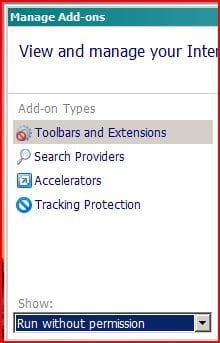
Cycle through the "show" options for add-ons and also look at the accelerators. eliminate anything you don't actually use or anything google. You can always replace these later.

Backup your favorites and history - everything else can be loaded fresh, passwords will have to be entered and saved again if you configure password saving.

After that.... Clean out all of your IE history and double check for any trouble lurking in the "view objects". Wish I could tell you exactly what to look for, but I don't have a clue.

Of course the final solution is most likely what NoelDP suggested. Start afresh with IE9.
 

Attachments

  • Anak add-on.JPG
    Anak add-on.JPG
    19.1 KB · Views: 3

My Computer My Computer

Computer type
Laptop
Computer Manufacturer/Model Number
HP Pavilion dv6-6c10us
OS
x64 (6.3.9600) Win8.1 Pro & soon dual boot x64 (6.1.7601) Win7_SP1 HomePrem
CPU
AMD A6-3420M APU with Radeon(tm) HD Graphics
Motherboard
Hewlett-Packard 1805
Memory
6.00 GB
Graphics Card(s)
AMD Radeon(TM) HD 6520G
Sound Card
(1) AMD High Definition Audio Device (2) IDT High Definiti
Monitor(s) Displays
HP W2072a 20" LCD (1600 x 900) @ 60 Hz
Screen Resolution
1366 x 768 x 32 bits (4294967296 colors) @ 60 Hz
Hard Drives
ST640LM0 00 HM641JI SATA Disk Device
Keyboard
Logitech k520 wireless KB
Mouse
Logitech m320 wireless mouse (bundled with KB)
Internet Speed
15/5 | 54 MB Wireless 'n'
Antivirus
Realtime: Defender or Avast | On-demand: Malwarebytes, ESET
Browser
IE 11 on Win8, IE 10 on win 7
Other Info
Media: [Gimp, Audacity, VLC] || Comm: [WEmail 2012, Skype] || Productivity: [OpenOffice,| Textpad] || Utils: [Sysinternals, cCleaner, Speccy, Defraggler]
Noel:

  • Uninstall/reinstall of IE9 did not work.
Sb:

  • Changing to software rendering did not work.

  • Changed pop-up blocker to off did not work.

  • HTTP or HTTPS does not work.

  • gmail was only used as the home page upon browser opening, the same effect occurred no matter what page/site was used as the home page.

  • There were no google add-ons to begin with, with all add-ons disabled, still did not work.

  • IE9 is backed up.

  • After clearing IE History and then viewing objects I do have Adobe® Flash® Player Installer/Uninstaller 10.1 r102 in C:\Windows\Downloaded Program Files\CONFLICT.1

  • See reply to Noel above, did not work.


When I updated to IE9 two weeks ago it ran fine, the only major or minor thing that happened since then has been Patch Tuesday 10-09-12.
I think I shall investigate the Windows Updates.

The only way it runs like it should is by using the "Run as Administrator" link in its context menu.
In the mean time, until I get this figured out would it be dangerous to run IE9 as Administrator?

Would IE be more open to malware?

I am removing the solved mark until this is corrected.
 

My Computer My Computer

Computer type
PC/Desktop
Computer Manufacturer/Model Number
Gateway DX4831-01e (Mid-Tower Desktop)
OS
Originally Win 7 Hm Prem x64 Ver 6.1.7600 Build 7601-SP1 | Upgraded to Windows 10 December 14, 2019
CPU
Intel i3 530 2.93GHz, 2933MHz 2 Cores 4 Logical Processors
Motherboard
Gateway H57M01 133 megahertz
Memory
6GB of 1,333MHz DDR3 SDRAM
Graphics Card(s)
32MB Intel Graphics Media Accelerator HD IGChip
Sound Card
Realtek High Definition Audio
Monitor(s) Displays
Gateway HX2000 20inch TFT active matrix TN
Screen Resolution
1600 x 900 x 59 hertz
Hard Drives
WDC WD10EADS-00M2B0 [HDD] (1000.20 GB) -- drive 0,
HL-DT-ST DVDRAM GH41N [CD-ROM dr]
Four card readers, and Four USB 2.0
PSU
300watts.
Case
Mid-Tower Desktop
Cooling
Stock from Gateway
Keyboard
Natural Ergonomic Keyboard 4000, see Other Info
Mouse
Orig. Gateway wore out now using Insignia USB wired optical
Internet Speed
Vz FIOS 10ms png 57.64Mbps down 65.53Mbps up Speedtest.org
Antivirus
Zamana Anti-logger with Anti-malware, MSE, Windows Firewall,
Browser
IE11.0.9600.19399-Upd ver11.0.135, Firefox 68.0.1 x64
Other Info
System Specs by Belarc.

BIOS: American Megatrends Inc. P01-A0 11/17/2009

Replaced the MS 'Natural' Standard PS/2 Enhanced 101-102 Keyboard with a new Natural Ergonomic Keyboard 4000 on August 1st 2014.

Canon Pixma MG3222 Printer.

Updated to IE11 on 12102015 | Fios Quantum Router g1100

Additional AV: SpywareBlaster, manual Mbam, SAS
CONFLICT.x - haven't seen that in ages. Now is that causing the problem? And can you just remove it? Hmmmm, let me look around a bit more.
 

My Computer My Computer

Computer type
Laptop
Computer Manufacturer/Model Number
HP Pavilion dv6-6c10us
OS
x64 (6.3.9600) Win8.1 Pro & soon dual boot x64 (6.1.7601) Win7_SP1 HomePrem
CPU
AMD A6-3420M APU with Radeon(tm) HD Graphics
Motherboard
Hewlett-Packard 1805
Memory
6.00 GB
Graphics Card(s)
AMD Radeon(TM) HD 6520G
Sound Card
(1) AMD High Definition Audio Device (2) IDT High Definiti
Monitor(s) Displays
HP W2072a 20" LCD (1600 x 900) @ 60 Hz
Screen Resolution
1366 x 768 x 32 bits (4294967296 colors) @ 60 Hz
Hard Drives
ST640LM0 00 HM641JI SATA Disk Device
Keyboard
Logitech k520 wireless KB
Mouse
Logitech m320 wireless mouse (bundled with KB)
Internet Speed
15/5 | 54 MB Wireless 'n'
Antivirus
Realtime: Defender or Avast | On-demand: Malwarebytes, ESET
Browser
IE 11 on Win8, IE 10 on win 7
Other Info
Media: [Gimp, Audacity, VLC] || Comm: [WEmail 2012, Skype] || Productivity: [OpenOffice,| Textpad] || Utils: [Sysinternals, cCleaner, Speccy, Defraggler]

My Computer My Computer

Computer type
Laptop
Computer Manufacturer/Model Number
HP Pavilion dv6-6c10us
OS
x64 (6.3.9600) Win8.1 Pro & soon dual boot x64 (6.1.7601) Win7_SP1 HomePrem
CPU
AMD A6-3420M APU with Radeon(tm) HD Graphics
Motherboard
Hewlett-Packard 1805
Memory
6.00 GB
Graphics Card(s)
AMD Radeon(TM) HD 6520G
Sound Card
(1) AMD High Definition Audio Device (2) IDT High Definiti
Monitor(s) Displays
HP W2072a 20" LCD (1600 x 900) @ 60 Hz
Screen Resolution
1366 x 768 x 32 bits (4294967296 colors) @ 60 Hz
Hard Drives
ST640LM0 00 HM641JI SATA Disk Device
Keyboard
Logitech k520 wireless KB
Mouse
Logitech m320 wireless mouse (bundled with KB)
Internet Speed
15/5 | 54 MB Wireless 'n'
Antivirus
Realtime: Defender or Avast | On-demand: Malwarebytes, ESET
Browser
IE 11 on Win8, IE 10 on win 7
Other Info
Media: [Gimp, Audacity, VLC] || Comm: [WEmail 2012, Skype] || Productivity: [OpenOffice,| Textpad] || Utils: [Sysinternals, cCleaner, Speccy, Defraggler]
I'm glad I stopped by to check this thread and make a post as I didn't get any notification that you had made your posts Sb.

It is set to instant, but I went ahead and re-set it so I'll have to wait and see what happens.


I read your link to INFO: Why CONFLICT Directories Are Created During Code Download and I'm planning to do the reinstall of Adobe Flash, thank you for the link to the uninstaller.

I'm going to delete that CONFLICT folder I have after I uninstall flash and then reinstall it. I'll let you know what happens.


Now, about my IE9 problems. I think they are solved knock on wood, I went ahead and did a system restore as a matter of fact a whole slew of them.

At one point I noticed the IE shortcut was gone and after I did the last one it was back. I thought oh what the heck and clicked on it and up popped IE9 like I never seen it open before. I've been using it for a day now and it seems to be running okay, I'm using it now.

I had one glitch yesterday where I went to refresh a tab and it was taking too long so I clicked on the address/search X to stop the load, but it wouldn't stop so I X'd the tab, it closed I then opened a new tab with the link I wanted and it popped right up.

So far today its been okay. :zip:
 

My Computer My Computer

Computer type
PC/Desktop
Computer Manufacturer/Model Number
Gateway DX4831-01e (Mid-Tower Desktop)
OS
Originally Win 7 Hm Prem x64 Ver 6.1.7600 Build 7601-SP1 | Upgraded to Windows 10 December 14, 2019
CPU
Intel i3 530 2.93GHz, 2933MHz 2 Cores 4 Logical Processors
Motherboard
Gateway H57M01 133 megahertz
Memory
6GB of 1,333MHz DDR3 SDRAM
Graphics Card(s)
32MB Intel Graphics Media Accelerator HD IGChip
Sound Card
Realtek High Definition Audio
Monitor(s) Displays
Gateway HX2000 20inch TFT active matrix TN
Screen Resolution
1600 x 900 x 59 hertz
Hard Drives
WDC WD10EADS-00M2B0 [HDD] (1000.20 GB) -- drive 0,
HL-DT-ST DVDRAM GH41N [CD-ROM dr]
Four card readers, and Four USB 2.0
PSU
300watts.
Case
Mid-Tower Desktop
Cooling
Stock from Gateway
Keyboard
Natural Ergonomic Keyboard 4000, see Other Info
Mouse
Orig. Gateway wore out now using Insignia USB wired optical
Internet Speed
Vz FIOS 10ms png 57.64Mbps down 65.53Mbps up Speedtest.org
Antivirus
Zamana Anti-logger with Anti-malware, MSE, Windows Firewall,
Browser
IE11.0.9600.19399-Upd ver11.0.135, Firefox 68.0.1 x64
Other Info
System Specs by Belarc.

BIOS: American Megatrends Inc. P01-A0 11/17/2009

Replaced the MS 'Natural' Standard PS/2 Enhanced 101-102 Keyboard with a new Natural Ergonomic Keyboard 4000 on August 1st 2014.

Canon Pixma MG3222 Printer.

Updated to IE11 on 12102015 | Fios Quantum Router g1100

Additional AV: SpywareBlaster, manual Mbam, SAS
Sounds encouraging, Steve.

Croesi bysedd y IE9 yn parhau i weithio a'r holl faterion eraill yn cael eu datrys. :)
 

My Computer My Computer

Computer type
Laptop
Computer Manufacturer/Model Number
Sony Vaio VPCEB47GM Laptop
OS
Win 7 Pro 64-bit
CPU
Intel i5 2.4 Ghz
Memory
8GB DDR3
Graphics Card(s)
Intel HD 3000
Sound Card
IDT High Definition
Monitor(s) Displays
15.6 WGXA Anti-Glare LED
Screen Resolution
1280x800
Hard Drives
640Gb 7200rpm
Antivirus
MSE
Browser
Opera (primary) with IE9 backup
Back
Top