Upgrade from IE 8 to IE 10 on Win 7 32-bit security updates?

win7freak000

New member
Local time
11:14 PM
Messages
14
1. I just installed IE 10 on my Win7 32bit machine.
My question is, what had happened to all the IE 8 security updates after IE 10 has been installed on Win7?
Did the IE 8 security updates been over-written by the IE 10 updates?

Another question:

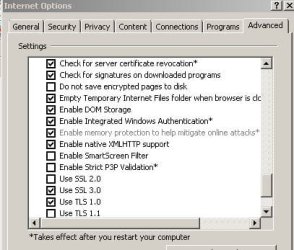
Also, I do not see the option for Enhanced Protected Mode from the Advanced tab in IE 10.
Is this because i am running Win7 32-bit?

Thanks
 

My Computer My Computer

At a glance

Windows 7 Ultimate 32 bit
Computer type
PC/Desktop
OS
Windows 7 Ultimate 32 bit
A lot of those security updates apply to both IE8 and 10.

Enhanced protected mode is a check box under tools>options>advanced>security
Click the cog wheel, select internet options from the list, go to the advanced tab, and scroll down to the security subgroup. You should find protected mode there.

Internet Explorer Enhanced Protected Mode - Turn On or Off

May I ask why you prefer IE10 to IE11?
 

My Computer My Computer

At a glance

Microsoft Windows 8.1 Pro 64-bitIntel(R) Core(TM) i3-4130 CPU @ 3.40GHz8.00 GBNone
Computer type
PC/Desktop
Computer Manufacturer/Model Number
Custom Asus Build
OS
Microsoft Windows 8.1 Pro 64-bit
CPU
Intel(R) Core(TM) i3-4130 CPU @ 3.40GHz
Motherboard
B85M-E
Memory
8.00 GB
Graphics Card(s)
None
Sound Card
Realtek High Definition Audio
Monitor(s) Displays
Asus 23.6" Monitor
Screen Resolution
1920 x 1080 x 32 bits (4294967296 colors) @ 60 Hz
Hard Drives
INTEL SSDSC2BW180A4
Samsung SSD 840 PRO Series
PSU
Seasonic S12II-380Bronze
Case
Lian Li
Cooling
Fan, Passive
Keyboard
Logitech K120
Mouse
Microsoft Touch Mouse
Internet Speed
4ms Ping, 19.0 Mbps Download, 19.0 Mbps Upload
Antivirus
Eset Endpoint
Browser
Internet Explorer, Chrome
"In [...] Internet Explorer 10 on Windows 7 [...], the only thing that enabling Enhanced Protected Mode does is turn on 64bit Content Processes. But, when running on Windows 8, the EPM option provides even more security by also causing the sandboxed Content Process to run in a new process isolation feature called 'AppContainer.'" - more at msdn
 

My Computer My Computer

At a glance

Microsoft Windows 8.1 Pro 64-bitIntel(R) Core(TM) i3-4130 CPU @ 3.40GHz8.00 GBNone
Computer type
PC/Desktop
Computer Manufacturer/Model Number
Custom Asus Build
OS
Microsoft Windows 8.1 Pro 64-bit
CPU
Intel(R) Core(TM) i3-4130 CPU @ 3.40GHz
Motherboard
B85M-E
Memory
8.00 GB
Graphics Card(s)
None
Sound Card
Realtek High Definition Audio
Monitor(s) Displays
Asus 23.6" Monitor
Screen Resolution
1920 x 1080 x 32 bits (4294967296 colors) @ 60 Hz
Hard Drives
INTEL SSDSC2BW180A4
Samsung SSD 840 PRO Series
PSU
Seasonic S12II-380Bronze
Case
Lian Li
Cooling
Fan, Passive
Keyboard
Logitech K120
Mouse
Microsoft Touch Mouse
Internet Speed
4ms Ping, 19.0 Mbps Download, 19.0 Mbps Upload
Antivirus
Eset Endpoint
Browser
Internet Explorer, Chrome
I do not have that option in the first place....
Please see image.
Maybe its because I run Win7 32-bit???

IE 11 is too too new. I would just wait and see how this one goes.

Also, I love IE 10 so far. Its very fluid and faster compared to IE 8.
So far so good.
 

Attachments

  • Capture.JPG
    Capture.JPG
    36.6 KB · Views: 24

My Computer My Computer

At a glance

Windows 7 Ultimate 32 bit
Computer type
PC/Desktop
OS
Windows 7 Ultimate 32 bit
Curious. By the look of the IE options window you have there, are you changing some settings, perhaps to increase performance? Because that looks like an earlier version of windows unless you did some tweaking.

It is very likely that it is not included in 32 bit, because it only effects 64bit features in Windows 7
 

My Computer My Computer

At a glance

Microsoft Windows 8.1 Pro 64-bitIntel(R) Core(TM) i3-4130 CPU @ 3.40GHz8.00 GBNone
Computer type
PC/Desktop
Computer Manufacturer/Model Number
Custom Asus Build
OS
Microsoft Windows 8.1 Pro 64-bit
CPU
Intel(R) Core(TM) i3-4130 CPU @ 3.40GHz
Motherboard
B85M-E
Memory
8.00 GB
Graphics Card(s)
None
Sound Card
Realtek High Definition Audio
Monitor(s) Displays
Asus 23.6" Monitor
Screen Resolution
1920 x 1080 x 32 bits (4294967296 colors) @ 60 Hz
Hard Drives
INTEL SSDSC2BW180A4
Samsung SSD 840 PRO Series
PSU
Seasonic S12II-380Bronze
Case
Lian Li
Cooling
Fan, Passive
Keyboard
Logitech K120
Mouse
Microsoft Touch Mouse
Internet Speed
4ms Ping, 19.0 Mbps Download, 19.0 Mbps Upload
Antivirus
Eset Endpoint
Browser
Internet Explorer, Chrome
LOL....:D Yes!!!! I did the tweaking. I just set the display or performance options in Win7 to Adjust for Best Performance..

Yes, I am running Win7 32 Bit SP1. Is that the reason why EPM is not there?

Also, now that I have IE 10 installed just now, should I not worry about the security updates until next time that MS will publish them for IE 10?
I had been patching IE 8 religously, so what should I do for IE 10 regarding these security patches?
Or, I noticed during the installation of IE 10, that it was downloading and installing required updates. Were those the needed security updates?
So should I just leave it until the next time MS publishes a security update for IE 10?
 

My Computer My Computer

At a glance

Windows 7 Ultimate 32 bit
Computer type
PC/Desktop
OS
Windows 7 Ultimate 32 bit
Win7,

I cannot give a 100% answer on Enhanced Protected Mode being available to 32bit browser, but because it is not available to you, and because MSDN says it turns on 64bit Content Processes, I'm pretty sure you do not get it. Upgrade to IE11, and you might be able to get it, along with additional security features.

You only need to worry about installing IE security updates through windows update. If there are no more updates for IE (any version), then you do not need to install them. If there are updates, whether they are available when you have IE8 or IE10, install them. Once again, many of those updates are for both IE8 AND IE10. And there is an optional update to windows 7 that they came out with that allows you to remove useless updates - http://www.sevenforums.com/tutorials/307546-windows-updates-remove-outdated-updates-windows-7-a.html
 

My Computer My Computer

At a glance

Microsoft Windows 8.1 Pro 64-bitIntel(R) Core(TM) i3-4130 CPU @ 3.40GHz8.00 GBNone
Computer type
PC/Desktop
Computer Manufacturer/Model Number
Custom Asus Build
OS
Microsoft Windows 8.1 Pro 64-bit
CPU
Intel(R) Core(TM) i3-4130 CPU @ 3.40GHz
Motherboard
B85M-E
Memory
8.00 GB
Graphics Card(s)
None
Sound Card
Realtek High Definition Audio
Monitor(s) Displays
Asus 23.6" Monitor
Screen Resolution
1920 x 1080 x 32 bits (4294967296 colors) @ 60 Hz
Hard Drives
INTEL SSDSC2BW180A4
Samsung SSD 840 PRO Series
PSU
Seasonic S12II-380Bronze
Case
Lian Li
Cooling
Fan, Passive
Keyboard
Logitech K120
Mouse
Microsoft Touch Mouse
Internet Speed
4ms Ping, 19.0 Mbps Download, 19.0 Mbps Upload
Antivirus
Eset Endpoint
Browser
Internet Explorer, Chrome
Thanks to all for the quick responses.
So far it seems that IE 10 is much much snappier than IE 8. I like it. Its very fast.
I am going to stick with IE 10. Then later to IE 11 if I feel the need to.

Thanks
 

My Computer My Computer

At a glance

Windows 7 Ultimate 32 bit
Computer type
PC/Desktop
OS
Windows 7 Ultimate 32 bit
A 32 bit machine would not have EPM because there's no 64 bit folder to access,
ie11 will make no difference in that EPM will never be available on a 32 bit machine,
Cheers.
 

My Computer My Computer

At a glance

Win-7-Pro64bit 7-H-Prem-64biti7-5930K 2nd i9-9940x both water blocked VRM'...Trident-z 3200C14 2nd Trident-z 3600C16EVGA 1080ti ftw3 2nd Titan Xp both water blocked
Computer type
PC/Desktop
Computer Manufacturer/Model Number
Custom assembled by me :}
OS
Win-7-Pro64bit 7-H-Prem-64bit
CPU
i7-5930K 2nd i9-9940x both water blocked VRM's too
Motherboard
ASUS SABERTOOTH X99 2nd ASUS x299 Apex
Memory
Trident-z 3200C14 2nd Trident-z 3600C16
Graphics Card(s)
EVGA 1080ti ftw3 2nd Titan Xp both water blocked
Sound Card
Built-in Realtek
Monitor(s) Displays
1-AOC G2460PG 24"G-Sync 144Hz/ 2nd 1-ASUS VG248QE 24" 144Hz
Screen Resolution
1920 x 1080 144Hz
Hard Drives
2-Samsung M.2 Evo & Evo Plus
2-Samsung 850 EVO 500GB SSD's/ 3-2.5 W.D. Black 1tb-&3-1tb/3-3.5 WD Black 1tb hdd's
PSU
EVGA SuperNOVA 1000-P2 2nd 1200-P2
Case
2-Corsair Obsidian Series 450D Black ATX Mid Tower
Cooling
Custom water loops
Keyboard
Logitech G710+/ 2nd Logitech G910
Mouse
2-RedDragon M901 Perdition 16400 dpi Gaming mouse = wired
Internet Speed
Comcast Ping 19ms 89.31mbps download speed 6.12mbps upload
Antivirus
Malwarebytes Pro/ Superantispyware Pro
Browser
FireFox & Pale moon
Other Info
2nd ASUS X299 Apex/Intel i9-9940x with Custom water loop/7H-Prem-x64/Corsair 450D case/Ram Trident-z 3600C16 4x8gb / Samsung970Evo plus 500gb SSD/Dual ssd EZ swap evo/PSU EVGA SuperNova 1200w-P2 80+Platinum/GPU Titan Xp /8-ML-140 on push-pull on 2-280GTX rads

My Computer My Computer

At a glance

Windows 10 Home x64INTEL Core i5-750 Quad-Core 3.37GHzHyperX Fury Black Series 8GB (2 x 4GB) 1866MhzEVGA GeForce GTX 750 Superclocked 1GB 128-Bit...
Computer type
PC/Desktop
OS
Windows 10 Home x64
CPU
INTEL Core i5-750 Quad-Core 3.37GHz
Motherboard
ASUS P7P55D
Memory
HyperX Fury Black Series 8GB (2 x 4GB) 1866Mhz
Graphics Card(s)
EVGA GeForce GTX 750 Superclocked 1GB 128-Bit GDDR5
Monitor(s) Displays
LG 32MA68HY 32" IPS
Screen Resolution
1920 x 1080
Hard Drives
Samsung 840 Evo 120GB, SEAGATE 500GB Barracuda® 7200.12, SATA 3 Gb/s, 7200 RPM, 16MB cache
PSU
ANTEC TruePower New TP-550, 80 PLUS, 550W
Case
ANTEC Three Hundred Illusion
Cooling
COOLER MASTER Hyper 212 Plus, 4 x 120mm 1 x 140mm Noctua's
Internet Speed
85 + Mbps
Antivirus
Avast
Browser
Vivaldi
Back
Top