Upgrade Install with Windows 7

How to Do an Inplace Upgrade Installation from Vista to Windows 7


   Information
A upgrade installation allows you to keep intact the files, settings, and programs from your current version of Vista SP1 or SP2. This will show you how to do a upgrade installation with a Upgrade version of Windows 7 from Vista. XP users will now be able to upgrade to Windows 7, but will have to do a clean install or custom install of Windows 7 instead.

Yes, you can do a clean install from a upgrade Windows 7 version. :)
NOTE: See this tutorial for how: Clean Install with a Upgrade Windows 7 Version
   Note
Do a Upgrade installation if:

  • Your computer is running Windows Vista with Service Pack 1.
    NOTE: To see if you are: Open the Start Menu, right click on Computer, and then click on Properties. Under Windows edition, look for Service Pack 1 next to your Windows Vista edition name. If you don’t have Vista Service Pack 1 installed, or your computer is running an earlier version of Windows, then you can’t perform an upgrade installation to Windows 7.
  • You DO want to preserve your user accounts, data, programs, and system drivers.
  • You want to do a in place upgrade from either a 32-bit version of Windows Vista to a 32-bit version of Windows 7, or a 64-bit version of Windows Vista to a 64-bit version of Windows 7. You cannot upgrade from 32-bit to 64-bit. You can only do a clean install from 32-bit to 64-bit, or from 64-bit to 32-bit.
  • You’re upgrading to the same Windows language. For example, from English to English.
   Tip
Before doing this upgrade install, you should run the Windows 7 Upgrade Advisor to see if you might have any issues before upgrading.

If everything checks out, then be sure to download and save all of your device drivers to DVD, or some other media, to have them handy to make setting up Windows 7 easier after the installation. Sometimes using the Vista drivers in Windows 7, you will need to use Compatibility Mode on the driver for it to install.

I would also recommend that you backup anything that you do not want to lose to be extra safe.

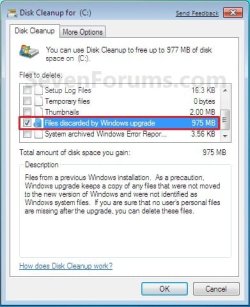
After you do a upgrade install, you will also see the option Files discarded by Windows upgrade option in Disk Cleanup. This would be for the C:\Windows.old , C:\$INPLACE.~TR , and C:\$WINDOWS.~Q files left over from the previous operating system.

You can also get more great information about upgrading Windows 7 at this link below:
Windows: Windows 7 Upgrade Option

   Warning
Windows 7 Minimum Hardware Requirements:


NOTE: See also: Windows 7 system requirements
  • 1 GHz 32-bit or 64-bit processor
  • 1 GB RAM for 32-bit Windows 7 OR 2 GB RAM for 64-bit Windows 7
  • 16 GB available disk space 32-bit Windows 7 OR 20 GB for 64-bit Windows 7
  • Support for DirectX 9 graphics with 128 MB memory (in order to enable Aero theme)
  • DVD-R/W Drive
  • Internet access (to download the Beta and get updates)
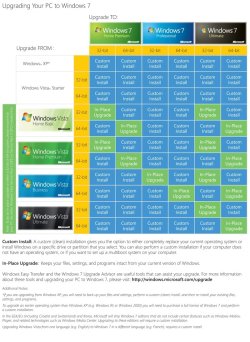
Supported Upgrade Paths to Window 7 without doing a Clean Install:
NOTE: You can only upgrade from a 32-bit (x86) Vista to 32-bit (x86) Windows 7 or 64-bit (x64) Vista to 64-bit (x64) Windows 7. Going from a 32-bit to 64-bit, or 64-bit to 32-bit, will require a clean install instead.

From Windows Vista (SP1, SP2) | Upgrade to Windows 7
Home Basic|Home Basic, Home Premium, Ultimate
Home Premium|Home Premium, Ultimate
Business|Professional, Enterprise, Ultimate
Ultimate|Ultimate
Enterprise|Enterprise

From Windows 7 | Repair -In-Place Upgrade to Windows 7
Starter (x86 only)|Starter (x86)
Home Basic|Home Basic
Home Premium|Home Premium
Professional|Professional
Ultimate|Ultimate
Enterprise|Enterprise

From Windows 7 | Anytime Upgrade to Windows 7
Starter|Home Premium, Professional, Ultimate
Home Basic|Home Premium, Professional, Ultimate
Home Premium|Professional, Ultimate
Professional|Ultimate
EXAMPLE: Windows 7 Upgrade Chart by Microsoft
NOTE: In-Place Upgrade is upgrading your currently installed OS to Windows 7 without losing anything. A Custom Install is doing a clean install without formatting the hard drive and selecting the current os to install Windows 7 on top of it to place the current OS in a C:\Windows.old folder as a backup.
windows7-upgrade-chart.jpg
Here's How:
1. Start Vista, and log on to an administrator account.
NOTE: If you wanted to do a clean install with an upgrade Windows 7, then you would be doing this tutorial to do a upgrade install of Windows 7 from within a clean install of Windows 7 instead of from within Vista.

2. Disable any 3rd party firewall, antivirus, or other security program to avoid it from possibly preventing the upgrade installation to Windows 7.

3. You should run the Windows 7 Upgrade Advisor to see if you may have any issues before upgrading. Correct any issues found before continuing.
NOTE: Skip this step if you are doing a clean install with a upgrade Windows 7, then you would be doing this tutorial to do a upgrade install of Windows 7 inside a clean install of Windows 7 instead.

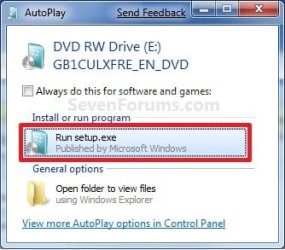
4. Place your Windows 7 installation DVD into the DVD drive and click on the Run setup.exe option in the AutoPlay window from within Vista. (See screenshot below)
NOTE: If the AutoPlay window does not open, then open the drive folder in Computer and run the setup.exe file.
AutoPlay.jpg
5. Click on the Install Now button to start the installation. (See screenshot below)
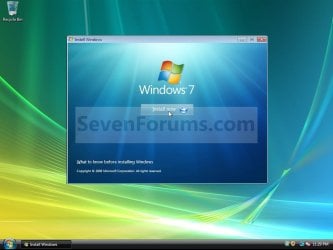
Step1.jpg
6. Uncheck the I want to help make Windows installation better box (unless you want to), and click on the Go online to get the latest updates for installation option. (See screenshot below)
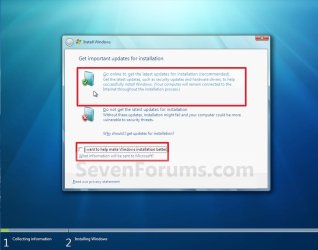
Step2.jpg
7. Windows 7 will now check online for and install any available installation updates. (See screenshots below)
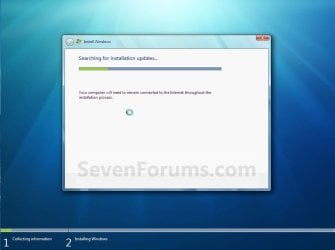
Step3.jpg

Step4.jpg

8. Check the I accept the license terms box and click on Next. (See screenshot below)
Step5.jpg
9. For a In-place Upgrade Install
NOTE: Do this option if you are currently running Vista and want to keep your files, programs, and settings and install (upgrade to) Windows 7. See the warning box at the top of the tutorial for upgrade options. Do this step if you are doing a clean install with a upgrade Windows 7, then you would be doing this tutorial to do a upgrade install of Windows 7 inside a clean install of Windows 7 instead.
A) Click on the Upgrade option. (See screenshot below)
Step6.jpg
B) Go to step 11.
10. For a Custom Install
NOTE: Do this option if you are running XP or want to completely replace your current version of Windows with Windows 7. You will need to reinstall your programs after installation. This will be like doing a clean install without formating. Your previous installation will be placed in the C:\Windows.old folder (step 19) so you can copy any files back.
A) Click on the Custom option. (See screenshot above)

B) Continue on to step 11.
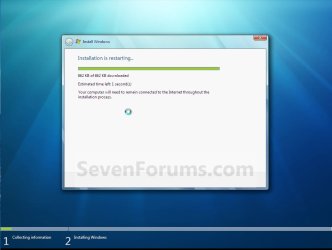
11. The installation of Windows 7 will now begin. (See screenshot below)
NOTE: During the installation process, your screen may flash and computer will restart a few times.
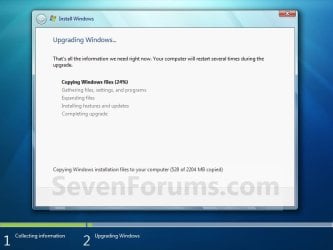
Step7.jpg
12. After the final restart, you will see this screen for a moment. (See screenshot below)
Step8.jpg
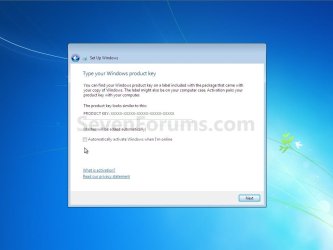
13. Type in your Windows 7 product key number. (See screenshot below step 14)

14. Uncheck the Automatically activate Windows when I'm online box unchecked, then click on the Next button. (See screenshot below)
NOTE: You can activate Windows 7 later after you make sure it is running properly. (See step 21 below)
If you chose to automatically activate Windows online when you set up your computer, automatic activation begins trying to activate your copy of Windows three days after you log on for the first time.
Step9.jpg
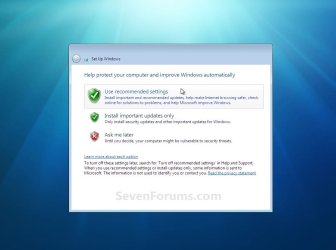
15. Click on Use recommended settings to allow automatic Windows Updates and proper security settings. (See screenshot below)
NOTE: For more information about these recommended settings, click on the Learn more about each option link in this window.
Step10.jpg
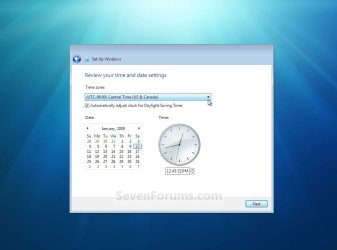
16. Select your time zone and set your time and date settings, then click on the Next button. (See screenshot below)
Step11.jpg
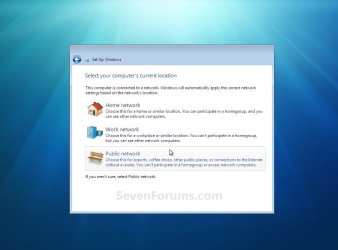
17. Click on your computer's correct network location type location to select it and have the settings for that location automatically applied. (See screenshot below)
Step12.jpg
18. Windows 7 will now prepare your desktop to startup. (See screenshots below)
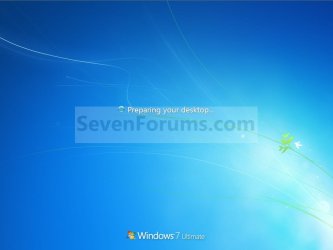
Step13A.jpg

Desktop.jpg

19. Check to see if you are missing any user files. If you are, then you can copy them from the C:\Windows.old or the hidden protected operating system C:\$INPLACE.~TR and C:\WINDOWS.~Q backup folders.

20. If everything checks out in step 19, then you can run Disk Cleanup (step 6 at this link). You will need to click on the Clean up system files button first, and then check the Files discarded by Windows upgrade box. (See screenshot below)
NOTE: This will delete the C:\Windows.old, C:\$INPLACE.~TR and C:\WINDOWS.~Q folders from step 17 above.
Disk_Cleanup.jpg
21. Install all of your device drivers if needed, then all Windows Updates.

22. Refresh your Windows Experience Index (WEI) score.

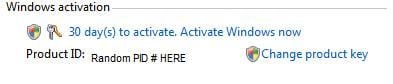
23. When done, all you will need to do is to activate Windows 7. (See screenshot below)
Activate.jpg
That's it,
Shawn


Last edited:
Yow Brinx.
I was able to I upgrade to Build 7127 version.
What is actualy the advantages of it.
Short explanation is appreciated Bro.

Hello Kevin,

If you mean what are the advantages of udgrading vs clean install, then doing a upgrade will allow you to install the new version of Windows 7 without having to reinstall all of your programs and files, or set your settings again.

Hope this helps,
Shawn
 

My Computer

Computer type
PC/Desktop
Computer Manufacturer/Model Number
Self built custom
OS
64-bit Windows 11 Pro for Workstations
CPU
Intel i7-8700K OC'd to 5 GHz
Motherboard
ASUS ROG Maximus XI Formula Z390
Memory
64 GB (4x16GB) G.SKILL TridentZ RGB DDR4 3600 MHz
Graphics Card(s)
ASUS ROG-STRIX-GTX1080TI-O11G-GAMING
Sound Card
Integrated
Monitor(s) Displays
2 x Samsung Odyssey G7 27"
Screen Resolution
2560x1440
Hard Drives
1TB Samsung 990 PRO M.2,
4TB Samsung 990 PRO PRO M.2,
TerraMaster F8 SSD Plus NAS
PSU
Seasonic Prime Titanium 850W
Case
Thermaltake Core P3
Cooling
Corsair Hydro H115i
Keyboard
Logitech wireless K800
Mouse
Logitech MX Master 4
Internet Speed
2 Gb/s Download and 100 Mb/s Upload
Antivirus
Malwarebyte Anti-Malware Premium
Browser
Google Chrome
Other Info
Logitech Z625 speaker system,
Logitech BRIO 4K Pro webcam,
HP Color LaserJet Pro MFP M477fdn,
APC SMART-UPS RT 1000 XL - SURT1000XLI,
Galaxy S23 Plus phone
Hi Shawn..

I moved already to Build 7600 x64. What made me wonder is that most of the devices, incl my wifi card instantaneously works before installing its native driver. And, it works perfectly.
I already installed most of the board drivers, except the wifi card. What do you suggest then. Should I install the native one as it is available?

Kevin.
 

My Computers

System One System Two

  • Computer type
    PC/Desktop
    Computer Manufacturer/Model Number
    MSI
    OS
    Windows 11 Prerelease
    CPU
    CORE i5 10400
    Motherboard
    MSI H510M Pro
    Memory
    16GB
    Graphics Card(s)
    GTX 750Ti
    Sound Card
    Realtek HD Integrated
    Monitor(s) Displays
    Samsung Curved 24"; Samsung TV 50"
    Screen Resolution
    1920 x 1080
    Hard Drives
    Vi-Gen NVMe 256GB
    WD 3 TB
    Seagate 2 TB
    Seagate 4TB
    PSU
    Power Striker
    Case
    VBR
    Cooling
    Conventional
    Keyboard
    Logitech Wireless
    Mouse
    Logitech Wireless
    Internet Speed
    2MBPs
  • Computer type
    Laptop
    System Manufacturer/Model Number
    Apple MacBook
    OS
    BigSur
    CPU
    Core i5
    Memory
    8 GB
    Monitor(s) Displays
    13 "
    Screen Resolution
    1366 x 768
    Hard Drives
    SSD 256 GB
Kevin,

If there is a newer 64-bit Windows 6 driver version available for the device, then you might consider installing it. I would recommend to read the release notes for the driver to see if it may address any issues that you may be having with the device, or if it may add any additional features. If it looks good, then give it a try.
 
Last edited:

My Computer

Computer type
PC/Desktop
Computer Manufacturer/Model Number
Self built custom
OS
64-bit Windows 11 Pro for Workstations
CPU
Intel i7-8700K OC'd to 5 GHz
Motherboard
ASUS ROG Maximus XI Formula Z390
Memory
64 GB (4x16GB) G.SKILL TridentZ RGB DDR4 3600 MHz
Graphics Card(s)
ASUS ROG-STRIX-GTX1080TI-O11G-GAMING
Sound Card
Integrated
Monitor(s) Displays
2 x Samsung Odyssey G7 27"
Screen Resolution
2560x1440
Hard Drives
1TB Samsung 990 PRO M.2,
4TB Samsung 990 PRO PRO M.2,
TerraMaster F8 SSD Plus NAS
PSU
Seasonic Prime Titanium 850W
Case
Thermaltake Core P3
Cooling
Corsair Hydro H115i
Keyboard
Logitech wireless K800
Mouse
Logitech MX Master 4
Internet Speed
2 Gb/s Download and 100 Mb/s Upload
Antivirus
Malwarebyte Anti-Malware Premium
Browser
Google Chrome
Other Info
Logitech Z625 speaker system,
Logitech BRIO 4K Pro webcam,
HP Color LaserJet Pro MFP M477fdn,
APC SMART-UPS RT 1000 XL - SURT1000XLI,
Galaxy S23 Plus phone
Yep...

Most the 64-bit board drivers are provided by Intel signed and dated around July 2009. So I installed it. I will verify the Wi-Fi, as it is 2 year old card and I need the 64-bit driver whenever possible (its D-Link DWA-520). So far it works with no problem.
Love it much :) :)

Thanks Shawn
 

My Computers

System One System Two

  • Computer type
    PC/Desktop
    Computer Manufacturer/Model Number
    MSI
    OS
    Windows 11 Prerelease
    CPU
    CORE i5 10400
    Motherboard
    MSI H510M Pro
    Memory
    16GB
    Graphics Card(s)
    GTX 750Ti
    Sound Card
    Realtek HD Integrated
    Monitor(s) Displays
    Samsung Curved 24"; Samsung TV 50"
    Screen Resolution
    1920 x 1080
    Hard Drives
    Vi-Gen NVMe 256GB
    WD 3 TB
    Seagate 2 TB
    Seagate 4TB
    PSU
    Power Striker
    Case
    VBR
    Cooling
    Conventional
    Keyboard
    Logitech Wireless
    Mouse
    Logitech Wireless
    Internet Speed
    2MBPs
  • Computer type
    Laptop
    System Manufacturer/Model Number
    Apple MacBook
    OS
    BigSur
    CPU
    Core i5
    Memory
    8 GB
    Monitor(s) Displays
    13 "
    Screen Resolution
    1366 x 768
    Hard Drives
    SSD 256 GB
Hey Shawn,

Great tut mate! This might be strange question, but I hope you will be able to help me! A friend of mine is running Vista Sp2 on his laptop, and want to upgrade to Windows 7. The question is, his system is in Chinese, and I only have the English version of the RTM. Will it be possible to do the upgrade, and then later just install the LP?

Thanks!!

Pierre
 

My Computer

Computer type
PC/Desktop
Computer Manufacturer/Model Number
Self built.
OS
Windows 7 RTM 64bit, Windows 8 Pro 64bit
CPU
Intel i5-2500K @ 3.3Ghz
Motherboard
Asus Maximus IV GENE-Z/GEN3
Memory
16GB G.Skill RaptorX 1600MHz DDR3
Graphics Card(s)
N570GTX Twin Frozr III Power Edition
Sound Card
SupremeFX X-Fi 2
Monitor(s) Displays
BenQ XL2420T 120Hz 24 inch gaming monitor, Acer V233H 23 inc
Screen Resolution
1920x1080
Hard Drives
320GB Seagate Barracuda
WD 1TB Black Caviar
2TB WD Green Caviar
Samsung SSD 840 PRO Series
PSU
CoolerMaster Silent Pro Gold 1200WATT 80 Plus Gold
Case
CoolerMaster HAF X RC-942
Cooling
CoolerMaster V6GT Multi-Platform CPU Cooler
Keyboard
Logitech G510 Gaming Keyboard
Mouse
Logitech G700 Gaming Mouse
Antivirus
Norton Internet Security
Browser
Firefox 21
Other Info
Logitech Extreme 3D Pro Gaming Joystick, Logitech G930 Wireless Gaming Headset

My Computer

Computer type
PC/Desktop
Computer Manufacturer/Model Number
Self built custom
OS
64-bit Windows 11 Pro for Workstations
CPU
Intel i7-8700K OC'd to 5 GHz
Motherboard
ASUS ROG Maximus XI Formula Z390
Memory
64 GB (4x16GB) G.SKILL TridentZ RGB DDR4 3600 MHz
Graphics Card(s)
ASUS ROG-STRIX-GTX1080TI-O11G-GAMING
Sound Card
Integrated
Monitor(s) Displays
2 x Samsung Odyssey G7 27"
Screen Resolution
2560x1440
Hard Drives
1TB Samsung 990 PRO M.2,
4TB Samsung 990 PRO PRO M.2,
TerraMaster F8 SSD Plus NAS
PSU
Seasonic Prime Titanium 850W
Case
Thermaltake Core P3
Cooling
Corsair Hydro H115i
Keyboard
Logitech wireless K800
Mouse
Logitech MX Master 4
Internet Speed
2 Gb/s Download and 100 Mb/s Upload
Antivirus
Malwarebyte Anti-Malware Premium
Browser
Google Chrome
Other Info
Logitech Z625 speaker system,
Logitech BRIO 4K Pro webcam,
HP Color LaserJet Pro MFP M477fdn,
APC SMART-UPS RT 1000 XL - SURT1000XLI,
Galaxy S23 Plus phone

My Computer

Computer type
PC/Desktop
Computer Manufacturer/Model Number
Self built.
OS
Windows 7 RTM 64bit, Windows 8 Pro 64bit
CPU
Intel i5-2500K @ 3.3Ghz
Motherboard
Asus Maximus IV GENE-Z/GEN3
Memory
16GB G.Skill RaptorX 1600MHz DDR3
Graphics Card(s)
N570GTX Twin Frozr III Power Edition
Sound Card
SupremeFX X-Fi 2
Monitor(s) Displays
BenQ XL2420T 120Hz 24 inch gaming monitor, Acer V233H 23 inc
Screen Resolution
1920x1080
Hard Drives
320GB Seagate Barracuda
WD 1TB Black Caviar
2TB WD Green Caviar
Samsung SSD 840 PRO Series
PSU
CoolerMaster Silent Pro Gold 1200WATT 80 Plus Gold
Case
CoolerMaster HAF X RC-942
Cooling
CoolerMaster V6GT Multi-Platform CPU Cooler
Keyboard
Logitech G510 Gaming Keyboard
Mouse
Logitech G700 Gaming Mouse
Antivirus
Norton Internet Security
Browser
Firefox 21
Other Info
Logitech Extreme 3D Pro Gaming Joystick, Logitech G930 Wireless Gaming Headset
You're most welcome Pierre. :)
 

My Computer

Computer type
PC/Desktop
Computer Manufacturer/Model Number
Self built custom
OS
64-bit Windows 11 Pro for Workstations
CPU
Intel i7-8700K OC'd to 5 GHz
Motherboard
ASUS ROG Maximus XI Formula Z390
Memory
64 GB (4x16GB) G.SKILL TridentZ RGB DDR4 3600 MHz
Graphics Card(s)
ASUS ROG-STRIX-GTX1080TI-O11G-GAMING
Sound Card
Integrated
Monitor(s) Displays
2 x Samsung Odyssey G7 27"
Screen Resolution
2560x1440
Hard Drives
1TB Samsung 990 PRO M.2,
4TB Samsung 990 PRO PRO M.2,
TerraMaster F8 SSD Plus NAS
PSU
Seasonic Prime Titanium 850W
Case
Thermaltake Core P3
Cooling
Corsair Hydro H115i
Keyboard
Logitech wireless K800
Mouse
Logitech MX Master 4
Internet Speed
2 Gb/s Download and 100 Mb/s Upload
Antivirus
Malwarebyte Anti-Malware Premium
Browser
Google Chrome
Other Info
Logitech Z625 speaker system,
Logitech BRIO 4K Pro webcam,
HP Color LaserJet Pro MFP M477fdn,
APC SMART-UPS RT 1000 XL - SURT1000XLI,
Galaxy S23 Plus phone
Hello, first off very nice tutorial.

However, I am still having an upgrade issue. I am running Vista Sp2 64bit but when I go to do the upgrade, the disc i have lets you choose between x64 and x86. When I pick the x64 upgrade it says both compatability errors, that I cannot upgrade 32 to 64 and also the message that I cannot upgrade 64 to 32.

This seems way too strange to be within my expertise...:sarc:
 

My Computer

Computer Manufacturer/Model Number
ASUS G50TV
OS
Vista SP2
CPU
P7450 @ 2.13ghz
Memory
4Gb
Graphics Card(s)
GeForce 9800m GS
Windows 7 Beta is done...

Hey, Falconkicker....

Too late to load any Win 7 Betas. That ended awhile back.

As a matter of fact.. the release Version is due out next month.

Can't wait.

ladycd
 

My Computer

OS
Vista Premium SP1
Thank you for clearing this up!

People have been pouring in here in the past few days and the misinformation flying about being able to boot to install the Upgrade disk was becoming overwhelming.

For those of us who have been battling back against this misinformation, and even been attacked by some who insist that a clean install Upgrade must be done from boot, this is sweet vindication.

All of this is exactly as it has been reported on the tech blogs, including MS Technet and the Win7 Team blog, over the past year.

If you want a clean install to formatted metal, you need to install to a second HDD kept as a dual boot, or set to boot in BIOS, marked active and run Startup Repair. I just did my second one.

This makes it a perfect day, the day the future arrives!
 
Hello Greg.

It is indeed. I wouldn't blame them to much though. There had been a lot of conflicting information about it out there, and I'm sure some of them just leaned on the side of caution. :)
 

My Computer

Computer type
PC/Desktop
Computer Manufacturer/Model Number
Self built custom
OS
64-bit Windows 11 Pro for Workstations
CPU
Intel i7-8700K OC'd to 5 GHz
Motherboard
ASUS ROG Maximus XI Formula Z390
Memory
64 GB (4x16GB) G.SKILL TridentZ RGB DDR4 3600 MHz
Graphics Card(s)
ASUS ROG-STRIX-GTX1080TI-O11G-GAMING
Sound Card
Integrated
Monitor(s) Displays
2 x Samsung Odyssey G7 27"
Screen Resolution
2560x1440
Hard Drives
1TB Samsung 990 PRO M.2,
4TB Samsung 990 PRO PRO M.2,
TerraMaster F8 SSD Plus NAS
PSU
Seasonic Prime Titanium 850W
Case
Thermaltake Core P3
Cooling
Corsair Hydro H115i
Keyboard
Logitech wireless K800
Mouse
Logitech MX Master 4
Internet Speed
2 Gb/s Download and 100 Mb/s Upload
Antivirus
Malwarebyte Anti-Malware Premium
Browser
Google Chrome
Other Info
Logitech Z625 speaker system,
Logitech BRIO 4K Pro webcam,
HP Color LaserJet Pro MFP M477fdn,
APC SMART-UPS RT 1000 XL - SURT1000XLI,
Galaxy S23 Plus phone
My only question is where is the Custom drive map showing partitions available for install, including secondary HDD? My understanding is that these can be pre-formatted with a partition manager for a true clean install to formatted metal.
 

My Computer

Computer type
PC/Desktop
Computer Manufacturer/Model Number
Self built custom
OS
64-bit Windows 11 Pro for Workstations
CPU
Intel i7-8700K OC'd to 5 GHz
Motherboard
ASUS ROG Maximus XI Formula Z390
Memory
64 GB (4x16GB) G.SKILL TridentZ RGB DDR4 3600 MHz
Graphics Card(s)
ASUS ROG-STRIX-GTX1080TI-O11G-GAMING
Sound Card
Integrated
Monitor(s) Displays
2 x Samsung Odyssey G7 27"
Screen Resolution
2560x1440
Hard Drives
1TB Samsung 990 PRO M.2,
4TB Samsung 990 PRO PRO M.2,
TerraMaster F8 SSD Plus NAS
PSU
Seasonic Prime Titanium 850W
Case
Thermaltake Core P3
Cooling
Corsair Hydro H115i
Keyboard
Logitech wireless K800
Mouse
Logitech MX Master 4
Internet Speed
2 Gb/s Download and 100 Mb/s Upload
Antivirus
Malwarebyte Anti-Malware Premium
Browser
Google Chrome
Other Info
Logitech Z625 speaker system,
Logitech BRIO 4K Pro webcam,
HP Color LaserJet Pro MFP M477fdn,
APC SMART-UPS RT 1000 XL - SURT1000XLI,
Galaxy S23 Plus phone

My Computer

Computer Manufacturer/Model Number
lenovo
OS
windows 7 pro
CPU
intel core 2 quad q8400 2.66
Memory
8 gb
Graphics Card(s)
ati radeon hd 3470
Sound Card
built in
Hard Drives
560 gb

My Computer

Computer type
PC/Desktop
Computer Manufacturer/Model Number
Self built custom
OS
64-bit Windows 11 Pro for Workstations
CPU
Intel i7-8700K OC'd to 5 GHz
Motherboard
ASUS ROG Maximus XI Formula Z390
Memory
64 GB (4x16GB) G.SKILL TridentZ RGB DDR4 3600 MHz
Graphics Card(s)
ASUS ROG-STRIX-GTX1080TI-O11G-GAMING
Sound Card
Integrated
Monitor(s) Displays
2 x Samsung Odyssey G7 27"
Screen Resolution
2560x1440
Hard Drives
1TB Samsung 990 PRO M.2,
4TB Samsung 990 PRO PRO M.2,
TerraMaster F8 SSD Plus NAS
PSU
Seasonic Prime Titanium 850W
Case
Thermaltake Core P3
Cooling
Corsair Hydro H115i
Keyboard
Logitech wireless K800
Mouse
Logitech MX Master 4
Internet Speed
2 Gb/s Download and 100 Mb/s Upload
Antivirus
Malwarebyte Anti-Malware Premium
Browser
Google Chrome
Other Info
Logitech Z625 speaker system,
Logitech BRIO 4K Pro webcam,
HP Color LaserJet Pro MFP M477fdn,
APC SMART-UPS RT 1000 XL - SURT1000XLI,
Galaxy S23 Plus phone
OK... So I never do "in place" upgrades, but my system was recently and majorly upgraded and a clean install of Vista Ultimate installed perhaps 5 months ago. I have all recent hardware and software, I've run upgrade advisor and the only flag was itunes.

After the Launch event I attended yesterday and hearing a MS IT Evangelist tell us how he too doesnt do in place upgrades but decided to do it with his main Vista machine and how successful it was... I'm tempted.

But first I think I will post a poll...

Here it is: http://www.sevenforums.com/installation-setup/32836-poll-place-upgraders.html
 
Last edited:

My Computer

Computer Manufacturer/Model Number
Homebrew PC - "Alpha_Dawg"
OS
Windows 7 Ultimate 64 bit Steve Ballmer Signature Edition
CPU
Intel Core 2 Quad - Q9550 - 2.83GHz stock - OC'd to 3.6GHz
Motherboard
Gigabyte EP45-UD3P
Memory
4GB DDR2 800MHz (PC6400) OCZ Reaper
Graphics Card(s)
Nvidia GE Force 8800 GTS
Sound Card
Asus Xonar DX
Monitor(s) Displays
Samsung SyncMaster 2333HD
Screen Resolution
1920 x 1080
Hard Drives
WD Caviar Black 750GB - 7200RPM - 32MB cache
WD Caviar Green 1.5TB - 5400RPM - 64MB cache
WD Caviar Green 2.0TB - 5400RPM - 64MB cache
PSU
PC Power & Cooling Silencer 750
Case
Gigabyte 3D Aurora
Cooling
Case is Air - 5ea. 120mm fans (mix of Arctic and Xigmatec)
Keyboard
MS Natural Wireless KB
Mouse
MS Wireless Mouse
Internet Speed
50 mbps down/5 mbps up
Other Info
AVerMedia - AVerTVHD G2 Dual Tuner Card
no COA

first of all thansk to everyone who takes the time to post here. I have a PC from HP that was running Vista home premium and was eligible for the free Windows 7 upgrade. I duly received my discs, installed them and upfgaded and everything seems fine BUT I did not get a COA and therefore have no 25 digit authentication key, so I cannot activate my Windows 7. I have 5 days left to activate, and HP's partner in the upgrade is telling me 2 different things.One contact is sending me new discs with a new COA and he says that all I need is to input that authentication code, but another is saying I did not need the authentication code as it was an upgrade from Vista, and if its prompting me for that then I need to re install VISTA and do the upgrade ALL OVER AGAIN!!! I am so frustrated with HP can anyone help me with what I should really do and which response is correct?

Many thanks
 

My Computer

Computer Manufacturer/Model Number
HP pavilion e9180t
OS
windows 7 home premium
CPU
core i7

My Computer

Computer type
PC/Desktop
Computer Manufacturer/Model Number
Self built custom
OS
64-bit Windows 11 Pro for Workstations
CPU
Intel i7-8700K OC'd to 5 GHz
Motherboard
ASUS ROG Maximus XI Formula Z390
Memory
64 GB (4x16GB) G.SKILL TridentZ RGB DDR4 3600 MHz
Graphics Card(s)
ASUS ROG-STRIX-GTX1080TI-O11G-GAMING
Sound Card
Integrated
Monitor(s) Displays
2 x Samsung Odyssey G7 27"
Screen Resolution
2560x1440
Hard Drives
1TB Samsung 990 PRO M.2,
4TB Samsung 990 PRO PRO M.2,
TerraMaster F8 SSD Plus NAS
PSU
Seasonic Prime Titanium 850W
Case
Thermaltake Core P3
Cooling
Corsair Hydro H115i
Keyboard
Logitech wireless K800
Mouse
Logitech MX Master 4
Internet Speed
2 Gb/s Download and 100 Mb/s Upload
Antivirus
Malwarebyte Anti-Malware Premium
Browser
Google Chrome
Other Info
Logitech Z625 speaker system,
Logitech BRIO 4K Pro webcam,
HP Color LaserJet Pro MFP M477fdn,
APC SMART-UPS RT 1000 XL - SURT1000XLI,
Galaxy S23 Plus phone
Thank you, i will try that until they can actually be bothered to help me out!!! I really appreciate the help.
 

My Computer

Computer Manufacturer/Model Number
HP pavilion e9180t
OS
windows 7 home premium
CPU
core i7
Back
Top