Upgrade Install with Windows 7

How to Do an Inplace Upgrade Installation from Vista to Windows 7


   Information
A upgrade installation allows you to keep intact the files, settings, and programs from your current version of Vista SP1 or SP2. This will show you how to do a upgrade installation with a Upgrade version of Windows 7 from Vista. XP users will now be able to upgrade to Windows 7, but will have to do a clean install or custom install of Windows 7 instead.

Yes, you can do a clean install from a upgrade Windows 7 version. :)
NOTE: See this tutorial for how: Clean Install with a Upgrade Windows 7 Version
   Note
Do a Upgrade installation if:

  • Your computer is running Windows Vista with Service Pack 1.
    NOTE: To see if you are: Open the Start Menu, right click on Computer, and then click on Properties. Under Windows edition, look for Service Pack 1 next to your Windows Vista edition name. If you don’t have Vista Service Pack 1 installed, or your computer is running an earlier version of Windows, then you can’t perform an upgrade installation to Windows 7.
  • You DO want to preserve your user accounts, data, programs, and system drivers.
  • You want to do a in place upgrade from either a 32-bit version of Windows Vista to a 32-bit version of Windows 7, or a 64-bit version of Windows Vista to a 64-bit version of Windows 7. You cannot upgrade from 32-bit to 64-bit. You can only do a clean install from 32-bit to 64-bit, or from 64-bit to 32-bit.
  • You’re upgrading to the same Windows language. For example, from English to English.
   Tip
Before doing this upgrade install, you should run the Windows 7 Upgrade Advisor to see if you might have any issues before upgrading.

If everything checks out, then be sure to download and save all of your device drivers to DVD, or some other media, to have them handy to make setting up Windows 7 easier after the installation. Sometimes using the Vista drivers in Windows 7, you will need to use Compatibility Mode on the driver for it to install.

I would also recommend that you backup anything that you do not want to lose to be extra safe.

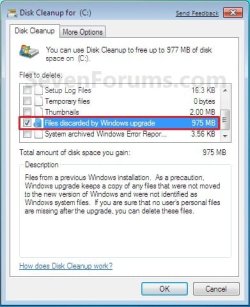
After you do a upgrade install, you will also see the option Files discarded by Windows upgrade option in Disk Cleanup. This would be for the C:\Windows.old , C:\$INPLACE.~TR , and C:\$WINDOWS.~Q files left over from the previous operating system.

You can also get more great information about upgrading Windows 7 at this link below:
Windows: Windows 7 Upgrade Option

   Warning
Windows 7 Minimum Hardware Requirements:


NOTE: See also: Windows 7 system requirements
  • 1 GHz 32-bit or 64-bit processor
  • 1 GB RAM for 32-bit Windows 7 OR 2 GB RAM for 64-bit Windows 7
  • 16 GB available disk space 32-bit Windows 7 OR 20 GB for 64-bit Windows 7
  • Support for DirectX 9 graphics with 128 MB memory (in order to enable Aero theme)
  • DVD-R/W Drive
  • Internet access (to download the Beta and get updates)
Supported Upgrade Paths to Window 7 without doing a Clean Install:
NOTE: You can only upgrade from a 32-bit (x86) Vista to 32-bit (x86) Windows 7 or 64-bit (x64) Vista to 64-bit (x64) Windows 7. Going from a 32-bit to 64-bit, or 64-bit to 32-bit, will require a clean install instead.

From Windows Vista (SP1, SP2) | Upgrade to Windows 7
Home Basic|Home Basic, Home Premium, Ultimate
Home Premium|Home Premium, Ultimate
Business|Professional, Enterprise, Ultimate
Ultimate|Ultimate
Enterprise|Enterprise

From Windows 7 | Repair -In-Place Upgrade to Windows 7
Starter (x86 only)|Starter (x86)
Home Basic|Home Basic
Home Premium|Home Premium
Professional|Professional
Ultimate|Ultimate
Enterprise|Enterprise

From Windows 7 | Anytime Upgrade to Windows 7
Starter|Home Premium, Professional, Ultimate
Home Basic|Home Premium, Professional, Ultimate
Home Premium|Professional, Ultimate
Professional|Ultimate
EXAMPLE: Windows 7 Upgrade Chart by Microsoft
NOTE: In-Place Upgrade is upgrading your currently installed OS to Windows 7 without losing anything. A Custom Install is doing a clean install without formatting the hard drive and selecting the current os to install Windows 7 on top of it to place the current OS in a C:\Windows.old folder as a backup.
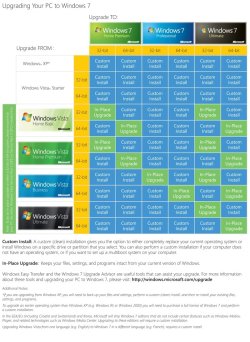
windows7-upgrade-chart.jpg
Here's How:
1. Start Vista, and log on to an administrator account.
NOTE: If you wanted to do a clean install with an upgrade Windows 7, then you would be doing this tutorial to do a upgrade install of Windows 7 from within a clean install of Windows 7 instead of from within Vista.

2. Disable any 3rd party firewall, antivirus, or other security program to avoid it from possibly preventing the upgrade installation to Windows 7.

3. You should run the Windows 7 Upgrade Advisor to see if you may have any issues before upgrading. Correct any issues found before continuing.
NOTE: Skip this step if you are doing a clean install with a upgrade Windows 7, then you would be doing this tutorial to do a upgrade install of Windows 7 inside a clean install of Windows 7 instead.

4. Place your Windows 7 installation DVD into the DVD drive and click on the Run setup.exe option in the AutoPlay window from within Vista. (See screenshot below)
NOTE: If the AutoPlay window does not open, then open the drive folder in Computer and run the setup.exe file.
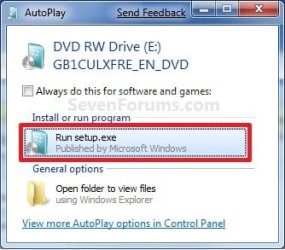
AutoPlay.jpg
5. Click on the Install Now button to start the installation. (See screenshot below)
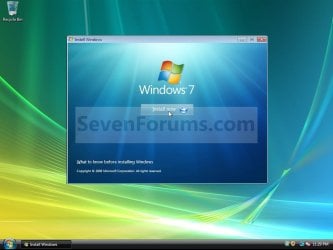
Step1.jpg
6. Uncheck the I want to help make Windows installation better box (unless you want to), and click on the Go online to get the latest updates for installation option. (See screenshot below)
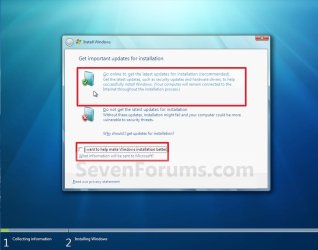
Step2.jpg
7. Windows 7 will now check online for and install any available installation updates. (See screenshots below)
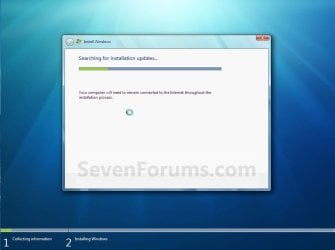
Step3.jpg

Step4.jpg

8. Check the I accept the license terms box and click on Next. (See screenshot below)
Step5.jpg
9. For a In-place Upgrade Install
NOTE: Do this option if you are currently running Vista and want to keep your files, programs, and settings and install (upgrade to) Windows 7. See the warning box at the top of the tutorial for upgrade options. Do this step if you are doing a clean install with a upgrade Windows 7, then you would be doing this tutorial to do a upgrade install of Windows 7 inside a clean install of Windows 7 instead.
A) Click on the Upgrade option. (See screenshot below)
Step6.jpg
B) Go to step 11.
10. For a Custom Install
NOTE: Do this option if you are running XP or want to completely replace your current version of Windows with Windows 7. You will need to reinstall your programs after installation. This will be like doing a clean install without formating. Your previous installation will be placed in the C:\Windows.old folder (step 19) so you can copy any files back.
A) Click on the Custom option. (See screenshot above)

B) Continue on to step 11.
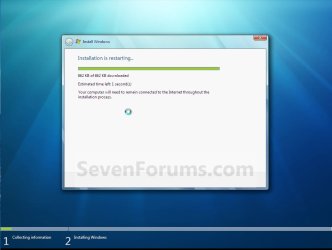
11. The installation of Windows 7 will now begin. (See screenshot below)
NOTE: During the installation process, your screen may flash and computer will restart a few times.
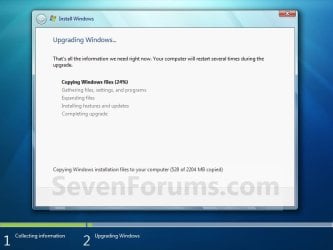
Step7.jpg
12. After the final restart, you will see this screen for a moment. (See screenshot below)
Step8.jpg
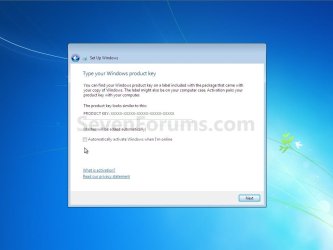
13. Type in your Windows 7 product key number. (See screenshot below step 14)

14. Uncheck the Automatically activate Windows when I'm online box unchecked, then click on the Next button. (See screenshot below)
NOTE: You can activate Windows 7 later after you make sure it is running properly. (See step 21 below)
If you chose to automatically activate Windows online when you set up your computer, automatic activation begins trying to activate your copy of Windows three days after you log on for the first time.
Step9.jpg
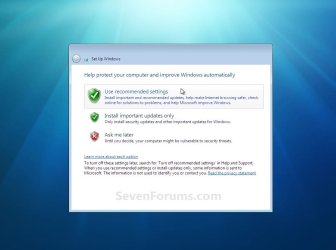
15. Click on Use recommended settings to allow automatic Windows Updates and proper security settings. (See screenshot below)
NOTE: For more information about these recommended settings, click on the Learn more about each option link in this window.
Step10.jpg
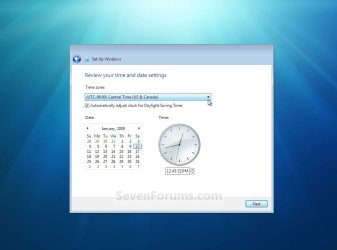
16. Select your time zone and set your time and date settings, then click on the Next button. (See screenshot below)
Step11.jpg
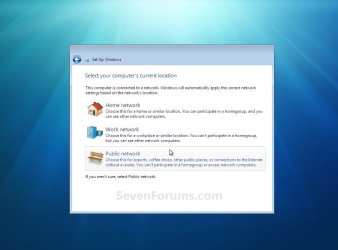
17. Click on your computer's correct network location type location to select it and have the settings for that location automatically applied. (See screenshot below)
Step12.jpg
18. Windows 7 will now prepare your desktop to startup. (See screenshots below)
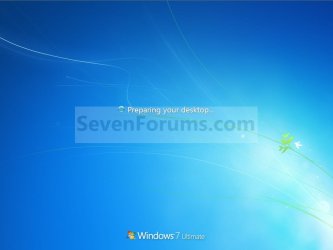
Step13A.jpg

Desktop.jpg

19. Check to see if you are missing any user files. If you are, then you can copy them from the C:\Windows.old or the hidden protected operating system C:\$INPLACE.~TR and C:\WINDOWS.~Q backup folders.

20. If everything checks out in step 19, then you can run Disk Cleanup (step 6 at this link). You will need to click on the Clean up system files button first, and then check the Files discarded by Windows upgrade box. (See screenshot below)
NOTE: This will delete the C:\Windows.old, C:\$INPLACE.~TR and C:\WINDOWS.~Q folders from step 17 above.
Disk_Cleanup.jpg
21. Install all of your device drivers if needed, then all Windows Updates.

22. Refresh your Windows Experience Index (WEI) score.

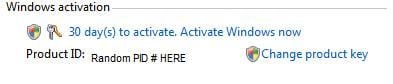
23. When done, all you will need to do is to activate Windows 7. (See screenshot below)
Activate.jpg
That's it,
Shawn


Last edited:
You're welcome Fluster. Hopefully they'll get it sorted out for you before the 120 days is up.
 

My Computer

Computer type
PC/Desktop
Computer Manufacturer/Model Number
Self built custom
OS
64-bit Windows 11 Pro for Workstations
CPU
Intel i7-8700K OC'd to 5 GHz
Motherboard
ASUS ROG Maximus XI Formula Z390
Memory
64 GB (4x16GB) G.SKILL TridentZ RGB DDR4 3600 MHz
Graphics Card(s)
ASUS ROG-STRIX-GTX1080TI-O11G-GAMING
Sound Card
Integrated
Monitor(s) Displays
2 x Samsung Odyssey G7 27"
Screen Resolution
2560x1440
Hard Drives
1TB Samsung 990 PRO M.2,
4TB Samsung 990 PRO PRO M.2,
TerraMaster F8 SSD Plus NAS
PSU
Seasonic Prime Titanium 850W
Case
Thermaltake Core P3
Cooling
Corsair Hydro H115i
Keyboard
Logitech wireless K800
Mouse
Logitech MX Master 4
Internet Speed
2 Gb/s Download and 100 Mb/s Upload
Antivirus
Malwarebyte Anti-Malware Premium
Browser
Google Chrome
Other Info
Logitech Z625 speaker system,
Logitech BRIO 4K Pro webcam,
HP Color LaserJet Pro MFP M477fdn,
APC SMART-UPS RT 1000 XL - SURT1000XLI,
Galaxy S23 Plus phone
1 last question

Brink 1 last(I promise)question......they have finally mailed me a new disc hopefully with a COA attached.Is the COA disc specific or is that authentication code good to use with any copy of Windows 7.I ask obviously because having already installed it using the other disc i just want to type in the code from the new one without having to use the new disc....

Thanks again if you have time to answer
 

My Computer

Computer Manufacturer/Model Number
HP pavilion e9180t
OS
windows 7 home premium
CPU
core i7
No problem Fluster. I'm happy to hear that you have recieved it. The product key number will be good on any same edition of Windows 7 and type (ex: OEM vs retail).
 

My Computer

Computer type
PC/Desktop
Computer Manufacturer/Model Number
Self built custom
OS
64-bit Windows 11 Pro for Workstations
CPU
Intel i7-8700K OC'd to 5 GHz
Motherboard
ASUS ROG Maximus XI Formula Z390
Memory
64 GB (4x16GB) G.SKILL TridentZ RGB DDR4 3600 MHz
Graphics Card(s)
ASUS ROG-STRIX-GTX1080TI-O11G-GAMING
Sound Card
Integrated
Monitor(s) Displays
2 x Samsung Odyssey G7 27"
Screen Resolution
2560x1440
Hard Drives
1TB Samsung 990 PRO M.2,
4TB Samsung 990 PRO PRO M.2,
TerraMaster F8 SSD Plus NAS
PSU
Seasonic Prime Titanium 850W
Case
Thermaltake Core P3
Cooling
Corsair Hydro H115i
Keyboard
Logitech wireless K800
Mouse
Logitech MX Master 4
Internet Speed
2 Gb/s Download and 100 Mb/s Upload
Antivirus
Malwarebyte Anti-Malware Premium
Browser
Google Chrome
Other Info
Logitech Z625 speaker system,
Logitech BRIO 4K Pro webcam,
HP Color LaserJet Pro MFP M477fdn,
APC SMART-UPS RT 1000 XL - SURT1000XLI,
Galaxy S23 Plus phone
INSTALL ISSUES

Hey Shawn,
Glad to see your keeping up the quality work:)
Got a question for you. I had 7 installed(RTM) in a dual boot, and decided to just dump it, and do an inplace upgrade. When it checks for compatibility, I get a message stating I need to uninstall KAV first, as well as CCC(obvious one there).
Thing is, I havent had Kaspersky on here in MONTHS, and can find any trace of it in the system. You may not remember, but I had to do a clean Vista install a few months back due to a corrupted KAV by way of ugly bug in system. I'm using avast now, and I did have it disabled, but not uninstalled.
Any thoughts ?:p
 
Last edited:

My Computer

Computer Manufacturer/Model Number
Custom
OS
Windows 7 ultimate X64
CPU
Core i7 870 Lynnfield
Motherboard
MSI P55-GD55
Memory
4GB Corsair XMS 3 1600Mhz
Graphics Card(s)
GeForce 8800 GTS (for the time being)
Sound Card
Onboard 7.1 digital
Monitor(s) Displays
Dell 19"
Screen Resolution
1280x1024
Hard Drives
Barracuda 750Gb
PSU
Corsair TX 650w
Case
Thermaltake Armour Extreme Edition
Cooling
Corsair H50
Keyboard
Dell XPS slim
Mouse
Dell XPS mouse (only good product)
Internet Speed
100 Mbps +/-
Hello Joey,

I would recommend a clean or custom install instead for the best results of installing Windows 7. This way you will have a fresh install without having to worry about any issues of upgrading from the previous OS.

If you really wanted to do a in-place upgrade, then you might search the registry for any "Kaspersky" entries and delete them as found. Afterwards, see if it still shows up in the report.

Registry Editor - Find and Find Next - Vista Forums

Hope this helps,
Shawn
 

My Computer

Computer type
PC/Desktop
Computer Manufacturer/Model Number
Self built custom
OS
64-bit Windows 11 Pro for Workstations
CPU
Intel i7-8700K OC'd to 5 GHz
Motherboard
ASUS ROG Maximus XI Formula Z390
Memory
64 GB (4x16GB) G.SKILL TridentZ RGB DDR4 3600 MHz
Graphics Card(s)
ASUS ROG-STRIX-GTX1080TI-O11G-GAMING
Sound Card
Integrated
Monitor(s) Displays
2 x Samsung Odyssey G7 27"
Screen Resolution
2560x1440
Hard Drives
1TB Samsung 990 PRO M.2,
4TB Samsung 990 PRO PRO M.2,
TerraMaster F8 SSD Plus NAS
PSU
Seasonic Prime Titanium 850W
Case
Thermaltake Core P3
Cooling
Corsair Hydro H115i
Keyboard
Logitech wireless K800
Mouse
Logitech MX Master 4
Internet Speed
2 Gb/s Download and 100 Mb/s Upload
Antivirus
Malwarebyte Anti-Malware Premium
Browser
Google Chrome
Other Info
Logitech Z625 speaker system,
Logitech BRIO 4K Pro webcam,
HP Color LaserJet Pro MFP M477fdn,
APC SMART-UPS RT 1000 XL - SURT1000XLI,
Galaxy S23 Plus phone
Hello Joey,

I would recommend a clean or custom install instead for the best results of installing Windows 7. This way you will have a fresh install without having to worry about any issues of upgrading from the previous OS.

If you really wanted to do a in-place upgrade, then you might search the registry for any "Kaspersky" entries and delete them as found. Afterwards, see if it still shows up in the report.

Registry Editor - Find and Find Next - Vista Forums

Hope this helps,
Shawn

Sound advice. I think I'll just do a quick backup of files, and start with a fresh system again.:)
Thanks;)
 

My Computer

Computer Manufacturer/Model Number
Custom
OS
Windows 7 ultimate X64
CPU
Core i7 870 Lynnfield
Motherboard
MSI P55-GD55
Memory
4GB Corsair XMS 3 1600Mhz
Graphics Card(s)
GeForce 8800 GTS (for the time being)
Sound Card
Onboard 7.1 digital
Monitor(s) Displays
Dell 19"
Screen Resolution
1280x1024
Hard Drives
Barracuda 750Gb
PSU
Corsair TX 650w
Case
Thermaltake Armour Extreme Edition
Cooling
Corsair H50
Keyboard
Dell XPS slim
Mouse
Dell XPS mouse (only good product)
Internet Speed
100 Mbps +/-
You're welcome Joey. Please let us know how it went. :)
 

My Computer

Computer type
PC/Desktop
Computer Manufacturer/Model Number
Self built custom
OS
64-bit Windows 11 Pro for Workstations
CPU
Intel i7-8700K OC'd to 5 GHz
Motherboard
ASUS ROG Maximus XI Formula Z390
Memory
64 GB (4x16GB) G.SKILL TridentZ RGB DDR4 3600 MHz
Graphics Card(s)
ASUS ROG-STRIX-GTX1080TI-O11G-GAMING
Sound Card
Integrated
Monitor(s) Displays
2 x Samsung Odyssey G7 27"
Screen Resolution
2560x1440
Hard Drives
1TB Samsung 990 PRO M.2,
4TB Samsung 990 PRO PRO M.2,
TerraMaster F8 SSD Plus NAS
PSU
Seasonic Prime Titanium 850W
Case
Thermaltake Core P3
Cooling
Corsair Hydro H115i
Keyboard
Logitech wireless K800
Mouse
Logitech MX Master 4
Internet Speed
2 Gb/s Download and 100 Mb/s Upload
Antivirus
Malwarebyte Anti-Malware Premium
Browser
Google Chrome
Other Info
Logitech Z625 speaker system,
Logitech BRIO 4K Pro webcam,
HP Color LaserJet Pro MFP M477fdn,
APC SMART-UPS RT 1000 XL - SURT1000XLI,
Galaxy S23 Plus phone
Clean install of 7 went very smooth, as well as activation. Although, I have NO sound now. IDT will not install. But I did find a thread on rewriting the .ini files. Sounds like a real pain there. I'm sure with enough research I'll find a driver/patch.
Thanks again for the cliffs notes :D
 
Last edited:

My Computer

Computer Manufacturer/Model Number
Custom
OS
Windows 7 ultimate X64
CPU
Core i7 870 Lynnfield
Motherboard
MSI P55-GD55
Memory
4GB Corsair XMS 3 1600Mhz
Graphics Card(s)
GeForce 8800 GTS (for the time being)
Sound Card
Onboard 7.1 digital
Monitor(s) Displays
Dell 19"
Screen Resolution
1280x1024
Hard Drives
Barracuda 750Gb
PSU
Corsair TX 650w
Case
Thermaltake Armour Extreme Edition
Cooling
Corsair H50
Keyboard
Dell XPS slim
Mouse
Dell XPS mouse (only good product)
Internet Speed
100 Mbps +/-
Well, if nothing else your computer or motherboard manufacturer's website may have drivers available that will work with it.
 

My Computer

Computer type
PC/Desktop
Computer Manufacturer/Model Number
Self built custom
OS
64-bit Windows 11 Pro for Workstations
CPU
Intel i7-8700K OC'd to 5 GHz
Motherboard
ASUS ROG Maximus XI Formula Z390
Memory
64 GB (4x16GB) G.SKILL TridentZ RGB DDR4 3600 MHz
Graphics Card(s)
ASUS ROG-STRIX-GTX1080TI-O11G-GAMING
Sound Card
Integrated
Monitor(s) Displays
2 x Samsung Odyssey G7 27"
Screen Resolution
2560x1440
Hard Drives
1TB Samsung 990 PRO M.2,
4TB Samsung 990 PRO PRO M.2,
TerraMaster F8 SSD Plus NAS
PSU
Seasonic Prime Titanium 850W
Case
Thermaltake Core P3
Cooling
Corsair Hydro H115i
Keyboard
Logitech wireless K800
Mouse
Logitech MX Master 4
Internet Speed
2 Gb/s Download and 100 Mb/s Upload
Antivirus
Malwarebyte Anti-Malware Premium
Browser
Google Chrome
Other Info
Logitech Z625 speaker system,
Logitech BRIO 4K Pro webcam,
HP Color LaserJet Pro MFP M477fdn,
APC SMART-UPS RT 1000 XL - SURT1000XLI,
Galaxy S23 Plus phone
IDT audio driver issue solved

The culprit was right under my nose the entire time.
I you installed Windows 7 and can't get your audio driver to work, check your bios settings after driver is installed.
Under integrated audio, there are three settings to choose from. (In Dell BIOS,at least) OFF - AUTO - ON
Make sure it is set to "AUTO", not "ON".
"ON" only allows for system audio to be used.
"AUTO" allows ADD-In audio device as well.
Save your settings, and reboot.
Vioa! The familiar Windows startup chime is heard.:D
Hope this helps someone.
 
Last edited:

My Computer

Computer Manufacturer/Model Number
Custom
OS
Windows 7 ultimate X64
CPU
Core i7 870 Lynnfield
Motherboard
MSI P55-GD55
Memory
4GB Corsair XMS 3 1600Mhz
Graphics Card(s)
GeForce 8800 GTS (for the time being)
Sound Card
Onboard 7.1 digital
Monitor(s) Displays
Dell 19"
Screen Resolution
1280x1024
Hard Drives
Barracuda 750Gb
PSU
Corsair TX 650w
Case
Thermaltake Armour Extreme Edition
Cooling
Corsair H50
Keyboard
Dell XPS slim
Mouse
Dell XPS mouse (only good product)
Internet Speed
100 Mbps +/-
Nice find Joey. Thank you for sharing your results. :)
 

My Computer

Computer type
PC/Desktop
Computer Manufacturer/Model Number
Self built custom
OS
64-bit Windows 11 Pro for Workstations
CPU
Intel i7-8700K OC'd to 5 GHz
Motherboard
ASUS ROG Maximus XI Formula Z390
Memory
64 GB (4x16GB) G.SKILL TridentZ RGB DDR4 3600 MHz
Graphics Card(s)
ASUS ROG-STRIX-GTX1080TI-O11G-GAMING
Sound Card
Integrated
Monitor(s) Displays
2 x Samsung Odyssey G7 27"
Screen Resolution
2560x1440
Hard Drives
1TB Samsung 990 PRO M.2,
4TB Samsung 990 PRO PRO M.2,
TerraMaster F8 SSD Plus NAS
PSU
Seasonic Prime Titanium 850W
Case
Thermaltake Core P3
Cooling
Corsair Hydro H115i
Keyboard
Logitech wireless K800
Mouse
Logitech MX Master 4
Internet Speed
2 Gb/s Download and 100 Mb/s Upload
Antivirus
Malwarebyte Anti-Malware Premium
Browser
Google Chrome
Other Info
Logitech Z625 speaker system,
Logitech BRIO 4K Pro webcam,
HP Color LaserJet Pro MFP M477fdn,
APC SMART-UPS RT 1000 XL - SURT1000XLI,
Galaxy S23 Plus phone
Hey Brink,

I want to upgrade from 64-bit windows 7 home premium to 64-bit windows 7 professor. Which path should I follow for the easily and safest upgrade: a clean install or just a simple upgrade install without reformatting my harddrive?
Since I partitioned my harddrives into C and D, if I do a clean install with reformatting my drive would it affect both of my drives (I only used C drive for windows and D for data storage)? Thanks in advance.
 

My Computer

OS
7
Hello Easyhoting, and welcome to Seven Forums.

I have always preferred a clean install over an inplace upgrade to prevent having any possible issues carry over into the new install from the upgrade. You're D: drive will not be affected by a clean or upgrade install as long as you do not select it to install Windows 7 on during installation.

A clean install will give you the best chance of a problem free installation, but you will have to reinstall everything (drivers, programs, etc....).

A inplace upgrade will allow you to upgrade to the Windows 7 Professional edition without losing anythiing from the previous installation. However, you will have a higher chance of something causing some sort of issue afterwards as well. If is does happen, you will most likely end up doing a clean install anyways to fix it.

Hope this helps,
Shawn
 

My Computer

Computer type
PC/Desktop
Computer Manufacturer/Model Number
Self built custom
OS
64-bit Windows 11 Pro for Workstations
CPU
Intel i7-8700K OC'd to 5 GHz
Motherboard
ASUS ROG Maximus XI Formula Z390
Memory
64 GB (4x16GB) G.SKILL TridentZ RGB DDR4 3600 MHz
Graphics Card(s)
ASUS ROG-STRIX-GTX1080TI-O11G-GAMING
Sound Card
Integrated
Monitor(s) Displays
2 x Samsung Odyssey G7 27"
Screen Resolution
2560x1440
Hard Drives
1TB Samsung 990 PRO M.2,
4TB Samsung 990 PRO PRO M.2,
TerraMaster F8 SSD Plus NAS
PSU
Seasonic Prime Titanium 850W
Case
Thermaltake Core P3
Cooling
Corsair Hydro H115i
Keyboard
Logitech wireless K800
Mouse
Logitech MX Master 4
Internet Speed
2 Gb/s Download and 100 Mb/s Upload
Antivirus
Malwarebyte Anti-Malware Premium
Browser
Google Chrome
Other Info
Logitech Z625 speaker system,
Logitech BRIO 4K Pro webcam,
HP Color LaserJet Pro MFP M477fdn,
APC SMART-UPS RT 1000 XL - SURT1000XLI,
Galaxy S23 Plus phone
You're most welcome. :)
 

My Computer

Computer type
PC/Desktop
Computer Manufacturer/Model Number
Self built custom
OS
64-bit Windows 11 Pro for Workstations
CPU
Intel i7-8700K OC'd to 5 GHz
Motherboard
ASUS ROG Maximus XI Formula Z390
Memory
64 GB (4x16GB) G.SKILL TridentZ RGB DDR4 3600 MHz
Graphics Card(s)
ASUS ROG-STRIX-GTX1080TI-O11G-GAMING
Sound Card
Integrated
Monitor(s) Displays
2 x Samsung Odyssey G7 27"
Screen Resolution
2560x1440
Hard Drives
1TB Samsung 990 PRO M.2,
4TB Samsung 990 PRO PRO M.2,
TerraMaster F8 SSD Plus NAS
PSU
Seasonic Prime Titanium 850W
Case
Thermaltake Core P3
Cooling
Corsair Hydro H115i
Keyboard
Logitech wireless K800
Mouse
Logitech MX Master 4
Internet Speed
2 Gb/s Download and 100 Mb/s Upload
Antivirus
Malwarebyte Anti-Malware Premium
Browser
Google Chrome
Other Info
Logitech Z625 speaker system,
Logitech BRIO 4K Pro webcam,
HP Color LaserJet Pro MFP M477fdn,
APC SMART-UPS RT 1000 XL - SURT1000XLI,
Galaxy S23 Plus phone
I’m quoting Page 5 of “Windows 7 – The Missing Manual” by David Pogue

ISBN: 978-1-596-80639-2

Note: Perhaps surprisingly, Starter doesn’t actually save you any hard drive space. Every copy of Windows 7 is actually a complete Ultimate edition on the hard drive – but with features turned off. That’s how Microsoft is able to pull off the instant-upgrade feature known as Anytime Upgrade. Choose its name from the Start menu, pay a few bucks at a Web site, and Presto: Your PC has just acquired one of the fancier editions of Windows 7.”

I performed a search using a search tool called “Everything” and found, at the end of extremely long path names that I would surely mistype:

WindowsAnytimeUpgrade.exe

WindowsAnytimeUpgradeResults.exe and

WindowsAnytimeUpgradeui.exe


as well as many non-executable files containing that character string.


I have Home Premium 64-bit

There is a comment to the effect that WindowsAnytimeUpgrade was originally called Windows Anytime Upgrade. Presumably Mr. Pogue wrote his book before the change in names.
 

My Computer

Computer Manufacturer/Model Number
Home Made
OS
Windows 7 Home Premium
CPU
Intel I5Core750
Motherboard
Gigabyte P55A-UD3
Memory
6 GB Corsair DDR3 1600
Graphics Card(s)
Zotac GeForce 9600 GT
Sound Card
7:1 on otherboard
Monitor(s) Displays
ViewSonic VG2030m (one of the last 4 by 3 monitors)
Screen Resolution
1400 by 1050 (Native Resolution)
Hard Drives
2 500 GB Western Digital SATA
PSU
Thermaltake TR2 500W
Case
Cooler Master Elite 332
Cooling
Thermaltake SpinQ
Keyboard
400 v1.0
Mouse
Logitech LX-8
Internet Speed
9.82 Mbs download speed 1.87 Mbs Upload speed
Other Info
Monochrome Laser Printer -HP 1020
Ink-Jet color all in one without fax - Canon Pixma MP 170
500GB external portable hard drive - Iomega
Upgrade Vista Home Premium 32 Bit to...

..Windows 7 Professional 64bit?

and keep all the stuff on my Laptop.

From what I can see this is not possible or am I wrong?

Do I have to do a 'clean install' is this right? if so will I loose all the stuff that is on the laptop - which is SONY VAIO which came with a software package.

The MS Win 7 Upgrade advisor gave no indication that I could not do this but I see that the 'matrix' of what can and cannot be done between Vista and Win 7 Pro does not indicate that it is possible.

Sorry about the seemingly silly question but I am a bit of a none tech person when it comes to such stuff.

However I did a new installation following the instructions on here so why not return and ask:)
 

My Computer

Computer Manufacturer/Model Number
Custom Built
OS
Windows 7 Pro 64-Bit
CPU
INTEL Pentium D950 (2x3.4GHZ) 800mhz FSB/2 x 2MB Cache
Motherboard
ASUS P5WD2 Premuim: Dual Core DDR2, 16VGA - 3 PCI/2 PCI-EX
Memory
4GB DDR2-533 PC4200
Graphics Card(s)
ATI Radeon HD3800 Series
Sound Card
Realtek ALC882D 8 Channel
Monitor(s) Displays
No1 = ACER P223w / No2 = ACER A1751
Hard Drives
Main 250GB Weston Digital 5400rpm (XP sp3)
Back-Up 750GB Weston Digital 'Caviar Green' 7400rpm
Windows7 64Bit on a separate 750mb Weston Digital
PSU
Silent 500 Watts + 120mm Fan
Cooling
2x120mm case fans, 100mm CPU fan
Keyboard
Logitec LX710
Mouse
Logitec Laser
Internet Speed
4.8Mbps
Hello Topspin,

If you were to upgrade from Vista Home Premium 32-bit to Windows 7 Professional 32-bit, then you would be able to keep everything on your computer by doing this tutorial for a inplace upgrade. You would probably only need to install the Windows 7 drivers afterwards.

However, a clean install is required when going from 32-bit to 64-bit, or 64-bit to 32-bit. :(


You could do a custom install though. It's almost the same as doing a clean install, but a copy of your current installation (ex: Vista) and all it's files is placed in the C:\Windows.old folder in the new installation (ex: Windows 7). You will still have to reinstall all drivers and programs, but you can copy any other files from within the Windows.old folder back into the new installation.

Hope this helps,
Shawn
 

My Computer

Computer type
PC/Desktop
Computer Manufacturer/Model Number
Self built custom
OS
64-bit Windows 11 Pro for Workstations
CPU
Intel i7-8700K OC'd to 5 GHz
Motherboard
ASUS ROG Maximus XI Formula Z390
Memory
64 GB (4x16GB) G.SKILL TridentZ RGB DDR4 3600 MHz
Graphics Card(s)
ASUS ROG-STRIX-GTX1080TI-O11G-GAMING
Sound Card
Integrated
Monitor(s) Displays
2 x Samsung Odyssey G7 27"
Screen Resolution
2560x1440
Hard Drives
1TB Samsung 990 PRO M.2,
4TB Samsung 990 PRO PRO M.2,
TerraMaster F8 SSD Plus NAS
PSU
Seasonic Prime Titanium 850W
Case
Thermaltake Core P3
Cooling
Corsair Hydro H115i
Keyboard
Logitech wireless K800
Mouse
Logitech MX Master 4
Internet Speed
2 Gb/s Download and 100 Mb/s Upload
Antivirus
Malwarebyte Anti-Malware Premium
Browser
Google Chrome
Other Info
Logitech Z625 speaker system,
Logitech BRIO 4K Pro webcam,
HP Color LaserJet Pro MFP M477fdn,
APC SMART-UPS RT 1000 XL - SURT1000XLI,
Galaxy S23 Plus phone
Many thanks for your prompt reply Shawn.

Given that this laptop had pre-installed software and I had no disc's with it by doing a 'custom install' will I still be able to lpad the 'on-board' software and re-load into Windows 7 or will I loose it?
 

My Computer

Computer Manufacturer/Model Number
Custom Built
OS
Windows 7 Pro 64-Bit
CPU
INTEL Pentium D950 (2x3.4GHZ) 800mhz FSB/2 x 2MB Cache
Motherboard
ASUS P5WD2 Premuim: Dual Core DDR2, 16VGA - 3 PCI/2 PCI-EX
Memory
4GB DDR2-533 PC4200
Graphics Card(s)
ATI Radeon HD3800 Series
Sound Card
Realtek ALC882D 8 Channel
Monitor(s) Displays
No1 = ACER P223w / No2 = ACER A1751
Hard Drives
Main 250GB Weston Digital 5400rpm (XP sp3)
Back-Up 750GB Weston Digital 'Caviar Green' 7400rpm
Windows7 64Bit on a separate 750mb Weston Digital
PSU
Silent 500 Watts + 120mm Fan
Cooling
2x120mm case fans, 100mm CPU fan
Keyboard
Logitec LX710
Mouse
Logitec Laser
Internet Speed
4.8Mbps
Sometimes when you create a set of recovery discs from a oem computer like this, you may have the option to have one DVD as the Vista factory recovery and a separate one for drivers and applications. If you have one for a separate "Drivers and Applications", then you might be able to reinstall the programs that came with the computer after doing a custom install of Windows 7.

However, it sounds like your best option would be to do a inplace upgrade install from Vista 32-bit to Windows 7 32-bit. This way you will not lose the installed programs.
 

My Computer

Computer type
PC/Desktop
Computer Manufacturer/Model Number
Self built custom
OS
64-bit Windows 11 Pro for Workstations
CPU
Intel i7-8700K OC'd to 5 GHz
Motherboard
ASUS ROG Maximus XI Formula Z390
Memory
64 GB (4x16GB) G.SKILL TridentZ RGB DDR4 3600 MHz
Graphics Card(s)
ASUS ROG-STRIX-GTX1080TI-O11G-GAMING
Sound Card
Integrated
Monitor(s) Displays
2 x Samsung Odyssey G7 27"
Screen Resolution
2560x1440
Hard Drives
1TB Samsung 990 PRO M.2,
4TB Samsung 990 PRO PRO M.2,
TerraMaster F8 SSD Plus NAS
PSU
Seasonic Prime Titanium 850W
Case
Thermaltake Core P3
Cooling
Corsair Hydro H115i
Keyboard
Logitech wireless K800
Mouse
Logitech MX Master 4
Internet Speed
2 Gb/s Download and 100 Mb/s Upload
Antivirus
Malwarebyte Anti-Malware Premium
Browser
Google Chrome
Other Info
Logitech Z625 speaker system,
Logitech BRIO 4K Pro webcam,
HP Color LaserJet Pro MFP M477fdn,
APC SMART-UPS RT 1000 XL - SURT1000XLI,
Galaxy S23 Plus phone
Back
Top