
Solved Upgrade or clean install to W7 Professional?

Tomtom111

Learn from everything
Member
VIP
Local time
1:48 PM
Messages
365
Location
Great Britian
Hi,

I just upgraded to Windows 7 Professional from Home Premium, but the resource usage appears to have increased dramatically even when I'm not doing anything (normal background activity), so I was wondering whether this is normal or if there is something I could/should tweak, or whether a clean install of professional would do the trick.

Thanks,
Tom
 

My Computer My Computer

At a glance

Windows 7 Professional SP1 x64AMD FX6300 3.6GHz (4.1GHz Turbo) 6 core Black...Crucial Ballistix Tactial 8GB (2x4GB) 1866MHzASUS Radeon HD6850 1GB
Computer type
PC/Desktop
Computer Manufacturer/Model Number
Custom Build
OS
Windows 7 Professional SP1 x64
CPU
AMD FX6300 3.6GHz (4.1GHz Turbo) 6 core Black Edition
Motherboard
ASRock 960GM/U3S3 FX Socket AM3+
Memory
Crucial Ballistix Tactial 8GB (2x4GB) 1866MHz
Graphics Card(s)
ASUS Radeon HD6850 1GB
Monitor(s) Displays
HP 22xi 21.5" Monitor
Screen Resolution
1920x1080p
Hard Drives
Western Digital 1TB SATA6 64MB Cache WD10EZEX
PSU
Corsair CX500 500W (Non modular)
Case
Fractal Design Define Mini
Cooling
2x Fractal Design 120MM 1200RPM, GPU fan, CPU fan, PSU fan
Keyboard
Logitech EX100 Keyboard
Mouse
Logitech MX Revoloution
Internet Speed
~37Mbps down, ~15Mbps up
Antivirus
Avast Anti-virus
Browser
Google Chrome
Other Info
Wireless card: TP-Link TL-WN781ND 150Mbps PCI-E Card

It also has a nice blue power button (Yay)
If you used Anytime Upgrade then it's the same exact OS with just a few extra hidden features unlocked.

But of course if this is an HP preinstall then you already have the worst load of crapware and duplicate utilties in the industry. No tech enthusiast would run such an install.

If you have a full or Upgrade version of Pro then you can of course boot it to Clean Reinstall - Factory OEM Windows 7.

Otherwise I'd reinstall Home Premium and immediately Anytime UPgrade again to Pro, set it up and then capture an image to use in place of Recovery going forward.
 
It was a clean install of home prem. then upgraded thought windows anytime upgrade to professional.

I don't have an official professional disc but other users on the forums have suggested using mydigitallife.info and downloading the correct ISO file burning it and installing it.

But before I do anything- what would you say has caused this performance change? I've not installed any new program's since the upgrade so I can't understand it.

Thanks.
 

My Computer My Computer

At a glance

Windows 7 Professional SP1 x64AMD FX6300 3.6GHz (4.1GHz Turbo) 6 core Black...Crucial Ballistix Tactial 8GB (2x4GB) 1866MHzASUS Radeon HD6850 1GB
Computer type
PC/Desktop
Computer Manufacturer/Model Number
Custom Build
OS
Windows 7 Professional SP1 x64
CPU
AMD FX6300 3.6GHz (4.1GHz Turbo) 6 core Black Edition
Motherboard
ASRock 960GM/U3S3 FX Socket AM3+
Memory
Crucial Ballistix Tactial 8GB (2x4GB) 1866MHz
Graphics Card(s)
ASUS Radeon HD6850 1GB
Monitor(s) Displays
HP 22xi 21.5" Monitor
Screen Resolution
1920x1080p
Hard Drives
Western Digital 1TB SATA6 64MB Cache WD10EZEX
PSU
Corsair CX500 500W (Non modular)
Case
Fractal Design Define Mini
Cooling
2x Fractal Design 120MM 1200RPM, GPU fan, CPU fan, PSU fan
Keyboard
Logitech EX100 Keyboard
Mouse
Logitech MX Revoloution
Internet Speed
~37Mbps down, ~15Mbps up
Antivirus
Avast Anti-virus
Browser
Google Chrome
Other Info
Wireless card: TP-Link TL-WN781ND 150Mbps PCI-E Card

It also has a nice blue power button (Yay)
It's definitely not an anytime upgrade key.

Thanks I'll go through the steps in the tutorial as you suggested.

Thanks again.
 

My Computer My Computer

At a glance

Windows 7 Professional SP1 x64AMD FX6300 3.6GHz (4.1GHz Turbo) 6 core Black...Crucial Ballistix Tactial 8GB (2x4GB) 1866MHzASUS Radeon HD6850 1GB
Computer type
PC/Desktop
Computer Manufacturer/Model Number
Custom Build
OS
Windows 7 Professional SP1 x64
CPU
AMD FX6300 3.6GHz (4.1GHz Turbo) 6 core Black Edition
Motherboard
ASRock 960GM/U3S3 FX Socket AM3+
Memory
Crucial Ballistix Tactial 8GB (2x4GB) 1866MHz
Graphics Card(s)
ASUS Radeon HD6850 1GB
Monitor(s) Displays
HP 22xi 21.5" Monitor
Screen Resolution
1920x1080p
Hard Drives
Western Digital 1TB SATA6 64MB Cache WD10EZEX
PSU
Corsair CX500 500W (Non modular)
Case
Fractal Design Define Mini
Cooling
2x Fractal Design 120MM 1200RPM, GPU fan, CPU fan, PSU fan
Keyboard
Logitech EX100 Keyboard
Mouse
Logitech MX Revoloution
Internet Speed
~37Mbps down, ~15Mbps up
Antivirus
Avast Anti-virus
Browser
Google Chrome
Other Info
Wireless card: TP-Link TL-WN781ND 150Mbps PCI-E Card

It also has a nice blue power button (Yay)
Sorry, I don't get what you mean.

When I upgraded from Home Premium to Pro I used Windows Anytime Upgrade. It said it failed the first two times, so I left it. When I next restarted it upgraded itself to Pro.
 

My Computer My Computer

At a glance

Windows 7 Professional SP1 x64AMD FX6300 3.6GHz (4.1GHz Turbo) 6 core Black...Crucial Ballistix Tactial 8GB (2x4GB) 1866MHzASUS Radeon HD6850 1GB
Computer type
PC/Desktop
Computer Manufacturer/Model Number
Custom Build
OS
Windows 7 Professional SP1 x64
CPU
AMD FX6300 3.6GHz (4.1GHz Turbo) 6 core Black Edition
Motherboard
ASRock 960GM/U3S3 FX Socket AM3+
Memory
Crucial Ballistix Tactial 8GB (2x4GB) 1866MHz
Graphics Card(s)
ASUS Radeon HD6850 1GB
Monitor(s) Displays
HP 22xi 21.5" Monitor
Screen Resolution
1920x1080p
Hard Drives
Western Digital 1TB SATA6 64MB Cache WD10EZEX
PSU
Corsair CX500 500W (Non modular)
Case
Fractal Design Define Mini
Cooling
2x Fractal Design 120MM 1200RPM, GPU fan, CPU fan, PSU fan
Keyboard
Logitech EX100 Keyboard
Mouse
Logitech MX Revoloution
Internet Speed
~37Mbps down, ~15Mbps up
Antivirus
Avast Anti-virus
Browser
Google Chrome
Other Info
Wireless card: TP-Link TL-WN781ND 150Mbps PCI-E Card

It also has a nice blue power button (Yay)
You say you "just" upgraded.

If "just" means very recently--the last few days---the increased resource usage could be general Windows housekeeping--such as indexing the drive. If the increased resource usage persists for weeks, then I'd agree something is amiss.
 

My Computer My Computer

At a glance

Windows 7 Home Premium SP1, 64-bitIntel Skylake i5-6600K, not overclocked8 GB HyperX DDR4-2666 (2 x 4 GB)none; graphics are integrated on CPU
Computer type
PC/Desktop
Computer Manufacturer/Model Number
Ignatz Special; 4 speed manual gearbox; factory air conditioning; one of one
OS
Windows 7 Home Premium SP1, 64-bit
CPU
Intel Skylake i5-6600K, not overclocked
Motherboard
AsRock Z170M Extreme 4, micro ATX
Memory
8 GB HyperX DDR4-2666 (2 x 4 GB)
Graphics Card(s)
none; graphics are integrated on CPU
Sound Card
onboard: Realtek ALC1150; external: USB Behringer UF0-202
Monitor(s) Displays
Dell S2340M 23 inch IPS
Screen Resolution
1600 x 900
Hard Drives
System: Crucial MX100 series SSD, 128 GB;
Data: Samsung Spinpoint 103SJ, 1 TB;
Backup: WD Caviar Green WD30EZRX-00D8PB0, 3 TB
PSU
Rosewill SilentNight 500 watt fanless, semi-modular
Case
Antec Solo II
Cooling
Noctua NH-U12S; Noctua F12 intake, Noctua S12A exhaust
Keyboard
Microsoft 200 6JH-00001 USB
Mouse
Dell or Microsoft optical wired; USB
Antivirus
Microsoft Security Essentials and Malwarebytes Premium
Browser
Pale Moon
Other Info
All fans PWM; speeds at idle: CPU circa 500 rpm; intake circa 600 rpm; exhaust circa 600 rpm; CPU temps 27 idle and 47 C load in a warm room (27 C/81 F) when running Intel Extreme Tuning Utility stress test.
I've turned indexing off. And it was about 3 days. Sorry I'll try to be more clear about what I say.

The average CPU/ram usage has gone from 35% and 1.20gb respectively to 60% and 2gb respectively.
 

My Computer My Computer

At a glance

Windows 7 Professional SP1 x64AMD FX6300 3.6GHz (4.1GHz Turbo) 6 core Black...Crucial Ballistix Tactial 8GB (2x4GB) 1866MHzASUS Radeon HD6850 1GB
Computer type
PC/Desktop
Computer Manufacturer/Model Number
Custom Build
OS
Windows 7 Professional SP1 x64
CPU
AMD FX6300 3.6GHz (4.1GHz Turbo) 6 core Black Edition
Motherboard
ASRock 960GM/U3S3 FX Socket AM3+
Memory
Crucial Ballistix Tactial 8GB (2x4GB) 1866MHz
Graphics Card(s)
ASUS Radeon HD6850 1GB
Monitor(s) Displays
HP 22xi 21.5" Monitor
Screen Resolution
1920x1080p
Hard Drives
Western Digital 1TB SATA6 64MB Cache WD10EZEX
PSU
Corsair CX500 500W (Non modular)
Case
Fractal Design Define Mini
Cooling
2x Fractal Design 120MM 1200RPM, GPU fan, CPU fan, PSU fan
Keyboard
Logitech EX100 Keyboard
Mouse
Logitech MX Revoloution
Internet Speed
~37Mbps down, ~15Mbps up
Antivirus
Avast Anti-virus
Browser
Google Chrome
Other Info
Wireless card: TP-Link TL-WN781ND 150Mbps PCI-E Card

It also has a nice blue power button (Yay)
Having said that, those figures seem to have gone down a bit, to to what it was with Home Prem but down all the same.
 

My Computer My Computer

At a glance

Windows 7 Professional SP1 x64AMD FX6300 3.6GHz (4.1GHz Turbo) 6 core Black...Crucial Ballistix Tactial 8GB (2x4GB) 1866MHzASUS Radeon HD6850 1GB
Computer type
PC/Desktop
Computer Manufacturer/Model Number
Custom Build
OS
Windows 7 Professional SP1 x64
CPU
AMD FX6300 3.6GHz (4.1GHz Turbo) 6 core Black Edition
Motherboard
ASRock 960GM/U3S3 FX Socket AM3+
Memory
Crucial Ballistix Tactial 8GB (2x4GB) 1866MHz
Graphics Card(s)
ASUS Radeon HD6850 1GB
Monitor(s) Displays
HP 22xi 21.5" Monitor
Screen Resolution
1920x1080p
Hard Drives
Western Digital 1TB SATA6 64MB Cache WD10EZEX
PSU
Corsair CX500 500W (Non modular)
Case
Fractal Design Define Mini
Cooling
2x Fractal Design 120MM 1200RPM, GPU fan, CPU fan, PSU fan
Keyboard
Logitech EX100 Keyboard
Mouse
Logitech MX Revoloution
Internet Speed
~37Mbps down, ~15Mbps up
Antivirus
Avast Anti-virus
Browser
Google Chrome
Other Info
Wireless card: TP-Link TL-WN781ND 150Mbps PCI-E Card

It also has a nice blue power button (Yay)
The usual recommendation is to take a gander into Task Manager and Resource Monitor to see what is using your resources---what processes, what applications, etc. Have you taken a look?

After a fresh boot, I typically use about 700 to 800 GB of RAM and have about 50 processes. A few hours later, RAM usage might be more like 1.2 GB, but CPU usage is under 5% at idle, bouncing a bit. I rarely have 60 processes.

I'm not entirely clear on what Windows likes to do after a clean install---there may be more to housekeeping than indexing---superfetch for instance.

But the longer it persists, the less likely it's "housekeeping".
 

My Computer My Computer

At a glance

Windows 7 Home Premium SP1, 64-bitIntel Skylake i5-6600K, not overclocked8 GB HyperX DDR4-2666 (2 x 4 GB)none; graphics are integrated on CPU
Computer type
PC/Desktop
Computer Manufacturer/Model Number
Ignatz Special; 4 speed manual gearbox; factory air conditioning; one of one
OS
Windows 7 Home Premium SP1, 64-bit
CPU
Intel Skylake i5-6600K, not overclocked
Motherboard
AsRock Z170M Extreme 4, micro ATX
Memory
8 GB HyperX DDR4-2666 (2 x 4 GB)
Graphics Card(s)
none; graphics are integrated on CPU
Sound Card
onboard: Realtek ALC1150; external: USB Behringer UF0-202
Monitor(s) Displays
Dell S2340M 23 inch IPS
Screen Resolution
1600 x 900
Hard Drives
System: Crucial MX100 series SSD, 128 GB;
Data: Samsung Spinpoint 103SJ, 1 TB;
Backup: WD Caviar Green WD30EZRX-00D8PB0, 3 TB
PSU
Rosewill SilentNight 500 watt fanless, semi-modular
Case
Antec Solo II
Cooling
Noctua NH-U12S; Noctua F12 intake, Noctua S12A exhaust
Keyboard
Microsoft 200 6JH-00001 USB
Mouse
Dell or Microsoft optical wired; USB
Antivirus
Microsoft Security Essentials and Malwarebytes Premium
Browser
Pale Moon
Other Info
All fans PWM; speeds at idle: CPU circa 500 rpm; intake circa 600 rpm; exhaust circa 600 rpm; CPU temps 27 idle and 47 C load in a warm room (27 C/81 F) when running Intel Extreme Tuning Utility stress test.
I currently have ~80 processes (up for 7 hours), but a major chunk of those are google chrome, but even before the upgrade, chrome wouldn't cause a big increase in resource use.

Now that you say about 'housekeeping' and that the resource usage is initially high but then settles down as it finishes up does seem to be happening as both ram and cpu are dropping considerably from what they were soon after the upgrade.

Just a quick question, not particularly related but as Google Chrome uses a single process per tab, and each process takes about 20k mb of ram, and I tend to have a few tabs open at once (10+) would a ram upgrade aid the situation in anyway?

Thanks
 

My Computer My Computer

At a glance

Windows 7 Professional SP1 x64AMD FX6300 3.6GHz (4.1GHz Turbo) 6 core Black...Crucial Ballistix Tactial 8GB (2x4GB) 1866MHzASUS Radeon HD6850 1GB
Computer type
PC/Desktop
Computer Manufacturer/Model Number
Custom Build
OS
Windows 7 Professional SP1 x64
CPU
AMD FX6300 3.6GHz (4.1GHz Turbo) 6 core Black Edition
Motherboard
ASRock 960GM/U3S3 FX Socket AM3+
Memory
Crucial Ballistix Tactial 8GB (2x4GB) 1866MHz
Graphics Card(s)
ASUS Radeon HD6850 1GB
Monitor(s) Displays
HP 22xi 21.5" Monitor
Screen Resolution
1920x1080p
Hard Drives
Western Digital 1TB SATA6 64MB Cache WD10EZEX
PSU
Corsair CX500 500W (Non modular)
Case
Fractal Design Define Mini
Cooling
2x Fractal Design 120MM 1200RPM, GPU fan, CPU fan, PSU fan
Keyboard
Logitech EX100 Keyboard
Mouse
Logitech MX Revoloution
Internet Speed
~37Mbps down, ~15Mbps up
Antivirus
Avast Anti-virus
Browser
Google Chrome
Other Info
Wireless card: TP-Link TL-WN781ND 150Mbps PCI-E Card

It also has a nice blue power button (Yay)
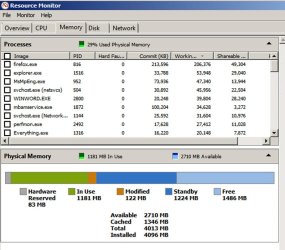
A RAM upgrade won't help if you aren't using ALL the RAM you currently have.

Resource Monitor is the best way to see your RAM situation.

Here is mine; you can see I have 4 GB of RAM and over 2.5 GB unused and currently available, which is typical on my PC.
 

Attachments

  • Untitled-1.jpg
    Untitled-1.jpg
    91.8 KB · Views: 4

My Computer My Computer

At a glance

Windows 7 Home Premium SP1, 64-bitIntel Skylake i5-6600K, not overclocked8 GB HyperX DDR4-2666 (2 x 4 GB)none; graphics are integrated on CPU
Computer type
PC/Desktop
Computer Manufacturer/Model Number
Ignatz Special; 4 speed manual gearbox; factory air conditioning; one of one
OS
Windows 7 Home Premium SP1, 64-bit
CPU
Intel Skylake i5-6600K, not overclocked
Motherboard
AsRock Z170M Extreme 4, micro ATX
Memory
8 GB HyperX DDR4-2666 (2 x 4 GB)
Graphics Card(s)
none; graphics are integrated on CPU
Sound Card
onboard: Realtek ALC1150; external: USB Behringer UF0-202
Monitor(s) Displays
Dell S2340M 23 inch IPS
Screen Resolution
1600 x 900
Hard Drives
System: Crucial MX100 series SSD, 128 GB;
Data: Samsung Spinpoint 103SJ, 1 TB;
Backup: WD Caviar Green WD30EZRX-00D8PB0, 3 TB
PSU
Rosewill SilentNight 500 watt fanless, semi-modular
Case
Antec Solo II
Cooling
Noctua NH-U12S; Noctua F12 intake, Noctua S12A exhaust
Keyboard
Microsoft 200 6JH-00001 USB
Mouse
Dell or Microsoft optical wired; USB
Antivirus
Microsoft Security Essentials and Malwarebytes Premium
Browser
Pale Moon
Other Info
All fans PWM; speeds at idle: CPU circa 500 rpm; intake circa 600 rpm; exhaust circa 600 rpm; CPU temps 27 idle and 47 C load in a warm room (27 C/81 F) when running Intel Extreme Tuning Utility stress test.
ok, thanks. Mine is fairly similar to yours, apart from the fact I have 3GB installed, so the free and standby figures are lower.

The usage of my resources does seem to be lower so its definitely settled down now.

Thanks for your help.
 

My Computer My Computer

At a glance

Windows 7 Professional SP1 x64AMD FX6300 3.6GHz (4.1GHz Turbo) 6 core Black...Crucial Ballistix Tactial 8GB (2x4GB) 1866MHzASUS Radeon HD6850 1GB
Computer type
PC/Desktop
Computer Manufacturer/Model Number
Custom Build
OS
Windows 7 Professional SP1 x64
CPU
AMD FX6300 3.6GHz (4.1GHz Turbo) 6 core Black Edition
Motherboard
ASRock 960GM/U3S3 FX Socket AM3+
Memory
Crucial Ballistix Tactial 8GB (2x4GB) 1866MHz
Graphics Card(s)
ASUS Radeon HD6850 1GB
Monitor(s) Displays
HP 22xi 21.5" Monitor
Screen Resolution
1920x1080p
Hard Drives
Western Digital 1TB SATA6 64MB Cache WD10EZEX
PSU
Corsair CX500 500W (Non modular)
Case
Fractal Design Define Mini
Cooling
2x Fractal Design 120MM 1200RPM, GPU fan, CPU fan, PSU fan
Keyboard
Logitech EX100 Keyboard
Mouse
Logitech MX Revoloution
Internet Speed
~37Mbps down, ~15Mbps up
Antivirus
Avast Anti-virus
Browser
Google Chrome
Other Info
Wireless card: TP-Link TL-WN781ND 150Mbps PCI-E Card

It also has a nice blue power button (Yay)
My point earlier was that if you used a regular retail Professional full or upgrade key then you can use it to boot the installer to Clean Reinstall Pro version as well as insert the key in Anytime Upgrade from a lower version. If it's a Anytime Upgrade key you can only use it in an Anytime Upgrade.

Step 7 in the Troubleshooting Steps I linked earlier covers how to monitor resource usage with Process Monitor.
 
Ok thanks.

If I were to get a new laptop with different specs and running windows 8 and I wanted to downgrade to windows 7, could I use windows system image to copy my system to the new laptop drive and would the install remain valid. And if I were to do a clean install, would the product key work on it?
 

My Computer My Computer

At a glance

Windows 7 Professional SP1 x64AMD FX6300 3.6GHz (4.1GHz Turbo) 6 core Black...Crucial Ballistix Tactial 8GB (2x4GB) 1866MHzASUS Radeon HD6850 1GB
Computer type
PC/Desktop
Computer Manufacturer/Model Number
Custom Build
OS
Windows 7 Professional SP1 x64
CPU
AMD FX6300 3.6GHz (4.1GHz Turbo) 6 core Black Edition
Motherboard
ASRock 960GM/U3S3 FX Socket AM3+
Memory
Crucial Ballistix Tactial 8GB (2x4GB) 1866MHz
Graphics Card(s)
ASUS Radeon HD6850 1GB
Monitor(s) Displays
HP 22xi 21.5" Monitor
Screen Resolution
1920x1080p
Hard Drives
Western Digital 1TB SATA6 64MB Cache WD10EZEX
PSU
Corsair CX500 500W (Non modular)
Case
Fractal Design Define Mini
Cooling
2x Fractal Design 120MM 1200RPM, GPU fan, CPU fan, PSU fan
Keyboard
Logitech EX100 Keyboard
Mouse
Logitech MX Revoloution
Internet Speed
~37Mbps down, ~15Mbps up
Antivirus
Avast Anti-virus
Browser
Google Chrome
Other Info
Wireless card: TP-Link TL-WN781ND 150Mbps PCI-E Card

It also has a nice blue power button (Yay)
Yes, but you'll either have to install in EFI mode if it's the new Win8 BIOS after disabling any Secure Boot setting in BIOS setup, or you'll have to bypass EFI mode by enabling Legacy BIOS in BIOS setup, removing EFI boot disk from BIOS boot order then wiping the HD with Diskpart Clean Command to clean the slate for an MBR disk format.

You can try to image Win7 over but it most likely won't start due to the change of hardware without SysPrep before imaging on the source HD: SysPrep to move HD to another computer. It may be easier to Clean Reinstall using the retail 7 Professional key.
 
Thanks. You may have to explain it in more detail when and if I get a windows 8 laptop. Also the bios might be limited like my HP one is, so it may be tricky to do the stuff you described. Thanks again.
 

My Computer My Computer

At a glance

Windows 7 Professional SP1 x64AMD FX6300 3.6GHz (4.1GHz Turbo) 6 core Black...Crucial Ballistix Tactial 8GB (2x4GB) 1866MHzASUS Radeon HD6850 1GB
Computer type
PC/Desktop
Computer Manufacturer/Model Number
Custom Build
OS
Windows 7 Professional SP1 x64
CPU
AMD FX6300 3.6GHz (4.1GHz Turbo) 6 core Black Edition
Motherboard
ASRock 960GM/U3S3 FX Socket AM3+
Memory
Crucial Ballistix Tactial 8GB (2x4GB) 1866MHz
Graphics Card(s)
ASUS Radeon HD6850 1GB
Monitor(s) Displays
HP 22xi 21.5" Monitor
Screen Resolution
1920x1080p
Hard Drives
Western Digital 1TB SATA6 64MB Cache WD10EZEX
PSU
Corsair CX500 500W (Non modular)
Case
Fractal Design Define Mini
Cooling
2x Fractal Design 120MM 1200RPM, GPU fan, CPU fan, PSU fan
Keyboard
Logitech EX100 Keyboard
Mouse
Logitech MX Revoloution
Internet Speed
~37Mbps down, ~15Mbps up
Antivirus
Avast Anti-virus
Browser
Google Chrome
Other Info
Wireless card: TP-Link TL-WN781ND 150Mbps PCI-E Card

It also has a nice blue power button (Yay)
Back
Top