
upgrading acer vista laptop with sony upgrade dvd

bathisland

New member
Local time
1:35 AM
Messages
9
Hi all.

I was wondering if I could upgrade to Win7 from vista HP on my Acer 5720z with an upgrade DVD I have from sony.

Actually I bought a Sony VAIO and I do not want to upgrade it to Win7. But I did want to use the upgrade DVD that came with it on my Acer.

Me thinks there should not be a problem and I will need to hunt for Acer drivers but I just wanted to confirm if Win7 would activate okay using Sony Win7 key on an Acer laptop????:huh:

TIA
 

My Computer My Computer

At a glance

vista
OS
vista
I think that varies case by case, from manufacturer to manufacturer. It could be that the Sony disc expects to see a Sony BIOS and if it doesn't, you are out of luck.

I'd guess you would just have to try it. I would further guess that if it will install, it will activate.

But as a safeguard, I would make sure I could restore the Acer to Vista if you can't upgrade to Windows 7 and things went in the toilet midway through.
 

My Computer My Computer

At a glance

Windows 7 Home Premium SP1, 64-bitIntel Skylake i5-6600K, not overclocked8 GB HyperX DDR4-2666 (2 x 4 GB)none; graphics are integrated on CPU
Computer type
PC/Desktop
Computer Manufacturer/Model Number
Ignatz Special; 4 speed manual gearbox; factory air conditioning; one of one
OS
Windows 7 Home Premium SP1, 64-bit
CPU
Intel Skylake i5-6600K, not overclocked
Motherboard
AsRock Z170M Extreme 4, micro ATX
Memory
8 GB HyperX DDR4-2666 (2 x 4 GB)
Graphics Card(s)
none; graphics are integrated on CPU
Sound Card
onboard: Realtek ALC1150; external: USB Behringer UF0-202
Monitor(s) Displays
Dell S2340M 23 inch IPS
Screen Resolution
1600 x 900
Hard Drives
System: Crucial MX100 series SSD, 128 GB;
Data: Samsung Spinpoint 103SJ, 1 TB;
Backup: WD Caviar Green WD30EZRX-00D8PB0, 3 TB
PSU
Rosewill SilentNight 500 watt fanless, semi-modular
Case
Antec Solo II
Cooling
Noctua NH-U12S; Noctua F12 intake, Noctua S12A exhaust
Keyboard
Microsoft 200 6JH-00001 USB
Mouse
Dell or Microsoft optical wired; USB
Antivirus
Microsoft Security Essentials and Malwarebytes Premium
Browser
Pale Moon
Other Info
All fans PWM; speeds at idle: CPU circa 500 rpm; intake circa 600 rpm; exhaust circa 600 rpm; CPU temps 27 idle and 47 C load in a warm room (27 C/81 F) when running Intel Extreme Tuning Utility stress test.
+1 .. The copy you got more than likely will not install on your Acer... Its prolly tied to the Sony (spit) BIOS...
 

My Computer My Computer

At a glance

64-bit Windows 8.1 ProCore(TM) i5 CPU 4330 Haswell @ 3.20GHz12.00 GBIntel(R) HD Graphics
Computer type
PC/Desktop
Computer Manufacturer/Model Number
LENOVO K450 @3.0GHZ
OS
64-bit Windows 8.1 Pro
CPU
Core(TM) i5 CPU 4330 Haswell @ 3.20GHz
Motherboard
LENOVO
Memory
12.00 GB
Graphics Card(s)
Intel(R) HD Graphics
Sound Card
Intel HD integtrated
Monitor(s) Displays
HP 25' ISP Monitor
Screen Resolution
1900/1020
Hard Drives
(1) ST1000DM003-1CH162 (2) Generic STORAGE DEVICE USB Device (3) Generic STORAGE DEVICE USB Device
Internet Speed
100mb down/10mb up
If it is a standard Win7 install DVD, then you can use it as an installer, however it may not activate.

Is there a key provided?

I'd use Disk Mgmt to shrink Vista, try booting DVD to install to second partition. If it will activate, then we can help you get rid of Vista when you are ready.
 
Thanks for the advices.

Yes it does have the key for the upgrade.

Could you please provide me links so that I can learn how to use the use Disk Mgmt to shrink Vista, and then install to the new partition. (the noobier the better :D )
 

My Computer My Computer

At a glance

vista
OS
vista
+1 .. The copy you got more than likely will not install on your Acer... Its prolly tied to the Sony (spit) BIOS...

How can I check to see if the DVD is tied to the Sony Bios OR if the key provided on the upgrade DVD cover is Sony specific only??
 

My Computer My Computer

At a glance

vista
OS
vista
The key will not be tied to anything... Boot the DVD, if it is tied to the Sony, it will tell you that it can not install to the Acer, otherwise, it will begin the installation... Good Luck..
 

My Computer My Computer

At a glance

64-bit Windows 8.1 ProCore(TM) i5 CPU 4330 Haswell @ 3.20GHz12.00 GBIntel(R) HD Graphics
Computer type
PC/Desktop
Computer Manufacturer/Model Number
LENOVO K450 @3.0GHZ
OS
64-bit Windows 8.1 Pro
CPU
Core(TM) i5 CPU 4330 Haswell @ 3.20GHz
Motherboard
LENOVO
Memory
12.00 GB
Graphics Card(s)
Intel(R) HD Graphics
Sound Card
Intel HD integtrated
Monitor(s) Displays
HP 25' ISP Monitor
Screen Resolution
1900/1020
Hard Drives
(1) ST1000DM003-1CH162 (2) Generic STORAGE DEVICE USB Device (3) Generic STORAGE DEVICE USB Device
Internet Speed
100mb down/10mb up
Okay..i did it.

Yes the dvd said Sony on it and it would not even load on my acer system.. I extracted the win 7 32 portion and ran it. It upgraded fine and the system is even activated. I am excited.

Now I have a dual boot laptop with Vista and Win7. so how do I get rid of the dual boot and say bye bye to Vista. :confused:

Thanks for the help in advance. :D
 

My Computer My Computer

At a glance

vista
OS
vista
How about if I Make sure the Default Operating System is set to 7 (in My Computer -> Properties-> Advanced system settings -> Uncheck "Time to display list of operating systems")

and then manually delete the vista files from C drive

... I have set Win7 in my D drive partition...

is this kosher????:huh:
 

My Computer My Computer

At a glance

vista
OS
vista
No. Please post back a screenshot of your full Disk Management drive map, using the Snipping Tool in Start Menu, attach file using paper clip in reply box. We will give you the exact steps to delete Vista and recovery the space as you wish.

If you'll include a screenshot of the files you have from the DVD, we'll tell you if they can be made into a bootable DVD for future reinstalls or repairs. Did you try booting the Sony DVD? Boot from CD - How to Boot your Computer from a Bootable CD or DVD - Boot to CD
 
That should do it, though there are other ways that others might recommend over this one...
 

My Computer My Computer

At a glance

64-bit Windows 8.1 ProCore(TM) i5 CPU 4330 Haswell @ 3.20GHz12.00 GBIntel(R) HD Graphics
Computer type
PC/Desktop
Computer Manufacturer/Model Number
LENOVO K450 @3.0GHZ
OS
64-bit Windows 8.1 Pro
CPU
Core(TM) i5 CPU 4330 Haswell @ 3.20GHz
Motherboard
LENOVO
Memory
12.00 GB
Graphics Card(s)
Intel(R) HD Graphics
Sound Card
Intel HD integtrated
Monitor(s) Displays
HP 25' ISP Monitor
Screen Resolution
1900/1020
Hard Drives
(1) ST1000DM003-1CH162 (2) Generic STORAGE DEVICE USB Device (3) Generic STORAGE DEVICE USB Device
Internet Speed
100mb down/10mb up
Here is screenshot of my disk management. Vista is in C drive while Win7 is in D drive.

Capture.JPG

And here is the screenie for the DVD. The DVD does not even auto play and the laptop will not boot from DVD. It reads the DVD all right but then in just keeps going into eternal loops and does nothing. :( Until I move the DVD out and then boot normally.
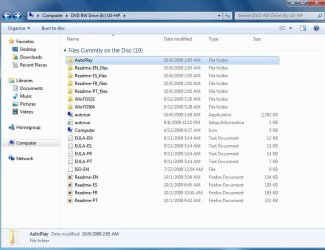
Capture disc.JPG

Thanks for the help and assistance.
 

My Computer My Computer

At a glance

vista
OS
vista
The first thing you will need is a bootable Win7 repair CD. Type System Repair Disk in Start Search box to make one. Then make sure it will boot: Boot from CD - How to Boot your Computer from a Bootable CD or DVD - Boot to CD

Make your Vista recovery disks if you haven't done that yet, as the recov partition may not work once you remove Vista. Back up your files and a Win7 backup image externally as resizing operations can fail.

Next boot free Partition Wizard bootable CD, select 1 for screen res, rightclick on Vista partition to Delete, OK. Then rightclick Delete recovery partition if you want.

Now rightclick on Win7 partition to Modify>Set Active, OK. Then rightclick>Resize, drag left border over the deleted Vista space, drag right border if you want to make room to Create Logical data partition, OK. Apply all steps.

Now boot Win7 Repair CD, click through to recovery tools list to run Startup Repair up to 3 separate times to rewrite the MBR to Win7.

Once you have Win7 setup as you want, save a Win7 Backup image externally so you never have to reinstall again, just reimage the HD or a replacement in 15 minutes.

I would be on the lookout for a bootable Win7 installer. You can unlock all versions in any installer by removing the ei.cfg file from Sources folder, then recompiling ISO to burn to DVD: http://www.sevenforums.com/tutorials/32055-bootable-iso-create-installation-files.html. What is in the autorun app listed in screenie? Can you run it?
 
OKAY...wish me luck..i am going to take the plunge today....and thank you very much for your help/advice
 

My Computer My Computer

At a glance

vista
OS
vista
Oh what a disaster. :cry:

I followed everything you said except I did not make an image of my existing setup.

After I deleted the Vista partition, I re-sized my Win7 partition. (this is what I should not have done). This messed up my existing Win7 setup. After I booted, my win7 was completely messed up and no files were accessible. Sometime it would not even boot and just sat there with a blinking cursor!!!

I had to borrow a Win7 cd from my friend, used that to boot and install Win7 again. I had to format what I had as it was beyond repair (which meant I lost most of my data....the very very important data was backed up on USB....thanks god).

I used the same Sony key for the fresh installation but have not activated it yet as I do not know what to expect.

I am just happy to be back and not sitting with an Acer brick. :confused:
 

My Computer My Computer

At a glance

vista
OS
vista
Did you follow the steps as given? If so, you should have not even tried to start Windows 7 after resizing the partition, but booted the Repair CD to run Startup Repair 3 times to repair the MBR which is often damaged by resizing.

If you allowed the resizing to complete, then ran Startup Repair 3 times as given it would have started up.

We help people delete their XP/Vista all the time, then resize Win7 into the space. As long as the Win7 partition is marked active and Startup Repair is run 3 times it will ALWAYS start up.

Too bad you didn't follow the steps given, or come back for help during the problem as we could have walked you through it. These problems are ALWAYS recoverable.
 
We have now helped with enough of these Sony Upgrade Kits that we know the DVD provided is not bootable, but you can run the files in the Win7 32 bit folder you'll find when browsing the DVD.

It's best to convert those files into an ISO to burn to DVD using this method: http://www.sevenforums.com/tutorials/32055-bootable-iso-create-installation-files.html You can burn the ISO from the same drop-down menu on the page where the ISO is created.

You can then boot the DVD to use Custom>Drive Tools to format the HD before install. It can also be used for repairs when Win7 will not start.

If you want to just run the files, then be sure to make a Win7 Repair CD, after saving a Backup Image externally so you never have to reinstall Win7 again.
 
Look inside the win 7 OS 32 and 64 folders. (Assuming you still have it )

You will almost certainly find the windows installation files in there.

Make a bootable .iso of each . That's all you need.

Otherwise make a copy of the dvd you borrowed from your friend.
 

My Computers My Computers

  • At a glance

    7 X64i5 84002x8gb 3200mhz
    Computer type
    PC/Desktop
    OS
    7 X64
    CPU
    i5 8400
    Motherboard
    gigabyte b365m ds3h
    Memory
    2x8gb 3200mhz
    Hard Drives
    various
    PSU
    pure power 11 400w cm
    Case
    Coolermaster
    Cooling
    cryorig m9i
  • At a glance

    7x64g54008gb ddr4 2400
    Computer type
    PC/Desktop
    OS
    7x64
    CPU
    g5400
    Motherboard
    ga b365m ds3h
    Memory
    8gb ddr4 2400
    PSU
    xfx pro 450w
Back
Top