upgrading memory on old HP pavilion dv4000

EmperorNortonI

New member
Member
Local time
7:49 PM
Messages
37
My friend bought a used laptop last year that has been running very slow. She asked me to fix it and I found out she's running Windows 7 on an old HP pavilion dv4250us with only 512 MB of ram. Obviously it needs more memory to run Windows 7 smoothly. I'm not sure if it's worth trying to find memory for this old laptop or going back to Windows XP. She can't afford anything too expensive (otherwise she'd just get a new laptop).

I found this: http://www.memorystock.com/memory/HewlettPackardPaviliondv4250us.html
which looks pretty reasonable. I'm guessing 2 1 GB sticks will do the trick.

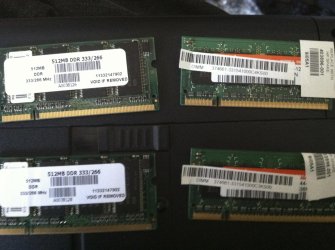
I'm not really sure how to change the memory in this laptop, but I managed to snap a picture of the memory after I opened it up and was hoping one of you guys can give me some tips and let me know if it's worth the effort.
 

Attachments

  • IMG_0758.jpg
    IMG_0758.jpg
    548.5 KB · Views: 2

My Computer My Computer

Computer Manufacturer/Model Number
Asus Essentio CG1330
OS
Windows 7 Home Premium 64 bit Edition
CPU
AMD Phenom(TM) II X6 1045T Processor 2.70 GHz
Motherboard
North Bridge: AMD 760G South Bridge: AMD SB710
Memory
8.00 GB 4 x DIMM Slots Dual Channel DDR3 1333 MHz. Support m
Graphics Card(s)
NVidia Geforce GTS 250
Sound Card
VIA High Definition Audio
Monitor(s) Displays
Samsung Syncmaster T260 HD and Generic PnP Monitor
Hard Drives
SATA
3.5" 500G ~ 4TB
PSU
CORSAIR Enthusiast Series TX650 V2 650W ATX12V v2.31/ EPS12V
Case
Asus Essentio CG1330
Cooling
Processor, Video Card, and Case fans

My Computer My Computer

Computer type
PC/Desktop
Computer Manufacturer/Model Number
My Own Build
OS
Windows 10 64 bit
CPU
Intel i7 6700K
Motherboard
ASUS ROG Maximus VIII Hero
Memory
16GB Corsair Dominator
Graphics Card(s)
Intel CPU Graphics
Sound Card
RealTek
Monitor(s) Displays
27" Dell S2719dgf
Screen Resolution
2560X1440
Hard Drives
1 TB Samsung 850 EVO SSD for Win 10 Pro
500GB Samsung 850 EVO SSD for Win 10 Insider
2 TB drive for backup
PSU
EVGA Supernova 750G2
Case
BeQuiet Silent Base 600
Cooling
Deepcool Captain 120EX
Keyboard
Microsoft Wireless 2000
Mouse
Microsoft wireless
Internet Speed
100 MB/sec (Cable)
Antivirus
Microsoft Defender and Malwarebytes
Browser
Edge/Firefox
Other Info
Cakewalk (Sonar) by BandLab and Studio One 4.1 Pro recording studio software. MOTU 896Mk3 Hybrid recording interface, Frontier Tranzport wireless control unit, Behringer X-Touch Control Surface.
Five USB connected optical drives for CD Audio production using Nero BurningROM
I had some memory from another broken laptop lying around. 512 MB sticks. I can't get them to fit though. Are they two different types of chips? They look the same, but it looks like the ones I'm trying to put in are DDR and the originals are DDR2. Are these compatible?

The ones on the right are the original sticks that came in the laptop. The ones on the left are the ones I'm trying to fit into the slots.
 

Attachments

  • IMG_0760.jpg
    IMG_0760.jpg
    497 KB · Views: 5

My Computer My Computer

Computer Manufacturer/Model Number
Asus Essentio CG1330
OS
Windows 7 Home Premium 64 bit Edition
CPU
AMD Phenom(TM) II X6 1045T Processor 2.70 GHz
Motherboard
North Bridge: AMD 760G South Bridge: AMD SB710
Memory
8.00 GB 4 x DIMM Slots Dual Channel DDR3 1333 MHz. Support m
Graphics Card(s)
NVidia Geforce GTS 250
Sound Card
VIA High Definition Audio
Monitor(s) Displays
Samsung Syncmaster T260 HD and Generic PnP Monitor
Hard Drives
SATA
3.5" 500G ~ 4TB
PSU
CORSAIR Enthusiast Series TX650 V2 650W ATX12V v2.31/ EPS12V
Case
Asus Essentio CG1330
Cooling
Processor, Video Card, and Case fans
I had some memory from another broken laptop lying around. 512 MB sticks. I can't get them to fit though. Are they two different types of chips? They look the same, but it looks like the ones I'm trying to put in are DDR and the originals are DDR2. Are these compatible?

The ones on the right are the original sticks that came in the laptop. The ones on the left are the ones I'm trying to fit into the slots.

http://en.wikipedia.org/wiki/Sodimm

Nope.

The slots in the DDR and DDR2 SODIMMs are in slightly different locations.

The electrical requirements are very different as well.

Stay with the 2X1GB DDR2.
 

My Computer My Computer

Computer Manufacturer/Model Number
homegrown
OS
Windows 7 Pro X64 SP1
CPU
Intel Core I7-3930k
Motherboard
Asus P9X79 Pro
Memory
16 GB Gskill DDR3-2133
Graphics Card(s)
eVGA GTX680
Sound Card
Creative X-Fi Titanium
Monitor(s) Displays
As PA246Q
Screen Resolution
1920 X 1200
Hard Drives
Corsair Force GT, 120 GB
WDC 1.5TB Caviar Black
PSU
PCP&C Silencer 750 Crossfire
Case
Silverstone FT02
Cooling
Noctua NH-D14
Keyboard
cheap Logitech USB
Mouse
Microsoft Intellimouse Explorer (old optical) USB
Internet Speed
6Mb cable
Other Info
Pioneer BDR-205
Samsung SH-203B
Monsoon 5.1 speakers
Back
Top