
Disk Management Problem ??
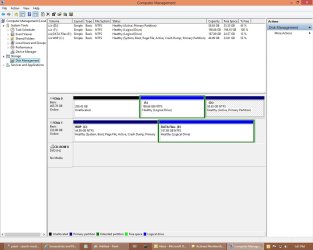
I have a Disk Management problem:
My Intel PC has (2) SATA HDs.
One HDD-1has a trial W8x64Pro installed on a "system" primary partition (drive: c) (Upgraded from W7x64P)
The second HDD-0 is new, and I installed W8x64Pro on an "active" primary partition (drive: D)
I want to use HDD-0 as my single HDD; I planned to remove HDD-1 after I was sure everything was working.
I can and do boot W8x64P from the HDD-0.
The Drive letter changes of course from D: to C:
Even though I was careful to install my new W8P on HDD-0 in a clean primary partition, there must be some data that my new W8P install on HDD-0 is reading from HDD-1=(system, active primary partition.).
** I noted that my HDD-0 partition where the new W8P was installed is an "*active", primary partition not a "*system", primary partition. [I suspect this is the root of my problem?]
I discovered that if I were to remove or loose my old W8P install on HDD-1, my new W8P install on HDD-0 will not boot. I am puzzled. My current Windows Disk Manager screen shot is submitted as an "attachment".
thank you
I have a Disk Management problem:
My Intel PC has (2) SATA HDs.
One HDD-1has a trial W8x64Pro installed on a "system" primary partition (drive: c) (Upgraded from W7x64P)
The second HDD-0 is new, and I installed W8x64Pro on an "active" primary partition (drive: D)
I want to use HDD-0 as my single HDD; I planned to remove HDD-1 after I was sure everything was working.
I can and do boot W8x64P from the HDD-0.
The Drive letter changes of course from D: to C:
Even though I was careful to install my new W8P on HDD-0 in a clean primary partition, there must be some data that my new W8P install on HDD-0 is reading from HDD-1=(system, active primary partition.).
** I noted that my HDD-0 partition where the new W8P was installed is an "*active", primary partition not a "*system", primary partition. [I suspect this is the root of my problem?]
I discovered that if I were to remove or loose my old W8P install on HDD-1, my new W8P install on HDD-0 will not boot. I am puzzled. My current Windows Disk Manager screen shot is submitted as an "attachment".
thank you
Attachments
Last edited:
My Computer
At a glance
W8x64ProIntel 3rd Gen i516GB samsung (8x2)intel embedded
- Computer type
- PC/Desktop
- Computer Manufacturer/Model Number
- Home Build
- OS
- W8x64Pro
- CPU
- Intel 3rd Gen i5
- Motherboard
- asus p8z77-v
- Memory
- 16GB samsung (8x2)
- Graphics Card(s)
- intel embedded
- Monitor(s) Displays
- lcd
- Hard Drives
- Two: SSD SATA 3; HHD SATA 2
Disk 0: W8P OS= C:; remaining is data folders
Disk 1: Data Storage
- PSU
- cooler master


