URGENT: Serious HDD Problems

techhead287

New member
Member
Local time
1:14 PM
Messages
66
I need URGENT help here.

I have been attempting to dual-boot Windows XP and Windows 7 on a mid-2004 HP Compaq laptop.
I booted into the Windows 7 setup, and used diskpart to shrink my XP partition. The commands I used were these:

  1. list disk
  2. select disk 1
  3. list volume
  4. select volume 1
  5. list partition
  6. select partition 1
  7. shrink desired=25000

After the shrink desired=25000 command, it went straight back to the prompt. I thought that was a little strange, but I continued with setup. When I was prompted to select a drive to install to, there were none. I launched diskpart again and typed list disk. It said there were no disks to display. I rebooted the computer, and it booted into XP as usual. I was taken to the login screen, and I entered my password. I pressed enter, and got a BSOD.
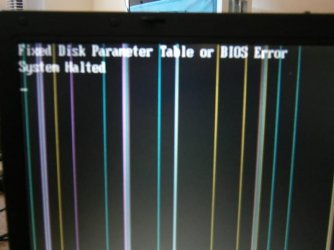
There was no error string, which would usually be something like PAGE_FAULT_IN_NONPAGED_AREA or IRQL_LESS_OR_NOT_EQUAL. The system rebooted. I shut it down by pressing the power button while the BIOS screen was up. I started up the computer, and the BIOS beeped 3 times and printed out the message of my nightmare:

Fixed Disk Parameter Table or BIOS Error
System Halted


My only choice now was to press the power button to power off the machine, and it did.

This is really bad. I need urgent help.

BSOD HELPERS - PLEASE READ:
Don't tell me to run some tool to get the BSOD crash dump. The HDD is not being recognized, and there is no way of accessing the data now.


Immediate help would be appreciated right now. This thread is high priority!

Please help, please help, please help!
-techhead287

Yes, I know the screen of the computer is messed up.
 

Attachments
  • PC150229.JPG
    PC150229.JPG
    40.4 KB · Views: 37

My Computer

Computer type
PC/Desktop
Computer Manufacturer/Model Number
Custom Build
OS
Windows 7 Ultimate 64-bit
CPU
Intel Core i7
Motherboard
ASUS
Memory
32GB RAM
Monitor(s) Displays
2
Hard Drives
1TB HDD
160GB SSD
2TB HDD
Cooling
3 Fans, water cooling
Keyboard
Microsoft
Mouse
Microsoft
Internet Speed
Around 70mbps
Antivirus
AVG Internet Security 2014
Browser
IE11, Google Chrome (default browser is Chrome)
Techhead mate try this to get some of the data back

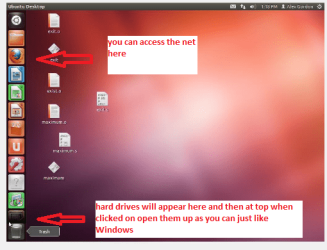
BOOTABLEUBUNTU

Make a bootable Ubuntu disk http://www.ubuntu.com/download

Set the BIOS to boot from theoptical when the machine boots it will show you a screen with TRY or INSTALL> select TRY

When it is finished - it takes verylittle time you will get a screen like in the pic .

Open the drive you want > Userand dig down until you get to the data / settings you may be able to copy /paste the material you want to an external source or other installed drive doingthis.

I am not sure if it will but I haverecovered tons of data etc using this method both on "dead" or justplain drives that you cannot get data from using Windows.
 

Attachments

  • UBUNTU.PNG
    UBUNTU.PNG
    58.1 KB · Views: 37

My Computer

Computer type
PC/Desktop
Computer Manufacturer/Model Number
Own build (new) Desk1 / Asus ROG Win 7 / Desk2 1st build
OS
Desk1 7 Home Prem / Desk2 10 Pro / Main lap Asus ROG 10 Pro 2 laptop Toshiba 7 Pro Asus P2520 7 & 10
CPU
Desk1 i5 3750K / Laptop i7 GTX 860M / Desk2 i5 2500
Motherboard
Desk1 Asus P877-V / Desk2 Gigabyte H67 UD3H / Laptop ?
Memory
Desk1 8GB (1866) / Desk2 16GB (1333) / Laptop 8Gb DDR3
Graphics Card(s)
Desk 1& 2NVidia GTX 650 & Laptops on board Intel
Sound Card
Desk 1 & 2 -XONAR DG Realtek High Def audio Laptop
Monitor(s) Displays
Desk 1 Benq HD 2450 / Desk2 Philips 24" / Laptop 17.5"
Screen Resolution
1920x1080 D1 & D2 & Laptop 1
Hard Drives
Desk1 Samsung 120GB 830 SSD
Asus ROG 256GB 850 Pro SSD
Desk2 Samsung 840 256 SSD
Toshiba 120GB EVO
PSU
Desk 1 Corsair HX 1050/ Laptop ? / Desk 2 Corsair HX 650
Case
Desk 1 Cooler HAF XM ? Toshiba laptop / Desk2 Coolermaster
Cooling
Fans on all Desk1 -2 Desk2 - all Coolermasters 5 Laptop ?
Keyboard
Desk 1 MS Sidewinder X6 Desk 2 MS Sidewinder X 4
Mouse
Desk 1&2 - Gigabyte MS 900 gamer - laptop - Logitec wireless
Internet Speed
ADSL2+
Other Info
One other Desktop (tester) and spare Toshba laptop both with SSD's
Running Kaspersky 2016 ISS on all machines config'd identically
Logitec audio stereo systems on each machine (x3)
Canon MG5250MFC
Router/modem TP-Link running WPA2SK
What a coincidence! I happen to have 2 Ubuntu 12.04 install CDs in my drawer!

I will try it in the laptop, and post back the results.
 

My Computer

Computer type
PC/Desktop
Computer Manufacturer/Model Number
Custom Build
OS
Windows 7 Ultimate 64-bit
CPU
Intel Core i7
Motherboard
ASUS
Memory
32GB RAM
Monitor(s) Displays
2
Hard Drives
1TB HDD
160GB SSD
2TB HDD
Cooling
3 Fans, water cooling
Keyboard
Microsoft
Mouse
Microsoft
Internet Speed
Around 70mbps
Antivirus
AVG Internet Security 2014
Browser
IE11, Google Chrome (default browser is Chrome)
Hey, good news.

I started up the PC, and instead of getting the BIOS error, it actually decided to boot into XP.
I am now on the XP desktop. I will post back if anything goes wrong.
 

My Computer

Computer type
PC/Desktop
Computer Manufacturer/Model Number
Custom Build
OS
Windows 7 Ultimate 64-bit
CPU
Intel Core i7
Motherboard
ASUS
Memory
32GB RAM
Monitor(s) Displays
2
Hard Drives
1TB HDD
160GB SSD
2TB HDD
Cooling
3 Fans, water cooling
Keyboard
Microsoft
Mouse
Microsoft
Internet Speed
Around 70mbps
Antivirus
AVG Internet Security 2014
Browser
IE11, Google Chrome (default browser is Chrome)
It was fine, until I suddenly got a BSOD and saw that same message.

I can't boot into any removable devices (such as an Ubuntu CD) and I can't even get into the BIOS setup.

What should I do now?
 

My Computer

Computer type
PC/Desktop
Computer Manufacturer/Model Number
Custom Build
OS
Windows 7 Ultimate 64-bit
CPU
Intel Core i7
Motherboard
ASUS
Memory
32GB RAM
Monitor(s) Displays
2
Hard Drives
1TB HDD
160GB SSD
2TB HDD
Cooling
3 Fans, water cooling
Keyboard
Microsoft
Mouse
Microsoft
Internet Speed
Around 70mbps
Antivirus
AVG Internet Security 2014
Browser
IE11, Google Chrome (default browser is Chrome)
Hey, good news.

I started up the PC, and instead of getting the BIOS error, it actually decided to boot into XP.
I am now on the XP desktop. I will post back if anything goes wrong.
Thats good news now if I were you I would back up all the data you want ASAP and then do some tests on the drives (spinners). There are two types one which does a general test like Seatools for example I don't know what brand you are using so I cannot advise which but Seatools usually will do most.

The SSD you could try the AS SSD run it is really to find out the read write rates but if it goes belly up may be indicative of it failing. AS SSD Benchmark Free Download

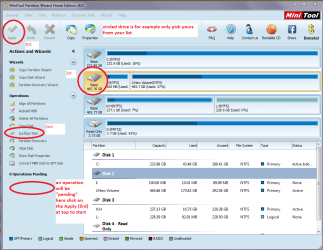
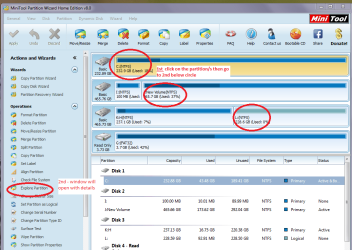
The second is a physical surface test using Partition Wizard Best Free Partition Manager Freeware and free partition magic for Windows 7, Windows 8, Windows Vista and Windows XP 32 bit & 64 bit. MiniTool Free Partition Manager Software Home Edition. see pics (very handy tool to keep) in one pic you will see the surface test the other you can see how to explore the partitions .
 

Attachments

  • SURFACE.PNG
    SURFACE.PNG
    53 KB · Views: 0
  • MINI TOOL4.PNG
    MINI TOOL4.PNG
    58.4 KB · Views: 0

My Computer

Computer type
PC/Desktop
Computer Manufacturer/Model Number
Own build (new) Desk1 / Asus ROG Win 7 / Desk2 1st build
OS
Desk1 7 Home Prem / Desk2 10 Pro / Main lap Asus ROG 10 Pro 2 laptop Toshiba 7 Pro Asus P2520 7 & 10
CPU
Desk1 i5 3750K / Laptop i7 GTX 860M / Desk2 i5 2500
Motherboard
Desk1 Asus P877-V / Desk2 Gigabyte H67 UD3H / Laptop ?
Memory
Desk1 8GB (1866) / Desk2 16GB (1333) / Laptop 8Gb DDR3
Graphics Card(s)
Desk 1& 2NVidia GTX 650 & Laptops on board Intel
Sound Card
Desk 1 & 2 -XONAR DG Realtek High Def audio Laptop
Monitor(s) Displays
Desk 1 Benq HD 2450 / Desk2 Philips 24" / Laptop 17.5"
Screen Resolution
1920x1080 D1 & D2 & Laptop 1
Hard Drives
Desk1 Samsung 120GB 830 SSD
Asus ROG 256GB 850 Pro SSD
Desk2 Samsung 840 256 SSD
Toshiba 120GB EVO
PSU
Desk 1 Corsair HX 1050/ Laptop ? / Desk 2 Corsair HX 650
Case
Desk 1 Cooler HAF XM ? Toshiba laptop / Desk2 Coolermaster
Cooling
Fans on all Desk1 -2 Desk2 - all Coolermasters 5 Laptop ?
Keyboard
Desk 1 MS Sidewinder X6 Desk 2 MS Sidewinder X 4
Mouse
Desk 1&2 - Gigabyte MS 900 gamer - laptop - Logitec wireless
Internet Speed
ADSL2+
Other Info
One other Desktop (tester) and spare Toshba laptop both with SSD's
Running Kaspersky 2016 ISS on all machines config'd identically
Logitec audio stereo systems on each machine (x3)
Canon MG5250MFC
Router/modem TP-Link running WPA2SK
It was fine, until I suddenly got a BSOD and saw that same message.

I can't boot into any removable devices (such as an Ubuntu CD) and I can't even get into the BIOS setup.

What should I do now?
Hmm I am not sure now no BIOS is not looking good Tech. I suppose you could try renewing the CMOS battery and see if it makes any difference but it certainly looks not good. Being a 10 year old machine just about maybe she has reached the use by date
I might just ask the others for some help mate.
 

My Computer

Computer type
PC/Desktop
Computer Manufacturer/Model Number
Own build (new) Desk1 / Asus ROG Win 7 / Desk2 1st build
OS
Desk1 7 Home Prem / Desk2 10 Pro / Main lap Asus ROG 10 Pro 2 laptop Toshiba 7 Pro Asus P2520 7 & 10
CPU
Desk1 i5 3750K / Laptop i7 GTX 860M / Desk2 i5 2500
Motherboard
Desk1 Asus P877-V / Desk2 Gigabyte H67 UD3H / Laptop ?
Memory
Desk1 8GB (1866) / Desk2 16GB (1333) / Laptop 8Gb DDR3
Graphics Card(s)
Desk 1& 2NVidia GTX 650 & Laptops on board Intel
Sound Card
Desk 1 & 2 -XONAR DG Realtek High Def audio Laptop
Monitor(s) Displays
Desk 1 Benq HD 2450 / Desk2 Philips 24" / Laptop 17.5"
Screen Resolution
1920x1080 D1 & D2 & Laptop 1
Hard Drives
Desk1 Samsung 120GB 830 SSD
Asus ROG 256GB 850 Pro SSD
Desk2 Samsung 840 256 SSD
Toshiba 120GB EVO
PSU
Desk 1 Corsair HX 1050/ Laptop ? / Desk 2 Corsair HX 650
Case
Desk 1 Cooler HAF XM ? Toshiba laptop / Desk2 Coolermaster
Cooling
Fans on all Desk1 -2 Desk2 - all Coolermasters 5 Laptop ?
Keyboard
Desk 1 MS Sidewinder X6 Desk 2 MS Sidewinder X 4
Mouse
Desk 1&2 - Gigabyte MS 900 gamer - laptop - Logitec wireless
Internet Speed
ADSL2+
Other Info
One other Desktop (tester) and spare Toshba laptop both with SSD's
Running Kaspersky 2016 ISS on all machines config'd identically
Logitec audio stereo systems on each machine (x3)
Canon MG5250MFC
Router/modem TP-Link running WPA2SK
Boot into BIOS setup to see if the XP drive is detected under storage devices. Set it first to boot. Henceforth attempt to boot any media using the one-time BIOS Boot Menu key.

Reset the BIOS to defaults after noting any SATA controller setting to put it back where it was: How To Clear CMOS (Reset BIOS)

Unplug any other drives while you run the maker's Hard Drive Diagnostic Procedure extended CD scan or PW CD surface scan suggested by John earlier.

Report back results.

If HDD cannot be found, can another? Try installing WIn7 now following http://www.sevenforums.com/tutorials/1649-clean-install-windows-7-a.html with all other drives unplugged.
 
It was fine, until I suddenly got a BSOD and saw that same message.

I can't boot into any removable devices (such as an Ubuntu CD) and I can't even get into the BIOS setup.

What should I do now?
Hmm I am not sure now no BIOS is not looking good Tech. I suppose you could try renewing the CMOS battery and see if it makes any difference but it certainly looks not good. Being a 10 year old machine just about maybe she has reached the use by date
I might just ask the others for some help mate.

I concur; removing the cmos battery should clear and return any changes made in the bios to defaults. Doing that might somehow correct the problem by getting it to possibly reconfigure the hard drive in the bios setup which might end up making it work again.
 

My Computer

Computer type
PC/Desktop
Computer Manufacturer/Model Number
custom built
OS
Windows 7 ultimate 64-bit
CPU
Intel I7 2600K 3.4ghz
Motherboard
Asus Evo P8P67
Memory
Corsair 16gb ddr3 1600mhz
Graphics Card(s)
Nvidia Geforce gt 430
Sound Card
Sound Blaster Titanium x-fi pci express
Monitor(s) Displays
Dell E198WFP
Hard Drives
1 western digital 2TB drive.
PSU
Antec 1200 watt
Case
Inwin Dragon Rider
Cooling
6 case supplied cooling fans
Keyboard
logitech mk700
Mouse
logitech m705
Internet Speed
25-50mbps download; 10mbps upload(i think)
Antivirus
avg free 2014
Browser
mozilla firefox
Other Info
Also have a pretty bad speaker setup which is a klipsch promedia 5.1 surround speaker setup with huge subwoofer and lg blu ray player/writer. Also a hp officejet pro 8600 plus wireless all in one and a logitech s7500 webcam.
also to add to the above tips if your system still does not boot after clearing cmos to the bios setup then try taking out the spinner as it may be hanging the boot order atm. I would also even if its working take the drive out and put it in another pc to back it up just in case.
 

My Computer

Computer type
PC/Desktop
Computer Manufacturer/Model Number
Custom
OS
10 Pro x64
CPU
Ryzen 9 3900X
Motherboard
Asrock x370 Tachi
Memory
64GB(4x16GB) DDR4
Graphics Card(s)
EVGA 1080ti FTW3
Sound Card
ASUS Xonar Essence STX (V4 Bursons), ODAC rev B, NFB-11, O2
Monitor(s) Displays
3xASUS PB278Q/R, Optoma HD142X
Screen Resolution
3x1440p, 1080p
Hard Drives
512GB 850 EVO(OS, Programs)
4TB (Movies)
3TB (Downloads)
3TB (Programs)
1TB HDD (Games)
2x6TB R1 (videos)
PSU
AX760
Case
Fractal Define R5
Cooling
NH-D15S
Keyboard
Massdrop Ctrl with Box Navy's
Mouse
G903, Alioth XXL Mat
Internet Speed
280/40
Antivirus
MBAM, ESET
Browser
Canary 64 Bit
Other Info
I also own a Thinkpad P50 Xeon 4K, X220T, X1C5
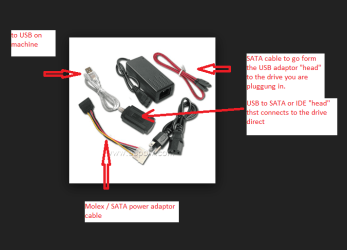
I suppose a last ditch thing would be to do as Greg says and do the clean install on a brand new drive and then recover the data from the old drive either by directly plugging it in or using a USB gadget. (see pic)
 

Attachments

  • USBSATA.PNG
    USBSATA.PNG
    26.6 KB · Views: 0

My Computer

Computer type
PC/Desktop
Computer Manufacturer/Model Number
Own build (new) Desk1 / Asus ROG Win 7 / Desk2 1st build
OS
Desk1 7 Home Prem / Desk2 10 Pro / Main lap Asus ROG 10 Pro 2 laptop Toshiba 7 Pro Asus P2520 7 & 10
CPU
Desk1 i5 3750K / Laptop i7 GTX 860M / Desk2 i5 2500
Motherboard
Desk1 Asus P877-V / Desk2 Gigabyte H67 UD3H / Laptop ?
Memory
Desk1 8GB (1866) / Desk2 16GB (1333) / Laptop 8Gb DDR3
Graphics Card(s)
Desk 1& 2NVidia GTX 650 & Laptops on board Intel
Sound Card
Desk 1 & 2 -XONAR DG Realtek High Def audio Laptop
Monitor(s) Displays
Desk 1 Benq HD 2450 / Desk2 Philips 24" / Laptop 17.5"
Screen Resolution
1920x1080 D1 & D2 & Laptop 1
Hard Drives
Desk1 Samsung 120GB 830 SSD
Asus ROG 256GB 850 Pro SSD
Desk2 Samsung 840 256 SSD
Toshiba 120GB EVO
PSU
Desk 1 Corsair HX 1050/ Laptop ? / Desk 2 Corsair HX 650
Case
Desk 1 Cooler HAF XM ? Toshiba laptop / Desk2 Coolermaster
Cooling
Fans on all Desk1 -2 Desk2 - all Coolermasters 5 Laptop ?
Keyboard
Desk 1 MS Sidewinder X6 Desk 2 MS Sidewinder X 4
Mouse
Desk 1&2 - Gigabyte MS 900 gamer - laptop - Logitec wireless
Internet Speed
ADSL2+
Other Info
One other Desktop (tester) and spare Toshba laptop both with SSD's
Running Kaspersky 2016 ISS on all machines config'd identically
Logitec audio stereo systems on each machine (x3)
Canon MG5250MFC
Router/modem TP-Link running WPA2SK
Back
Top