
Solved USB 3.0 Driver Issues

LouieP9086

New member
Local time
9:38 AM
Messages
30
I am having an issue with the USB 3.0 ports on my Samsung Laptop (NP900x4c)

The ports work fine in BIOS. So, I am sure it's not a hardware issue

I've tried installing the USB 3.0 drivers that Samsung provides, but the install keeps failing. I get an error that says; Error 2739. Could not access the JavaScript run time for custom action.

I may have previously installed an incorrect Chipset driver that cause the problem, but I am not 100% sure. I'm at my wits end trying to resolve this. Any steps to resolve this would be helpful.

Thank You.


Note: Here is what my current device manager looks like;
 

Attachments
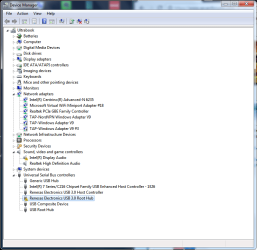
  • devicemanager.png
    devicemanager.png
    30.1 KB · Views: 0
Last edited:

My Computer

Computer type
Laptop
Computer Manufacturer/Model Number
Samsung NP900x4c
OS
Windows 7 Home Premium 64-bit
CPU
Intel Core i7-3517U
Memory
16GB Corsair PC3-12800 DDR3 1600mhz
Graphics Card(s)
Onboard
Hard Drives
256 SSD
Solved

For those who are having this problem...

Disabling driver signing enforcement will solve the problem.

For those that don't know how to do this...

1. just start up your computer while tapping F8.
2. Safe mode options will come up.
3. You will see an option for "Disable Driver Signature Enforcement"
 
Last edited:

My Computer

Computer type
Laptop
Computer Manufacturer/Model Number
Samsung NP900x4c
OS
Windows 7 Home Premium 64-bit
CPU
Intel Core i7-3517U
Memory
16GB Corsair PC3-12800 DDR3 1600mhz
Graphics Card(s)
Onboard
Hard Drives
256 SSD
Thanks for passing that on Louie.


Most appreciated.
 

My Computer

Computer type
PC/Desktop
Computer Manufacturer/Model Number
Home Built
OS
Windows `10 Professional 64bit
CPU
Intel i5 [email protected]
Motherboard
MSI P67A-GD55 (MS7681)
Memory
Corsair Vengeance DDR3 1600 16G
Graphics Card(s)
NVIDIA GeForce GT520 1GHz
Sound Card
Realtek High Definition Audio
Monitor(s) Displays
Haans G 241
Screen Resolution
1600X1024
Hard Drives
Crucial MX100 256GB SSD
PSU
OCZ ModXStream Modular High Performance 500 Watt
Case
Rosewill Challenger-U3
Cooling
Just Fans
Keyboard
Kensington K64338B
Mouse
Microsoft wheel mouse 1.1A
Internet Speed
240.0 Mbps
Antivirus
ESET Internet Security
Browser
Firefox
Other Info
SuperAntiSpyware-Pro
Malwarebytes (Premium)
Kerish Doctor
The problem is that every-time I restart my computer, "Driver Signature Enforcement" in re-enabled and my USB 3.0 ports stop working again. This is so freaking annoying.
 
Last edited:

My Computer

Computer type
Laptop
Computer Manufacturer/Model Number
Samsung NP900x4c
OS
Windows 7 Home Premium 64-bit
CPU
Intel Core i7-3517U
Memory
16GB Corsair PC3-12800 DDR3 1600mhz
Graphics Card(s)
Onboard
Hard Drives
256 SSD
Anyone have any advice on how to fix this?

I tried re-installing the drivers from Samsung's website, but it doesn't resolve the problem.
 

My Computer

Computer type
Laptop
Computer Manufacturer/Model Number
Samsung NP900x4c
OS
Windows 7 Home Premium 64-bit
CPU
Intel Core i7-3517U
Memory
16GB Corsair PC3-12800 DDR3 1600mhz
Graphics Card(s)
Onboard
Hard Drives
256 SSD
your Samsung laptop uses Renesas Electronics USB 3.0 driver.
I need the hardware ID number of the Renesas Electronics USB 3.0 controller device so I may find a compatible driver for Win7. use this link on how to find the hardware ID number of a device in Device Manager.

also be sure to be running Windows 7 with Service Pack 1 and the KB3071756 and KB3033929 security updates are installed. some newer drivers require certain Win7 SP1 updates for them to work correctly


Edit 9/18: try all the solutions from this Tom's Hardware forum thread.
And download v3.0.23 of the Renesas USB 3.0 drivers from here as they are no longer available from the Renesas web site.
 
Last edited:

My Computer

Computer type
PC/Desktop
Computer Manufacturer/Model Number
Dell Inspiron 620
OS
Windows 7 SP1 Home Premium 64bit [x64]
CPU
Intel(R) Core(TM) i5-2310 CPU @ 2.90GHz
Memory
6 GB
Graphics Card(s)
Intel HD Graphics 2000
Sound Card
Conexant CX20641 HD Audio
Hard Drives
Western Digital 1TB (1024GB) WD10EALX-759BA1
Internet Speed
Spectrum Cable Internet up to 100Mbps
I am having the same problem with Intel Display Audio.

How do I fix this?

Here are the Hardware ID's....

Intel Display Audio:
HDAUDIO\FUNC_01&VEN_8086&DEV_2806&SUBSYS_80860101&REV_1000
HDAUDIO\FUNC_01&VEN_8086&DEV_2806&SUBSYS_80860101

Renesas Electronics USB 3.0 Root Hub
RENESAS_USB3\ROOT_HUB30&VID_1912&PID_0015&REV_0002&SID_C0CD144D
RENESAS_USB3\ROOT_HUB30&VID_1912&PID_0015&REV_0002
RENESAS_USB3\ROOT_HUB30&VID_1912&PID_0015
 

My Computer

Computer type
Laptop
Computer Manufacturer/Model Number
Samsung NP900x4c
OS
Windows 7 Home Premium 64-bit
CPU
Intel Core i7-3517U
Memory
16GB Corsair PC3-12800 DDR3 1600mhz
Graphics Card(s)
Onboard
Hard Drives
256 SSD
Your help is appreciated.
 

My Computer

Computer type
Laptop
Computer Manufacturer/Model Number
Samsung NP900x4c
OS
Windows 7 Home Premium 64-bit
CPU
Intel Core i7-3517U
Memory
16GB Corsair PC3-12800 DDR3 1600mhz
Graphics Card(s)
Onboard
Hard Drives
256 SSD
your Samsung laptop uses Renesas Electronics USB 3.0 driver.
I need the hardware ID number of the Renesas Electronics USB 3.0 controller device so I may find a compatible driver for Win7. use this link on how to find the hardware ID number of a device in Device Manager.

also be sure to be running Windows 7 with Service Pack 1 and the KB3071756 and KB3033929 security updates are installed. some newer drivers require certain Win7 SP1 updates for them to work correctly


Edit 9/18: try all the solutions from this Tom's Hardware forum thread.
And download v3.0.23 of the Renesas USB 3.0 drivers from here as they are no longer available from the Renesas web site.
Hey,

Thanks for the help. You solution for the USB 3.0 driver worked.

However, I am also having the same problem with my Intel Display Audio.

Can you help me fix this as well?
 

My Computer

Computer type
Laptop
Computer Manufacturer/Model Number
Samsung NP900x4c
OS
Windows 7 Home Premium 64-bit
CPU
Intel Core i7-3517U
Memory
16GB Corsair PC3-12800 DDR3 1600mhz
Graphics Card(s)
Onboard
Hard Drives
256 SSD
I tried reinstalling the audio driver supplied from Samsung for this laptop, but it didn't work (even though Samsung says it's the current version)

I tried installing the same graphics driver from Intel's website and it resolved Driver Enforcement issue with the Intel Display Audio
 
Last edited:

My Computer

Computer type
Laptop
Computer Manufacturer/Model Number
Samsung NP900x4c
OS
Windows 7 Home Premium 64-bit
CPU
Intel Core i7-3517U
Memory
16GB Corsair PC3-12800 DDR3 1600mhz
Graphics Card(s)
Onboard
Hard Drives
256 SSD
Back
Top