USB 3.0 Host Controller not found

on the review it mention that you need a PCIx slot what is that? When I analyze my pc I think the card is in a PCI-x slot but I am not sure
 

My Computer

Computer Manufacturer/Model Number
dell xps 8300
OS
Windows 7 Home Premium x64
CPU
i5-2310
Motherboard
Intel H67 Revision B3 Dell Inc. 0Y2MRG A00
Memory
6 GB
Graphics Card(s)
AMD Radeon HD 7850
Hard Drives
Samsung 840 series 120 GB
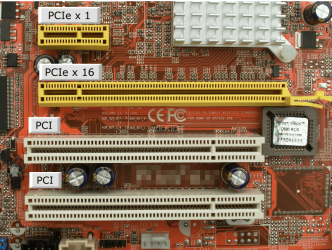
It is a pcie slot and not a pci slot. For the difference...

PCIe Slots.PNG
 

My Computers

System One System Two

  • Computer type
    PC/Desktop
    Computer Manufacturer/Model Number
    ALWAYS UNDER CONSTRUCTION
    OS
    Windows 11 Pro
    CPU
    Ryzen 9 5900X
    Motherboard
    Asus X570 Crosshair Viii Hero
    Memory
    32GB G Skill DDR4-3600
    Graphics Card(s)
    EVGA RTX 3080 FTW 3 Ultra
    Sound Card
    On Board/Sennheiser PC37X Headset
    Monitor(s) Displays
    3 X Asus 27"
    Screen Resolution
    2560x1440
    Hard Drives
    2 X 1 TB NVME drives
    PSU
    EVGA 850
    Case
    Phanteks Eclipse P400A
    Cooling
    EVGA 280 AIO
    Keyboard
    Logitech G510s/ Logitech G13
    Mouse
    Logitech G502
    Internet Speed
    24/1
    Antivirus
    ESET/MBAM Pro/SAS Pro
    Browser
    Chrome/ Firefox/ Edge
  • Computer type
    Laptop
    System Manufacturer/Model Number
    Dell 16 Plus
    OS
    Windows 11 Pro
    CPU
    Intel Ultra 9 288V
    Memory
    32 GB LPDDR5X 8533
    Monitor(s) Displays
    16" Mini-LED HDR600 Touch 90 Hz
    Screen Resolution
    2560X1600
    Hard Drives
    1 TB NVME
no problems about the pcie slots. In the above picture, would a PCIe x1 work on a PCIe x16 slot?

So I did the uninstall, remove hardware, install software, install hardware again, still doesn't work. I am beginning to give up hope.

Maybe I should just get another card.

Can you recommend a card that should be compatible with the motherboard and x64 windows 7. Preferably an inexpensive card. I am in Canada so supplying links to a deal will probably not be needed. If you need anymore info I will try to provide it.
 

My Computer

Computer Manufacturer/Model Number
dell xps 8300
OS
Windows 7 Home Premium x64
CPU
i5-2310
Motherboard
Intel H67 Revision B3 Dell Inc. 0Y2MRG A00
Memory
6 GB
Graphics Card(s)
AMD Radeon HD 7850
Hard Drives
Samsung 840 series 120 GB

My Computers

System One System Two

  • Computer type
    PC/Desktop
    Computer Manufacturer/Model Number
    ALWAYS UNDER CONSTRUCTION
    OS
    Windows 11 Pro
    CPU
    Ryzen 9 5900X
    Motherboard
    Asus X570 Crosshair Viii Hero
    Memory
    32GB G Skill DDR4-3600
    Graphics Card(s)
    EVGA RTX 3080 FTW 3 Ultra
    Sound Card
    On Board/Sennheiser PC37X Headset
    Monitor(s) Displays
    3 X Asus 27"
    Screen Resolution
    2560x1440
    Hard Drives
    2 X 1 TB NVME drives
    PSU
    EVGA 850
    Case
    Phanteks Eclipse P400A
    Cooling
    EVGA 280 AIO
    Keyboard
    Logitech G510s/ Logitech G13
    Mouse
    Logitech G502
    Internet Speed
    24/1
    Antivirus
    ESET/MBAM Pro/SAS Pro
    Browser
    Chrome/ Firefox/ Edge
  • Computer type
    Laptop
    System Manufacturer/Model Number
    Dell 16 Plus
    OS
    Windows 11 Pro
    CPU
    Intel Ultra 9 288V
    Memory
    32 GB LPDDR5X 8533
    Monitor(s) Displays
    16" Mini-LED HDR600 Touch 90 Hz
    Screen Resolution
    2560X1600
    Hard Drives
    1 TB NVME
I tried the rebooting. I restart the computer after each uninstall and install.

How would I know whether a card is compatible with my computer? I guess I have to look at the manufacturer manual.
 

My Computer

Computer Manufacturer/Model Number
dell xps 8300
OS
Windows 7 Home Premium x64
CPU
i5-2310
Motherboard
Intel H67 Revision B3 Dell Inc. 0Y2MRG A00
Memory
6 GB
Graphics Card(s)
AMD Radeon HD 7850
Hard Drives
Samsung 840 series 120 GB
the details tab on Newegg for that card says it is compatible with Windows 7.
 

My Computers

System One System Two

  • Computer type
    PC/Desktop
    Computer Manufacturer/Model Number
    ALWAYS UNDER CONSTRUCTION
    OS
    Windows 11 Pro
    CPU
    Ryzen 9 5900X
    Motherboard
    Asus X570 Crosshair Viii Hero
    Memory
    32GB G Skill DDR4-3600
    Graphics Card(s)
    EVGA RTX 3080 FTW 3 Ultra
    Sound Card
    On Board/Sennheiser PC37X Headset
    Monitor(s) Displays
    3 X Asus 27"
    Screen Resolution
    2560x1440
    Hard Drives
    2 X 1 TB NVME drives
    PSU
    EVGA 850
    Case
    Phanteks Eclipse P400A
    Cooling
    EVGA 280 AIO
    Keyboard
    Logitech G510s/ Logitech G13
    Mouse
    Logitech G502
    Internet Speed
    24/1
    Antivirus
    ESET/MBAM Pro/SAS Pro
    Browser
    Chrome/ Firefox/ Edge
  • Computer type
    Laptop
    System Manufacturer/Model Number
    Dell 16 Plus
    OS
    Windows 11 Pro
    CPU
    Intel Ultra 9 288V
    Memory
    32 GB LPDDR5X 8533
    Monitor(s) Displays
    16" Mini-LED HDR600 Touch 90 Hz
    Screen Resolution
    2560X1600
    Hard Drives
    1 TB NVME
thanks for the help
 

My Computer

Computer Manufacturer/Model Number
dell xps 8300
OS
Windows 7 Home Premium x64
CPU
i5-2310
Motherboard
Intel H67 Revision B3 Dell Inc. 0Y2MRG A00
Memory
6 GB
Graphics Card(s)
AMD Radeon HD 7850
Hard Drives
Samsung 840 series 120 GB
I'm just sorry I couldn't find the answer for you. There seems to be a way to do it. I just can't find it.
 

My Computers

System One System Two

  • Computer type
    PC/Desktop
    Computer Manufacturer/Model Number
    ALWAYS UNDER CONSTRUCTION
    OS
    Windows 11 Pro
    CPU
    Ryzen 9 5900X
    Motherboard
    Asus X570 Crosshair Viii Hero
    Memory
    32GB G Skill DDR4-3600
    Graphics Card(s)
    EVGA RTX 3080 FTW 3 Ultra
    Sound Card
    On Board/Sennheiser PC37X Headset
    Monitor(s) Displays
    3 X Asus 27"
    Screen Resolution
    2560x1440
    Hard Drives
    2 X 1 TB NVME drives
    PSU
    EVGA 850
    Case
    Phanteks Eclipse P400A
    Cooling
    EVGA 280 AIO
    Keyboard
    Logitech G510s/ Logitech G13
    Mouse
    Logitech G502
    Internet Speed
    24/1
    Antivirus
    ESET/MBAM Pro/SAS Pro
    Browser
    Chrome/ Firefox/ Edge
  • Computer type
    Laptop
    System Manufacturer/Model Number
    Dell 16 Plus
    OS
    Windows 11 Pro
    CPU
    Intel Ultra 9 288V
    Memory
    32 GB LPDDR5X 8533
    Monitor(s) Displays
    16" Mini-LED HDR600 Touch 90 Hz
    Screen Resolution
    2560X1600
    Hard Drives
    1 TB NVME
Check and make sure you have the card set up right. If you want to take a big gamble, let me know. I have a NEC USB 3.0 driver I used for a card I had in another computer. It is not for your card, but could work. It is a gamble though.
 

My Computers

System One System Two

  • Computer type
    PC/Desktop
    Computer Manufacturer/Model Number
    ALWAYS UNDER CONSTRUCTION
    OS
    Windows 11 Pro
    CPU
    Ryzen 9 5900X
    Motherboard
    Asus X570 Crosshair Viii Hero
    Memory
    32GB G Skill DDR4-3600
    Graphics Card(s)
    EVGA RTX 3080 FTW 3 Ultra
    Sound Card
    On Board/Sennheiser PC37X Headset
    Monitor(s) Displays
    3 X Asus 27"
    Screen Resolution
    2560x1440
    Hard Drives
    2 X 1 TB NVME drives
    PSU
    EVGA 850
    Case
    Phanteks Eclipse P400A
    Cooling
    EVGA 280 AIO
    Keyboard
    Logitech G510s/ Logitech G13
    Mouse
    Logitech G502
    Internet Speed
    24/1
    Antivirus
    ESET/MBAM Pro/SAS Pro
    Browser
    Chrome/ Firefox/ Edge
  • Computer type
    Laptop
    System Manufacturer/Model Number
    Dell 16 Plus
    OS
    Windows 11 Pro
    CPU
    Intel Ultra 9 288V
    Memory
    32 GB LPDDR5X 8533
    Monitor(s) Displays
    16" Mini-LED HDR600 Touch 90 Hz
    Screen Resolution
    2560X1600
    Hard Drives
    1 TB NVME
I do think my card is set up right. How big of a gamble would your driver be? Would I need to backup everything on my computer?
 

My Computer

Computer Manufacturer/Model Number
dell xps 8300
OS
Windows 7 Home Premium x64
CPU
i5-2310
Motherboard
Intel H67 Revision B3 Dell Inc. 0Y2MRG A00
Memory
6 GB
Graphics Card(s)
AMD Radeon HD 7850
Hard Drives
Samsung 840 series 120 GB
Have you tried installing these drivers manually? By that I mean not running a .exe file to install them, but extracting the driver and finding them through device manager...usually by point the update wizard to the .inf file?
 

My Computer

OS
Windows 7 Ultimate x64 SP1
CPU
Intel Core i7-2600
Motherboard
Gigabyte GA-P67A-UD3P-B3
Memory
12 GB Patriot Extreme DDR3-1333
Graphics Card(s)
Nvidia GTX 470
Monitor(s) Displays
Dell UltraSharp 2209WA
Hard Drives
OCZ Agility3 240 GB, WD5001AALS, WD7501AALS
PSU
OCZ ModStream 700W
Case
CoolerMaster HAF 912 Advanced
Cooling
CoolerMaster Hyper 212 Plus
I really would not think so. But honestly don't know. But, it wouldn't be the first time someone installed the wrong driver. Either there is something wrong with your card or it is not installed right. The driver we used last night should have worked. It worked on that same card before. Otherwise, you installed the wrong driver last night. Just uninstall it first, I would think. You decide, but in case you want to use it, I'll put it here. It is a zip folder, unzip it and click on it and it should self install.

View attachment 235191
 

My Computers

System One System Two

  • Computer type
    PC/Desktop
    Computer Manufacturer/Model Number
    ALWAYS UNDER CONSTRUCTION
    OS
    Windows 11 Pro
    CPU
    Ryzen 9 5900X
    Motherboard
    Asus X570 Crosshair Viii Hero
    Memory
    32GB G Skill DDR4-3600
    Graphics Card(s)
    EVGA RTX 3080 FTW 3 Ultra
    Sound Card
    On Board/Sennheiser PC37X Headset
    Monitor(s) Displays
    3 X Asus 27"
    Screen Resolution
    2560x1440
    Hard Drives
    2 X 1 TB NVME drives
    PSU
    EVGA 850
    Case
    Phanteks Eclipse P400A
    Cooling
    EVGA 280 AIO
    Keyboard
    Logitech G510s/ Logitech G13
    Mouse
    Logitech G502
    Internet Speed
    24/1
    Antivirus
    ESET/MBAM Pro/SAS Pro
    Browser
    Chrome/ Firefox/ Edge
  • Computer type
    Laptop
    System Manufacturer/Model Number
    Dell 16 Plus
    OS
    Windows 11 Pro
    CPU
    Intel Ultra 9 288V
    Memory
    32 GB LPDDR5X 8533
    Monitor(s) Displays
    16" Mini-LED HDR600 Touch 90 Hz
    Screen Resolution
    2560X1600
    Hard Drives
    1 TB NVME
I have tried installing the drivers through device manager.
I tried essenbe's driver
I tried installing the card on all available PCIe slots on my PC.
I also tried installing the card on another PC but it was also x64 system

It is always the same problem the "USB 3.0 Host Controller not found" and in device manager I get a caution symbol for the "NEC electronics USB 3.0 host controller"

I think this card just doesn't run on x64 or I got a faulty card. But if I run system information for windows (SIW) the card shows up that it is in the PCIe slot.
 

My Computer

Computer Manufacturer/Model Number
dell xps 8300
OS
Windows 7 Home Premium x64
CPU
i5-2310
Motherboard
Intel H67 Revision B3 Dell Inc. 0Y2MRG A00
Memory
6 GB
Graphics Card(s)
AMD Radeon HD 7850
Hard Drives
Samsung 840 series 120 GB
Did you connect a power connector to the card? Also, I recall you bought it from Amazon. Amazon has a very easy RMA service. Newegg says the card has been discontinued.

Never mind, I thought it needed external power. I does not seem to.
 

My Computers

System One System Two

  • Computer type
    PC/Desktop
    Computer Manufacturer/Model Number
    ALWAYS UNDER CONSTRUCTION
    OS
    Windows 11 Pro
    CPU
    Ryzen 9 5900X
    Motherboard
    Asus X570 Crosshair Viii Hero
    Memory
    32GB G Skill DDR4-3600
    Graphics Card(s)
    EVGA RTX 3080 FTW 3 Ultra
    Sound Card
    On Board/Sennheiser PC37X Headset
    Monitor(s) Displays
    3 X Asus 27"
    Screen Resolution
    2560x1440
    Hard Drives
    2 X 1 TB NVME drives
    PSU
    EVGA 850
    Case
    Phanteks Eclipse P400A
    Cooling
    EVGA 280 AIO
    Keyboard
    Logitech G510s/ Logitech G13
    Mouse
    Logitech G502
    Internet Speed
    24/1
    Antivirus
    ESET/MBAM Pro/SAS Pro
    Browser
    Chrome/ Firefox/ Edge
  • Computer type
    Laptop
    System Manufacturer/Model Number
    Dell 16 Plus
    OS
    Windows 11 Pro
    CPU
    Intel Ultra 9 288V
    Memory
    32 GB LPDDR5X 8533
    Monitor(s) Displays
    16" Mini-LED HDR600 Touch 90 Hz
    Screen Resolution
    2560X1600
    Hard Drives
    1 TB NVME
I think I am just going to return the card. Shouldn't be too hard. But I will probably wait until the thanksgiving holiday backlog clears at the post office, maybe by random miracle the card would start working before then.
 

My Computer

Computer Manufacturer/Model Number
dell xps 8300
OS
Windows 7 Home Premium x64
CPU
i5-2310
Motherboard
Intel H67 Revision B3 Dell Inc. 0Y2MRG A00
Memory
6 GB
Graphics Card(s)
AMD Radeon HD 7850
Hard Drives
Samsung 840 series 120 GB
Amazon's return policy is within 30 days. I guess as long as you do it before then. If you bought from one of their vendors, you may end up dealing with them.
 

My Computers

System One System Two

  • Computer type
    PC/Desktop
    Computer Manufacturer/Model Number
    ALWAYS UNDER CONSTRUCTION
    OS
    Windows 11 Pro
    CPU
    Ryzen 9 5900X
    Motherboard
    Asus X570 Crosshair Viii Hero
    Memory
    32GB G Skill DDR4-3600
    Graphics Card(s)
    EVGA RTX 3080 FTW 3 Ultra
    Sound Card
    On Board/Sennheiser PC37X Headset
    Monitor(s) Displays
    3 X Asus 27"
    Screen Resolution
    2560x1440
    Hard Drives
    2 X 1 TB NVME drives
    PSU
    EVGA 850
    Case
    Phanteks Eclipse P400A
    Cooling
    EVGA 280 AIO
    Keyboard
    Logitech G510s/ Logitech G13
    Mouse
    Logitech G502
    Internet Speed
    24/1
    Antivirus
    ESET/MBAM Pro/SAS Pro
    Browser
    Chrome/ Firefox/ Edge
  • Computer type
    Laptop
    System Manufacturer/Model Number
    Dell 16 Plus
    OS
    Windows 11 Pro
    CPU
    Intel Ultra 9 288V
    Memory
    32 GB LPDDR5X 8533
    Monitor(s) Displays
    16" Mini-LED HDR600 Touch 90 Hz
    Screen Resolution
    2560X1600
    Hard Drives
    1 TB NVME
Not sure if you returned something with Amazon before, but can I return the item in the Amazon labelled box it came in? Or do I need a new box? The instruction on the American and Canadian site doesn't say. My first time actually returning something order online.
 

My Computer

Computer Manufacturer/Model Number
dell xps 8300
OS
Windows 7 Home Premium x64
CPU
i5-2310
Motherboard
Intel H67 Revision B3 Dell Inc. 0Y2MRG A00
Memory
6 GB
Graphics Card(s)
AMD Radeon HD 7850
Hard Drives
Samsung 840 series 120 GB
With me I've always gone to my account and found the order, push the available actions button and one will be request a return. Follow the directions and they will give you where to find the link to print out a return label. That's how it has always worked for me. You have to have an RMA number.
 

My Computers

System One System Two

  • Computer type
    PC/Desktop
    Computer Manufacturer/Model Number
    ALWAYS UNDER CONSTRUCTION
    OS
    Windows 11 Pro
    CPU
    Ryzen 9 5900X
    Motherboard
    Asus X570 Crosshair Viii Hero
    Memory
    32GB G Skill DDR4-3600
    Graphics Card(s)
    EVGA RTX 3080 FTW 3 Ultra
    Sound Card
    On Board/Sennheiser PC37X Headset
    Monitor(s) Displays
    3 X Asus 27"
    Screen Resolution
    2560x1440
    Hard Drives
    2 X 1 TB NVME drives
    PSU
    EVGA 850
    Case
    Phanteks Eclipse P400A
    Cooling
    EVGA 280 AIO
    Keyboard
    Logitech G510s/ Logitech G13
    Mouse
    Logitech G502
    Internet Speed
    24/1
    Antivirus
    ESET/MBAM Pro/SAS Pro
    Browser
    Chrome/ Firefox/ Edge
  • Computer type
    Laptop
    System Manufacturer/Model Number
    Dell 16 Plus
    OS
    Windows 11 Pro
    CPU
    Intel Ultra 9 288V
    Memory
    32 GB LPDDR5X 8533
    Monitor(s) Displays
    16" Mini-LED HDR600 Touch 90 Hz
    Screen Resolution
    2560X1600
    Hard Drives
    1 TB NVME
Back
Top