
- Local time
- 4:08 PM
- Messages
- 37
Hey guys,
Have a really big favor I need to ask. Can someone link me if they had success utilizing the USB 3.0 ports(2 ports) and the steps they took to make them work.
I have an on going battle getting these ports to work at USB 3.0 speeds.
I have tried a multitude of drivers and my Dell u3014 USB 3.0 hub / note 3 phone only are recognized / run at USB 2.0 speeds. When plug USB 3.0 devices into the ports they are recognized but win 7 always comes back with the message to please connect the devices to a faster port. Would really appreciate any help
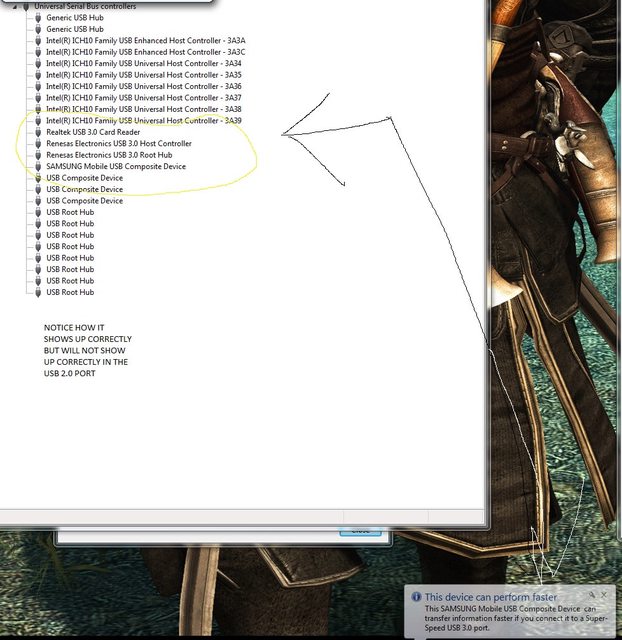
In this photo see how it shows as a usb 3.0 host controller / root hub. I have connected my note 3 phone but as you can see there is the error this device can perform faster if connect to a super speed USB 3.0 port.
Also you will see that it lists two "Generic USB Hub" this is from the USB 2.0 port of one of the monitors connected. When the monitor is connected to the USB 3 port I t reports as: "Renesas Electronics USB 2.0 Hub" Oddly enough, the Realtek USB 3.0 Card reader cannot be read nor can USB 3.0 from the phone. Something has to be missing and I have tried a slew of drivers already.
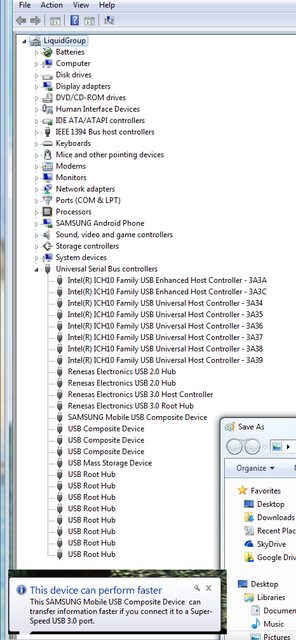
This photo shows how the system reports the USB 3.0 hub on the dell monitor as USB 2.0, Oddly enough when I connect it to the USB 2.0 port on the computer the 2 listings that say Renesas Electronics USB 2.0 HUB dissapear and are reported back as:
Realtek Usb 3.0 Card Reader. Now how weird is that?
EDIT: IS it possible that I need to flash the firmware? Right now it is at firmware 3034. If I flash it to an earlier version maybe I will have a better chance of using it?
Edit: The motherboard uses Renesas Electronics uPD720200 Version 3 rom chip. I have tried 2 different firmwares now Version 3.0.2.8 and 3.0.3.4 My devices still only show as a USB 2.0 connections. The dell hub still will not utilize the usb 3.0 hub nor will it show the memory card reader (will only show when plugged into a usb2 slot).
I am thinking that maybe the issue is more driver driven but nothing I can do helps.
-Installed Realtek drivers
-Installed 3 different renesas drivers
- Changed driver manually from Renesas USB 2.0 hub and to Renesas USB 3.0 Hub (dell port)
- What else can I do?
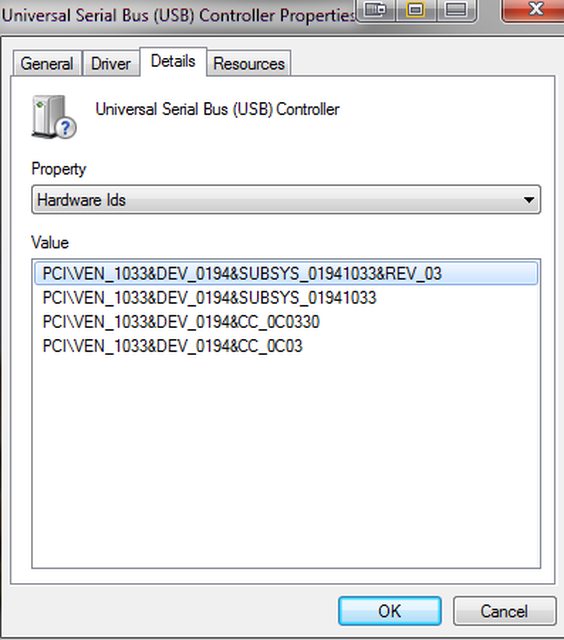
These are my hardware ID:
I also have followed the guide to uninstall all hidden drivers
Have a really big favor I need to ask. Can someone link me if they had success utilizing the USB 3.0 ports(2 ports) and the steps they took to make them work.
I have an on going battle getting these ports to work at USB 3.0 speeds.
I have tried a multitude of drivers and my Dell u3014 USB 3.0 hub / note 3 phone only are recognized / run at USB 2.0 speeds. When plug USB 3.0 devices into the ports they are recognized but win 7 always comes back with the message to please connect the devices to a faster port. Would really appreciate any help
In this photo see how it shows as a usb 3.0 host controller / root hub. I have connected my note 3 phone but as you can see there is the error this device can perform faster if connect to a super speed USB 3.0 port.
Also you will see that it lists two "Generic USB Hub" this is from the USB 2.0 port of one of the monitors connected. When the monitor is connected to the USB 3 port I t reports as: "Renesas Electronics USB 2.0 Hub" Oddly enough, the Realtek USB 3.0 Card reader cannot be read nor can USB 3.0 from the phone. Something has to be missing and I have tried a slew of drivers already.
This photo shows how the system reports the USB 3.0 hub on the dell monitor as USB 2.0, Oddly enough when I connect it to the USB 2.0 port on the computer the 2 listings that say Renesas Electronics USB 2.0 HUB dissapear and are reported back as:
Realtek Usb 3.0 Card Reader. Now how weird is that?
EDIT: IS it possible that I need to flash the firmware? Right now it is at firmware 3034. If I flash it to an earlier version maybe I will have a better chance of using it?
Edit: The motherboard uses Renesas Electronics uPD720200 Version 3 rom chip. I have tried 2 different firmwares now Version 3.0.2.8 and 3.0.3.4 My devices still only show as a USB 2.0 connections. The dell hub still will not utilize the usb 3.0 hub nor will it show the memory card reader (will only show when plugged into a usb2 slot).
I am thinking that maybe the issue is more driver driven but nothing I can do helps.
-Installed Realtek drivers
-Installed 3 different renesas drivers
- Changed driver manually from Renesas USB 2.0 hub and to Renesas USB 3.0 Hub (dell port)
- What else can I do?
These are my hardware ID:
I also have followed the guide to uninstall all hidden drivers
Last edited:
My Computer
At a glance
Windows 7 Ultimatei7-930 @3.99ghzG.Skill 6GBTitan
- OS
- Windows 7 Ultimate
- CPU
- i7-930 @3.99ghz
- Motherboard
- Gigabyte X58-UD5
- Memory
- G.Skill 6GB
- Graphics Card(s)
- Titan
- Sound Card
- onboard
- Monitor(s) Displays
- Dell 30"
- Screen Resolution
- 2560x1600 surround
- Hard Drives
- 4 1.5 TB seagate HD
- PSU
- Corsair HX750


