Usb code 10

Also tried startup repair doesn't work, it says "startup repair cannot repair this computer automatically
 

My Computer

Computer type
PC/Desktop
OS
Windows 7 64 bit
CPU
Overclocked Intel® Core™i7-4770k Quad Core (
Motherboard
ASUS® Z87-A: ATX, USB3.0, SATA6GB/S, SLi, XFIRE
Memory
16GB KINGSTON HYPERX BEAST DUAL-DDR3 2400MHz X.
Graphics Card(s)
3GB NVIDIA GEFORCE GTX 780 - 2 DVI, HDMI, DP -
Monitor(s) Displays
Asus VG248QE 24-inch 3D LED Monitor - Black (1920x1080, 8000
Hard Drives
1st Hard Disk 240GB INTEL® 520 SERIES SSD (upto 550MB/sR | 520MB/sW)

2nd Hard Disk 1TB WD CAVIAR BLACK WD1003FZEX, SATA 6 Gb/s, 64MB CACHE (7200rpm)
PSU
CORSAIR 750W RM SERIES™ MODULAR 80 PLUS® GOLD,
Case
COOLERMASTER CM STORM TROOPER - GAMING ENTHUSIAST CASE
Cooling
Corsair H80i Hydro Series High Performance. Thermal Paste
Yikes!! Yea. you didn't want to do that but you might be able to back out. Try system restore from boot \http://www.sevenforums.com/tutorials/700-system-restore.html

>* EDIT */\
That's option 2 in the guide

/* EDIT */
And, patience. I hope you can recover. I also want to look at filters but need to know which one. Hope you can recover
 

My Computer

Computer type
PC/Desktop
Computer Manufacturer/Model Number
Dell Optiplex 360 and Optiplex 755
OS
Desk 1: Win 7 Pro x32; Desk 2: Windows 10 x64
Hard Drives
500GB Crucial SSD in both Desktops
Other Info
Buffalo 6TB NAS, Raid 1
Em got the disc how do i run it? I'm in BIOS insterted the disc but nothing is happening
 

My Computer

Computer type
PC/Desktop
OS
Windows 7 64 bit
CPU
Overclocked Intel® Core™i7-4770k Quad Core (
Motherboard
ASUS® Z87-A: ATX, USB3.0, SATA6GB/S, SLi, XFIRE
Memory
16GB KINGSTON HYPERX BEAST DUAL-DDR3 2400MHz X.
Graphics Card(s)
3GB NVIDIA GEFORCE GTX 780 - 2 DVI, HDMI, DP -
Monitor(s) Displays
Asus VG248QE 24-inch 3D LED Monitor - Black (1920x1080, 8000
Hard Drives
1st Hard Disk 240GB INTEL® 520 SERIES SSD (upto 550MB/sR | 520MB/sW)

2nd Hard Disk 1TB WD CAVIAR BLACK WD1003FZEX, SATA 6 Gb/s, 64MB CACHE (7200rpm)
PSU
CORSAIR 750W RM SERIES™ MODULAR 80 PLUS® GOLD,
Case
COOLERMASTER CM STORM TROOPER - GAMING ENTHUSIAST CASE
Cooling
Corsair H80i Hydro Series High Performance. Thermal Paste
Ok figured it out will try do a recovery
 

My Computer

Computer type
PC/Desktop
OS
Windows 7 64 bit
CPU
Overclocked Intel® Core™i7-4770k Quad Core (
Motherboard
ASUS® Z87-A: ATX, USB3.0, SATA6GB/S, SLi, XFIRE
Memory
16GB KINGSTON HYPERX BEAST DUAL-DDR3 2400MHz X.
Graphics Card(s)
3GB NVIDIA GEFORCE GTX 780 - 2 DVI, HDMI, DP -
Monitor(s) Displays
Asus VG248QE 24-inch 3D LED Monitor - Black (1920x1080, 8000
Hard Drives
1st Hard Disk 240GB INTEL® 520 SERIES SSD (upto 550MB/sR | 520MB/sW)

2nd Hard Disk 1TB WD CAVIAR BLACK WD1003FZEX, SATA 6 Gb/s, 64MB CACHE (7200rpm)
PSU
CORSAIR 750W RM SERIES™ MODULAR 80 PLUS® GOLD,
Case
COOLERMASTER CM STORM TROOPER - GAMING ENTHUSIAST CASE
Cooling
Corsair H80i Hydro Series High Performance. Thermal Paste
No joy on the repair :(
 

My Computer

Computer type
PC/Desktop
OS
Windows 7 64 bit
CPU
Overclocked Intel® Core™i7-4770k Quad Core (
Motherboard
ASUS® Z87-A: ATX, USB3.0, SATA6GB/S, SLi, XFIRE
Memory
16GB KINGSTON HYPERX BEAST DUAL-DDR3 2400MHz X.
Graphics Card(s)
3GB NVIDIA GEFORCE GTX 780 - 2 DVI, HDMI, DP -
Monitor(s) Displays
Asus VG248QE 24-inch 3D LED Monitor - Black (1920x1080, 8000
Hard Drives
1st Hard Disk 240GB INTEL® 520 SERIES SSD (upto 550MB/sR | 520MB/sW)

2nd Hard Disk 1TB WD CAVIAR BLACK WD1003FZEX, SATA 6 Gb/s, 64MB CACHE (7200rpm)
PSU
CORSAIR 750W RM SERIES™ MODULAR 80 PLUS® GOLD,
Case
COOLERMASTER CM STORM TROOPER - GAMING ENTHUSIAST CASE
Cooling
Corsair H80i Hydro Series High Performance. Thermal Paste

My Computer

Computer type
PC/Desktop
Computer Manufacturer/Model Number
Dell Optiplex 360 and Optiplex 755
OS
Desk 1: Win 7 Pro x32; Desk 2: Windows 10 x64
Hard Drives
500GB Crucial SSD in both Desktops
Other Info
Buffalo 6TB NAS, Raid 1
Can't see it listed on my asus boot menu? Ok same here off to bed :) night
 

My Computer

Computer type
PC/Desktop
OS
Windows 7 64 bit
CPU
Overclocked Intel® Core™i7-4770k Quad Core (
Motherboard
ASUS® Z87-A: ATX, USB3.0, SATA6GB/S, SLi, XFIRE
Memory
16GB KINGSTON HYPERX BEAST DUAL-DDR3 2400MHz X.
Graphics Card(s)
3GB NVIDIA GEFORCE GTX 780 - 2 DVI, HDMI, DP -
Monitor(s) Displays
Asus VG248QE 24-inch 3D LED Monitor - Black (1920x1080, 8000
Hard Drives
1st Hard Disk 240GB INTEL® 520 SERIES SSD (upto 550MB/sR | 520MB/sW)

2nd Hard Disk 1TB WD CAVIAR BLACK WD1003FZEX, SATA 6 Gb/s, 64MB CACHE (7200rpm)
PSU
CORSAIR 750W RM SERIES™ MODULAR 80 PLUS® GOLD,
Case
COOLERMASTER CM STORM TROOPER - GAMING ENTHUSIAST CASE
Cooling
Corsair H80i Hydro Series High Performance. Thermal Paste
Well... i'm still up.. but you're 6 hours ahead so hope you're fast asleep!

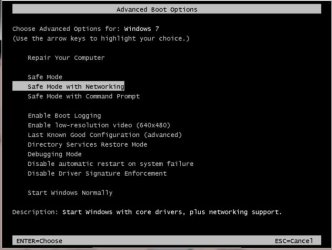
So when you hit F8 your Advanced Boot options didn't include Last Known Config? (see snapshot) And if the System Restore from Boot - option 2 in the guide I gave before also didn't work (note: Startup repair option won't help in your case) , there's one more way to try recover your corrupt registry. Use the steps in this tutorial
http://www.sevenforums.com/tutorials/139576-startup-repair-infinite-loop-recovery.html
 

Attachments

  • 2015-10-18_225713.jpg
    2015-10-18_225713.jpg
    26.9 KB · Views: 14

My Computer

Computer type
PC/Desktop
Computer Manufacturer/Model Number
Dell Optiplex 360 and Optiplex 755
OS
Desk 1: Win 7 Pro x32; Desk 2: Windows 10 x64
Hard Drives
500GB Crucial SSD in both Desktops
Other Info
Buffalo 6TB NAS, Raid 1
Well i will give that a go. What MB are you using? Because my Asus Z87-A doesn't showing that kind if layout in advanved boot?
 

My Computer

Computer type
PC/Desktop
OS
Windows 7 64 bit
CPU
Overclocked Intel® Core™i7-4770k Quad Core (
Motherboard
ASUS® Z87-A: ATX, USB3.0, SATA6GB/S, SLi, XFIRE
Memory
16GB KINGSTON HYPERX BEAST DUAL-DDR3 2400MHz X.
Graphics Card(s)
3GB NVIDIA GEFORCE GTX 780 - 2 DVI, HDMI, DP -
Monitor(s) Displays
Asus VG248QE 24-inch 3D LED Monitor - Black (1920x1080, 8000
Hard Drives
1st Hard Disk 240GB INTEL® 520 SERIES SSD (upto 550MB/sR | 520MB/sW)

2nd Hard Disk 1TB WD CAVIAR BLACK WD1003FZEX, SATA 6 Gb/s, 64MB CACHE (7200rpm)
PSU
CORSAIR 750W RM SERIES™ MODULAR 80 PLUS® GOLD,
Case
COOLERMASTER CM STORM TROOPER - GAMING ENTHUSIAST CASE
Cooling
Corsair H80i Hydro Series High Performance. Thermal Paste
Holly shhhh man that has worked ! Withour you guys i would be screwed. Very smart people who think of this :)

Now i'm back in will i do a windows 7 repair or anything because i deleted those reg lower / upper filters ?
 

My Computer

Computer type
PC/Desktop
OS
Windows 7 64 bit
CPU
Overclocked Intel® Core™i7-4770k Quad Core (
Motherboard
ASUS® Z87-A: ATX, USB3.0, SATA6GB/S, SLi, XFIRE
Memory
16GB KINGSTON HYPERX BEAST DUAL-DDR3 2400MHz X.
Graphics Card(s)
3GB NVIDIA GEFORCE GTX 780 - 2 DVI, HDMI, DP -
Monitor(s) Displays
Asus VG248QE 24-inch 3D LED Monitor - Black (1920x1080, 8000
Hard Drives
1st Hard Disk 240GB INTEL® 520 SERIES SSD (upto 550MB/sR | 520MB/sW)

2nd Hard Disk 1TB WD CAVIAR BLACK WD1003FZEX, SATA 6 Gb/s, 64MB CACHE (7200rpm)
PSU
CORSAIR 750W RM SERIES™ MODULAR 80 PLUS® GOLD,
Case
COOLERMASTER CM STORM TROOPER - GAMING ENTHUSIAST CASE
Cooling
Corsair H80i Hydro Series High Performance. Thermal Paste
Just checked regedit its all back.
 

My Computer

Computer type
PC/Desktop
OS
Windows 7 64 bit
CPU
Overclocked Intel® Core™i7-4770k Quad Core (
Motherboard
ASUS® Z87-A: ATX, USB3.0, SATA6GB/S, SLi, XFIRE
Memory
16GB KINGSTON HYPERX BEAST DUAL-DDR3 2400MHz X.
Graphics Card(s)
3GB NVIDIA GEFORCE GTX 780 - 2 DVI, HDMI, DP -
Monitor(s) Displays
Asus VG248QE 24-inch 3D LED Monitor - Black (1920x1080, 8000
Hard Drives
1st Hard Disk 240GB INTEL® 520 SERIES SSD (upto 550MB/sR | 520MB/sW)

2nd Hard Disk 1TB WD CAVIAR BLACK WD1003FZEX, SATA 6 Gb/s, 64MB CACHE (7200rpm)
PSU
CORSAIR 750W RM SERIES™ MODULAR 80 PLUS® GOLD,
Case
COOLERMASTER CM STORM TROOPER - GAMING ENTHUSIAST CASE
Cooling
Corsair H80i Hydro Series High Performance. Thermal Paste
The code 10 is back and its listed in - Sound, video, and game controllers

Thats for the headset
 

My Computer

Computer type
PC/Desktop
OS
Windows 7 64 bit
CPU
Overclocked Intel® Core™i7-4770k Quad Core (
Motherboard
ASUS® Z87-A: ATX, USB3.0, SATA6GB/S, SLi, XFIRE
Memory
16GB KINGSTON HYPERX BEAST DUAL-DDR3 2400MHz X.
Graphics Card(s)
3GB NVIDIA GEFORCE GTX 780 - 2 DVI, HDMI, DP -
Monitor(s) Displays
Asus VG248QE 24-inch 3D LED Monitor - Black (1920x1080, 8000
Hard Drives
1st Hard Disk 240GB INTEL® 520 SERIES SSD (upto 550MB/sR | 520MB/sW)

2nd Hard Disk 1TB WD CAVIAR BLACK WD1003FZEX, SATA 6 Gb/s, 64MB CACHE (7200rpm)
PSU
CORSAIR 750W RM SERIES™ MODULAR 80 PLUS® GOLD,
Case
COOLERMASTER CM STORM TROOPER - GAMING ENTHUSIAST CASE
Cooling
Corsair H80i Hydro Series High Performance. Thermal Paste
Hey- Hey! Back in business. Moving forward back to the original problem at hand.

/* EDIT */
Just noticed #32 is saying audio device. Though among your first showed Problem Report it showed a USB device. Do the code 10 errors pop up on both types?
/* end EDIT */

Is code 10 error happening again?
> In device manager, select the device with the code 10 error
> If no code 10 error at the moment, you can select any USB device.
Just tell me which of the two cases you're posting per instruction below
  • Right click Properties select Details tab
  • Use the pull down menu to carefully look for entries Class upper filters and/or Class lower filters
  • If one is found, select it. Tell me which one it is and copy/paste its values displayed
  • Repeat for the other entry if it's found as well.
  • Next, for same device, click on the Driver tab
  • Click the Driver Details button
  • Post a screen shot of the the Driver Details value display http://www.sevenforums.com/tutorials/9733-screenshots-files-upload-post-seven-forums.html
 

Attachments

  • Filters.jpg
    Filters.jpg
    18.7 KB · Views: 14
Last edited:

My Computer

Computer type
PC/Desktop
Computer Manufacturer/Model Number
Dell Optiplex 360 and Optiplex 755
OS
Desk 1: Win 7 Pro x32; Desk 2: Windows 10 x64
Hard Drives
500GB Crucial SSD in both Desktops
Other Info
Buffalo 6TB NAS, Raid 1
Wait. Just noticed you said the error is with the audio device??? Then redo step above looking and posting about filters but selecting the code 10 audio device. and p.s. Excluding case where you connected to a hub, is the driver code error you seeing occur for devices listed under USB as well as devices under audio?

Run another Problem Report again too. Thanks!
  • Make sure devices are connected and powered on
  • Click the Start Orb, type msinfo32 in the search box. Hit Enter
  • Click the + sign next to Components to expand it
  • Click Problem Devices. Anything appear?
  • If yes, click on it, Ctrl-A to select all, Ctrl-C to copy it, Ctrl-V to paste into next post
  • On the other hand, if no devices are listed, tell me so
 

My Computer

Computer type
PC/Desktop
Computer Manufacturer/Model Number
Dell Optiplex 360 and Optiplex 755
OS
Desk 1: Win 7 Pro x32; Desk 2: Windows 10 x64
Hard Drives
500GB Crucial SSD in both Desktops
Other Info
Buffalo 6TB NAS, Raid 1
Hey! I need to keep resetting my PC untill i get that error code 10 so once it pops up i'll send details.

It only shows under audio for the headset
 

My Computer

Computer type
PC/Desktop
OS
Windows 7 64 bit
CPU
Overclocked Intel® Core™i7-4770k Quad Core (
Motherboard
ASUS® Z87-A: ATX, USB3.0, SATA6GB/S, SLi, XFIRE
Memory
16GB KINGSTON HYPERX BEAST DUAL-DDR3 2400MHz X.
Graphics Card(s)
3GB NVIDIA GEFORCE GTX 780 - 2 DVI, HDMI, DP -
Monitor(s) Displays
Asus VG248QE 24-inch 3D LED Monitor - Black (1920x1080, 8000
Hard Drives
1st Hard Disk 240GB INTEL® 520 SERIES SSD (upto 550MB/sR | 520MB/sW)

2nd Hard Disk 1TB WD CAVIAR BLACK WD1003FZEX, SATA 6 Gb/s, 64MB CACHE (7200rpm)
PSU
CORSAIR 750W RM SERIES™ MODULAR 80 PLUS® GOLD,
Case
COOLERMASTER CM STORM TROOPER - GAMING ENTHUSIAST CASE
Cooling
Corsair H80i Hydro Series High Performance. Thermal Paste
class upper filters

value - ksthunk
 

My Computer

Computer type
PC/Desktop
OS
Windows 7 64 bit
CPU
Overclocked Intel® Core™i7-4770k Quad Core (
Motherboard
ASUS® Z87-A: ATX, USB3.0, SATA6GB/S, SLi, XFIRE
Memory
16GB KINGSTON HYPERX BEAST DUAL-DDR3 2400MHz X.
Graphics Card(s)
3GB NVIDIA GEFORCE GTX 780 - 2 DVI, HDMI, DP -
Monitor(s) Displays
Asus VG248QE 24-inch 3D LED Monitor - Black (1920x1080, 8000
Hard Drives
1st Hard Disk 240GB INTEL® 520 SERIES SSD (upto 550MB/sR | 520MB/sW)

2nd Hard Disk 1TB WD CAVIAR BLACK WD1003FZEX, SATA 6 Gb/s, 64MB CACHE (7200rpm)
PSU
CORSAIR 750W RM SERIES™ MODULAR 80 PLUS® GOLD,
Case
COOLERMASTER CM STORM TROOPER - GAMING ENTHUSIAST CASE
Cooling
Corsair H80i Hydro Series High Performance. Thermal Paste
Is device currently OK or showing code 10? To reconfirm, your audio device has class upper filter ksthunk and no lower filter listed, correct?

Turtle Beach Z300 USB\VID_10F5&PID_2110&MI_00\7&131D7507&0&0000 This device cannot start.
That error message above would make me think that code 10 appeared on a USB device entry in Device Manager. Is that true or not? Or do you remember for sure?

Let's keep an eye and let me know when the error happens again
> Is a USB device (and device name)
> Is it an audio device (and device name)

What is it you do that makes the problem go away? just restart? reinstall any software? do you see Windows reinstalling drivers? etc
 

My Computer

Computer type
PC/Desktop
Computer Manufacturer/Model Number
Dell Optiplex 360 and Optiplex 755
OS
Desk 1: Win 7 Pro x32; Desk 2: Windows 10 x64
Hard Drives
500GB Crucial SSD in both Desktops
Other Info
Buffalo 6TB NAS, Raid 1
image.jpeg
[/URL][/IMG]
 

My Computer

Computer type
PC/Desktop
OS
Windows 7 64 bit
CPU
Overclocked Intel® Core™i7-4770k Quad Core (
Motherboard
ASUS® Z87-A: ATX, USB3.0, SATA6GB/S, SLi, XFIRE
Memory
16GB KINGSTON HYPERX BEAST DUAL-DDR3 2400MHz X.
Graphics Card(s)
3GB NVIDIA GEFORCE GTX 780 - 2 DVI, HDMI, DP -
Monitor(s) Displays
Asus VG248QE 24-inch 3D LED Monitor - Black (1920x1080, 8000
Hard Drives
1st Hard Disk 240GB INTEL® 520 SERIES SSD (upto 550MB/sR | 520MB/sW)

2nd Hard Disk 1TB WD CAVIAR BLACK WD1003FZEX, SATA 6 Gb/s, 64MB CACHE (7200rpm)
PSU
CORSAIR 750W RM SERIES™ MODULAR 80 PLUS® GOLD,
Case
COOLERMASTER CM STORM TROOPER - GAMING ENTHUSIAST CASE
Cooling
Corsair H80i Hydro Series High Performance. Thermal Paste
USB Audio Device USB\VID_10F5&PID_2110&MI_00\6&131D7507&0&0000 This device cannot start.
 

My Computer

Computer type
PC/Desktop
OS
Windows 7 64 bit
CPU
Overclocked Intel® Core™i7-4770k Quad Core (
Motherboard
ASUS® Z87-A: ATX, USB3.0, SATA6GB/S, SLi, XFIRE
Memory
16GB KINGSTON HYPERX BEAST DUAL-DDR3 2400MHz X.
Graphics Card(s)
3GB NVIDIA GEFORCE GTX 780 - 2 DVI, HDMI, DP -
Monitor(s) Displays
Asus VG248QE 24-inch 3D LED Monitor - Black (1920x1080, 8000
Hard Drives
1st Hard Disk 240GB INTEL® 520 SERIES SSD (upto 550MB/sR | 520MB/sW)

2nd Hard Disk 1TB WD CAVIAR BLACK WD1003FZEX, SATA 6 Gb/s, 64MB CACHE (7200rpm)
PSU
CORSAIR 750W RM SERIES™ MODULAR 80 PLUS® GOLD,
Case
COOLERMASTER CM STORM TROOPER - GAMING ENTHUSIAST CASE
Cooling
Corsair H80i Hydro Series High Performance. Thermal Paste
My device is showing code 10. but its fine if i click troubleshoot and reinstall the driver i only get that error after resetting the PC a few times or something.
 

My Computer

Computer type
PC/Desktop
OS
Windows 7 64 bit
CPU
Overclocked Intel® Core™i7-4770k Quad Core (
Motherboard
ASUS® Z87-A: ATX, USB3.0, SATA6GB/S, SLi, XFIRE
Memory
16GB KINGSTON HYPERX BEAST DUAL-DDR3 2400MHz X.
Graphics Card(s)
3GB NVIDIA GEFORCE GTX 780 - 2 DVI, HDMI, DP -
Monitor(s) Displays
Asus VG248QE 24-inch 3D LED Monitor - Black (1920x1080, 8000
Hard Drives
1st Hard Disk 240GB INTEL® 520 SERIES SSD (upto 550MB/sR | 520MB/sW)

2nd Hard Disk 1TB WD CAVIAR BLACK WD1003FZEX, SATA 6 Gb/s, 64MB CACHE (7200rpm)
PSU
CORSAIR 750W RM SERIES™ MODULAR 80 PLUS® GOLD,
Case
COOLERMASTER CM STORM TROOPER - GAMING ENTHUSIAST CASE
Cooling
Corsair H80i Hydro Series High Performance. Thermal Paste
Back
Top