
Solved USB Composite device - cannot find specified file

tentimes

New member
Local time
8:02 PM
Messages
4
Hi,

I have a standard wireless USB mouse that installs in 2 out of 3 of my Windows x64 systems. All three of my systems are the same hardware and OS level.

It is a "2.4G Keyboard Mouse" and you can see it here

In two of the systems it is in it installs alongside the other wireless keyboard and mouse and works no problem.

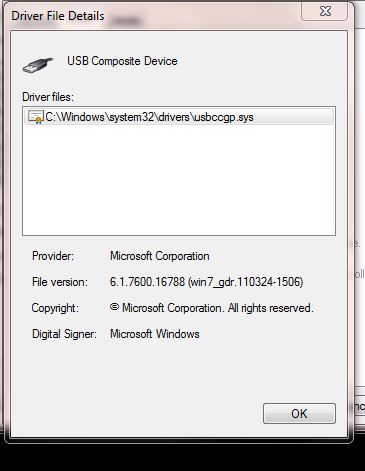
In the third machine it says it cannot find a driver. When I try to install by giving it the location of windows/system32/drivers it has an error when trying to install it: "The system cannot find the specified file". Here is a screenshot:

usbcomp.PNG


I have a microsoft desktop 6000 receiver which is a similar device, but have even tried uninstalling it.

Now both of these are class drivers and work simply from usb.inf. They are both simple Class drivers and there should be no issue. On two of the three machines there is no issue and the class driver installs ok. Here is a picture of the composite device installed:
Capture.PNG


I have even gone so far as using a copy of the driver folder as a base for finding the driver for it, it says it can't find it.

Has anyone any idea what could be broken in my driver models? I have tried a repair on windows system files and that doesn't help either. I have checked for duplicate or ghost devices, there are none.

I am usually giving other people help with this type of thing, but this has me totally stumped! It's a stinker and no mistake. I have been working on it for hours now and run out of ideas.

Just in case anyone directs me to the manufacturer web site for a driver: this is not relevant unfortunately, as it (like most other devices of it's type) uses a windows class driver and so there is no driver as such - it comes with windows.

Apart from a reinstall I can't think of what to do.

I will be really impressed if someone can get this one, and really grateful too :)

Thanks!

Kevin
Northern Ireland
 

My Computer

OS
Windows 7 x64
Here is the report from windows/inf/setupapi.dev.log:

Code:
>>>  [Device Install (Hardware initiated) - USB\VID_062A&PID_4101\6&12e3c9ed&0&5]
>>>  Section start 2012/11/09 17:02:05.501
     ump: Creating Install Process: DrvInst.exe 17:02:05.501
     ndv: Retrieving device info...
     ndv: Setting device parameters...
     ndv: Searching just Driver Store...
     dvi: {Build Driver List} 17:02:05.517
     dvi:      Searching for hardware ID(s):
     dvi:           usb\vid_062a&pid_4101&rev_0300
     dvi:           usb\vid_062a&pid_4101
     dvi:      Searching for compatible ID(s):
     dvi:           usb\devclass_00&subclass_00&prot_00
     dvi:           usb\devclass_00&subclass_00
     dvi:           usb\devclass_00
     dvi:           usb\composite
     cpy:      Policy is set to make all digital signatures equal.
     dvi:      Enumerating INFs from path list 'C:\windows\INF'
     inf:      Searched 1 potential matches in published INF directory
     inf:      Searched 35 INFs in directory: 'C:\windows\INF'
     dvi: {Build Driver List - exit(0x00000000)} 17:02:05.564
     ndv: Selecting best match from just Driver Store...
     dvi: {DIF_SELECTBESTCOMPATDRV} 17:02:05.579
     dvi:      No class installer for '2.4G Keyboard Mouse'
     dvi:      No CoInstallers found
     dvi:      Default installer: Enter 17:02:05.579
     dvi:           {Select Best Driver}
!    dvi:                Selecting driver failed(0xe0000228)
     dvi:           {Select Best Driver - exit(0xe0000228)}
!    dvi:      Default installer: failed!
!    dvi:      Error 0xe0000228: There are no compatible drivers for this device.
     dvi: {DIF_SELECTBESTCOMPATDRV - exit(0xe0000228)} 17:02:05.579
     ndv: Searching Windows Update for drivers... 17:02:05.595
     ndv: Waiting for previous WU search to complete. 17:02:05.595
     ndv: Acquired WU search serialization mutex. 17:02:17.342
     ndv: About to release WU search serialization mutex. 17:02:23.114
     ndv: No driver found on Windows Update. 17:02:23.114
     ndv: Searching Driver Store and Device Path...
     dvi: {Build Driver List} 17:02:23.114
     dvi:      Searching for hardware ID(s):
     dvi:           usb\vid_062a&pid_4101&rev_0300
     dvi:           usb\vid_062a&pid_4101
     dvi:      Searching for compatible ID(s):
     dvi:           usb\devclass_00&subclass_00&prot_00
     dvi:           usb\devclass_00&subclass_00
     dvi:           usb\devclass_00
     dvi:           usb\composite
     cpy:      Policy is set to make all digital signatures equal.
     dvi:      Enumerating INFs from path list 'C:\windows\inf'
     inf:      Searched 1 potential matches in published INF directory
     inf:      Searched 35 INFs in directory: 'C:\windows\inf'
     dvi: {Build Driver List - exit(0x00000000)} 17:02:23.207
     ndv: Selecting best match from Driver Store (including Device Path)...
     dvi: {DIF_SELECTBESTCOMPATDRV} 17:02:23.207
     dvi:      No class installer for '2.4G Keyboard Mouse'
     dvi:      Default installer: Enter 17:02:23.207
     dvi:           {Select Best Driver}
!    dvi:                Selecting driver failed(0xe0000228)
     dvi:           {Select Best Driver - exit(0xe0000228)}
!    dvi:      Default installer: failed!
!    dvi:      Error 0xe0000228: There are no compatible drivers for this device.
     dvi: {DIF_SELECTBESTCOMPATDRV - exit(0xe0000228)} 17:02:23.207
     ndv: {Core Device Install} 17:02:23.207
!    ndv:      Installing NULL driver!
     dvi:      Set selected driver complete.
     dvi:      {DIF_ALLOW_INSTALL} 17:02:23.207
     dvi:           No class installer for '2.4G Keyboard Mouse'
     dvi:           Default installer: Enter 17:02:23.207
     dvi:           Default installer: Exit
     dvi:      {DIF_ALLOW_INSTALL - exit(0xe000020e)} 17:02:23.207
     dvi:      {DIF_INSTALLDEVICE} 17:02:23.207
     dvi:           No class installer for '2.4G Keyboard Mouse'
     dvi:           Default installer: Enter 17:02:23.223
!    dvi:                Installing NULL driver!
     dvi:                Writing common driver property settings.
     dvi:                {Restarting Devices} 17:02:23.238
     dvi:                     Restart: USB\VID_062A&PID_4101\6&12E3C9ED&0&5
     dvi:                     Restart complete.
     dvi:                {Restarting Devices exit} 17:02:23.238
     dvi:           Default installer: Exit
     dvi:      {DIF_INSTALLDEVICE - exit(0x00000000)} 17:02:23.238
     ndv:      Device install status=0xe0000203
     ndv:      Performing device install final cleanup...
!    ndv:      Queueing up error report since device installation failed...
     ndv: {Core Device Install - exit(0xe0000203)} 17:02:23.238
     ump: Server install process exited with code 0xe0000203 17:02:23.238
<<<  Section end 2012/11/09 17:02:23.254
<<<  [Exit status: FAILURE(0xe0000203)]
 

My Computer

OS
Windows 7 x64
Sorry, they are not identical hardware machines. The one that fails is a Z68 chipset and the other two are P55 express (so two machines that work are older core 2 duo machines with a standard chipset, this one is a new gigabyte z68-xp-ud3 board).

I have all legacy options installed in the BIOS and have checked it over. I have also tried it in the USB3 ports, same thing. It tries to look the device up in Window update as it is not identifying it as the correct class and loading the class driver, whereas it DOES identify the class correctly in the other two Win 7 x64 machines and installs the correct USB Composite class driver.
 

My Computer

OS
Windows 7 x64
I have a solution!

usb.inf was missing! How the hell did that happen? What I did was to copy the windows/inf folder from my other machine to this one, not overwriting anything, and it copied over usb.inf and possibly other files that were missing.

I am definitely virus free and have no idea how it happened, but what a journey to find the solution to this one.

The inspiration came from this post.

I really hope someone else finds this post in the future and saves themselves a reinstall or 10 hours of 'fun' like I have had!
 

My Computer

OS
Windows 7 x64
Did you check to see if usb.inf exists? :sarc:
Glad you came here for a solution and found it in less then an hour - even if you found the solution on your own.

Good work!
 

My Computer

Computer type
Laptop
Computer Manufacturer/Model Number
HP Pavilion dv6-6c10us
OS
x64 (6.3.9600) Win8.1 Pro & soon dual boot x64 (6.1.7601) Win7_SP1 HomePrem
CPU
AMD A6-3420M APU with Radeon(tm) HD Graphics
Motherboard
Hewlett-Packard 1805
Memory
6.00 GB
Graphics Card(s)
AMD Radeon(TM) HD 6520G
Sound Card
(1) AMD High Definition Audio Device (2) IDT High Definiti
Monitor(s) Displays
HP W2072a 20" LCD (1600 x 900) @ 60 Hz
Screen Resolution
1366 x 768 x 32 bits (4294967296 colors) @ 60 Hz
Hard Drives
ST640LM0 00 HM641JI SATA Disk Device
Keyboard
Logitech k520 wireless KB
Mouse
Logitech m320 wireless mouse (bundled with KB)
Internet Speed
15/5 | 54 MB Wireless 'n'
Antivirus
Realtime: Defender or Avast | On-demand: Malwarebytes, ESET
Browser
IE 11 on Win8, IE 10 on win 7
Other Info
Media: [Gimp, Audacity, VLC] || Comm: [WEmail 2012, Skype] || Productivity: [OpenOffice,| Textpad] || Utils: [Sysinternals, cCleaner, Speccy, Defraggler]
Thanks man! I spent at list 4 hours to find out that you already had the answer for my issue...

Best
Dreex
 

My Computer

Computer type
Laptop
Computer Manufacturer/Model Number
Sony
OS
Windows 7 Pro 64
CPU
I7
Memory
12gb
Graphics Card(s)
ATI/Intel
Hard Drives
240gb Patriot Wildfire
256gb Samsung 830
Antivirus
AVG free
Browser
Chrome
I wonder if
SFC /scannow
was appropriate for this problem.

In any case, for future reference:

If you discover 1 file from a Windows install is missing and you have the install disc, usually it can be found there and either expanded (has extension ending in _) or extracted from a compressed .cab file and some might just be sitting there, just needing copied over.

Just so folks aren't totally reinstalling over one missing file, there are some sites that have a ton of these individual files for download, also, possibly quicker. :)
 

My Computer

Computer type
PC/Desktop
Computer Manufacturer/Model Number
Self Built Custom
OS
Windows 7 Ultimate Retail Box (64-bit installed) + Service Pack 1
CPU
AMD FX-8350 CPU v1.15 (or 1.0F) BIOS was required!
Motherboard
MSI 890FXA-GD70
Memory
8G CAS-7 G-Skill DDR3 @1333 (2 fours) [mobo nonOC max rec'd]
Graphics Card(s)
Radeon HD 7950 [3 gigs of GDDR5] MSI Twin Frozr model
Sound Card
Realtek High Definition Audio (onboard mobo, ALC-889 chip)
Monitor(s) Displays
2 WS LED Monitors: One LG One Viewsonic
Screen Resolution
1920 by 1080
Hard Drives
SSD for OS: Samsung 840 Pro
SSD for VM and utilities: Adata SX900
7200 RPM SATA HDs for the rest: Hitachi and Seagate
PSU
Corsair TX850 - 850W max, in service since August 2010.
Case
Thermaltake Armor A90
Cooling
Thermaltake Spin Q CPU Cooler, in service since August 2010
Keyboard
Logitech G11
Mouse
Logitech M310 Wireless
Internet Speed
100 Megabit broadband supposedly upgraded from 50 (Cable)
Antivirus
Bitdefender Internet Security 2014 suite
Browser
Pale Moon 64-bit main, also IceDragon, Opera, and Maxthon.
Other Info
CompTIA A+ certified (220-800 series) in July 2013.
Fixed my problem, more info for others

HA this was a great find :) I was having a problem where my Logitech C-U0007 wireless adapter was not being recognized by windows 7, could not find the driver. Test on other systems and was working, so knew is was something with the usb setup. My usb.inf file was missing also! I was in the middle of doing a windiff on a fresh virtual install of W7 when I found this thread.

In hopes this might help others running a "sfc /scannow" DID NOT fix this issue when it really should have.

usb.inf is located under c:\windows\inf if its not there do a "dir usb.inf /s" and it will scan the windows directory for a copy of usb.inf, copy this to c:\windows\inf and do rescan of hardware should fix things up :)

Tony
 

My Computer

Computer type
PC/Desktop
Computer Manufacturer/Model Number
tonymorella
OS
Maine
CPU
tonymorella
Motherboard
tonymorella
Memory
tonymorella
Graphics Card(s)
tonymorella
Antivirus
tonymorella
Browser
tonymorella
Guys thanks,

your advice save me from a "total reinstall", I tried to install a latest Razer Orochi driver but nothing, so I remove the driver and install the legacy one (stand alone) nothing... I reinstall the chipset driver from intel same result... nothing, I found this post, copied the USB.inf and the USB.PNF file from another pc and all goes well!!!

Thank you again!

Bizzotech
 

My Computer

Computer type
PC/Desktop
Computer Manufacturer/Model Number
custom build
OS
Windows 7 Ultimate N
This resolved my issue as well. I found the latest folder (C:\Windows\System32\DriverStore\FileRepository\usb.inf_amd64_neutral_42d7284868af1f40) and copied the usb.inf from there into C:\Windows\inf.

Thanks much for the tip.
 

My Computer

Computer type
PC/Desktop
Computer Manufacturer/Model Number
Dell XPS8500
OS
Windows 7 Home Premium 64 Bit
I registered to this forum only to say BIG THANK YOU! The usb.inf copied from latest filerepository\usb.inf_amd64* to c:\windows\inf fixed all my issues with drivers installation for usb devices ... I have no idea why that file disappeared and how was I supposed to find that :) thanks! Radek
 

My Computer

Computer type
PC/Desktop
OS
Win 7 Pro 64bit
Back
Top