Solved USB Device not Recognised

Roderunner

Exterminator
Guru
Gold Member
VIP
Local time
12:38 PM
Messages
2,362
Location
Scotland
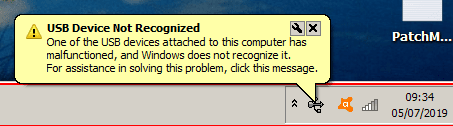
I got the image on my Win7 Home Prem. 32bit Laptop when nothing was connected to it.
RR.png
 

My Computer

Computer Manufacturer/Model Number
Look in my Signature.
OS
Win7 H.Prem. 32bit+SP1
Hi Roderunner,

I got the image on my Win7 Home Prem. 32bit Laptop when nothing was connected to it.

View attachment 408598
That's strange.

[1] When you last used a USB, did you remove it safely?

[2] Check for any yellow triangles in the Device Manager [Start => Control Panel => Device Manager => Expand ALL nodes]?

[3] Does the message still appear after a reboot?

I hope this helps!
 

My Computer

Computer type
Laptop
Computer Manufacturer/Model Number
Fujitsu LIFEBOOK
OS
Win 7 HP SP1 64-bit Vista HB SP2 32-bit Linux Mint 18.3
CPU
Intel(R) Pentium(R) CPU P6200 @ 2.13GHz
Motherboard
FUJITSU FJNBB06
Memory
4.00 GB
Graphics Card(s)
Intel(R) Graphics Media Accelerator HD
Sound Card
[1] Realtek High Definition Audio [2] Intel(R) Display Audio
Screen Resolution
1366 x 768 x 32 bits (4294967296 colors) @ 59 Hz
Hard Drives
TOSHIBA MK5076GSX
Antivirus
AVG FREE
Hi Paul, just remembered I have used a cordless usb mouse on my laptop for so long I forgot about it.
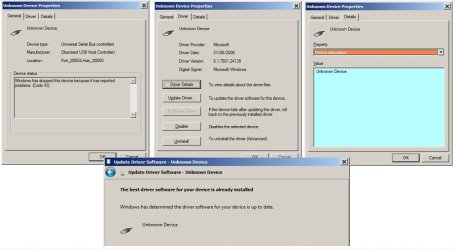
I always use safely remove. I also saw a yellow tick in Device Manager. I uninstalled it, the mouse continued to work. I then rebooted and got this.

RR.jpg
 

My Computer

Computer Manufacturer/Model Number
Look in my Signature.
OS
Win7 H.Prem. 32bit+SP1
Hi Roderunner,

Hi Paul, just remembered I have used a cordless usb mouse on my laptop for so long I forgot about it.
I always use safely remove. I also saw a yellow tick in Device Manager. I uninstalled it, the mouse continued to work. I then rebooted and got this.

View attachment 408599
Very strange! You might have to wait and see if the message reappears!

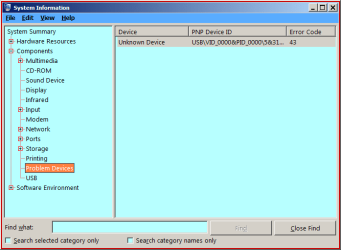
You can also check for any problems by clicking Start => Run, in the search box type msinfo32 => Enter => Components. If there are still any problem drivers they will be shown on the right-hand side of the Components screen. When it is blank, you are good to go.

I hope this helps!
 

My Computer

Computer type
Laptop
Computer Manufacturer/Model Number
Fujitsu LIFEBOOK
OS
Win 7 HP SP1 64-bit Vista HB SP2 32-bit Linux Mint 18.3
CPU
Intel(R) Pentium(R) CPU P6200 @ 2.13GHz
Motherboard
FUJITSU FJNBB06
Memory
4.00 GB
Graphics Card(s)
Intel(R) Graphics Media Accelerator HD
Sound Card
[1] Realtek High Definition Audio [2] Intel(R) Display Audio
Screen Resolution
1366 x 768 x 32 bits (4294967296 colors) @ 59 Hz
Hard Drives
TOSHIBA MK5076GSX
Antivirus
AVG FREE
Hi Paul, there is no entry to safely remove mouse usb controller.
My mouse batterys are almost new.
I tried clearing the tray notifications icons by stopping/restarting explorer.exe plus Ccleaner.
I can press fn key & F7 to temporarily stop the touch pad. (it restarts on reboot)
I tried a different port for the mouse usb. no change.

RR.png
 

My Computer

Computer Manufacturer/Model Number
Look in my Signature.
OS
Win7 H.Prem. 32bit+SP1
Hi Roderunner,

I tried clearing the tray notifications icons by stopping/restarting explorer.exe plus Ccleaner.
I can press fn key & F7 to temporarily stop the touch pad. (it restarts on reboot)
I tried a different port for the mouse usb. no change.

Did you try the below as a sort of double check?

You can also check for any problems by clicking Start => Run, in the search box type msinfo32 => Enter => Components. If there are still any problem drivers they will be shown on the right-hand side of the Components screen. When it is blank, you are good to go.
 

My Computer

Computer type
Laptop
Computer Manufacturer/Model Number
Fujitsu LIFEBOOK
OS
Win 7 HP SP1 64-bit Vista HB SP2 32-bit Linux Mint 18.3
CPU
Intel(R) Pentium(R) CPU P6200 @ 2.13GHz
Motherboard
FUJITSU FJNBB06
Memory
4.00 GB
Graphics Card(s)
Intel(R) Graphics Media Accelerator HD
Sound Card
[1] Realtek High Definition Audio [2] Intel(R) Display Audio
Screen Resolution
1366 x 768 x 32 bits (4294967296 colors) @ 59 Hz
Hard Drives
TOSHIBA MK5076GSX
Antivirus
AVG FREE
Hi Roderunner,


Did you try the below as a sort of double check?

You can also check for any problems by clicking Start => Run, in the search box type msinfo32 => Enter => Components. If there are still any problem drivers they will be shown on the right-hand side of the Components screen. When it is blank, you are good to go.

Yes as in my image above.
 

My Computer

Computer Manufacturer/Model Number
Look in my Signature.
OS
Win7 H.Prem. 32bit+SP1

My Computer

Computer type
Laptop
Computer Manufacturer/Model Number
Fujitsu LIFEBOOK
OS
Win 7 HP SP1 64-bit Vista HB SP2 32-bit Linux Mint 18.3
CPU
Intel(R) Pentium(R) CPU P6200 @ 2.13GHz
Motherboard
FUJITSU FJNBB06
Memory
4.00 GB
Graphics Card(s)
Intel(R) Graphics Media Accelerator HD
Sound Card
[1] Realtek High Definition Audio [2] Intel(R) Display Audio
Screen Resolution
1366 x 768 x 32 bits (4294967296 colors) @ 59 Hz
Hard Drives
TOSHIBA MK5076GSX
Antivirus
AVG FREE
You wanted me to do this,
You can also check for any problems by clicking Start => Run, in the search box type msinfo32 => Enter => Components. If there are still any problem drivers they will be shown on the right-hand side of the Components screen. When it is blank, you are good to go
.
Can you post an image when you do so please.
 

My Computer

Computer Manufacturer/Model Number
Look in my Signature.
OS
Win7 H.Prem. 32bit+SP1
Hello Roderunner

Hi Paul, just remembered I have used a cordless usb mouse on my laptop for so long I forgot about it.
I always use safely remove. I also saw a yellow tick in Device Manager. I uninstalled it, the mouse continued to work. I then rebooted and got this.

View attachment 408599

You might find that the mouse / mouse driver are okay. Judging by the screen images, I would suspect that the USB Host Controller has developed a fault.

You might want to download and run USB Device Tree Viewer for a second opinion on the matter. USB Device Tree Viewer does not require any installation, and it gives more verbose error reporting.
 

My Computer

Computer type
PC/Desktop
OS
Windows 7 x64, Vista x64, 8.1 smartphone
CPU
Intel E8400 65W 64-bit
Motherboard
Gigabyte EP45-UD3LR
Memory
DDR2 2 x 2GB, 1GB x 2
Graphics Card(s)
XFX Radeon HD5750
Sound Card
AMD High Definition Audio; Realtek High Definition Audio
Monitor(s) Displays
iiyama prolite X2377HDS
Screen Resolution
1920 x 1080
Hard Drives
500GB 7200 rpm Seagate ST3500413AS 16MB, 500GB 5400 rpm Toshiba MQ02ABF050H 32MB, 200GB 7200 rpm Seagate ST3200820AS 8MB, 2TB 7200 rpm Western Digital WD20EZRX 64MB
PSU
Enermax Liberty Modular
Case
Antec P193 Midi Tower
Keyboard
Mionix ZIBAL 60
Mouse
Razer USB 2.0 Diamondback Mouse or Huion Graphics Tablet
Browser
Internet Explorer, Lunascape, Firefox, Opera, Avast Safezone
Here is what it gave me:-
-

=========================== USB Port4 ===========================

Connection Status : 0x02 (Device failed enumeration)
Port Chain : 1-4

======================== USB Device ========================

+++++++++++++++++ Device Information ++++++++++++++++++
Device Description : Unknown Device
Device ID : USB\VID_0000&PID_0000\5&313B0DD2&0&4
Hardware IDs : USB\UNKNOWN
Driver KeyName : {36fc9e60-c465-11cf-8056-444553540000}\0021 (GUID_DEVCLASS_USB)
Driver Inf : C:\Windows\inf\usb.inf
Legacy BusType : PNPBus
Class : USB
Class GUID : {36fc9e60-c465-11cf-8056-444553540000} (GUID_DEVCLASS_USB)
Enumerator : USB
Location Info : Port_#0004.Hub_#0005
Manufacturer Info : (Standard USB Host Controller)
Capabilities : 0x44 (Removable, RawDeviceOK)
Status : 0x01806400 (DN_HAS_PROBLEM, DN_DISABLEABLE, DN_REMOVABLE, DN_NT_ENUMERATOR, DN_NT_DRIVER)
Problem Code : 43 (CM_PROB_FAILED_POST_START)
Address : 4
Power State : D3 (supported: D0, D2, D3, wake from D0, wake from D2)

---------------- Connection Information ---------------
Connection Index : 0x04 (4)
Connection Status : 0x02 (DeviceFailedEnumeration)
Current Config Value : 0x00
Device Address : 0x00 (0)
Is Hub : 0x00 (no)
Device Bus Speed : 0x00 (Low-Speed)
Number Of Open Pipes : 0x00 (0 pipes to data endpoints)
Data (HexDump) : 04 00 00 00 00 00 00 00 00 00 00 00 00 00 00 00 ................
00 00 00 00 00 00 00 00 00 00 00 00 00 00 00 02 ................
00 00 00 ...

---------------------- Device Descriptor ----------------------
bLength : 0x00 (0 bytes)

-------------------- String Descriptors -------------------
String descriptors are not available (because the device has problem code CM_PROB_FAILED_POST_START)
 

My Computer

Computer Manufacturer/Model Number
Look in my Signature.
OS
Win7 H.Prem. 32bit+SP1
The message says the problem is with a USB Host Controller at Port 4 Hub 5. It is a matter of diagnosing where the faulty device is and determining the cause.

If any device (other than keyboard or mouse) is connected to the computer's USB ports, then disconnect these temporarily, and try again.
- Does the computer have an USB Expansion card or USB Hub adaptor connected ?
- Do you have the motherboard device drivers at hand? It could be that Pug and Play has found the wrong driver version for your firmware. Check the motherboard support for the latest.
 

My Computer

Computer type
PC/Desktop
OS
Windows 7 x64, Vista x64, 8.1 smartphone
CPU
Intel E8400 65W 64-bit
Motherboard
Gigabyte EP45-UD3LR
Memory
DDR2 2 x 2GB, 1GB x 2
Graphics Card(s)
XFX Radeon HD5750
Sound Card
AMD High Definition Audio; Realtek High Definition Audio
Monitor(s) Displays
iiyama prolite X2377HDS
Screen Resolution
1920 x 1080
Hard Drives
500GB 7200 rpm Seagate ST3500413AS 16MB, 500GB 5400 rpm Toshiba MQ02ABF050H 32MB, 200GB 7200 rpm Seagate ST3200820AS 8MB, 2TB 7200 rpm Western Digital WD20EZRX 64MB
PSU
Enermax Liberty Modular
Case
Antec P193 Midi Tower
Keyboard
Mionix ZIBAL 60
Mouse
Razer USB 2.0 Diamondback Mouse or Huion Graphics Tablet
Browser
Internet Explorer, Lunascape, Firefox, Opera, Avast Safezone
In Mice and Pointing Devices in Device Manager, what is shown?

If you double click on it and open the details tab, click on Hardware IDs in the Property option, what is shown?
 

My Computer

Computer type
Laptop
Computer Manufacturer/Model Number
Dell M6500 Precision Work Station
OS
Windows 7 Pro SP1 64 bit
Memory
8 GB
Screen Resolution
1920x
Internet Speed
30 Mbps
Antivirus
Norton Security
Browser
IE 11
The message says the problem is with a USB Host Controller at Port 4 Hub 5. It is a matter of diagnosing where the faulty device is and determining the cause.

If any device (other than keyboard or mouse) is connected to the computer's USB ports, then disconnect these temporarily, and try again.
- Does the computer have an USB Expansion card or USB Hub adaptor connected ?
- Do you have the motherboard device drivers at hand? It could be that Pug and Play has found the wrong driver version for your firmware. Check the motherboard support for the latest.
When my mouse is disconnected, there is NO other USB device attached to my Laptop.
I can access Packard Bell online to get the drivers.
-
View attachment 408609

In my image, the 5 entries starting with Standard have never changed.
-
USB Composite Device is my cordless usb connected mouse.
-
To start, I unplugged my mouse and rebooted my laptop. I still got the yellow ticked Unknown Device so I uninstalled it. Did a reboot. It reappeared again.
-
I then reconnected my mouse and the USB Composite Device reappeared.
 

My Computer

Computer Manufacturer/Model Number
Look in my Signature.
OS
Win7 H.Prem. 32bit+SP1
In Mice and Pointing Devices in Device Manager, what is shown?

If you double click on it and open the details tab, click on Hardware IDs in the Property option, what is shown?
Here is the info you want.
-
HID-compliant mouse
HID\VID_046D&PID_C526&REV_0500&MI_00
HID\VID_046D&PID_C526&MI_00
HID_DEVICE_SYSTEM_MOUSE
HID_DEVICE_UP:0001_U:0002
HID_DEVICE
---
PS/2 Compatible Mouse
ACPI\SYN1B20
*SYN1B20
 

My Computer

Computer Manufacturer/Model Number
Look in my Signature.
OS
Win7 H.Prem. 32bit+SP1
In my image, the 5 entries starting with Standard have never changed.
-
USB Composite Device is my cordless usb connected mouse.
-

In which image is that?

In your case, there is nothing wrong with the USB Composite Device.
 

My Computer

Computer type
PC/Desktop
OS
Windows 7 x64, Vista x64, 8.1 smartphone
CPU
Intel E8400 65W 64-bit
Motherboard
Gigabyte EP45-UD3LR
Memory
DDR2 2 x 2GB, 1GB x 2
Graphics Card(s)
XFX Radeon HD5750
Sound Card
AMD High Definition Audio; Realtek High Definition Audio
Monitor(s) Displays
iiyama prolite X2377HDS
Screen Resolution
1920 x 1080
Hard Drives
500GB 7200 rpm Seagate ST3500413AS 16MB, 500GB 5400 rpm Toshiba MQ02ABF050H 32MB, 200GB 7200 rpm Seagate ST3200820AS 8MB, 2TB 7200 rpm Western Digital WD20EZRX 64MB
PSU
Enermax Liberty Modular
Case
Antec P193 Midi Tower
Keyboard
Mionix ZIBAL 60
Mouse
Razer USB 2.0 Diamondback Mouse or Huion Graphics Tablet
Browser
Internet Explorer, Lunascape, Firefox, Opera, Avast Safezone
What is the device ID?
On post #3 - Details tab - Instead of device description select Hardware IDs
Put the mouse on the fist line, right click - copy
Paste the ID here. Is something like USB\VID_000...

Edit: Just saw that is on post #11
USB\VID_0000&PID_0000\5&313B0DD2&0&4
 

My Computers

System One System Two

  • Computer type
    PC/Desktop
    Computer Manufacturer/Model Number
    custom build
    OS
    Windows 7 HP 64
    CPU
    i5 6600K - 800MHz to 4200MHz
    Motherboard
    GA-Z170-HD3P
    Memory
    4+4G GSkill DDR4 3000
    Graphics Card(s)
    IG - Intel 530
    Monitor(s) Displays
    Samsung 226BW
    Screen Resolution
    1680x1050
    Hard Drives
    (1) -1 SM951 – 128GB M.2 AHCI PCIe SSD drive for Windows 7 and Lubuntu
    (2) -1 WD SATA 3 - 1T for Data
    (3) -1 WD SATA 3 - 1T for backup
    PSU
    Thermaltake 450W TR2 gold
    Keyboard
    Old and good Chicony mechanical keyboard
    Mouse
    Logitech mX performance - 9 buttons (had to disable some)
    Internet Speed
    500Mb/s
    Browser
    Firefox 64
    Other Info
    TinyWall firewall
  • Computer type
    Laptop
    System Manufacturer/Model Number
    Asus Q550LF
    OS
    Windows 7 Pro
    CPU
    i7-4500U 800MHz to 3.0GHz
    Motherboard
    Asus Q550LF
    Memory
    (4+4)G DDR3 1600
    Graphics Card(s)
    IG intel 4400 + NVIDIA GeForce GT 745M
    Sound Card
    Realtek
    Monitor(s) Displays
    LG Display LP156WF4-SPH1
    Screen Resolution
    1920 x 1080
    Hard Drives
    BX500 120G SSD for Windows and programs +
    1T HDD for data
    Internet Speed
    500 Mb/s
    Browser
    Firefox
    Other Info
    TinyWall firewall

My Computer

Computer Manufacturer/Model Number
Look in my Signature.
OS
Win7 H.Prem. 32bit+SP1
What is the device ID?
On post #3 - Details tab - Instead of device description select Hardware IDs
Put the mouse on the fist line, right click - copy
Paste the ID here. Is something like USB\VID_000...

In Mice and Pointing Devices in Device Manager. I have 2 entrys
HID-compliant mouse
HID\VID_046D&PID_C526&REV_0500&MI_00
HID\VID_046D&PID_C526&MI_00
HID_DEVICE_SYSTEM_MOUSE
HID_DEVICE_UP:0001_U:0002
HID_DEVICE
---
PS/2 Compatible Mouse
ACPI\SYN1B20
*SYN1B20
-
This was posted in #15
 

My Computer

Computer Manufacturer/Model Number
Look in my Signature.
OS
Win7 H.Prem. 32bit+SP1
I thought I had given the wrong information to the post by Megahertz07 so I looked again in Device Manager and found all was error free.
What I did previously, was to put 'USB Device not Recognised' into Google, it suggested deleting all USB Root Hub entrys, power off unplug from mains and wait 2or3 minutes. Not corrected yet when checked.
I reinstalled drivers for my Packard Bell laptop plus the BIOS. Not corrected yet when checked. as suggested by iko22 in post #12
I will leave this temporarily then mark as solved.
A big big thanks to all.
 

My Computer

Computer Manufacturer/Model Number
Look in my Signature.
OS
Win7 H.Prem. 32bit+SP1
Back
Top
