
USB Driver - General Fix for Problems

General Fix for USB Driver Problems

I recommend using a wired mouse and keyboard, removing all USB devices and in the section where it says Uninstall all the faded entries. take that as reading uninstall everything USB, if you cannot get hold of a wired mouse then you will have to follow the tutorial as written.

After going through this tutorial You may need to reinstall some USB device drivers!!

After a USB device is installed and then removed Windows hides the driver, this first part makes all hidden drivers visible.


1. Unplug all USB devices except mouse and keyboard.


2. Click on Start orb, :orb: Type Advanced System settings in the search box and Click on View Advanced System Settings to go there.


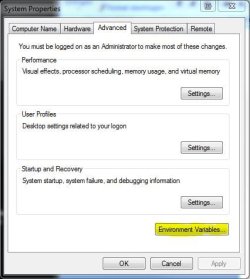
3. Click on Advanced tab, Click on Environment Variables.

Tutorial 1.JPG


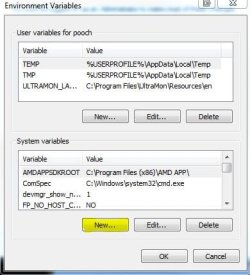
4. Under the window "System variables" Click on New.

Tutorial 2.JPG


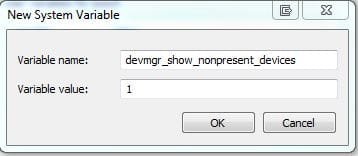
5. Type devmgr_show_nonpresent_devices as the variable name and type 1 as the value.

Tutorial 3.JPG


6. Click OK 3 times to close the windows.


7. Click on Start orb, :orb: Type Device Manager in the search box and Click on Device Manager in the list to go there.


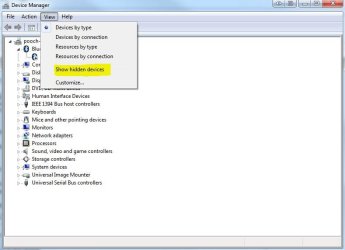
8. Click on View, then Show hidden devices.

Tutorial 4.JPG


9. You will now notice that you have a list of USB devices and that some lines appear to be faded. Uninstall all the faded entries.
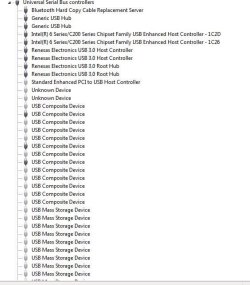

Capture.JPG


The INFCACHE.1 file is used to store information about USB drivers, the information in this file may have become corrupted and may cause windows to load the wrong driver or cause a driver not found message to be generated.
Deleting this file will force windows to generate a new INFCACHE.1 file.


1. Right Click on Start orb :orb: and Click on Open Windows Explorer.


2. Select Computer in the navigation pane, and search for INFCACHE.1
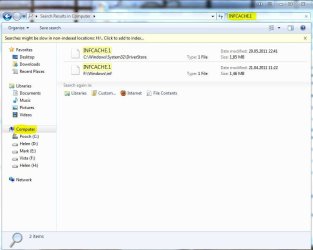

Tutorial 5.JPG


3. Right Click on the file INFCACHE.1 (if you have more instances of Windows installed only do this for INFCACHE.1 C:\Windows\System32\Driver Store)


4. Click on Properties, Click on Security tab, Click on Edit, Click on Add.
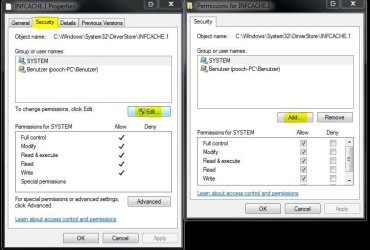

Tutorial 6.JPG


5. Type Administrators in the window with the blinking cursor, Click OK.
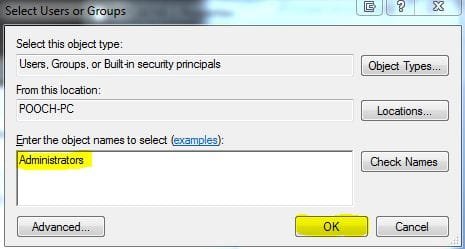

Tutorial 7.JPG


6. Delete the INFCACHE.1 file.


7. Connect a USB device, but not the one you were having trouble with this will make a new INFCACHE.1


8. New Start the PC and try your device again.


NOTE... It may, in a few cases be necessary to go through this Tutorial two or even three times to get this to work.
 
Last edited by a moderator:
disable USB debugging

Go here. "http://htc-one.wonderhowto.com/forum/enable-usb-debugging-your-htc-one-0151177". Follow the instructions to access developer options. DISABLE Usb debugging. If that doesn't work right off the bat, try rolling back the driver for the phone.
 

My Computer

Computer type
PC/Desktop
Computer Manufacturer/Model Number
Dell & custom Asus
OS
Windows 7 Ultimate x64, Windows 7 Home Premium 32bit
CPU
Intel quads
Motherboard
Asus & Dell proprietary
Memory
8 gigs per
Graphics Card(s)
ATI & Nvidia
Hard Drives
a number of Crucial & Samsung SSDs
Antivirus
Microsoft with WFC
Browser
Firefox
I tried as suggested in the reply but still no luck. Spoke to Microsoft people. They say the problem may be due to some changes done by some Windows update. Unfortunately, I removed all old restore points one day before this problem started. Some say, re-formatting Windows is the only answer. I can get it done but what is the guarantee the problem will not crop up again after sometime. I have tried a number of Android phones and problems continue with all of them. But they are all recognized on my Laptop. One thing is clear, there is no driver issue with any cell. It is some Windows file which is corrupted. Can some one help me in finding some solution other than re-formatting as it will create lot of problem in bringing my PC to shape one again after re-formatting.
 

My Computer

Computer type
PC/Desktop
Computer Manufacturer/Model Number
HP
OS
Windows 7 32 Bit Professional
CPU
Intel(R) Pentium(R) CPU [email protected]
Motherboard
Intel Corporation DH61HO
Memory
Installed 8 GB 3.41 GB Usable
Graphics Card(s)
Don't Know
Hard Drives
500 GB
Antivirus
ESET Security
Browser
IE9 and Google Chrome
If in fact Microsoft suggests that the conflict may be caused by one of their sometimes flaky updates AND if the phone is recognized by the other comp AND if both comps have the same operating system, see if you can compare the update history of both comps to see if the problem comp has an update that the good one doesn't. I know that might seem problematic but remember that both probably won't have the same hardware and while it could be time consuming at least you may be able to isolate a conflict with otherwise congruous hardware.

While you haven't indicated how old your comps are, there is another tack to take with USB issues and that is if the problematic comp is a desktop there is a possibility that the power supply or the board is no longer delivering the appropriate levels of power to the physical ports, particularly if they are all plugged in and/or all the devices are trying to draw the maximum amount of power according to their individual specifications beyond what is available. As odd as that might sound, I have discovered over the years that if you aren't willing to try another power supply, sometimes switching to an external powered hub or turning off, say, the front USB ports in the bios and moving everything to the back or to a powered hub may allow a tired P.S. to deliver the necessary power to the remaining ports. Remember that if a controller decides it can't supply the appropriate power to any particular port in an internal hub it will shift the device to a root hub that requires less power which may actually inhibit the device. This is very common with security cameras and capture devices for instance. Could this condition be caused by an incompatible update or drivers too advanced for the ancient 8 year old basic Microsoft controller and root hub drivers? Why not? That is, whether they know it or not, why so many people have suggested that you try the anecdotal solution of switching physical ports.
 
Last edited:

My Computer

Computer type
PC/Desktop
Computer Manufacturer/Model Number
Dell & custom Asus
OS
Windows 7 Ultimate x64, Windows 7 Home Premium 32bit
CPU
Intel quads
Motherboard
Asus & Dell proprietary
Memory
8 gigs per
Graphics Card(s)
ATI & Nvidia
Hard Drives
a number of Crucial & Samsung SSDs
Antivirus
Microsoft with WFC
Browser
Firefox
Hey Pooch, I followed the tut exactly except for step 6 because it said "You need permission to perform this action" "You need permission from Administrators to make changes to this file" but i am an administrator on this laptop and the problem still occurs. and I looked at Take Ownership Shortcut but nothing happened. :(
 

My Computer

Computer type
Laptop
Computer Manufacturer/Model Number
Acer
OS
Windows 7 Home Premium 64bit
CPU
B960
Motherboard
Aspire 5750Z
Memory
4.00 GB
Graphics Card(s)
Intel(R) HD Graphics Family
Antivirus
Malwarebytes Anti-Malware
Browser
Google Chrome
thanks its working ;)
 

My Computer

Computer type
PC/Desktop
Computer Manufacturer/Model Number
hcl
OS
windows7 32 bit
CPU
i3
Motherboard
intel
Memory
2gb
Graphics Card(s)
api
Hard Drives
500gb
Antivirus
macafee
Browser
firefox
Bless You

Thank you Thank you Thank you Thank you

For solving my problem!!!

:party::party:
 

My Computer

Computer type
PC/Desktop
Computer Manufacturer/Model Number
HP
OS
Windows 7 64
CPU
2.80 gigahertz Intel Core i7 930
Motherboard
PEGATRON 2A86 1.04E01
Memory
9 GB
Graphics Card(s)
ATI Radeon HD 5770
can not install

Hi

I don't know what is happening to my Intel USB driver controller, I can not able to install in anyway...
I delete and install them again but nothing installed and unsuccessful warning pups up everytime
 
Last edited by a moderator:

My Computer

Computer type
PC/Desktop
OS
Windows 7 Ultimate x86
Came to this topic after a BSOD problem 'fix' (updating graphics driver) corrupted my USB drivers
http://www.sevenforums.com/bsod-help-support/383034-2-separate-atikm-ag-bsod-errors.html
and more specific to the USB problem
http://www.sevenforums.com/hardware...s-corrupted-after-graphics-driver-update.html

I followed all the steps, and now, not only do I still not have working USB ports, but now I've lost my network printer.

It was only 2 Blue Screens - Why couldn't I have just left well enough alone?
 
Last edited by a moderator:

My Computer

Computer type
Laptop
OS
Windows 7 home premium 64 bit
CPU
AMD K10
Motherboard
Hewlett-Packard 1444 (Socket S1G4)
Memory
3.00GB Dual-Channel DDR3 @ 532MHz
Graphics Card(s)
ATI AMD M880G with ATI Mobility Radeon HD 4250 (HP)
Sound Card
Realtek
Screen Resolution
1366 x 768
Hard Drives
465GB Western Digital
Antivirus
MSE
Safe mode

Manifa, I had to do all the deletions mentioned (ALL, not just the greyed/faded out ones) but in Safe Mode, otherwise it didn't work. Yes, it was straight after a Windows Update, something got tweaked wrongly.
 

My Computer

Computer type
PC/Desktop
Computer Manufacturer/Model Number
Dell
OS
Windows 7 Home Premium
I DONT HAVE INFCACHE.1

INFCACHE.1 doesnt show up for me..
does that mean i dont have one?
or i cant find it?

plz help.
i needto fix this quick!

best regards
 

My Computer

Computer type
Laptop
Computer Manufacturer/Model Number
parckard bell
OS
windows 10
where do i find the INFCACHE.1,,,, what do you mean by uninstall? you mean that i will uninstall all the USB ports on my LAptop then the INFCACHE.1 will appear? sorry im just a newbie for this problem please help me :(

INFCACHE.1 is located in C:\Windows\System32\DriverStore

The rest of the instructions are clearly listed in the original post by pooch if you scroll back up.


well, clearly it doesnt show up for me....
i dont have it..........
so it cant be found there......
anything else i could try out ?? to find this INFCACHE.1
 

My Computer

Computer type
Laptop
Computer Manufacturer/Model Number
parckard bell
OS
windows 10

My Computer

Computer Manufacturer/Model Number
DIY
OS
Windows 7 Ultimate x64
CPU
Intel i-5 760
Motherboard
Gigabyte P55-UD3L
Memory
8GB Kingston DDR-3
Graphics Card(s)
ATI Radeon HD 5670 1GB
Sound Card
Realtek High Definition Audio on MOBO
Monitor(s) Displays
HP w2228h
Hard Drives
Seagate ST3320620A 320GB; ST31000528AS 1TB; Western Digital WDC WD10EALX 1TB
PSU
Inbtel 450W
Case
China "SP" Branded
Cooling
Intel stock, plus 3 extra case fans with contollers.
General Fix for USB Driver Problems

Worked perfectly for me. I'd somehow managed to accumulate more than 20 shaded usb device symbols. After deleting them, and the infcache.1, all my usb ports are working again.
Big thanks!
 

My Computer

Computer type
PC/Desktop
Computer Manufacturer/Model Number
dell
OS
British Columbia
Pooch! Thank you so much man. Your solution worked like a charm
for me. Thank you for fantastic advice, professional help screens
and descriptions. You saved my day, you are my hero, you are the man! :D
 

My Computer

Computer type
PC/Desktop
OS
win ultimate 7x64
Hi, Pooch, thanks for your technical advice on usb devices.
I have a peculiar problem of VIA usb rev5 or later usb controllers , 3 in numbers , suddenly becoming to show yellow exclamations to denote not working stage. But when I click the properties, it says , that this device is working correctly message.
It is having during my test on device manager. please give solution. If i click uninstall and click scan for hardware changes, this does not show at all and again getting drivers installed on next boot again to show, yellow marks on unexpected times.
For what purpose, these drivers are?
Moreover, 2, I had another problem of connecting a usb to ethernet device to get internet access.
my lan port got damaged and I was provided with this usb to ethernet device 2.0. One time it shows, the device as RD 9700 usb to fast ethernet adapter in device manager, but subsequently gone off suddenly .the device is also having No.9700 on its top
how to fix these kind of issues.
I will definity try your first option of adding a separate entry in environmental tab.
 

My Computer

Computer type
PC/Desktop
Computer Manufacturer/Model Number
custom build
OS
Microsoft Windows 7 Ultimate 64-bit 7601 Multiprocessor Free Service Pack 1
CPU
Intel(R) Core(TM)2 Duo CPU E7200 @ 2.53GHz
Motherboard
To be filled by O.E.M. To be filled by O.E.M.
Memory
4.00 GB
Graphics Card(s)
NVIDIA GeForce 210
Sound Card
(1) NVIDIA High Definition Audio (2) Realtek High Definiti
Screen Resolution
1920 x 1080 x 32 bits (4294967296 colors) @ 60 Hz
Hard Drives
ST3500312CS ATA Device
There has been no reply for my queries. please give me fixes
 

My Computer

Computer type
PC/Desktop
Computer Manufacturer/Model Number
custom build
OS
Microsoft Windows 7 Ultimate 64-bit 7601 Multiprocessor Free Service Pack 1
CPU
Intel(R) Core(TM)2 Duo CPU E7200 @ 2.53GHz
Motherboard
To be filled by O.E.M. To be filled by O.E.M.
Memory
4.00 GB
Graphics Card(s)
NVIDIA GeForce 210
Sound Card
(1) NVIDIA High Definition Audio (2) Realtek High Definiti
Screen Resolution
1920 x 1080 x 32 bits (4294967296 colors) @ 60 Hz
Hard Drives
ST3500312CS ATA Device
Back
Top