
USB Driver - General Fix for Problems

General Fix for USB Driver Problems

I recommend using a wired mouse and keyboard, removing all USB devices and in the section where it says Uninstall all the faded entries. take that as reading uninstall everything USB, if you cannot get hold of a wired mouse then you will have to follow the tutorial as written.

After going through this tutorial You may need to reinstall some USB device drivers!!

After a USB device is installed and then removed Windows hides the driver, this first part makes all hidden drivers visible.


1. Unplug all USB devices except mouse and keyboard.


2. Click on Start orb, :orb: Type Advanced System settings in the search box and Click on View Advanced System Settings to go there.


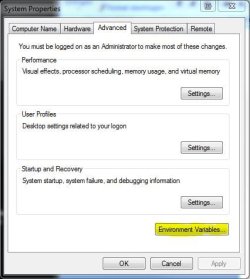
3. Click on Advanced tab, Click on Environment Variables.

Tutorial 1.JPG


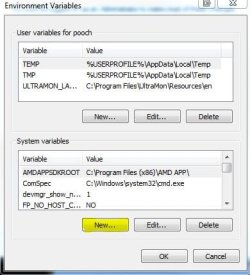
4. Under the window "System variables" Click on New.

Tutorial 2.JPG


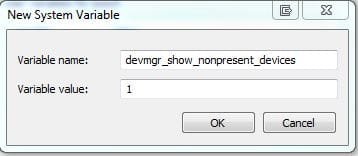
5. Type devmgr_show_nonpresent_devices as the variable name and type 1 as the value.

Tutorial 3.JPG


6. Click OK 3 times to close the windows.


7. Click on Start orb, :orb: Type Device Manager in the search box and Click on Device Manager in the list to go there.


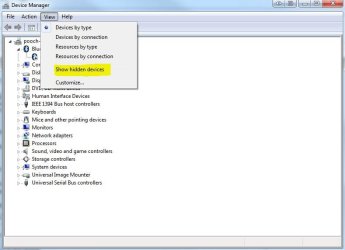
8. Click on View, then Show hidden devices.

Tutorial 4.JPG


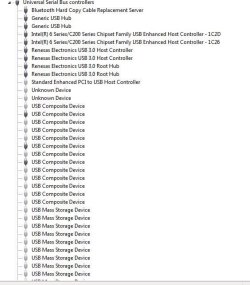
9. You will now notice that you have a list of USB devices and that some lines appear to be faded. Uninstall all the faded entries.

Capture.JPG


The INFCACHE.1 file is used to store information about USB drivers, the information in this file may have become corrupted and may cause windows to load the wrong driver or cause a driver not found message to be generated.
Deleting this file will force windows to generate a new INFCACHE.1 file.


1. Right Click on Start orb :orb: and Click on Open Windows Explorer.


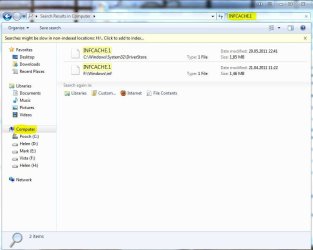
2. Select Computer in the navigation pane, and search for INFCACHE.1

Tutorial 5.JPG


3. Right Click on the file INFCACHE.1 (if you have more instances of Windows installed only do this for INFCACHE.1 C:\Windows\System32\Driver Store)


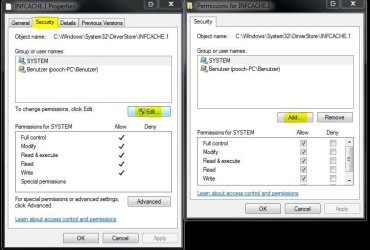
4. Click on Properties, Click on Security tab, Click on Edit, Click on Add.

Tutorial 6.JPG


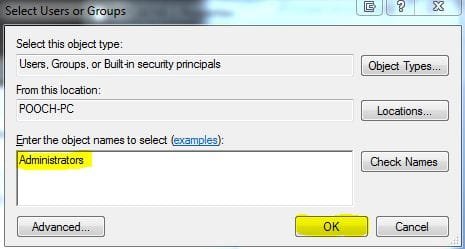
5. Type Administrators in the window with the blinking cursor, Click OK.

Tutorial 7.JPG


6. Delete the INFCACHE.1 file.


7. Connect a USB device, but not the one you were having trouble with this will make a new INFCACHE.1


8. New Start the PC and try your device again.


NOTE... It may, in a few cases be necessary to go through this Tutorial two or even three times to get this to work.
 
Last edited by a moderator:
where do i find the INFCACHE.1,,,, what do you mean by uninstall? you mean that i will uninstall all the USB ports on my LAptop then the INFCACHE.1 will appear? sorry im just a newbie for this problem please help me :(

INFCACHE.1 is located in C:\Windows\System32\DriverStore

The rest of the instructions are clearly listed in the original post by pooch if you scroll back up.
 

My Computer

Computer type
PC/Desktop
Computer Manufacturer/Model Number
Less is more
OS
Windows 7 Ultimate x64 SP1
CPU
Core i7 2600k (4.6GHz)
Motherboard
ASUS P8Z68 Deluxe (3603)
Memory
16GB G.SKILL Ares 1600MHz
Graphics Card(s)
MSI R6970 Lightning
Sound Card
Asus Xonar Essence ST (UNi drivers 1.41)
Monitor(s) Displays
Samsung P2570, CrossOver 27Q LED-P
Screen Resolution
1920*1080, 2560*1440
Hard Drives
256GB OCZ Vector, 2x Hitachi 4TB (7K4000), Hitachi 3TB (7K3000 & 5K3000)
PSU
Seasonic X750
Case
Lian-Li PC-P80N
Cooling
NZXT HAVIK 140 (2x GELID Wing12PL Push/Pull)
Keyboard
CM Storm Trigger (Brown Switch)
Mouse
Logitech G400
Internet Speed
55Mbps/10Mbps
Other Info
Speakers - Klipsch ProMedia 2.1
Headphones - Sennheiser HD595
Router - ASUS RT-N66U
Webcam - Logitech C910
similar problem but pooch's solution won't hold

Hey all,

So I'm having a similar problem, I think, but the general solutions doesn't totally work.

I have at least 4 different USB controllers (one multi-card reader in front, another 2-port in front with the headphone/mic jacks, two in back, and a 3.0 in back)... but I'm not perfectly sure how to identify any of these in the Device Manager.

Nonetheless, Pooch's solution works for me, but only for the reboot immediately following the procedure. On the next reboot, all but one of my USB controllers won't start (I get the code 10 in the device manager). But, if I go into the Device manager, and 'disable' each controller, then 'enable' each controller, I can get all the ports to work. Until the next time I reboot the system. I tried the pooch-solution three different times, all with the same outcome, one good reboot, then back to 'code 10' on all but one bank of ports.

I'm doing my best to avoid reinstalling windows, and since eventually I can get all the ports to work, I feel like it's just a software problem. I'd prefer not to have to access the device manager every morning when I turn the machine on, so I'm hoping for some sort of solution.

This basically started happening without any major hardware changes. I did have a USB flash drive that was causing my problems, and I started troubleshooting that, and I'm guessing maybe some 1 got changed to a 0 in the process.

Any thoughts?

--Dave
 

My Computer

OS
Windows 7 Home Premium x64
Just a quick question regarding the above tutorial:

I am having intermittent success in getting my system to recognise a Freecom external USB HDD.
Freecom themselves have directed me to the infcache.1 renaming process as described above, but their version said to delete only shaded entries in the USB controllers list. Also I could not rename infcache.1 even though I set full permissions, and ultimately changed ownership of it. I even tried to move it out of the DriverStore folder - which I could do, but Windows did not rebuild it and it would not let me put the old one back! I ended up using System Restore to revert to the setting from 24 hours previous. So I am back where I started.

If I delete ALL listing under Device Manager > USB controllers, as directed above, will that impact on the fact that both my keyboard and mouse are connected via USB? My mobo does not have PS2 connectivity.

Thanks
 

My Computer

Computer Manufacturer/Model Number
Self built
OS
Windows 7 Professional 64 bit
CPU
Intel i7 3820 3.6Ghz 10mb quad core
Motherboard
ASUS P9x79 Pro
Memory
16 GB Corasir Dominator 1600 mHz (2 x 8 GB)
Graphics Card(s)
ASUS Radeon HD7870 2GB Direct CUII
Sound Card
Onboard - Realtek
Monitor(s) Displays
2 x AOC F22
Hard Drives
1 x 2TB Seagate Barracuda 7200 rpm
1 x 500 GB Hitachi
1 x 400 GB Freecom USB 2.0 External
PSU
ADATA 800W PSU
Case
Antec Eleven Hundred
Cooling
Intel RTS2011LC Liquid Cooling System
On the step where we have to open windows explorer, and i type in INFCACHE.1 nothing comes up.
 

My Computer

OS
Windows 7 Home Premium 64bit
Hello Wally, and welcome to Seven Forums. :)

Did you select Computer in the navigation pane first to search for INFCACHE.1 in Computer?
 

My Computer

Computer type
PC/Desktop
Computer Manufacturer/Model Number
Self built custom
OS
64-bit Windows 11 Pro for Workstations
CPU
Intel i7-8700K OC'd to 5 GHz
Motherboard
ASUS ROG Maximus XI Formula Z390
Memory
64 GB (4x16GB) G.SKILL TridentZ RGB DDR4 3600 MHz
Graphics Card(s)
ASUS ROG-STRIX-GTX1080TI-O11G-GAMING
Sound Card
Integrated
Monitor(s) Displays
2 x Samsung Odyssey G7 27"
Screen Resolution
2560x1440
Hard Drives
1TB Samsung 990 PRO M.2,
4TB Samsung 990 PRO PRO M.2,
TerraMaster F8 SSD Plus NAS
PSU
Seasonic Prime Titanium 850W
Case
Thermaltake Core P3
Cooling
Corsair Hydro H115i
Keyboard
Logitech wireless K800
Mouse
Logitech MX Master 4
Internet Speed
2 Gb/s Download and 100 Mb/s Upload
Antivirus
Malwarebyte Anti-Malware Premium
Browser
Google Chrome
Other Info
Logitech Z625 speaker system,
Logitech BRIO 4K Pro webcam,
HP Color LaserJet Pro MFP M477fdn,
APC SMART-UPS RT 1000 XL - SURT1000XLI,
Galaxy S23 Plus phone
Yes I did. I figured it out though. I just did a system restore to two days ago and started the tutorial over. So far everything's fine. Just one question, when it says connect usb device, does that mean just insert the usb cord.? Or should I insert the cord and my phone.?
 

My Computer

OS
Windows 7 Home Premium 64bit
Good news. Yes, it means to connect both to connect the device completely. :)
 

My Computer

Computer type
PC/Desktop
Computer Manufacturer/Model Number
Self built custom
OS
64-bit Windows 11 Pro for Workstations
CPU
Intel i7-8700K OC'd to 5 GHz
Motherboard
ASUS ROG Maximus XI Formula Z390
Memory
64 GB (4x16GB) G.SKILL TridentZ RGB DDR4 3600 MHz
Graphics Card(s)
ASUS ROG-STRIX-GTX1080TI-O11G-GAMING
Sound Card
Integrated
Monitor(s) Displays
2 x Samsung Odyssey G7 27"
Screen Resolution
2560x1440
Hard Drives
1TB Samsung 990 PRO M.2,
4TB Samsung 990 PRO PRO M.2,
TerraMaster F8 SSD Plus NAS
PSU
Seasonic Prime Titanium 850W
Case
Thermaltake Core P3
Cooling
Corsair Hydro H115i
Keyboard
Logitech wireless K800
Mouse
Logitech MX Master 4
Internet Speed
2 Gb/s Download and 100 Mb/s Upload
Antivirus
Malwarebyte Anti-Malware Premium
Browser
Google Chrome
Other Info
Logitech Z625 speaker system,
Logitech BRIO 4K Pro webcam,
HP Color LaserJet Pro MFP M477fdn,
APC SMART-UPS RT 1000 XL - SURT1000XLI,
Galaxy S23 Plus phone
I kept my phone plugged in while it was restarting. When the computer started back up, it charged, but that only lasted for a few seconds. Anyone know why.?
 

My Computer

OS
Windows 7 Home Premium 64bit
For anyone who cannot delete the INFCACHE.1 file, there's a solution:

After creating "Administrators" in Step 5, please check all the box under "Allow" (such as totally control, edit, read&execute, etc -> I'm using a Chinese OS so the wordings may not be exactly the same ;)

That should fix and can delete the file now
 

My Computer

OS
Windows 7 Professional x32
THE BEST!!!!

Pooch, this bsod was driving me CRAZY!!! The usb mouse would disconnect every once in a while and unplugging/plugging back in solved the issue.
Then all of a sudden, after about 3 s/w installs and MS Updates, the fe error.

Thought it was the mobo. Then h/w. Uninstalled the new s/w. Nope.

About to go out and buy new mobo, figuring it was the mouse/keyboard inputs.

Found this tutorial. Holy Mackerel!!! The number of greyed out usbs was over 30.
The issue of Admin addition not working is because you have to add Rights to that user; are not automatically granted.

Thank you pooch, very much.
 

My Computer

OS
Win 7 Ultimate 64
CPU
AMD Phenom II 64 940
Memory
8 GB
Monitor(s) Displays
Envision 19
hi pooch,


Help please,

I have an Imation Usb Flash disk 4GB nano pro,
everytime I plug in to my Toshiba Laptop A300 using Windows 7
it says windows update cannot find the driver ,
so it say usb device not recognized and I cant see it in my Devices with removable storage.

When i go to device manager, i can see the unknown device as nano pro
but no driver installed, it has an yellow exclamation mark. tried update driver but failed because Windows 7 cannot find it online.

When i run Ubuntu OS on the same laptop,
usb imation is working so i guess theres a problem only with Windows 7 driver or Windows 7 OS .

I followed your instruction here but still it doesnt work because it doesnt have a driver,

Also, i tried a different brand usb flash disk and its working, only this Imation brand is not.

Thanks a lot
 

My Computer

OS
win 7 ultimate
Mmmm none of this works for me i have 2 different systems same hardware different mother boards both asus
1 a p5VD1_X(X-XP3) and a P5bw-LA (x-VISTA) both newdrives to windows 7 ultimate everthing is ok with the P5VD but none of the usb ports internal and external work on the P5BW if i put the vista drive back in all works well so problem is not hardware but is windows seven dose not like my board althoug seven adviser said all was ok.
All usb ports are live but do not read or write they show in device manager
I have done all as above but does not work so no need to go back over that!
ran driver wizard and all drivers are upto date.
When i compare device manager USB's they are titled different?
Anyone anyfurther Ideas
 

My Computer

Computer Manufacturer/Model Number
self builds
OS
7 ultimate 32bit 4off
CPU
3.6ht 3.9ht intel 755
Motherboard
asus p5vd1-x asus p5bw-la
Memory
pc3200 3gig pc 6400 2 gig
Graphics Card(s)
nvidea 7300gt nvidea 9500gt
Sound Card
trust 5.1 surround
Monitor(s) Displays
relisys 21" flat screen hd 3d
Hard Drives
seagate300gbx2
PSU
x power 750watt
Case
compaq presario vento ak
Cooling
intel fans
For those asking about how to delete the infcache.1 file, I deduced after adding administrators it would be necessary to check the boxes regarding permissions.
 

My Computer

Computer Manufacturer/Model Number
Homebrew
OS
Window 7 Pro 64 bit
CPU
Intel Core 2 Duo E6700
Motherboard
EVGA nForce 680i SLI 122-CK-NF68
Memory
8 gb G Skill DDR 2 PC2-6400
Graphics Card(s)
Radeon x550
My system has been freezing a lot so this looked like a good option. I do not have a wired mouse so had to use a USB version. Have restarted the computer but none of the USB ports seem to be active; that is to say, none of the devices respond, including the mouse and keyboard! Is there a way that I can activate the USB ports?
CANCEL - sorry, after rebooting (a couple of times) the usbs became active!
 
Last edited:

My Computer

OS
Windows 7 home premium 32bit
USB Driver Problems

Hi,

I am having trouble with my laptop (HP Compaq 6715b) USB ports as I have followed each step by pooch about three to four times. I have searched Google and Youtube but no luck except this thread.

Before having this problem, my USB ports were working fine about five (5) to eight (8) days ago. These ports cannot be dead as I have tested an old USB stick (to create the new INFCACHE.1 file when following pooch's steps) and my USB mouse and keyboard. Both work in all four (4) USB ports and no errors.

Once I put in the devices that I need for data and transferring data to is - Seagate External HDD which is brand new bought just before Christmas 2012, Samsung smartphone and USB stick. All these devices give me the balloon error "USB Device Not Regonized". Strangely enough the USB stick that I inserted to refresh the INFCACHE.1 file by following all steps given by pooch works.

Also, these devices that I am trying to get to work, all of these devices work on my PS3 but not on my HP Compaq 6715b laptop.

If anyone can please help me that would be much appreciated as I need to get data from these devices and also copy data onto other devices for back up.

Thank you!
Mexako
 
Last edited:

My Computer

OS
Windows 7 Ulimate x32
I have solved my USB copy problems on my Asus P8P67 Pro motherboard by updating the BIOS to the latest version.
 

My Computer

Computer type
PC/Desktop
OS
Windows 7 x64
I get stuck at following poing:

5. Type Administrators in the window with the blinking cursor, Click OK.
After clicking on OK as you mentioned in point 5 following widows appears.

repair-usb.png


it says:
-------------------------------------------
Can not find an object named "Administrators". Check the accuracy of the selected object types and location, and make sure you typed the object name correctly, or remove this object from the selection.

( ) Correct information object and search again

( ) Remove "Administrators" selection
--------------------------------------------

What do I have to do in this window?

Thank you for your help!
Hannes
 

My Computer

Computer type
PC/Desktop
Computer Manufacturer/Model Number
HP desktop
OS
Windows 7 Home Permium, Service Pack 1, 64bit
Thank you SOOO MUCH!

I've been trying to get my wireless mouse to work for almost a week now. This tutorial finally fixed it along with a few other devices that were giving me issues on the USB front. I can't say enough how much this helps me out, I hate using a touch pad and it's been driving me crazy!
 

My Computer

Computer type
Laptop
Computer Manufacturer/Model Number
Dell
OS
Windows 7 Home Premium
CPU
Intel
Antivirus
United States
I've been trying to get my wireless mouse to work for almost a week now. This tutorial finally fixed it along with a few other devices that were giving me issues on the USB front. I can't say enough how much this helps me out, I hate using a touch pad and it's been driving me crazy!

+10

I Googled for days attempting to fix my wireless mouse stuttering. This fix made a 99% improvement.
 

My Computer

Computer type
PC/Desktop
Computer Manufacturer/Model Number
Custom, Dell and Lenono LT's
OS
Win8/8.1,Win7-U64, Vista U64, uncounted Linux distor's
CPU
AMD and Intell, 9590, 8350, i5 3570k
Motherboard
CFVFZ, GA990FXA, Z77e-itx
Memory
Corsair G Skill
Graphics Card(s)
Crossfired Sapphire HD 7950 Vapor-X, ASUS R9 280X TOP
Sound Card
Realtek ALC889
Monitor(s) Displays
ViewSonic VX2770SMH 27" / ViewSonic VX2433 LCD 24"
Screen Resolution
1080i HD
Hard Drives
Samsung SSD 840 Pro
OCZ Agility 3's
OCZ Vector's
WD's Blue, red, green, Velociraptors
Seagate USB3 & Hybrid's
ASUS Blu-Ray
ASUS DVD
PSU
Corsair AX1200i, Seasonice 850 Gold
Case
Cooler Master HAF 922 & HAF 932, Lian Li Train case.
Cooling
Air, Glacer 240L expanded, custom EK loop with duel D5's
Keyboard
Microsoft SideWinder X4 USB Keyboard / Logitech 250 PS2
Mouse
Logitech G500 / MS wireless 5000
Internet Speed
Best of 5ms / 75+ dn / 12+ up More or less.
Antivirus
MS esentials-MalwareBytes
Browser
Firefox Chromebook
Back
Top