USB Drivers

bicmitchum

New member
Local time
12:54 AM
Messages
1
Had a copy of Windows 7 on a USB flash drive. Successfully installed Windows 7 to a new hard drive on a 2016 Dell Desktop computer (D11S). Went to setup a wireless internet connection with the software installation disc, and the mouse and keyboard quit working half way through. Tried another, different wireless software installation disc, and the same thing happened. The USB controller properties show the drivers are not installed. According to "the internet" this problem should have happened when I was trying to install Windows 7 to the computer, and in order to solve the problem the drivers have to be added to the installation disk and/or flash drive. Is there a way I can just transfer the drivers over to the computer without an internet connection, or does it have to be part of the OS installation?
 

My Computers

System One System Two

  • Computer type
    PC/Desktop
    Computer Manufacturer/Model Number
    Dell
    OS
    Windows 7
    Memory
    4 GB
  • Computer type
    PC/Desktop
Is there a way I can just transfer the drivers over to the computer without an internet connection, or does it have to be part of the OS installation?

you can use another computer to d/l them and put them on a usb stick. But if your mouse and keyboard arent working you wont be able to do anything on that machine.


The trick is to plug the hd from the dell 7040 into a working machine. Dont try and boot into it.
Boot into the normal os on the working machine.
Run dism++ https://www.sevenforums.com/attachm...0k-windows-7-ssd-no-longer-bootable-dism-.zip
Point it at the os on the dell hd - click it in the top pane so it turns blue, then click "open session"

Click Updates in the left pane , then click ADD and browse to the update. It will install the update

Then click Drivers in the left Pane. Click ADD and browse to the drivers FOLDER. It will install the drivers.

Now you can put the dell hd back in the dell 7040.

They are at the bottom of all my posts.https://www.sevenforums.com/attachm...oting-new-pc-usb-3-0-ports-usb3_win7_2021.zip

Install the update first, then the drivers.

Out of curiosity, is it this
Refurbished: Dell Optiplex 7040 D11S Desktop PC - Core i5 (6500) 3.2GHz Quad Core - 256GB SSD - 8GB RAM - DVD - Windows 10 Pro Installed - Newegg.com

How did you activate win7 on there? It has "downgrade" rights to win7 pro, you should use slp activation for that.

- - - Updated - - -

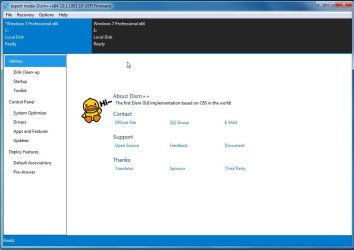
1. The currently running os (C) is highlighted in blue

The other os (E) is on a different disk.

dism++-select-os.jpg


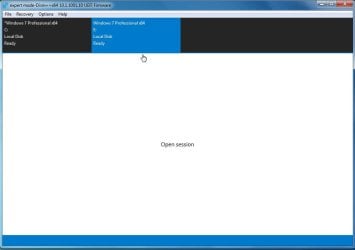
To select E to work on, click it to highlight it in blue

dism++-select-os2.jpg

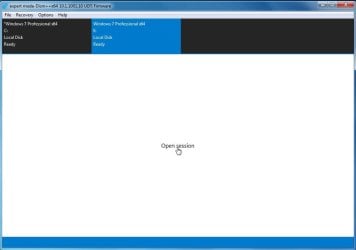
Then click "Open Session"

open-seesion.jpg

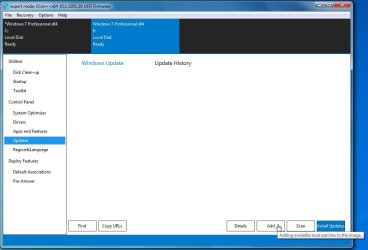
To add update to the selected os - click Updates in the left pane, then click ADD and browse to the update FILE

ADD-UPDATES.jpg


To add drivers to the selected os - click Drivers in the left pane, then click ADD and browse to the FOLDER containing the drivers

ADD-DRIVERS.jpg
 
Last edited:

My Computers

System One System Two

  • Computer type
    PC/Desktop
    OS
    7 X64
    CPU
    i5 8400
    Motherboard
    gigabyte b365m ds3h
    Memory
    2x8gb 3200mhz
    Hard Drives
    various
    PSU
    pure power 11 400w cm
    Case
    Coolermaster
    Cooling
    cryorig m9i
  • Computer type
    PC/Desktop
    OS
    7x64
    CPU
    g5400
    Motherboard
    ga b365m ds3h
    Memory
    8gb ddr4 2400
    PSU
    xfx pro 450w
Had a copy of Windows 7 on a USB flash drive. Successfully installed Windows 7 to a new hard drive on a 2016 Dell Desktop computer (D11S). Went to setup a wireless internet connection with the software installation disc, and the mouse and keyboard quit working half way through. Tried another, different wireless software installation disc, and the same thing happened. The USB controller properties show the drivers are not installed. According to "the internet" this problem should have happened when I was trying to install Windows 7 to the computer, and in order to solve the problem the drivers have to be added to the installation disk and/or flash drive. Is there a way I can just transfer the drivers over to the computer without an internet connection, or does it have to be part of the OS installation?

First, just let me say that I sympathize with you, and your driver problems.
I ran Windows 7 for many years, but I got old, and tired of chasing drivers all over the world, every time I installed Win-7 someplace.
I experimented with Windows 8.1/Pro/64 on a couple of PC's and found that it comes with one Whale of a Driver Package.
(every bit as good as Windows 10)

And here's a little tidbit to blow your mind.
I'm an experimenter with different OS's. I have ten PC's of different age and type.
After having "the last straw" problem with Win-7, I backed up all my data and reformatted my SSD on my main PC.
I installed Windows 8.1/Pro/64 and set it all up the way I wanted it, even with the Classic Shell.
When it installed, it supplied all the drivers for my NVIDEA video card, LAN, Sound, USB, card slots, etc. I didn't have to install anything but my Epson Printer.
Then I took that SSD out and cloned it to several other of my PC's. On first boot, lights flashed, drives whirred, and in practically no time at all, Windows 8.1 had totally set itself up on the new PC. It blew my mind, because I had never seen any OS do that before.
I'm running one of those PC's now. An HP Slimline (SFF) desktop PC, and I've never yet installed any drivers for it, except I did run the Install CD for my Epson 6100 AIO printer.

So, someday, when you're tired of chasing drivers for Win-7, Give Windows 8.1 a try. It's OUT THERE if you just want to try it.

Cheers Mate,
TM :cool:
 

My Computer

Computer type
PC/Desktop
Computer Manufacturer/Model Number
Various
OS
Win 7 Pro, SP1, x86, Win-11/Pro/64
CPU
AMD
Motherboard
Various
Memory
8GB Crucial
Graphics Card(s)
Various
Sound Card
OnBoard
Monitor(s) Displays
Acer 21.5"
Hard Drives
Crucial SSD, 500 GB
PSU
OEM
Case
SFF Slim Line Case
Cooling
OEM
Keyboard
eMachines
Mouse
Logitech Wireless
Internet Speed
varies
Antivirus
Windows Defender/Super Anti-Spyware
Browser
Firefox
Help please i have a new lenovo desktop ideacentre i5, want to put windows 7 ultimate 64 bit on it. and use my windows 10 on an external portable drive. been reading thru the forums , for a month , want to use a usb bootable drive, but unable to figure out the best way to do this , what exactly do I need. since lenovo has no windows 7 drivers for its motherboard.
 

My Computers

System One System Two

  • Computer type
    PC/Desktop
    Computer Manufacturer/Model Number
    Lenovo - IdeaCentre 5i Desktop - Intel Core i5 - 8GB Memory - 1TB Hard Drive -
    OS
    windows 10 pro 64 bit
    CPU
    Intel(R) core(TM) i5-10400 CPU @ 2.90GHz
    Motherboard
    lenovo 370 A
    Memory
    Micron 8.00 GB
    Graphics Card(s)
    Intel(R) UHD Graphics 630 / Nvidia GeForce GT 1030
    Sound Card
    built in Intel corp
    Hard Drives
    Seagate sata - 1 terabyte /
  • Computer type
    PC/Desktop
    System Manufacturer/Model Number
    Dell OptiPlex 7020
    OS
    win 7 /win 10 dual boot
    CPU
    intel core i5 4570 (3.2Ghz)
    Memory
    32 Gb
    Graphics Card(s)
    Intel HD Graphics 4600
    Monitor(s) Displays
    Dell
    Hard Drives
    SSD 512Gb
What is the exact model number of the Lenovo?
 

My Computers

System One System Two

  • Computer type
    PC/Desktop
    OS
    7 X64
    CPU
    i5 8400
    Motherboard
    gigabyte b365m ds3h
    Memory
    2x8gb 3200mhz
    Hard Drives
    various
    PSU
    pure power 11 400w cm
    Case
    Coolermaster
    Cooling
    cryorig m9i
  • Computer type
    PC/Desktop
    OS
    7x64
    CPU
    g5400
    Motherboard
    ga b365m ds3h
    Memory
    8gb ddr4 2400
    PSU
    xfx pro 450w
[FONT=&quot][h=1]Lenovo - IdeaCentre 5i Desktop - Intel Core i5 - 8GB Memory - 1TB Hard Drive - Mineral Grey[/h][/FONT]
[FONT=&quot]Model:90NA0001US
SKU:6424471


[/FONT]
 

My Computers

System One System Two

  • Computer type
    PC/Desktop
    Computer Manufacturer/Model Number
    Lenovo - IdeaCentre 5i Desktop - Intel Core i5 - 8GB Memory - 1TB Hard Drive -
    OS
    windows 10 pro 64 bit
    CPU
    Intel(R) core(TM) i5-10400 CPU @ 2.90GHz
    Motherboard
    lenovo 370 A
    Memory
    Micron 8.00 GB
    Graphics Card(s)
    Intel(R) UHD Graphics 630 / Nvidia GeForce GT 1030
    Sound Card
    built in Intel corp
    Hard Drives
    Seagate sata - 1 terabyte /
  • Computer type
    PC/Desktop
    System Manufacturer/Model Number
    Dell OptiPlex 7020
    OS
    win 7 /win 10 dual boot
    CPU
    intel core i5 4570 (3.2Ghz)
    Memory
    32 Gb
    Graphics Card(s)
    Intel HD Graphics 4600
    Monitor(s) Displays
    Dell
    Hard Drives
    SSD 512Gb
There are at leat 3 things to consider.

1) Does the motherboard have CSM support ( you can check the manual or look in bios settings). If not, then either uefi7 or win11 boot files can be used .

If you already running win11, you could install/apply win7 to a separate partition and add a boot menu entry to the existing win11 bcd.


2) Do you have a separate graphics card you can use? There are no win7 drivers for 10th and 11th gen on cpu graphics ( called igpu ), so a separate graphics card that has win7 drivers is needed.

3) Windows 7 media will probably also need usb3 and nvme support added - not difficult.
 

My Computers

System One System Two

  • Computer type
    PC/Desktop
    OS
    7 X64
    CPU
    i5 8400
    Motherboard
    gigabyte b365m ds3h
    Memory
    2x8gb 3200mhz
    Hard Drives
    various
    PSU
    pure power 11 400w cm
    Case
    Coolermaster
    Cooling
    cryorig m9i
  • Computer type
    PC/Desktop
    OS
    7x64
    CPU
    g5400
    Motherboard
    ga b365m ds3h
    Memory
    8gb ddr4 2400
    PSU
    xfx pro 450w
okay let me check
 

My Computers

System One System Two

  • Computer type
    PC/Desktop
    Computer Manufacturer/Model Number
    Lenovo - IdeaCentre 5i Desktop - Intel Core i5 - 8GB Memory - 1TB Hard Drive -
    OS
    windows 10 pro 64 bit
    CPU
    Intel(R) core(TM) i5-10400 CPU @ 2.90GHz
    Motherboard
    lenovo 370 A
    Memory
    Micron 8.00 GB
    Graphics Card(s)
    Intel(R) UHD Graphics 630 / Nvidia GeForce GT 1030
    Sound Card
    built in Intel corp
    Hard Drives
    Seagate sata - 1 terabyte /
  • Computer type
    PC/Desktop
    System Manufacturer/Model Number
    Dell OptiPlex 7020
    OS
    win 7 /win 10 dual boot
    CPU
    intel core i5 4570 (3.2Ghz)
    Memory
    32 Gb
    Graphics Card(s)
    Intel HD Graphics 4600
    Monitor(s) Displays
    Dell
    Hard Drives
    SSD 512Gb

My Computers

System One System Two

  • Computer type
    PC/Desktop
    OS
    7 X64
    CPU
    i5 8400
    Motherboard
    gigabyte b365m ds3h
    Memory
    2x8gb 3200mhz
    Hard Drives
    various
    PSU
    pure power 11 400w cm
    Case
    Coolermaster
    Cooling
    cryorig m9i
  • Computer type
    PC/Desktop
    OS
    7x64
    CPU
    g5400
    Motherboard
    ga b365m ds3h
    Memory
    8gb ddr4 2400
    PSU
    xfx pro 450w
the mother board has csm , but would like to use uefi7 if possible, where would i find that please.
will have to look and see if i have a graphics card i could put in it , but i did get to the bsod when installing from a dvd, the four stars came up during loading and then froze, I'm using vga cable on my desktop.
so i assumed the graphics would work, HMMMMMM thats what i get for assuming.
 

My Computers

System One System Two

  • Computer type
    PC/Desktop
    Computer Manufacturer/Model Number
    Lenovo - IdeaCentre 5i Desktop - Intel Core i5 - 8GB Memory - 1TB Hard Drive -
    OS
    windows 10 pro 64 bit
    CPU
    Intel(R) core(TM) i5-10400 CPU @ 2.90GHz
    Motherboard
    lenovo 370 A
    Memory
    Micron 8.00 GB
    Graphics Card(s)
    Intel(R) UHD Graphics 630 / Nvidia GeForce GT 1030
    Sound Card
    built in Intel corp
    Hard Drives
    Seagate sata - 1 terabyte /
  • Computer type
    PC/Desktop
    System Manufacturer/Model Number
    Dell OptiPlex 7020
    OS
    win 7 /win 10 dual boot
    CPU
    intel core i5 4570 (3.2Ghz)
    Memory
    32 Gb
    Graphics Card(s)
    Intel HD Graphics 4600
    Monitor(s) Displays
    Dell
    Hard Drives
    SSD 512Gb
Thsi tells you roughly what it does
Windows 7 (and possibly Vista, Server 2008 and Server 2008 R2) EFI-mode installation instructions | windows_7_efi_guide

latest version is available here: Releases . manatails/uefiseven . GitHub


The simplest way is to install win7 to a separate partition from within win11.

1. ) Boot into win11, run winntsetup. Browse to the win7 wim or iso, then point it at the new partition you want to install win7 onto. Winntsetup will apply the image and add a boot menu entry for you.

winntsetup v5.01
https://mega.nz/folder/zWIXgaqT#rdX_-WE7dH0iAcIt3qqUZQ/file/SHBVhSZT

Uefi7 should not be needed if you do it that way, and you dont need to try and get win7 boot.wim working from the dvd.

Do not reboot into your newly applied win7 just yet.

2) Stay in win11 and use dism++ to add the necessary updates and drivers to the applied win7 image.

Latest version of dism++
http://gh.api.99988866.xyz/github.c...s/download/v10.1.1002.1/Dism++10.1.1002.1.zip

1- nvme updates from my sig below
2- usb3 update from my sig below ( must put the update in before the drivers )

3- usb3 drivers from my sig below
4- graphics drivers for your graphics card

3). Then use regedit to load the system hive from the win7 partition and set vga.sys to start type 4. Do both controlsets. Unload the hive.
( You need to disable vga.sys so win7 only uses the graphics drivers you have installed with dism++. )

Now restart and select win7 boot menu entry. Cross fingers.
 
Last edited:

My Computers

System One System Two

  • Computer type
    PC/Desktop
    OS
    7 X64
    CPU
    i5 8400
    Motherboard
    gigabyte b365m ds3h
    Memory
    2x8gb 3200mhz
    Hard Drives
    various
    PSU
    pure power 11 400w cm
    Case
    Coolermaster
    Cooling
    cryorig m9i
  • Computer type
    PC/Desktop
    OS
    7x64
    CPU
    g5400
    Motherboard
    ga b365m ds3h
    Memory
    8gb ddr4 2400
    PSU
    xfx pro 450w
nic card per manual Gigabit Ethernet, 1x RJ45
 

My Computers

System One System Two

  • Computer type
    PC/Desktop
    Computer Manufacturer/Model Number
    Lenovo - IdeaCentre 5i Desktop - Intel Core i5 - 8GB Memory - 1TB Hard Drive -
    OS
    windows 10 pro 64 bit
    CPU
    Intel(R) core(TM) i5-10400 CPU @ 2.90GHz
    Motherboard
    lenovo 370 A
    Memory
    Micron 8.00 GB
    Graphics Card(s)
    Intel(R) UHD Graphics 630 / Nvidia GeForce GT 1030
    Sound Card
    built in Intel corp
    Hard Drives
    Seagate sata - 1 terabyte /
  • Computer type
    PC/Desktop
    System Manufacturer/Model Number
    Dell OptiPlex 7020
    OS
    win 7 /win 10 dual boot
    CPU
    intel core i5 4570 (3.2Ghz)
    Memory
    32 Gb
    Graphics Card(s)
    Intel HD Graphics 4600
    Monitor(s) Displays
    Dell
    Hard Drives
    SSD 512Gb

My Computers

System One System Two

  • Computer type
    PC/Desktop
    OS
    7 X64
    CPU
    i5 8400
    Motherboard
    gigabyte b365m ds3h
    Memory
    2x8gb 3200mhz
    Hard Drives
    various
    PSU
    pure power 11 400w cm
    Case
    Coolermaster
    Cooling
    cryorig m9i
  • Computer type
    PC/Desktop
    OS
    7x64
    CPU
    g5400
    Motherboard
    ga b365m ds3h
    Memory
    8gb ddr4 2400
    PSU
    xfx pro 450w
okay

- - - Updated - - -

maybe i misunderstood, or wrote wrong , sorry just trying for over a month to figure this out,
I want windows 7 ultimate on my new tower, and put this windows 10 in a portable drive so dual boot available , but if one crashes then im okay have the other
 

My Computers

System One System Two

  • Computer type
    PC/Desktop
    Computer Manufacturer/Model Number
    Lenovo - IdeaCentre 5i Desktop - Intel Core i5 - 8GB Memory - 1TB Hard Drive -
    OS
    windows 10 pro 64 bit
    CPU
    Intel(R) core(TM) i5-10400 CPU @ 2.90GHz
    Motherboard
    lenovo 370 A
    Memory
    Micron 8.00 GB
    Graphics Card(s)
    Intel(R) UHD Graphics 630 / Nvidia GeForce GT 1030
    Sound Card
    built in Intel corp
    Hard Drives
    Seagate sata - 1 terabyte /
  • Computer type
    PC/Desktop
    System Manufacturer/Model Number
    Dell OptiPlex 7020
    OS
    win 7 /win 10 dual boot
    CPU
    intel core i5 4570 (3.2Ghz)
    Memory
    32 Gb
    Graphics Card(s)
    Intel HD Graphics 4600
    Monitor(s) Displays
    Dell
    Hard Drives
    SSD 512Gb
You want it on a separate disk?

In that case I would partition the target disk first. Create gpt disk with diskgenius. Create esp and msr partitions at the start of the disk ( just accept diskgenius defaults). Then create another partition behind that - this is the partition you are going to install win7 on.

Free Download DiskGenius Online

Then use diskgenius add a drive letter to the esp partition you just created on the new disk.

Using diskgenius, copy the contents of your current win 11 esp partition onto the new esp partition.

Apply the win 7 image to the target partition on the new disk using dism++ ( dont use winntsetup for this scenario )

Add a boot menu entry to the new esp partition either manually, or with bcdboot

admin cmd prompt:

bcdboot win7_letter:\windows /s new_esp_partition_letter:

e.g

bcdboot e:\windows /s g:

Now use dism++ to integrate the updates and drivers into the applied win7 partition as my previous post. Dont forget to disable vga.sys

You have done all that from within your current win11 installation.
 

My Computers

System One System Two

  • Computer type
    PC/Desktop
    OS
    7 X64
    CPU
    i5 8400
    Motherboard
    gigabyte b365m ds3h
    Memory
    2x8gb 3200mhz
    Hard Drives
    various
    PSU
    pure power 11 400w cm
    Case
    Coolermaster
    Cooling
    cryorig m9i
  • Computer type
    PC/Desktop
    OS
    7x64
    CPU
    g5400
    Motherboard
    ga b365m ds3h
    Memory
    8gb ddr4 2400
    PSU
    xfx pro 450w
okay will try that , tyvm, been reading all your articles on how to do this , but just way to many ways lol
 

My Computers

System One System Two

  • Computer type
    PC/Desktop
    Computer Manufacturer/Model Number
    Lenovo - IdeaCentre 5i Desktop - Intel Core i5 - 8GB Memory - 1TB Hard Drive -
    OS
    windows 10 pro 64 bit
    CPU
    Intel(R) core(TM) i5-10400 CPU @ 2.90GHz
    Motherboard
    lenovo 370 A
    Memory
    Micron 8.00 GB
    Graphics Card(s)
    Intel(R) UHD Graphics 630 / Nvidia GeForce GT 1030
    Sound Card
    built in Intel corp
    Hard Drives
    Seagate sata - 1 terabyte /
  • Computer type
    PC/Desktop
    System Manufacturer/Model Number
    Dell OptiPlex 7020
    OS
    win 7 /win 10 dual boot
    CPU
    intel core i5 4570 (3.2Ghz)
    Memory
    32 Gb
    Graphics Card(s)
    Intel HD Graphics 4600
    Monitor(s) Displays
    Dell
    Hard Drives
    SSD 512Gb
Doing it from within your current win10/11 is a lot easier than trying to use the win7 installation media and setup routine.

If you have csm disabled, you want vga.sys disabled (start type 4) so win7 uses only the 3rd party graphics drivers you integrated,

If you have csm enabled, you want vga.sys enabled ( start type 1)

- - - Updated - - -

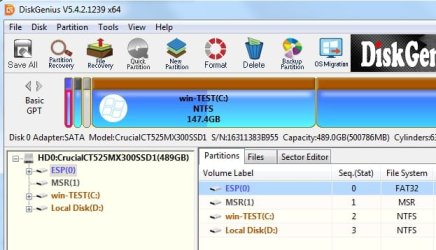
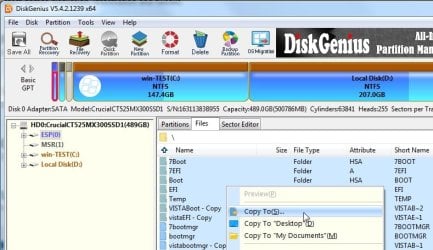
To copy files from esp partition:

click esp partition
copyesp1.jpg


click Files Tab
copyesp2.jpg


Select the files and you can copy them to any lettered ( mounted) partition
For example, if you have assigned letter Z to the esp partition on a different disk, you can copy them them to Z:

copyesp3.jpg

You will probably only have bootmgr file and boot and efi folders on your esp partition - I have extra stuff on mine.
 
Last edited:

My Computers

System One System Two

  • Computer type
    PC/Desktop
    OS
    7 X64
    CPU
    i5 8400
    Motherboard
    gigabyte b365m ds3h
    Memory
    2x8gb 3200mhz
    Hard Drives
    various
    PSU
    pure power 11 400w cm
    Case
    Coolermaster
    Cooling
    cryorig m9i
  • Computer type
    PC/Desktop
    OS
    7x64
    CPU
    g5400
    Motherboard
    ga b365m ds3h
    Memory
    8gb ddr4 2400
    PSU
    xfx pro 450w
okay perfect thanks will try it
 

My Computers

System One System Two

  • Computer type
    PC/Desktop
    Computer Manufacturer/Model Number
    Lenovo - IdeaCentre 5i Desktop - Intel Core i5 - 8GB Memory - 1TB Hard Drive -
    OS
    windows 10 pro 64 bit
    CPU
    Intel(R) core(TM) i5-10400 CPU @ 2.90GHz
    Motherboard
    lenovo 370 A
    Memory
    Micron 8.00 GB
    Graphics Card(s)
    Intel(R) UHD Graphics 630 / Nvidia GeForce GT 1030
    Sound Card
    built in Intel corp
    Hard Drives
    Seagate sata - 1 terabyte /
  • Computer type
    PC/Desktop
    System Manufacturer/Model Number
    Dell OptiPlex 7020
    OS
    win 7 /win 10 dual boot
    CPU
    intel core i5 4570 (3.2Ghz)
    Memory
    32 Gb
    Graphics Card(s)
    Intel HD Graphics 4600
    Monitor(s) Displays
    Dell
    Hard Drives
    SSD 512Gb
Back
Top