

Everytime I attempt to eject any of my USB drives, I get the following error. They are closed, and I can't see what programs can be using them.
Anyone with some wisdom, please??
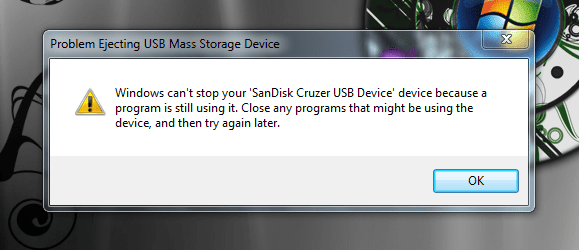
Anyone with some wisdom, please??
My Computer
- Computer type
- PC/Desktop
- Computer Manufacturer/Model Number
- Self built.
- OS
- Windows 7 RTM 64bit, Windows 8 Pro 64bit
- CPU
- Intel i5-2500K @ 3.3Ghz
- Motherboard
- Asus Maximus IV GENE-Z/GEN3
- Memory
- 16GB G.Skill RaptorX 1600MHz DDR3
- Graphics Card(s)
- N570GTX Twin Frozr III Power Edition
- Sound Card
- SupremeFX X-Fi 2
- Monitor(s) Displays
- BenQ XL2420T 120Hz 24 inch gaming monitor, Acer V233H 23 inc
- Screen Resolution
- 1920x1080
- Hard Drives
- 320GB Seagate Barracuda
WD 1TB Black Caviar
2TB WD Green Caviar
Samsung SSD 840 PRO Series
- PSU
- CoolerMaster Silent Pro Gold 1200WATT 80 Plus Gold
- Case
- CoolerMaster HAF X RC-942
- Cooling
- CoolerMaster V6GT Multi-Platform CPU Cooler
- Keyboard
- Logitech G510 Gaming Keyboard
- Mouse
- Logitech G700 Gaming Mouse
- Antivirus
- Norton Internet Security
- Browser
- Firefox 21
- Other Info
- Logitech Extreme 3D Pro Gaming Joystick, Logitech G930 Wireless Gaming Headset


