usb generic drivers

rbee

New member
Local time
5:53 PM
Messages
6
Found out that a Samsung camera is not compatible with Win7 64 bit OS which I tried to download from yesterday.
Apparently it has corrupted a driver set and am at a loss as to how to make a repair. I have lost the ability to access several flash drives of different manufacture. The rest of my USB connections are not affected.
I get the following message from the "Device Manager-Storage volumes-Generic volume":
Windows cannot load the device driver for this hardware. The driver may be corrupted or missing. (Code 39).
I get the safely remove hardware and eject button in the task bar.
Have tried uninstalling,ran a system file check,checked Intel for possible updates, restored to earlier date, all to no avail.
 

My Computer

OS
Win 7 Professional x64
Hello rbee & welcome to the sevenforums...

Could you tell us more about the Specs of your machine?
 

My Computer

Computer type
PC/Desktop
Computer Manufacturer/Model Number
Custom Build
OS
Windows 7 Professional SP1 - x64 [Non-UEFI Boot]
CPU
Ivy Bridge Core i5 3570K (Delidded)
Motherboard
Asus P8Z77-V LE PLUS
Memory
G.Skill "Ares" DDR3 PC3-12800 - 1600MHz (16Gb)
Graphics Card(s)
Asus Dual-RX480-O4G
Sound Card
Creative Sound Blaster Z w/5.1 sound system
Monitor(s) Displays
Asus IPS 23"
Screen Resolution
16/9
Hard Drives
Internal:
500Go Sata 6Gb/s (x2)
500Go Sata 3Gb/s (x2)
SSD 60Go Sata 6Gb/s
PSU
In Win C 900W Series 80+ Platinum
Case
Thermaltake Chaser A71
Cooling
Custom Water Cooling Loop
Keyboard
Cooler Master QuickFire XTi
Mouse
Razer Imperator 2012 (4G)
Antivirus
MSE
Browser
IE 11.0.xxx Rtm
Other Info
"Raid0" with Intel Smart Response Technology (HDD/SSD)
ASUSTeK Model P7P55D
North Bridge Intel DMI Host Bridge Revision 11
South Bridge Intel P55 Revision 11
CPU Intel(R) Core(TM) i5 CPU 750 @ 2.67GHz
[FONT=&quot]Cpu Socket Socket 1156 LGA

[/FONT]
 

My Computer

OS
Win 7 Professional x64

My Computer

Computer type
PC/Desktop
Computer Manufacturer/Model Number
Custom Build
OS
Windows 7 Professional SP1 - x64 [Non-UEFI Boot]
CPU
Ivy Bridge Core i5 3570K (Delidded)
Motherboard
Asus P8Z77-V LE PLUS
Memory
G.Skill "Ares" DDR3 PC3-12800 - 1600MHz (16Gb)
Graphics Card(s)
Asus Dual-RX480-O4G
Sound Card
Creative Sound Blaster Z w/5.1 sound system
Monitor(s) Displays
Asus IPS 23"
Screen Resolution
16/9
Hard Drives
Internal:
500Go Sata 6Gb/s (x2)
500Go Sata 3Gb/s (x2)
SSD 60Go Sata 6Gb/s
PSU
In Win C 900W Series 80+ Platinum
Case
Thermaltake Chaser A71
Cooling
Custom Water Cooling Loop
Keyboard
Cooler Master QuickFire XTi
Mouse
Razer Imperator 2012 (4G)
Antivirus
MSE
Browser
IE 11.0.xxx Rtm
Other Info
"Raid0" with Intel Smart Response Technology (HDD/SSD)
Just reinstalled chipset drivers-didn't help.
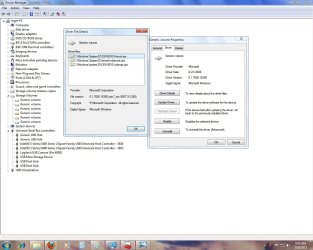
The drivers it is complaining about are Microsoft products.

driver date 6/21/2006
driver version 6.1.7600.16385
Digital signer Microsoft Windows

Do you think this is a MOBO issue and not a Windows problem?
 

My Computer

OS
Win 7 Professional x64
Can you post a screenshot of the Device Manager for us? It will be helpful to see what's under Flash Drives you mentionned.
Those drivers might be needed & updated aswell, i know Texas Instruments or SD Cards Readers too, but depend of your machine now.

Snapping Tool:
How to Use the Snipping Tool in Vista - Vista Forums

Upload Screenshot in sevenforums:
http://www.sevenforums.com/tutorials/9733-screenshots-files-upload-post-seven-forums.html

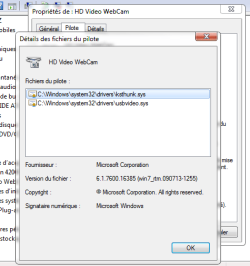
You will find on the screenshot the drivers for my webcam and those are microsoft ones.
None from the manufacturers there...Therefore i need the manufacturer application software to be installed in order the camera to works.
It doesn't work with the only Microsoft Drivers, you'll have to install the manufacturer one aswell (you could grab Vista x64 one if none for Windows 7 x64).
 

Attachments

  • Capture.PNG
    Capture.PNG
    16.1 KB · Views: 15

My Computer

Computer type
PC/Desktop
Computer Manufacturer/Model Number
Custom Build
OS
Windows 7 Professional SP1 - x64 [Non-UEFI Boot]
CPU
Ivy Bridge Core i5 3570K (Delidded)
Motherboard
Asus P8Z77-V LE PLUS
Memory
G.Skill "Ares" DDR3 PC3-12800 - 1600MHz (16Gb)
Graphics Card(s)
Asus Dual-RX480-O4G
Sound Card
Creative Sound Blaster Z w/5.1 sound system
Monitor(s) Displays
Asus IPS 23"
Screen Resolution
16/9
Hard Drives
Internal:
500Go Sata 6Gb/s (x2)
500Go Sata 3Gb/s (x2)
SSD 60Go Sata 6Gb/s
PSU
In Win C 900W Series 80+ Platinum
Case
Thermaltake Chaser A71
Cooling
Custom Water Cooling Loop
Keyboard
Cooler Master QuickFire XTi
Mouse
Razer Imperator 2012 (4G)
Antivirus
MSE
Browser
IE 11.0.xxx Rtm
Other Info
"Raid0" with Intel Smart Response Technology (HDD/SSD)
Enough info to make a conclusion?
 

Attachments

  • scrn2.jpg
    scrn2.jpg
    114.5 KB · Views: 87

My Computer

OS
Win 7 Professional x64
Looks it's nothing to do now with your samsung camera....At least others drivers are allright.

It does looks like, you have enable Ready Boost for that drive. Could be aswell an unsupported Ready Boost device.
May be in "Computer" right click on the device, propreties, and not allow ready boost for this device. Then in device manager property of your generic storage volume, set the strategy for no write cache.
 

My Computer

Computer type
PC/Desktop
Computer Manufacturer/Model Number
Custom Build
OS
Windows 7 Professional SP1 - x64 [Non-UEFI Boot]
CPU
Ivy Bridge Core i5 3570K (Delidded)
Motherboard
Asus P8Z77-V LE PLUS
Memory
G.Skill "Ares" DDR3 PC3-12800 - 1600MHz (16Gb)
Graphics Card(s)
Asus Dual-RX480-O4G
Sound Card
Creative Sound Blaster Z w/5.1 sound system
Monitor(s) Displays
Asus IPS 23"
Screen Resolution
16/9
Hard Drives
Internal:
500Go Sata 6Gb/s (x2)
500Go Sata 3Gb/s (x2)
SSD 60Go Sata 6Gb/s
PSU
In Win C 900W Series 80+ Platinum
Case
Thermaltake Chaser A71
Cooling
Custom Water Cooling Loop
Keyboard
Cooler Master QuickFire XTi
Mouse
Razer Imperator 2012 (4G)
Antivirus
MSE
Browser
IE 11.0.xxx Rtm
Other Info
"Raid0" with Intel Smart Response Technology (HDD/SSD)
The flash drives never show up in the "Devices and Removable Storage" all that shows are my disk players. Also, when a flash drive is plugged in, the windows audible tone is sounded. I am not aware of Samsung putting anything on the computer, it seems that somehow whatever the computer was trying to read, it messed something up. I guess my real question is if there is some way to reinstall that set of drivers?
 

My Computer

OS
Win 7 Professional x64
The flash drives never show up in the "Devices and Removable Storage" all that shows are my disk players. Also, when a flash drive is plugged in, the windows audible tone is sounded. I am not aware of Samsung putting anything on the computer, it seems that somehow whatever the computer was trying to read, it messed something up. I guess my real question is if there is some way to reinstall that set of drivers?

What's about uninstall from the Device Manager the yellow marked "!" device Generic Volume Storage (without deleting the pilote), then reboot...This will maybe reinstall it properly.

If its still not work, do it again with deleting the pilote aswell. This will force windows to look for the one needed.
 

My Computer

Computer type
PC/Desktop
Computer Manufacturer/Model Number
Custom Build
OS
Windows 7 Professional SP1 - x64 [Non-UEFI Boot]
CPU
Ivy Bridge Core i5 3570K (Delidded)
Motherboard
Asus P8Z77-V LE PLUS
Memory
G.Skill "Ares" DDR3 PC3-12800 - 1600MHz (16Gb)
Graphics Card(s)
Asus Dual-RX480-O4G
Sound Card
Creative Sound Blaster Z w/5.1 sound system
Monitor(s) Displays
Asus IPS 23"
Screen Resolution
16/9
Hard Drives
Internal:
500Go Sata 6Gb/s (x2)
500Go Sata 3Gb/s (x2)
SSD 60Go Sata 6Gb/s
PSU
In Win C 900W Series 80+ Platinum
Case
Thermaltake Chaser A71
Cooling
Custom Water Cooling Loop
Keyboard
Cooler Master QuickFire XTi
Mouse
Razer Imperator 2012 (4G)
Antivirus
MSE
Browser
IE 11.0.xxx Rtm
Other Info
"Raid0" with Intel Smart Response Technology (HDD/SSD)
Not familiar with the word "pilote" However I again uninstalled all the generic volumes and the problem persists.
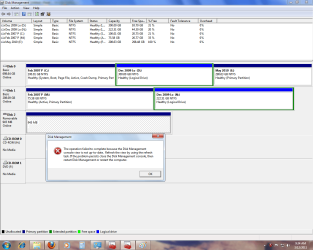
In looking at my Disk management I get the attached screen shot when attempting to get any info on Disk 2. The reboot or refresh do nothing. In looking back at a post from over a year ago there was a user with the same problem but there wasn't a fix posted.
Do I have a USB hub issue?
 

Attachments

  • scrn3.png
    scrn3.png
    56 KB · Views: 38

My Computer

OS
Win 7 Professional x64
Not familiar with the word "pilote" However I again uninstalled all the generic volumes and the problem persists.
In looking at my Disk management I get the attached screen shot when attempting to get any info on Disk 2. The reboot or refresh do nothing. In looking back at a post from over a year ago there was a user with the same problem but there wasn't a fix posted.
Do I have a USB hub issue?

Maybe you can ask and will have better chance to get an answer here:

http://www.sevenforums.com/tutorials/681-startup-repair.html

http://www.sevenforums.com/tutorials/105541-startup-repair-run-3-separate-times.html

To organize your disks.
 

My Computer

Computer type
PC/Desktop
Computer Manufacturer/Model Number
Custom Build
OS
Windows 7 Professional SP1 - x64 [Non-UEFI Boot]
CPU
Ivy Bridge Core i5 3570K (Delidded)
Motherboard
Asus P8Z77-V LE PLUS
Memory
G.Skill "Ares" DDR3 PC3-12800 - 1600MHz (16Gb)
Graphics Card(s)
Asus Dual-RX480-O4G
Sound Card
Creative Sound Blaster Z w/5.1 sound system
Monitor(s) Displays
Asus IPS 23"
Screen Resolution
16/9
Hard Drives
Internal:
500Go Sata 6Gb/s (x2)
500Go Sata 3Gb/s (x2)
SSD 60Go Sata 6Gb/s
PSU
In Win C 900W Series 80+ Platinum
Case
Thermaltake Chaser A71
Cooling
Custom Water Cooling Loop
Keyboard
Cooler Master QuickFire XTi
Mouse
Razer Imperator 2012 (4G)
Antivirus
MSE
Browser
IE 11.0.xxx Rtm
Other Info
"Raid0" with Intel Smart Response Technology (HDD/SSD)
Back
Top