USB hard drive a bootable Windows 7 install disk

NormCameron

@ Tenforums.com
Pro User
VIP
Local time
12:53 AM
Messages
576
Location
Gladstone, Queensland
This article refers to the Hard Drives issued at PDC, but it also applies to using ANY USB hard drive as a bootable disk.


Tip: make your PDC 2008 USB hard drive a bootable Windows 7 install disk

If you’re one of eight thousand people lucky enough to attend PDC 2008 last week and receive the ultra-cool 160GB portable hard drive with “the goods” then I have some extra good news for you, your hard drive can also become a bootable Windows 7 install disk. The best part is that you don’t even have to delete any of the existing files on the drive since there’s about 90GB free of the 160GB drive.

This is especially handy if you’re trying to install Windows 7 on a device without a DVD drive or if you don’t have any blank DVDs to burn the ISO on.

Of course this guide also works if you have an existing portable USB hard drive that has enough free space to partition and a copy of a Windows 7 ISO, which I’m sure you can get *wink*.
1.jpg
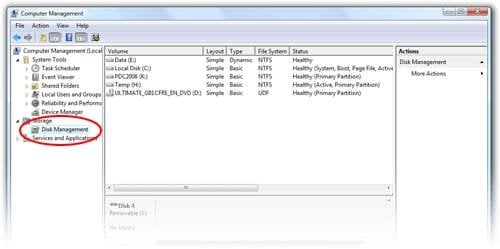
Step 1: Click open the Start Menu, right click on “Computer”, “Manage”. Open the “Disk Management” tool.
pdchd2.jpg
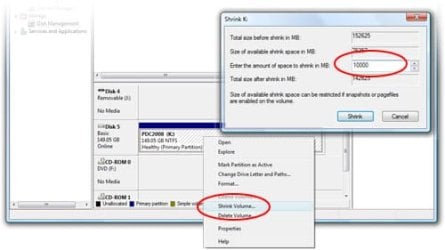
Step 2: Find the USB hard drive, should be 149.05GB. Right click on the volume and click “Shrink volume”. Shrink the volume by 10000MB.
pdchd3.jpg
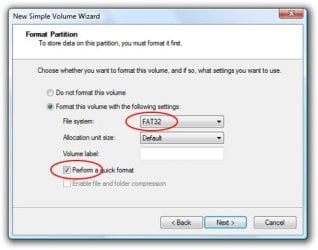
Step 3: Right click on the new unallocated volume, “New Simple Volume”, format as “FAT32″. Check “Perform quick format” unless you have time to waste.
pdchd4.jpg
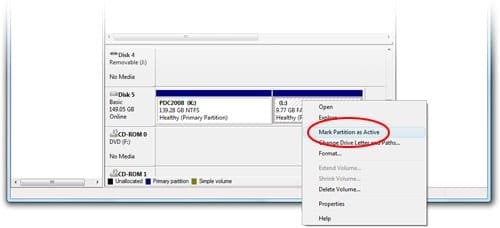
Step 4: Right click on the new volume, “Mark Partition as Active”.
pdchd5.jpg
Step 5: Mount the Windows 7 ISO from the USB (\Windows7\ISO\6801.0.080913-2030_Client_en-us_ULTIMATE-ULTIMATE_GB1CFRE_EN_DVD.iso) using your favorite ISO tool (I use Daemon Tools Lite).
pdchd6.jpg
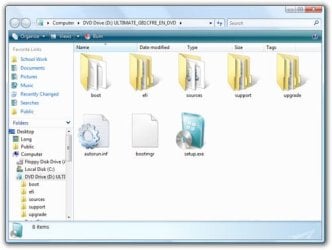
Step 6: Copy the entire DVD directory into your newly created volume.
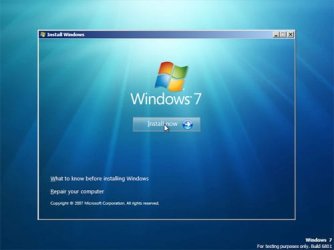
pdchd7.jpg
Step 7: Now take your USB drive and tell the PC to boot from USB. The Windows 7 setup should appear.

To restore your USB drive to the previous state and reclaim the 10GB of space, simply delete the new volume created and extend the original volume to consume the entire 10000MB now unallocated."

Tip: make your PDC 2008 USB hard drive a bootable Windows 7 install disk - istartedsomething
 

My Computer

Computer Manufacturer/Model Number
Self Built
OS
Vista X32. Windows 7 32bit
CPU
Intel Quad Core 6600
Motherboard
Asus P5B
Memory
4096 MB Xtreme-Dark 800mhz
Graphics Card(s)
Zotac Amp Edition 8800GT - 512MB DDR3, O/C 700mhz
Monitor(s) Displays
Samsung 206BW
Screen Resolution
1680 X 1024
Hard Drives
4 X Samsung 500GB 7200rpm Serial ATA-II HDD w. 16MB Cache .
PSU
550 w
Case
Thermaltake
Cooling
3 x octua NF-S12-1200 - 120mm 1200RPM Sound Optimised Fans
Keyboard
Microsoft
Mouse
Targus
Internet Speed
1500kbs
hi, I tried to follow this guide and I stumbled onto a problem, it says "Ntdlr missing" when I try to boot from the external HD
I am using Vista with an HP Setup and want to install Windows 7 on this machine here
 

My Computer

OS
Windows 7
If you’re one of eight thousand people lucky enough to attend PDC 2008 last week and receive the ultra-cool 160GB portable hard drive with “the goods” then I have some extra good news for you, your hard drive can also become a bootable Windows 7 install disk. The best part is that you don’t even have to delete any of the existing files on the drive since there’s about 90GB free of the 160GB drive
Sizlopedia
 

My Computer

OS
windows 7
That error is due to the fact the guide above skipped an important step. The USB drive was never made to be bootable. There are many guides online, and I've seen a few linked here as well, that show you how to get the USB drive bootable, to where it runs the installer, just as if you booted from the DVD.

http://kmwoley.com/blog/?p=345
 

My Computer

OS
Windows 7 Ultimate x64 SP1
CPU
Intel Core i7-2600
Motherboard
Gigabyte GA-P67A-UD3P-B3
Memory
12 GB Patriot Extreme DDR3-1333
Graphics Card(s)
Nvidia GTX 470
Monitor(s) Displays
Dell UltraSharp 2209WA
Hard Drives
OCZ Agility3 240 GB, WD5001AALS, WD7501AALS
PSU
OCZ ModStream 700W
Case
CoolerMaster HAF 912 Advanced
Cooling
CoolerMaster Hyper 212 Plus
It requires a completely different process, but I believe XP can be installed from a USB flash drive.
 

My Computer

OS
Windows 7 Ultimate x64 SP1
CPU
Intel Core i7-2600
Motherboard
Gigabyte GA-P67A-UD3P-B3
Memory
12 GB Patriot Extreme DDR3-1333
Graphics Card(s)
Nvidia GTX 470
Monitor(s) Displays
Dell UltraSharp 2209WA
Hard Drives
OCZ Agility3 240 GB, WD5001AALS, WD7501AALS
PSU
OCZ ModStream 700W
Case
CoolerMaster HAF 912 Advanced
Cooling
CoolerMaster Hyper 212 Plus
It's maybe embarrassing to ask but what's the difference between USB Flash Drive and USB Hard Drive ?
 

My Computer

OS
Windows 7
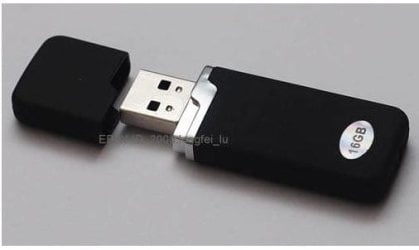
A flash drive is one of those small sticks...it's flash memory .

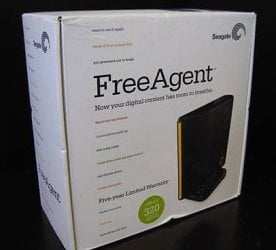
A USB hard drive is any hard drive that will connect via USB...
 

My Computer

Computer Manufacturer/Model Number
Self-Built
OS
Vista Ultimate X64/ Windows 7 Dual-boot
CPU
Q6600
Motherboard
ASUS P5K
Memory
4G OCZ PC2 8500 Platinum
Graphics Card(s)
EVGA 8800GTS Vid Card
Hard Drives
500G Seagate SATA
200G Seagate SATA
100G WD Caviar SATA
80G WD Caviar IDE
PSU
OCZ Elite 800W PSU
Case
RaidMax Smilodon Case
It's maybe embarrassing to ask but what's the difference between USB Flash Drive and USB Hard Drive ?


Here are some pics: ;)
 

Attachments

  • Usb_Flash_Drive_16gb.JPG
    Usb_Flash_Drive_16gb.JPG
    17.4 KB · Views: 262
  • Seagate_USB Hard Drive.JPG
    Seagate_USB Hard Drive.JPG
    24 KB · Views: 286

My Computer

Computer type
PC/Desktop
Computer Manufacturer/Model Number
Built them myself, Science Experiments !
OS
Win7 Enterprise, Win7 x86 (Ult 7600), Win7 x64 Ult 7600, TechNet RTM on AMD x64 (2.8Ghz)
CPU
AMD fx8350 4ghz, AMD-32 2400mhz, AMD-64 3200mhz, AMDx64 2.8G
Motherboard
SIS 755, ECS-K8M890M-M (Ult 7600), GigaByte & others
Memory
2gb, 4gb on the Ult 7600, 4gb on Technet RTM, 32gb on FX8350
Graphics Card(s)
Draw my own Graphics, several nVidia cards
Sound Card
on motherboard
Monitor(s) Displays
19" flat scr, 28" I-Inc widescr,22" Emprex Widescr, 23" Acer
Screen Resolution
1280 x 1024, 1440 x 900, 1920 x 1080
Hard Drives
6 pata Ide HD's & 2 Sata HD's
added 80gb external on Ult 7600 computer,
numerous extra 1tb, 2TB, 3Tb SATA HD's
A collection of ext HD Docks w/ HDs
PSU
430w, 550w, 600w, 700, 800, etc
Case
All Generic Full Towers
Cooling
Open Air & a few fans, some w/ colored LEDs
Keyboard
Compaq & Dell recycled from GoodWill
Mouse
Made in China Optical Wired Mouse
Internet Speed
Fast Cable InterNet
Antivirus
AVG Free on 24 different Desktops, NO Problems!
Browser
IE 8 is preferred, but use FireFox sometimes
Other Info
Linksys Routers, switches, & Hubs
Too Many USB Flash Drives to count, Biggest is 64GB !
Eight computers in my home network.
Sixteen computers at my business network.
Linked via TeamViewer !
Lots of old used spare computer parts everywhere!

My Computer

Computer type
PC/Desktop
Computer Manufacturer/Model Number
Built them myself, Science Experiments !
OS
Win7 Enterprise, Win7 x86 (Ult 7600), Win7 x64 Ult 7600, TechNet RTM on AMD x64 (2.8Ghz)
CPU
AMD fx8350 4ghz, AMD-32 2400mhz, AMD-64 3200mhz, AMDx64 2.8G
Motherboard
SIS 755, ECS-K8M890M-M (Ult 7600), GigaByte & others
Memory
2gb, 4gb on the Ult 7600, 4gb on Technet RTM, 32gb on FX8350
Graphics Card(s)
Draw my own Graphics, several nVidia cards
Sound Card
on motherboard
Monitor(s) Displays
19" flat scr, 28" I-Inc widescr,22" Emprex Widescr, 23" Acer
Screen Resolution
1280 x 1024, 1440 x 900, 1920 x 1080
Hard Drives
6 pata Ide HD's & 2 Sata HD's
added 80gb external on Ult 7600 computer,
numerous extra 1tb, 2TB, 3Tb SATA HD's
A collection of ext HD Docks w/ HDs
PSU
430w, 550w, 600w, 700, 800, etc
Case
All Generic Full Towers
Cooling
Open Air & a few fans, some w/ colored LEDs
Keyboard
Compaq & Dell recycled from GoodWill
Mouse
Made in China Optical Wired Mouse
Internet Speed
Fast Cable InterNet
Antivirus
AVG Free on 24 different Desktops, NO Problems!
Browser
IE 8 is preferred, but use FireFox sometimes
Other Info
Linksys Routers, switches, & Hubs
Too Many USB Flash Drives to count, Biggest is 64GB !
Eight computers in my home network.
Sixteen computers at my business network.
Linked via TeamViewer !
Lots of old used spare computer parts everywhere!
Thanks , now I know the difference .
By the way , why I cant rep you two , i don't see the Rep Icon :sarc:
 

My Computer

OS
Windows 7
Thanks , now I know the difference .
By the way , why I cant rep you two , i don't see the Rep Icon :sarc:

NO rep allowed in News & Chillout Threads.


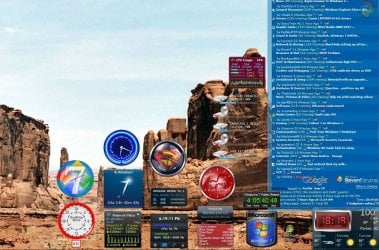
Check out the Sevenforums Gadget ;)


" Doc "
 

Attachments

  • Gadget_Cluster_10_17_2009.JPG
    Gadget_Cluster_10_17_2009.JPG
    224.9 KB · Views: 510

My Computer

Computer type
PC/Desktop
Computer Manufacturer/Model Number
Built them myself, Science Experiments !
OS
Win7 Enterprise, Win7 x86 (Ult 7600), Win7 x64 Ult 7600, TechNet RTM on AMD x64 (2.8Ghz)
CPU
AMD fx8350 4ghz, AMD-32 2400mhz, AMD-64 3200mhz, AMDx64 2.8G
Motherboard
SIS 755, ECS-K8M890M-M (Ult 7600), GigaByte & others
Memory
2gb, 4gb on the Ult 7600, 4gb on Technet RTM, 32gb on FX8350
Graphics Card(s)
Draw my own Graphics, several nVidia cards
Sound Card
on motherboard
Monitor(s) Displays
19" flat scr, 28" I-Inc widescr,22" Emprex Widescr, 23" Acer
Screen Resolution
1280 x 1024, 1440 x 900, 1920 x 1080
Hard Drives
6 pata Ide HD's & 2 Sata HD's
added 80gb external on Ult 7600 computer,
numerous extra 1tb, 2TB, 3Tb SATA HD's
A collection of ext HD Docks w/ HDs
PSU
430w, 550w, 600w, 700, 800, etc
Case
All Generic Full Towers
Cooling
Open Air & a few fans, some w/ colored LEDs
Keyboard
Compaq & Dell recycled from GoodWill
Mouse
Made in China Optical Wired Mouse
Internet Speed
Fast Cable InterNet
Antivirus
AVG Free on 24 different Desktops, NO Problems!
Browser
IE 8 is preferred, but use FireFox sometimes
Other Info
Linksys Routers, switches, & Hubs
Too Many USB Flash Drives to count, Biggest is 64GB !
Eight computers in my home network.
Sixteen computers at my business network.
Linked via TeamViewer !
Lots of old used spare computer parts everywhere!
Sorry to necro this thread, it just I still need an answer and I spent alot of time googling and searching on this forum. So far, despite following the directions, when I try to boot from the external hard drive, it just hangs there and the screen never opens (unless I need to really wait a really long time).

It seems the missing detail is likely that I have to make the hard drive bootable.


However, so far, all the guides that talks about making them bootable requires to clean the drive (well flash, but I guess hard drives requires that too). That defeats one of the biggest selling points in this guide, no need to delete any files (also to note, I seperated the hard drive into two partitions as directed, the cmd only see them as one). So how does one make it bootable without clearing all the files.

Update: http://www.sevenforums.com/general-discussion/8793-how-make-your-external-hd-bootable-2.html It seems that it should work now, I don't understand what is my problem. When I try to boot from USB, it just hangs there and the Windows 7 setup never appears.
 

My Computer

OS
Vista
nt6 hdd installer
altarnative...
5xmna0.jpg

10fxojb.jpg

264olxd.jpg

2nlhahw.jpg

28843zd.jpg

2cqzf43.jpg

4pt3td.jpg

BRSBOXÎļþ¹ñ|BRSBOX Ãâ·ÑÍøÂçÓ²ÅÌ|chzhlhµÄÎļþ¹ñ\nt6 hdd installer (ing)
nt6 hdd installer

sorry bad english
 

My Computer

OS
7022 32 bit
Back
Top