
You are using an out of date browser. It may not display this or other websites correctly.
You should upgrade or use an alternative browser.
You should upgrade or use an alternative browser.
Solved usb hard drive shows completely different partitions when directly con
- Thread starter rolling7z
- Start date

- Local time
- 1:49 PM
- Messages
- 5,915
Hi rolling7z
That can't happen. You probably plugged in a different HDD.
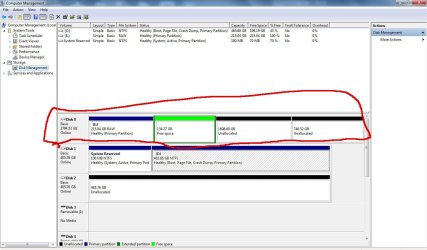
To validate your statement and examine the issue - if there is one - please post the screenshots of Windows Disk Management of your USB hard drive directly connected and "indirectly" connected.
http://www.sevenforums.com/tutorials/274797-disk-management-post-screen-capture-image.html
By the by what is that indirect and direct connection of the USB drive? Can you elaborate?
That can't happen. You probably plugged in a different HDD.
To validate your statement and examine the issue - if there is one - please post the screenshots of Windows Disk Management of your USB hard drive directly connected and "indirectly" connected.
http://www.sevenforums.com/tutorials/274797-disk-management-post-screen-capture-image.html
By the by what is that indirect and direct connection of the USB drive? Can you elaborate?
My Computer
At a glance
Windows 7 Home Premium 32 bit
- OS
- Windows 7 Home Premium 32 bit

My Computer
At a glance
windows 7
- Computer type
- PC/Desktop
- OS
- windows 7
- Local time
- 1:49 PM
- Messages
- 5,915
In one sentence it is a 3TB HDD. If you had been using it in the external enclosure and all is well use it so and not as an internal drive.
My Computer
At a glance
Windows 7 Home Premium 32 bit
- OS
- Windows 7 Home Premium 32 bit
A possible explanation:
I am assuming you are pulling the HDD out of a Seagate enclosure. It looks like there may be some special firmware in the enclosure interface. See here
How To Open a Seagate GoFlex Desk Hard Disk Drive Case
"But cracking them open isn’t all that worthwhile, since the format requires the GoFlex Dock adapter."
I am assuming you are pulling the HDD out of a Seagate enclosure. It looks like there may be some special firmware in the enclosure interface. See here
How To Open a Seagate GoFlex Desk Hard Disk Drive Case
"But cracking them open isn’t all that worthwhile, since the format requires the GoFlex Dock adapter."
My Computer
At a glance
Windows 7x64 Home Premium SP1Intel i7 2600kG.Skill Ripjaws (DDR3-1600) 2x4GBNvidia GeForce GTS 450; Intel HD Graphics 300...
- Computer type
- PC/Desktop
- Computer Manufacturer/Model Number
- Own build
- OS
- Windows 7x64 Home Premium SP1
- CPU
- Intel i7 2600k
- Motherboard
- ASUS P8Z68 Deluxe
- Memory
- G.Skill Ripjaws (DDR3-1600) 2x4GB
- Graphics Card(s)
- Nvidia GeForce GTS 450; Intel HD Graphics 3000(GT2+)
- Monitor(s) Displays
- Dell Ultrasharp IPS panel U2311H, Samsung SyncMaster P2350
- Screen Resolution
- 1920x1080
- Hard Drives
- Samsung 850 Pro SSD 256GB, Samsung SSD 840 120GB, Seagates 1TB Barracuda ST31000528AS x2
- PSU
- Seasonic M12II 520W
- Case
- Lian Li Lancool PC-K60
- Cooling
- Case: 1x120mm, 3x140mm CPU: Hyper 212+
- Keyboard
- Logitech MK520 (wireless)
- Mouse
- Logitech MK520
- Internet Speed
- 6-7 Mbps
- Antivirus
- Norton Security Premium, Malwarebytes on 2 (MSE on 3rd PC)
- Browser
- FireFox
- Other Info
- Audio: Logitech Z523 2.1
- Local time
- 1:49 PM
- Messages
- 5,915
@rolling7z, You have not given full details of your external case. Did you buy the external case separately and your 3TB HDD separately.? Or is it a branded external HDD like Western Digital My BooK/ Passport, Seagate expansion/Backup Plus etc.,and you have taken the HDD out of such a branded external drive?
It would appear that your 3TB HDD has been formatted by you. Did you format it inside the enclosure? Did you format it as an MBR drive or GPT drive?
Have you been using it inside the enclosure and was it OK? Do you have any data on it?
It would appear that your 3TB HDD has been formatted by you. Did you format it inside the enclosure? Did you format it as an MBR drive or GPT drive?
Have you been using it inside the enclosure and was it OK? Do you have any data on it?
My Computer
At a glance
Windows 7 Home Premium 32 bit
- OS
- Windows 7 Home Premium 32 bit
1) What is the model number of the external eg. STAC3000101 3 TB.
2) Have you pulled the hard drive out of the external enclosure (presumably yes).
2) Have you pulled the hard drive out of the external enclosure (presumably yes).
My Computer
At a glance
Windows 7x64 Home Premium SP1Intel i7 2600kG.Skill Ripjaws (DDR3-1600) 2x4GBNvidia GeForce GTS 450; Intel HD Graphics 300...
- Computer type
- PC/Desktop
- Computer Manufacturer/Model Number
- Own build
- OS
- Windows 7x64 Home Premium SP1
- CPU
- Intel i7 2600k
- Motherboard
- ASUS P8Z68 Deluxe
- Memory
- G.Skill Ripjaws (DDR3-1600) 2x4GB
- Graphics Card(s)
- Nvidia GeForce GTS 450; Intel HD Graphics 3000(GT2+)
- Monitor(s) Displays
- Dell Ultrasharp IPS panel U2311H, Samsung SyncMaster P2350
- Screen Resolution
- 1920x1080
- Hard Drives
- Samsung 850 Pro SSD 256GB, Samsung SSD 840 120GB, Seagates 1TB Barracuda ST31000528AS x2
- PSU
- Seasonic M12II 520W
- Case
- Lian Li Lancool PC-K60
- Cooling
- Case: 1x120mm, 3x140mm CPU: Hyper 212+
- Keyboard
- Logitech MK520 (wireless)
- Mouse
- Logitech MK520
- Internet Speed
- 6-7 Mbps
- Antivirus
- Norton Security Premium, Malwarebytes on 2 (MSE on 3rd PC)
- Browser
- FireFox
- Other Info
- Audio: Logitech Z523 2.1
- Local time
- 1:49 PM
- Messages
- 5,915
Persumably  yes. So I am going ahead with that presumption that you bought a second hand used 3TB Seagate external drive and you took the HDD out prying the case open.
Since you took the two screenshots one with the 3TB HDD inside the external enclosure and one with the bare 3TB HDD connected internally, I am also presuming that the external case is still serviceable.
Now here is the answer.
Your 3TB HDD inside the enclosure came as an Advance Formatted MBR drive. There is a specific drive translation circuitry in the external enclosure's interface electronics to write and read the data into 4096 byte sector size. When you take the drive out and use the bare 3TB HDD as an internal drive this drive translation circuit that does the 512 byte to 4096 sector size and vice versa is absent. That is why you see a different jumbled up partition structure.
If you want to use the 3TB HDD as an internal drive you should now format it as a GPT drive.
Try deleting the RAW and the two unallocated partitions with Windows Disk Management, initialise the drive as GPT and then format the drive.
If you have any problems report.
( Now I am asking this question just out of curiosity. The user must have had some reason for disposing off that external drive. When inside the external case, were you able to read any data on it? Though I had given you the reference http://www.sevenforums.com/tutorials/274797-disk-management-post-screen-capture-image.html you don't seem to have read that and followed the guidelines indicated therein to present a full screen untruncated screenshot. In the second screenshot you posted showing the drive inside the enclosure, I am unable to see the Capacity, Free Space and %Free in the drive list above. It is obscured by the Action pane.The tutorial tells you how to hide the Console Tree and Action Pane so that all the information is seen on the screenshot.)
yes. So I am going ahead with that presumption that you bought a second hand used 3TB Seagate external drive and you took the HDD out prying the case open. Since you took the two screenshots one with the 3TB HDD inside the external enclosure and one with the bare 3TB HDD connected internally, I am also presuming that the external case is still serviceable.
Now here is the answer.
Your 3TB HDD inside the enclosure came as an Advance Formatted MBR drive. There is a specific drive translation circuitry in the external enclosure's interface electronics to write and read the data into 4096 byte sector size. When you take the drive out and use the bare 3TB HDD as an internal drive this drive translation circuit that does the 512 byte to 4096 sector size and vice versa is absent. That is why you see a different jumbled up partition structure.
If you want to use the 3TB HDD as an internal drive you should now format it as a GPT drive.
Try deleting the RAW and the two unallocated partitions with Windows Disk Management, initialise the drive as GPT and then format the drive.
If you have any problems report.
( Now I am asking this question just out of curiosity. The user must have had some reason for disposing off that external drive. When inside the external case, were you able to read any data on it? Though I had given you the reference http://www.sevenforums.com/tutorials/274797-disk-management-post-screen-capture-image.html you don't seem to have read that and followed the guidelines indicated therein to present a full screen untruncated screenshot. In the second screenshot you posted showing the drive inside the enclosure, I am unable to see the Capacity, Free Space and %Free in the drive list above. It is obscured by the Action pane.The tutorial tells you how to hide the Console Tree and Action Pane so that all the information is seen on the screenshot.)
Last edited:
My Computer
At a glance
Windows 7 Home Premium 32 bit
- OS
- Windows 7 Home Premium 32 bit
Given it is second hand  I'd run the Seatools diagnostics on the drive. I'd start with the short tests then run at least one of the long tests (and they will take many hours for 3 TB).
You need to decide if you want to use it as an external (with its current enclosure) or an internal. It's one or the other. If you format it for internal drive use then you do it at your own risk.
I'd run the Seatools diagnostics on the drive. I'd start with the short tests then run at least one of the long tests (and they will take many hours for 3 TB). You need to decide if you want to use it as an external (with its current enclosure) or an internal. It's one or the other. If you format it for internal drive use then you do it at your own risk.
My Computer
At a glance
Windows 7x64 Home Premium SP1Intel i7 2600kG.Skill Ripjaws (DDR3-1600) 2x4GBNvidia GeForce GTS 450; Intel HD Graphics 300...
- Computer type
- PC/Desktop
- Computer Manufacturer/Model Number
- Own build
- OS
- Windows 7x64 Home Premium SP1
- CPU
- Intel i7 2600k
- Motherboard
- ASUS P8Z68 Deluxe
- Memory
- G.Skill Ripjaws (DDR3-1600) 2x4GB
- Graphics Card(s)
- Nvidia GeForce GTS 450; Intel HD Graphics 3000(GT2+)
- Monitor(s) Displays
- Dell Ultrasharp IPS panel U2311H, Samsung SyncMaster P2350
- Screen Resolution
- 1920x1080
- Hard Drives
- Samsung 850 Pro SSD 256GB, Samsung SSD 840 120GB, Seagates 1TB Barracuda ST31000528AS x2
- PSU
- Seasonic M12II 520W
- Case
- Lian Li Lancool PC-K60
- Cooling
- Case: 1x120mm, 3x140mm CPU: Hyper 212+
- Keyboard
- Logitech MK520 (wireless)
- Mouse
- Logitech MK520
- Internet Speed
- 6-7 Mbps
- Antivirus
- Norton Security Premium, Malwarebytes on 2 (MSE on 3rd PC)
- Browser
- FireFox
- Other Info
- Audio: Logitech Z523 2.1
- Local time
- 1:49 PM
- Messages
- 5,915
OK, good that you have finally made up your mind to use it as an external drive with the 3TB HDD back into its heavenly abode.
As mjf suggested download, install and run SeaTools for Windows
SeaTools for Windows | Seagate ( Read the instructions on that download page)
Read the user Guide here http://www.seagate.com/staticfiles/support/downloads/seatools/docs/SeaTools%20for%20Windows.en-US.pdf ( Read,Read, Read....it. You learn things only by reading)
Run the Short Generic Test and then the Long Generic Test. After completion of both tests, go to Advanced Tests - "Full Erase (SATA)" and write zeros to all sectors to clean the drive.
After that initialise the drive as MBR and format it. ( Partition it if you want to.)
Note:If the Short Generic Test fails, you have to download Seatools for DOS, burn it to a CD boot from that CD and run the tests. Only the DOS version has the ability to repair. Read the User Guide for the DOS version..
If you have any problems, don't hesitate to ask for help.
In a nutshell,
1. If you want to use the 3TB HDD in its original external casing, clean wipe it and initialise it as an MBR drive and format.
2. If you want to use it as an internal drive inside the Desktop,clean wipe it, initialise it as a GPT drive and format it ( There is absolutely no risk in initialising it as a GPT drive.)
You cannot change the drive from here to there and there to here.
Note to others who read this thread: Now that Windows XP is no longer supported, the drive manufacturers have started abondoning Advance Formatting with MBR initialisation - which was necessary till now to make the larger than 2TB external drives compatible with Windows XP - and have started changing over to GPT initialised larger than 2TB external drives in phases.(model-wise.) Now it is a transition period. The new larger than 2TB external drive you buy may be GPT drive or Advanced formatted MBR drive. Check and note whether it is an MBR initialised drive or GPT initialised drive.
As mjf suggested download, install and run SeaTools for Windows
SeaTools for Windows | Seagate ( Read the instructions on that download page)
Read the user Guide here http://www.seagate.com/staticfiles/support/downloads/seatools/docs/SeaTools%20for%20Windows.en-US.pdf ( Read,Read, Read....it. You learn things only by reading)
Run the Short Generic Test and then the Long Generic Test. After completion of both tests, go to Advanced Tests - "Full Erase (SATA)" and write zeros to all sectors to clean the drive.
After that initialise the drive as MBR and format it. ( Partition it if you want to.)
Note:If the Short Generic Test fails, you have to download Seatools for DOS, burn it to a CD boot from that CD and run the tests. Only the DOS version has the ability to repair. Read the User Guide for the DOS version..
If you have any problems, don't hesitate to ask for help.
In a nutshell,
1. If you want to use the 3TB HDD in its original external casing, clean wipe it and initialise it as an MBR drive and format.
2. If you want to use it as an internal drive inside the Desktop,clean wipe it, initialise it as a GPT drive and format it ( There is absolutely no risk in initialising it as a GPT drive.)
You cannot change the drive from here to there and there to here.
Note to others who read this thread: Now that Windows XP is no longer supported, the drive manufacturers have started abondoning Advance Formatting with MBR initialisation - which was necessary till now to make the larger than 2TB external drives compatible with Windows XP - and have started changing over to GPT initialised larger than 2TB external drives in phases.(model-wise.) Now it is a transition period. The new larger than 2TB external drive you buy may be GPT drive or Advanced formatted MBR drive. Check and note whether it is an MBR initialised drive or GPT initialised drive.
Last edited:
My Computer
At a glance
Windows 7 Home Premium 32 bit
- OS
- Windows 7 Home Premium 32 bit
Similar threads
- Replies
- 1
- Views
- 1K

- Replies
- 6
- Views
- 2K

- Replies
- 5
- Views
- 2K
- Replies
- 16
- Views
- 53K
