Solved USB inop after software install/uninstall

golem

New member
Member
VIP
Local time
2:06 AM
Messages
129
I posted this here previously but it was transferred to the "virtualization" sub-forum -- I fully understood the reasoning. Since I've now removed VirtualBox and reinstalled all USB related drivers I'm hoping to get some feedback from this sub-forum.

As intimated -- I had installed VirtualBox and from that point on was unable to access USB HDD's while I could access USB flash drives and card readers. After exhausting what looked to be all options (uninstalling/reinstalling all USB drivers and making sure BIOS was configured correctly) I simply uninstalled VirtualBox. Subsequent to this I still had no USB HD access. I again uninstalled and reinstalled USB drivers along with Intel Management Engine Interface but USB remains inop for HD access.

I should clarify that the drives do mount but display as non-initalized in both the Computer Management console and eject tree in the tray (as expected, not visible in explorer). USB flash drives and card readers remain readable. The USB HDD's work fine in both the other bootable partition of the same computer along with any other computer so this should rule out a hardware fault.

Any ideas as to what else I might be able to check? All insight appreciated.
 

My Computer

Computer type
PC/Desktop
Computer Manufacturer/Model Number
Self Assembly
OS
Windows 10 64
CPU
Intel i5 3570K (4.13GHz w/cool & quiet))
Motherboard
ASUS P8Z77-V LK
Memory
4x-4Gb Crucial Ballistix Sport PC3-12800 (1600)
Graphics Card(s)
GeForce GTX 1060 6GB
Sound Card
Realtek ALC892 (onboard)
Monitor(s) Displays
TCL 50" 4K
Screen Resolution
3840x2160
Hard Drives
Crucial MX500, Intel 330; Adata 480; Sea ST8000MD
PSU
Antec HCG-520M
Cooling
CPU - Coolermaster Hyper 212 P, Case - 2-120mm Scythe
Keyboard
Logitecl compact
Mouse
Logitec M705
Internet Speed
Gigabit
Other Info
1 RX-C525 Rosewill trayless hot-swap mobile rack
Download and run Filter Load Order tool. Run the executable. Select any Disk, hit the Clipboard button in the tool, paste the result into your next post
 

My Computer

Computer type
PC/Desktop
Computer Manufacturer/Model Number
Dell Optiplex 360 and Optiplex 755
OS
Desk 1: Win 7 Pro x32; Desk 2: Windows 10 x64
Hard Drives
500GB Crucial SSD in both Desktops
Other Info
Buffalo 6TB NAS, Raid 1
Appreciate your interest!

Code:
  Upper Class Filter:  snapman
  Upper Class Filter:  PartMgr
  Device Object:  INTEL SSDSC2CT180A3 ATA Device
  Lower Class Filter:  vidsflt53

  Driver Name:  snapman.sys
  File Location:  c:\windows\system32\drivers
  File Description:  Acronis Snapshot API
  File Version:  3.12 build 603 [3.12.0.603]
  Product Name:  Acronis Snapshot API
  Product Version:  3.12 build 603 [3.12.0.603]
  Company Name:  Acronis

  Driver Name:  partmgr.sys
  File Location:  c:\windows\system32\drivers
  File Description:  Partition Management Driver
  File Version:  6.1.7600.16385 (win7_rtm.090713-1255) [6.1.7601.17796]
  Product Name:  Microsoft® Windows® Operating System
  Product Version:  6.1.7600.16385 [6.1.7601.17796]
  Company Name:  Microsoft Corporation
 

My Computer

Computer type
PC/Desktop
Computer Manufacturer/Model Number
Self Assembly
OS
Windows 10 64
CPU
Intel i5 3570K (4.13GHz w/cool & quiet))
Motherboard
ASUS P8Z77-V LK
Memory
4x-4Gb Crucial Ballistix Sport PC3-12800 (1600)
Graphics Card(s)
GeForce GTX 1060 6GB
Sound Card
Realtek ALC892 (onboard)
Monitor(s) Displays
TCL 50" 4K
Screen Resolution
3840x2160
Hard Drives
Crucial MX500, Intel 330; Adata 480; Sea ST8000MD
PSU
Antec HCG-520M
Cooling
CPU - Coolermaster Hyper 212 P, Case - 2-120mm Scythe
Keyboard
Logitecl compact
Mouse
Logitec M705
Internet Speed
Gigabit
Other Info
1 RX-C525 Rosewill trayless hot-swap mobile rack
Do you still have Acronis installed? Or had you performed any change like an Acronis upgrade?

/* EDIT */
Did you paste everything from the clipboard??? It looks like some info is missing. Or try again and paste into notepad. Do you see more then is displayed in your last post? If yes, please paste all the info
 

My Computer

Computer type
PC/Desktop
Computer Manufacturer/Model Number
Dell Optiplex 360 and Optiplex 755
OS
Desk 1: Win 7 Pro x32; Desk 2: Windows 10 x64
Hard Drives
500GB Crucial SSD in both Desktops
Other Info
Buffalo 6TB NAS, Raid 1
Acronis was installed at time of build to facilitate initial disk imaging. Really have not used or modified it since -- Been more than a couple years.
 

My Computer

Computer type
PC/Desktop
Computer Manufacturer/Model Number
Self Assembly
OS
Windows 10 64
CPU
Intel i5 3570K (4.13GHz w/cool & quiet))
Motherboard
ASUS P8Z77-V LK
Memory
4x-4Gb Crucial Ballistix Sport PC3-12800 (1600)
Graphics Card(s)
GeForce GTX 1060 6GB
Sound Card
Realtek ALC892 (onboard)
Monitor(s) Displays
TCL 50" 4K
Screen Resolution
3840x2160
Hard Drives
Crucial MX500, Intel 330; Adata 480; Sea ST8000MD
PSU
Antec HCG-520M
Cooling
CPU - Coolermaster Hyper 212 P, Case - 2-120mm Scythe
Keyboard
Logitecl compact
Mouse
Logitec M705
Internet Speed
Gigabit
Other Info
1 RX-C525 Rosewill trayless hot-swap mobile rack
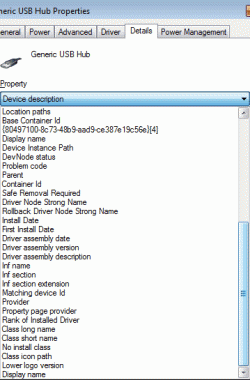
Run the filter order tool again. and paste again. It doesn't look to me like the full report I'd expect

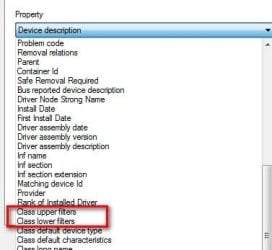
Let's also check filters on a couple other devices but will have to do this by hand. Select any USB controller, right click Properties->Details tab. Carefully look through the list to see if any Class Upper Filters or Class Lower Filters is listed. If yes, select it and then copy past the info that's displayed.

Now look in Device Manager again and select any Generic volume that appears under Storage Volumes. Repeat the process and to look for and report info if any class upper or lower filters appear.

/* EDIT */
Forgot to a attach a pic of what you're looking for - may be helpful
 

Attachments

  • Filters.jpg
    Filters.jpg
    18.7 KB · Views: 21

My Computer

Computer type
PC/Desktop
Computer Manufacturer/Model Number
Dell Optiplex 360 and Optiplex 755
OS
Desk 1: Win 7 Pro x32; Desk 2: Windows 10 x64
Hard Drives
500GB Crucial SSD in both Desktops
Other Info
Buffalo 6TB NAS, Raid 1
Ran the filter order tool again on two different drives. Closed and re-launched the exe between snaps to assure refresh.

Code:
----------------------------------------------------
Filter Driver Load Order     http://www.bustrace.com
----------------------------------------------------

  Upper Class Filter:  snapman
  Upper Class Filter:  PartMgr
       Device Object:  WDC WD20EARX-008FB0 ATA Device
  Lower Class Filter:  vidsflt53

         Driver Name:  snapman.sys
       File Location:  c:\windows\system32\drivers
    File Description:  Acronis Snapshot API
        File Version:  3.12 build 603 [3.12.0.603]
        Product Name:  Acronis Snapshot API
     Product Version:  3.12 build 603 [3.12.0.603]
        Company Name:  Acronis

         Driver Name:  partmgr.sys
       File Location:  c:\windows\system32\drivers
    File Description:  Partition Management Driver
        File Version:  6.1.7600.16385 (win7_rtm.090713-1255) [6.1.7601.17796]
        Product Name:  Microsoft® Windows® Operating System
     Product Version:  6.1.7600.16385 [6.1.7601.17796]
        Company Name:  Microsoft Corporation

----------------------------------------------------
Filter Driver Load Order     http://www.bustrace.com
----------------------------------------------------

  Upper Class Filter:  snapman
  Upper Class Filter:  PartMgr
       Device Object:  SPCC Solid State Disk ATA Device
  Lower Class Filter:  vidsflt53

         Driver Name:  snapman.sys
       File Location:  c:\windows\system32\drivers
    File Description:  Acronis Snapshot API
        File Version:  3.12 build 603 [3.12.0.603]
        Product Name:  Acronis Snapshot API
     Product Version:  3.12 build 603 [3.12.0.603]
        Company Name:  Acronis

         Driver Name:  partmgr.sys
       File Location:  c:\windows\system32\drivers
    File Description:  Partition Management Driver
        File Version:  6.1.7600.16385 (win7_rtm.090713-1255) [6.1.7601.17796]
        Product Name:  Microsoft® Windows® Operating System
     Product Version:  6.1.7600.16385 [6.1.7601.17796]
        Company Name:  Microsoft Corporation
.

Checked all USB controllers. None displayed any "Class Upper" or "Class Lower" filters. Additionally, Device Manager lists no Storage Volumes. Should I be looking within a sub?
.
 

Attachments

  • usb_details.gif
    usb_details.gif
    13.8 KB · Views: 21
  • usb_cons.PNG
    usb_cons.PNG
    5.2 KB · Views: 21
  • dev_man.PNG
    dev_man.PNG
    7.9 KB · Views: 20

My Computer

Computer type
PC/Desktop
Computer Manufacturer/Model Number
Self Assembly
OS
Windows 10 64
CPU
Intel i5 3570K (4.13GHz w/cool & quiet))
Motherboard
ASUS P8Z77-V LK
Memory
4x-4Gb Crucial Ballistix Sport PC3-12800 (1600)
Graphics Card(s)
GeForce GTX 1060 6GB
Sound Card
Realtek ALC892 (onboard)
Monitor(s) Displays
TCL 50" 4K
Screen Resolution
3840x2160
Hard Drives
Crucial MX500, Intel 330; Adata 480; Sea ST8000MD
PSU
Antec HCG-520M
Cooling
CPU - Coolermaster Hyper 212 P, Case - 2-120mm Scythe
Keyboard
Logitecl compact
Mouse
Logitec M705
Internet Speed
Gigabit
Other Info
1 RX-C525 Rosewill trayless hot-swap mobile rack
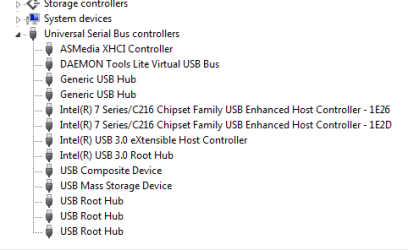
My bad! (Twice!)

1. In order to see Storage Volumes in Device Manager, you first need click View->Show hidden devices. But no need to follow up and do so

2. I see a problem. (It's been toooo long since i used the Filter Load Order tool!) Now i know why i thought the report looks incomplete. It looks incomplete because there's a problem with your Acronis installation.
Code:
----------------------------------------------------
Filter Driver Load Order     http://www.bustrace.com
----------------------------------------------------

  Upper Class Filter:  snapman
  Upper Class Filter:  PartMgr
       Device Object:  WDC WD20EARX-008FB0 ATA Device
  [COLOR="Red"]Lower Class Filter:  [B]vidsflt53[/B][/COLOR]
That lower filter vidsflt53 is an Acronis filter. Your report indicates it's defined in the registry but the filter file isn't found on disk (I wasn't seeing a file description. THAT is why your report looked incomplete).

Bad driver filters can be a reason for type of problem you describe. I suggest you uninstall Acronis. Run the filter order tool again to assure both snapman and vidsflt53 are no longer listed at the beginning of the report. Check your disk problem again
 

My Computer

Computer type
PC/Desktop
Computer Manufacturer/Model Number
Dell Optiplex 360 and Optiplex 755
OS
Desk 1: Win 7 Pro x32; Desk 2: Windows 10 x64
Hard Drives
500GB Crucial SSD in both Desktops
Other Info
Buffalo 6TB NAS, Raid 1
It's the end of the week...we're both probably just a bit on the weary side. ;-)

Removed Acronis True Image WD Edition then rebooted. Ran Filter Order Tool and as you can see the "vidsflt53" remains. I also tried to access a couple USB HDD's to no avail. They do mount but are not available.

Code:
----------------------------------------------------
Filter Driver Load Order     http://www.bustrace.com
----------------------------------------------------

  Upper Class Filter:  PartMgr
       Device Object:  INTEL SSDSC2CT180A3 ATA Device
  Lower Class Filter:  vidsflt53

         Driver Name:  partmgr.sys
       File Location:  c:\windows\system32\drivers
    File Description:  Partition Management Driver
        File Version:  6.1.7600.16385 (win7_rtm.090713-1255) [6.1.7601.17796]
        Product Name:  Microsoft® Windows® Operating System
     Product Version:  6.1.7600.16385 [6.1.7601.17796]
        Company Name:  Microsoft Corporation


----------------------------------------------------
Filter Driver Load Order     http://www.bustrace.com
----------------------------------------------------

  Upper Class Filter:  PartMgr
       Device Object:  SPCC Solid State Disk ATA Device
  Lower Class Filter:  vidsflt53

         Driver Name:  partmgr.sys
       File Location:  c:\windows\system32\drivers
    File Description:  Partition Management Driver
        File Version:  6.1.7600.16385 (win7_rtm.090713-1255) [6.1.7601.17796]
        Product Name:  Microsoft® Windows® Operating System
     Product Version:  6.1.7600.16385 [6.1.7601.17796]
        Company Name:  Microsoft Corporation
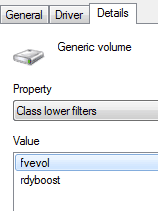
I did check for the Upper/Lower Filters. There are a number of generic storage volumes and they all list Upper and Lower filter categories. The Uppers displayed no contents while all Lowers viewed as follows:
 

Attachments

  • gen_vol_filt.gif
    gen_vol_filt.gif
    3.3 KB · Views: 21

My Computer

Computer type
PC/Desktop
Computer Manufacturer/Model Number
Self Assembly
OS
Windows 10 64
CPU
Intel i5 3570K (4.13GHz w/cool & quiet))
Motherboard
ASUS P8Z77-V LK
Memory
4x-4Gb Crucial Ballistix Sport PC3-12800 (1600)
Graphics Card(s)
GeForce GTX 1060 6GB
Sound Card
Realtek ALC892 (onboard)
Monitor(s) Displays
TCL 50" 4K
Screen Resolution
3840x2160
Hard Drives
Crucial MX500, Intel 330; Adata 480; Sea ST8000MD
PSU
Antec HCG-520M
Cooling
CPU - Coolermaster Hyper 212 P, Case - 2-120mm Scythe
Keyboard
Logitecl compact
Mouse
Logitec M705
Internet Speed
Gigabit
Other Info
1 RX-C525 Rosewill trayless hot-swap mobile rack
Those storage volume filters fvevol and rdyboost are both Microsoft filters. Microsoft filters are never the problem. That leaves us with two things to cleanup. We'll do one at a time. Hopefully, one or the other will prove to be the cause of your problem.

We'll fix Storage Volume first. We need edit the registry. First create a system restore point and a registry backup (just to be cautious). From an admin command prompt, type regedit. Carefully navigate to
Code:
HKEY_LOCAL_MACHINE\SYSTEM\CurrentControlSet\Control\Class\{71A27CDD-812A-11D0-BEC7-08002BE2092F}
If you're at the right spot you should see Storage Volumes listed as shown below.

Based on info from last post, I also expect you should see see an Upper Filters key whose Data value is blank (i.e. no data value listed)

Is that what you see? Only if data value is indeed blank, delete the Upper Filters key. Reboot and retest your problem
 

Attachments

  • 2016-04-29_190027.jpg
    2016-04-29_190027.jpg
    5.4 KB · Views: 20

My Computer

Computer type
PC/Desktop
Computer Manufacturer/Model Number
Dell Optiplex 360 and Optiplex 755
OS
Desk 1: Win 7 Pro x32; Desk 2: Windows 10 x64
Hard Drives
500GB Crucial SSD in both Desktops
Other Info
Buffalo 6TB NAS, Raid 1
Yikes! I did find the Upper Filters key blank. Deleted the key and after reboot USB remained inop.

Now, for the oops part. Before finding out what your second option was I jumped the gun. Noticed I did have a restore point (last one in list) created at the time of initial install of VirtualBox. Hastily I decided there was little of importance modified since then (other than OS updates) so I ran the restore. Well, upon reboot she just hangs at black screen after loading bios.

I'm typing this from the other bootable partition of the same comp. I'll be MIA for a bit as I get this new "bump" sorted. :o
 

My Computer

Computer type
PC/Desktop
Computer Manufacturer/Model Number
Self Assembly
OS
Windows 10 64
CPU
Intel i5 3570K (4.13GHz w/cool & quiet))
Motherboard
ASUS P8Z77-V LK
Memory
4x-4Gb Crucial Ballistix Sport PC3-12800 (1600)
Graphics Card(s)
GeForce GTX 1060 6GB
Sound Card
Realtek ALC892 (onboard)
Monitor(s) Displays
TCL 50" 4K
Screen Resolution
3840x2160
Hard Drives
Crucial MX500, Intel 330; Adata 480; Sea ST8000MD
PSU
Antec HCG-520M
Cooling
CPU - Coolermaster Hyper 212 P, Case - 2-120mm Scythe
Keyboard
Logitecl compact
Mouse
Logitec M705
Internet Speed
Gigabit
Other Info
1 RX-C525 Rosewill trayless hot-swap mobile rack
Again, I really appreciate your help!

Ok, I'm back up and running with nary a hitch. System is restored back (or forward, we could say) to where it was 30 minutes ago. The only downside now is that I no longer have the at-time-of-VirtualBox-install restore point available as it seems to have been pushed off the list due to space constraints.

I just tested the USB ports again and can advise there is no change. Can also advise registry has not repopulated or added an UpperFilters key. LowerFilters data is as expected listing the two MS filters.
 

My Computer

Computer type
PC/Desktop
Computer Manufacturer/Model Number
Self Assembly
OS
Windows 10 64
CPU
Intel i5 3570K (4.13GHz w/cool & quiet))
Motherboard
ASUS P8Z77-V LK
Memory
4x-4Gb Crucial Ballistix Sport PC3-12800 (1600)
Graphics Card(s)
GeForce GTX 1060 6GB
Sound Card
Realtek ALC892 (onboard)
Monitor(s) Displays
TCL 50" 4K
Screen Resolution
3840x2160
Hard Drives
Crucial MX500, Intel 330; Adata 480; Sea ST8000MD
PSU
Antec HCG-520M
Cooling
CPU - Coolermaster Hyper 212 P, Case - 2-120mm Scythe
Keyboard
Logitecl compact
Mouse
Logitec M705
Internet Speed
Gigabit
Other Info
1 RX-C525 Rosewill trayless hot-swap mobile rack
Well, that was a commendably quick recovery! And glad to try and help. I just hope this might ultimately resolve your problem.

So next we want to cleanup the registry entry that defines a stale lower filter for device class= Disk. Create the sys restore point again. Use regedit and navigate to
Code:
HKEY_LOCAL_MACHINE\SYSTEM\CurrentControlSet\Control\Class\{4d36e967-e325-11ce-bfc1-08002be10318}
You can confirm you're at the right spot as this time you should see Class REG_SZ DiskDrive appear towards the top of the list of keys. You should also the LowerFilter key with value vidsflt53. Delete it. close regedit. reboot and retest. Any luck?
 

My Computer

Computer type
PC/Desktop
Computer Manufacturer/Model Number
Dell Optiplex 360 and Optiplex 755
OS
Desk 1: Win 7 Pro x32; Desk 2: Windows 10 x64
Hard Drives
500GB Crucial SSD in both Desktops
Other Info
Buffalo 6TB NAS, Raid 1
Gave it a go but unfortunately still no luck.

I do want to verify -- You do mean to delete the value name listed in the value pane under the "name" column, not the actual key in the left pane, correct?

Having deleted the value names (corresponding to your replies) I can advise they have not repopulated even after rebooting and attempting to mount USB HDD's. Is that to be expected?

It is verified that USB flash drives and card readers do still operate properly when plugged into the same ports.

Attached is a snip showing the mounted but non functioning USB HDD drive as displayed in Disk Management after performing a "rescan". That particular drive is 70% full and mounts properly on the same computer (different bootable partition) and other comps.

Hope it's not looking dire. :p
.
 

Attachments

  • comp_mgmt.PNG
    comp_mgmt.PNG
    2.7 KB · Views: 4

My Computer

Computer type
PC/Desktop
Computer Manufacturer/Model Number
Self Assembly
OS
Windows 10 64
CPU
Intel i5 3570K (4.13GHz w/cool & quiet))
Motherboard
ASUS P8Z77-V LK
Memory
4x-4Gb Crucial Ballistix Sport PC3-12800 (1600)
Graphics Card(s)
GeForce GTX 1060 6GB
Sound Card
Realtek ALC892 (onboard)
Monitor(s) Displays
TCL 50" 4K
Screen Resolution
3840x2160
Hard Drives
Crucial MX500, Intel 330; Adata 480; Sea ST8000MD
PSU
Antec HCG-520M
Cooling
CPU - Coolermaster Hyper 212 P, Case - 2-120mm Scythe
Keyboard
Logitecl compact
Mouse
Logitec M705
Internet Speed
Gigabit
Other Info
1 RX-C525 Rosewill trayless hot-swap mobile rack

I do want to verify -- You do mean to delete the value name listed in the value pane under the "name" column, not the actual key in the left pane, correct?
Yes. You're correct. I was lax in my use of terminology. We were deleting values (where the registry value is a name/data pair) You got it right! :)

Try this also. See How to Cleanup and Remove old USB Mass Storage Drivers
 
Last edited:

My Computer

Computer type
PC/Desktop
Computer Manufacturer/Model Number
Dell Optiplex 360 and Optiplex 755
OS
Desk 1: Win 7 Pro x32; Desk 2: Windows 10 x64
Hard Drives
500GB Crucial SSD in both Desktops
Other Info
Buffalo 6TB NAS, Raid 1
Thanks for sticking around!

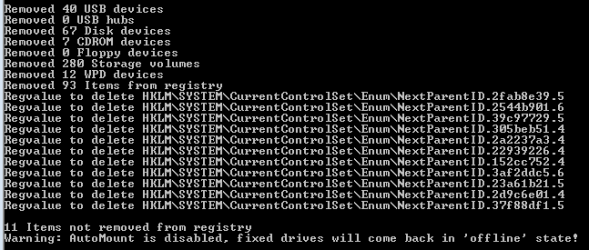
Have to say I got excited when I spied how many devices were removed via DriveCleanup but sadly, after rebooting, once again access to these USB HDD's remains inop. I tried first with just the default MS drivers then installed the MB-specific Intel and ASMedia drivers but to no avail. USB flash drives and card readers do still work.

One observation I forgot all about was the fact my 3.5" removable bay(s) are also inop. For some reason I was thinking they were tapped to onboard USB ports but now that I think of it they're SATA. This now really has me befuddled. Just like the USB HDD's these removable bays do work from the other bootable partition of the same computer. In a few minutes, just for kicks, I'll swap the SATA connection with one of the internal drives.
 

Attachments

  • driveclean_01.PNG
    driveclean_01.PNG
    3.7 KB · Views: 15

My Computer

Computer type
PC/Desktop
Computer Manufacturer/Model Number
Self Assembly
OS
Windows 10 64
CPU
Intel i5 3570K (4.13GHz w/cool & quiet))
Motherboard
ASUS P8Z77-V LK
Memory
4x-4Gb Crucial Ballistix Sport PC3-12800 (1600)
Graphics Card(s)
GeForce GTX 1060 6GB
Sound Card
Realtek ALC892 (onboard)
Monitor(s) Displays
TCL 50" 4K
Screen Resolution
3840x2160
Hard Drives
Crucial MX500, Intel 330; Adata 480; Sea ST8000MD
PSU
Antec HCG-520M
Cooling
CPU - Coolermaster Hyper 212 P, Case - 2-120mm Scythe
Keyboard
Logitecl compact
Mouse
Logitec M705
Internet Speed
Gigabit
Other Info
1 RX-C525 Rosewill trayless hot-swap mobile rack
Hmm.. Is there a reason automount is disabled? Open an elevated command prompt
> Type diskpart
> Type automount enable
> Type exit

/* EDIT */
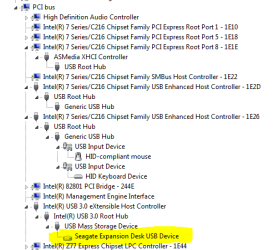
Let's also check how your hdd is connected. Open Device Manager. Click View->Devices by Connection to see how your devices connect to one another. Expand ACPI PC and then ACPI System. You should now see the PCI bus. Expand it too. Expand your USB controllers and drill down to find the USB HD in question. (It will likely be connected to a USB 3.0 or a 2.0 "Enhanced" Controller.

It should be connected under a USB controller. We want to make sure it's not connected to a virtual or software enumerated bus (those would not be under the PCI bus hierarchy). Connection via a virtual of software enumerated bus could indicate a leftover from your Virtual Box installation

In my snapshot below you can see i have a USB 3.0 flash drive that connects via a USB 2.0 controller (no USB 3 on that particular computer)
 

Attachments

  • 2016-05-01_192819.jpg
    2016-05-01_192819.jpg
    65.7 KB · Views: 1

My Computer

Computer type
PC/Desktop
Computer Manufacturer/Model Number
Dell Optiplex 360 and Optiplex 755
OS
Desk 1: Win 7 Pro x32; Desk 2: Windows 10 x64
Hard Drives
500GB Crucial SSD in both Desktops
Other Info
Buffalo 6TB NAS, Raid 1
By George (err ComputerGeek), I think you've got it! :party:

It was enabling AutoMount that looks to have gotten it back on track. Just checked all USB and removable HDD ports -- Each perform as intended.

When you pointed out the lack of AutoMount support (as noted by DriveCleanup) I quickly assumed it would have no effect since it seems to state its application being for "fixed" disks. I do have multiple fixed disks, both HDD & SSD, and none have been offline or requiring to be placed back online via Disk Management. Interesting.

This failure coincided with the install of VirtualBox but interestingly after over a week of scouring the internet for similar situations I could find non nor could I elicit any replies from VB specific forums. Must be that special one in a million case or I simply experienced an unlucky coincidence of timing.

Anyhow, THANKS ever so much for your dogged persistence in helping to get this solved. I worked on it for quite some time and was pretty much tapped out. You've brought convenience back to my comp time.

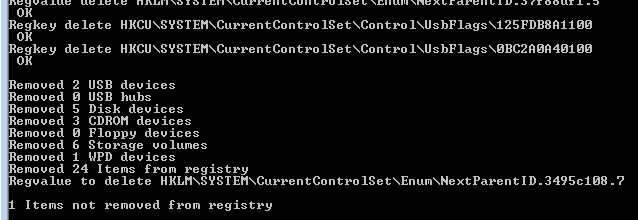
Just for 'its & grins I've attached a snap of Comp Mgmt to show where the drive is now loaded post AutoMount enable. In addition, I ran DriveCleanup again and it can be seen there is no longer an AutoMount warning!
.
 

Attachments

  • dev_man_02.PNG
    dev_man_02.PNG
    9.5 KB · Views: 10
  • driveclean_02.PNG
    driveclean_02.PNG
    3.1 KB · Views: 10

My Computer

Computer type
PC/Desktop
Computer Manufacturer/Model Number
Self Assembly
OS
Windows 10 64
CPU
Intel i5 3570K (4.13GHz w/cool & quiet))
Motherboard
ASUS P8Z77-V LK
Memory
4x-4Gb Crucial Ballistix Sport PC3-12800 (1600)
Graphics Card(s)
GeForce GTX 1060 6GB
Sound Card
Realtek ALC892 (onboard)
Monitor(s) Displays
TCL 50" 4K
Screen Resolution
3840x2160
Hard Drives
Crucial MX500, Intel 330; Adata 480; Sea ST8000MD
PSU
Antec HCG-520M
Cooling
CPU - Coolermaster Hyper 212 P, Case - 2-120mm Scythe
Keyboard
Logitecl compact
Mouse
Logitec M705
Internet Speed
Gigabit
Other Info
1 RX-C525 Rosewill trayless hot-swap mobile rack
Woohooo! You're most welcome.

Glad we figured it out. I was running out of ideas of things to check and do!
 

My Computer

Computer type
PC/Desktop
Computer Manufacturer/Model Number
Dell Optiplex 360 and Optiplex 755
OS
Desk 1: Win 7 Pro x32; Desk 2: Windows 10 x64
Hard Drives
500GB Crucial SSD in both Desktops
Other Info
Buffalo 6TB NAS, Raid 1
Back
Top