USB Output causing WIndows to Hang

EvilTwinTepe

New member
Local time
2:01 PM
Messages
24
I've been looking around a lot for this, and have found very little - but I don't think it is just me. :huh:

First, the important stuff:
Windows 7 x64, build 7100
AMD Athlon FX-52
MSI mobo, nVidia chipset (750a)
4GB of RAM
Wireless USB NIC (Linksys WUSB600N)


Now on to the problem.
Whenever I am transferring data FROM my PC to a device using USB (iPhone, or even uploading a file via my USB NIC), Windows will hang.

It's not a bllue screen, or a crash, but the USB connection craps out, the CPU spikes, and I need to hard-reset the PC, shutting down simply won't work. Though, I've not waited more than a few minutes for it to complete.

While not my post, this seems to explain the issue in more tecnical terms:
USB driver not working on windows 7 - microsoft.public.windowsxp.device_driver.dev | Google Groups

Am I crazy? I can't be the only person experiencing this.

If youve gotten things working, I'm all ears!
Thanks for any help in advance!
 

My Computer

OS
Windows 7 Home Premium x64
CPU
AMD Phenom(tm) II X4 945 (3.0GHz)
Motherboard
MSI K9N2 Platinum/750a SLI
Memory
4GB Corsair
Graphics Card(s)
nVidia Gefore 8800 GTX
Sound Card
On-Board/Realtek
Hard Drives
nVidia SATA RAID
465GB RAID5

3 x 230GB Western Digital Cavier
PSU
750W
Just had it happen again, and all I was doing was trying to download the Win7 build 7232 iso in the hopes it fixes this problem.

It wasn't a LOT of data, but it seems anything steadily using a USB port is definitely crashing something on my system. I can't even shut down once the CPU spikes. If anybody has some ideas of how to troubleshoot this, let me know, or even get some sort of dump? Thanks!

Here's an interesting update: Although I had power control turned off for all USB, when I went into Device Manager and drilled down to my WUSB600N, I checked its properties. Under the Power Management tab, I saw that the 'Allow the computer to turn off this device to save power' was in fact checked.

I've unchecked it - will update the status if it seems to work. Will also try this with the iPhone.

UPDATE: NO luck. Thought it was fine, returned to my machine (while trying to download Windows build 3272 via P2P) only to find it frozen once more.
 
Last edited:

My Computer

OS
Windows 7 Home Premium x64
CPU
AMD Phenom(tm) II X4 945 (3.0GHz)
Motherboard
MSI K9N2 Platinum/750a SLI
Memory
4GB Corsair
Graphics Card(s)
nVidia Gefore 8800 GTX
Sound Card
On-Board/Realtek
Hard Drives
nVidia SATA RAID
465GB RAID5

3 x 230GB Western Digital Cavier
PSU
750W
usb output causes computer hang

I've been looking around a lot for this, and have found very little - but I don't think it is just me. :huh:

First, the important stuff:
Windows 7 x64, build 7100
AMD Athlon FX-52
MSI mobo, nVidia chipset (750a)
4GB of RAM
Wireless USB NIC (Linksys WUSB600N)


Now on to the problem.
Whenever I am transferring data FROM my PC to a device using USB (iPhone, or even uploading a file via my USB NIC), Windows will hang.

It's not a bllue screen, or a crash, but the USB connection craps out, the CPU spikes, and I need to hard-reset the PC, shutting down simply won't work. Though, I've not waited more than a few minutes for it to complete.

While not my post, this seems to explain the issue in more tecnical terms:
USB driver not working on windows 7 - microsoft.public.windowsxp.device_driver.dev | Google Groups

Am I crazy? I can't be the only person experiencing this.

If youve gotten things working, I'm all ears!
Thanks for any help in advance!

While similar its not really like yours i think. In that there were bsod, and it was in xp. I have seen it here. There have been 2 things i have seen
1-the correct usb driver was not installed or corrupt.
2- have also seen it where a usb cable has crashed every time a tranfer. I had this one.
Try re-installing the driver.

Hope this helps a little

Ken
 

My Computer

Computer Manufacturer/Model Number
HP Pavillion dv-7 1005 Tx
OS
Win 8 Release candidate 8400
CPU
[email protected]
Memory
4 gigs
Graphics Card(s)
Nvidia 9600M
Sound Card
HD built-in
Monitor(s) Displays
17" Wxga
Screen Resolution
1440x900
Cooling
none
Internet Speed
45Mb down 5Mb up
Well I'll be damned.

And here I thought I knew a thing or two about computers :o

So, I look into it, and sure enough, Windows replaced my nice, working, Linksys driver with a windows driver - for the wrong model NIC.

Gogo Microsoft.

I've replaced the Microsoft driver with the Linksys and so far so good.

I wonder if I need to do the same thing for the iPhone...
 

My Computer

OS
Windows 7 Home Premium x64
CPU
AMD Phenom(tm) II X4 945 (3.0GHz)
Motherboard
MSI K9N2 Platinum/750a SLI
Memory
4GB Corsair
Graphics Card(s)
nVidia Gefore 8800 GTX
Sound Card
On-Board/Realtek
Hard Drives
nVidia SATA RAID
465GB RAID5

3 x 230GB Western Digital Cavier
PSU
750W
driver issue

Well I'll be damned.

And here I thought I knew a thing or two about computers :o

So, I look into it, and sure enough, Windows replaced my nice, working, Linksys driver with a windows driver - for the wrong model NIC.

Gogo Microsoft.

I've replaced the Microsoft driver with the Linksys and so far so good.

I wonder if I need to do the same thing for the iPhone...

I hope this resolved your issue I was just checking back to make sure. RE: Iphone it cant help to check to be sure.

Have fun and keep asking questions

Ken
 

My Computer

Computer Manufacturer/Model Number
HP Pavillion dv-7 1005 Tx
OS
Win 8 Release candidate 8400
CPU
[email protected]
Memory
4 gigs
Graphics Card(s)
Nvidia 9600M
Sound Card
HD built-in
Monitor(s) Displays
17" Wxga
Screen Resolution
1440x900
Cooling
none
Internet Speed
45Mb down 5Mb up
I stand corrected - ran into the same issue.

I've since updated to build 7232 with no luck. In fact, it seems it is more pronounced now - though I admit that might just be me thinking it is.

But once again - with both the iPhone, and my Linksys WUSB600N NIC I get crashes whenever data is 'output'.

Is there some sort of dump, or trace, or anything I can run to get something off to MS? At least if it BSODed I could write something down, but the CPU spike/freeze makes it impossible to get any useful data.
 

My Computer

OS
Windows 7 Home Premium x64
CPU
AMD Phenom(tm) II X4 945 (3.0GHz)
Motherboard
MSI K9N2 Platinum/750a SLI
Memory
4GB Corsair
Graphics Card(s)
nVidia Gefore 8800 GTX
Sound Card
On-Board/Realtek
Hard Drives
nVidia SATA RAID
465GB RAID5

3 x 230GB Western Digital Cavier
PSU
750W
usb output causes crash

I stand corrected - ran into the same issue.

I've since updated to build 7232 with no luck. In fact, it seems it is more pronounced now - though I admit that might just be me thinking it is.

But once again - with both the iPhone, and my Linksys WUSB600N NIC I get crashes whenever data is 'output'.

Is there some sort of dump, or trace, or anything I can run to get something off to MS? At least if it BSODed I could write something down, but the CPU spike/freeze makes it impossible to get any useful data.

You can check event viewer to see if there are errors listed relating to the problem. Just type event in search and click on it. then sears for the errors

Ken
 

My Computer

Computer Manufacturer/Model Number
HP Pavillion dv-7 1005 Tx
OS
Win 8 Release candidate 8400
CPU
[email protected]
Memory
4 gigs
Graphics Card(s)
Nvidia 9600M
Sound Card
HD built-in
Monitor(s) Displays
17" Wxga
Screen Resolution
1440x900
Cooling
none
Internet Speed
45Mb down 5Mb up
One question I have is WHY?
In my years doing computer builds and repairs, the only time I ever used a USB-NIC adapter was back in the Win2000 days and earlier when some computers did not have a NIC of any type, and opening it up to temporarily use a PCI NIC was too time consuming or too dirty... even then with occasional usage, they usually crapped out on me within a few months and I would need to get a new one.
Anymore, if a PC does not have a built in NIC then I ALWAYS pick up a PCI or PCIe x1 NIC card. They are stable, they work well and I almost never have had one of them die, even with business 24/7 usage.

Something else I noticed is that cheap or dying power supplies tend to drop the USB voltage/power whenever the system voltage gets to be too much for it, or with cheap power supplies, when it feels like it. This may be another route to check into... get a voltrage monitoring program, something like SpeedFan and see if when this happens your USB or any opther voltages spike or drop significantly.
 

My Computer

Computer Manufacturer/Model Number
Custom built desktops and a Compaq CQ60-211DX laptop
OS
Win7, XP, Vista x64, Ubuntu 9.04
CPU
Desktops: E6600, E2140, XP3000+; Laptop: Celeron 585
Motherboard
Desktops: GA-EP35-DS3P, GA-P965-DS3, A7N8X
Memory
Desktops: 4GB, 3GB, 1GB; Laptop: 2GB
Graphics Card(s)
Desktops: 320MB 8800GTS, 128MB 7300GTS, 128MB 9600XT
Sound Card
Creative or onboard
Monitor(s) Displays
19" widescreen, 17" CRT, 19" CRT, and 15.6" LCD on laptop.
Screen Resolution
1440x900, 1280x1024.... 1366x768
Hard Drives
Desktop 1: 320GB Seagate main, 500GB WD backup, 120GB WD testing
Desktop 2: 80GB server
Desktop 3: 160GB main, 250GB backup
Laptop: 160GB
PSU
varies, 350W to 550W
Internet Speed
8Mb+ cable
The answer is fairly simple - I don't feel like wiring myself for a cabled network, and WiFi right now is pretty strong. I could go for an internal PCI wireless-G/N NIC, but running on Vista this USB NIC was awesome. I see no need or reason to replace it now. I've had this NIC for at least a year now.

In regards to the power - I already knew about that one, and so it's running off of a self-powered hub, and is the ONLY item running on said hub. This is also how it worked with my Vista setup.

Regardless, the real issue is this: it's not just my NIC, but also my iPhone, or I have no doubt, any other USB device I plug in to Windows 7. If I were to plug in a USB memory stick and copy data to it, it would have the same issue I'm sure. In fact, perhaps I'll test this tonight, just to verify...
 

My Computer

OS
Windows 7 Home Premium x64
CPU
AMD Phenom(tm) II X4 945 (3.0GHz)
Motherboard
MSI K9N2 Platinum/750a SLI
Memory
4GB Corsair
Graphics Card(s)
nVidia Gefore 8800 GTX
Sound Card
On-Board/Realtek
Hard Drives
nVidia SATA RAID
465GB RAID5

3 x 230GB Western Digital Cavier
PSU
750W
You can check event viewer to see if there are errors listed relating to the problem. Just type event in search and click on it. then sears for the errors

I did do a fairly thorough search of event logs:System, App, and Security (in that order), with no luck. I was really hoping for something a bit 'deeper' in terms of a dump - like I said, even a BSOD would be preferable because it outputs something to the screen, rather than just freezing my system.
 

My Computer

OS
Windows 7 Home Premium x64
CPU
AMD Phenom(tm) II X4 945 (3.0GHz)
Motherboard
MSI K9N2 Platinum/750a SLI
Memory
4GB Corsair
Graphics Card(s)
nVidia Gefore 8800 GTX
Sound Card
On-Board/Realtek
Hard Drives
nVidia SATA RAID
465GB RAID5

3 x 230GB Western Digital Cavier
PSU
750W
usb output causes computer hang

I did do a fairly thorough search of event logs:System, App, and Security (in that order), with no luck. I was really hoping for something a bit 'deeper' in terms of a dump - like I said, even a BSOD would be preferable because it outputs something to the screen, rather than just freezing my system.

Hey Im running out of ideas. im going to pop over to MS and see if there is any known issue.

I have subscribed to this thread so i will get email anytime someone posts so i will be keeping an eye out

Ken
 

My Computer

Computer Manufacturer/Model Number
HP Pavillion dv-7 1005 Tx
OS
Win 8 Release candidate 8400
CPU
[email protected]
Memory
4 gigs
Graphics Card(s)
Nvidia 9600M
Sound Card
HD built-in
Monitor(s) Displays
17" Wxga
Screen Resolution
1440x900
Cooling
none
Internet Speed
45Mb down 5Mb up
You.. can do that? My hero ;)

Anyway, so I DID test out copying data to a plain 'ol USB thumbdrive - sure enough, after about 350MB of a 700MB file the system locked up. I'm going to try some further testing, and am beginning to wonder if it's perhaps my mouse (USB) interrupting or confusing the controller.

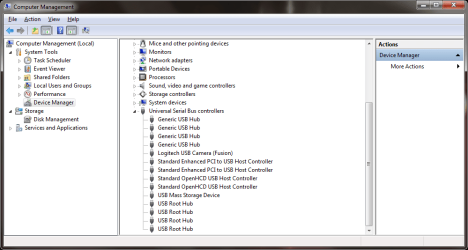
Also uploaded a screenshot of my USB info - I apparently have a lot of hubs:
Powered 4-port hub -> WUSB600N
Powered Monitor hub -> Quickcam, and Mouse BT receiver (which is apparently its own USB hub)

Perhaps some part of the problem?

Although, originally everything was connected directly through the PC, and still had the issues, so, likely not.
 

Attachments

  • screenshot.png
    screenshot.png
    26 KB · Views: 26

My Computer

OS
Windows 7 Home Premium x64
CPU
AMD Phenom(tm) II X4 945 (3.0GHz)
Motherboard
MSI K9N2 Platinum/750a SLI
Memory
4GB Corsair
Graphics Card(s)
nVidia Gefore 8800 GTX
Sound Card
On-Board/Realtek
Hard Drives
nVidia SATA RAID
465GB RAID5

3 x 230GB Western Digital Cavier
PSU
750W
usb output causes computer hang

You.. can do that? My hero ;)

Anyway, so I DID test out copying data to a plain 'ol USB thumbdrive - sure enough, after about 350MB of a 700MB file the system locked up. I'm going to try some further testing, and am beginning to wonder if it's perhaps my mouse (USB) interrupting or confusing the controller.

Also uploaded a screenshot of my USB info - I apparently have a lot of hubs:
Powered 4-port hub -> WUSB600N
Powered Monitor hub -> Quickcam, and Mouse BT receiver (which is apparently its own USB hub)

Perhaps some part of the problem?

Although, originally everything was connected directly through the PC, and still had the issues, so, likely not.
device manager looks OK

Why dont you try this.

take as much USB stuff off as you can (leave 1 attached) see if you freeze. then add 1 at atime until the problem re-appears. then you know which device is giving you grief

try this

Ken
 

My Computer

Computer Manufacturer/Model Number
HP Pavillion dv-7 1005 Tx
OS
Win 8 Release candidate 8400
CPU
[email protected]
Memory
4 gigs
Graphics Card(s)
Nvidia 9600M
Sound Card
HD built-in
Monitor(s) Displays
17" Wxga
Screen Resolution
1440x900
Cooling
none
Internet Speed
45Mb down 5Mb up
I'll have to take home a USB wired mouse, because of course, I have a Logitech MX1000 duo (keyboard/mouse USB bluetooth).

That said I did try that a bit last night, and started first simply in safe mode (no Networking), and what do you know? I was able to copy an 800MB file to a USB thumbdrive without an issue.

I uninstalled the NIC, rebooted, worked again. As soon as that stupid NIC is in, I get the problem again. What irks me is windows HAS drivers for it (albeit a ver. 2 of the card, gogo Linksys?) but that doesn't seem to help either - I have run it with both Windows and Linksys drivers.

I'll cough up the $40 and get a PCI Wireless-N card and see if it helps.

UPDATE:
I've started looking for internal (PCI) wireless NICs, but I decided to do a bit of research. In my searching I've found a few intersting posts/topics/etc. Most things point at a 'ralink' driver causing issues with ANY sort of wireless data streaming. Two links below for a bit more detail:
Link #1
Link #2
ralink Driver Downloads
ralink Install instructions?
I DO recall seeing something about an ralink driver on my Windows 7 machine - but of course now I am at work and cannot verify. BUT this is rather exciting as it seems to be pointing me in some correct direction.
 
Last edited:

My Computer

OS
Windows 7 Home Premium x64
CPU
AMD Phenom(tm) II X4 945 (3.0GHz)
Motherboard
MSI K9N2 Platinum/750a SLI
Memory
4GB Corsair
Graphics Card(s)
nVidia Gefore 8800 GTX
Sound Card
On-Board/Realtek
Hard Drives
nVidia SATA RAID
465GB RAID5

3 x 230GB Western Digital Cavier
PSU
750W
Good News Everybody!

It was, in fact, bad ralink drivers. At least, so far.

I updated to the latest ones (2.3.1.0) and I've had a P2P going for just under 2 hours.

I'll try a file copy, see what happens.
 

My Computer

OS
Windows 7 Home Premium x64
CPU
AMD Phenom(tm) II X4 945 (3.0GHz)
Motherboard
MSI K9N2 Platinum/750a SLI
Memory
4GB Corsair
Graphics Card(s)
nVidia Gefore 8800 GTX
Sound Card
On-Board/Realtek
Hard Drives
nVidia SATA RAID
465GB RAID5

3 x 230GB Western Digital Cavier
PSU
750W
usb output causes computer hang

It was, in fact, bad ralink drivers. At least, so far.

I updated to the latest ones (2.3.1.0) and I've had a P2P going for just under 2 hours.

I'll try a file copy, see what happens.


happy to see things are looking up hope we have helped

Ken
 

My Computer

Computer Manufacturer/Model Number
HP Pavillion dv-7 1005 Tx
OS
Win 8 Release candidate 8400
CPU
[email protected]
Memory
4 gigs
Graphics Card(s)
Nvidia 9600M
Sound Card
HD built-in
Monitor(s) Displays
17" Wxga
Screen Resolution
1440x900
Cooling
none
Internet Speed
45Mb down 5Mb up
Many thanks indeed - lots of pointers in the right direction for me here.

I was able to copy a full 700MB file to a thumb drive - check. Copying my iTunes database over now (another WiFi test) while P2Ping, and will try an iPhone sync.

Though I have low hopes for that - I have a pretty good feeling that's an Apple/Windows7 driver issue. But... one never knows.

Thanks again for everything.

UPDATE:
Or not. For some peculiar reason it DID NOT update the driver (though I thought it did) and as such, it only seemed to be working. Got me as to why it seemed to do so much better. Anyway. I changed the Linksys USB to a simple RALINK USB to see if that helps. At least the correct driver version is showing now.

UPDATE #2:
I am now at a total loss. Updating to the ralink seemed to work, but after a reboot the whole PC froze. So, back to square one. Going away for a few days, upon my return I'll rebuild the PC and use only Windows drivers - maybe not even install Setpoint which I suppose is a possible problem.
 
Last edited:

My Computer

OS
Windows 7 Home Premium x64
CPU
AMD Phenom(tm) II X4 945 (3.0GHz)
Motherboard
MSI K9N2 Platinum/750a SLI
Memory
4GB Corsair
Graphics Card(s)
nVidia Gefore 8800 GTX
Sound Card
On-Board/Realtek
Hard Drives
nVidia SATA RAID
465GB RAID5

3 x 230GB Western Digital Cavier
PSU
750W
OK - so I remain not working. On the bright side though, I finally have a dump file.

I sadly have no IDEA what to do with it - maybe one of you do. I've attached the Dump file, and the sysdata file as well.

The WER is an XML file, and th minidump is a .dump file.
 

Attachments

My Computer

OS
Windows 7 Home Premium x64
CPU
AMD Phenom(tm) II X4 945 (3.0GHz)
Motherboard
MSI K9N2 Platinum/750a SLI
Memory
4GB Corsair
Graphics Card(s)
nVidia Gefore 8800 GTX
Sound Card
On-Board/Realtek
Hard Drives
nVidia SATA RAID
465GB RAID5

3 x 230GB Western Digital Cavier
PSU
750W
I know this is (by now) an old post, but I wanted to bump it, because I am still seeing the issue. Microsoft did release some updated drivers for my NIC, but that didn't solve the problem.

I'm back to the belief that it is USB in and of itself that causes the issue. And again, to describe it:

Whenever data is moving out from the PC over some USB connection (thumb drive, NIC card, iPhone) after a time the CPU will spike to 100%, though no processes are utilizing the processor that much (even showing all processes as admin), and much of the time a hard reset is necessary to correct the problem.

I've done more research, and a lot of what I see is people saying it's a power issue - but the only device on my PC I can see using that power, is the NIC, and that's on a self-powered USB hub (4-port hub, the NIC is the only device on it).

I'm completely out of ideas. Halp! Thank you :cry:

UPDATE: A few links of others with the problem:
Link #1
Link #2
 
Last edited:

My Computer

OS
Windows 7 Home Premium x64
CPU
AMD Phenom(tm) II X4 945 (3.0GHz)
Motherboard
MSI K9N2 Platinum/750a SLI
Memory
4GB Corsair
Graphics Card(s)
nVidia Gefore 8800 GTX
Sound Card
On-Board/Realtek
Hard Drives
nVidia SATA RAID
465GB RAID5

3 x 230GB Western Digital Cavier
PSU
750W
I know this is (by now) an old post, but I wanted to bump it, because I am still seeing the issue. Microsoft did release some updated drivers for my NIC, but that didn't solve the problem.

I'm back to the belief that it is USB in and of itself that causes the issue. And again, to describe it:

Whenever data is moving out from the PC over some USB connection (thumb drive, NIC card, iPhone) after a time the CPU will spike to 100%, though no processes are utilizing the processor that much (even showing all processes as admin), and much of the time a hard reset is necessary to correct the problem.

I've done more research, and a lot of what I see is people saying it's a power issue - but the only device on my PC I can see using that power, is the NIC, and that's on a self-powered USB hub (4-port hub, the NIC is the only device on it).

I'm completely out of ideas. Halp! Thank you :cry:

UPDATE: A few links of others with the problem:
Link #1
Link #2

Hey ET
While not reading the entire thread I checked the two links first was spot on, second also on the money. they were both 64 bit with 4 gigs of ram (driver maybe), have you run process explorer to see what process is pinning the cpu aat 100%, second are there any refernces to the problem in event viewer?

Sorry I cant be more help so far.

Ken
 

My Computer

Computer Manufacturer/Model Number
HP Pavillion dv-7 1005 Tx
OS
Win 8 Release candidate 8400
CPU
[email protected]
Memory
4 gigs
Graphics Card(s)
Nvidia 9600M
Sound Card
HD built-in
Monitor(s) Displays
17" Wxga
Screen Resolution
1440x900
Cooling
none
Internet Speed
45Mb down 5Mb up
Back
Top