usb ports have stopped working

obadagibidaz

New member
Local time
1:39 PM
Messages
8
usb ports were working fine for my headset and wireless mouse/keyboard receiver just two days ago. today first my headset wouldnt work when i plugged it into the one outlet, then i tried in the other outlet and got no luck, and my wireless reciever wouldnt work after i plugged it back in either. and the usb ports have not worked since. usually it gives me no indication that it found something is plugged in but sometimes it will give me a message in a little pop-up bubble saying
" USB Device Not Recognized"
one of the usb devices attached to this computer has malfunctioned, and windows does not recognize it. for assistance in solving this problem, click this message

clicking the message brings us a screen that shows the 3 available usb ports, with an unknown device in one of them. at the bottom it says a recommendation to try reconnecting it and if windows still doesnt recognize it, replace the device.

this device has always worked without any problems for the 3 months ive owned this computer and so has the headset so im pretty convinced the devices arent the problem.
 

My Computer My Computer

Computer Manufacturer/Model Number
acer
OS
windows 7
CPU
aspire m3203
Memory
3 gigabytes
Graphics Card(s)
ati radeon 3100
Monitor(s) Displays
acer
Hard Drives
340 gigabvyte hd
usb ports were working fine for my headset and wireless mouse/keyboard receiver just two days ago. today first my headset wouldnt work when i plugged it into the one outlet, then i tried in the other outlet and got no luck, and my wireless reciever wouldnt work after i plugged it back in either. and the usb ports have not worked since. usually it gives me no indication that it found something is plugged in but sometimes it will give me a message in a little pop-up bubble saying
" USB Device Not Recognized"
one of the usb devices attached to this computer has malfunctioned, and windows does not recognize it. for assistance in solving this problem, click this message

clicking the message brings us a screen that shows the 3 available usb ports, with an unknown device in one of them. at the bottom it says a recommendation to try reconnecting it and if windows still doesnt recognize it, replace the device.

this device has always worked without any problems for the 3 months ive owned this computer and so has the headset so im pretty convinced the devices arent the problem.
Have you updated drivers or downloaded any programs in the last 2-3 days?

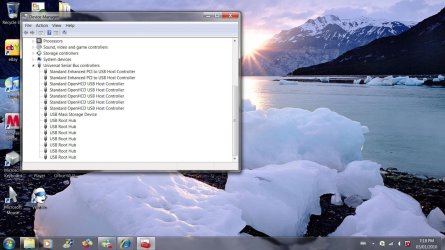
Can you see them in your device manager? computer>system properties>device manager (left)>Universial serial bus controllers (usb)
Any yellow triangles?

A system restore would more than likely fix it if your really stuck.
 

My Computer My Computer

Computer Manufacturer/Model Number
Blue Shards 1.0
OS
Windows 7 Ultimate 64bit
CPU
AMD Phenom II 555 Black Edition Quad Core OC'd to 4.0GHz
Motherboard
ASUS M4A88T-M
Memory
G Skill RipJaw 1333MHz 4GB
Graphics Card(s)
ATI raideon 4250 HD/XFX ATI Radeon 1GB HD4650
Sound Card
Realteck HD Audio
Monitor(s) Displays
2x 22" Widescreen HD Monitors
Hard Drives
500GB Sata 7500RPM
80GB IDE
PSU
850W OCUK Modular
Case
Antec Dark Fleet DF-30
Cooling
Titan Fenrir Pro (CPU)
Keyboard
Logitech Wireless
Mouse
Logitech Wireless
Internet Speed
24Meg
Other Info
Getting soon-
2TB 7200RPM HDD
+8GB RAM
30GB SSD
HD6950/70
Have you been to your driver page for the latest W7 drivers? There is a ATI chipset driver that maybe of help - select desktop model / your version of W7 :
Service & Support
 

My Computer My Computer

OS
XP, Vista, W7 64bit Home Premium
CPU
Intel Core Duo 6850 3.0 ghz @ 3.7 ghz
Motherboard
Asus P5E
Memory
4GB Corsair DDR 2 PC-6400
Graphics Card(s)
Ati 4870 1ghz
Sound Card
Supreme FX 11
Monitor(s) Displays
View Sonic VX1962wm
Screen Resolution
1680 X1050
Hard Drives
3 Seagate Sata Drives 160gb 250gb 500gb
PSU
Thermaltake 600 watt
Case
NZXT Alpha
Cooling
3X120cm Fans
Keyboard
Microsoft Digital Media Pro Keyboard
Mouse
Microsoft Wheel Mouse Optical
Internet Speed
1.5Mb to 8Mb/384k
hey there,

my mouse stopped working aswell several weeks after i installed Win 7.
This is caused by the mouse driver.
also a lot of other drivers start causing trouble after some weeks.
most drivers aren't compatible with Win7 and have to be updated.
many of these updates are not yet downloadable at this moment.
 

My Computer My Computer

Computer Manufacturer/Model Number
I've build my own gaming system
OS
microsoft windows 7
CPU
Intel Quad Core Q9450 2.66Ghz (x4)
Motherboard
MSI X38 Diamond - FSB 1333MHz - DDR3 - Circu-Pipe cooling
Memory
6 Gigabite - PC3-10666 - DDR3 - Corsair TWINX C9DHX
Graphics Card(s)
2x Nvidia GeForce 9800 GT - 512 Mb RAM
Sound Card
7.1 ch. HD Audio + S/PDIF onboard & 7.1 ch. HD Realtek Card
Monitor(s) Displays
Samsung 22 inch HD LCD monitor
Hard Drives
OS Drive: Western Digital VelociRaptor 74Gb (SATA300 -16Mb)
- Seagate 500 Gb ST3500320AS (SATA300 - 32 Mb)
- Samsung 1 Tb HD103SI 5400RPM (SATA300 - 32 Mb)
PSU
850 Watt PSU - Zalman ZM850- HeatPipe Cooled
Case
NZXT Lexa LEX-301 BlueLine GamingCase - Zwart/Blauw
Cooling
Zalman CNPS 9700 NT - Socket 775
The wireless mouse and keyboard are actually microsoft products and i did go to the microsoft page to try and find new drivers for them. i downloaded the driver for this product but im not sure if it was even an update i think it was just the regular driver for it. Anyhow it made no difference, and i searched for updates for my usb drivers manually through the device manager, that also didnt help. Apparently microsoft products arent even compatible with windows 7.

not sure what u mean by the driver page whest but i couldnt find that download youre referring to

sometimes my device manager will recognize that there's something plugged in and it show a yellow triangle
on the usb port saying unknown device, sometimes it doesnt recognize that anything is even plugged in.
I have this comp configured to automatically search for updates so i dont know if there were any recent changes made.

i've since tried pluggin in my ipod and a mini usb storage device, which have always worked on this but i havent used them for a while, and they also get no response. my ipod will blink on when i plug it in, but no response from the computer, no response on itunes.
 

My Computer My Computer

Computer Manufacturer/Model Number
acer
OS
windows 7
CPU
aspire m3203
Memory
3 gigabytes
Graphics Card(s)
ati radeon 3100
Monitor(s) Displays
acer
Hard Drives
340 gigabvyte hd
I have just updated the usb drivers with a Win7 compatible update (says the site).
it didn't stop the problems and at other forums is everyone still trying aswell.

I just don't understand that it works perfectly in the beginning and suddenly it starts giving trouble.
so, i've tried today to get the correct drivers for all hardware but, could only find 2 drivers that were win 7 compatible. and there are 23 drivers who are old or possibly not-compatible.

just keep searching, it can't take very long till someone finds the selution.

if i find something i'll let you know.

greatzz
 

My Computer My Computer

Computer Manufacturer/Model Number
I've build my own gaming system
OS
microsoft windows 7
CPU
Intel Quad Core Q9450 2.66Ghz (x4)
Motherboard
MSI X38 Diamond - FSB 1333MHz - DDR3 - Circu-Pipe cooling
Memory
6 Gigabite - PC3-10666 - DDR3 - Corsair TWINX C9DHX
Graphics Card(s)
2x Nvidia GeForce 9800 GT - 512 Mb RAM
Sound Card
7.1 ch. HD Audio + S/PDIF onboard & 7.1 ch. HD Realtek Card
Monitor(s) Displays
Samsung 22 inch HD LCD monitor
Hard Drives
OS Drive: Western Digital VelociRaptor 74Gb (SATA300 -16Mb)
- Seagate 500 Gb ST3500320AS (SATA300 - 32 Mb)
- Samsung 1 Tb HD103SI 5400RPM (SATA300 - 32 Mb)
PSU
850 Watt PSU - Zalman ZM850- HeatPipe Cooled
Case
NZXT Lexa LEX-301 BlueLine GamingCase - Zwart/Blauw
Cooling
Zalman CNPS 9700 NT - Socket 775
Click on the link in my last post - in the select product family select desktop - in the select product line select aspire - in the select product model select aspire m3203 - NOW YOUR ON YOUR DRIVER PAGE - the page defaults to windows vista basic 32 bit, so in the operating system drop down list select your version of W7. Then you will see the ATI Chipset driver - download and install.
Post back if this doesnt work I have one other idea.
 

My Computer My Computer

OS
XP, Vista, W7 64bit Home Premium
CPU
Intel Core Duo 6850 3.0 ghz @ 3.7 ghz
Motherboard
Asus P5E
Memory
4GB Corsair DDR 2 PC-6400
Graphics Card(s)
Ati 4870 1ghz
Sound Card
Supreme FX 11
Monitor(s) Displays
View Sonic VX1962wm
Screen Resolution
1680 X1050
Hard Drives
3 Seagate Sata Drives 160gb 250gb 500gb
PSU
Thermaltake 600 watt
Case
NZXT Alpha
Cooling
3X120cm Fans
Keyboard
Microsoft Digital Media Pro Keyboard
Mouse
Microsoft Wheel Mouse Optical
Internet Speed
1.5Mb to 8Mb/384k
Shut down and then switch off the power on the back of the PC. wait a couple minutes then turn back on, boot computer. Should reset the ports.

USB hubs are always alive even after a shutdown, if they error in any way they will not recover until all power is removed from the MoBo.
 

My Computer My Computer

Computer Manufacturer/Model Number
Asus Component Home Brew
OS
Windows 7 x86
CPU
Intel E8400
Motherboard
ASUS P5E Deluxe
Memory
2x Corsair 2gig
Graphics Card(s)
Asus Geforce 9800 GTX+
Sound Card
Auzentech X-Fi Prelude 7.1
Monitor(s) Displays
3x Samsung SyncMaster 245B
Screen Resolution
3x 1920 x 1200
PSU
Corsair 550vx
Case
Old black one
Cooling
Dusty fans
Keyboard
Razer Tarantula
Mouse
Logitec G5
Internet Speed
Some times fast - Other times insanely fast
Other Info
Logitech Z-5500 speakers - Outpost OSS 6.7 - MediaMonkey it rocks - TrackIR Pro 4 - Hotas Cougar - Saitek Pro Yoke - Matrox TripleHeader
I tried turning off my comp and unplugging it for 5 or 10 mins ( there's no power switch on the back) and that changed nothing.

downloadaed the ATI chipset and that didnt help either
 

My Computer My Computer

Computer Manufacturer/Model Number
acer
OS
windows 7
CPU
aspire m3203
Memory
3 gigabytes
Graphics Card(s)
ati radeon 3100
Monitor(s) Displays
acer
Hard Drives
340 gigabvyte hd
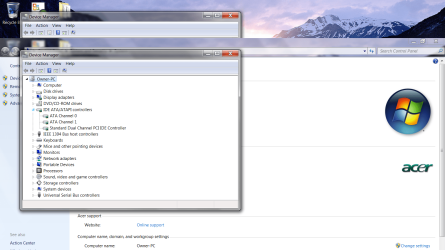
Can you go into device manager - right click Computer - select properties - device manager - expand
1 IDE ATI/ATIPI controllers
2 Universal Serial Bus Controllers
and take a screen shot, and attach it to your next post.
 

My Computer My Computer

OS
XP, Vista, W7 64bit Home Premium
CPU
Intel Core Duo 6850 3.0 ghz @ 3.7 ghz
Motherboard
Asus P5E
Memory
4GB Corsair DDR 2 PC-6400
Graphics Card(s)
Ati 4870 1ghz
Sound Card
Supreme FX 11
Monitor(s) Displays
View Sonic VX1962wm
Screen Resolution
1680 X1050
Hard Drives
3 Seagate Sata Drives 160gb 250gb 500gb
PSU
Thermaltake 600 watt
Case
NZXT Alpha
Cooling
3X120cm Fans
Keyboard
Microsoft Digital Media Pro Keyboard
Mouse
Microsoft Wheel Mouse Optical
Internet Speed
1.5Mb to 8Mb/384k
I just posted this one:
I have a Dell Inspiron laptop, brand new, that since yesterday won't recognize the Dell optical mouse. It gives an "error 43". I tried uninstalling and reinstalling the driver without success. I got on Dell on-line tech support and their guy worked on it for over an hour and 3 reboots without success. What is going on? We plugged the mouse in when we took it out of the box and it worked for over a week just fine.

What the heck is going on with Windows 7 and these USB device driver problems? Did MS once again screw us with a product that wasn't ready for prime time? I'm really ticked off.
 

My Computer My Computer

Computer Manufacturer/Model Number
Dell Inspiron 1545 Laptop
OS
Windows 7
CPU
Intel® Pentium® Dual Core T4300 (2.1GHz/800Mhz FSB/1MB cache
Memory
4G DDR2 SDRAM (shared)
Graphics Card(s)
Intel Integrated Graphics Media Accelerator 4500HD
Monitor(s) Displays
Glossy 15.6" Widescreen XGA
Screen Resolution
1366x768
Hard Drives
320G 5400 rpm
Other Info
Intel® Cantiga GM45 Chipset
To dmunnro55
You need to download and install the latest intel matrix storage manager software/driver because AHCI is enabled in your bios, and what happens during installation of W7 is W7 installs the Intel driver, but for correct functionality you need to install the intel matrix storage manager after installation is complete if you dont it will cause the problems: you can find it on your driver page under sata drives (select your version of W7) or the intel site :

Drivers & Downloads=


You will find it at the intel site - http://downloadcenter.intel.com/default.aspx
Select chipsets - chipset software - intel(R) matrix storage manager - Select Operating System - select Windows 7 (64bit OR 32 bit) - select drivers - select intel(R) matrix storage manager 8.9.0.1023 - download and install.
(make sure you don't download the floppy configuration utility by mistake) - it will show up if you select utilities.
 

My Computer My Computer

OS
XP, Vista, W7 64bit Home Premium
CPU
Intel Core Duo 6850 3.0 ghz @ 3.7 ghz
Motherboard
Asus P5E
Memory
4GB Corsair DDR 2 PC-6400
Graphics Card(s)
Ati 4870 1ghz
Sound Card
Supreme FX 11
Monitor(s) Displays
View Sonic VX1962wm
Screen Resolution
1680 X1050
Hard Drives
3 Seagate Sata Drives 160gb 250gb 500gb
PSU
Thermaltake 600 watt
Case
NZXT Alpha
Cooling
3X120cm Fans
Keyboard
Microsoft Digital Media Pro Keyboard
Mouse
Microsoft Wheel Mouse Optical
Internet Speed
1.5Mb to 8Mb/384k
Those are taken with nothing in the usb slots. When the problem first started happening it didnt say usb mass storage in that one slot. That didnt appear until i plugged a flash drive in to see if it would work, which it didnt, but its said that since.
 

Attachments

  • 123.jpg
    123.jpg
    161.6 KB · Views: 96
  • Untitled - Copy.png
    Untitled - Copy.png
    161.3 KB · Views: 98

My Computer My Computer

Computer Manufacturer/Model Number
acer
OS
windows 7
CPU
aspire m3203
Memory
3 gigabytes
Graphics Card(s)
ati radeon 3100
Monitor(s) Displays
acer
Hard Drives
340 gigabvyte hd
obadagibidaz
I think you should run the W7 DVD repair utility - START install - when you reach the repair option - select and follow instructions - this should fix the problems - then make sure you dont install anything without scrutinizing it, and setting up a restore point, also so you could type this in search - click start - click search - type "change device installation settings" and select "never install drivers from windows update".
If that still doesnt work you need to reinstall W7.
Also, I 'm assuming you have tried a system restore around the mess, if not do that firstly - type system restore in search - and select
 

My Computer My Computer

OS
XP, Vista, W7 64bit Home Premium
CPU
Intel Core Duo 6850 3.0 ghz @ 3.7 ghz
Motherboard
Asus P5E
Memory
4GB Corsair DDR 2 PC-6400
Graphics Card(s)
Ati 4870 1ghz
Sound Card
Supreme FX 11
Monitor(s) Displays
View Sonic VX1962wm
Screen Resolution
1680 X1050
Hard Drives
3 Seagate Sata Drives 160gb 250gb 500gb
PSU
Thermaltake 600 watt
Case
NZXT Alpha
Cooling
3X120cm Fans
Keyboard
Microsoft Digital Media Pro Keyboard
Mouse
Microsoft Wheel Mouse Optical
Internet Speed
1.5Mb to 8Mb/384k
well system restore didnt help and i didnt get the windows 7 discs with the package, just recovery discs, so i guess im re-installing windows

big fail, f u microsoft
 

My Computer My Computer

Computer Manufacturer/Model Number
acer
OS
windows 7
CPU
aspire m3203
Memory
3 gigabytes
Graphics Card(s)
ati radeon 3100
Monitor(s) Displays
acer
Hard Drives
340 gigabvyte hd
Good decision - you can waste a lot more time trying to fix a problem, as such, getting frustrated etc, then you would by just reinstalling.:).
Start backup next time, you can include a system image - a lot less problems, as it copies the whole drive. For the system imagine you will need a separate partition or drive as you cannot use the same drive the OS is installed to.
 

My Computer My Computer

OS
XP, Vista, W7 64bit Home Premium
CPU
Intel Core Duo 6850 3.0 ghz @ 3.7 ghz
Motherboard
Asus P5E
Memory
4GB Corsair DDR 2 PC-6400
Graphics Card(s)
Ati 4870 1ghz
Sound Card
Supreme FX 11
Monitor(s) Displays
View Sonic VX1962wm
Screen Resolution
1680 X1050
Hard Drives
3 Seagate Sata Drives 160gb 250gb 500gb
PSU
Thermaltake 600 watt
Case
NZXT Alpha
Cooling
3X120cm Fans
Keyboard
Microsoft Digital Media Pro Keyboard
Mouse
Microsoft Wheel Mouse Optical
Internet Speed
1.5Mb to 8Mb/384k
Good decision - you can waste a lot more time trying to fix a problem, as such, getting frustrated etc, then you would by just reinstalling.:).

lol, he is re-installing the whole OS. And that has to work you would think. I wonder how he's doing now. :p
 

My Computer My Computer

Computer Manufacturer/Model Number
Lenovo ThinkPad T60
OS
Windows 7 Ultimate 64Bit
CPU
GenuineIntel Intel(R) Core(TM) DuoCore T2400 @ 1.83GHz
Motherboard
Intel(R) 82801G (ICH7 Family)
Memory
2.00 GB
Graphics Card(s)
Mobile Intel(R) 945 Express Chipset
Sound Card
SoundMAX Integrated Digital HD Audio
Monitor(s) Displays
ThinkPad Display
Screen Resolution
1400x1050
Hard Drives
100Gb SATA
Keyboard
Standard Keyboard
Mouse
HID-compliant Mouse
Internet Speed
Cable Broadband - 54Mbps
Other Info
Intel(R) PRO/1000 PL Network Connection
11a/b/g Wireless LAN Mini PCI Express Adapter
Actually, after realizing i cant save my music library to anything now, i decided not to re-install windows just yet.

ive read thru other forums since and this seems to be a pretty common problem with windows 7. some people have said theirs started working again after a few days or weeks later, but they also said the problem would come back, so im gonna wait this out a little and hope someone comes up with a solution in the meantime.

Thnx for your time by the way guys, whest, much appreciated
 

My Computer My Computer

Computer Manufacturer/Model Number
acer
OS
windows 7
CPU
aspire m3203
Memory
3 gigabytes
Graphics Card(s)
ati radeon 3100
Monitor(s) Displays
acer
Hard Drives
340 gigabvyte hd
Those are taken with nothing in the usb slots. When the problem first started happening it didnt say usb mass storage in that one slot. That didnt appear until i plugged a flash drive in to see if it would work, which it didnt, but its said that since.

How does the device manager look like when u plug in the usb device?
 

My Computer My Computer

Computer Manufacturer/Model Number
Lenovo ThinkPad T60
OS
Windows 7 Ultimate 64Bit
CPU
GenuineIntel Intel(R) Core(TM) DuoCore T2400 @ 1.83GHz
Motherboard
Intel(R) 82801G (ICH7 Family)
Memory
2.00 GB
Graphics Card(s)
Mobile Intel(R) 945 Express Chipset
Sound Card
SoundMAX Integrated Digital HD Audio
Monitor(s) Displays
ThinkPad Display
Screen Resolution
1400x1050
Hard Drives
100Gb SATA
Keyboard
Standard Keyboard
Mouse
HID-compliant Mouse
Internet Speed
Cable Broadband - 54Mbps
Other Info
Intel(R) PRO/1000 PL Network Connection
11a/b/g Wireless LAN Mini PCI Express Adapter
Since your not reinstalling you could run this to check your system files - click start - all programs - accessories - right click command prompt, and select run as administrator, and type this in command prompt, or paste it in by right clicking the window, and select paste - to copy just highlight it, and press ctrl+c : SFC /scannow. You maybe able to use the recovery disk to find the files if any are corrupted.
 

My Computer My Computer

OS
XP, Vista, W7 64bit Home Premium
CPU
Intel Core Duo 6850 3.0 ghz @ 3.7 ghz
Motherboard
Asus P5E
Memory
4GB Corsair DDR 2 PC-6400
Graphics Card(s)
Ati 4870 1ghz
Sound Card
Supreme FX 11
Monitor(s) Displays
View Sonic VX1962wm
Screen Resolution
1680 X1050
Hard Drives
3 Seagate Sata Drives 160gb 250gb 500gb
PSU
Thermaltake 600 watt
Case
NZXT Alpha
Cooling
3X120cm Fans
Keyboard
Microsoft Digital Media Pro Keyboard
Mouse
Microsoft Wheel Mouse Optical
Internet Speed
1.5Mb to 8Mb/384k
Back
Top